StoryCut
StoryCut turns long videos into captioned vertical clips. Remote MCP server (Streamable HTTP, OAuth 2.1 with dynamic client registration) at https://app.storycut.com/mcp. Tools: create_clips, clips_status, my_usage. Free on every plan.
Hosted MCP Server
npx add-mcp 'https://app.storycut.com/mcp'Installs into Claude Code, Codex, Cursor and more
Documentation
What is the StoryCut MCP server?
MCP (Model Context Protocol) is the open standard AI assistants use to work with outside tools. StoryCut runs a hosted MCP server at https://app.storycut.com/mcp. Add that address to your assistant, sign in to your StoryCut account once, and the assistant can start AI Clips runs, tell you which clip is best and check what your plan has left.
Everything happens on your own StoryCut account, with your plan’s normal rules. Your videos, clips and exports stay on StoryCut: the chat is a faster way to start the work and find the result.
Four tools your assistant can call
create_clips
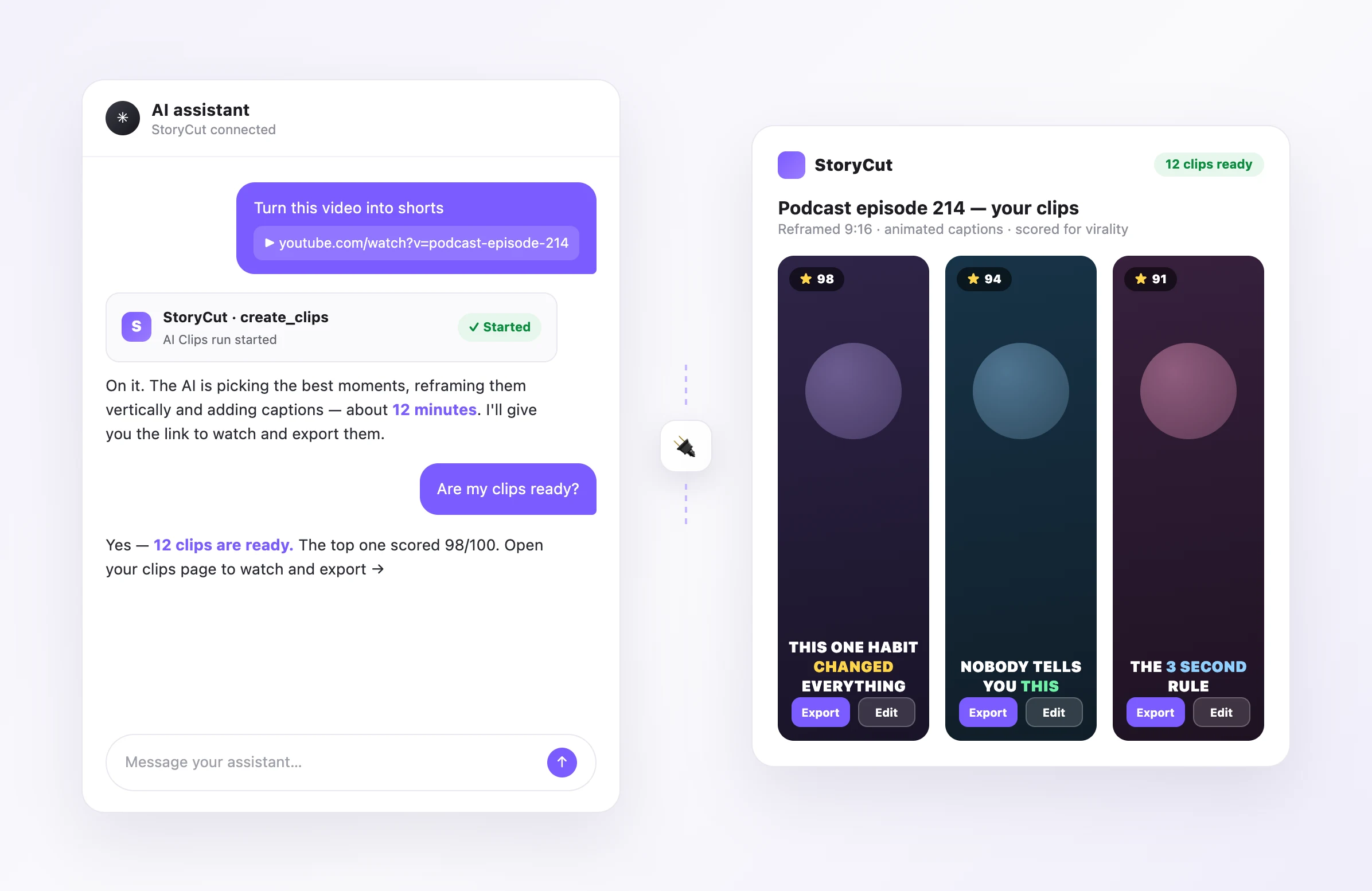
Starts an AI Clips run from a YouTube link: the AI picks the strongest moments, reframes them vertically around the speaker and adds animated captions. Short, medium or long clips.
list_clips
The clips of a finished run, best first: title, virality score out of 100, length and the link to edit or export each one.
clips_status
Whether your latest runs are still processing, finished or failed, with the link to each clips page.
my_usage
Your plan and what it has left this month: AI Clips videos, eye contact fixes and video slots.
Try it with one prompt
“Turn this YouTube video into shorts”
Paste the link after it. The run starts on your account and takes about 10 to 15 minutes.
“Make 30 to 60 second clips from this podcast”
The assistant picks the medium clip length for you. Long clips run 60 to 89 seconds.
“Which of my clips is the best?”
You get the clips of your latest run ranked by score, with a link to open the top one.
“How many videos do I have left?”
Your remaining AI Clips videos this month, plus eye contact and video slots.
From a message to finished clips
Ask in plain words. The assistant calls StoryCut, the run starts on your account, and you get the link to watch, edit and export the clips: captions, reframing and virality scores included. Open any clip in the StoryCut editor to change the caption style, add zooms, music or eye contact correction.
Claude Code, ChatGPT and Cursor
Claude Code: run claude mcp add --transport http storycut https://app.storycut.com/mcp in your terminal, then type /mcp inside Claude Code to sign in to StoryCut.
ChatGPT: custom MCP connectors work in Developer mode, which OpenAI offers on its paid ChatGPT plans. Turn it on under Settings → Apps & Connectors → Advanced settings, then create a connector with https://app.storycut.com/mcp and OAuth sign-in.
Cursor and other MCP clients: add a remote (streamable HTTP) MCP server with the URL https://app.storycut.com/mcp. The client opens the StoryCut sign-in page the first time it connects.
Video clipping MCP servers compared
| Feature |  StoryCut StoryCut |  OpusClip OpusClip |
|---|---|---|
| Hosted remote MCP server | Yeshttps://app.storycut.com/mcp | Yeshttps://mcp.opus.pro/mcp |
| Sign-in | OAuth with your StoryCut account, no API key | OAuth with your OpusClip account, no API key |
| Free use | Free plan: 1 long video a month (first 30 min) | Free trial |
| Clients | Claude, Claude Code, ChatGPT (developer mode), Cursor | Claude, Claude Code, ChatGPT, Cursor, Codex, Cline |
| What the tools do | Start clip runs, rank clips by score, run status, plan usage | Clip, find viral moments, caption, reframe, repurpose, schedule posts |
| After the clips are made | Full StoryCut editor: 1,000+ caption styles, zooms, music, sound effects, eye contact fix | OpusClip editor |
Checked on October 20, 2026 from each product’s public pages. Sources: OpusClip MCP server, opus-pro/opusclip-mcp on GitHub, Claude custom connectors.
Frequently Asked Questions
Clips without leaving the chat
Create a free StoryCut account, add https://app.storycut.com/mcp to your assistant, and turn the next video you share into shorts.
- Join 10,000+ creators
- No credit card required

AI video editor for creators who want viral content without the editing grind.
Features
AI Captions Hormozi Captions MrBeast Captions Add Subtitles to Video Subtitle Generator AI Video Editor AI Clip Generator YouTube to Shorts ChatGPT & Claude Connector Video Clipping API Eye Contact Fix Magic Zoom Transitions Clean Audio AI Music Sound Effects AI Auto Edit Remove Silence AI Thumbnails Brand Kits Community Styles AI Video Translator
Free Tools
Video Hook Generator TikTok Captions Instagram Captions YouTube Titles TikTok Hashtags Video Script Generator AI Video Ideas Content Calendar TikTok Transcript Video to Text Free SRT Generator Subtitle Translator Free Teleprompter Words to Minutes SRT to VTT Converter TikTok Safe Zone Free Sound Effects All 40 Tools →
Use Cases
TikTok Creators YouTube Shorts Instagram Reels Podcasters Clippers Agencies & Teams LinkedIn Videos Teleprompter Eye Contact Premiere Pro Eye Contact DaVinci Resolve Eye Contact Final Cut Pro Eye Contact Loom Eye Contact