Google Ads MCP by Markifact
Google Ads MCP server for Claude, ChatGPT, Codex, Cursor and any MCP client: reports, search terms, negatives, budgets, bids, campaign creation and Performance Max, with approval on every write. Hosted by Markifact, OAuth login, nothing to install locally.
Hosted MCP Server
npx add-mcp 'https://api.markifact.com/mcp/google-ads'Installs into Claude Code, Codex, Cursor and more
Documentation
The Google Ads MCP server with safe write access
Connect Google Ads to Claude, ChatGPT, or any AI agent. Analyze performance, create campaigns, optimize keywords, and manage budgets. Every change waits for your approval before it goes live.


10,000+ marketers scaling with AI.
See Google Ads MCP in action
Trusted by marketing teams at
What you can do with Google Ads MCP
From reporting to campaign management, Markifact helps you analyze, create, and optimize Google Ads directly from Claude or ChatGPT.
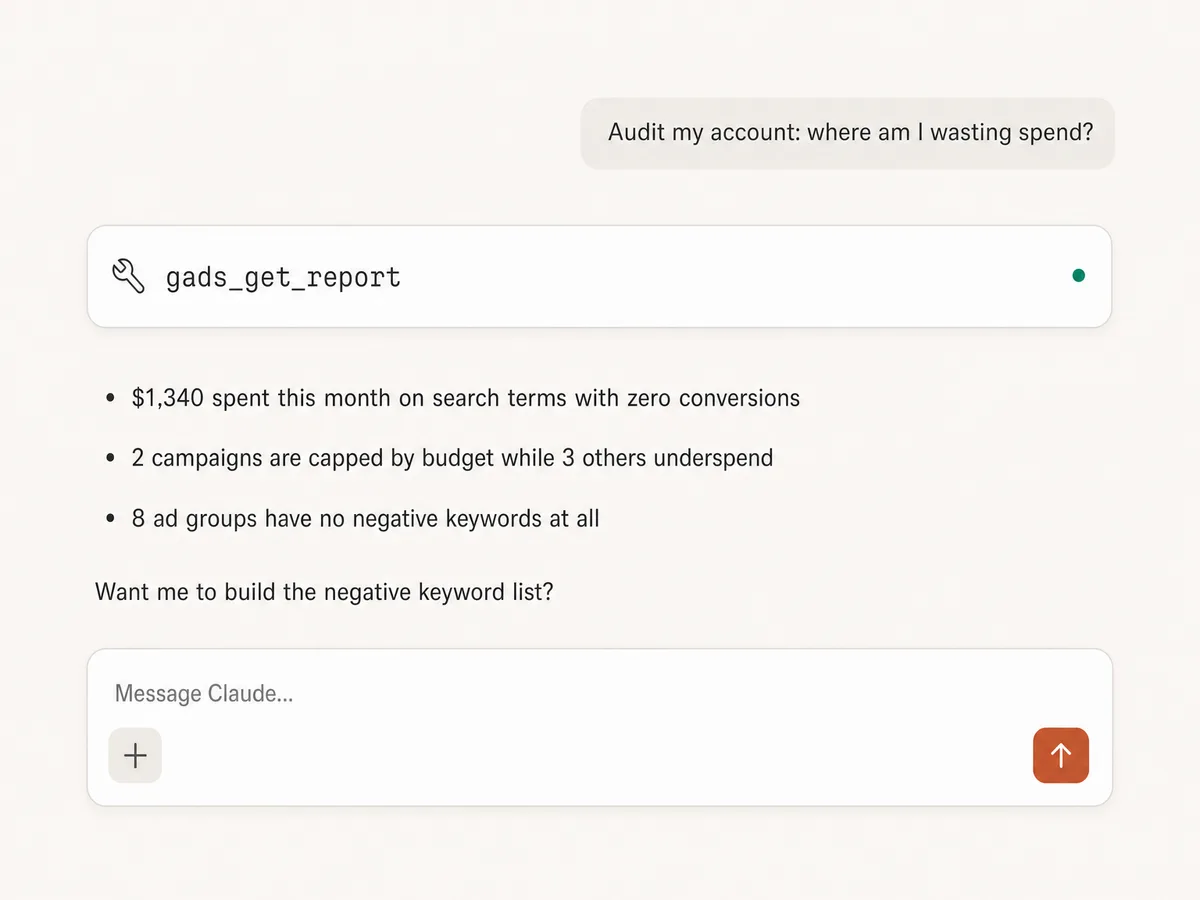
Report across ad accounts
Analyze campaign, ad group, ad, keyword, search term, asset, and conversion performance across multiple Google Ads accounts.
Audit account structure
Inspect campaign settings, conversion tracking, keyword coverage, asset groups, landing pages, and account-level issues.
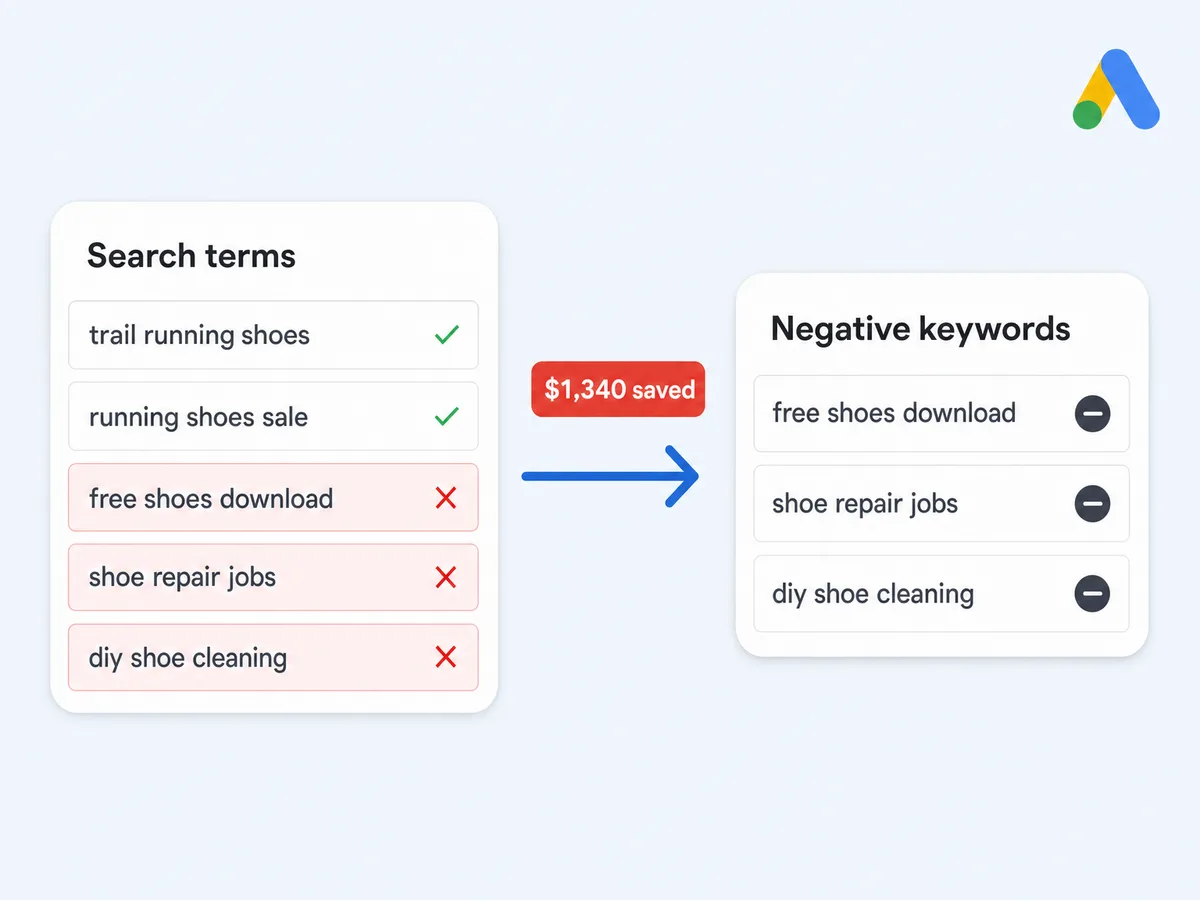
Optimize keywords
Analyze search terms, find wasted spend, build negative keyword lists, refine match types, and spot query patterns that deserve new ad groups.
Manage bids and budgets
Review budget pacing, update budgets, adjust bidding strategies, and move spend toward campaigns that are actually working.
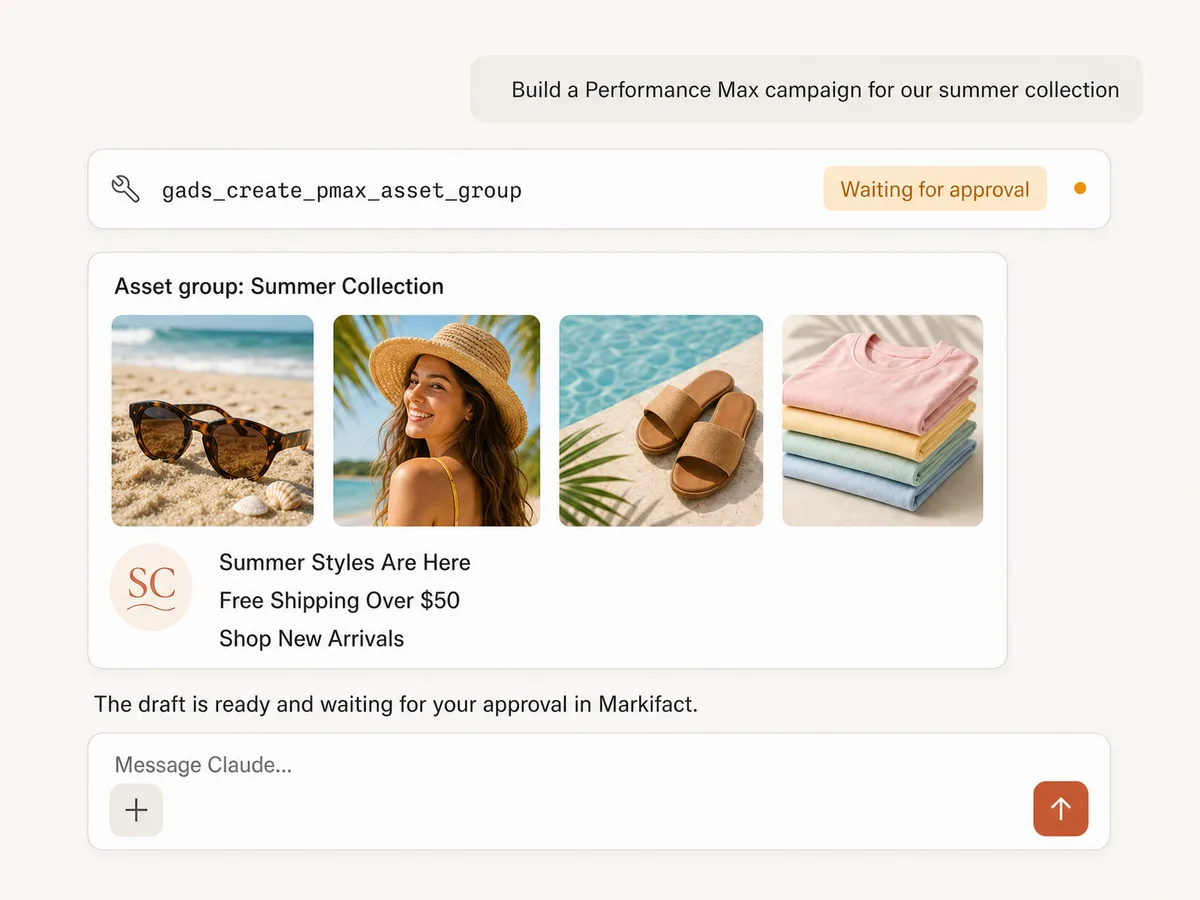
Create campaigns and ads
Create Search, Display, Shopping, Demand Gen, and Performance Max campaign drafts with budgets, bidding, keywords, and ad copy.
Improve performance
Review responsive search ads, assets, recommendations, and conversion signals before making approved optimizations.
Use Google Ads in your favorite AI. Plus your whole marketing stack
One MCP server. Google Ads, the rest of your stack, and the AI assistant you already use.
Set up in minutes
One-click OAuth, managed setup. Three steps and you're managing Google Ads from your AI assistant.
1
Connect Google Ads
Sign up for Markifact and connect your Google Ads account with one-click OAuth. Setup is managed as part of your Markifact account.
Clients
- Claude
- ChatGPT
- Cursor
- Codex
- Gemini CLI
- Other clients
Markifact is available in the Claude connector directory:
Open the listing and click Connect to add Markifact to Claude.
2
Connect your AI assistant
Install Markifact from the Claude directory or ChatGPT marketplace, then sign in. For other clients, use the setup shown in the tabs.
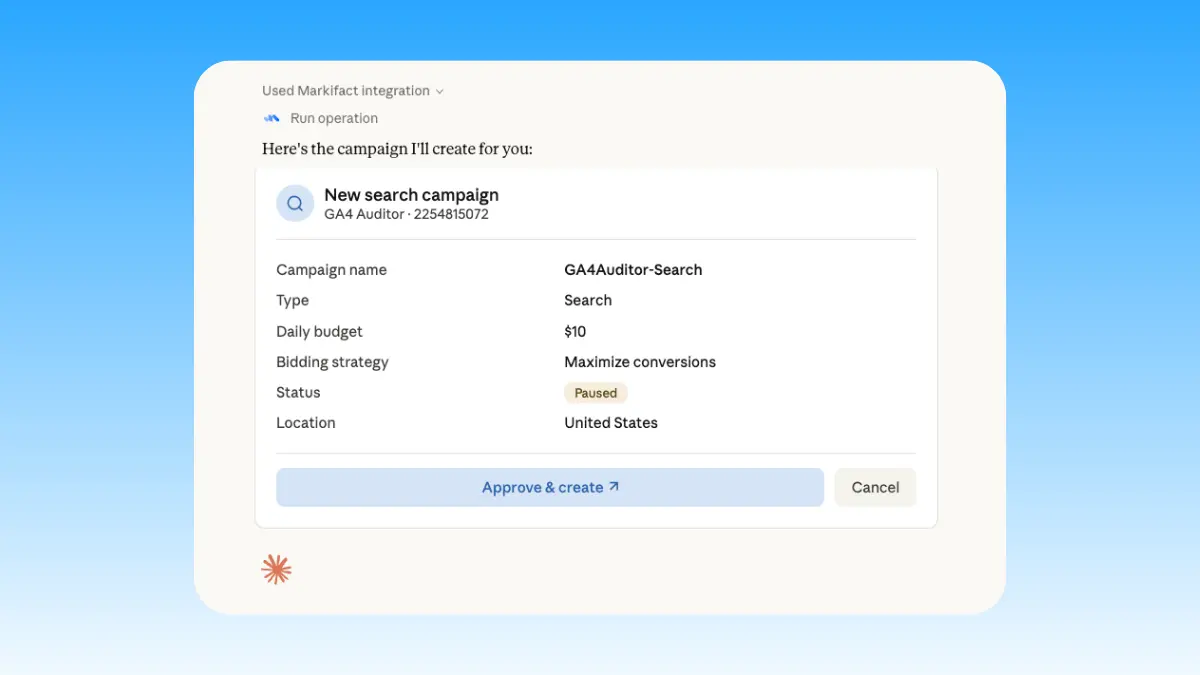
3
Start managing ads
Create campaigns, pull reports, optimize bids, manage keywords, and reduce wasted spend in plain English. Full read and write access to your ad account.
Start with your first task
Choose a guide and put your connection to work.
Connect Google Ads to Claude
Install the approved connector and run your first report.
Run a 15-minute Google Ads audit
Review campaign changes and prioritize your weekly account checks.
Use Google Ads in Claude Code
Work with Google Ads from your development environment.
Google Ads MCP prompt examples
Use Markifact MCP to research, launch, report, and optimize Google Ads from Claude, ChatGPT, Cursor, or any MCP-compatible client.
Create campaign drafts and prepare them for review.
- Create a paused Search campaign draft for this landing page with ad groups, keywords, and ads.
- Build a Performance Max campaign draft with asset group ideas for this product.
- Create responsive search ad copy variants for each ad group.
- Build a negative keyword starter list before launch based on my search term history.
What a session actually looks like
A search term audit in Claude, from prompt to approved change. Your AI finds the operation, runs the report, proposes the fix, and waits for you.
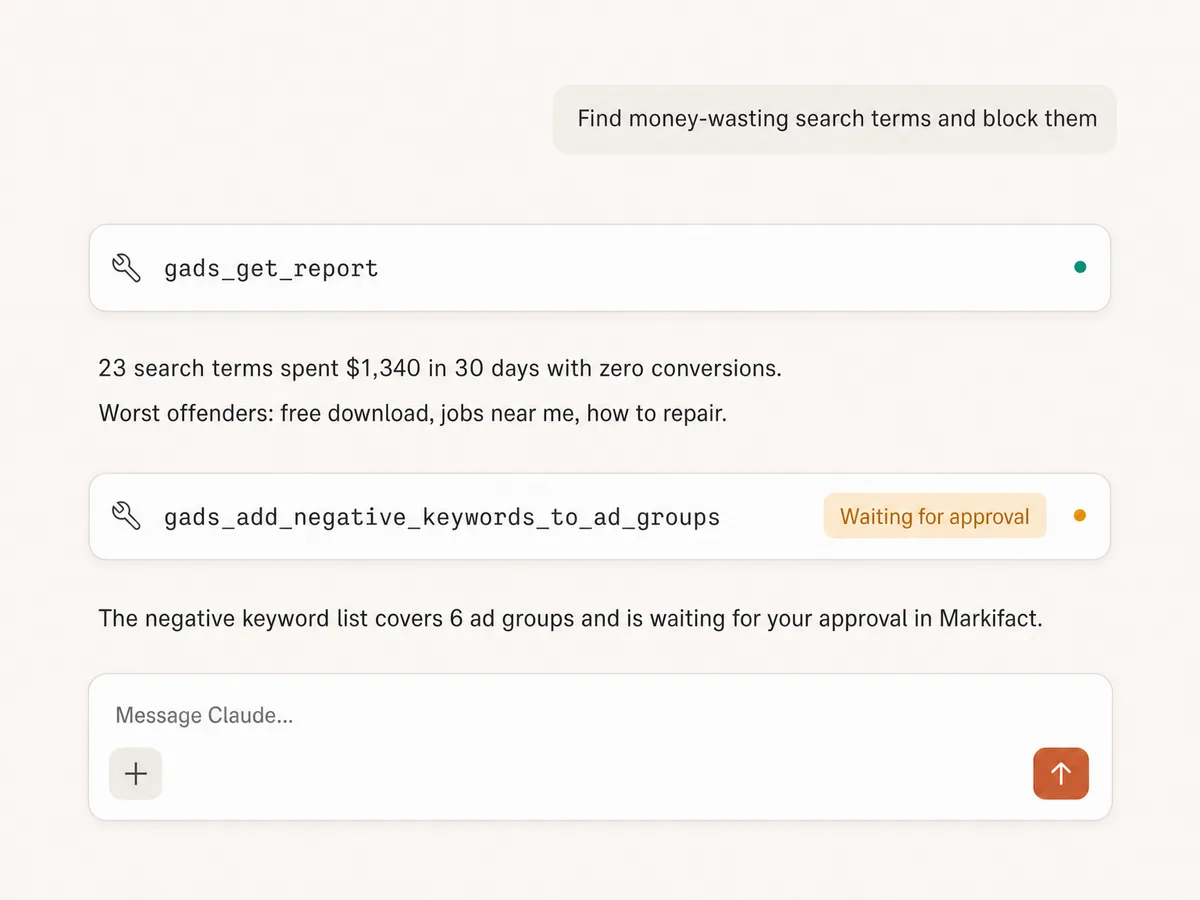
Example session. Claude uses Markifact's real Google Ads tools (gads_get_report, gads_add_negative_keywords_to_ad_groups); write operations always stop for your approval.
Tools directory
60+ Google Ads tools your AI can use
These are the real Google Ads tools Markifact exposes through MCP. Your AI client discovers them automatically once connected, and every write operation waits for your approval before it goes live.
Reporting & auditing
Pull performance data at any level, run raw GAQL, and review account change history.
gads_get_reportgads_run_gaql_querygads_search_gaql_resourcesgads_list_report_fieldsgads_get_account_historygads_select_accounts
Research & planning
Keyword ideas, volumes, and forecasts, plus geo targets, audience segments, and competitor ads.
gads_keyword_plannergads_search_geo_targetsgads_list_audience_segmentsgads_ads_transparency
Campaigns & ad groups
Create Search, Display, Shopping, Demand Gen, and Performance Max structures.
gads_create_campaigngads_create_ad_groupgads_create_pmax_asset_groupgads_update_listing_groupsgads_rename_campaigngads_rename_ad_group
Ads & creative
Build and edit responsive search, display, Demand Gen, and app ads.
gads_create_responsive_search_adgads_edit_responsive_search_adgads_create_responsive_display_adgads_create_demand_gen_single_image_adgads_create_demand_gen_carousel_adgads_create_demand_gen_video_adgads_create_app_ad
Assets & extensions
Sitelinks, callouts, snippets, promotions, and reusable image and text assets.
gads_create_sitelinksgads_create_calloutsgads_create_structured_snippetsgads_create_promotion_assetgads_create_image_assetgads_create_headline_assetgads_create_description_asset
Keywords & negatives
Add keywords, manage status, and build negative keyword lists that block wasted spend.
gads_add_keyword_to_ad_groupgads_update_keyword_statusgads_create_negative_keyword_listgads_add_keywords_to_negative_listgads_attach_negative_list_to_campaignsgads_add_negative_keywords_to_campaignsgads_add_negative_keywords_to_ad_groups
Budgets, bidding & status
Adjust budgets, bidding strategies, bids, schedules, and entity status across the account.
gads_update_campaign_budgetgads_update_campaign_bidding_strategygads_update_ad_group_bidgads_manage_portfolio_bidding_strategygads_assign_portfolio_bidding_strategygads_update_campaign_statusgads_update_ad_group_statusgads_update_ad_statusgads_update_asset_statusgads_update_campaign_ad_schedule
Audiences & exclusions
Target or exclude audience segments, manage custom audiences, and block placements and IPs.
gads_manage_custom_audiencegads_target_audience_segmentsgads_exclude_audience_segmentsgads_update_audience_signalsgads_create_placement_exclusion_listgads_add_placements_to_exclusion_listgads_manage_ip_exclusions
Account setup & advanced
Conversion actions, labels, experiments, recommendations, MCC links, and raw API mutations.
gads_create_conversion_actiongads_create_labelgads_manage_label_assignmentgads_manage_experimentgads_manage_recommendationsgads_manage_mcc_linkgads_create_client_accountgads_update_campaign_location_languagegads_mutate
Frequently Asked Questions
Have a different question? Reach out to Markifact support team.
What is Google Ads MCP?
Is Markifact Google Ads MCP official?
Why use Google Ads MCP instead of the Google Ads UI?
Which AI clients does Markifact support for Google Ads MCP?
Can I use Google Ads MCP with Claude?
Can I use Google Ads MCP with ChatGPT?
What can I do with Google Ads MCP in Markifact?
Which Google Ads tools are available through MCP?
Can I create and update Google Ads campaigns through MCP?
Can Markifact manage multiple Google Ads accounts?
Is my Google Ads connection secure?
Is it safe to use MCP for Google Ads management?
Can I research competitor ads with Google Ads MCP?
Can I use Google Trends with Google Ads MCP?
Should I use Google Ads MCP or the Google Ads AI agent?
Is there a Claude connector for Google Ads?
Is there a Google Ads MCP repository on GitHub?
More MCP servers
Start using Google Ads in Claude today
Connect your Google Ads account and start managing campaigns, keywords, budgets, and reports from Claude, ChatGPT, or any MCP client.