GigHQ.ai
Job-search tracker for AI agents: applications, stale follow-ups, skills gaps, H-1B lookup.
Hosted MCP Server
npx add-mcp 'https://mcp.gighq.ai/mcp'Installs into Claude Code, Codex, Cursor and more
Documentation

Model Context Protocol v1.0
Your Job Search,
Inside Your AI Assistant
Connect Claude, ChatGPT, or Grok directly to your live GigHQ data. Track applications, analyze skills gaps, research hiring metrics, and maintain your career journal — without switching tabs.
MCP Server Endpoint Streamable HTTP Ready
https://mcp.gighq.ai/mcp Copy URL
Setup Instructions Explore 16 MCP Tools Watch 2-Min Demo
See It In Action
Contextual AI Search in Real-Time
Watch how GigHQ MCP Server turns natural language prompts into live pipeline updates and deep company intelligence.
Architecture & Standard
What is the Model Context Protocol?
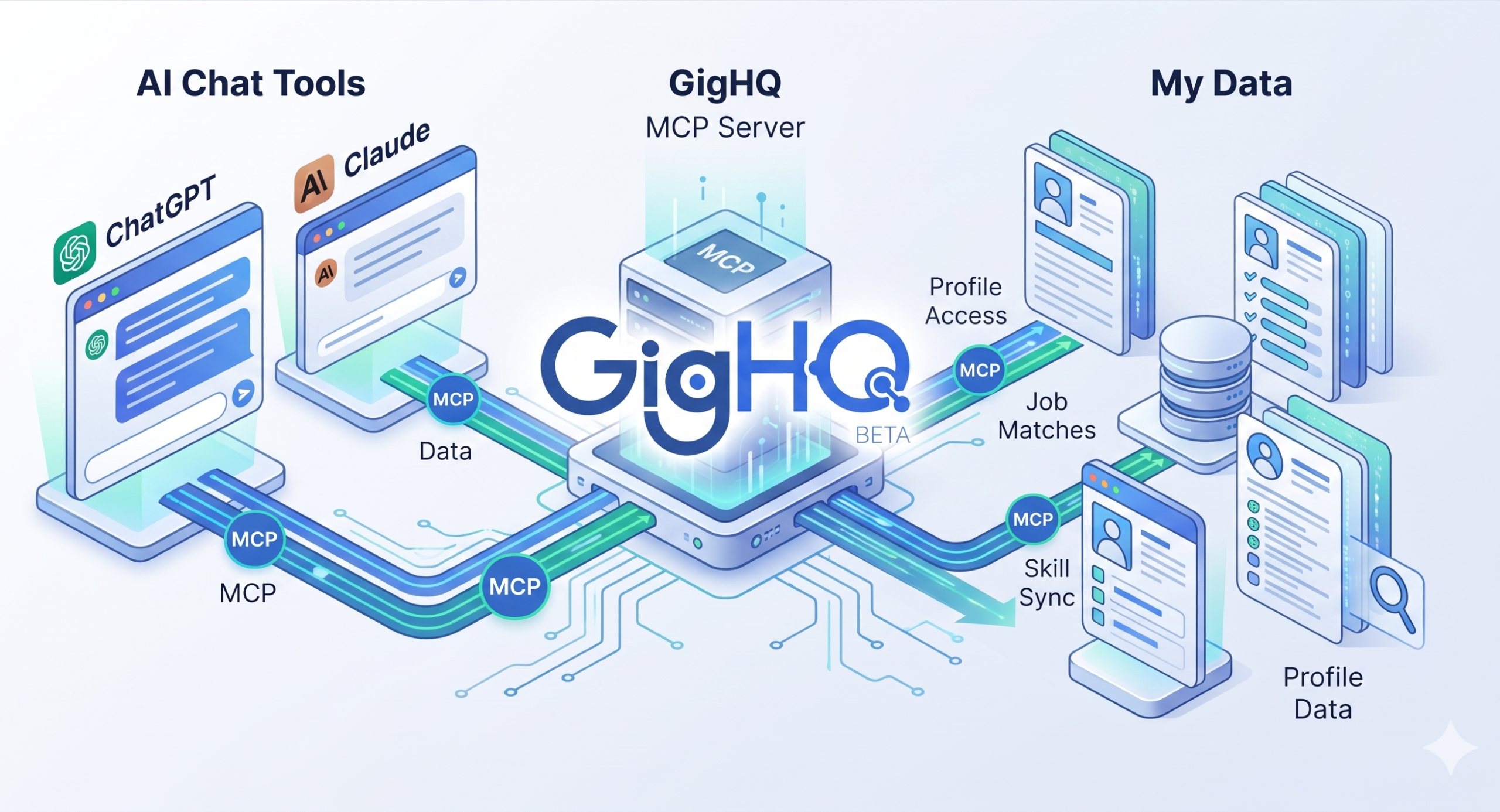
The Model Context Protocol (MCP) is an open standard that lets AI assistants like Claude and ChatGPT securely connect to external tools and data.
The GigHQ MCP Server makes your personal GigHQ account available as a live, secure data source inside your AI conversations. No copy-pasting required.
Zero Credential Sharing
OAuth 2.0 authentication protects your account. Your password is never shared with your AI assistant.
Live Data Sync
Changes made during your chat sessions update your GigHQ pipeline immediately in real-time.
Structured Intelligence
Extract interview insights, skills gaps, and visa sponsorship history through natural conversation.
What You Can Do
Powerful AI Workflows
Try these ready-to-use prompts with your AI assistant once the GigHQ MCP Server is connected.
Pipeline Tracking
Job Application Tracking
Ask your AI to show recent applications, find specific companies, flag stale follow-ups, or log a new application without leaving your chat.
Example Prompt Copy Prompt
"Show me everything I have in progress and flag anything I haven't touched in two weeks."
Interview Prep
Skills Gap Analysis
Save a job description in GigHQ, then ask your AI to run a structured skills gap analysis to surface match strengths and cover letter talking points.
Example Prompt Copy Prompt
"Do a skills gap analysis for the Stripe role I saved last week."
Market Research
Company & Visa Intelligence
Look up hiring trends, applicant volume, time-to-decision metrics, and historical H1B sponsorship records for any employer.
Example Prompt Copy Prompt
"Does Airbnb sponsor H1B visas? And how long does their interview process typically take?"
Pipeline Health
Weekly Job Search Summary
Get a plain-language health check on your pipeline: stage conversion rates, longest-open roles, and suggested focus areas for the week ahead.
Example Prompt Copy Prompt
"Give me a summary of my job search this week."
Personal Branding
Career Journal & Milestones
Log achievements, project milestones, and tech wins as they happen so raw material is ready whenever you write a resume or cover letter.
Example Prompt Copy Prompt
"Add an entry to my career journal: I led the migration to the new billing system, cut support tickets by 30%."
Reflection Helper
Guided Reflection Prompts
Request guided prompts from your AI assistant to help you reflect on your work and surface achievements you might have overlooked.
Example Prompt Copy Prompt
"Give me 3 guided journal prompts to reflect on my wins at work this week."
Quick Setup
Integrate With Your AI Assistant
Select your preferred AI client below for step-by-step connection instructions.
 Claude (Web & Desktop)
  ChatGPT (Web & Desktop)
  Grok (Web & Desktop)
Connecting to Claude (claude.ai & Claude Desktop)
- 1Open Claude Settings In claude.ai or Claude Desktop, navigate to Settings → Integrations / Developer.
- 2Add Custom MCP Server Click Add MCP Server and enter the server endpoint URL:
https://mcp.gighq.ai/mcp - 3Authorize via OAuth 2.0 You will be redirected to GigHQ to sign in and authorize access. Your credentials are never shared with Anthropic.
- 4Start Prompting Ask Claude: "Show my recent applications from GigHQ" to start using live data.
View Detailed Claude Setup Guide
claude_desktop_config.json Copy JSON
{
  "mcpServers": {
    "gighq": {
      "url": "https://mcp.gighq.ai/mcp",
      "transport": "http"
    }
  }
}
Connecting to ChatGPT (chatgpt.com & ChatGPT Desktop)
- 1Open ChatGPT Settings Open ChatGPT Settings → Apps & Integrations → Custom Connectors.
- 2Add Connector URL Click Add Connector and paste the endpoint:
https://mcp.gighq.ai/mcp - 3Authenticate Account Click Connect Account to authorize your GigHQ account securely.
- 4Ready to Prompt In any ChatGPT conversation, ask: "Give me a summary of my job search this week."
View Detailed ChatGPT Setup Guide
ChatGPT Custom Connector URL Copy URL
https://mcp.gighq.ai/mcp
Connecting to Grok (grok.com & Grok Desktop)
- 1Click "Skills and Connectors" In the left sidebar of Grok, click on Skills and Connectors.
- 2Switch to Connectors & Add New Switch to the Connectors tab at the top and click the New Connector button.
- 3Enter Server Endpoint URL Name the connector
GigHQ.aiand paste the MCP server endpoint:https://mcp.gighq.ai/mcp - 4Connect & Start Prompting Click Connect to authorize. Once shown as Connected, ask in any chat: "Review my open job applications and summarize recent updates."
Grok MCP Connector URL Copy URL
https://mcp.gighq.ai/mcp
Available Tools & Resources
Explore All 16 MCP Tools & 6 Live Resources
Exposing 16 specialized tools and 6 live context resources (22 capabilities) across job tracking, market radar, and career journaling.
All (16) Job Applications (7) Companies & Jobs (4) Career Journal (4) Analytics (1)
get_recent_applications OAuth Required
List your 10 most recent job applications with status, dates, and stage metadata.
Job Applications
search_job_applications OAuth Required
Find job applications matching a specific company name or keyword query.
Job Applications
get_job_application OAuth Required
Fetch full details, notes, salary info, and stage history for a single application ID.
Job Applications
create_job_application OAuth Required
Log a new job application directly into your GigHQ tracker from chat.
Job Applications
update_job_application_status OAuth Required
Update an application's current stage (e.g. Applied, Interviewing, Offer, Rejected).
Job Applications
check_stale_applications OAuth Required
Find job applications with no recent activity or updates in over 14 days.
Job Applications
weekly_job_search_summary OAuth Required
Generate an executive weekly pipeline health digest and conversion rates.
Analytics
analyze_skills_gap OAuth Required
Structured skills gap analysis comparing a saved application to your background profile.
Job Applications
search_companies Public Tool
Search companies in GigHQ's database by company name or sector.
Companies & Jobs
get_company_details Public Tool
Fetch company hiring metrics, applicant volume, and average time-to-decision by stage.
Companies & Jobs
get_job_details Public Tool
Retrieve job-level applicant metrics, timeline benchmarks, and requirements.
Companies & Jobs
lookup_h1b_sponsorship Public Tool
Check if a company historically sponsors H1B visas based on official labor data.
Companies & Jobs
add_career_entry OAuth Required
Add an achievement, project win, or technical milestone to your career journal.
Career Journal
update_career_entry OAuth Required
Edit an existing career journal entry or update accomplishment metrics.
Career Journal
list_career_entries OAuth Required
View your saved career journal entries to reference during interviews or resume writing.
Career Journal
get_career_journal_prompts OAuth Required
Get guided prompts to help you reflect on your work and extract achievements.
Career Journal
Privacy & Security
Enterprise Security via OAuth 2.0
Authentication uses OAuth 2.0 — the same industry standard used by Sign in with Google and Sign in with Apple. Your GigHQ credentials are never shared with your AI assistant.
No Passwords Shared
You authorize access directly on GigHQ.ai. Your AI assistant only receives a secure token.
Private Account Scope
Queries are strictly scoped to your authenticated account. GigHQ never sends data proactively.
One-Click Revocation
You can disconnect active AI assistant sessions at any time in your GigHQ Account Settings.
AI Assistant
OAuth 2.0 PKCE
GigHQ Account Data
Protocol Specifications
GigHQ MCP Server Technical Reference
Key architectural and protocol parameters for developers, LLM engineers, and agent integrations.
| Specification Parameter | Value / Technical Detail |
|---|---|
| Protocol Specification | Model Context Protocol (MCP) by Anthropic / Linux Foundation |
| Production Endpoint URL | https://mcp.gighq.ai/mcp |
| Supported Transports | Streamable HTTP |
| Total Capabilities | 22 Capabilities (16 Specialized Tools + 6 Live Dynamic Resources) |
| Authentication & Security | OAuth 2.0 PKCE & Secure Personal Access Tokens (Zero plain passwords stored) |
| Compatible LLM Clients | Claude Desktop, Claude Code, Cursor IDE, Windsurf, ChatGPT (Custom Actions), LibreChat, Custom Agents |
| Data Scope & Privacy | User-scoped job applications, contacts, career reflections, company intelligence, and H-1B sponsorship records |
FAQs
Frequently Asked Questions
Everything you need to know about setting up and using the GigHQ MCP Server.
What is the URL for the MCP Server?
Use this URL when configuring the GigHQ server in any MCP-compatible AI assistant: https://mcp.gighq.ai/mcp
Do I need a GigHQ account?
Yes. The MCP server connects to your personal GigHQ data, so you need an account to use the authenticated tools. Company search and H1B lookup are available without authentication.
Is my data shared with the AI company?
When you ask your AI a question, the relevant data from GigHQ is included in that conversation. Your data is handled according to your AI assistant's privacy policy. GigHQ never sends your data proactively.
Which AI assistants are supported?
Currently Claude (via claude.ai and Claude desktop app), ChatGPT (via chatgpt.com and the ChatGPT desktop app), and Grok (via grok.com and Grok desktop app). Any MCP-compatible client that supports Streamable HTTP transport will work.
Is this free?
The MCP server is available to all GigHQ users at no additional cost.
Platform
Resources
Job Market Radar
Partners
GigHQ.ai © 2026
Made with in Austin, Texas
Proudly powered by WordPress.
{"@context":"https:\/\/schema.org","@graph":[{"@type":"WebPage","@id":"https:\/\/www.gighq.ai\/mcp-server\/","url":"https:\/\/www.gighq.ai\/mcp-server\/","name":"MCP Server - GigHQ.ai","isPartOf":{"@id":"https:\/\/www.gighq.ai\/#website"},"primaryImageOfPage":{"@id":"https:\/\/www.gighq.ai\/mcp-server\/#primaryimage"},"image":{"@id":"https:\/\/www.gighq.ai\/mcp-server\/#primaryimage"},"thumbnailUrl":"https:\/\/www.gighq.ai\/wp-content\/uploads\/2026\/07\/gighq-mcp-server-v2.webp","datePublished":"2026-05-19T20:46:34+00:00","dateModified":"2026-07-03T16:00:55+00:00","description":"Connect Claude, ChatGPT, or Grok directly to your live GigHQ data via Model Context Protocol (MCP). Track applications, analyze skills gaps, and query your job search conversationally.","breadcrumb":{"@id":"https:\/\/www.gighq.ai\/mcp-server\/#breadcrumb"},"inLanguage":"en-US","potentialAction":[{"@type":"ReadAction","target":["https:\/\/www.gighq.ai\/mcp-server\/"]}]},{"@type":"ImageObject","inLanguage":"en-US","@id":"https:\/\/www.gighq.ai\/mcp-server\/#primaryimage","url":"https:\/\/www.gighq.ai\/wp-content\/uploads\/2026\/07\/gighq-mcp-server-v2.webp","contentUrl":"https:\/\/www.gighq.ai\/wp-content\/uploads\/2026\/07\/gighq-mcp-server-v2.webp","width":2560,"height":1386,"caption":"GigHQ.ai MCP Server"},{"@type":"BreadcrumbList","@id":"https:\/\/www.gighq.ai\/mcp-server\/#breadcrumb","itemListElement":[{"@type":"ListItem","position":1,"name":"Home","item":"https:\/\/www.gighq.ai\/"},{"@type":"ListItem","position":2,"name":"MCP Server"}]},{"@type":"WebSite","@id":"https:\/\/www.gighq.ai\/#website","url":"https:\/\/www.gighq.ai\/","name":"GigHQ.ai","description":"Your AI-powered job search copilot.","publisher":{"@id":"https:\/\/www.gighq.ai\/#organization"},"potentialAction":[{"@type":"SearchAction","target":{"@type":"EntryPoint","urlTemplate":"https:\/\/www.gighq.ai\/?s={search_term_string}"},"query-input":{"@type":"PropertyValueSpecification","valueRequired":true,"valueName":"search_term_string"}}],"inLanguage":"en-US"},{"@type":"Organization","@id":"https:\/\/www.gighq.ai\/#organization","name":"GigHQ.ai","url":"https:\/\/www.gighq.ai","logo":"https:\/\/www.gighq.ai\/wp-content\/uploads\/2025\/09\/header-home-v5-1.webp","image":{"@id":"https:\/\/www.gighq.ai\/#\/schema\/logo\/image\/"},"sameAs":["https:\/\/www.linkedin.com\/company\/gighqai\/","https:\/\/x.com\/GigHQAI","https:\/\/chromewebstore.google.com\/detail\/iijkgkanplfgchpbihfpmoaldfklfpmk","https:\/\/www.facebook.com\/people\/GigHqai\/61576249973860\/","https:\/\/www.instagram.com\/gighqai\/","https:\/\/www.reddit.com\/r\/gighq_ai\/","https:\/\/discord.gg\/EzbWw4344n","https:\/\/www.youtube.com\/@gighqai","https:\/\/www.tiktok.com\/@gighq.ai"],"description":"AI-powered job search copilot, multi-tenant workforce outcome engine, and application tracking platform.","founder":{"@type":"Person","name":"Hasnain Baxamoosa","url":"https:\/\/www.gighq.ai\/author\/hasnain-baxamoosa\/"},"foundingDate":"2024","address":{"@type":"PostalAddress","addressLocality":"Austin","addressRegion":"TX","addressCountry":"US"},"knowsAbout":["Workforce Innovation and Opportunity Act (WIOA) Compliance","Workforce Development Boards (WDB)","Employment Outcomes Tracking","Job Placement Reporting & Verification","Career Services Case Management","Higher Education Career Outcomes","Bootcamp Placement Verification","Labor Market Outcomes Tracking","Client Placement Velocity Analytics","State Workforce Agencies","Job Application Tracker","AI-Powered Job Search Copilot","Applicant Tracking Systems (ATS)","ATS Integration and Scraping (50+ Platforms)","Model Context Protocol (MCP) for Career Management","Model Context Protocol (MCP) for Job Search","Model Context Protocol (MCP) for Contact Management","AI Resume Optimization and Keyword Matching","Job Application Chrome Extension","Automated Application Organization","LinkedIn Alternative for Job Tracking","Real-Time Labor Market Intelligence","Employer Response Rate Analytics","Ghost Job Detection & Reporting","Applicant Competition Velocity","Company Hiring Trends","Job Market Radar","State Unemployment Insurance Benefits","Unemployment Eligibility Guidelines","Work Search Activity Logs & Requirements","Department of Labor Benefit Schedules"]}]}
{
    "@context": "https://schema.org",
    "@type": "FAQPage",
    "mainEntity": [
        {
            "@type": "Question",
            "name": "What is the URL for the MCP Server?",
            "acceptedAnswer": {
                "@type": "Answer",
                "text": "Use this URL when configuring the GigHQ server in any MCP-compatible AI assistant: https://mcp.gighq.ai/mcp"
            }
        },
        {
            "@type": "Question",
            "name": "Do I need a GigHQ account?",
            "acceptedAnswer": {
                "@type": "Answer",
                "text": "Yes. The MCP server connects to your personal GigHQ data, so you need an account to use the authenticated tools. Company search and H1B lookup are available without authentication."
            }
        },
        {
            "@type": "Question",
            "name": "Is my data shared with the AI company?",
            "acceptedAnswer": {
                "@type": "Answer",
                "text": "When you ask your AI a question, the relevant data from GigHQ is included in that conversation. Your data is handled according to your AI assistant's privacy policy. GigHQ never sends your data proactively."
            }
        },
        {
            "@type": "Question",
            "name": "Which AI assistants are supported?",
            "acceptedAnswer": {
                "@type": "Answer",
                "text": "Currently Claude (via claude.ai and Claude desktop app), ChatGPT (via chatgpt.com and the ChatGPT desktop app), and Grok (via grok.com and Grok desktop app). Any MCP-compatible client that supports Streamable HTTP transport will work."
            }
        },
        {
            "@type": "Question",
            "name": "Is the GigHQ MCP server free?",
            "acceptedAnswer": {
                "@type": "Answer",
                "text": "The MCP server is available to all GigHQ users at no additional cost."
            }
        }
    ]
}