Devart MCP Server for SQLite (ODBC)
Self-hosted MCP server for secure AI access to SQLite databases. Free to use on Windows; requires the commercial Devart ODBC Driver for SQLite (free 30-day trial).
Documentation
Connect your AI tools to live SQLite data
MCP Server for SQLite is a free, self-hosted solution that connects AI tools to your SQLite databases. It makes database content accessible through natural language, so users can find information and examine database structures without building a dedicated AI integration.
-
Explore tables, views, and indexes
-
Understand schemas and relationships
-
Find data without extra tooling
-
Keep SQLite data local and under your control
What is Devart MCP Server for SQLite?
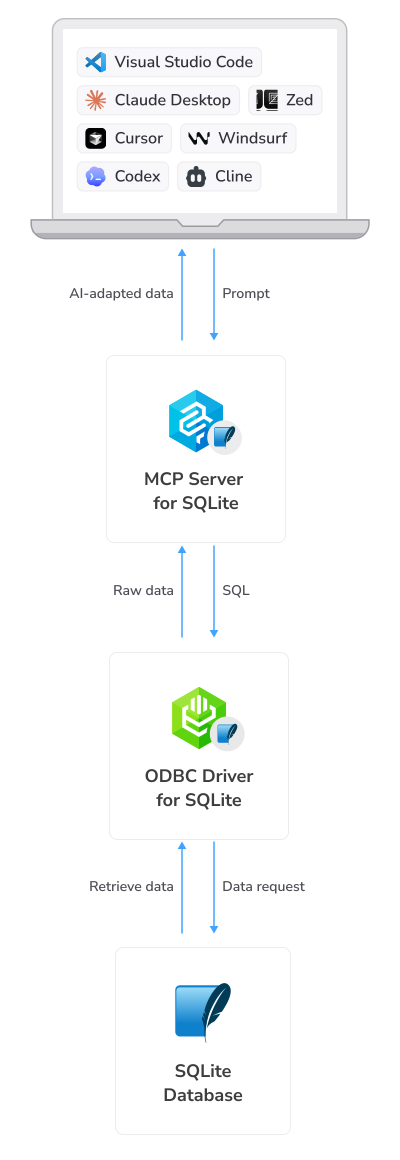
Devart MCP Server for SQLite connects AI assistants and agents to SQLite databases through the Model Context Protocol (MCP). This free, self-hosted solution lets AI tools work with data stored in SQLite files, inspect database structures, and answer natural-language questions without requiring a custom AI-to-database integration.
At the connectivity layer, MCP Server uses Devart ODBC Driver for SQLite to access database files, execute queries, and retrieve data and metadata. The server then delivers structured results to the AI client, providing a consistent interface for working with SQLite from MCP-compatible tools.
Why connect AI to SQLite data through MCP?
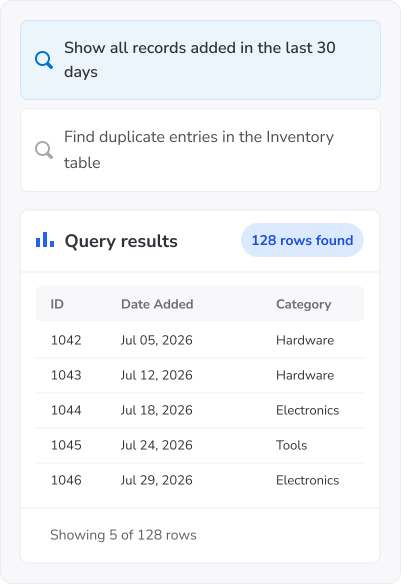
Connecting AI to SQLite through MCP turns a conventional AI chat into a practical way of working with live data. It is much faster than manual data export or SQL querying.
Ask SQLite in plain language
Retrieve data, inspect schemas, and investigate issues in the most natural and convenient way.
Built for teams working with SQLite
MCP Server for SQLite gives teams a natural-language interface to SQLite data for analysis, development, troubleshooting, validation, and controlled AI access.
Team
Request
Analysts & data teams
Show event counts by type for the last month.
Queries the SQLite database and returns events grouped by type, without requiring users to write SQL or create a separate analysis script.
App developers & engineers
What does this view do, and which indexes support it?
Examines tables, views, indexes, and other schema objects to help teams understand and work with application databases.
QA, support & operations teams
Find the records linked to session ID 4471.
Retrieves related records from the SQLite database to help teams investigate, reproduce, and verify issues using application data.
Platform & security teams
How can we give teams AI access to a SQLite database without sharing the file directly?
Provides a self-hosted layer for controlled AI access to SQLite while keeping database connectivity within your environment.
How to get started with an MCP Server for SQLite
1
2
3
4
1
Download MCP Server
Install the self-hosted server and open the setup.
2
Access your SQLite
Use an existing DSN or create a custom SQLite connection.
3
Connect your AI tool
Integrate Claude, VS Code, Cursor, Codex, or another compatible MCP tool.
4
Ask in plain language
Begin querying your SQLite data in natural language through the MCP layer.

Get started with MCP Server for SQLite
Download and set up the free, self-hosted MCP Server to securely connect your AI tools to SQLite and start asking questions in plain language.
WhoBenefitsTitle

TechnicalTeams
App developers, data engineers, analysts, and architects who work with SQLite databases in applications, prototypes, and data pipelines and need a quicker way to understand their structure and contents. They can use natural-language queries to explore tables, views, indexes, and relationships, inspect application data, retrieve related records, investigate query behavior, and troubleshoot data issues directly from their AI tools.
BusinessTeams
Operations, product, and analytics teams that need answers from data stored in SQLite in plain language, without writing SQL or setting up a separate tool.

AiAndAutomationTeams
Teams adding AI capabilities to applications, developer tools, or local workflows that use SQLite databases. MCP lets their AI tools work with database content and structure through a common interface.


Need an MCP Server for multiple data sources?
A single MCP layer for all your databases and cloud services.
Explore other MCP servers
Frequently asked questions
What is MCP Server for SQLite?
MCP Server for SQLite is a self-hosted solution that lets AI assistants and agents work with SQLite databases through the Model Context Protocol (MCP). It provides a standard interface for querying data, examining database structures, and working with SQLite files through natural-language requests.
How does MCP Server connect AI to SQLite?
The AI client sends MCP tool calls to the server, which accesses the SQLite database through Devart ODBC Driver for SQLite. The server performs the requested database operations and returns structured results, without requiring the AI client to open the database file itself.
Can AI query live SQLite data through MCP?
Yes. AI assistants can retrieve current data from the connected SQLite file and inspect its schema, views, indexes, triggers, and other available metadata. Queries work against the database itself rather than an exported copy.
Is MCP Server for SQLite secure?
MCP Server runs in your environment, giving you control over which SQLite files and connections are available to AI tools. Database access is handled through the server instead of giving AI clients direct access to the files.
Is MCP Server for SQLite free?
Yes. MCP Server for SQLite is free to download and use, with no license key, activation, or expiration. SQLite connectivity is provided through Devart ODBC Driver for SQLite, which is licensed separately and includes a 30-day trial.
What can AI assistants do with SQLite through MCP?
AI assistants can explore schemas, query tables and views, inspect indexes and triggers, retrieve records, analyze query plans, and perform ad-hoc analysis directly against SQLite databases.
Can AI read the schema of a SQLite file?
Yes. AI can examine available schema metadata to identify tables, columns, views, indexes, and triggers. It can then explain how the objects in a single-file SQLite database are organized and related.
Can AI explain a slow query in SQLite?
Yes. AI can examine the query and its available query plan to identify scans, index usage, joins, and other details that may affect performance. Based on that information, it can help investigate possible indexing or query changes.
Do I need to build a custom API integration to connect SQLite to AI?
No. Configure the SQLite connection in MCP Server and register the server with your MCP-compatible AI client. You can then work with the database through MCP without developing a separate API layer.
Which AI tools work with MCP Server for SQLite?
You can connect MCP Server for SQLite to Claude, Visual Studio Code, Cursor, Codex, Windsurf, Cline, Zed, and other tools with MCP support. The same SQLite setup can therefore be used with different compatible AI clients.