Devart MCP Server for Salesforce (ODBC)
Self-hosted MCP server for secure AI access to Salesforce CRM data. Free to use on Windows; requires the commercial Devart ODBC Driver for Salesforce (free 30-day trial).
Documentation
Connect your AI tools to live Salesforce data
MCP Server for Salesforce is a free, self-hosted solution that gives AI tools real-time access to your Salesforce data. It makes CRM information accessible through natural language, helping users find business insights and investigate customer activity without developing a custom AI-to-CRM integration.
-
Navigate leads, accounts, and opportunities
-
Explore standard and custom objects
-
Find CRM data without writing SOQL
-
Keep AI access to Salesforce on-prem
What is Devart MCP Server for Salesforce?
Devart MCP Server for Salesforce gives AI assistants and agents a self-hosted way to work with Salesforce data through the Model Context Protocol (MCP). It allows compatible AI tools to find and analyze CRM information, explore standard and custom objects, and retrieve records through natural-language requests.
The server accesses Salesforce through Devart ODBC Driver for Salesforce, which provides a structured interface to objects, fields, relationships, and records. It handles the underlying Salesforce connectivity while the MCP Server passes requested data back to the AI client, removing the need to develop and maintain a custom AI-to-Salesforce integration.
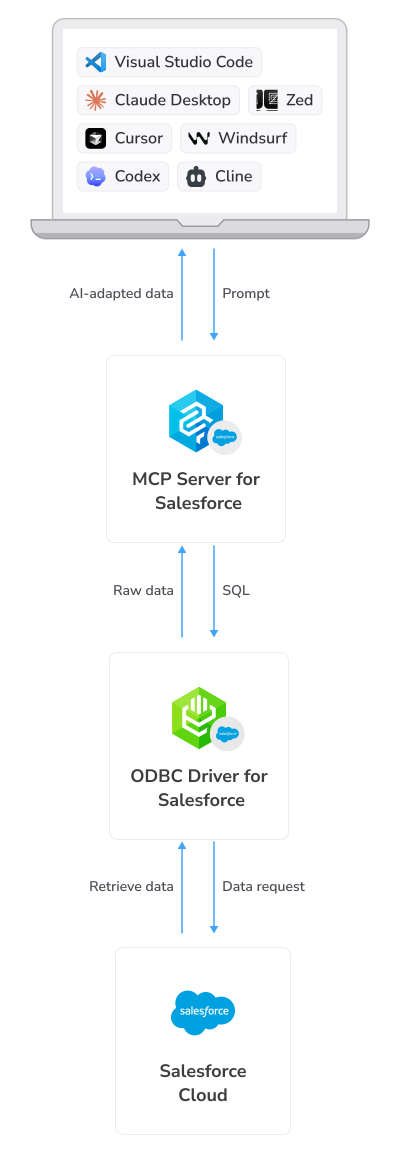
Why connect AI to Salesforce data through MCP?
Connecting AI to Salesforce through MCP turns a conventional AI chat into a practical way of working with live CRM data. It is much faster than manual exports, custom reports, or writing SOQL by hand.
Ask Salesforce in plain language
Retrieve records, inspect objects and fields, and investigate issues in the most natural and convenient way.
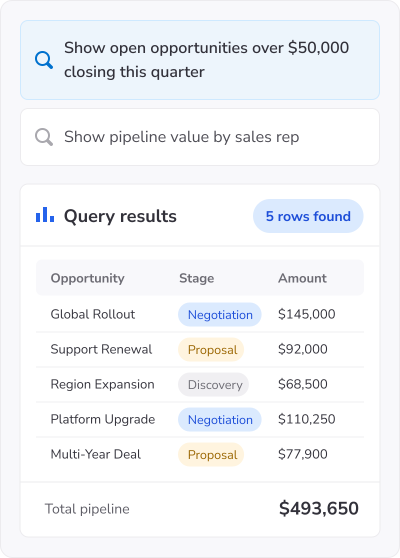
Built for teams working with Salesforce
MCP Server for Salesforce gives teams a natural-language interface to CRM data for sales analysis, marketing insights, development, validation, and controlled AI access.
Team
Request
Sales & RevOps teams
Summarize this quarter's pipeline by stage.
Queries Salesforce and returns opportunities grouped by stage, without requiring users to build a report or export the data.
Marketing & demand gen teams
Show new leads by source this month.
Retrieves leads and groups them by source and status to help teams understand acquisition and conversion activity.
Salesforce admins & developers
Which custom objects reference Opportunity?
Examines standard and custom objects, fields, and relationships to help teams understand and work with the Salesforce data model.
Platform & security teams
How can we give teams AI access to Salesforce without giving them direct access to the org?
Provides a self-hosted layer for controlled AI access to Salesforce while keeping connectivity within your environment.
How to get started with an MCP Server for Salesforce
1
2
3
4
1
Download MCP Server
Install the self-hosted server and open the setup.
2
Access your Salesforce
Use an existing DSN or create a custom Salesforce connection.
3
Connect your AI tool
Integrate Claude, VS Code, Cursor, Codex, or another compatible MCP tool.
4
Ask in plain language
Begin querying your Salesforce data in natural language through the MCP layer.

Get started with MCP Server for Salesforce
Download and set up the free, self-hosted MCP Server to securely connect your AI tools to Salesforce and start asking questions in plain language.
WhoBenefitsTitle

TechnicalTeams
Salesforce admins, developers, architects, and data engineers who need to understand and work with CRM data without writing SOQL for every request. They can use natural-language queries to explore standard and custom objects, fields, and relationships, retrieve accounts, contacts, leads, opportunities, and other records, investigate object dependencies, validate data, and get the context they need when configuring, troubleshooting, or extending Salesforce.
BusinessTeams
Sales, marketing, RevOps, and service teams that need answers from Salesforce in plain language, without waiting on reports or exports.

AiAndAutomationTeams
Teams developing sales assistants, CRM copilots, or agent workflows that use Salesforce records as business context. MCP provides a common interface to available CRM data, so different AI applications can work with the configured Salesforce connection without each requiring its own integration.


Need an MCP Server for multiple data sources?
A single MCP layer for all your databases and cloud services.
Explore other MCP servers
Frequently asked questions
What is MCP Server for Salesforce?
MCP Server for Salesforce is a self-hosted solution that brings Salesforce CRM data into MCP-compatible AI assistants and agents. It gives AI tools a standard way to access records, explore object relationships, and analyze business data through natural-language requests.
How does MCP Server connect AI to Salesforce?
The server receives tool calls from an AI client and accesses Salesforce through Devart ODBC Driver for Salesforce. The driver handles communication with Salesforce and exposes its objects, fields, and records through a structured data interface. Results are then returned to the AI client for further processing.
Can AI query live Salesforce data through MCP?
Yes. AI assistants can work with current Salesforce records, including leads, accounts, contacts, opportunities, and cases. This makes it possible to answer questions using up-to-date CRM information rather than exported datasets.
Is MCP Server for Salesforce secure?
MCP Server runs in your environment, while access to Salesforce is made through the connection you configure. Salesforce permissions continue to determine which objects, fields, and records are available, giving you control over the data AI tools can access.
Is MCP Server for Salesforce free?
Yes. MCP Server for Salesforce is free to download and use, with no license key, activation, or expiration. Devart ODBC Driver for Salesforce used for connectivity is licensed separately and includes a 30-day trial.
What can AI assistants do with Salesforce through MCP?
AI assistants can explore customer and sales records, analyze opportunities and pipeline activity, retrieve cases associated with an account, examine relationships between objects, and perform ad-hoc CRM analysis and reporting.
Do I need to write SOQL or API calls to use Salesforce through MCP?
No. You can request Salesforce data in natural language without manually writing SOQL or working with the Salesforce API. The MCP Server and Devart ODBC Driver for Salesforce handle the underlying data access.
Can AI work with Salesforce standard and custom objects?
Yes. AI assistants can access standard objects such as Accounts, Contacts, Leads, and Opportunities, as well as available custom objects and fields. They can also use object relationships to provide context across related CRM records.
Can AI follow Salesforce leads through conversion?
Yes. AI can analyze available lead, account, contact, and opportunity data to examine conversion activity. For example, it can group leads by source or status and summarize related conversion data over a selected period.
Which AI tools work with MCP Server for Salesforce?
MCP Server for Salesforce works with MCP-compatible clients such as Claude, Visual Studio Code, Cursor, Codex, Windsurf, Cline, and Zed. Other AI applications can also connect if they support the Model Context Protocol and the required server configuration.