kuruitsugizaki
Lets a model write FL Studio projects (notes, any installed plugin and preset, mixer, sidechain, automation), open them in a running FL, and render them.
Documentation
kuruitsugizaki
An MCP server that lets a model read and write FL Studio projects and drive a running FL Studio, so it can write music. FL Studio is the first integration; the harness is meant to reach more software later.
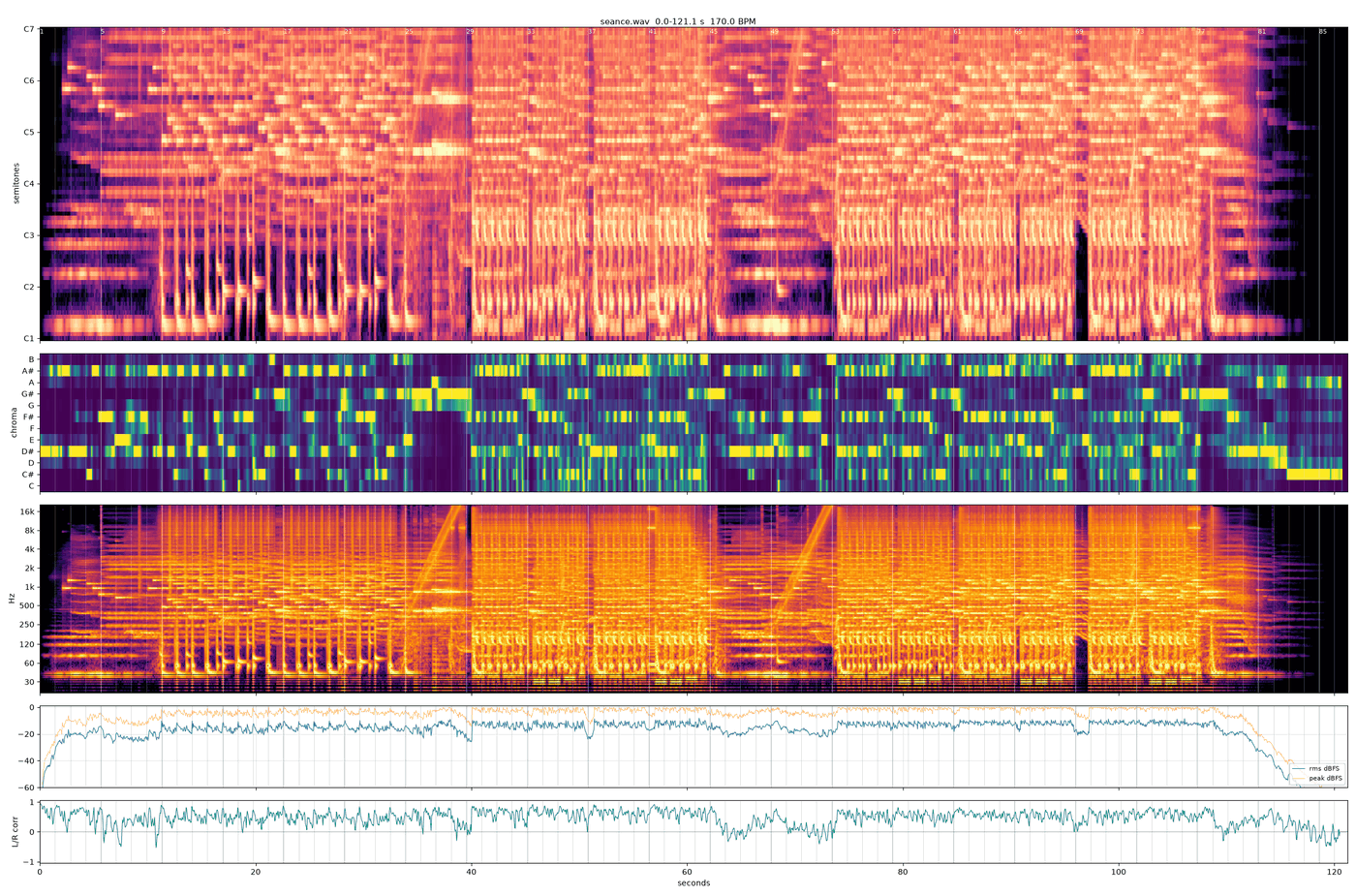
The model does not listen. A render comes back as numbers and pictures (spectrograms, loudness, stereo width), and the person listens and decides.
Factory Seance, two minutes of glitchy witch house and breakcore, was written start to finish by Claude Opus 5.5 through this harness, in about 35 minutes: every note, drum hit, sound choice, mixer route and automation clip, from FL's factory sounds only. Nobody edited it; the person who asked for it listened afterwards and kept it as it was. Listen: examples/seance.mp3, the clip with sound: examples/demo.mp4, how it was made: examples/seance.md.
https://github.com/user-attachments/assets/8ee80e6e-cf6b-459d-bbe1-a83a50da325c

Windows only. To install it, follow INSTALL.md. Everything past setup and the tools (how to write a piece, the file format, traps, decisions) is under docs/, starting at docs/INDEX.md.
Requirements
- Windows, FL Studio 2025. Built and measured on FL 25.1.6, scripting API 38.
- loopMIDI with at least one port. FL loads the controller script only when its MIDI input port exists.
- Python 3.12 or newer and
uv. ffmpegandffprobeon PATH, for the analysis scripts.- Serum 2 to use the Serum 2 channel of the template. FLEX ships with FL.
Setup
The short way: close FL and double-click setup.bat. It installs what is missing (uv, loopMIDI, optionally ffmpeg), builds the environment, installs FL's controller script, makes the MIDI port and FL's MIDI setting, adds the server to the Claude desktop app, and ends with a check that FL answers. INSTALL.md lists every step and where it lands.
By hand, the same in four moves (INSTALL.md, By hand, has the detail):
uv sync
Register the server with the MCP client, with the path to this folder:
"kuruitsugizaki": { "command": "<this folder>\\.venv\\Scripts\\kuruitsugizaki.exe" }
Then, in a chat with the model, FL closed:
- It calls
config. On a standard install every path is found by itself (FL underProgram Files\Image-Line, the rest under your Documents folder) and shows asdetected; for anything not found it asks you where it is and sets it; it does not guess. The keys are inkuruitsugizaki.example.json; what you set is stored inkuruitsugizaki.jsonhere, which git ignores. - It calls
fl_install, which writes the controller script into FL'sSettings\Hardwarefolder with this folder's bridge path filled in, adds a loopMIDI port namedkuruitsugizakiand assigns the script to it in FL's MIDI settings. Both of those live in the registry, and FL overwrites its own when it closes, which is why FL has to be closed. - Only when
fl_installanswers that it could not make the MIDI setting: in FL, Options, MIDI settings, select a loopMIDI input port, controller type kuruitsugizaki, and restart FL once.
Script output in FL shows kuruitsugizaki {'api': 38, ...} on load. .venv\Scripts\python scripts\doctor.py prints one line per requirement, any time.
The server starts loopMIDI and FL itself when a live tool finds them closed.
Layout
| file | what |
|---|---|
scripts/server.py | the MCP server: tools, and the live link to FL |
scripts/config.py | the machine paths, read from kuruitsugizaki.json |
setup.bat, setup.ps1 | the one-step install (INSTALL.md, The short way) |
Dockerfile | for MCP directories' automated checks: runs the server on Linux, where the file tools work and the live link to FL answers that it needs Windows |
scripts/doctor.py | doctor.py [--install] [--claude [config]] [--live]: one line per requirement of this machine's setup, ok or MISSING with what to do; --install runs fl_install, --claude adds the server to the Claude desktop app's config, --live starts FL and asks it for its API version |
scripts/midisetup.py | the loopMIDI port and FL's MIDI input setting, both in the registry: reads them, and makes them when no input has the script |
fl/device_kuruitsugizaki.py | FL controller script; fl_install puts it in place |
scripts/flp.py | .flp event codec: parse, serialize (byte-exact), notes, diff |
scripts/project.py | .flp -> full project JSON (round-trips byte-identical) |
scripts/view.py | compact and summary views, compact -> full |
scripts/writer.py | project JSON -> .flp, template based |
scripts/automation.py | automation points (event 234) and targets (event 227) |
scripts/levels.py | mixer fader and main volume records in event 225 |
scripts/mixerfx.py | mixer effect blocks: read one from any FL-saved project, place it in a track's slot |
scripts/presets.py | puts a preset into a plugin channel's state: .vital (Vital), .h2p (Diva), .fxp (Sylenth1), .SerumPreset (Serum 2), <pack>/<preset> (FLEX) |
scripts/serum2.py, sylenth1.py, diva.py, flex.py | each synth's preset format, and <script> catalog [out.tsv]: one TSV row per preset in that library |
scripts/catalog.py | catalog.py <preset folder> <out.tsv>: Vital presets by style, oscillators, unison, effects on, macro names |
scripts/render.py | render.py <flp> [--close] [--reopen]: FL's command-line render to wav and mp3 beside the project, then spectro and stereo stats. FL must be closed first; --close asks it to (never forced) |
scripts/spectro.py | render -> PNG: semitone piano-roll spectrogram, chroma, 20 Hz-20 kHz spectrogram, RMS/peak, L/R correlation; --bpm adds bar lines. PNGs in tmp/spectro/ |
scripts/loudness.py | integrated and momentary LUFS, LRA, true peak, RMS; --zwicker adds ISO 532-1 loudness in sones |
scripts/scope.py | stereo density heatmaps per moment and band, --timeline for width over time |
scripts/waveshape.py | A/B of several renders at several zooms around each file's loudest second |
scripts/onsets.py | hit onsets of a WAV, for chopping loops |
scripts/chop.py | cuts time ranges of a file into their own WAVs with short fades, optionally reversed |
scripts/vox.py | vocal -> syllables with a median pitch each |
scripts/samples.py | samples.py <folder>: per file duration, BPM and key from the name, levels, width, onsets, centroid -> tmp/samples/<folder>.tsv |
scripts/melstats.py | per-instrument note overview of a project |
scripts/fxdump_fl.py | sent through fl_exec: every effect on every insert of the open project with its parameters |
scripts/nudgemap.py, profiles/serum2/ | Serum 2 host-parameter mapping (parked) |
profiles/sylenth1/params.json | Sylenth1's 244 parameter names in blob order |
projects/init/init.flp | the template new projects are built from |
projects/init/fx.flp | a library of FL's own effects to copy from |
examples/ | seven small documents, one per part of the format (instruments, effects, routing and sidechain, global, mixer and instrument automation), and a full two-minute piece with its script, notes and render; examples/build.py builds them all. Start at examples/README.md |
docs/params/ | parameter maps, one TSV per plugin: 27 of FL's own and 22 VST3s, listed in docs/params/INDEX.md; the params tool reads them |
Tools
| tool | does |
|---|---|
config(key=None, value=None) | no arguments: every path key, its value or the path detected for it, and whether it exists; with key and value: sets it |
fl_install() | installs the controller script into FL's Hardware folder with the bridge path written in and, with FL closed and unless an input in FL already has the script, adds a loopMIDI port named kuruitsugizaki and assigns the script to it in FL's MIDI settings (midisetup.py); the answer's midi entry says what was done or what is left to do by hand |
project_read(path, view="compact", patterns=None, arrangements=None, unused=False) | .flp -> JSON. compact: rows with pointers, the form project_write takes. summary: per-pattern stats and a per-track timeline. full: exact round-trip form |
project_write(doc, path, open=False, play=None) | JSON (compact or full) -> .flp; open loads it in FL (launching FL if needed), play = song or pattern |
fl_render(path, reopen=True) | saves FL's open project, then runs render.py <path> --close [--reopen] detached; returns the log path under tmp/render_logs/ |
fl_transport(action, mode=None, pattern=None) | play / stop, song / pattern mode |
plugins(query=None) | every plugin FL has installed, and every instance in the optional library project (see Plugins by name): name, instrument or effect, vendor, format, source, how many presets load by name, whether it has a parameter map |
presets(plugin, query=None, limit=200) | a library plugin's preset ids, filtered by words; the id goes into project_write as preset |
params(plugin, query=None) | a library plugin's parameters from docs/params/: index (for automation targets), name, saved value and display, and FL's display at 0, .25, .5, .75 and 1 where swept |
fl_exec(code, out=None, timeout=10), fl_call(fn, args), fl_probe() | raw access to FL's Python API inside the running FL; fl_exec returns what the code assigns to result, or writes it as JSON to out (also when result is {'__out__': path, 'data': value}) |
test() | returns ok |
project_read, project_write, plugins, presets and params reload the codec modules on every call; a change to server.py, flex.py or diva.py needs an MCP restart, and a new tool reaches a client only in a session started after it.
The template
projects/init/init.flp, saved by FL: a Sampler, Serum 2, FLEX, one audio channel and one automation clip; master plus inserts 1-17, no effects. Route to inserts 1-16: insert 17 takes no fader on this mixer (docs/NOTES.md). A plugin instrument is copied from the template channel of that plugin, so with this template plugin takes serum2 or flex. The preset loaders also handle Vital, Diva and Sylenth1: to use them, save a template of your own in FL holding those plugins and set template to it, or take a channel from any project with state: {from, channel}. Template plugins are matched by name: Serum2, FLEX, Vital, Sylenth1, Diva(x64).
Effects
The writer cannot make an effect; it copies one, with its settings, from a project FL saved. projects/init/fx.flp holds FL's own:
| from insert/slot | effect |
|---|---|
| 1/0 | Fruity Parametric EQ 2, saved with a band set (a high shelf at -18 dB); move or zero its bands before relying on it |
| 2/0 | Fruity Limiter |
| 3/0 | Fruity Limiter in compressor mode, set up for sidechain ducking |
| 4/0 | Fruity Reeverb 2 |
| 5/0 | Fruity Multiband Compressor |
| 6/0 | Soundgoodizer |
| 7/0 | Gross Beat |
Soundgoodizer and Gross Beat load only in an FL edition that includes them. Any other installed effect goes in by name (Plugins by name).
Plugins by name
Every plugin FL has installed can go into a project by name, with nothing to prepare: FL's plugin manager keeps one entry per plugin in its Plugin database (Documents\Image-Line\FL Studio\Presets\Plugin database, config key plugin_db, found by itself), and the writer builds the plugin from it on the template's blocks, fresh, as dragging it in from FL's browser does. plugins lists them; project_write takes an instrument as {"kind": "plugin", "plugin": "<name>", "preset": "<id>"} and an effect as mixer.effects: [{"track": t, "slot": s, "plugin": "<name>", "preset": "<id>"}]. A plugin installed in several formats is one name; add "format": "vst3" (or native, clap, vst) to pick one. A plugin FL has not scanned is not listed: run FL's plugin manager first.
Optionally, one project FL saved can hold tuned instances you want reused as they are, each instrument on its own channel, each effect in a mixer slot; set its path as config key library. A library instance wins over a fresh one of the same name.
Presets, listed by presets:
.fstfiles, from FL's factory and user Plugin presets folders (config keysfl_presets,fl_user_presets, found by themselves). FL writes one for any plugin from its plugin menu, VSTs included (a wrapped VST's go intoFruity Wrapper - <name>), so saving a sound there makes it usable by name.- Vendor preset files for JUCE plugins (an XML preset) and Cableguys ones (
#zip#), from the folders config keyvst_presetsnames per plugin; a JUCE plugin needs no saved instance for this:{"<plugin>": {"ext": ".vpreset", "dirs": {"": "<factory folder>", "user": "<user folder>"}}}.
Parameter maps: open a copy of the library in FL (the sweep leaves every knob at 1) and send the text of scripts/params_fl.py through fl_exec once. Then _kz_dump('tmp/params/pass1_all.json'); for each v in 0, .25, .5, .75, 1, four separate fl_exec calls, _kz_sweep(v, 'set'), _kz_sweep(v, 'nudge'), _kz_sweep(v, 'back'), _kz_read('tmp/params/sweep_<v>.json') (a display read in the call that set it is stale); then python scripts/parammap.py writes docs/params/. Each function takes only and skip lists of plugin names as FL reports them (docs/params/INDEX.md, column as FL names it).
Project JSON, compact form
{
 "format": "compact",
 "base": "projects/init/init.flp",
 "project": {"bpm": 175, "ppq": 96},
 "instruments": [{"id": "lead", "kind": "plugin", "plugin": "serum2", "preset": "C:/presets/lead.SerumPreset", "mixer": 1},
                 {"id": "keys", "kind": "plugin", "plugin": "flex", "preset": "Hard 808s/808 Clean Fuzz", "mixer": 2},
                 {"id": "pad", "kind": "plugin", "state": {"from": "projects/my_song.flp", "channel": 3}, "mixer": 3}],
 "samples": [{"id": "snare", "kind": "audio", "path": "C:/samples/snare.wav", "mixer": 8}],
 "automation": [{"id": "fade", "kind": "automation", "target": {"mixer": 0, "param": "vol"}, "points": [[0, 0.8], [32, 0.0]]}],
 "mixer": {"volume": {"1": 0.729, "7": 0.434}, "main_volume": 0.6625},
 "note_cols": ["bar", "beat", "tick", "len", "key", "vel", "inst"],
 "patterns": [{"id": "lead_a", "notes": [[1, 1, 4, 66, "A#4", 96, 0], [1, 2, 3, 18, "G#4", 80, 0]]}],
 "clip_cols": ["track", "bar", "beat", "tick", "len", "src", "trim?"],
 "arrangements": [{"name": "Arrangement", "clips": [[5, 17, 1, 0, 1536, "lead_a"], [4, 17, 3, 0, 31, "s0"], [20, 1, 1, 0, 27648, "a0"]]}]
}
- Time:
[bar, beat, tick], 1-based bar and beat, 96 ticks per beat, 4/4. Lengths in ticks. Exact integers; no grid is imposed. - Keys: note names, MIDI 60 = C4 (FL's own UI calls MIDI 60 C5). Flats accepted.
- Pointers: a note's
instis an index intoinstruments. A clip'ssrcis a pattern id,s<N>(sample N) ora<N>(automation N), so no instrument or pattern id may look likes1ora1. - Patterns hold notes for any number of instruments. A clip's
lensets how much of a pattern plays. - Instruments:
state: {from: file, channel: n}copies that channel whole, preset and routing included, from any FL-saved project; or a templateplugin(see The template).presetloads a sound into it: a.SerumPreset,.vital,.h2por.fxppath, or<pack>/<preset>for FLEX.mixer: nroutes it. Serum 1.fxpare not supported. - Sampler channels:
"kind": "sampler"with apathloads that file into a sampler, so notes pitch it (C4 = original pitch). A sampler plays its sample to the end whatever the note length; cut chops to their own files first (chop.py). - Song mode: compact documents are saved in song mode so FL and its command-line render play the arrangement;
project.song_mode: falsesaves pattern mode. - Samples:
path, orstateto copy one. An audio clip withouttrimplays the whole sample;trimis[start_ms, end_ms]into the sample. A path may start with%FLStudioFactoryData%, FL's own token for its install folder, so%FLStudioFactoryData%/Data/Patches/Packs/Drums/Kicks/808 Kick.wavfinds FL's factory kick on any machine. - Project info:
projecttakestitle,author,genreandcomment, written into FL's project info (FL shows the title in its window), andproject_readreturns them. - Automation:
pointsare[beat, value, tension?]in beats from the clip start. Targets:{"global": "tempo" | "main_pitch"},{"mixer": t, "param": "vol" | "pan" | "sep"}(insert 0 is the master: its fader is the overall level),{"mixer": t, "slot": s, "param": n}(effect parameter n),{"mixer": t, "slot": s, "rec": "0x1f00"}(the slot's mute) or"0x1f01"(its mix),{"channel": id, "param": n}(instrument parameter n) or{"channel": id, "param": "vol" | "pan" | "pitch" | "fcut" | "fres" | "mute"}. Values: tempo = (bpm - 60) / 120; main pitch 0.5 in tune, +-12 semitones; mixer volume 0.8 = 0 dB; pan 0 left, 0.5 centre, 1 right; sep 1 mono, 0 widest; channel pitch 0.5 in tune, +-48 semitones; channel volume 0.78 is FL's default.{"global": "main_vol"}is written but FL 2025 ignores it.examples/README.mdlists the scales measured so far (fcut, fres and mute are written but their scales were not measured). - Mixer effects:
mixer.effects: [{"track": 0, "slot": 9, "from": {"file": "projects/init/fx.flp", "track": 2, "slot": 0}}]copies that effect with its settings into the given slot, replacing what was there. - Mixer routes:
mixer.routes: [{"from": 11, "to": 10, "level": 0.0}]routes insert 11 to insert 10;level0 is a sidechain-only send, which is what a sidechained limiter or compressor listens to."on": falseremoves a route. - Mixer volume:
mixer.volumemaps insert -> fader, 0.8 = 0 dB;main_volumeis FL's global main volume. - base: the file whose globals, unmapped sections, arrangement track templates and mixer are kept. Building on one of your own projects keeps its mixer chains. Default: the
templatekey.
The compact form leaves out bytes that are not mapped. For editing an existing project without losing anything, use view="full".
Not written yet
Mixer pans and sends as static settings; a plugin FL's plugin manager has not scanned; pattern names; time signature; vendor preset files for VSTs whose state is neither JUCE XML nor #zip# (an .fst saved from FL is their route). See docs/FLP.md, Open.
License
MIT, see LICENSE. It covers this code and these docs, not FL Studio, the plugins or their presets.