Weeklane
Official hosted MCP server for the Weeklane weekly planner (iPhone, iPad, Mac, Android). Lets Claude, ChatGPT and other MCP clients show your week, add, move and complete tasks (in bulk too), set reminders, manage repeating tasks, control Task Lock (the iPhone/iPad app blocker) and undo the last change. OAuth sign-in with Apple or Google. Also in the Claude Connectors Directory and ChatGPT Plugins. Requires Weeklane Pro.
Hosted MCP Server
npx add-mcp 'https://mcp.weeklane.app/mcp'Installs into Claude Code, Codex, Cursor and more
Documentation
Home Features Task Lock Plan with AI Guides
en
Get the app App Store Google Play
en
Home / Plan with AI
New in Weeklane 3.0 · Pro
Plan your week with AI
Connect ChatGPT, Claude or another assistant to Weeklane. Tell it what your week looks like, and it adds, moves and checks off tasks for you. Everything shows up in the app within seconds.
Server URLhttps://mcp.weeklane.app/mcpCopy
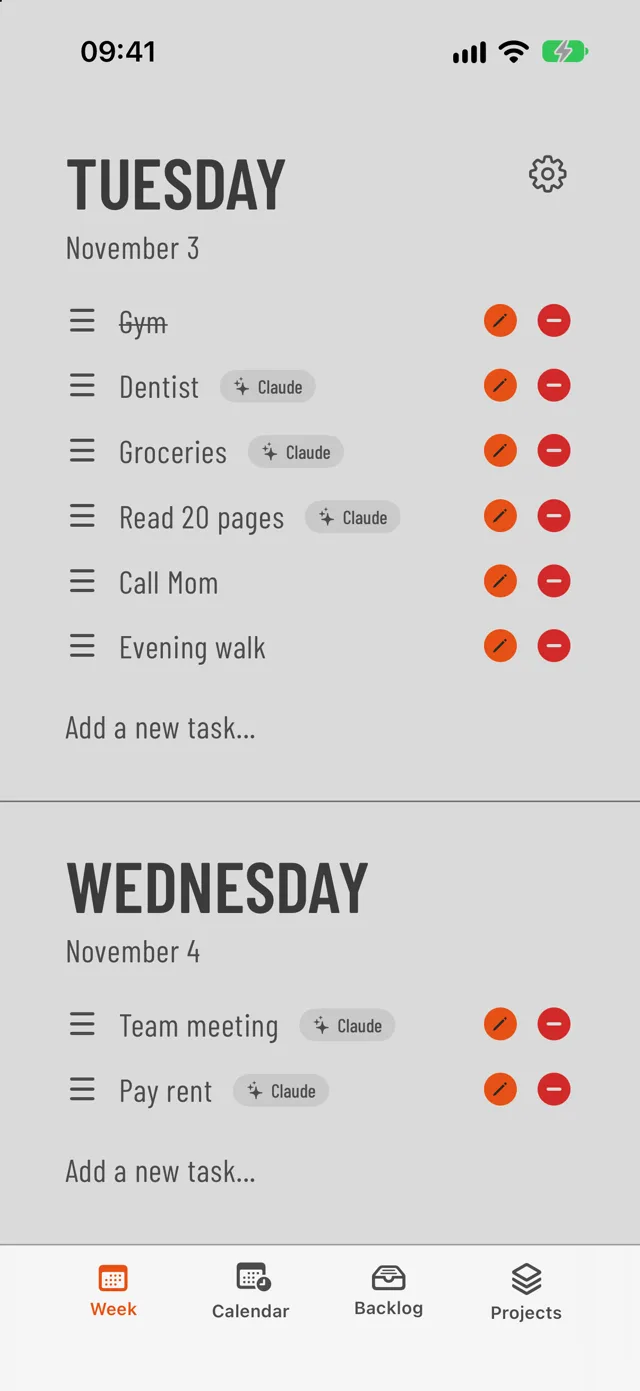
Tasks added by Claude carry a small badge (Plan with AI is part of Weeklane Pro)
Before you start
- Update Weeklane to 3.0 or later.
- In Weeklane, open Settings → Account and sign in with Apple or Google.
- Make sure you have Weeklane Pro (lifetime unlock included).
Connect your assistant
Claude
- Find Weeklane in Claude's connector directory: open the Weeklane listing and click Connect (or search for Weeklane under Settings → Connectors → Browse connectors).
- Sign in with the same Apple or Google account you use in Weeklane, and click Allow.
- In a chat, ask for example: “What's on my Weeklane list this week?”
Or add it manually
- On claude.ai or in the Claude app, open Settings → Connectors and choose Add custom connector.
- Name it Weeklane, paste the server URL below, click Connect and sign in.
ChatGPT
- Find Weeklane in ChatGPT's Plugins directory: open the Weeklane listing and click Install plugin (or open Plugins in ChatGPT and search for Weeklane).
- Sign in with the same Apple or Google account you use in Weeklane, and click Allow.
- In a new chat, ask it to plan your week. ChatGPT asks for your approval before some actions, such as changing Task Lock.
If you can't find it
- In ChatGPT, open Plugins, choose Add, then Add custom MCP server (if your plan allows it).
- Paste the server URL below, choose OAuth, click Connect and sign in.
Gemini CLI
- Add Weeklane to ~/.gemini/settings.json under mcpServers: "weeklane": { "httpUrl": "https://mcp.weeklane.app/mcp" }.
- Start Gemini CLI and run /mcp auth weeklane. A browser window opens; sign in and click Allow.
Codex
- Run: codex mcp add weeklane --url https://mcp.weeklane.app/mcp
- Run: codex mcp login weeklane, then sign in and click Allow in the browser.
Cursor and other MCP apps
- Add a remote MCP server with the URL below (Streamable HTTP). Most apps call this a custom connector or remote MCP server.
- When the app asks you to sign in, use the same Apple or Google account as in Weeklane and click Allow.
Other assistants
The same server URL works in other assistants that let you add a custom connector. Each guide has numbered steps, prompts to try and a short FAQ.
- GrokTested
Plugins → New Connector → CustomOr just ask Grok to add the Weeklane connector. Connectors may require a paid Grok plan.Read the Grok guide → - Perplexity
Plugins → Add custom → ConnectorCustom remote connector with OAuth. Paid Perplexity plans.Read the Perplexity guide → - Mistral Le Chat
Connectors → Custom MCP ConnectorCustom connectors are on Le Chat's free plan too.Read the Mistral Le Chat guide → - Gemini
Settings → Connected Apps → Add a custom appLimited for now: US, 18+, personal Google account, English.Read the Gemini guide →
What your assistant can do
The Weeklane connector gives your assistant 20 tools. It only works with your personal tasks, never shared projects.
Your week and tasks
Read a week or a day, add up to 50 tasks at once (with a time if you want), edit, check off, move and delete tasks.
get_week``list_tasks``add_tasks``update_task``complete_task``move_tasks``delete_task
Search and bulk edits
Find tasks by words in the title (from a month back to a year ahead), then edit, check off or delete up to 50 of them in one go.
search_tasks``update_tasks``complete_tasks``delete_tasks
Repeating tasks
Set up, change or stop repeating tasks, or skip a single day (“no gym this Monday”).
list_repeating_tasks``add_repeating_task``update_repeating_task``stop_repeating_task``skip_occurrence
Reminders
Any task can get a reminder: a number of minutes before its time, or at a set time, including the evening before. Reminders are scheduled on your phone like the ones you add yourself.
Task Lock (iPhone and iPad)
See whether Task Lock is on and locking right now and how many tasks are left, turn it on or off, set the time the lock starts, allow or turn off 15-minute breaks, and switch between block lists you saved on your iPhone or iPad. The assistant only sees list names and how many apps each one blocks; it can never see or pick which apps are blocked. Apps are chosen on the phone in Apple's Screen Time picker.
get_task_lock``set_task_lock``switch_task_lock_list
Undo
Undo the assistant's last change, including Task Lock changes.
undo_last_change
Things to try
- “ Plan my week: gym Monday, Wednesday and Friday at 7, and dentist Thursday at 10 with a reminder 30 minutes before. ”
- “ Move everything I didn't finish today to tomorrow. ”
- “ Turn on Task Lock from 9:00 with my Social list, and no breaks. ”
- “ What's left on my list for today? ”
- “ Undo that last change. ”
Guides
- Get a phone notification when Claude Code needs you — let Claude Code, Codex or a scheduled agent add tasks and decisions to your phone.
- How to brain dump to AI and get a to-do list for the week — a copy-paste prompt that turns a messy dump into a realistic week.
- How to connect your to-do list to Claude (3 ways) — Apple Reminders, directory connectors and custom MCP compared.
- Can ChatGPT manage your to-do list? 3 setups that work — prompts, ChatGPT Tasks and a connected planner compared.
Building agents?
Claude Code, Codex, Cursor and scheduled agents can use Weeklane as a to-do list for their human: they add tasks and decisions, your phone gets a notification. Weeklane for AI agents →
Questions
Is Weeklane in Claude's connector directory?
Yes. Weeklane is listed in the Claude Connectors Directory at https://claude.ai/directory/weeklane. Open the listing, click Connect and sign in with your Weeklane account. You can still add it as a custom connector with the server URL https://mcp.weeklane.app/mcp if you prefer.
Is Weeklane in ChatGPT's Plugins directory?
Yes. Weeklane is listed in ChatGPT's Plugins directory at https://chatgpt.com/plugins/plugin\_asdk\_app\_6ad9234fc8f081918c7feb642e79a4da. Open the listing, click Install plugin and sign in with your Weeklane account. If you can't find it, you can add it as a custom MCP server with the server URL https://mcp.weeklane.app/mcp if your ChatGPT plan allows it.
What do I need?
Weeklane 3.0 or later, signed in under Settings → Account with Apple or Google, and Weeklane Pro. Lifetime unlock owners are included. Siri and Shortcuts work without Pro.
What can the assistant do?
Read your week, search your tasks, add tasks (with a time and reminder if you want), edit, move, check off and delete tasks one at a time or in bulk, manage repeating tasks, and undo its own last change. With Task Lock on iPhone and iPad it can also read its status, turn it on or off, set when the lock starts, allow or turn off breaks and switch between block lists you saved on your phone. It cannot see shared projects or which apps are in your block lists, and it cannot choose apps.
Can the assistant control Task Lock?
Yes, on iPhone and iPad with Weeklane Pro. Set up Task Lock and save your block lists in Weeklane on your phone first. After that the assistant can tell you whether Task Lock is on and how many tasks are left, turn it on or off, set the time it starts locking, allow or turn off 15-minute breaks, and switch to another saved block list. It never sees or picks which apps are blocked: apps can only be chosen on the phone in Apple's Screen Time picker. Your phone applies the change as soon as it arrives, and you can undo it.
How do changes reach my phone?
Changes sync to your devices within seconds. Reminders are scheduled on your phone when the change arrives, exactly like tasks you add yourself.
How do I disconnect an assistant?
In Weeklane, open Settings → Plan with AI and tap Revoke next to the assistant. You can also see recent AI changes there and undo the last one.
Is my data used to train AI?
No. Weeklane does not sell your tasks or use them to train AI. When you ask an assistant about your tasks, the assistant's own privacy terms apply to that conversation; check your settings in ChatGPT, Claude or the app you use.
Something not working? Contact support.
Get Weeklane 3.0
Free to plan your week on iPhone, iPad, Mac and Android. Plan with AI and sync are part of Weeklane Pro.
Download on theApp Store Get it onGoogle Play

App Store
Google Play
Scan to download
© 2026 Weeklane
Task Lock Plan with AI Versions Free tools About Support Press Privacy Terms Delete account
English Svenska Español Deutsch Italiano Français 日本語 简体中文 Português 한국어