WalletPassBuilder
Create, update and message Apple Wallet and Google Wallet passes, and run loyalty stamp cards, from Claude, ChatGPT or any MCP client. Remote server with OAuth sign-in.
Hosted MCP Server
npx add-mcp 'https://walletpassbuilder.com/api/mcp'Installs into Claude Code, Codex, Cursor and more
Documentation
Create wallet passes from Claude, ChatGPT and any AI assistant
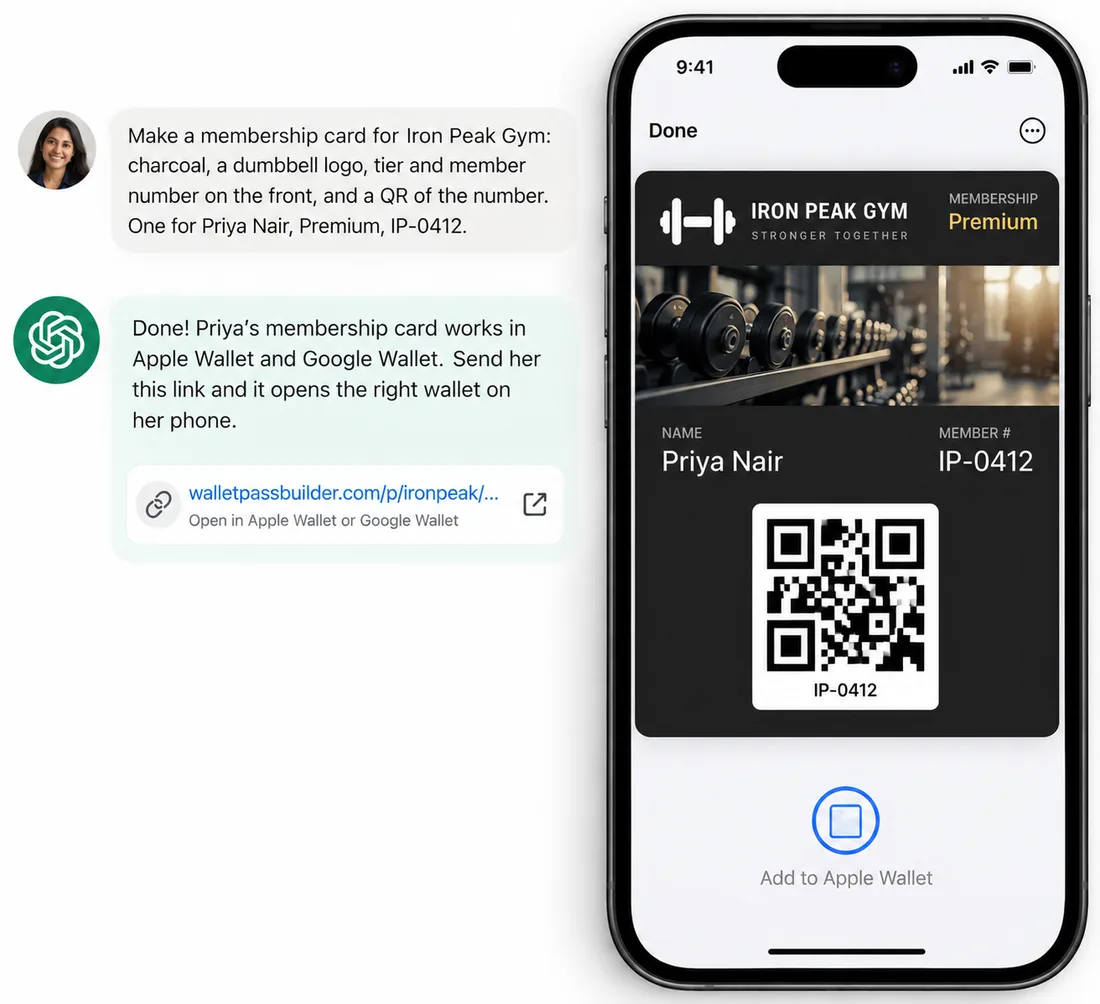
Describe a card in a sentence and it lands in Apple Wallet and Google Wallet. Your assistant can update it, message everyone who saved it and add loyalty stamps, through WalletPassBuilder’s MCP server.
New accounts get free pass credits to start. No code needed.
Claude
- 1In Claude, open Customize, then Connectors.
- 2Find "Wallet Pass Builder" in the directory and click Connect.
- 3Sign in to WalletPassBuilder and approve the connection.
- 4In a chat, click +, open Connectors and switch it on.
Listed in Claude's Connectors Directory, so it works in claude.ai, Claude Desktop, the mobile apps and Claude Code. On Team and Enterprise, an owner adds it for the organization first, then each person connects.
Open in the Claude directory Step-by-step guide
ChatGPT
- 1Turn on developer mode in Settings, then Apps, then Advanced settings.
- 2In Settings, then Apps, click Create.
- 3Paste https://walletpassbuilder.com/api/mcp, choose OAuth, and click Scan Tools.
- 4Sign in to WalletPassBuilder, approve the connection, then click Create.
Custom MCP apps are available on ChatGPT Business, Enterprise and Edu, on the web. On Business, only admins and owners can use developer mode; an admin can then publish the app for the workspace.

Claude Code, Cursor, VS Code and other MCP clients
- 1Add WalletPassBuilder as a remote (Streamable HTTP) MCP server with the URL below.
- 2In Claude Code, run the command below, start Claude, then run /mcp to sign in.
- 3A client that can't sign in can send your API key as Authorization: Bearer <key> instead.
Every client signs in the same way, so none of them needs your API key.
https://walletpassbuilder.com/api/mcp
claude mcp add --transport http walletpassbuilder https://walletpassbuilder.com/api/mcp
13 tools for Apple Wallet and Google Wallet
A remote MCP server any client can use. Your assistant chooses the tool from what you ask; you never call them by name.
create_pass
Make a pass for both wallets, a loyalty program, or one card per person, with share links.
update_pass
Change only what you name; every saved copy updates.
update_recipient
Change one person's details, like their tier or points.
get_pass
A pass's design, links and recipients.
list_passes
Your passes, newest first, with how many people joined.
archive_pass
Retire a pass: its link stops and saved copies show as expired.
send_notification
A lock-screen message to everyone who saved a pass, now or scheduled.
list_notifications
Sent and scheduled messages and how they did.
cancel_notification
Cancel a scheduled message.
record_loyalty_visit
Add a stamp or a purchase to a customer's card.
list_loyalty_customers
Who joined a loyalty program and their progress.
get_credits
Pass credits left and used.
list_workspaces
Your workspaces, to work in one other than the default.
Server URL
https://walletpassbuilder.com/api/mcp
Transport
Streamable HTTP, remote. Nothing to install.
Sign-in
OAuth 2.1 with PKCE, or your API key as a Bearer token.
Credits
Same as the dashboard: 1 per pass created or saved to a wallet, whichever total is higher. Updates, messages and reads are free.
Prefer code? The same actions are in the REST API.
Zapier, Make and n8n
Native apps are on the way. Today, automations already create passes when an order or sign-up comes in from Shopify, Stripe Checkout, Square, WooCommerce, Jotform or Typeform, and Make and n8n can call the REST API with your API key from their HTTP steps.
Questions about the integrations
Does it cost extra?+
No. Assistants use the same pass credits as the dashboard and the API: 1 per pass created or saved to a wallet, whichever total is higher. Updating cards, sending notifications and reading your passes don't use credits. New accounts get free pass credits to start.
Do I need to write any code?+
No. Add WalletPassBuilder as a connector in Claude or an app in ChatGPT, sign in once, and describe what you want in plain words.
What can the assistant do with my account?+
Create, update and archive passes, send lock-screen notifications, add loyalty stamps, and read your passes, loyalty customers' names and progress, and credits. It can't see or change your billing, API key, team, password or customers' phone numbers, and you can disconnect it at any time under API, then Connected apps.
Will it message my customers without asking?+
WalletPassBuilder tells the assistant to show you the exact message and get your yes before sending, and Claude and ChatGPT can also ask for your approval before running an action.
Which assistants work?+
Claude (from its Connectors Directory, on the web, desktop and mobile), ChatGPT Business, Enterprise and Edu on the web, Claude Code, Cursor, VS Code, and any other client that supports remote MCP servers.
Is there an MCP server for Apple Wallet passes?+
Yes. WalletPassBuilder runs a remote MCP server at https://walletpassbuilder.com/api/mcp that creates, updates and messages Apple Wallet and Google Wallet passes.
Can Claude create an Apple Wallet pass?+
Yes. Connect WalletPassBuilder from Claude's Connectors Directory, describe the pass, and Claude creates it and gives you a link that adds it to Apple Wallet on an iPhone or Google Wallet on an Android phone.
Who on my team can connect an assistant?+
An account admin with access to every workspace, the same people who can manage the API key. If they leave the team, any assistant they connected stops working.
Where do I get help connecting?+
Email [email protected] with the assistant you're using and what you see. To disconnect an assistant, open API in the dashboard, then Connected apps, and click Disconnect.