Vocemo
Vocemo is an on-device AI toolkit for macOS. It types what you say into any app, transcribes recordings with speaker labels and captions, reads text aloud, answers questions about what is on screen, converts documents, and translates. Every model runs on your own Mac, so no file, recording or word is ever uploaded. The installer is 5.5 MB because models download only for the features you use, and shut down when idle. One subscription covers every feature on up to three Macs, with a seven day free trial.
Documentation
AI that runs on your Mac, not in the cloud.
Vocemo types what you say, writes up your meetings, reads things aloud, translates, and sorts out your PDFs. All of it happens on your own Mac. Your recordings and files are never uploaded, and it keeps working with the Wi-Fi switched off.
Download for Mac See the price Free for 7 days · 5.5 MB · macOS 13 or newer
5.5 MB The download. Tiny, because the AI models arrive only when you need them.
21 Things it does with documents, like PDF to Word or receipts to a spreadsheet.
0 Files, recordings or words uploaded anywhere. It all stays on your Mac.
1 Subscription instead of five. No credits, no per-minute charges.
Opening it the first time: double-click and it opens. Vocemo is signed and notarised by Apple, so macOS verifies the app and steps aside. It asks once whether you meant to open something you downloaded; click Open. Full steps.
What it actually looks like.
Five real screens from the app. Nothing here is a drawing of something that doesn't exist yet.
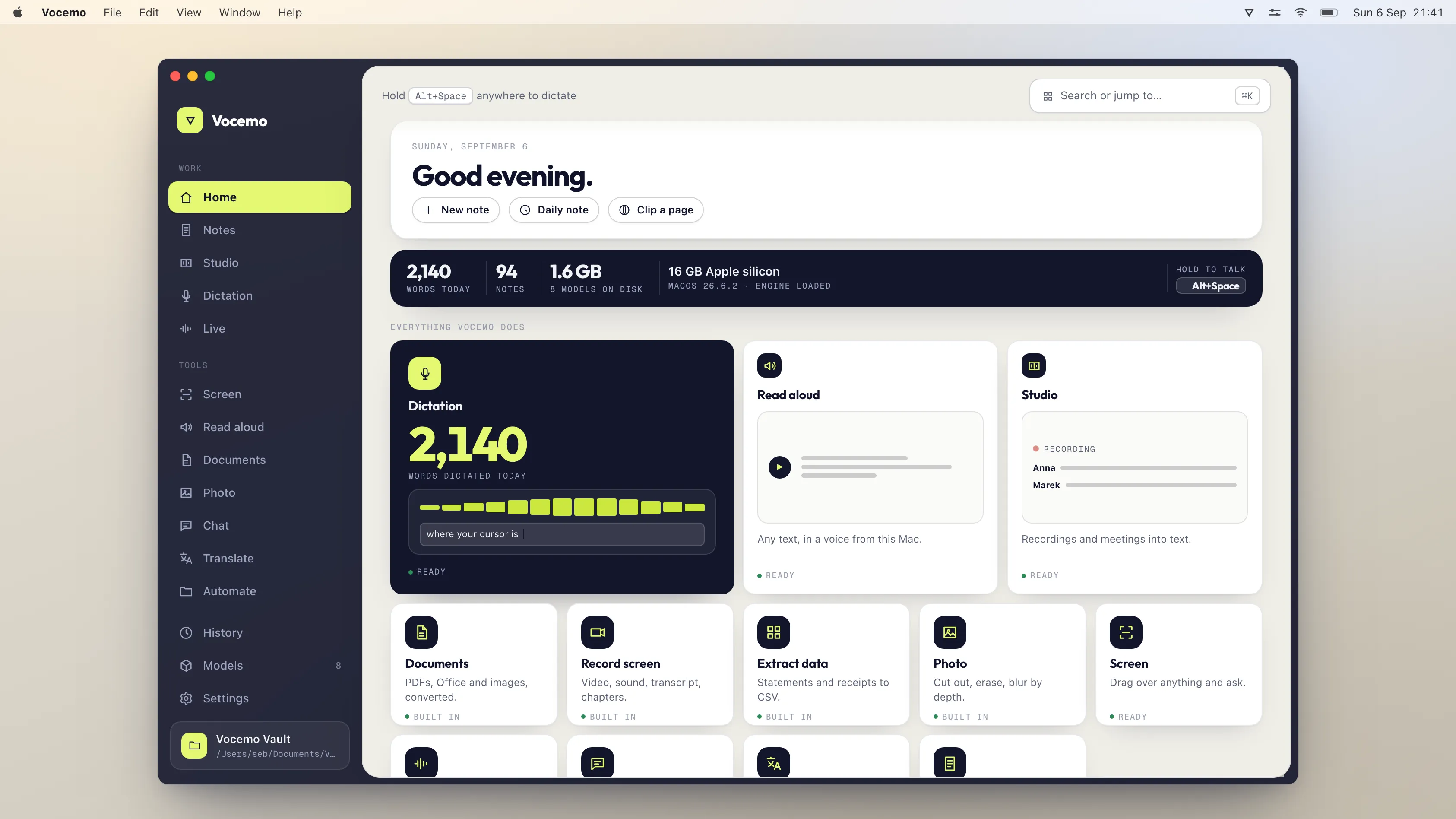
Everything in one place.
Every feature is a card, and each one tells you whether it is ready to go or still needs a quick download. Nothing is locked off to sell you a bigger plan.
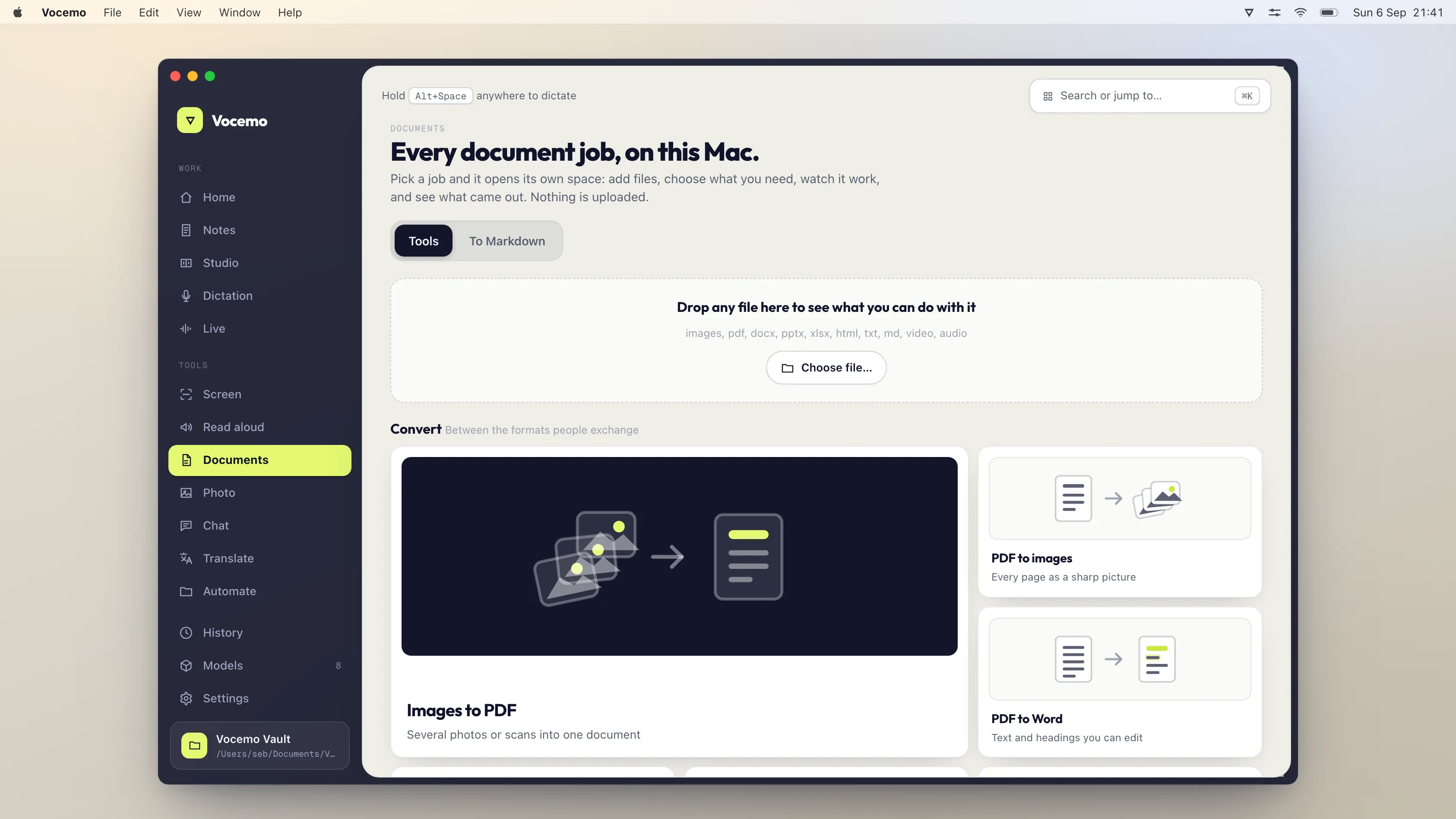
Drop in a file and it shows you the options.
Drag a PDF, a photo or a Word file onto the window, and Vocemo leaves you only the jobs that make sense for it.
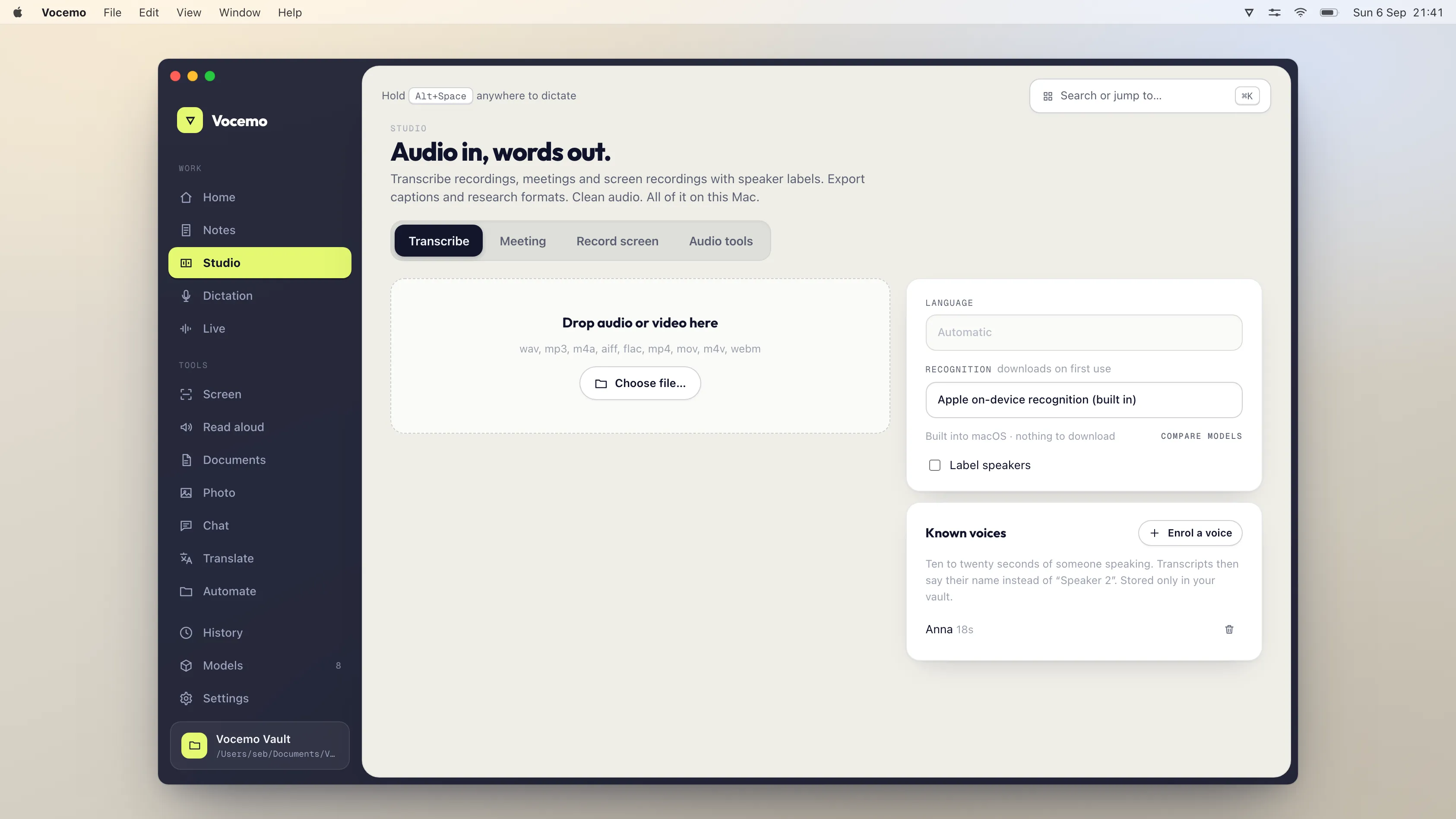
Drop in a recording.
You get the text back, with names against who said what.
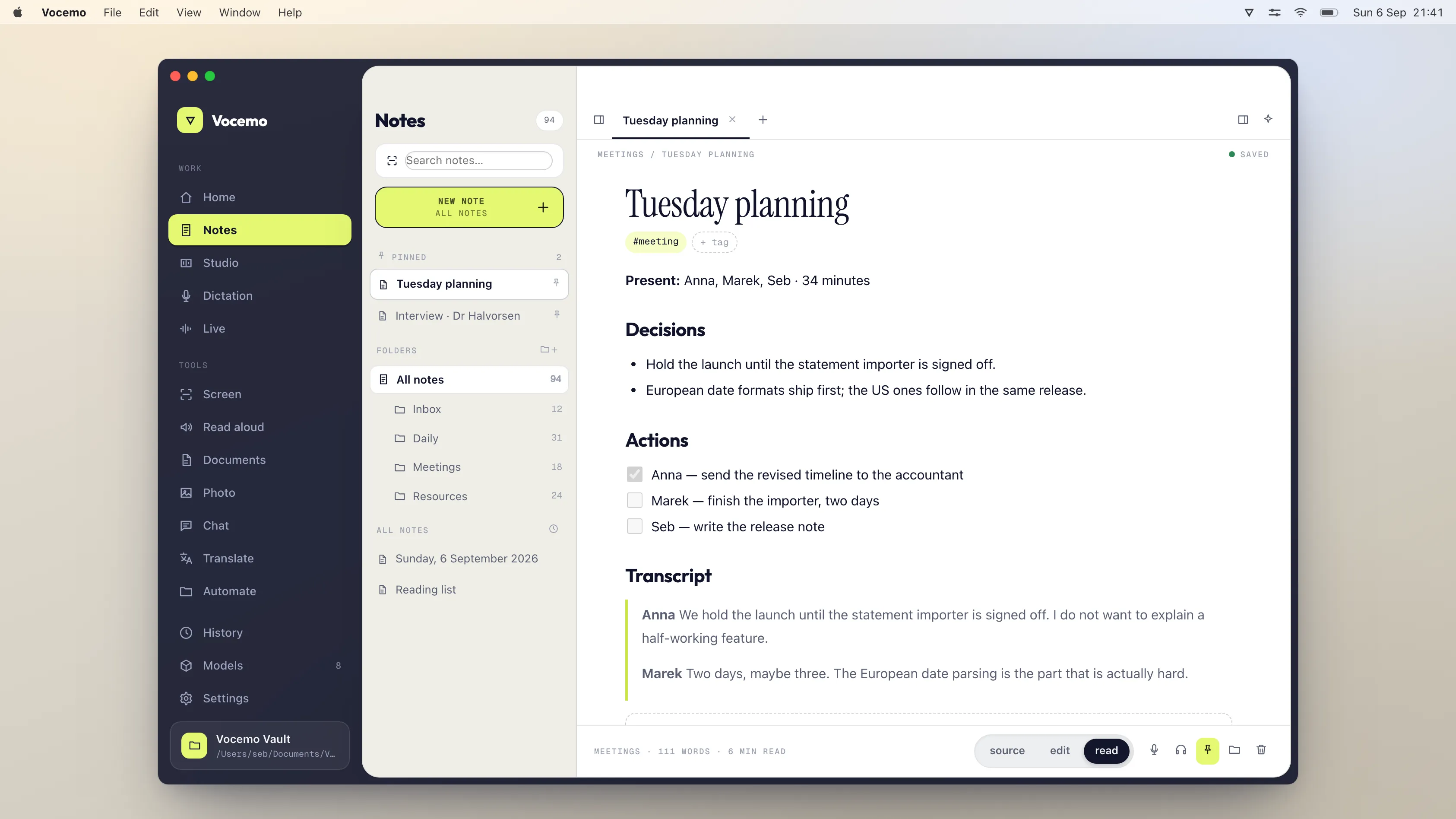
Saved as ordinary files.
In a folder you pick, so you can still open them in anything else.
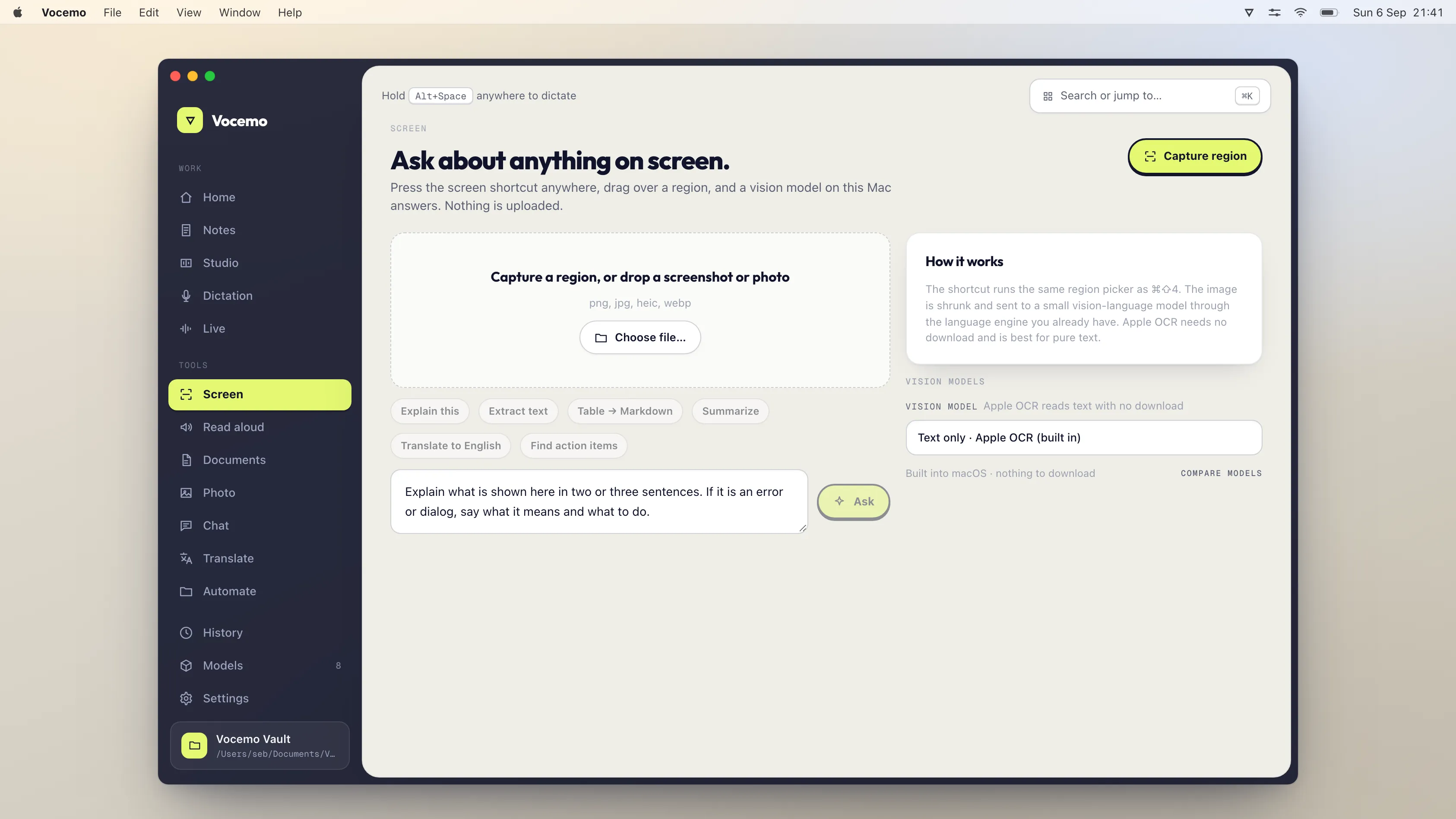
Point at something and ask.
Draw a box around any part of your screen and ask about it. The answer is worked out on your Mac, and the picture is thrown away straight after.
Six everyday jobs, one app.
Most people pay for these separately: a dictation app, a meeting notetaker, a PDF website, a translator. Vocemo does all of them, and does them on your Mac instead of on someone else's computer.
Hold a key, talk, and it types.
Works in any app on your Mac — email, Slack, Word, your browser. It writes numbers as digits, learns words you use a lot, and tidies up the "ums" before it types. Much faster than typing, and nobody hears the recording but your Mac.
Get your meeting written up.
Record a call, or drop in a recording you already have. Vocemo writes down what was said, works out who said it, and gives you a short summary with the decisions and the to-dos. No robot joins your call asking to record.
Have things read to you.
An article, a PDF, your own notes. Pick a voice and a speed, and listen instead of reading.
Translate without the internet.
Text and whole documents. Nothing gets sent to a translation website to be read.
Ask about whatever is on your screen.
Draw a box around a chart, an error message or a form, and ask what it means. Vocemo can also put live subtitles on anything playing on your Mac, so a video in another language becomes text you can follow.
The stuff you normally Google a website for.
Join PDFs together, split them up, make them smaller, add a password, sign one, or turn a PDF into an editable Word file. Make a scan searchable. Turn a bank statement or a pile of receipts into a spreadsheet. All on your Mac — so you are not uploading your bank statement to a free website and hoping for the best.
You don't have to understand any of it.
There are no models to choose, no settings to get right and no account to make. Vocemo checks what your Mac can handle and picks for you, downloads what a feature needs the first time you use it, then shuts it down again so your Mac stays fast.
What leaves your Mac, and what doesn't.
Plenty of apps say they are "private". Here is the actual list, so you can check it rather than take our word for it.
-
Downloading an AI model. The first time you use a feature that needs one. After that the feature works offline.
-
Checking your subscription, once a day. It sends an anonymous ID for your Mac, your computer's name and your licence key. That is the whole message.
-
Your recordings. Dictation, meetings and subtitles are all handled on your Mac.
-
Your documents. PDFs, bank statements, receipts and scans stay on your disk.
-
Your words. Notes, transcripts and translations are not sent anywhere.
-
Your screen. A region you ask about is answered on your Mac, then deleted.
-
You. No account, no sign-in, no tracking, no ads.
One price. Everything included.
No basic and pro versions, no charge per minute of audio, no credits that run out.
Save 20% $12 / month Billed $144 once a year
$15 / month Billed monthly, cancel anytime
- Voice typing in any app on your Mac
- Meeting and recording transcripts, with names
- 21 document jobs, from PDF to Word to receipts as a spreadsheet
- Read aloud, translation, live subtitles, screen questions
- Screen recording, with the words and chapters written up
- Every update, on up to three Macs
Try it free for 7 days No account needed. Cancel in one click.
Things people ask.
What does "on-device AI" mean?
It means the AI runs on your own Mac rather than on a company's servers. Most AI apps send your recording or your file off to be processed somewhere else, then send the result back. Vocemo does the work on your Mac's own chip, so your audio and files never go anywhere.
Do my files or recordings get uploaded?
No. Vocemo only goes online for two things: downloading an AI model the first time you use a feature that needs one, and checking once a day that your subscription is still active. That check sends an anonymous ID for your Mac, your computer's name and your licence key — nothing else, and never anything you have written, said or opened.
Does it work without internet?
Yes. Once the models have downloaded, everything works with the Wi-Fi off, including on a plane. Your subscription is remembered for 14 days offline, so a fortnight without a connection will not lock you out.
Why is the download only 5.5 MB? Other AI apps are huge.
Because the AI models are not inside the download. Vocemo fetches only the models for the features you actually use, keeps them in a folder on your Mac, and shuts them down after two minutes of sitting idle so they stop using memory. Apps that pack everything in are hundreds of megabytes whether you use those parts or not.
What happens the first time I open it?
It opens. Vocemo is signed with an Apple Developer ID and notarised by Apple, which means Apple has already checked the build and macOS can confirm that before it runs.
macOS asks once whether you are sure you want to open an app you downloaded from the internet. Click Open. Every app that comes from outside the App Store asks that the first time, and you will not see it again.
There is nothing to unblock and no trip to System Settings.
If you would rather check the download before running it, its SHA-256 is 37c76e27b9a236eba329a62944472f4bca1e00c8cba0d41c296a4d9fb980a75c.
Will it run on my Mac?
If it is an Apple silicon Mac — an M1 or newer — running macOS 13 or later, yes. Vocemo looks at how much memory your Mac has and only offers models it can actually run, so you cannot accidentally pick one that gives up halfway through a long recording.
Do I need to know anything about AI to use it?
No. There is nothing to configure and no model to choose. Open the app, hold a key and talk, or drag a file onto it. Vocemo works out the rest.
What happens to my files?
They stay where they are. Converted files appear next to the originals, and transcripts next to the recording. Vocemo does not swallow your documents into a library, and if you uninstall it, everything it made for you stays on your disk.
Can I use it on more than one Mac?
Yes, up to three. The same licence works on each, and you can free one up when you replace a machine.