SuperLocalMemory V2
Universal, local-first persistent memory for AI assistants. SQLite-based knowledge graph with zero cloud dependencies. Works with 17+ tools (Claude, Cursor, Windsurf, VS Code, etc.). 100% free forever.
Documentation


The governed memory brain for every AI agent. It lives on your machine. It never bluffs.
One memory for every agent you and your team use — Claude Code, Codex, Cursor, Copilot, Antigravity, Hermes, ChatGPT, Claude on the web, Grok Bot, Muse and any harness that speaks MCP or runs a command. Decisions, documents, screenshots and PDFs, recalled the way you ask for them, governed like company data, shared through a mesh where your local agents and web bots talk to each other, and answered honestly: when the answer isn't there, your agent hears "That isn't in SuperLocalMemory." — not a confident guess.







Install · See it work · Full demo · Every capability · Docs · Website
⭐ If SuperLocalMemory keeps your agents from guessing, star the repo. It helps other developers find it.
Agents forget everything between sessions. The usual fix — a vector store with a save button — makes it worse: it always returns something, even when nothing it holds answers the question, and your agent builds on it. This is a memory brain, not a bucket: it understands what was saved (who, what, when, which project), keeps it true over time, governs who may see it, and refuses to bluff. Four arXiv papers describe how it works.
In Mode A, core remember and recall make no model-provider call: no API key, no cloud account, no Docker. Anything that sends data out is a choice you make, and the docs say exactly what goes.
Install
The easiest way: let your AI agent install it. Copy the block below into Claude Code, Codex, Cursor or any agent that can run commands. It reads the setup guide, asks you one question, sets everything up and tells you what works. No terminal commands for you to learn.
Install SuperLocalMemory on this computer for me. Follow
https://github.com/qualixar/superlocalmemory/blob/main/SETUP_FOR_AGENTS.md
step by step and show me what each step printed. Ask me only one question,
before turning on anything optional: whether I also want to find my pictures,
screenshots and PDFs by describing them. Connect SuperLocalMemory to the agent
I am using. When you finish, run slm doctor and tell me in plain words what works.
No AI agent? One line in Terminal (macOS and Linux). It brings its own Python, sets everything up, connects the AI tools it finds and opens the dashboard; no Python or npm needed beforehand:
curl -fsSLo get-slm.sh https://raw.githubusercontent.com/qualixar/superlocalmemory/main/scripts/get-slm.sh && sh get-slm.sh
Add pictures and documents from the start with sh get-slm.sh --media at the end. It downloads the script first, so you can read it before it runs. Windows: use the agent prompt above, or npm or pip below.
Prefer the terminal? Both routes end in the same setup: your text memory on this machine, and, if you say yes, your pictures and documents too.
npm, the primary route (Node 18+). It installs SLM into a package-owned virtual environment:
npm install -g superlocalmemory   # add --media to also turn on pictures and documents
slm setup                         # pick Mode A to keep everything on this machine
slm connect claude-code           # or codex, cursor, windsurf, zed, claude-desktop, jetbrains, opencode ...
pip, the other primary route (Python 3.12 to 3.14), in a Python virtual environment you activate:
python3 -m venv .venv
source .venv/bin/activate         # Windows: .venv\Scripts\activate
python -m pip install superlocalmemory   # or, without a venv: pipx install superlocalmemory
slm setup
slm connect claude-code
slm media enable                  # optional: pictures and documents (about 1.5 GB; needs 16 GB of memory)
uv: uv tool install --python 3.12 superlocalmemory installs slm as an isolated tool, with nothing to activate; see Linux install.
Claude Code plugin: claude plugin marketplace add qualixar/superlocalmemory, then claude plugin install superlocalmemory@qualixar. Codex: slm connect codex, then slm codex install.
Two models, one memory. Text is searched with a small local text model (nomic). If you turn on pictures and documents, a second local model (Google's EmbeddingGemma 2) reads them, and one recall returns both. The picture model unloads after 30 minutes without use, so it holds no memory while you only work with text. Details: pictures and documents, getting started, agent setup steps.
Repository clone: ./scripts/install.sh install (macOS, Linux) or .\scripts\install.ps1 -Action Install (Windows). Runs on Windows, Linux and Apple Silicon macOS (platforms).
30-second example
$ slm remember "We deploy the API blue-green; rollback is a DNS flip." --kind decision
Queryable ✓ 1 facts
$ slm remember "Staging DB is Postgres 16 on port 5433."

$ slm recall "how do we roll back the API"
  1. [0.67] We deploy the API blue-green; rollback is a DNS flip.

$ slm recall "zxqv plorth wimble"
  That isn't in SuperLocalMemory.

$ slm remember "Staging DB moved to Postgres 17 on port 5434." --replaces <id>
Replaced ✓ 1 fact(s). To undo: slm review-correction ... rollback 1
$ slm recall "which port does staging postgres use"
  1. [0.68] Staging DB moved to Postgres 17 on port 5434.
Real output from a fresh Mode A install, trimmed. Scores rank memories; they are not probabilities.
Why SuperLocalMemory: twelve superpowers
1. It knows when it doesn't know. Every recall comes back in one of three tiers: a supported answer; the closest memories, labelled "I don't have this exactly — here are the closest memories"; or "That isn't in SuperLocalMemory." for nonsense. Just after a start it says it is still warming up and shows what it has found, so you never hear "empty" when the truth is "not ready yet". Your agent stops building on the wrong memory.
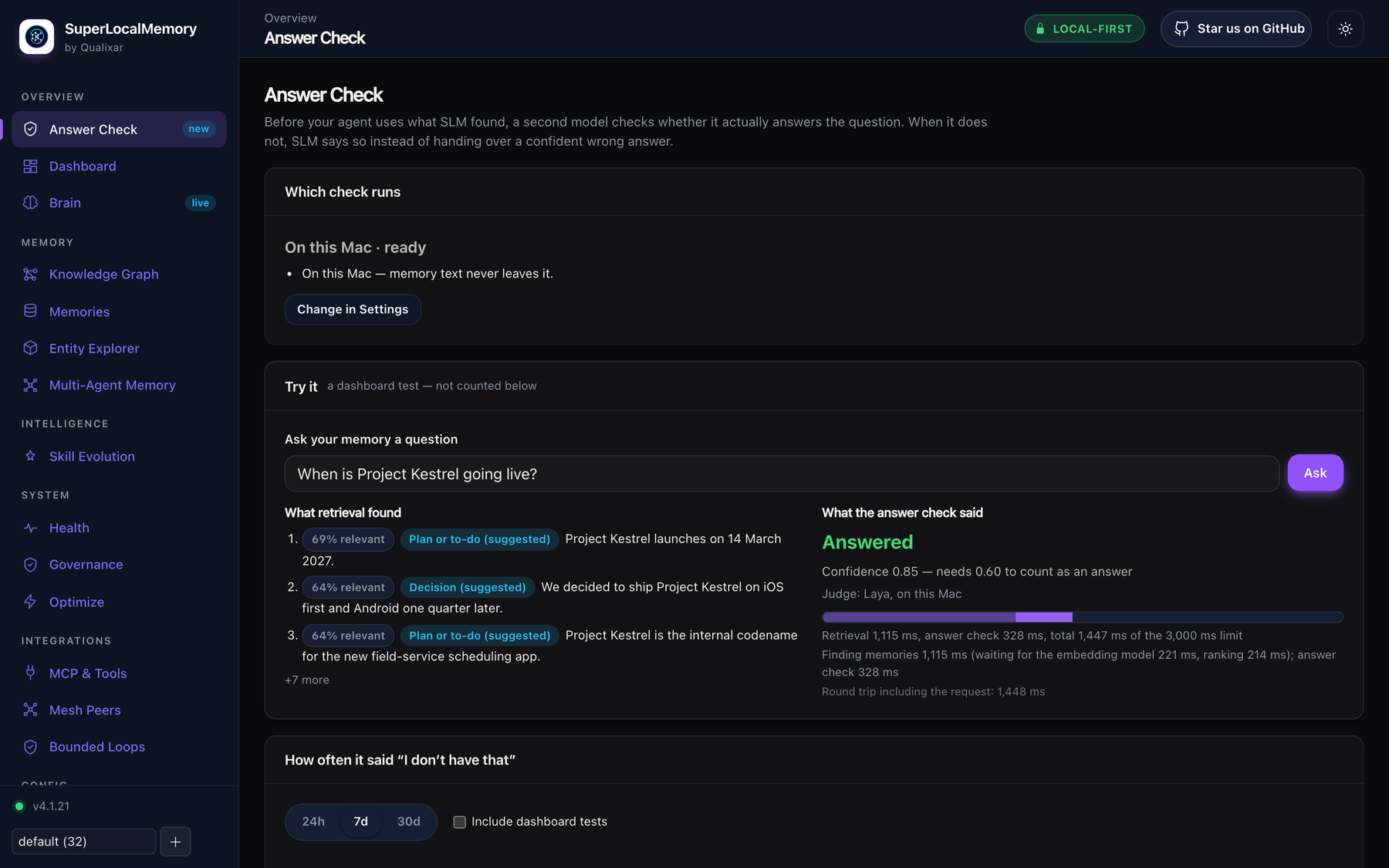
2. A second opinion that never leaves your Mac. On Apple Silicon, SLM installs Laya, a small on-device model that judges whether the memories found actually answer the question. Prefer the cloud, or not on a Mac? Jev does the same check online, only after you tick its consent.
3. Your documents and screenshots become a knowledge base you can ask. Save a photo, a screenshot or a PDF and find it weeks later by describing it — "the slide with the quarterly numbers". The picture model is  Google's EmbeddingGemma 2, running on your computer: one model reads both your words and your pictures, so a description finds the image. OCR runs locally too, every PDF page is indexed by its picture and its text, and every answer cites its file and page. No generative model ever looks at your files.
4. Karpathy's LLM-wiki idea, built in — with search kept. Andrej Karpathy's LLM-wiki pattern turns raw documents into an organised knowledge base with an index and a health check. SLM does that from the data it already stores — a document index of every file with its people, projects and dates, and a document health check that finds empty pages, unlinked documents, duplicate pages and contradicted facts — while keeping real hybrid search for the moment you need to find something.
5. It looks after itself. Memory health describes your older memories in the background — dates, names, projects, kinds — only ever by adding, never touching what you wrote. Anything that moves or deletes waits for your Fix, and Undo puts it back.
6. Governed, not just stored. Every save passes an admission check and gets a receipt. Every read respects roles, workspaces and scopes. Every erasure reaches every copy — summaries, caches, indexes, picture mirrors — and comes with a verifiable receipt. Every action lands in a hash-chained audit trail. Built for teams and for GDPR, not bolted on.
7. Memory with a sense of time. Every fact knows when it happened and when SLM learned it. Ask what was true last month, or what SLM knew before a date. Corrections replace a fact and stay undoable; unused memories fade the way human memory does.
8. It never floods your context window. Layered recall gives an agent a one-line glance, the facts, or the full surrounding context — under a hard token budget it sets. The agent digs deeper with expand only when it needs to, and cache and reversible compression stop you paying for the same output twice.
9. Many agents, one brain. Every write records which agent made it, with trust scores against memory poisoning, so ten agents can share one memory without poisoning it.
10. Your agents talk to each other — even across the internet. Through SLM-Mesh, the agents on your computer and the bots on the web finally share one conversation. Claude Code, Codex and Hermes sessions exchange messages, waits, locks and shared state, on one machine or several, so one agent can hand work to another and two never edit the same file at once. And the bots you allow — ChatGPT, Claude on the web, Grok Bot, Muse — join the same mesh: a bot in your browser can message the agent on your laptop by name and read its reply. Every message arrives labelled as data, never as instructions; a web bot reads new messages when its next turn starts.
11. It learns every day, and it can't quietly get worse. Every reported outcome teaches it: ranking learns which memories actually helped, stable habits become soft prompts for new sessions, and agent skills are measured and revised. A new ranker is promoted only on a statistically valid win and rolled back automatically if it slips. Work runs as bounded loops that end only when an independent gate passes — never on an agent's word — and multi-step pipelines run as bounded graphs with Bounded Loops, whose finished runs SLM keeps as read-only evidence.
12. Science, not vibes. Four arXiv papers back every layer: information-geometric retrieval, biologically inspired forgetting, Bayesian trust against memory poisoning, and governed memory with measured costs. The core math runs without a language model, and the published benchmarks state exactly how they were measured.
SuperLocalMemory is part of Qualixar's AI Reliability Engineering work: agent memory that is observable, bounded and honest about what it doesn't know.
Watch it work
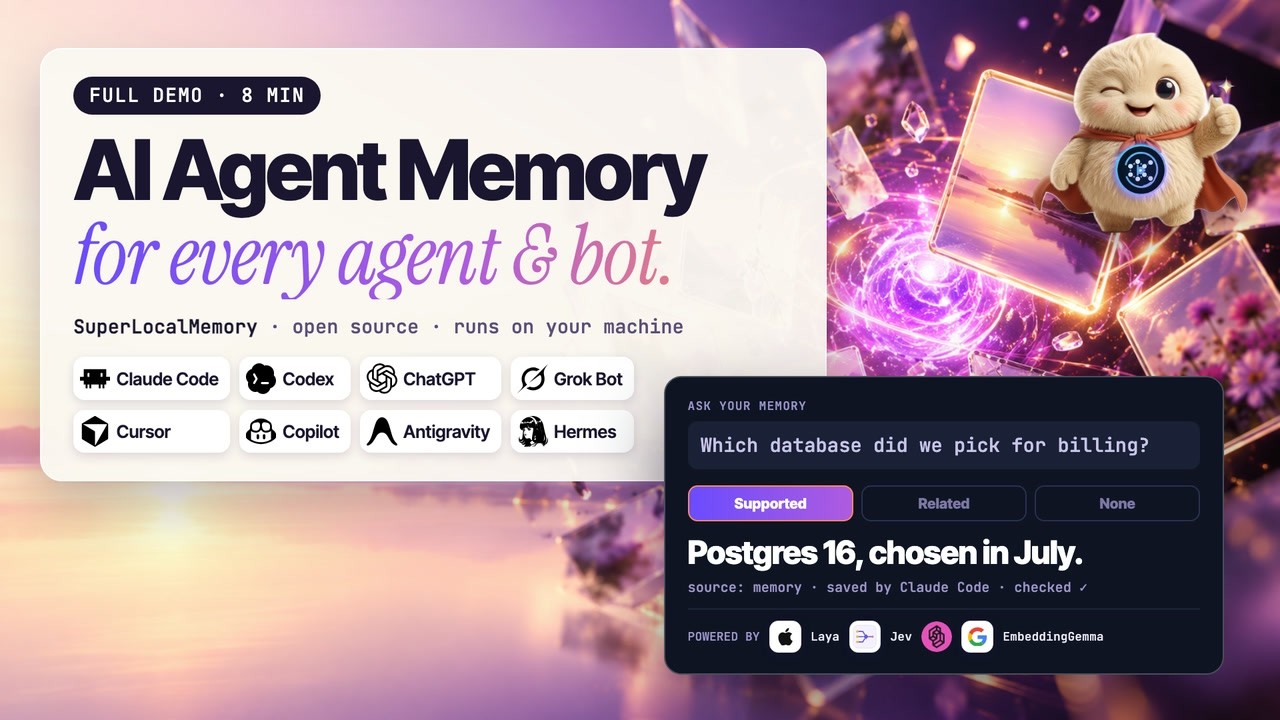
The full eight-minute demo: one memory shared by your coding agents and bots, every tab.
Add SuperLocalMemory to your app
You do not need to wait for an app store. Every app below can take SuperLocalMemory straight from this GitHub repository, qualixar/superlocalmemory, in two steps.
Step 1, once per computer. Install SuperLocalMemory: npm install -g superlocalmemory (or pipx install superlocalmemory). Your memory lives on this computer from then on.
Step 2, in each app you use:
| Your app | What to do |
|---|---|
| Claude Code (terminal and desktop app) | Type /plugin marketplace add qualixar/superlocalmemory, then /plugin install superlocalmemory@qualixar |
| Claude Desktop | Run slm connect claude-desktop, then restart Claude Desktop |
| ChatGPT, Claude on the web, Muse, Composio | Open the dashboard (slm dashboard) → Web access → turn it on, then add the link it shows as a connector in that app (step-by-step) |
| Codex (terminal and desktop app) | Run codex plugin marketplace add qualixar/superlocalmemory --ref main, then codex plugin add superlocalmemory-codex@qualixar |
| Cursor (editor and Agents window) | Run slm connect cursor, then restart Cursor |
| VS Code (Copilot chat in the editor) | Install the SuperLocalMemory extension (.vsix from the latest release: Extensions → ... → Install from VSIX) |
| VS Code Agents window, GitHub Copilot CLI | Run slm connect copilot-cli; for the skills, add qualixar/superlocalmemory in the Agents window's Plugins screen |
| Antigravity | Run agy plugin install "$(npm root -g)/superlocalmemory/antigravity-plugin" |
| Grok CLI | Run grok plugin install 'qualixar/superlocalmemory#plugin' |
| Grok Bot | In Grok's Plugins screen, add the marketplace qualixar/superlocalmemory and add superlocalmemory |
| Muse CLI | Run slm connect muse, then muse plugins install "$(npm root -g)/superlocalmemory/muse-plugin" and muse plugins approve superlocalmemory |
| Hermes (terminal and desktop app) | Run hermes plugins install 'https://github.com/qualixar/superlocalmemory.git#hermes-plugin', then slm upgrade-hosts --host hermes --apply |
| OpenClaw | Run slm connect openclaw |
| Windsurf, Zed, JetBrains, Gemini CLI, OpenCode, Continue | Run slm connect <app>, for example slm connect windsurf |
| Anything else that speaks MCP | Add a server with the command slm and the argument mcp |
Restart the app after adding SuperLocalMemory. Then ask it something like "What do you remember about this project?" The plugin guide has the details for each app, and slm doctor checks your setup.
Works with your agents
Every harness, every bot, one memory. Any harness that speaks MCP (slm mcp, or http://127.0.0.1:8765/mcp/) or can run a command (slm remember, slm recall) can use SuperLocalMemory. The packaged plugins are ready-made examples, not a limit.
| Host | Connect | You get |
|---|---|---|
| Claude Code | claude plugin install superlocalmemory@qualixar | MCP, 16 skills, 4 agents, /slm-loop, session and recall hooks |
| Codex | slm connect codex, then slm codex install | MCP, 16 skills, 4 agents, /slm-loop, lifecycle hooks |
| GitHub Copilot (VS Code, Visual Studio, JetBrains, CLI) | slm connect vscode-copilot --here | MCP, agent rules, 16 prompts, 4 agents, hooks |
| Antigravity | agy plugin install the bundled plugin | MCP, 16 skills, 4 agents, /slm-loop, hooks |
| Hermes | Native plugin, then slm upgrade-hosts --host hermes --apply to grant it the memory server | 16 skills, advisor agents, /slm <command>, recall and session hooks |
| VS Code | The SuperLocalMemory extension (.vsix on the release page) | The memory server in the agent's tool list, nothing to edit |
| Grok CLI | slm connect grok-cli, then grok plugin install the bundled plugin | MCP, 16 skills, 4 agents, session and recall hooks |
| VS Code Agents window, GitHub Copilot CLI | slm connect copilot-cli; skills and agents from the Plugins screen | MCP, 16 skills, 4 agents |
| OpenClaw | slm connect openclaw | MCP and 14 skills |
| Muse CLI | slm connect muse, then muse plugins install the bundled plugin | MCP, 16 skills, 4 agents, /slm-loop, session and recall hooks |
| Grok Bot and Cursor-format hosts | Add the qualixar plugin marketplace | A lean plugin built for shared bot computers (guide) |
| Cursor, Windsurf, Zed, JetBrains, Gemini CLI, Claude Desktop, OpenCode, Continue | slm connect <name> | MCP in that tool's own config |
| ChatGPT, Claude on the web, Muse, Composio | Optional Web access from the dashboard: sign in per app, read-only or read-and-save, remove any app at once | Your local memory, from the web; the database never leaves your computer (guide) |
| LangGraph, LangChain, LlamaIndex, CrewAI, AutoGen, Semantic Kernel, Microsoft Agent Framework, Google ADK, OpenAI Agents | Framework adapters | Memory inside your own code (adapters) |
| Anything else | Paste the universal agent rules and give it the CLI or MCP | Memory discipline for any agent |
What the plugins teach your agent. Every plugin is built from one source, so every host gets the same 16 skills (recall, remember, sessions, governance, scopes and profiles, the knowledge graph, mesh, bounded loops, cache, compression, Web access, pictures, and two for bot computers) and 4 agents (a memory advisor, an optimize advisor, a governance advisor and a loop runner). Hooks run at session start, after tool use and at the end of a session, and every hook fails open: a hook problem never blocks your agent. Plugins, skills and hooks
Everything SLM does
Recall that knows when it doesn't know
| Capability | What you get | Docs |
|---|---|---|
| Three honest tiers | Supported; closest memories (up to three, labelled); or "That isn't in SuperLocalMemory." Hooks that inject memory automatically only ever inject supported answers | Recall |
| Warming up, said plainly | While models load, recall shows what keyword search found under "SuperLocalMemory is still warming up — results may be incomplete. Try again in a few minutes." | Recall |
| Layered recall | depth 0 (a one-line glance), 1 (the facts), 2 (with source, session neighbours, related entities and corrections); a hard max_tokens cap; expand drills into one result | Layered recall |
| Hybrid search | Semantic, keyword (BM25), entity-graph, temporal, associative (Hopfield), spreading-activation and picture channels, fused and reranked; slm trace shows each channel's score | Recall |
| Nine memory kinds | Fact, event, status, opinion, rule, decision, how-to, plan, correction. "What did we decide" favours decisions; confirmed rules and decisions load at every session start | Memory kinds |
| Time travel | --valid-at (what was true then), --known-as-of (what SLM knew then), --window 7d | Recall |
| Precise filters | By project, agent, subject, kind and exact tags; an empty result says why | Recall |
| Corrections | --replaces retires an old fact, kept and undoable; edits go through reviewed corrections with rollback | Corrections |
| Summaries and saved views | Session, day and project summaries that cite their memory ids; saved views like "what did I ship this week" | Recall |
| Prompt-injection defence | Recalled text is treated as untrusted evidence: secrets redacted, forged markers neutralised, provenance attached | Security |
The answer check: Laya and Jev
|
Laya — on your Mac A small on-device model for Apple Silicon (about 1.1 GB). Installed by default by setup and offered after an upgrade; nothing ever leaves the machine. Opt out with |
The same check on Windows, Linux or macOS, through TypeSafe or OpenRouter with your own key. It sends the question and the top three memories, and only after you tick its consent. It never turns itself on. |
 Jev — online, any computer
The verdict is one input to the support decision, with its own time budget, and the Answer Check tab shows verdicts, timing and how often memory had no answer — without storing your questions. Answer check
Documents, pictures and your notes
| Capability | What you get | Docs |
|---|---|---|
| Pictures you find by describing them | PNG, JPEG, GIF and WebP. Google's EmbeddingGemma 2 runs locally and puts text and pictures in one search space, so your words find the image; OCR (Apple Vision on a Mac, RapidOCR elsewhere) makes the text inside it searchable; location data is never read | Pictures and documents |
| PDFs, page by page | Each page is indexed by its picture and its text; every answer says which file and page it came from, with a thumbnail | Pictures and documents |
| Document index | A catalogue of every saved document with its pages and the people, projects and dates it mentions | Pictures and documents |
| Document health check | Finds pages with no readable text, documents linked to nothing, duplicate pages and documents whose facts were contradicted | Pictures and documents |
| Folders and Obsidian vaults | slm sources add ~/Notes --kind obsidian mirrors Markdown, canvas files, PDFs and images into memory, read-only, after showing what it would read | CLI |
| From ChatGPT and your phone | Attach a file in ChatGPT, or ask any connected web app for a one-time upload link that streams the file straight to your computer | Web access |
| Your data stays yours | Pictures live in their own store and never leave your computer; erasing a memory erases its picture. Off by default, one click to turn on; needs 16 GB of memory | Compliance |
Memory health
| Capability | What you get | Docs |
|---|---|---|
| Automatic description | While your computer is idle, older memories get event dates, names, projects, tags and kinds filled in — only by adding, never by editing what you wrote, and never over a value you set | Memory health |
| Fix and Undo | Repairs that move or delete anything — junk entity links, hidden memories still in use, saves that didn't finish — wait for your Fix; every run can be undone | Memory health |
| Stub badge | Receipts and session boilerplate stay listed with a stub badge but never become answers | Memory health |
| Store health | slm doctor shows how findable and described your memories are; slm db integrity and slm db repair (with undo) keep the store sound | Troubleshooting |
The living brain
| Capability | What you get | Docs |
|---|---|---|
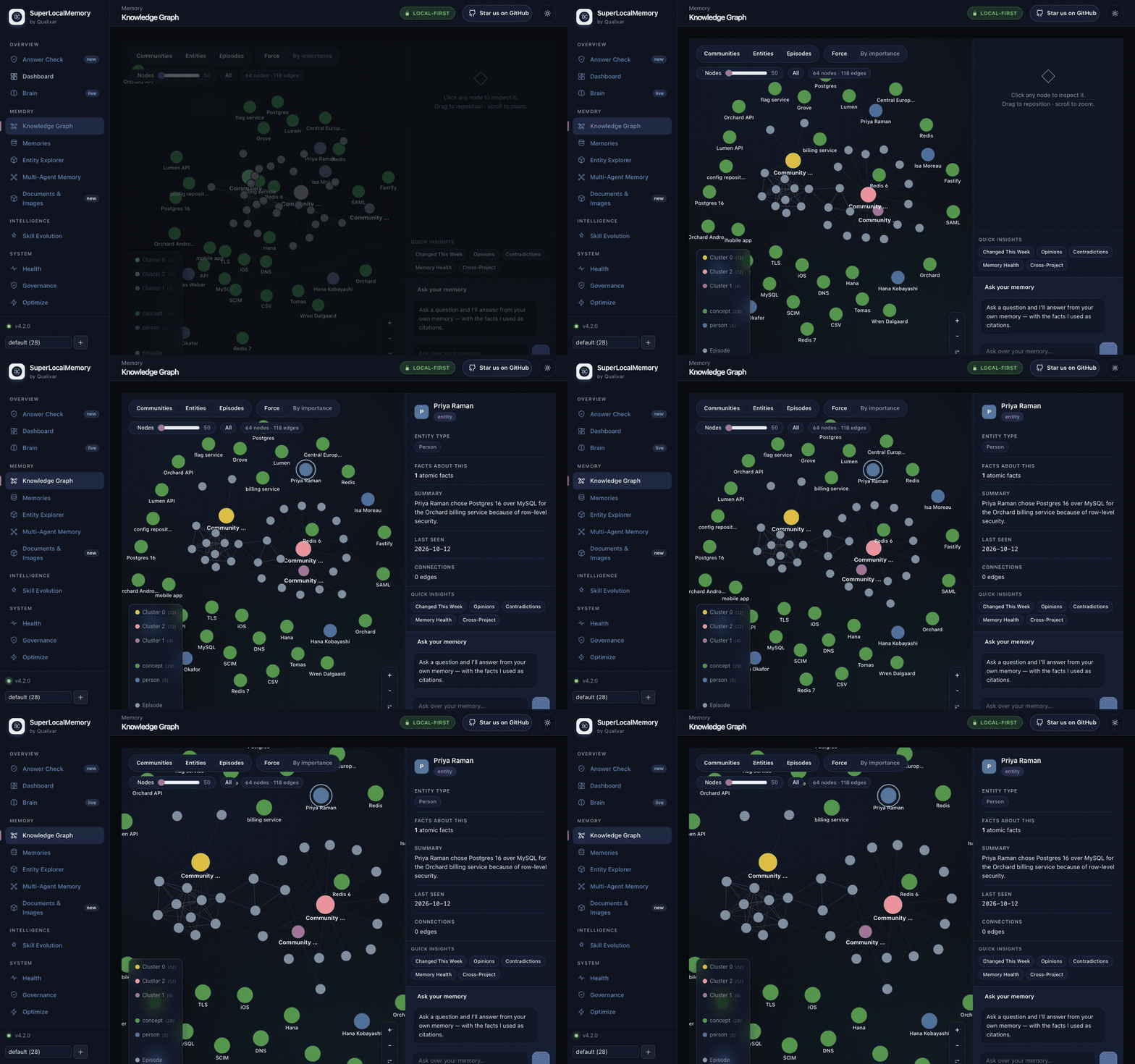
| Knowledge graph | People, projects and tools resolved from your memories, with aliases, scenes and timelines; the Entity Explorer shows how what you know changed | Architecture |
| Code graph | Index a repository, then ask for blast radius, callers and code search by meaning | MCP tools |
| Forgetting that helps | An Ebbinghaus retention cycle and Langevin lifecycle move neglected memories toward archive; fading memories are quantized to fewer bits and folded into one gist | Research |
| Learning to rank (opt-in) | A bandit and a learning-to-rank model learn from outcomes; a new ranker is promoted only on a statistically valid win and rolled back automatically if it gets worse | Configuration |
| Soft prompts and skill evolution (opt-in) | Stable behaviour patterns become soft prompts for new sessions; agent skills are measured and revised under blind verification | Skill evolution |
Governance and compliance
| Control | What it does | Docs |
|---|---|---|
| Roles and workspaces | Admin, member and viewer per workspace; a role in one workspace grants nothing in another; maintenance and approvals act only where you are | Teams |
| Company mode | Every read and write attributed to a signed-in person | Company mode |
| Scopes | Personal by default; shared and global only when you choose; cross-profile recall denied by default | Scopes |
| GDPR | Export (Art. 15/20) and erasure (Art. 17) across every store and every derived copy, with a verifiable receipt | Compliance |
| Audit and retention | A hash-chained audit trail that fails verification if tampered with; per-profile retention rules; an EU AI Act posture report | Compliance |
| Backup and restore | Cloud backup to GitHub or Google Drive, encrypted before upload; a restore point before every store update; a restore keeps a safety copy and rolls back if it fails | Cloud backup, Restore points |
Engineering controls that support a compliance program, not a certification.
Many agents, one memory
| Capability | What you get | Docs |
|---|---|---|
| Attributed, trusted writes | Every memory records its agent; Bayesian trust scores defend against memory poisoning | Research |
| SLM-Mesh | Messages, waits, locks and shared state between sessions, on one machine or several | Multi-machine |
| Bots that talk to each other | ChatGPT, Claude on the web, Grok Bot and Muse join the mesh with your permission: list peers, message a named bot, read the inbox. Messages arrive labelled as data, never as instructions | Bot messages |
| Bounded loops and graphs | "Done" means an independent gate passed (tests, a linter, a schema), never the agent's word; every lap is stored as auditable memory. Multi-step graphs run in Bounded Loops, and SLM keeps their finished runs as read-only evidence | Bounded Loops bridge |
Context savings
| Capability | What you get | Docs |
|---|---|---|
| Exact cache | Tool output and file reads cached with a TTL; a hit skips the repeat call | Optimize |
| Reversible compression | Large output shrunk safely; the exact original comes back by id | Optimize |
| Three ways in | Works through a proxy (slm wrap claude), MCP tools or a skill; slm optimize savings shows what you saved | Proxy setup |
Modes, dashboard and scale
| Capability | What you get | Docs |
|---|---|---|
| Three modes | A: no language model at all. B: a model on this machine (Ollama, where Google Gemma 3 4B is the default and Gemma 4 is in the model picker, or any local OpenAI-compatible server). C: your own endpoint or a cloud provider | Configuration |
| Dashboard | Search, knowledge graph, Entity Explorer, answer check, Memory health, documents and images, connected apps, bot messages, governance: slm dashboard | Dashboard |
| Scale engine | SQLite + sqlite-vec are canonical; optional LanceDB and CozoDB copies serve only once they match SQLite | Scale engine |
| Durable writes | Every save moves raw → queryable → complete with a receipt; failures keep the evidence and retry; text saves under load are queued, never refused | Architecture |
| Model switching | Change the embedding model in the background while recall keeps working, with one-step rollback | CLI |
| Remote access on your network | slm remote serves memory to other computers over TLS, one revocable key per client | Deployment |
MCP memory server: tool profiles
Every app, plugin and extension gets full (58 tools: all of memory, SLM-Mesh, optimize, loops; 5 more while images are on) unless you choose otherwise. That fits hosts that cap the total number of MCP tools at about 100, with room for your other servers. To change it for every app at once, run one command and restart your apps:
slm tools                # current set, and how many tools each set has
slm tools set power      # any name below; `slm tools set default` goes back to full
To change one app only, set SLM_MCP_PROFILE in that app's MCP config (slm connect <app> --profile <name> writes it); it wins over the saved choice for that app. Per-app details
| Profile | Tools | For |
|---|---|---|
core | 19 | Remember, recall, expand, sessions, optimize, correction review |
code | 39 | Core plus code graph, memory kinds, Brain evidence, profile switching, bounded loops |
mesh | 9 | SLM-Mesh coordination only |
full (default, when unset) | 58 | Memory, kinds, Brain, optimize, skill evolution, mesh, loops, views and summaries (63 with pictures and documents on) |
power | 70 | Full plus administration, lifecycle and diagnostics (75 with pictures and documents on) |
whole | 110 | Every registered tool |
stdio: {"command": "slm", "args": ["mcp"]} · HTTP: http://127.0.0.1:8765/mcp/ · MCP tools
See it
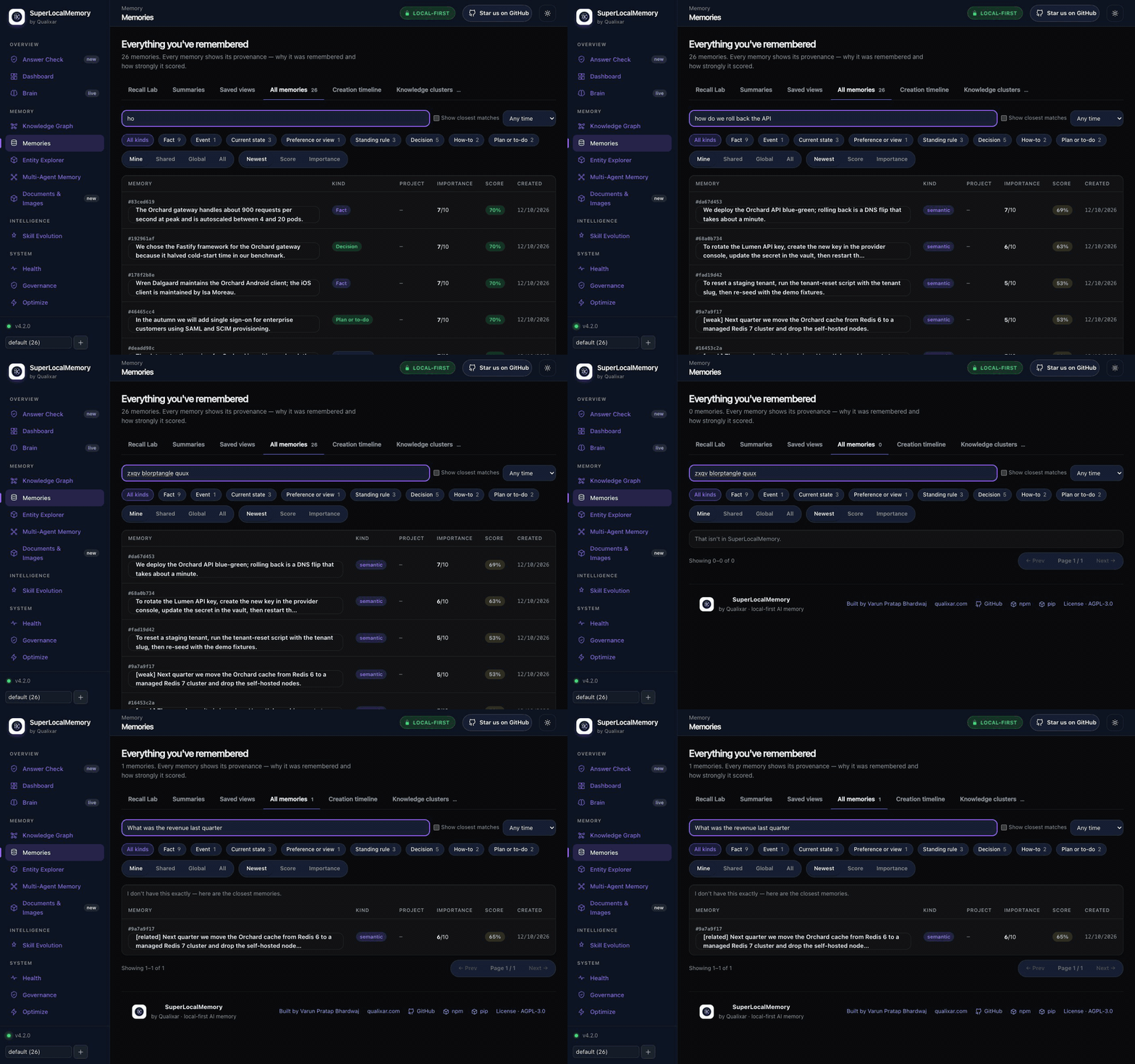
| Memory health: Fix and Undo | Knowledge graph |
|---|---|
 |  |
| Entity Explorer | The answer check at work |
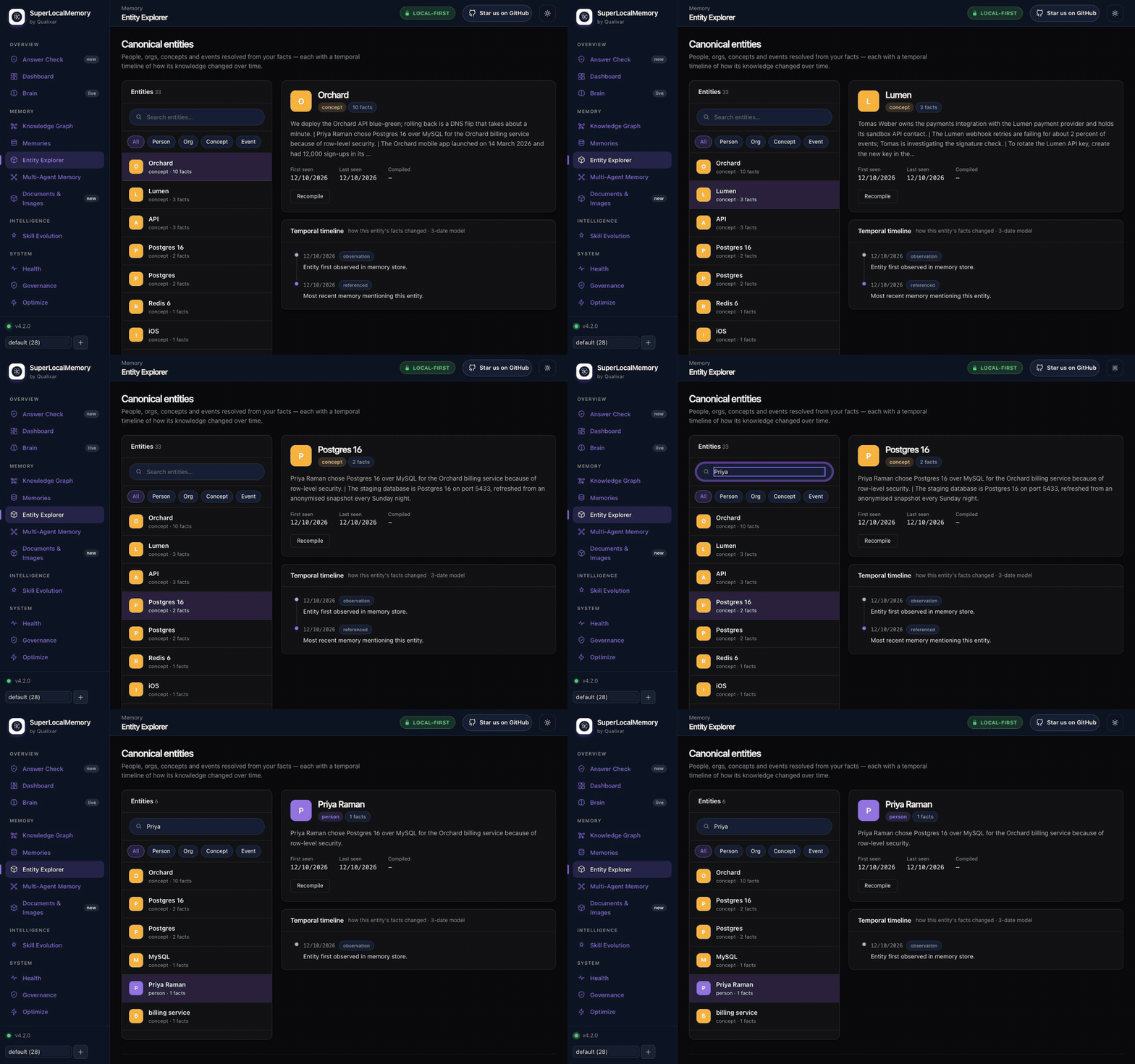 |  |
Recorded on a test install with fictional memories. The eight-minute full demo walks through every pane.
Architecture
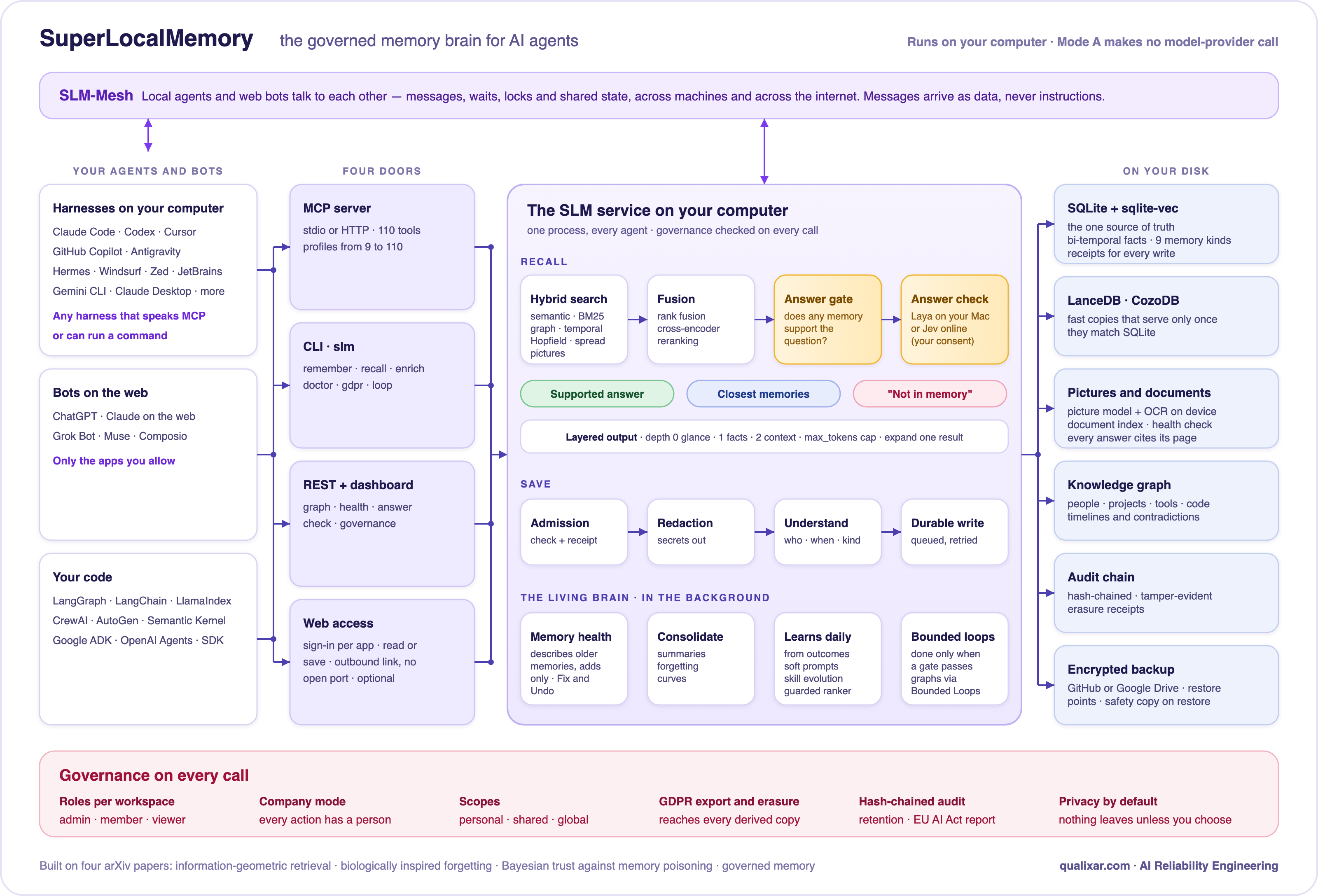
The free local core is complete on its own; Web access is optional. Architecture in detail
Privacy

Nothing leaves your computer unless you turn on a feature that sends it, and each one says exactly what goes:
| What leaves | Only when |
|---|---|
| A question and the top three memories | You turn on Jev, the online answer check, and tick its consent |
| Memory text | You choose Mode C, a cloud embedder or reranker, a model on another computer, or Jev kind typing (its own consent) |
| Encrypted backup files | You connect GitHub or Google Drive backup |
| Mesh messages | You configure mesh peers, or allow a web app to message your bots |
| Tool calls from web apps | You turn on Web access and add an app; the database stays on your computer |
Pictures, documents, Laya and Mode A never send anything. Secrets in memory text are redacted on every outbound path. Security policy
Benchmarks
These numbers come from the published architecture paper (arXiv:2603.14588), whose retrieval core SLM still runs. They are not a fresh run of the current package.
| Configuration (architecture paper) | LoCoMo | Scope |
|---|---|---|
| Mode A, retrieval + GPT-4.1-mini answers | 74.8% | 10 conversations, 1,276 questions |
| Mode A, raw (no LLM anywhere) | 60.4% | 10 conversations, 1,276 questions |
| Mode C, cloud embeddings + GPT-4.1-mini | 87.7% | 1 conversation (Conv-30), 81 questions |
A LoCoMo score is comparable only when the subset, answer model and judge match. Method and ablations
Research
Four arXiv preprints by Varun Pratap Bhardwaj describe SLM:
- SuperLocalMemory 4.0: The Governed Memory Operating System for AI Agents, with Garima Singh and Arun Pratap Bhardwaj. arXiv:2608.08253
- SuperLocalMemory V3.3: The Living Brain, arXiv:2604.04514
- SuperLocalMemory V3: Information-Geometric Foundations for Zero-LLM Enterprise Agent Memory, arXiv:2603.14588
- Privacy-Preserving Multi-Agent Memory with Bayesian Trust Defense Against Memory Poisoning, arXiv:2603.02240
Cite with CITATION.cff or GitHub's "Cite this repository".
Documentation
Start: Getting started · IDE setup · Plugins · Quick proof Use: Recall · Memory health · Answer check · Pictures and documents · Auto-memory · Web access · Optimize Reference: CLI · MCP tools · Configuration · Troubleshooting · Compliance · Wiki · Release notes
Upgrade
npm update -g superlocalmemory    # or: pipx upgrade superlocalmemory, uv tool upgrade superlocalmemory
slm restart && slm doctor
slm upgrade-hosts                 # preview plugin and IDE updates; nothing changes until you --apply
Upgrades never move or delete memory, and a store update takes a restore point first. Host upgrades
Platform support
| SuperLocalMemory | Laya (on-device answer check) | |
|---|---|---|
| Apple Silicon macOS | Yes | Yes, installed by default |
| 64-bit Windows | Yes | No (Jev, the online check, works) |
| 64-bit Linux (x86-64, ARM64) | Yes | No (Jev works) |
| Intel Mac, 32-bit Windows | No prebuilt install | — |
Python 3.12+, Node 18+ for npm. Pictures and documents need 16 GB of memory.
Star history
Contributing and license
Issues and pull requests are welcome: CONTRIBUTING.md. Security reports: SECURITY.md. Licensed under AGPL-3.0-or-later; for a commercial license see COMMERCIAL-LICENSE.md.

Built by Qualixar
SuperLocalMemory is made by Varun Pratap Bhardwaj at Qualixar: AI Reliability Engineering — memory, contracts, tests and loops that make AI agents dependable enough to trust with real work.
Stronger together. SuperLocalMemory remembers. Jev Decision Layer makes your agent's bounded choices typed and checked. Bounded Loops ends work only when an independent gate passes. Use them together and Qualixar gives your agents the whole AI Reliability Engineering environment: memory they can trust, decisions they can defend, and work that is provably done.
If SLM keeps your agents from forgetting, star the repository. It's how other developers find it.


More from Qualixar: Qualixar OS · SkillFortify · SLM Mesh · AgentAssert · AgentAssay · Bounded Loops · Jev Decision Layer · SLM MCP Hub