powhttp-mcp
MCP server enabling agents to debug HTTP requests better
Documentation
powhttp-mcp



An MCP server that gives AI assistants X-ray vision into HTTP traffic captured by powhttp.
See it in action
Using /generate_scraper to build a BMW car listing monitor:
https://github.com/user-attachments/assets/be098e9d-d700-491c-ae7f-5afb12732728
Features
- HTTP Traffic Analysis - Search, inspect, and analyze captured HTTP requests/responses
- Anti-Bot Detection - Compare browser vs program traffic to identify detection vectors
- Fingerprinting - Generate TLS (JA3/JA4) and HTTP/2 fingerprints
- API Mapping - Cluster and catalog API endpoints from captured traffic
- GraphQL Analysis - Cluster operations, inspect schemas, and extract errors from GraphQL APIs
- Schema Inference - Infer merged schemas from multiple response bodies with field statistics
- Flow Tracing - Trace related requests (redirects, dependent calls)
- Schema Validation - Validate response bodies against Go structs, Zod, or JSON Schema
- Scraper Generation - Generate PoC Go scrapers from captured traffic
Schema validation in action - correcting data structures for edge cases:
https://github.com/user-attachments/assets/1156c537-70ab-4179-ad4a-c148988ac503
Installation
Install via go install:
go install github.com/usestring/powhttp-mcp/cmd/powhttp-mcp@latest
Or install a specific version:
go install github.com/usestring/powhttp-mcp/cmd/powhttp-mcp@v1.0.0
Don't have Go installed?
Download and install Go from the official website: https://go.dev/doc/install
Adding Go binaries to your PATH
If you get command not found: powhttp-mcp after installation, you need to add Go's bin directory to your PATH.
Find your Go bin directory:
go env GOPATH
This returns your Go workspace directory, typically ~/go (macOS/Linux) or C:\Users\yourname\go (Windows). The binaries are installed in the bin subdirectory.
macOS / Linux
For bash (~/.bashrc or ~/.bash_profile):
export PATH="$PATH:$(go env GOPATH)/bin"
For zsh (~/.zshrc):
export PATH="$PATH:$(go env GOPATH)/bin"
For fish (~/.config/fish/config.fish):
fish_add_path (go env GOPATH)/bin
Then reload your shell:
source ~/.zshrc # or ~/.bashrc, etc.
Windows
PowerShell (current session):
$env:PATH += ";$(go env GOPATH)\bin"
Permanently via PowerShell:
[Environment]::SetEnvironmentVariable("PATH", $env:PATH + ";$(go env GOPATH)\bin", "User")
Or via System Settings:
- Press
Win + R, typesysdm.cpl, press Enter - Go to Advanced → Environment Variables
- Under "User variables", select Path and click Edit
- Click New and add
%USERPROFILE%\go\bin - Click OK to save, then restart your terminal
Enabling the Data API
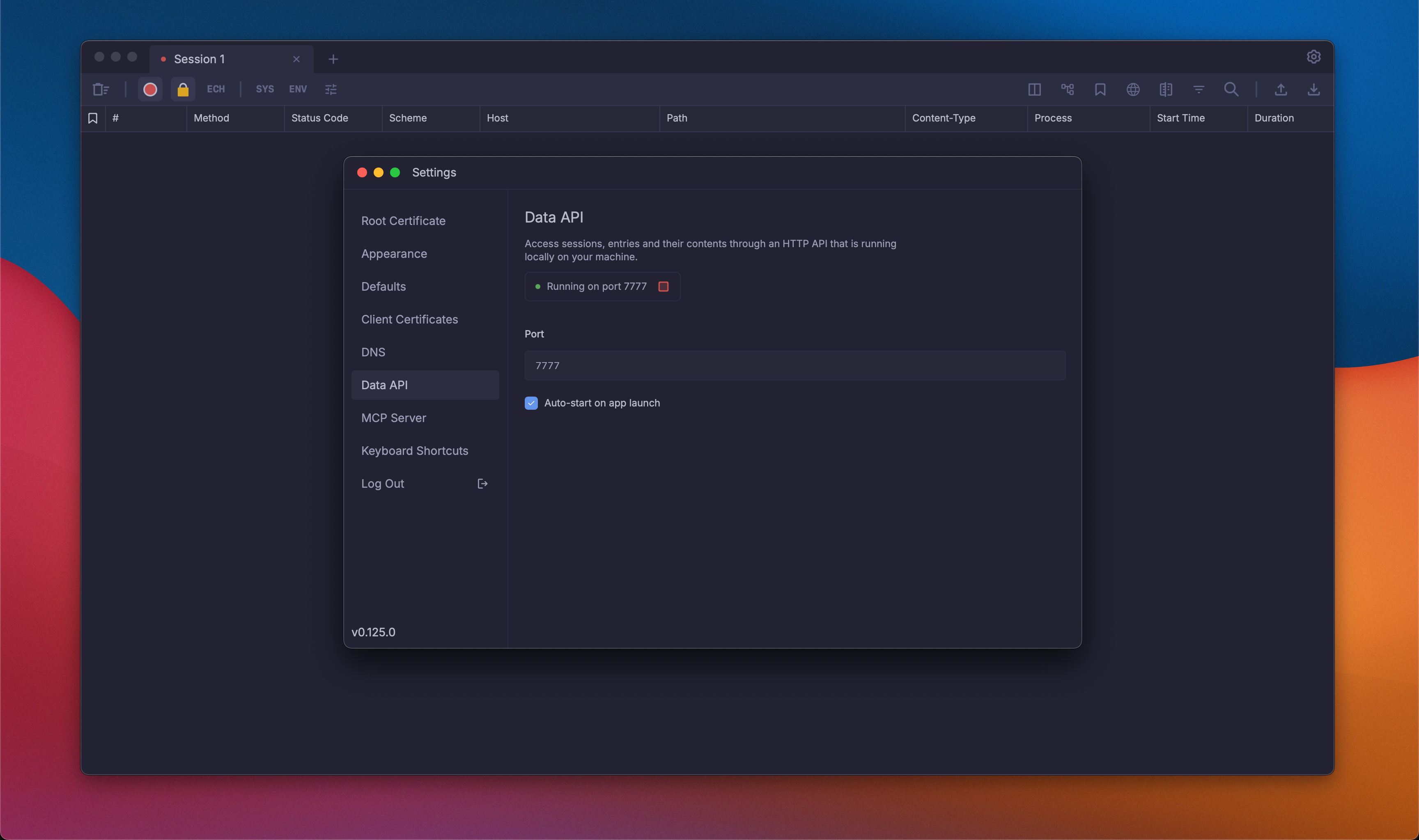
Before using powhttp-mcp, you need to enable the Data API in powhttp:
- Open Powhttp Settings > Data API
- Make sure the Data API is running
- (Recommended) Enable Auto start on app launch for convenience
- Note the port number — you'll need this for
POWHTTP_BASE_URLin your MCP configuration
Usage
Connecting to Cursor
Add to your .cursor/mcp.json:
{
  "mcpServers": {
    "powhttp": {
      "command": "powhttp-mcp",
      "env": {
        "POWHTTP_BASE_URL": "http://localhost:7777",
        "POWHTTP_PROXY_URL": "http://localhost:8888"
      }
    }
  }
}
Connecting to Claude Desktop
Add to your Claude Desktop config (~/Library/Application Support/Claude/claude_desktop_config.json on macOS):
{
  "mcpServers": {
    "powhttp": {
      "command": "powhttp-mcp",
      "env": {
        "POWHTTP_BASE_URL": "http://localhost:7777",
        "POWHTTP_PROXY_URL": "http://localhost:8888"
      }
    }
  }
}
Connecting to Claude Code
Add using the CLI:
claude mcp add powhttp -e POWHTTP_BASE_URL=http://localhost:7777 -e POWHTTP_PROXY_URL=http://localhost:8888 -- powhttp-mcp
The generated scraper running successfully:
https://github.com/user-attachments/assets/52b30cbf-7c66-40b1-a3fe-9c12d37ece11
MCP Prompts
powhttp-mcp provides 4 prompts for guided workflows:
| Prompt | Description |
|---|---|
base_prompt | START HERE: Essential guide for efficient tool usage and token optimization |
compare_browser_program | Compare browser vs program traffic to find anti-bot detection differences |
build_api_map | Build an API endpoint catalog from captured traffic |
generate_scraper | Generate PoC Go scrapers from captured traffic |
MCP Tools
powhttp-mcp provides 17 tools for HTTP traffic analysis:
| Tool | Description |
|---|---|
powhttp_sessions_list | List all sessions with entry counts |
powhttp_session_active | Get the currently active session |
powhttp_search_entries | Search entries with filters and free text |
powhttp_get_entry | Get full details of a specific entry |
powhttp_get_tls | Get TLS handshake events for a connection |
powhttp_get_http2_stream | Get HTTP/2 frame details for a stream |
powhttp_fingerprint | Generate HTTP, TLS, and HTTP/2 fingerprints |
powhttp_diff_entries | Compare two entries to find detection differences |
powhttp_extract_endpoints | Cluster entries into endpoint groups |
powhttp_describe_endpoint | Generate detailed endpoint description |
powhttp_trace_flow | Trace related requests around a seed entry |
powhttp_validate_schema | Validate entry bodies against a schema |
powhttp_query_body | Extract specific fields from bodies using JQ expressions |
powhttp_infer_schema | Infer merged schema from multiple entry bodies with field statistics |
powhttp_graphql_operations | Cluster GraphQL traffic by operation name and type |
powhttp_graphql_inspect | Parse and inspect individual GraphQL operations |
powhttp_graphql_errors | Extract and categorize GraphQL errors from responses |
See internal/mcp/README.md for detailed tool documentation.
Environment Variables
Basic Configuration
| Variable | Description | Default |
|---|---|---|
POWHTTP_BASE_URL | Where to find the powhttp API server | http://localhost:7777 |
POWHTTP_PROXY_URL | Proxy URL used by prompts when generating scrapers and debugging | http://127.0.0.1:8890 |
LOG_LEVEL | How verbose the logs are: debug, info, warn, error | info |
LOG_FILE | File to write logs to (empty = print to console) | "" (console) |
Performance Tuning
| Variable | Description | Default |
|---|---|---|
HTTP_CLIENT_TIMEOUT_MS | How long to wait for API responses (milliseconds) | 10000 (10s) |
FETCH_WORKERS | How many entries to fetch in parallel | 16 |
ENTRY_CACHE_MAX_ITEMS | How many entries to keep in memory cache | 512 |
REFRESH_INTERVAL_MS | How often to check for new entries (milliseconds) | 2000 (2s) |
REFRESH_TIMEOUT_MS | Max time for index refresh operation (milliseconds) | 15000 (15s) |
FRESHNESS_THRESHOLD_MS | Consider data stale after this many milliseconds | 500 (0.5s) |
Data Limits
| Variable | Description | Default |
|---|---|---|
TOOL_MAX_BYTES_DEFAULT | Max response body size tools return (bytes) | 2000000 (2MB) |
RESOURCE_MAX_BODY_BYTES | Max body size for MCP resources (bytes) | 65536 (64KB) |
TLS_MAX_EVENTS_DEFAULT | Max TLS handshake events to return | 200 |
H2_MAX_EVENTS_DEFAULT | Max HTTP/2 frames to return | 200 |
BOOTSTRAP_TAIL_LIMIT | Max entries to load when starting up | 20000 |
AI Token Optimization
| Variable | Description | Default |
|---|---|---|
COMPACT_MAX_ARRAY_ITEMS | In compact mode, trim arrays to this many items | 3 |
COMPACT_MAX_STRING_LEN | Truncate strings longer than this (chars) | 500 |
COMPACT_MAX_DEPTH | Max nesting depth for compaction (0 = unlimited) | 0 |
DEFAULT_SEARCH_LIMIT | Default max results for search_entries | 10 |
DEFAULT_QUERY_LIMIT | Default max entries for query_body | 20 |
DEFAULT_CLUSTER_LIMIT | Default max clusters for extract_endpoints | 15 |
DEFAULT_EXAMPLES_PER_ITEM | Default examples shown per cluster | 3 |
Log Rotation
| Variable | Description | Default |
|---|---|---|
LOG_MAX_SIZE_MB | Rotate log when it reaches this size (MB) | 10 |
LOG_MAX_BACKUPS | Keep this many old log files | 5 |
LOG_MAX_AGE_DAYS | Delete log files older than this (days) | 28 |
LOG_COMPRESS | Compress old log files (true/false) | true |
Development
Prerequisites
- Go 1.24.5 or later
- Running powhttp instance
Building
go build ./cmd/powhttp-mcp
Testing
go test ./...
Feature Requests & Bug Reports
Have a feature suggestion or found a bug? We'd love to hear from you!
- Feature Requests: Open an issue with the
enhancementlabel - Bug Reports: Please include steps to reproduce, your environment details, and relevant logs
Contributing
We use squash merges for all pull requests. When creating a PR, ensure the PR title follows Conventional Commits format, as it will become the commit message:
Triggers release:
feat:- minor version bumpfix:- patch version bumpperf:- patch version bumprevert:- patch version bumpfeat!:orBREAKING CHANGE:- major version bump
No release:
docs:,chore:,refactor:,test:,style:,build:,ci:
Versioning is automated via release-please.
License
This project is licensed under the GNU Affero General Public License v3.0 - see the LICENSE file for details.
Acknowledgments
About String — String ( better website coming soon :) ) extracts structured data from any website at scale. We handle all the code and maintenance.
This project was built during an internal hackathon focused on developer experience tooling. Special thanks to:
- Kashif Ghafoor — For his contributions during the hackathon
- Florian — Creator of powhttp for implementing the API from a suggestion and being responsive to feedback
Related Projects
- powhttp - HTTP traffic capture and analysis
- Model Context Protocol - Protocol specification