Lightpath
Your coding agent clicks a button in your running React app and gets back the browser and Node lines that click ran, plus the lines that didn't.
Documentation

See the exact lines one click ran, in the browser and on the server.
An MCP server for coding agents working on React + Node apps.


Website · Quick start · Case study · Release notes · Changelog
Your coding agent reads your code, but it doesn't see which lines a click actually ran.
Lightpath is an MCP server for React + Node apps. Your agent clicks a button in your running app and gets back the lines that click ran, in the browser and on the server, from V8's own coverage.
npx @lightpath-dev/cli init --agent claude-code   # or: cursor, vscode, kiro, other
npx @lightpath-dev/cli doctor
Restart your agent and tell it the bug: "I click Mark as paid and Outstanding doesn't drop." It calls run_action and gets:
POST /api/invoices/INV-2041/pay → 200 [node, 8 ms]
  …
  server/services/ledger.ts
    getSummary 14-28 ×1 not run: 16-27
    markPaid 38-46 ×1
getSummary ran but skipped lines 16-27, where the totals are summed: it returned a stale cache. That is part of a real answer from a one-run case study on a planted bug, where the agent without Lightpath fixed it too.
Quick start
In your app's folder (React in the browser, a Node server, a dev script in package.json):
npx @lightpath-dev/cli init --agent claude-code   # or: cursor, vscode, kiro, other
npx @lightpath-dev/cli doctor                     # checks what init wrote
# restart your agent, then tell it the bug: "I click Save and the list doesn't update"
That's all. The first time the agent calls a Lightpath tool, Lightpath starts your dev server and its own browser by itself, and stops them when the agent closes.
Needs Node.js 22.12+ and Chrome or Edge. Latest release: 0.1.2 (release notes, CHANGELOG).
What your agent gets
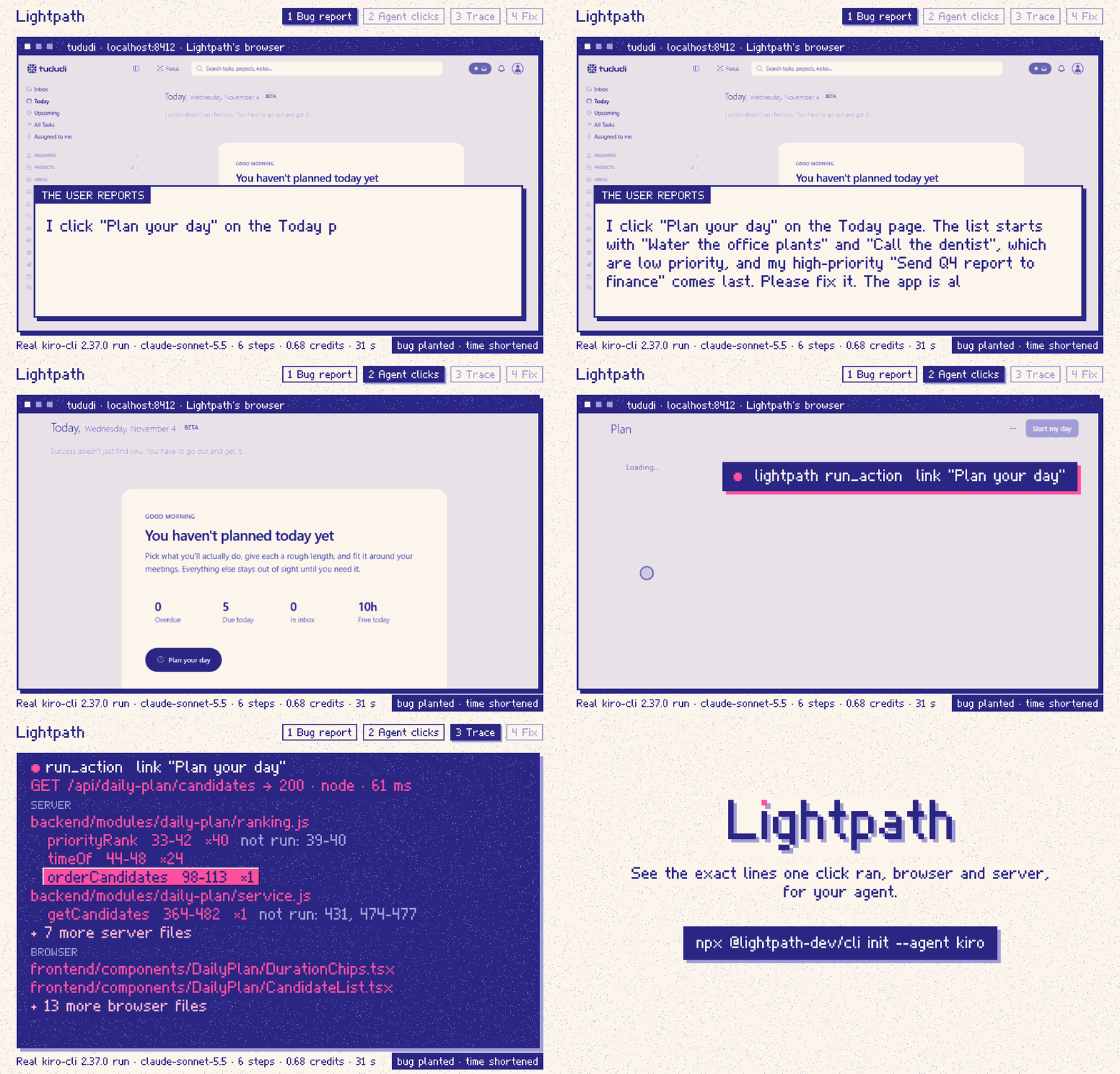
This is an agent's run_action call on this repo's small example app, examples/invoices, from an earlier recorded run with a planted bug, and the start of what came back (cut where it says …; the full answer is in the transcript). It is shown here instead of the GIF's tududi trace because it is short enough to read whole:
run_action  target: button "Mark as paid"  within: "Kestrel Labs"

Trace t_dw649hdbx0jj: button: Mark as paid
action: click button "Mark as paid" within "Kestrel Labs" (boundary press, settled quiet)
page: http://localhost:5174/
request: POST /api/invoices/INV-2041/pay → 200 (node, 4 ms)

before POST /api/invoices/INV-2041/pay [browser]
  src/api.ts
    payInvoice 31-33 ×1
  src/App.tsx
    App 14-103 ×2 not run: 22-28, 35-42, 96-98
    pay 31-43 ×1 not run: 35-42
  …
POST /api/invoices/INV-2041/pay → 200 [node, 4 ms]
  server/data.ts
    findInvoice 85-87 ×1
    (anonymous) 86 ×1
  server/routes/invoices.ts
    payInvoice 9-20 ×1 not run: 14-19
  server/services/ledger.ts
    getSummary 14-28 ×1 not run: 16-27
    markPaid 38-46 ×1
after the response [browser]
  …
Each function that ran is listed with its lines, how often it was called, and the lines inside it that did not run. Here getSummary ran, but lines 16-27, where the totals are summed, didn't: it returned a cached copy. That's the bug, and the agent said so in its answer.
0.1.2 fixed lines that showed as run when they didn't: untaken else if and switch branches, and the untaken arm of a multi-line ternary or &&. When a call throws, V8 has no count for the lines after it, so the trace marks them unknown and names the line that threw. pnpm accuracy checks every line of small Node and React apps against results written by hand (D-149, D-153).
Every answer is at most 16,000 characters (about 4,000 tokens). When a trace is bigger, the least-used files are left out and the last line says how to see them with get_trace (D-109, checked in pnpm e2e).
MCP tools
| Tool | What it does |
|---|---|
run_action | Clicks a button or link, or presses Enter or Space, in your app, and returns that click's trace |
run_request | Sends one HTTP request to your app on localhost and returns the backend code it ran (no browser) |
find_code_for_action | The latest trace for an action by its label, without acting ("which code handles Checkout?") |
get_trace | One file or function of a trace, line by line, with the lines that didn't run marked |
diff_traces | Two traces of the same action, before and after a fix: what ran in only one |
list_traces | Recent actions, newest first, with their trace ids |
run_action can fill form fields first, for example to sign in. The values it types never appear in any output. The whole tool list is under 4,000 characters, so it costs your agent little context (packages/mcp/test/output.test.ts).
Options on run_action, new in 0.1.1:
| Option | What it does |
|---|---|
compareTo | Re-runs the action and returns the new trace plus what ran in only one of the two, so a fix is checked in one call (D-144, scripts/e2e-invoices-fix.mjs) |
times | Repeats the same action, up to 5 times, in one call and one trace (D-142) |
includeCode | Adds the code of the lines that ran, with not-run lines folded. Off by default, because it makes answers about 4-6 times longer (D-145, D-146) |
When a target isn't found, the answer names the closest buttons and links on the page, and says when the page is a sign-in form (D-139). Code in any answer is redacted the same way as everything else: keys and tokens written in your source come back as [redacted].
Set up your agent
One command in your project folder. Each writes the agent's MCP config, a lightpath.config.json with your dev command, and a short block in AGENTS.md (and CLAUDE.md if you have one) that tells the agent when to use Lightpath.
| Agent | Command | Writes | Guide |
|---|---|---|---|
| Claude Code | npx @lightpath-dev/cli init --agent claude-code | .mcp.json | docs/agents/claude-code.md |
| Cursor | npx @lightpath-dev/cli init --agent cursor | .cursor/mcp.json | docs/agents/cursor.md |
| VS Code | npx @lightpath-dev/cli init --agent vscode | .vscode/mcp.json | docs/agents/vscode.md |
| Kiro | npx @lightpath-dev/cli init --agent kiro | .kiro/settings/mcp.json | docs/agents/kiro.md |
| Other | npx @lightpath-dev/cli init --agent other | no client config | Any MCP client |
What is tested: CI runs all five init commands on Linux, macOS and Windows with no agent installed, starts the server each config names (for other, the entry it prints), lists its tools, and runs doctor (scripts/setup-check.mjs). Only Kiro (kiro-cli 2.37.0) has run Lightpath for real, in the benchmark and the GIF. How Claude Code, Cursor and VS Code pick and call MCP tools is from their docs, not tested here.
Other servers in the config file stay. Running init again changes nothing. On Windows, init writes cmd /c npx …, which doesn't run on macOS or Linux, so a teammate there runs init again; doctor flags the wrong form.
One-click install

The button adds only the MCP server, in the macOS and Linux form (npx). It doesn't write lightpath.config.json or the AGENTS.md block, so auto-start stays off and the agent isn't told when to use Lightpath: run init for those. On Windows, run init instead, because it writes cmd /c npx. The link format is from VS Code's docs.
Cursor documents only a cursor:// link (Cursor's docs), and a GitHub page links only to http and https addresses. The Add to Cursor button is on the site, under the Cursor tab. Clicking either button was not tested here.
Any MCP client
For a client without its own init (--agent other prints this entry and writes no client config). Add it to the client's MCP config:
{
  "mcpServers": {
    "lightpath": {
      "command": "npx",
      "args": ["-y", "@lightpath-dev/cli", "mcp"]
    }
  }
}
- On Windows, use
"command": "cmd"and"args": ["/c", "npx", "-y", "@lightpath-dev/cli", "mcp"], the forminitwrites. - VS Code reads
"servers"instead of"mcpServers", and each entry has"type": "stdio". initpins the version, like@lightpath-dev/cli@0.1.2, solightpath mcpandlightpath devmatch.- Auto-start needs a
lightpath.config.jsonwith your dev command;init --agent otherwrites it, with theAGENTS.mdblock.
It should work in clients that start a stdio MCP server, such as Windsurf, Cline, Zed, Continue, Codex CLI, Gemini CLI and Claude Desktop. None of them is tested.
How it works
 Lightpath's browser ──(V8 coverage over DevTools)──┐
       │ click → request + x-lightpath-trace         │
       ▼                                             ▼
 your Node server ──(in-process agent)──────► lightpath daemon ──► MCP (your agent), terminal, VS Code
| Part | How |
|---|---|
| Browser | V8 precise coverage over the Chrome DevTools Protocol. Reading it resets the counters, so a read before and after a click gives exactly that click's code |
| Click boundary | A capture pointerdown listener pauses the page for the read, before your handlers run (ADR 0003) |
| Agent clicks | run_action acts in the browser Lightpath opened, through Playwright, on 127.0.0.1 with the daemon's token. No debug port is opened (ADR 0007) |
| Node backend | An agent preloaded with --require brackets each HTTP request with coverage reads, using diagnostics_channel |
| Joining them | Requests from the click carry an x-lightpath-trace header |
| Mapping | Byte offsets → lines → source maps → your files, in a pure, tested pipeline |
No code changes to your app. The daemon listens on 127.0.0.1 and needs a token. Nothing leaves your machine. Secrets in URLs, key=value pairs, Bearer tokens and JWT-like strings become [redacted] in every answer, and request and response bodies and headers are never collected (D-123, packages/mcp/test/redact.test.ts, pnpm e2e).
More: docs/ARCHITECTURE.md, docs/PROTOCOL.md, docs/adr.
Limits
- Chromium browsers only (Chrome or Edge): precise coverage is a DevTools Protocol feature.
- Node backends. A Python agent is a preview and isn't joined into click traces yet.
run_actiondoes click, Enter and Space, with fields filled first. Not hover, drag, file upload, dialogs, popups or iframes (docs/design/agent-loop.md, section 15).- Not traced yet: WebSocket messages (socket.io), Web Workers, Next.js server components, worker threads.
- Overlapping requests in one process can't be told apart; their traces say "overlapped".
- In very large apps (over about 3,000 React components in dev mode), clicks are traced from the mouse release, so
pointerdownandmousedownhandlers are left out. - webpack needs source maps in development (
devtool: 'eval-cheap-module-source-map'); Lightpath says so when they're missing. Vite needs nothing. - Service workers are off in Lightpath's browser, so requests stay visible to it. Offline mode and push don't work there.
Found another? Open an issue with your stack and what you clicked.
Troubleshooting
Run npx @lightpath-dev/cli doctor in your project folder first. These are the messages you may see, and the fix:
| Message | Fix |
|---|---|
Lightpath couldn't start a Chromium-based browser | Install Google Chrome or Microsoft Edge, or run npx playwright install chromium |
starts a bare npx, which a client can't start on Windows without a shell | Run npx @lightpath-dev/cli init --agent <agent> again on this machine; it writes cmd /c npx |
starts "cmd", which exists only on Windows | Run npx @lightpath-dev/cli init --agent <agent> again on this machine; it writes npx |
webpack is serving your code without source maps (devtool 'eval') | Set devtool: 'eval-cheap-module-source-map' in your webpack config for development |
Lightpath isn't running in <folder> | Run npx @lightpath-dev/cli dev -- npm run dev, or set "autoStart": true and "command" in lightpath.config.json |
stale .lightpath/daemon.json (port <n> not answering); delete it | Delete .lightpath/daemon.json; lightpath dev writes a new one |
Uninstall
init writes these, and nothing else:
- The
"lightpath"entry in your agent's MCP config:.mcp.json,.cursor/mcp.json,.vscode/mcp.jsonor.kiro/settings/mcp.json. Delete that entry; other servers there are yours.--agent otherwrites no client config, so remove the entry you pasted. lightpath.config.json. Delete it.- The block from
<!-- lightpath:start -->to<!-- lightpath:end -->inAGENTS.md, and inCLAUDE.mdif you have one. Delete the block.
lightpath dev also writes a .lightpath folder in your project; delete it. A server added with a one-click button is removed in the editor's MCP server list. Nothing is installed globally: npx runs Lightpath from npm's cache.
Without an agent
lightpath dev runs your dev command and opens your app; each click prints its code path in the terminal:
npx @lightpath-dev/cli dev -- npm run dev
◆ button: Checkout 335 ms
  → POST /api/orders 201
  ├─ src/Cart.tsx :11-14, 16-19, 21-28, 30-33, 35-44, 46-48, 50 ×4
  ├─ server/routes/orders.ts :11-14, 19-21, 25, 29, 31-33, 38-40
  └─ server/services/pricing.ts :12-19, 21-22, 26-33
(From the example shop, cut to 3 of its 8 files.) A VS Code extension (0.0.1) lights up the lines that ran in your editor and can replay a click file by file.
Config file
Flags are enough for most apps. To save them, or to hide generated code, put a lightpath.config.json next to your package.json (init writes one):
{
  "$schema": "./node_modules/@lightpath-dev/cli/lightpath.config.schema.json",
  "command": "npm run dev",
  "autoStart": true,
  "ignore": ["src/generated/**", "*.gen.ts"]
}
| Key | What it does |
|---|---|
command | Your dev command. A string runs in a shell; a list runs as is |
autoStart | Lets lightpath mcp start lightpath dev the first time a tool needs it |
url | Your app's URL, if Lightpath can't find it in the command's output |
webRoot | The folder your dev server serves from, if it isn't this one |
backend | Remote API origins to link to clicks. Local ones on any port are linked already |
roots | Folders whose files show in traces (default: this one) |
ignore | Globs for files to leave out of traces |
settleMs, maxSettleMs | How long a click waits for quiet (300 ms) and at most (5,000 ms) |
browser, headless | browser: false traces backend requests only; headless: true hides the window |
A flag on the command line wins over the file. Unknown keys are errors, so typos don't pass silently.
Performance
For development, not production or load tests. Measured on Windows 11 with a Ryzen 7 9700X (bench/README.md):
| What | Cost |
|---|---|
| Backend request, Express/Fastify/Nest examples | 4 to 6 ms extra |
| Backend request, about 50,000 functions | about 50 ms extra |
| Click pause, 100 React components | 2.4 ms p50, 3.0 ms p99 |
| Click pause, 3,000 React components | 7.9 ms p50, 11.3 ms p99 |
| Click pause, Actual Budget (about 35,000 functions) | 15.9 ms p50, 19.8 ms p99 |
Tested on real apps
| App | Stack | Result |
|---|---|---|
| stepful/fullstack_boilerplate | React + Vite, Fastify under ts-node | Works with no flags |
| chrisvel/tududi | React + webpack, Express | Works once webpack has source maps |
| actualbudget/actual | React 19 + Vite, bundled Express 5 | Works, 263 frontend files on one click |
| louislam/uptime-kuma | Vue + Vite, Express + socket.io | Works for HTTP requests; socket.io messages not yet |
Details: docs/tested-apps.md.
Try it on the example apps
git clone https://github.com/Unknown-333/Lightpath.git
cd Lightpath
corepack pnpm install
corepack pnpm build
corepack pnpm --filter invoices lightpath   # the app in the GIF; or: --filter shop
Packages
| Package | What it does |
|---|---|
@lightpath-dev/cli | lightpath init, mcp, dev, doctor |
@lightpath-dev/mcp | The MCP tools |
@lightpath-dev/daemon | Receives coverage, builds traces, runs actions |
@lightpath-dev/browser | Chrome launcher, click boundary, frontend coverage |
@lightpath-dev/node-agent | Runs inside your Node process; no dependencies |
@lightpath-dev/core | Coverage ranges to source lines; pure and fully tested |
@lightpath-dev/protocol | Message schemas and the daemon client |
lightpath-vscode | Editor highlights and replay (0.0.1) |
lightpath-agent (PyPI) | Python agent with WSGI and ASGI middleware (preview) |
Roadmap
Next, in this order: Next.js, WebSocket messages (socket.io), then Python backends (FastAPI) in the same trace as the React frontend (docs/design/agent-loop.md). Milestones so far: docs/ROADMAP.md. Changes: CHANGELOG.md.
Contributing
Issues and pull requests are welcome. See CONTRIBUTING.md; corepack pnpm check runs what CI runs. Good first issues are labelled good first issue.