Trayd
Trade Robinhood with natural language in Claude Code
Documentation
Trayd
Trade Robinhood from Claude. Portfolio analysis, real-time quotes, and order execution through natural language.



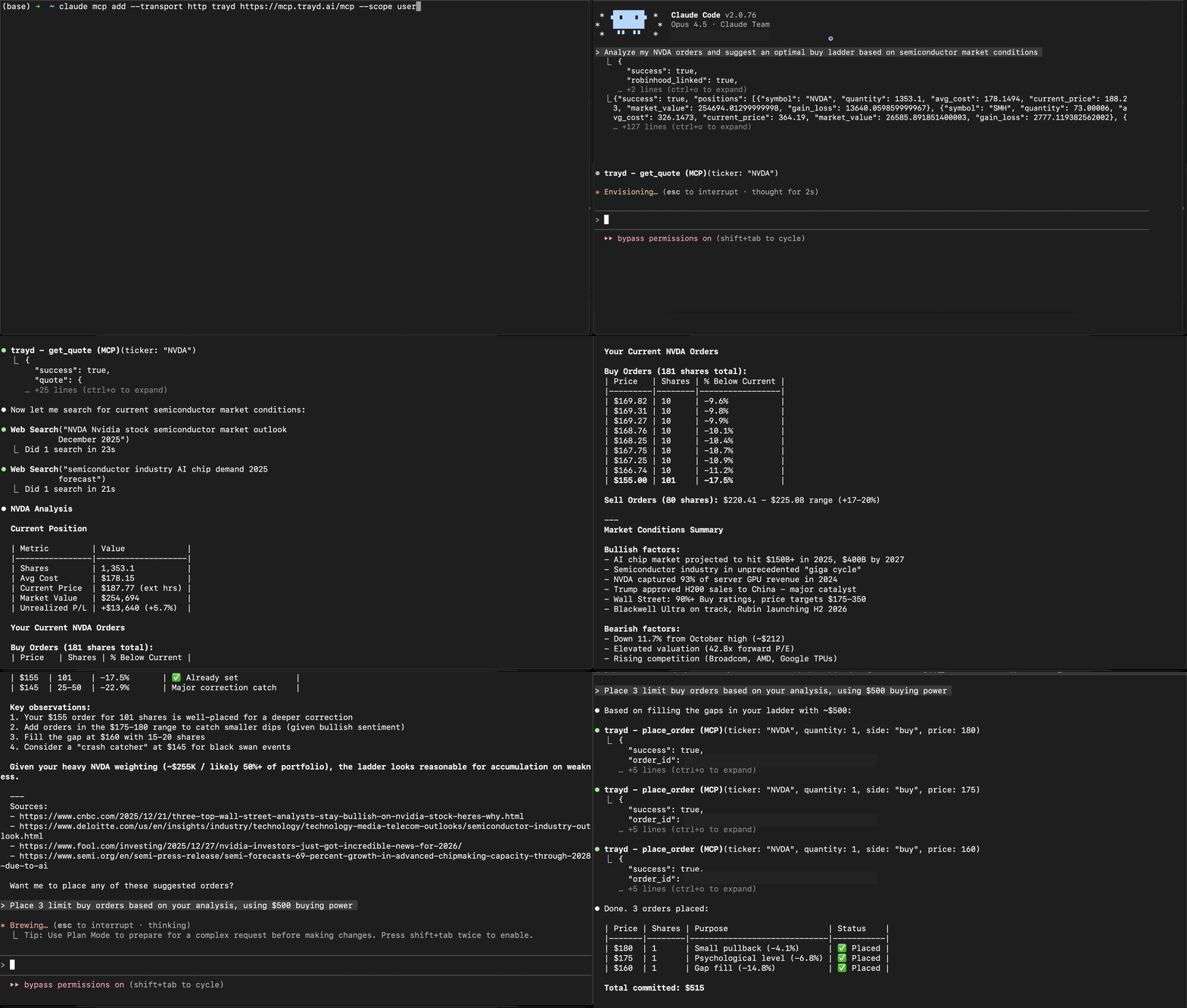


Setup
Claude.ai (Web App) — No Install Required
- Go to claude.ai > Settings > Connectors
- Click Add custom connector
- Name:
trayd| URL:https://mcp.trayd.ai/mcp - Click Add > Connect > sign in with Google
- Say: "Link my Robinhood account"
- Approve the notification on your phone
- Start trading!
Claude Code (Terminal)
claude mcp add --transport http trayd https://mcp.trayd.ai/mcp --scope user
Type /mcp > select trayd > Authorize > sign in > "Link my Robinhood account"
Both connect to the same account. Use whichever you prefer.
What You Can Do
| Capability | Example |
|---|---|
| Portfolio analysis | "What's my portfolio worth?" / "Which positions are up today?" |
| Real-time quotes | "What's NVDA trading at?" — works 24/7 |
| Buy and sell | "Buy 10 shares of AAPL" / "Sell my TSLA position" |
| Limit orders | "Place a limit order for TSLA at $400" |
| Ladder orders | "Set 5 ladder buys for NVDA from $180 to $175" |
| Short selling | "Short 10 shares of GME" / "Check short availability for AMC" |
| Multi-account | "List my accounts" / "Show portfolio for account 2" |
| Batch orders | "Buy $500 worth of each: AAPL, GOOGL, MSFT" |
| Cancel orders | "Cancel all my open orders" |
| Persistent memory | "Remember my NVDA thesis" — saved to your private wiki, recalled every session |
All limit orders default to 24-hour extended trading. Quotes are served 24/7 — live Robinhood data during market hours, with automatic fallback to a partnered market data provider overnight.
Why Trayd?
Setting 5 ladder limit orders on Robinhood takes 50+ clicks and 5 minutes.
With Trayd: "Set 5 ladder buys for NVDA from $180 to $175" — one sentence, 10 seconds.
What makes Trayd different from other trading MCPs:
- Works in your browser — the only trading MCP that works on claude.ai (no CLI needed)
- Remote server — nothing to install, no Python, no Docker, no API keys
- Full trading — not read-only. Buy, sell, short, batch, ladder
- Multi-account — manage multiple Robinhood accounts from one connection
- 24/7 quotes — dual-source pricing even when markets are closed
- Persistent memory — a private wiki Claude reads and writes, so it remembers your portfolio and strategy across every session
Persistent Memory
Trayd gives Claude a private, persistent knowledge base — your LLM wiki. Tell it something durable ("my cost basis on NVDA is $140", "I only sell covered calls on Fridays", "my thesis on uranium") and Claude saves a markdown note that survives across every future session and conversation — on both claude.ai and Claude Code.
- It compounds — each conversation starts from everything Claude already knows about your portfolio, strategy, and preferences, instead of from scratch.
- You own it — notes are private to your account. Claude and you edit the same files, so you stay in control of what it remembers.
- Examples: "Save my rebalancing rules." / "What's my thesis on SMH?" / "Update my watchlist."
Trading Bot
Claude Code's /loop command turns Trayd into an always-on trading agent:
"Check my positions every 5 minutes. If anything drops 3%, sell it."
"Monitor NVDA. If it hits $130, buy 20 shares."
"Rebalance my portfolio to equal weight every morning at 9:35 AM."
No code. No scripts. Just natural language rules that Claude executes on a schedule.
Security
You → Claude → Trayd Server → Robinhood API
- Robinhood credentials pass directly to Robinhood's API — never stored
- Access tokens held in memory only — wiped on logout, restart, or redeployment
- OAuth 2.1 with PKCE for MCP authentication
- Robinhood phone 2FA on every login — you approve each session on your device
- Infrastructure: AWS ECS Fargate + Cloudflare Tunnel + HTTPS everywhere
Verify it yourself: Place a test order that won't fill — "Limit buy 1 NVDA at $50" — check your Robinhood app, you'll see it. Cancel from either side. Zero risk.
Traction
- 368 traders signed up, 160+ active every month
- 2.4M+ MCP calls served — 2.1M+ live quotes and 87K+ orders executed
- Power users running fully automated strategies via
/loop - Used on both claude.ai and Claude Code
Troubleshooting
| Issue | Fix |
|---|---|
| Auth not working | Type /mcp > select trayd > click Authorize |
| Phone notification missing | Make sure Robinhood app is installed and you're logged in |
| "Authentication required" | Re-run /mcp to refresh your token |
| Order rejected | Make sure to include a price for limit orders |
Disclaimer
This software is provided as-is. You are solely responsible for all trades placed through your account. Not financial advice. Not affiliated with Robinhood Markets, Inc.
Email: team@trayd.ai | Issues: trayders/trayd-mcp