Umless
Open-source MCP server and CLI that finds filler words, stutters, retakes and long pauses in a talking-head video and renders a tighter copy with ffmpeg. analyze_video returns a timestamped cut list; clean_video renders it. Needs ffmpeg and your OpenRouter key (audio is sent to OpenRouter for transcription).
Documentation
Umless
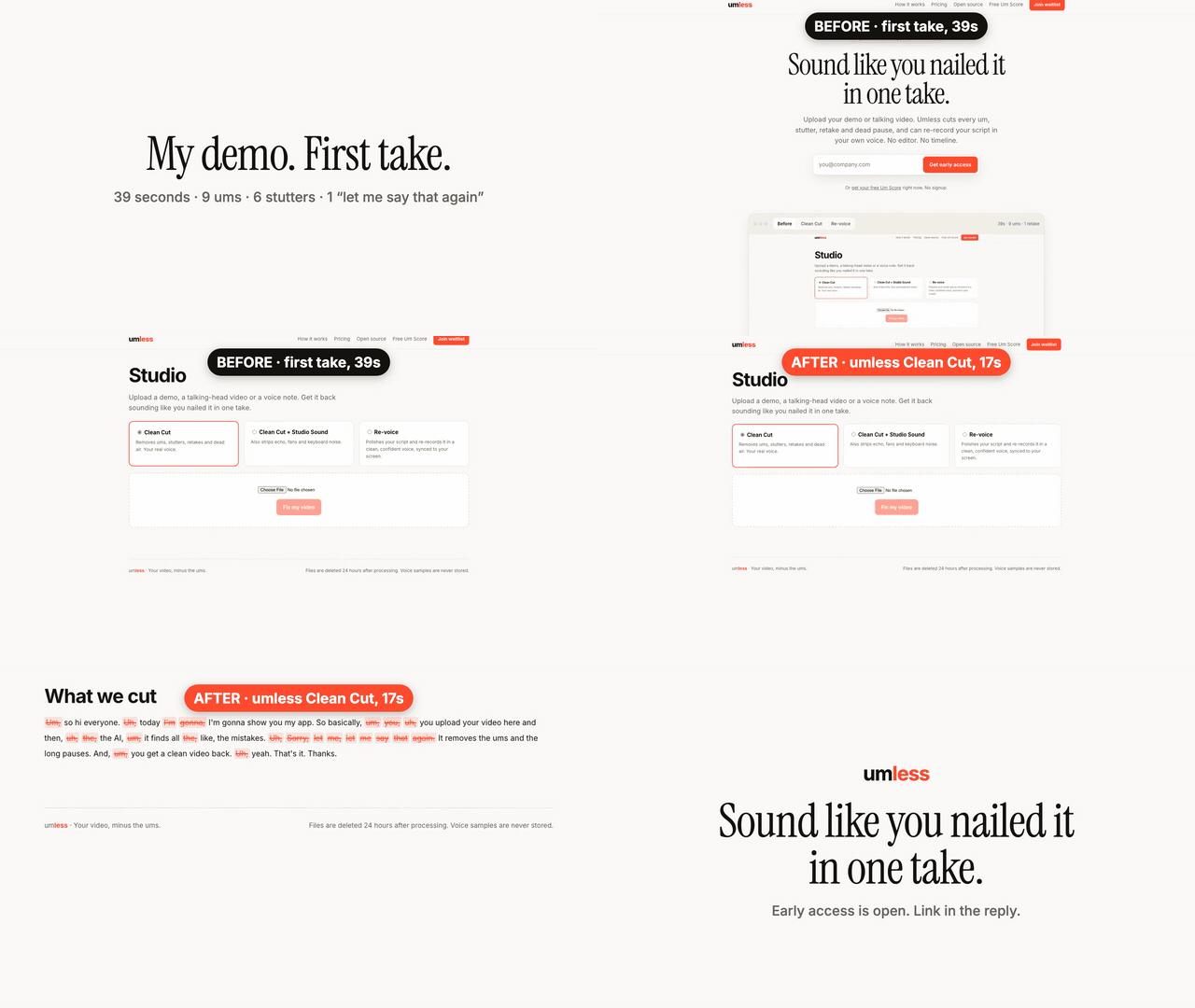
Record once, post today. Umless is an open-source command-line tool that cuts ums, stutters, retakes and dead air out of talking-head video and demo recordings. On our test take it turned 39.4 s into 17.5 s: 9 ums, 6 stutters and one "let me say that again" removed, with no clicks at the cuts.
Quick start · Use it from AI agents (MCP) · How it works · Hosted version · Report a bad cut
If Umless saves you an editing session, a ⭐ helps other people find it.
Quick start
You need Node 20+, ffmpeg on your PATH and an OpenRouter key. A 3-minute video costs about $0.02 in API calls.
export OPENROUTER_API_KEY=...
npx -y github:thoufeekx/umless my-video.mp4          # writes my-video.umless.mp4
npx -y github:thoufeekx/umless my-video.mp4 --score  # Um Score only, no render
The first run builds the CLI from GitHub, so it takes a minute; later runs are cached. (npx umless without the github: prefix will work once the package is on npm.) From a clone:
git clone https://github.com/thoufeekx/umless && cd umless && npm install
npx tsx cli/umless.ts my-video.mp4
The terminal prints an Um Score (ums per minute, stutters and retakes, seconds of dead air), your transcript with every cut word struck through, and the before/after length. Audio files work too and come out as .m4a.
What it cuts
- Filler words: um, uh, er and similar. The transcriber keeps every "um" (many speech-to-text models silently drop them).
- Stutters and repeated phrases: "the the", "so so so".
- Retakes and false starts: say a sentence twice and it keeps the last clean one.
- Dead air: long pauses shrink to a natural 0.25 s.
- Clean cuts: every boundary snaps to the quietest 10 ms nearby, with 15 ms fades, so you don't hear clicks.
On real footage
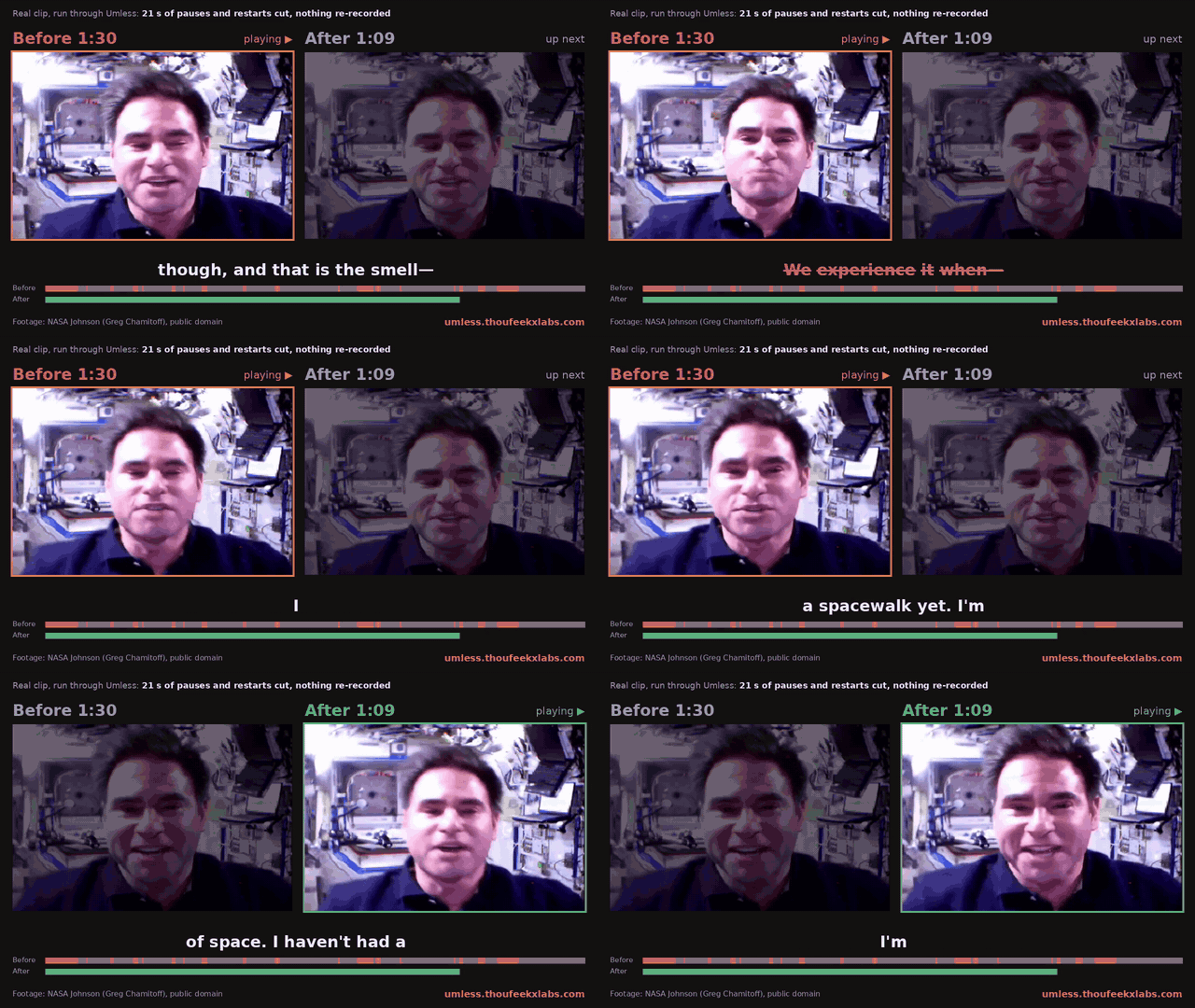
The 39 s test take above is scripted. Here are two unscripted clips from Wikimedia Commons, run through the same CLI with no hand edits:
| Clip | Before | After | What it cut |
|---|---|---|---|
| NASA astronaut Greg Chamitoff, "The Smell of Space" (public domain) | 1:30 | 1:09 (−23%) | 1 restart, 1 false start, 1 repeat, 17.7 s of dead air |
| Mick Harvey, interviewed by Andrew McMillen (CC BY 3.0) | 1:30 | 0:54 (−40%) | 2 restarts, 1 repeat, 32.2 s of dead air |
On these clips the transcriber returned very few "um" tokens, so the savings come from restarts, repeats and pauses. Sources: Chamitoff clip (NASA Johnson; no endorsement implied), Harvey clip (Andrew McMillen, CC BY 3.0, trimmed to 90 s and cut by Umless).
Use it from AI agents: MCP server and Claude skill
umless mcp starts an MCP server on stdio with two tools:
| Tool | What it does | Returns |
|---|---|---|
analyze_video(path, retakes?) | Transcribes and finds every cut, no render | cuts[] (start, end, type: filler / repeat / retake / silence, text, reason), keep[] segments, Um Score, counts, before/after duration |
clean_video(path, out?, options?) | Renders the cleaned file (options: retakes, studio_sound) | output path, before/after duration, seconds saved, counts, the full cut list |
The server needs ffmpeg on the PATH and your OPENROUTER_API_KEY in its environment. Files are read from and written to the machine the server runs on.
Claude Code
claude mcp add umless -e OPENROUTER_API_KEY=$OPENROUTER_API_KEY -- npx -y github:thoufeekx/umless mcp
Or install the plugin, which adds the MCP server and the umless skill (so "remove the ums from demo.mp4" just works):
/plugin marketplace add thoufeekx/umless
/plugin install umless@umless
Claude Desktop (claude_desktop_config.json) and Cursor (~/.cursor/mcp.json or .cursor/mcp.json) use the same block:
{
  "mcpServers": {
    "umless": {
      "command": "npx",
      "args": ["-y", "github:thoufeekx/umless", "mcp"],
      "env": { "OPENROUTER_API_KEY": "sk-or-..." }
    }
  }
}
Skill only (Claude Code, uses the CLI if the MCP server is not connected):
mkdir -p ~/.claude/skills/umless && curl -fsSL https://raw.githubusercontent.com/thoufeekx/umless/main/skills/umless/SKILL.md -o ~/.claude/skills/umless/SKILL.md
To check the server end to end on your machine: node scripts/mcp-e2e.mjs testdata/demo_raw.mp4 (calls both tools over stdio).
How it works
ffmpegpulls the audio track.- ElevenLabs Scribe v2 (through OpenRouter) transcribes it word by word with timings. A second, cheap pass (Parakeet) finds the ums Scribe skipped, and each one is cut only where the audio shows a sound between two words.
- Rules mark fillers and repeats, and an LLM (
gpt-5-miniby default) marks retakes and false starts. ffmpegrenders the kept segments into a new file.
Change the models with UMLESS_STT_MODEL, UMLESS_FILLER_MODEL (off disables the second pass) and UMLESS_LLM_MODEL. The pipeline is in lib/pipeline.ts, the CLI in cli/umless.ts, the cut-list layer in lib/cutlist.ts and the MCP server in mcp/server.ts.
To try it before using your own footage, run it on testdata/demo_raw.mp4, a 39 s take with 9 ums, 6 stutters and a retake.
Why open source
Most filler-word removers are closed. You can't see why a word was cut, and you pay per minute forever. With Umless you can read every rule, change the thresholds and run it in your own scripts and pipelines.
Don't want a terminal?
- Umless hosted: upload in the browser, plus Studio Sound and re-voicing a clean script in your own voice. Join the waitlist.
- Done-for-you: send raw recordings and get finished edits back. Your first cleanup is free.
Roadmap
npx umlesson npm (today:npx github:thoufeekx/umless)- Timeline export (FCPXML / EDL) so you can finish in Premiere, Resolve, Final Cut or Kdenlive
- A
--jsoncut list on the CLI (the MCP server already returns one) - A local transcription option (whisper.cpp)
Want one of these sooner? Open an issue or send a PR.
Contributing
Issues and PRs are welcome. If Umless cut something it shouldn't have, open an issue with the command you ran and the struck-through transcript it printed. Development and deploy notes for the hosted app are in docs/DEVELOPMENT.md.
License
MIT © 2026 ThoufeekX Labs