restic-defensive-mcp
Structurally read-only stdio MCP server for inspecting restic repositories. Repositories and credentials are sealed at startup; only a fixed subset of restic subcommands can run (snapshots/ls/find/stats). No shell, no backup/restore/forget/prune.
Documentation
restic-defensive-mcp
Inspect restic snapshots through a read-only stdio MCP server. List backups, browse file metadata, find paths, and get repository statistics.
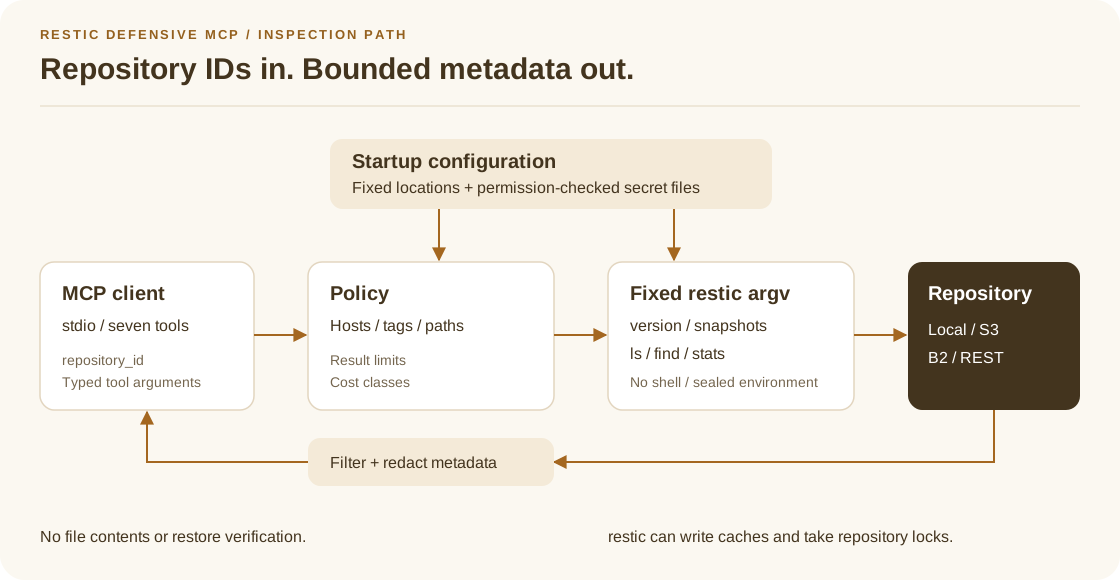
Repository locations remain fixed after startup. The runner accepts only
version, snapshots, ls, find, and stats with controlled arguments.
It uses no shell. Policies restrict hosts, tags, paths, and result sizes.
Errors remove secrets, and each tool reports its cost class.
Requirements
- Go 1.26.10+ or Go 1.27.3+ for source builds. Use the latest patch of a supported Go release.
- restic 0.17.1+ on
PATH, or an explicitrestic_binarypath. CI covers 0.17.1 and 0.19.1. - An MCP client that supports local stdio servers
Install a release
Download the archive for your system and SHA256SUMS from
GitHub Releases.
Release binaries support Linux amd64/arm64, macOS arm64, and Windows amd64.
Install restic separately.
Compare the archive's SHA-256 checksum with its entry in SHA256SUMS.
On Linux, use sha256sum; on macOS, use shasum -a 256.
On Windows, use Get-FileHash -Algorithm SHA256.
Extract the archive. On Linux and macOS, give the binary execute permission with chmod +x if necessary.
Run the binary with --version before configuration.
Install (from source)
git clone https://github.com/ThomasCrouzet/restic-defensive-mcp.git
cd restic-defensive-mcp
make build
./bin/restic-defensive-mcp --version
Quick start
- Create regular password and repository location files outside the repository. Do not use symlinks. Enter the password through an editor:
secret_dir="${XDG_CONFIG_HOME:-$HOME/.config}/restic-defensive-mcp"
install -d -m 700 "$secret_dir"
install -m 600 /dev/null "$secret_dir/repository"
printf '%s\n' '/path/to/your/repo' > "$secret_dir/repository"
install -m 600 /dev/null "$secret_dir/password"
"${EDITOR:-vi}" "$secret_dir/password"
-
Copy config.example.yaml outside the repository.
-
Set its repository file, password file, and host/tag/path allowlists.
-
Start the binary:
./bin/restic-defensive-mcp --config /path/to/config.yaml
- Register the absolute binary path and
--configargument in your MCP host.
Example MCP client configuration:
{
  "mcpServers": {
    "restic-defensive": {
      "command": "/absolute/path/to/restic-defensive-mcp",
      "args": ["--config", "/etc/restic-defensive-mcp/config.yaml"]
    }
  }
}
Tools (exactly seven)
| Tool | Cost | Purpose |
|---|---|---|
restic_capabilities | light | Versions, limits, backends, warnings |
list_repositories | light | Configured IDs and allowlists (no URLs) |
list_snapshots | light | Bounded snapshot list |
get_snapshot | light | Metadata for one snapshot |
browse_snapshot | moderate | Directory listing inside allowlisted path |
find_files | moderate or expensive | Simple glob search |
repository_stats | moderate or expensive | Size/count statistics for permitted modes |
There is no run_restic, backup, restore, forget, prune, unlock,
check --read-data, or repository URL argument.
Full request/response shapes: docs/tool-contract.md.
Configuration
See config.example.yaml for all settings:
- MCP callers pass only
repository_id - Prefer
repository_file+password_fileover inline secrets - Repository locations and backend credentials are loaded and sealed at boot; changing their source files does not retarget a running server
- The password file path stays fixed. Restic reads its contents for each command. Restart the server after repository location or backend credential changes.
- S3 repositories require nonempty
AWS_ACCESS_KEY_IDandAWS_SECRET_ACCESS_KEYvalues inenv_files.AWS_SESSION_TOKENis optional. Instance-role credentials and anonymous S3 access are unsupported.AWS_PROFILEandAWS_SHARED_CREDENTIALS_FILEare rejected because credential profiles can execute helpers. allowed_hosts,allowed_tags, andallowed_pathsenforce access restrictions- Empty allowlists mean no restriction for that dimension; the server logs a
boot-time warning (
empty_allowlist) so operators notice - Unknown YAML keys and multiple YAML documents are rejected
- Secret files must be regular, non-symlink files; Unix requires mode
0600or stricter, while Windows deployments must enforce equivalent NTFS ACLs find_filesrequires an explicitpathwhen multiple roots are allowlisted- Runtime limits: zeros become defaults; values outside absolute min/max are rejected (not silently clamped). Defaults are the recommended starting point; values may be raised only up to those ceilings
Supported backends
| Backend | Supported |
|---|---|
| local filesystem | yes (absolute paths only) |
| S3 | yes (credentials via allowlisted env files) |
| Backblaze B2 | yes |
| REST server | yes |
| SFTP | no (spawns ssh) |
| rclone | no (spawns rclone) |
| other | no |
Compatibility notes: docs/restic-compatibility.md.
Local effects: cache and locks
Read-only inspection can have these local and repository effects:
- restic may create or update a local cache (
cache_diror default) - restic may take a repository lock during snapshots/ls/find/stats
This server never intentionally mutates backup contents or snapshot sets.
It also never runs full data verification (restic check --read-data).
repository_stats answers size/count questions only.
Details: SECURITY.md.
Privacy limits
Snapshot file names, paths, hosts, tags, sizes, and timestamps are sensitive. This server:
- never returns file contents
- never returns repository URLs or secret file paths
- bounds listings and find results
- sanitizes control characters in names
- keeps audit logs free of full paths by default
Demo (local temporary repository)
make demo
The demo starts the MCP executable through stdio and uses real restic commands against a temporary repository.
internal/testrepo creates two backups and removes the fixture after the run.
The suite calls all seven tools and rejects paths outside the allowlist.
make integration also runs the in-memory MCP regression suite.
These tests inspect metadata. They do not restore file contents.
Go can download modules on a new checkout.
Development
make fmt
make lint
make test          # local regression tests
make race          # race detector
make fuzz-smoke    # short run of every fuzz target
make integration   # executable and in-memory MCP with real restic
make vet
See Testing for coverage, local artifacts, and repeatable commands. See Releasing for the publication procedure and CI gates.
Dependencies
| Module | Why |
|---|---|
github.com/modelcontextprotocol/go-sdk | Official MCP Go SDK (stdio server/client) |
gopkg.in/yaml.v3 | Config file parsing |
Restic itself is an external binary, not a Go module.
Documentation
- Tool contract: inputs, outputs, policies, and costs.
- restic compatibility: commands and backend limits.
- Security: secret files, metadata privacy, and remaining risks.
- Contributing and Changelog.
License
MIT, see LICENSE.