SpecStream
Give your agent finished lists from the live web: every row with its source, priced per match. Ask in plain English for companies, local businesses, tenders, grants, jobs or research papers and get only the rows that fit.
Hosted MCP Server
npx add-mcp 'https://api.specstream.ai/mcp'Installs into Claude Code, Codex, Cursor and more
Documentation

The live web data engine for teams and agents.
Website · Docs · Pricing · MCP Registry
Finished lists from the live web for your agent, every row with its source, priced before anything runs. Ask for the list you need in plain words and get all of it: only the matches, each with the page it came from, kept current and sent where you work. You pay only for the matches.
Your agent asks for "food banks in Texas, with their annual revenue" and gets rows it can cite, each with the page behind it. It sees the price first, and a search that finds nothing costs nothing.
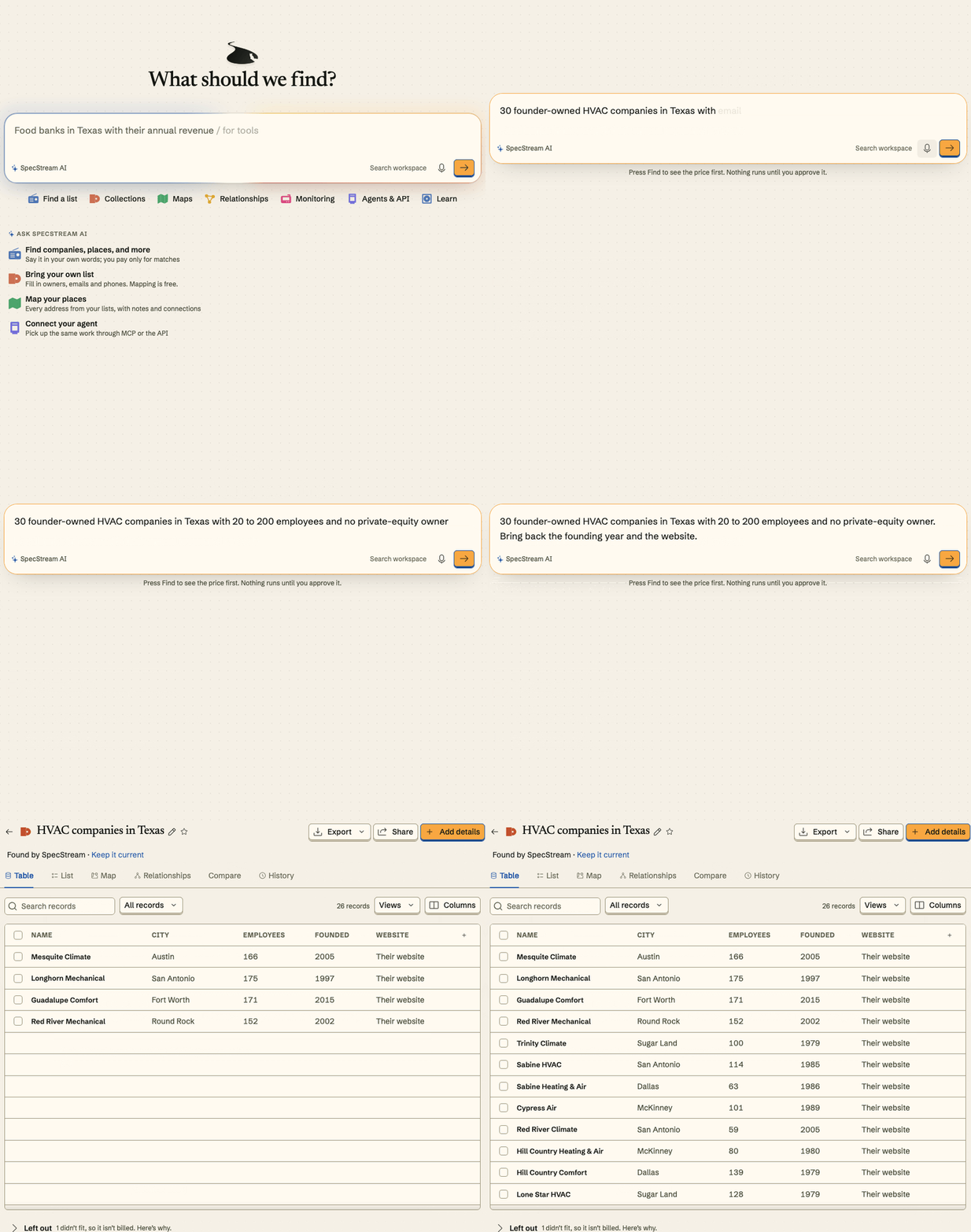




This repository holds what you install around SpecStream: MCP client setup, agent plugins and skills, SDKs, the n8n node, a GitHub Action, and examples. The product itself runs at specstream.ai. Licensed MIT.
| Path | What it is |
|---|---|
server.json | Entry for the official MCP Registry, ai.specstream/specstream |
skills/ | Agent skills: compile, review-work, approve-work, continue-work |
plugins/claude-code/ | Claude Code plugin (MCP server and the four skills) |
plugins/github-agent/ | Plugin for agents that read the agent-plugins format |
.cursor-plugin/ | Cursor plugin |
packages/sdk-py/ | specstream-client: Python client and the specstream command |
packages/sdk-ts/ | @specstream/sdk: TypeScript client |
packages/mcp-stdio/ | specstream-mcp-stdio: stdio proxy for clients that only start local servers |
integrations/n8n/ | n8n-nodes-specstream: n8n community node |
integrations/vscode/ | VS Code extension: MCP sign-in and @specstream chat |
actions/find-action/ | GitHub Action that runs a request and uploads a CSV |
Formula/ | Homebrew formula for the command line |
examples/ | Python SDK, TypeScript SDK, OpenAI Agents SDK and LangChain |
Connect an agent
The MCP server is https://api.specstream.ai/mcp (Streamable HTTP, 97 tools). Your agent works on your account: the same balance, permissions and spending limits you have.
-
Open Agents & API in the workspace and create an API key. Give it only what the task needs: read, prepare, or execute, the projects it may use, an expiry, and a spending limit.
-
Put it in an environment variable, so no file holds it:
export SPECSTREAM_API_KEY="ss_live_..." -
Add the server to your client, below.
Clients that support MCP sign-in can connect without a key. Each guide at specstream.ai/docs/mcp shows the current steps.
New accounts start with $10 of work free for 30 days, no card.
Claude
In Claude, go to Customize > Connectors, choose Add custom connector, name it SpecStream and paste https://api.specstream.ai/mcp. Steps for both sign-in and a key: docs/mcp/claude.
Claude Code
claude mcp add --transport http specstream https://api.specstream.ai/mcp \
  --header "Authorization: Bearer $SPECSTREAM_API_KEY"
Or install the plugin, which adds the server and the four skills:
/plugin marketplace add Specstreamai/specstream-tools
/plugin install specstream@specstream
ChatGPT
Go to ChatGPT Plugins, choose the plus button, then Add custom MCP server. Paste https://api.specstream.ai/mcp under Connection and set Authentication to OAuth. Steps: docs/mcp/chatgpt.
Codex
Add to ~/.codex/config.toml:
[mcp_servers.specstream]
url = "https://api.specstream.ai/mcp"
bearer_token_env_var = "SPECSTREAM_API_KEY"
Cursor
Add to ~/.cursor/mcp.json, or .cursor/mcp.json in one project:
{
  "mcpServers": {
    "specstream": {
      "url": "https://api.specstream.ai/mcp",
      "headers": { "Authorization": "Bearer ${env:SPECSTREAM_API_KEY}" }
    }
  }
}
VS Code
Add to .vscode/mcp.json. VS Code asks for the key once and keeps it out of the file.
{
  "inputs": [
    { "type": "promptString", "id": "specstream-key", "description": "SpecStream API key", "password": true }
  ],
  "servers": {
    "specstream": {
      "type": "http",
      "url": "https://api.specstream.ai/mcp",
      "headers": { "Authorization": "Bearer ${input:specstream-key}" }
    }
  }
}
Windsurf
Add to ~/.codeium/windsurf/mcp_config.json:
{
  "mcpServers": {
    "specstream": {
      "serverUrl": "https://api.specstream.ai/mcp",
      "headers": { "Authorization": "Bearer ${env:SPECSTREAM_API_KEY}" }
    }
  }
}
Zed, Cline, and Continue
These start a local server, so use the stdio proxy. It forwards your key from the environment and nothing else.
pip install specstream-mcp-stdio
Zed, in settings.json:
{
  "context_servers": {
    "specstream": {
      "command": "specstream-mcp-stdio",
      "args": [],
      "env": { "SPECSTREAM_MCP_URL": "https://api.specstream.ai/mcp" }
    }
  }
}
Cline, in cline_mcp_settings.json:
{
  "mcpServers": {
    "specstream": {
      "command": "specstream-mcp-stdio",
      "args": [],
      "env": { "SPECSTREAM_MCP_URL": "https://api.specstream.ai/mcp" }
    }
  }
}
Continue, in .continue/mcpServers/specstream.yaml:
name: SpecStream
version: 1.0.0
schema: v1
mcpServers:
  - name: specstream
    type: stdio
    command: specstream-mcp-stdio
    args: []
    env:
      SPECSTREAM_MCP_URL: https://api.specstream.ai/mcp
      SPECSTREAM_API_KEY: ${{ secrets.SPECSTREAM_API_KEY }}
Start Zed and Cline from a shell where SPECSTREAM_API_KEY is set. Agents installing SpecStream for someone can follow llms-install.md.
Gemini CLI
gemini mcp add --transport http specstream https://api.specstream.ai/mcp \
  --header "Authorization: Bearer $SPECSTREAM_API_KEY"
Or in ~/.gemini/settings.json:
{
  "mcpServers": {
    "specstream": {
      "httpUrl": "https://api.specstream.ai/mcp",
      "headers": { "Authorization": "Bearer $SPECSTREAM_API_KEY" }
    }
  }
}
n8n
Install the community node from Settings > Community nodes: n8n-nodes-specstream. It reads a request, shows the quote, approves the maximum you type in, and returns the results. Three importable workflows are in integrations/n8n/workflows. An AI agent in n8n can also use the MCP Client Tool node with endpoint https://api.specstream.ai/mcp, transport HTTP Streamable and a Bearer credential.
LangChain
import os
from langchain_mcp_adapters.client import MultiServerMCPClient

client = MultiServerMCPClient({
    "specstream": {
        "transport": "streamable_http",
        "url": "https://api.specstream.ai/mcp",
        "headers": {"Authorization": f"Bearer {os.environ['SPECSTREAM_API_KEY']}"},
    }
})
tools = await client.get_tools()
A full agent is in examples/langchain-mcp.
OpenAI Agents SDK
import os
from agents import Agent, Runner
from agents.mcp import MCPServerStreamableHttp

async with MCPServerStreamableHttp(
    name="SpecStream",
    params={
        "url": "https://api.specstream.ai/mcp",
        "headers": {"Authorization": f"Bearer {os.environ['SPECSTREAM_API_KEY']}"},
    },
    cache_tools_list=True,
) as server:
    agent = Agent(name="Researcher", instructions="Use SpecStream for lists.", mcp_servers=[server])
    result = await Runner.run(agent, "Food banks in Texas, with their annual revenue. Show me the price first.")
A full agent is in examples/openai-agents-sdk.
Any other client that speaks remote MCP over Streamable HTTP works with the address above and an Authorization: Bearer header.
What the agent does, in order
Nothing is spent until a person – or an agent inside a limit a person set – approves a price.
compilereads the request and returns how SpecStream understood it: the kind of thing, the conditions every result must meet, the facts to bring back.quote_capacity_workreturns the price and the most the work can cost. A price lasts 30 minutes.authorize_capacity_workapproves that exact quote, with the maximum in cents (confirm_max_cents) and a stableidempotency_key, so a retry never pays twice.get_findshows progress while rows arrive.list_find_rowsreturns results with the reason and the source for each fact.export_find,share_find, andsend_to_destinationmove results on. Reading, exporting, and sharing cost nothing.
Each delivered result costs 10 cents, 30 cents or $1 depending on how many facts it carries. A search that finds nothing is free. See pricing.
The four skills in skills/ teach an agent this order and where to stop and ask: compile, review-work, approve-work, continue-work.
SDKs and command line
pip install specstream-client        # Python 3.12+, import specstream_client, command: specstream
npm install @specstream/sdk          # Node 22+
brew tap specstreamai/specstream-tools https://github.com/Specstreamai/specstream-tools
brew install specstream              # the command line
import os
from specstream_client import Client

client = Client(os.environ["SPECSTREAM_API_KEY"])
read = client.compile("Datasets on urban tree canopy published since 2020 under an open license.")
offer = client.quote_capacity_work({
    "ast_hash": read["ast_hash"], "operation": "find",
    "requested_units": read["ast"]["limit"]["max"],
})
print(offer["maximum_cents"], offer["expires_at"])
import { Client } from "@specstream/sdk";

const client = new Client({ apiKey: process.env.SPECSTREAM_API_KEY! });
const read = await client.compile("Datasets on urban tree canopy published since 2020 under an open license.");
Working scripts that run a request end to end are in examples/python-sdk and examples/typescript-sdk.
GitHub Action
- uses: Specstreamai/specstream-tools/actions/find-action@v1
  with:
    request: Open tenders on SAM.gov for translation services with a deadline after November 1. Include the buyer and the estimated value.
    api_key: ${{ secrets.SPECSTREAM_API_KEY }}
    confirm_max_usd: "10"
The step stops if the price is above confirm_max_usd.
Three requests
Say what you need the way you would to a colleague. These come from the request templates in the product.
Software companies in Germany with 50 to 500 employees that are hiring salespeople. Include the job post and contact email. One row per company, with its size, the sales job post and the contact email the company published. Each row says in one line why it fits, with the page each fact came from. Companies SpecStream could not confirm are listed apart, and they cost nothing.
Open tenders on SAM.gov for translation services with a deadline after November 1. Include the buyer and the estimated value. One row per notice, with the buyer, the estimated value, the deadline and a link to the notice. Code compares the deadline with the date you gave.
Rust command-line tools on GitHub with more than 1,000 stars, pushed to in the last month, under an MIT or Apache license. One row per repository, with its stars, last push and license. Code compares the stars and the date with your numbers, and each row links to the repository.
Reading goes where those things live: registries and official APIs, maps and directories, job boards, research indexes, news, and each result's own site. SpecStream reads at the moment you ask.
Docs and support
- Getting started, API, SDKs, MCP
- Pricing
- Agent guide and
llms.txt - Support: support@specstream.ai
- Security reports: see SECURITY.md
License
MIT. See LICENSE. SpecStream the service is governed by its terms.