Doco
Give AI agents a shared document workspace with stable block IDs, conflict-safe writes, search, Markdown, and real-time collaboration.
Documentation
Doco
📖 中文版
The document space where humans and AI agents write together. An open-source rich-text collaborative editor that puts your data back in your hands — and treats your AI agents with the same care: block-level stable addressing, optimistic concurrency control, and a 29-tool MCP server, so agents read and write your knowledge base as safely as a careful human editor.
- Hosted: doco.page — free during beta
- Connect your agent:
claude mcp add doco -- npx -y --package doco-agent-cli doco mcp - CLI:
npm i -g doco-agent-cli && doco login - npm: doco-agent-cli · API docs: doco.page/api-docs
Claude Code Plugin Marketplace
/plugin marketplace add songofhawk/doco
/plugin install doco@doco
The marketplace bundles the Doco MCP server and the safe read → version → protected-write operating protocol. Tokens remain in Claude Code's local configuration and are never included in the plugin repository.
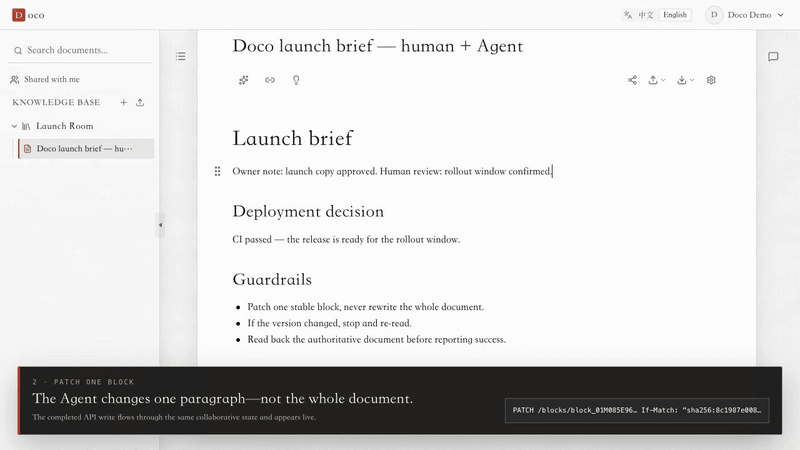
Why agents are safe here
| Capability | What it means |
|---|---|
| Block-level stable addressing | Every paragraph has a block_<ULID> id — position-independent, survives drags and folds |
| Optimistic concurrency | Reads return a sha256 version; writes require If-Match; on 409 the agent re-reads, merges, retries — blind overwrites are impossible |
| Markdown round-trip | Export with ?annotate=anchors; write the whole document back and block ids are preserved |
| Human–agent co-editing | Agent writes flow through the same Yjs document — changes appear live in the browser |
| Transactions & idempotency | Batch operations commit atomically; Idempotency-Key makes retries side-effect-free |
Features
Editing Experience
- Rich text editing: headings, lists, blockquotes, task lists, code blocks (syntax highlighting), tables, images, links, text styling, and more
/slash command: type/to open the command palette with fuzzy search — supports pinyin abbreviations for Chinese users- Floating toolbar: auto-appears on text selection, all formatting actions within two centimeters of your cursor
- Block drag-and-drop: hover the left edge of any paragraph to reveal a drag handle — reorder content like building blocks
- Collapsible sections: fold away sections you're not working on; collapse state persists across sessions
- Auto heading numbering: one-click toggle — H1–H4 headings automatically maintain hierarchical numbering (
1.1.11.1.1) - Keyboard shortcuts:
⌥↑/↓move blocks,⌘Dduplicate blocks,⌘⌥1/2/3/0switch heading levels
Text-to-Diagram
Write Mermaid or PlantUML source code directly in your document. Diagrams render in place. Double-click to edit, fullscreen view, pinch-to-zoom — no more export-import-replace cycles with draw.io.
- Mermaid: flowcharts, sequence diagrams, class diagrams, Gantt charts, state diagrams, and more
- PlantUML: sequence diagrams, class diagrams, use case diagrams, component diagrams, and more
Spreadsheet
A full spreadsheet engine embedded in your documents:
- Formula evaluation, cell formatting
- Freeze panes, sort & filter
- Cell merge / split
- CSV import / export
Use it inline as a content block, or pop it out as a standalone full-screen spreadsheet.
Knowledge Base
- Knowledge Base → Folders (nestable) → Documents — a three-level structure
- Drag-and-drop reordering, renaming, and moving in the sidebar
- Whole-KB ZIP export preserving folder hierarchy, with bundled images
- Lossless native
.doco.ziptransfer for a document, folder, or whole knowledge base
Real-time Collaboration
Built on the Yjs CRDT algorithm:
- No save button — changes sync automatically
- Offline-first: browser IndexedDB is the primary store; the server holds a snapshot. Edit without a network, merge automatically when reconnected
- Seamless device switching: close your laptop, pick up your phone, keep writing
Import / Export
| Format | Import | Export |
|---|---|---|
| Doco native package | ✅ Document / folder / KB | ✅ Lossless document / folder / KB |
| Markdown | ✅ Paste / file upload | ✅ Single doc & KB bundle |
| Word (DOCX) | ✅ | ✅ |
| ✅ | ✅ | |
| HTML | ✅ | — |
| WeChat Official Account | — | ✅ (with theme preview) |
| Images (in-document) | ✅ (paste / drag-drop) | ✅ (bundled in ZIP) |
API · MCP · CLI
Three channels, one contract:
- REST API: OpenAPI 3.1 spec, Bearer Token auth, ETag versioning, cursor pagination, idempotency keys
- MCP server:
doco mcp(ships insidedoco-agent-cli) — 29 tools plusdoco://resources - doco CLI:
login / whoami / docs / blocks / edit / mcp, global--json, writes internalize ETag/If-Match
Turn your docs into programmable assets — script your own backups, let an agent organize your knowledge base, pipe docs from your publishing workflow to your blog. Built-in API documentation page, ready to use out of the box.
Tech Stack
| Layer | Technology |
|---|---|
| Frontend Framework | React 18 + Vite + TypeScript |
| CSS | Tailwind CSS v4 |
| Editor | Tiptap v3 (ProseMirror) |
| Collaboration | Yjs (CRDT) + Hocuspocus |
| Diagrams | Mermaid + PlantUML |
| Backend | Node.js + Express + Hocuspocus Server |
| Database | better-sqlite3 (SQLite, WAL mode) |
| UI Components | Radix UI, Lucide React, Tippy.js |
Quick Start
Prerequisites
- Node.js >= 22
- pnpm
Install & Run
# Install frontend dependencies
pnpm install

# Install backend dependencies
cd backend && npm install && cd ..

# Start the frontend dev server (Vite, default :5173)
pnpm run dev

# In another terminal, start the backend (Express + WebSocket, default :8000)
cd backend
npm run dev
Open http://localhost:5173 — it will auto-connect to the backend WebSocket service.
Docker Deployment (recommended)
The complete self-hosted package includes a Caddy frontend, Node.js collaboration backend, persistent SQLite storage, health checks, and a same-origin WebSocket proxy. The public images support both linux/amd64 and linux/arm64.
git clone https://github.com/songofhawk/doco.git
cd doco
cp .env.docker.example .env.docker

# Review .env.docker first, then start with prebuilt Docker Hub images
docker compose --env-file .env.docker up -d

# Verify the deployment
docker compose --env-file .env.docker ps
curl --fail http://localhost:8080/healthz
Open http://localhost:8080 by default. Set ALLOWED_ORIGINS, COOKIE_SECURE, Google OAuth, and SMTP values in .env.docker for your environment. These values are injected when the containers start and are not baked into the images. Application data is stored in the doco-data named volume.
Docker Hub: songofhawkg/doco-frontend · songofhawkg/doco-backend
To build the same images from source instead:
docker compose --env-file .env.docker up -d --build
See the Docker deployment guide for all configuration options, HTTPS, logs, backup, restore, and upgrades. Do not run docker compose down -v unless you intend to delete the database and attachments.
Manual Build & Deployment
# Frontend build
pnpm run build          # output → dist/
pnpm run deploy         # deploy to Cloudflare Pages

# Backend (production)
cd backend
npm start
Project Structure
doco/
├── src/
│   ├── main.tsx                      # App entry point
│   ├── App.tsx                       # Root component, routing, import/export
│   ├── components/
│   │   └── Sidebar.tsx               # KB sidebar (document tree)
│   └── editor/                       # Editor module
│       ├── index.ts                  # Entry, exports DocoEditor component
│       ├── DocoEditor.tsx            # Editor core (Yjs/Hocuspocus init, extension registration)
│       ├── types.ts                  # DocoEditor Props/Ref type definitions
│       └── components/
│           ├── BubbleMenu.tsx        # Selection floating toolbar
│           ├── BlockHandle.tsx       # Block drag handle
│           ├── SlashCommand.ts       # / command palette
│           ├── CommandList.tsx       # Command palette UI
│           ├── suggestions.ts        # Command menu data
│           ├── CollapseExtension.ts  # Block collapse extension
│           ├── DocSettings.tsx       # Document settings (heading numbering, background)
│           ├── MermaidBlock.ts       # Mermaid node definition
│           ├── MermaidComponent.tsx  # Mermaid renderer
│           ├── PlantUMLBlock.ts      # PlantUML node definition
│           ├── PlantUMLComponent.tsx # PlantUML renderer
│           ├── CalloutBlock.ts       # Callout block definition
│           ├── CalloutComponent.tsx  # Callout renderer
│           ├── SpreadsheetBlock.ts   # Spreadsheet node definition
│           ├── SpreadsheetComponent.tsx  # Spreadsheet renderer
│           ├── spreadsheetEngine.ts  # Spreadsheet calculation engine
│           ├── WeChatExportDialog.tsx # WeChat Official Account export
│           ├── KeyboardShortcuts.ts  # Keyboard shortcuts
│           ├── TableOfContents.tsx   # Table of contents
│           ├── CodeBlockComponent.tsx # Code block (highlight + copy)
│           └── ImageComponent.tsx    # Image renderer
├── backend/
│   ├── server.js                     # Entry: Express + Hocuspocus + export routes
│   ├── database.js                   # better-sqlite3 init & schema
│   ├── api.js                        # KB / folder / document REST API
│   ├── auth.js                       # Auth (OAuth + Email + API Token)
│   ├── markdown.js                   # YDoc → Markdown server-side export
│   ├── permissions.js                # Permission management
│   ├── quota.js                      # Quota management
│   ├── openapi.js                    # OpenAPI spec definition
│   └── tests/                        # Backend tests
└── docs/                             # Design docs & proposals
Standalone Frontend Component
The editor core is also published as doco-text-editor. It contains the full Doco editing experience and built-in styles, but has no dependency on Doco authentication, REST APIs, collaboration services, or IndexedDB. The host application decides whether content lives in memory, browser storage, its own backend, or an external system such as ClickUp.
npm install doco-text-editor
import { useRef } from 'react'
import {
  DocoTextEditor,
  type DocoTextEditorRef,
} from 'doco-text-editor'
import 'doco-text-editor/style.css'

const editorRef = useRef<DocoTextEditorRef>(null)

<DocoTextEditor
  ref={editorRef}
  defaultValue="# Browser-only draft"
  format="markdown"
  onChange={({ steps }) => {
    // Only the ProseMirror steps changed by this transaction.
    queueIncrementalChanges(steps)
  }}
/>

// Read the complete document only when needed.
const json = editorRef.current?.getContent('tiptap-json')
const markdown = editorRef.current?.getContent('markdown')
const html = editorRef.current?.getContent('html')
const text = editorRef.current?.getContent('text')
The package includes headings, inline formatting, blockquotes, ordered/unordered/task lists, code blocks, images, tables, callouts, Mermaid, optional PlantUML rendering, and embedded spreadsheets. See src/editor/README.md for the complete API and integration notes.
Full Doco Editor Component Usage
import { DocoEditor } from './editor'
import type { DocoEditorRef } from './editor/types'

const editorRef = useRef<DocoEditorRef>(null)

<DocoEditor
  ref={editorRef}
  docId="doc-001"
  userId="user-001"
  collaboration={{
    websocketUrl: 'ws://localhost:8000',
  }}
  onTitleChange={(docId, title) => console.log('Title changed:', title)}
  placeholder="Start writing…"
/>

{/* Call export methods via ref */}
<button onClick={() => editorRef.current?.exportMarkdown()}>Export MD</button>
Collaboration Architecture
Browser IndexedDB (y-indexeddb)  ← local primary store
       ↕
Browser Y.Doc  ← @hocuspocus/provider (WebSocket)
       ↕  Yjs binary delta messages
Server @hocuspocus/server  →  SQLite ydoc_state (one merged snapshot per doc)
- The browser IndexedDB is the primary store; the server snapshot is auxiliary. If the server snapshot is lost, simply open the document in the browser to repopulate it.
- Offline editing works seamlessly; changes sync automatically when the network returns.
- Collaborative cursors: supported by the framework, not enabled by default.
Markdown Export
Both single documents and KB bundles support Markdown export, generated on-the-fly from YDoc on the server:
# Single document export
curl http://localhost:8000/api/docs/{id}/export.md

# KB ZIP bundle
curl http://localhost:8000/api/kb/{id}/export.zip
Custom nodes (Mermaid, PlantUML, Callout, etc.) have corresponding serialization rules in backend/markdown.js. When adding new custom nodes, update the server-side serializer accordingly.
Lossless Doco Transfer
Use Export Doco File in a document, folder, or knowledge-base menu. The resulting .doco.zip contains the original Yjs state, hierarchy, document settings, standalone spreadsheets, and attachments. Importing always creates a copy with fresh resource and attachment IDs, so it can safely move between independent Doco deployments without colliding with existing data.
Use the upload button beside the knowledge-base heading to import a whole knowledge base. To import a document or folder package, choose Import Doco File from the destination knowledge base or folder menu.
License
MIT