MindmupGoogleDriveMcp
This server enables you to search, retrieve, and parse MindMup files stored in your Google Drive directly through the MCP interface.
Documentation
MindMup2 Google Drive MCP Server
A Model Context Protocol (MCP) server that lets AI clients (Claude Code, Cursor) search, read, and drill into MindMup 2 .mup mind maps stored in Google Drive — without dumping a 3MB JSON tree into the model. Large maps are auto-summarised into a tree outline; the AI then drills into specific sections by node_path.
Compatibility: Claude Code, Cursor (HTTP transport). Not supported: Claude Desktop (stdio-only).
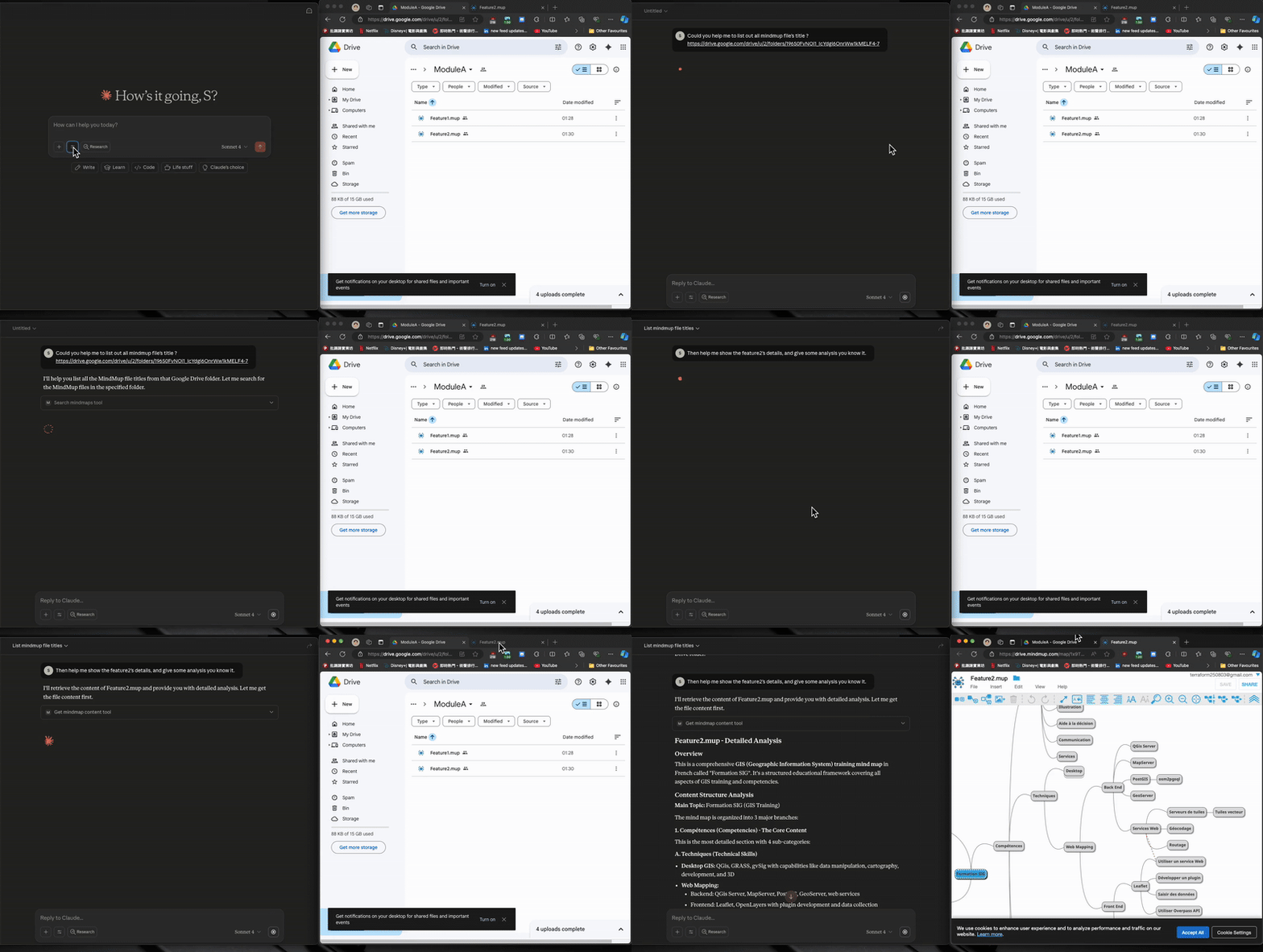
💫 Result
✨ Features
- Search MindMup files across your entire Google Drive (read-only)
- Tree navigation + section drill-down for large mind maps — small files return full content, large files return an outline you can drill into
- Per-client cache isolation via
X-Client-Idheader, so different users/tools don't share cached content - Hot-reload dev mode via
fastmcp run --reload+ bind-mounted source - FastMCP server with built-in
/healthand/pingendpoints - Docker Compose for both dev and prod
🗺️ End-to-End Flow
1. Set up Google Cloud service account     →  download JSON key
2. Share your Drive folder with the SA     →  Viewer access
3. Base64-encode the JSON key              →  for X-Google-Credential header
4. Run the server  (Docker or Python)      →  http://127.0.0.1:9805
5. Configure your MCP client (Claude/Cursor) with the base64 credential
6. Verify  →  curl http://127.0.0.1:9805/health
🔧 Available MCP Tools
| Tool | Description |
|---|---|
list_files | List MindMup files from Google Drive (folders and non-.mup filtered by default). Returns id, name, folder_url, size, modified_time. |
read_mindmap | Read a MindMup file by file_id or file_name (one required; name uses first partial match). Small files (<100KB AI-dict) return content_type: "full". Large files return content_type: "outline_only" with tree_outline, section_stats, and suggested_start_paths. |
search_mindmap | Search nodes by keyword. Params: file_id, keyword, optional node_path (subtree scope), max_results=30, normalize_whitespace=True. Returns nodes with node_path, title_preview, breadcrumb, children_count. |
get_mindmap_section | Drill into a section by node_path (dotted integers, root is 1, e.g. "1.2.3"). Optional max_depth, offset=0, limit=0. Returns content_type: "full" | "outline_only" | "paginated" | "truncated" — auto-switches when the section is still too large. |
Suggested workflow for AI agents: list_files → read_mindmap → if outline_only, either search_mindmap (by keyword) or get_mindmap_section (by node_path from suggested_start_paths).
🚀 Getting Started
Prerequisites
- Python 3.12+
- Docker & docker-compose (required for
make run-dev-docker/make run-prod) ; Ref. makefile - Google Cloud Platform account
- An MCP client that supports HTTP transport (Claude Code or Cursor)
Google Drive API Setup
| Step | Description | Image |
|---|---|---|
| 1 | Go to Google Cloud Console and create a new project (free tier is fine — no billing required for Drive API). | |
| 2 | Enable the Google Drive API. | |
| 3 | Create Service Account credentials: - "IAM & Admin" → "Service Accounts" → "Create Service Account" - No project-level role needed (Drive sharing handles auth) - Open the SA → "Keys" tab → "Add Key" → JSON → download the key file. | 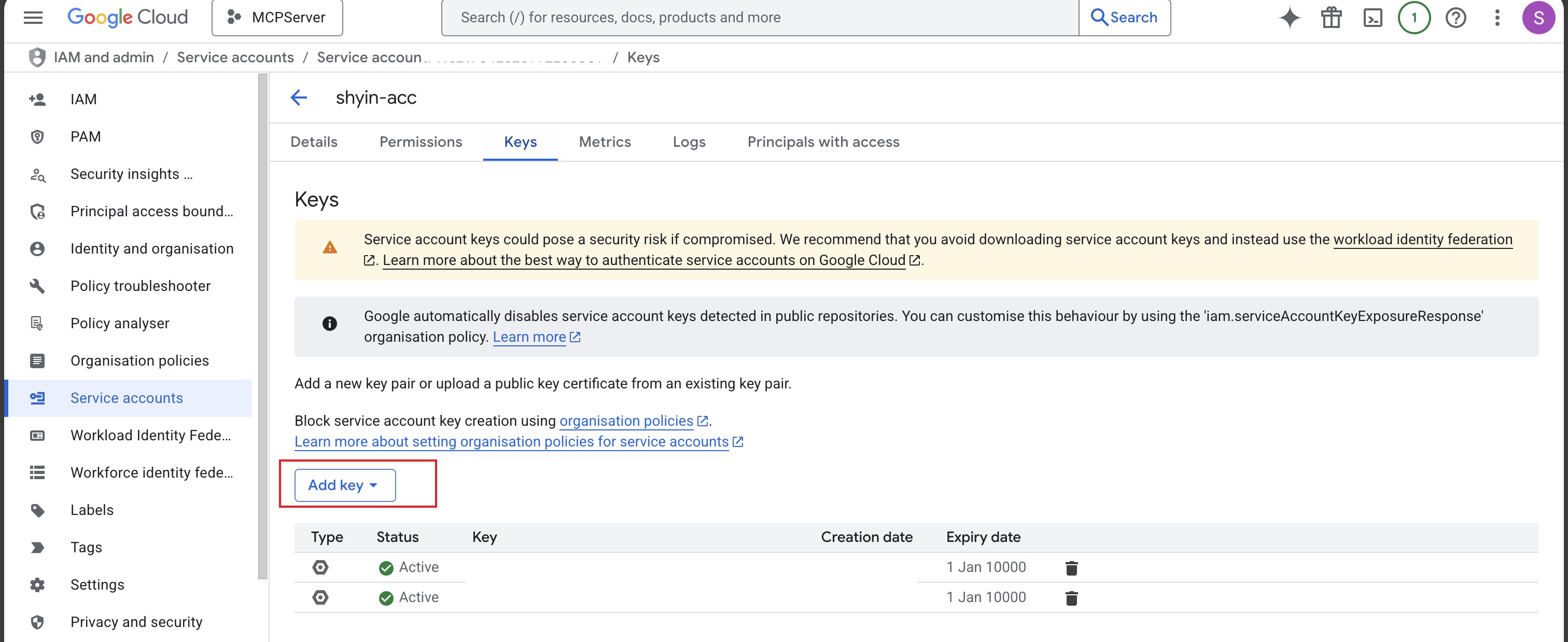 |
| 4 | Base64-encode the entire JSON key file (see Header Reference). ⚠️ Add the JSON file to .gitignore — never commit it. | |
| 5 | Share your Google Drive folder with the SA: - Copy the client_email value from the JSON- Right-click the folder → Share → paste the email - Grant Viewer access, uncheck "Notify people" - Sharing propagates to subfolders. | 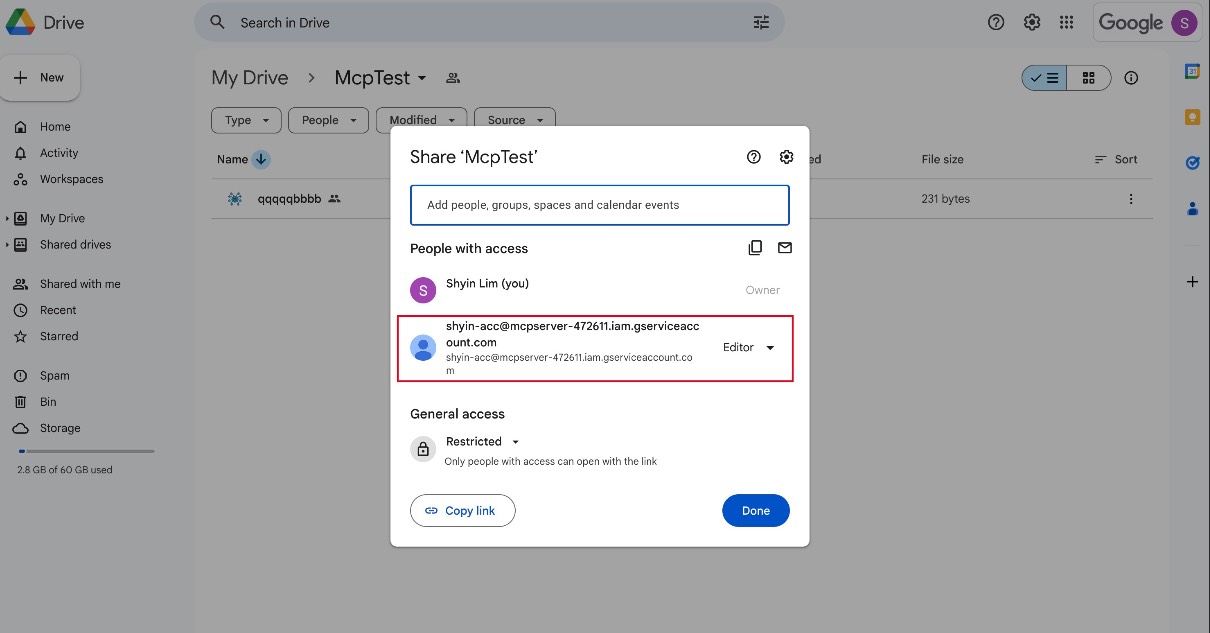 |
Note on scopes: The server requests
auth/drive+auth/drive.file. Despite the broad scope, withViewerfolder-level sharing the SA can only read what you've shared. Workspace-managed accounts may block external sharing — if so, ask your admin to allow service-account sharing for your domain.
Run the Server
Docker (recommended):
make run-dev-docker   # dev: hot-reload, source bind-mounted
make run-prod         # prod: no reload
Direct Python (no Docker):
pip install -r requirements.txt
python3 run.py
# Optionally: MCP_TRANSPORT=streamable-http python3 run.py
Verify the Server
curl http://127.0.0.1:9805/health
# => {"result":"success","time":"...","message":"MCP server is running. ..."}
If you don't get success, check docker logs <container> (Docker mode) or stdout (Python mode).
Run Tests
pip install -r requirements.txt
pytest
MCP Client Configuration
Add to your MCP client config (~/.claude/mcp.json for Claude Code, or your Cursor MCP settings):
{
    "mcpServers": {
        "mindmup-gdrive": {
            "type": "http",
            "url": "http://127.0.0.1:9805/mcp",
            "headers": {
                "X-Google-Credential": "ewogICJ0eXBlIjogInNlcnZpY2VfYWNjb3VuXXXXXXXXXXX",
                "X-Client-Id": "shyin-claude-code"
            }
        }
    }
}
Header Reference
| Header | Required | Description |
|---|---|---|
X-Google-Credential | ✅ | Your service account JSON, base64-encoded. Use base64encode.org and paste the output here. ⚠️ Base64 is encoding, not encryption — the MCP client config sits in plaintext on disk, so don't sync it to public repos / unencrypted cloud backups. |
X-Client-Id | Optional | A unique identifier per user + tool, e.g. shyin-claude-code. Used as part of the cache key (X-Client-Id, credential_hash, file_id) to isolate cached content across clients. If omitted, falls back to default (cache may be shared with other unset clients) and a warning is logged. Recommended format: <your-name>-<tool-name>. Use a high-entropy value to avoid collisions with other users. |
🩺 Troubleshooting
| Symptom | Likely cause / fix |
|---|---|
health returns nothing / connection refused | Server not running. Check docker ps or stdout. Port 9805 already in use? Edit mcp_deployment/docker-compose-dev.yml to remap. |
Google Drive authentication failed | Invalid base64. Sanity check: echo "$CRED" | base64 -d | jq .client_email — should print the SA email. |
list_files returns empty | (a) Folder shared with the wrong email — must match client_email in the JSON. (b) Files aren't .mup — call with mindmup_only=False to confirm visibility. (c) Workspace org policy blocks external sharing. |
| Docker build fails | Make sure Docker daemon is running. Re-run make run-dev-docker. |
| Changes not picking up in dev | Hot-reload only watches Python source. Restart the container after dependency or env changes. |
🏗️ Project Structure
Click to expand
├── mcp_deployment/
│   ├── docker-compose-dev.yml
│   ├── docker-compose-prod.yml
│   └── Dockerfile
├── src/
│   ├── core/
│   │   ├── gdrive_client.py    # Google Drive API client
│   │   ├── gdrive_feature.py   # Google Drive feature implementation
│   │   ├── mcp_server.py       # Main MCP server with read tools
│   │   └── mindmup_parser.py   # MindMup parsing + tree navigation
│   ├── model/
│   │   ├── common_model.py     # Common data models
│   │   ├── gdrive_model.py     # Google Drive data models
│   │   └── mindmup_model.py    # Mind map data models (with to_ai_dict)
│   └── utility/
│       ├── enum.py             # Enumerations and constants
│       └── logger.py           # Logging utilities
├── tests/                      # Unit tests
├── plans/                      # Implementation plans
├── run.py                      # Main entry point
├── requirements.txt            # Python dependencies
└── makefile                    # Build and deployment commands