Tacto — Time Tracking for Trello
Native time tracking Power-Up for Trello with a hosted MCP server. Log hours on Trello cards from Claude, ChatGPT, Cursor, or VS Code, check estimates and team reports, and create or move cards with confirmation previews.
Hosted MCP Server
npx add-mcp 'https://chrono.customapp.tech/mcp'Installs into Claude Code, Codex, Cursor and more
Documentation

Tacto MCP — Time Tracking for Trello
Log hours on Trello cards, check estimates and team reports, prepare client billing totals, and create or move cards — straight from Claude, ChatGPT, Cursor, VS Code, or any MCP client.

Add Tacto to Trello · Claude Directory · Documentation · Privacy Policy
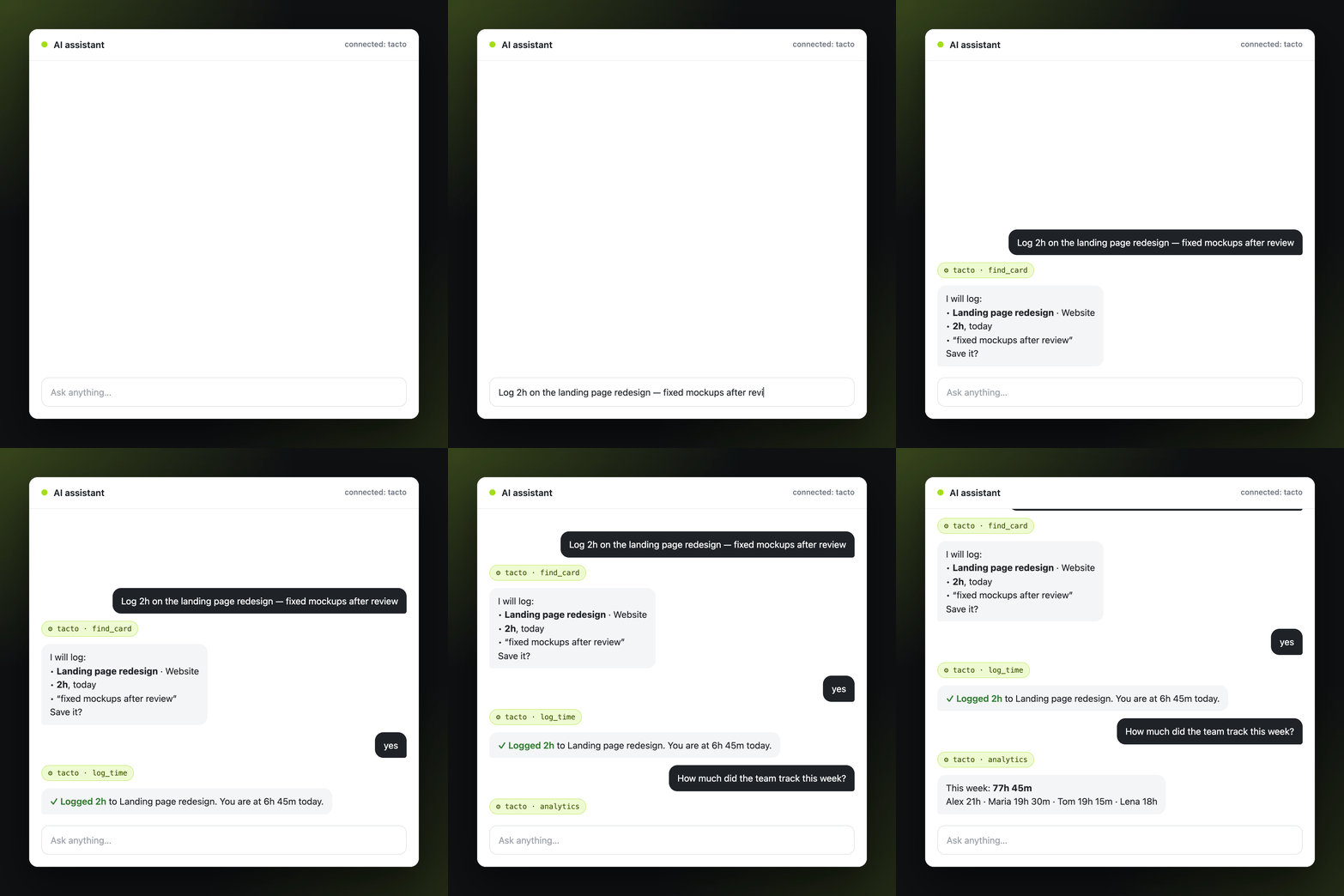
Why Tacto?
Tacto is a native time tracking Power-Up that lives inside your Trello cards — with server-side timers, manual entries, card estimates, team calendars, timelines, analytics, CSV / Excel / PDF exports, and PDF client invoices.
Its hosted Model Context Protocol (MCP) endpoint (https://chrono.customapp.tech/mcp) lets your AI assistant read and write time directly on your Trello cards:
- Natural-language time logging — "log 2h 30m on the landing page redesign for yesterday, fixed mockups after review" or log a full week in one batch.
- Safe preview before saving — by default, Tacto shows the exact board, card, date, and hours (
before → afterfor edits) and waits for your confirmation before anything is written. - Workspace & guest privacy — respects Trello board visibility, entry rules (required notes, locked reporting periods, weekend rules), and hides tracked hours from outside board guests unless an admin grants access.
- Zero local installation — hosted Streamable HTTP endpoint with OAuth 2.0 (sign in with Trello) and optional personal
catt_…keys. - Free during early access — every feature, any team size, no card required. Teams of up to 3 people stay free after early access.
Prerequisite: Enable the Tacto Power-Up on at least one Trello board first.
Quick Connect
Remote MCP Endpoint (Streamable HTTP):
https://chrono.customapp.tech/mcp
1. Sign in with Trello (OAuth 2.0 — no key needed)
Claude (claude.ai, Claude Desktop, Mobile)
- Open the Tacto page in the Claude Connectors Directory and click Connect, or
- Go to Settings → Connectors → Add custom connector, paste
https://chrono.customapp.tech/mcp, sign in with Trello, and click Allow.
Claude Code
claude mcp add --transport http tacto https://chrono.customapp.tech/mcp
Then run /mcp in Claude Code to complete Trello sign-in.
ChatGPT (chatgpt.com & Desktop)
- Go to Settings → Connectors / Plugins → Add custom MCP server.
- Choose Streamable HTTP, enter
https://chrono.customapp.tech/mcp, save, and sign in with Trello. - Set tool approval to Always ask so confirmation previews work smoothly.
2. Connect with a Personal Key (Cursor, VS Code, Windsurf, Zed, custom agents)
- Open any Trello board with Tacto → Tacto menu → Settings → AI assistant → Create key. Copy your
catt_…key (shown once). - Add the HTTP server to your client configuration:
Cursor (~/.cursor/mcp.json) & Windsurf
{
  "mcpServers": {
    "tacto": {
      "url": "https://chrono.customapp.tech/mcp",
      "headers": {
        "Authorization": "Bearer catt_your_key"
      }
    }
  }
}
VS Code / GitHub Copilot (.vscode/mcp.json)
{
  "servers": {
    "tacto": {
      "type": "http",
      "url": "https://chrono.customapp.tech/mcp",
      "headers": {
        "Authorization": "Bearer catt_your_key"
      }
    }
  }
}
Claude Desktop via local stdio bridge (optional if not using OAuth)
{
  "mcpServers": {
    "tacto": {
      "command": "npx",
      "args": [
        "-y",
        "mcp-remote",
        "https://chrono.customapp.tech/mcp",
        "--header",
        "Authorization:Bearer catt_your_key"
      ]
    }
  }
}
- Verify: Start a new chat and ask "Which boards do I have in Tacto?"
What You Can Ask
| Goal | Example prompt |
|---|---|
| Log time on a card | "Log 2h 30m on homepage copy for yesterday, note: hero section" |
| Log a whole week | "Log my week: Mon 3h on login flow, Tue 2h on API review" |
| Check your hours | "How much time did I track this week?" |
| Inspect recent work | "What cards have I been working on lately?" |
| Check card estimates | "Is the Homepage copy card over its estimate?" |
| Set an estimate | "Estimate the login card: backend 5h, iOS 8h" |
| Create & log in one go | "Create a card 'Fix webhook retry' in Backlog and log 1h 30m to it" |
| Move or rename a card | "Move 'Fix webhook retry' to Done" |
| Edit or delete an entry | "Change entry #114395 to 3 hours" / "Restore the entry I deleted" |
| Team analytics | "Compare this month with last month by board and person" |
| Client billing totals | "What are the billable hours and amounts for Acme Co in October?" |
Supports flexible durations (2h 30m, 1.5, 90m, 1:30), dates (today, yesterday, Aug 19, 2026-11-26 14:00), date ranges (week, last month, 2026-11-01..2026-11-26), and prompts in any language.
Available MCP Tools (19)
Every tool carries standard MCP safety annotations (readOnlyHint, destructiveHint, idempotentHint, openWorldHint).
Read-Only Tools
| Tool | Description |
|---|---|
list_boards | List Trello boards accessible to you, grouped by workspace |
list_cards | List cards and lists on a board |
recent_cards | Show cards you logged time on recently |
find_card | Fuzzy-search cards across your boards (handles typos) |
my_time | Summary of your tracked hours for a period across boards and workspaces |
list_worklogs | List individual time entries with filters |
analytics | Period-over-period analytics by board, card, or team member |
| Finance report | Billable hours, client rates, and billing totals for workspace admins |
Write & Management Tools (Preview-Protected)
| Tool | Description |
|---|---|
log_time | Log a time entry on a Trello card |
log_entries | Batch-log multiple time entries at once |
update_worklog | Update duration, date, note, or billable status of your entry |
delete_worklog | Delete one of your time entries |
restore_worklog | Restore a previously deleted time entry |
set_estimate | Set or update total or per-role estimates on a card |
create_card | Create a new card on a Trello board (requires Trello access granted in Tacto) |
move_card | Move a card between lists or reorder it |
rename_card | Rename a Trello card |
apply_preview | Confirm and apply a previewed change by its preview ID |
assistant_settings | View confirmation settings or tighten confirmation mode |
Security & Privacy
- Hours never touch Trello
pluginData(which any board viewer could inspect) — all time logs live on Tacto's backend behind workspace visibility rules. - Prompt-injection protection: Confirmation mode (
allby default) can only be tightened from chat, never loosened — untrusted text inside a Trello card cannot disable confirmations. - Instant revocation: Disconnect OAuth apps or revoke
catt_…keys anytime in Tacto → Settings → AI assistant.
Links & Support
- Trello Power-Up Directory: https://trello.com/power-ups/6a7496725e6f3dc355d54fb9
- Documentation: https://chrono.customapp.tech/docs/
- AI Assistant Guide: https://chrono.customapp.tech/docs/ai-assistant.html
- Official MCP Registry:
io.github.shutrup/tacto(server.json) - Support: tacto@customapp.tech · Support page
License
Documentation and configuration examples in this repository are released under the MIT License.