Revit Model MCP
Work with live Autodesk Revit models from any MCP client, locally or on a remote Windows PC over SSH: query, aggregate, inspect and act with undo.
Documentation

Revit Model MCP
For people reviewing or automating Revit projects with an MCP client: read and act on a live Revit project through MCP. Actions are enabled by default, and either read-only setting disables them.







Privacy policy
Revit Model MCP returns requested model data to the selected MCP client. The bundle enables response path redaction by default. The privacy policy covers collection, storage, sharing, retention and contact information.
Code signing
Release builds are not code-signed yet, so Revit asks whether to load the add-in after install and after each update.
Verify downloads with SHA256SUMS.txt and the build provenance attestation; see code signing.
Install
Claude Desktop bundle
Install uv on the client's PATH, download revit-model-mcp-<version>.mcpb from the latest release, and open it in Claude Desktop.
The bundle starts from the local uv cache. The server checks for a newer stable release in the background once per day.
The next client start uses the refreshed version. Set REVIT_MCP_NO_UPDATE_CHECK=1 to opt out.
The settings form configures the workstation host, path redaction, optional actions and the HTTP bearer token without editing JSON.
Use local on the Windows Revit workstation, or configure a remote workstation for macOS and Linux clients.
Path redaction starts enabled and actions start disabled.
The Windows workstation still needs the add-in below.
See the bundle guide for build details and prerequisites.
Verify downloads. Release assets include GitHub build provenance attestations; follow download verification before installing.
On the Revit workstation
Download RevitModelMcp-<version>-SingleUser.msi (current user) or RevitModelMcp-<version>-MultiUser.msi (all users) from the latest release.
Run it with Revit closed, then start Revit and open a model.
See automatic updates for update behavior and opt-out settings.
Alternatively, run from a clone in PowerShell:
.\install.ps1 -Source Release
On the machine with the MCP client
Install uv and use Python 3.11+. For Claude Code on the same Windows workstation:
claude mcp add revit-model-mcp -e REVIT_MCP_HOST=local -e REVIT_MCP_REDACT_PATHS=1 -- uvx revit-model-mcp
For manual Claude Desktop registration, add to its MCP configuration:
{
  "mcpServers": {
    "revit-model-mcp": {
      "command": "uvx",
      "args": ["revit-model-mcp"],
      "env": {
        "REVIT_MCP_HOST": "local",
        "REVIT_MCP_REDACT_PATHS": "1"
      }
    }
  }
}
From a clone, uv run --directory server revit-model-mcp runs the same server without installing the package.
With REVIT_MCP_HOST=local the server reaches each Revit through its own named pipe, restricted to the Windows user running Revit; no port or URL reservation is needed.
For macOS or Linux clients, configure a remote workstation.
Check
Call revit_ping in the MCP client and expect success: true.
In action
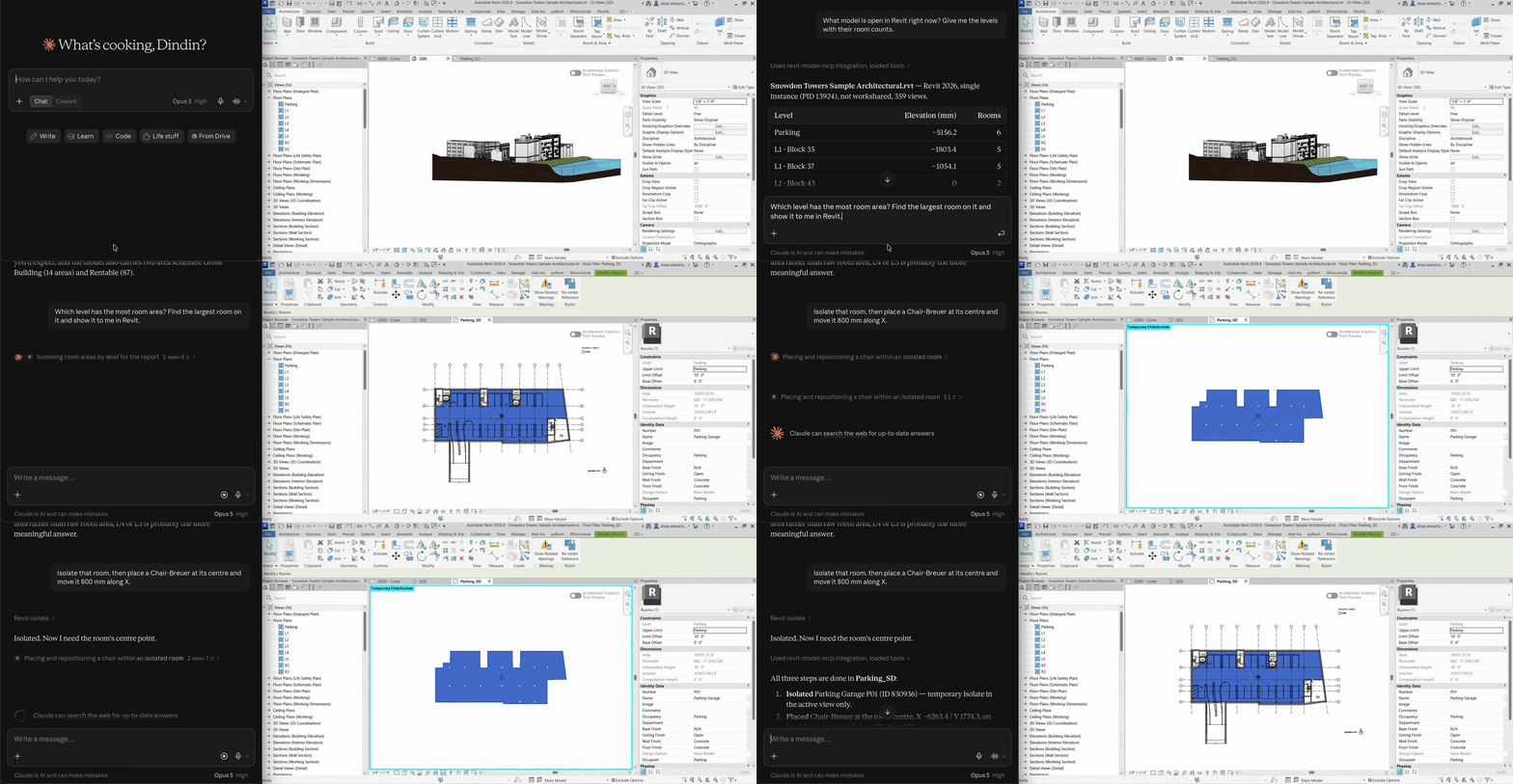
Claude Desktop runs on a Mac and connects to Revit 2026 on a Windows workstation. Actions are enabled in this recording.
If Revit Model MCP saves you time, a :star: on GitHub helps other Revit users find it.
What happens in the recording, in order:
- "What model is open in Revit right now?" The client reads the document, levels and room counts.
- "Which level has the most room area? Find the largest room and show it to me." The client aggregates room areas by level and queries the largest room.
revit_showopens a matching plan and selects the room. - "Isolate that room, place a Chair-Breuer at its centre and move it 800 mm along X."
revit_isolate, thenrevit_place_familyat the room'sroomCenterMm, thenrevit_move. Each mutation is its own Revit transaction. - Cleanup afterwards is one more sentence: reset the view, delete the chair.
The picture below is the PNG saved by revit_export_view during an earlier session against Revit 2023 over SSH, untouched:

What you get
| Read tools | Names |
|---|---|
| Document and catalog | revit_ping, revit_document_info, revit_list_catalog, revit_list_instances |
| Elements and parameters | revit_query_elements, revit_aggregate_elements, revit_element_details, revit_list_relations, revit_list_warnings |
| Views and export | revit_list_views, revit_view_summary, revit_view_elements, revit_view_warnings, revit_export_view |
| Coordinator checks | revit_model_health, revit_links_status, revit_shared_coordinates, revit_parameter_fill_check |
See the full tool reference for arguments, units and limits.
Actions are enabled by default: opt out with REVIT_MCP_READ_ONLY=1 in the server, or the workstation read-only file.
Model mutations support dry_run previews and return verification and a human-readable summary; a committed action assimilates into one named Revit undo entry, visible in the add-in's "MCP activity" pane; revit_undo_last undoes it while it is still Revit's last change.
See actions for gates, exceptions and verification failures.
Remote workstations
Local Windows clients use REVIT_MCP_HOST=local under the Revit user's account.
Remote clients run the whole server on the workstation over SSH, as the same Windows user that runs Revit.
Install it there once with uv tool install revit-model-mcp, then register ssh as the command:
{
  "mcpServers": {
    "revit-model-mcp": {
      "command": "ssh",
      "args": ["revit-pc", "revit-model-mcp", "--redact-paths"]
    }
  }
}
Replace revit-pc with the workstation's SSH host alias.
MCP stdio flows through the SSH session and the remote server uses the named pipe, so no port opens.
REVIT_MCP_HOST=ssh:<alias> (file channel over SSH) and HTTP through an SSH tunnel remain available; HTTP requires a bearer token except for /health and binds to loopback by default.
See transport setup.
Security
The default tools read the model without model-changing transactions; exports and channel operations write files outside it.
MCP actions are refused in read-only mode, while direct HTTP callers require the bearer token and are refused while the workstation read-only file is present.
REVIT_MCP_REDACT_PATHS=1 hides directories in response path fields, but names, parameter values, errors, channel files and exported image localPath values remain visible.
See security details for authentication and privacy boundaries, and SECURITY.md to report a vulnerability.
Compatibility
| Revit year | Add-in target framework | Validation status |
|---|---|---|
| 2022 | .NET Framework 4.8 | Build evidence |
| 2023 | .NET Framework 4.8 | Build evidence |
| 2024 | .NET Framework 4.8 | Builds and install script |
| 2025 | .NET 8 | Build evidence |
| 2026 | .NET 8 | Builds, live reads/actions and install script |
| 2027 | .NET 10 | Build evidence |
See validation evidence for dates and limits, and known gaps.
Contributing and support
Documentation covers setup, tools and transport.
Start with CONTRIBUTING.md, ask questions in Discussions, or report bugs and request features through the issue forms. CI runs the C# and Python test suites and builds the supported Revit configurations.
Contributors
License
MIT, maintained by Dinar Sharafutdinov. See third-party notices for dependency licenses.