job-search-mcp
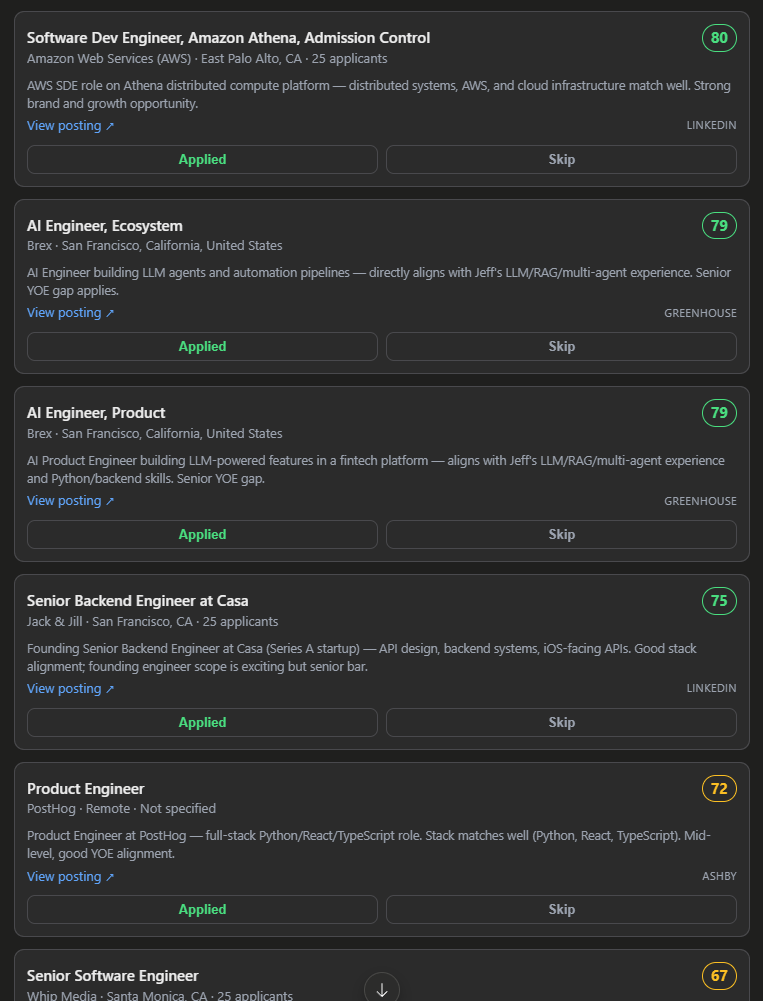
Claude Desktop job search assistant: searches LinkedIn + 8 ATS boards, scores each job 0-100 for fit, and shows a ranked board to triage.
Documentation
job-search-mcp
A personal job-search assistant for Claude Desktop. You ask Claude to find jobs; it searches the real job boards, scores each one 0–100 for how well it fits you, and shows them on a ranked board you can triage with one click. Everything runs locally — no API keys, no accounts required.
It's an MCP App: a small server Claude Desktop talks to, plus an inline board that renders right in the chat.
Scope: it's tuned for US software-engineering roles (the built-in sources and role filters target US tech employers). Other fields or regions will return sparse results.
Works in: built and tested for Claude Desktop. It should also work in other MCP clients that both run a local (stdio) server and render MCP App UIs, such as VS Code (Copilot), Cursor, or Goose (untested). Remote-only clients (ChatGPT, Claude on web/mobile) can't launch a local server, so they won't work.
What it does
- Searches real job boards — LinkedIn plus 8 ATS/job sources (Greenhouse, Lever, Ashby, Workday, SmartRecruiters, Hacker News, RemoteOK, Remotive), using your target roles and location.
- Scores each job for you — Claude reads the full description and gives it a 0–100 fit score with a one-line reason, weighing your skills, years of experience, seniority fit, and the role.
- Lets you triage fast — Apply / Skip on each card, or in bulk ("dismiss everything under 60").
- Remembers — keeps a running shortlist, a tracker of what you've applied to, and won't show you the same job twice (for 6 months).
Setup
1. Tell Claude Desktop about it. Open your config file:
- Windows:
%APPDATA%\Claude\claude_desktop_config.json - macOS:
~/Library/Application Support/Claude/claude_desktop_config.json
Add this under "mcpServers" — npx fetches the published package
for you, no cloning or building required:
{
  "mcpServers": {
    "job-search": {
      "command": "npx",
      "args": ["-y", "@servation/job-search-mcp"]
    }
  }
}
2. Fully quit and reopen Claude Desktop (on Windows, quit it from the system tray — closing the window isn't enough). That's it.
Running from source instead
npm install
npm run build
Then point the config at this folder's dist/main.js instead:
{
  "mcpServers": {
    "job-search": {
      "command": "node",
      "args": ["D:\\job-search-mcp\\dist\\main.js"]
    }
  }
}
How to use it
Just talk to Claude. For example:
- "Save my profile" — paste your resume first; Claude pulls out your skills, roles, years, and location so searches and scoring are tailored to you.
- "Find backend engineer jobs in California, senior level, posted this week."
- "Find low-applicant jobs" — adds LinkedIn's early-applicant filter.
- "Dismiss everything under 60."
- "Show what I've applied to."
- "Re-score the board."
A typical first run: save your profile → "find jobs" → Claude scores them and shows the ranked board → you Apply/Skip.
The board
The board is a running shortlist. A job stays on it until you Apply (moves to your tracker) or Skip (hidden for good). New searches automatically skip jobs already on the board, in your tracker, dismissed, or shown in the last 6 months — so you never see the same listing twice in a row.
Click Applied or Skip on a card, or ask Claude to do it. Triaged in the widget, it sticks.
Tools (for reference)
You rarely call these by name — Claude picks the right one — but here's what's under the hood:
| Tool | What it does |
|---|---|
find_jobs | Search the boards for your roles/location (with optional filters: seniority, type, recency, remote, salary, applicants, source). |
evaluate_jobs | Claude scores the found jobs 0–100 for fit (runs automatically after a search). |
show_board | Display the ranked board (or your saved tracker). |
set_status | Apply / Skip / save a single job (also the card buttons). |
bulk_status | Triage many at once by score or source, e.g. dismiss everything under 60. |
whats_promising | List the current board as text (all scored jobs + anything still unscored). |
review_saved | Your tracker — jobs you've saved or applied to. |
rescore_board | Re-score every job on the board from scratch. |
clear_jobs | Declutter: clear unscored leftovers or the whole board (never touches applied/dismissed). |
save_profile | Save your resume profile (drives search + scoring). |
Where your data lives
One JSON file on your machine — no cloud, nothing sent anywhere except the job boards you search:
- Installed:
~/.job-search-mcp/jobs.json - Running from source:
./data/jobs.json - Override with the
JOB_SEARCH_MCP_DATAenvironment variable.
Optional: LinkedIn Premium mode
By default LinkedIn uses its public guest endpoints: no login and no account-login risk, and you
already get full job descriptions. Note that automated access still runs from your own IP and is against
LinkedIn's User Agreement even in guest mode, so use it at your discretion. If you want richer/Premium
data, you can use your logged-in account by adding an env block to the server config:
"job-search": {
  "command": "npx",
  "args": ["-y", "@servation/job-search-mcp"],
  "env": {
    "LINKEDIN_LI_AT": "<your li_at cookie>",
    "LINKEDIN_JSESSIONID": "ajax:1234567890123456789"
  }
}
Get both cookies from a logged-in linkedin.com tab → DevTools → Application → Cookies.
⚠️ Heads up: this is against LinkedIn's Terms of Service and can get your account flagged or restricted. The cookies also expire about monthly and LinkedIn's internal endpoints change without notice. If anything fails it falls back to guest mode automatically. Leave the
envblock out to stay fully safe (guest-only).
How scoring works
Claude (the host model) does the scoring directly — it reads each description and judges fit, which is
well-calibrated. A deterministic formula (computeMatchScore in scoring.ts) is kept as a fallback for
anyone running a weaker local model that tends to over-rank everything; it's not active by default.
Development
npm run typecheck    # type-check UI + server + harness
npm run build        # build the UI bundle (vite single-file) + compile the server (tsc)
npm run serve:stdio  # run the server from source (tsx) for local testing
npm run harness      # work on the review UI without Claude Desktop (see harness/)
npm run canary       # check every job source is still returning postings
The server is stdio-only (main.ts → server.ts); the UI is a React app bundled to a single inlined
HTML file (src/mcp-app.tsx → dist/mcp-app.html) that the server serves as a ui:// resource.
Working on the UI, use harness/. It is a local stand-in for Claude Desktop that renders
the widget against a synthetic job store and a real ui/* bridge. Opening dist/mcp-app.html in a
browser tab just gets you "Connecting…", and the things most likely to break (link opening, theming,
the post-mount refresh) are all host-mediated, so they only show up with a host on the other end.
If a job source goes dark, npm run canary tells you which one. Company slugs rot often, so the fix
usually belongs in the remote slug registry that updateCompanyDirectoriesFromRegistry() re-reads at
runtime, rather than in a new release.