Returnolio
Read-only stock research: company scores, the monthly Top 10, the screener and your own portfolio, for about 1,000 public companies.
Hosted MCP Server
npx add-mcp 'https://mcp.returnolio.com/mcp'Installs into Claude Code, Codex, Cursor and more
Documentation
Every plan includes access to our MCP server, Free among them: a read-only bridge between your AI assistant and Returnolio's research data. Instead of your AI guessing at scores or prices, it looks them up.
What the connector can reach is exactly what your plan can reach. It is the same permission check the app runs, asked by a different client, so a Free connector is a real taster of the product rather than a way around the tiers.
MCP (Model Context Protocol) is an open standard. Any client with a remote MCP or "connector" setting can use our server: Claude (web, desktop and Claude Code), ChatGPT, Cursor, VS Code, Windsurf and a growing list of others.
What your AI can see
- Company scores and the pillar breakdown behind them
- Fair-value estimates and margin of safety (how far the price sits below our estimate)
- Fundamentals, smart-money moves (what large professional investors have been buying and selling) and macro context
- The current Top 10 and our public portfolio
- Your own portfolio, if you track it in the app
- The screener and side-by-side comparisons
Each line follows your plan. On Free that means the market overview, the Top 10 two editions back, your monthly analysis, the calendar and your watchlist. The screener, portfolio and comparison tools are not part of it, exactly as they are not part of the Free tier in the app. When your AI asks for one it gets a plain answer saying which tier includes it, never a silent empty result.
Everything is read-only by design, on every tier. Your AI can look things up; it can never change anything in your account.
To see what those lines look like on one company before you connect anything, the sample report shows a whole Stock Deep Dive on Amazon: the score and its pillars, fair value, the filed statements and the insider filings, every one dated. Your assistant reads the same tables those pages were drawn from.
Setup
- Sign in to the app at app.returnolio.com. Any plan works, including Free.
- Add the connector in your AI tool. The server URL is:
https://mcp.returnolio.com/mcp- Claude (web or desktop): open Settings, then Connectors, then Add custom connector, and paste the URL.
- Claude Code:
claude mcp add returnolio --transport http https://mcp.returnolio.com/mcp - ChatGPT: open Settings, then Connectors, then Advanced, then Add remote MCP server, and paste the URL.
- Other clients: look for "MCP server", "connector" or "remote tool" in the settings and paste the same URL.
- Claude Code:
- Claude (web or desktop): open Settings, then Connectors, then Add custom connector, and paste the URL.
- Approve access. Your browser opens a Returnolio sign-in page once; approve it and you are done. You can revoke the connection any time in the app under Settings.
Usage allowance
Connect your AI via MCP (Claude, ChatGPT; read-only)
Core
Starter weekly allowance
Analyst
4x Core
Pro
Unlimited
What your AI can reach through MCP
Core
Everything your plan includes
Analyst
Everything your plan includes
Pro
Everything your plan includes
The allowance resets weekly. If you hit the cap mid-week, the server tells your AI so. No silent failures. Free is sized as a taster, enough to see what a connected assistant does rather than to work with daily; Pro removes the cap entirely.
The table above is generated from the same plan definitions the app bills against, so it cannot drift out of date the way a hand-typed one would. Full plan details live on the plans and pricing page.
What it looks like, for real
Everything below is a real exchange with the live server on 18 September 2026, from a test account of ours, trimmed for length and nothing else. The account was on Free for the second half so the refusals are the ones a Free reader gets.
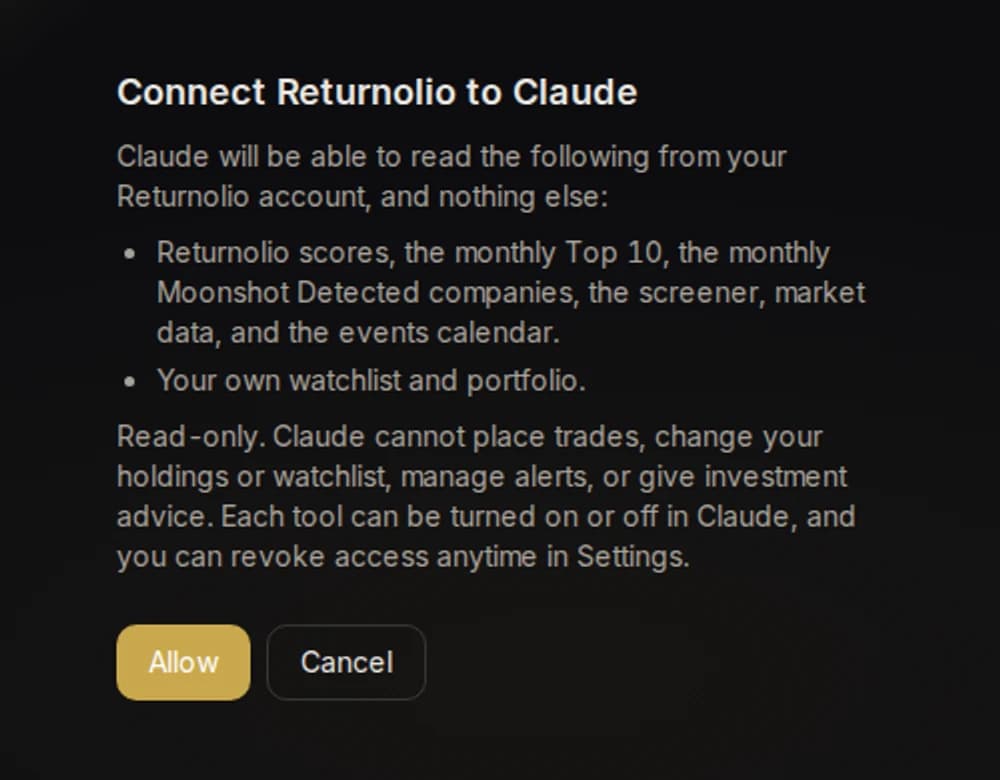
The one screen you see. It says what the connection can read, that it is read-only, and how to revoke it. Allow, and the client gets a token that expires in an hour and renews itself.
The tools your assistant is offered. Eleven, all read-only: get_stock_score, compare_stocks, screen_stocks, get_top10, get_moonshot, get_market_overview, get_calendar, search_tickers, my_watchlist, my_portfolio and get_app_link (a deep link into the app for anything the connection cannot do, such as editing a holding).
One company. Asked for Amazon:
{"stock":{"ticker":"AMZN","company_name":"Amazon.com, Inc.","sector":"Consumer Cyclical",
 "score":"68.76","quality":"56.89","momentum":"63.89","value_mos":"89.37","earnings_power":"39.42",
 "mos_pct":null,
 "mos_note":"At the bottom of our scale. The price is at least double our conservative estimate of what the business is worth, and the scale stops there, so this is a cap rather than a measurement. Read it as 'richly priced, no discount left', and do not quote a number."},
 "_link":"https://app.returnolio.com/universe/AMZN",
 "_usage":{"weekly_calls":"unlimited"}}
The headline score, the pillar readings behind it, and a note where a number would mislead. How the pillars combine into the headline is not in the answer, on any tier; that is ours.
The Top 10, on Free. The same call on a Free account answers with the edition two months back and says so:
{"picks":[{"rank":1,"ticker":"TSM","company_name":"Taiwan Semiconductor Manufacturing Company Limited", ...}, ...],
 "note":"This is the most recent edition this plan can see. It stays 2 editions behind the current one; a paid plan shows the current one, with the full rationale and the monthly video in the app.",
 "_usage":{"weekly_calls_remaining":8,"window_resets_at":"2026-09-25T20:40:26.388Z"}}
A tool the plan does not include. The screener, asked for from Free:
403 plan_required: screen_stocks is not part of the Free plan.
What each tier includes: https://returnolio.com/pricing
A plain sentence your assistant can read out, never an empty list.
The weekly allowance, used up. After the tenth call of the week on Free (the count is in every answer's _usage), the eleventh gets:
429 weekly_limit_reached: You have used this week's free MCP allowance.
Any paid tier raises it and unlocks the current Top 10, the screener and portfolio tools.
Your next call becomes available at 2026-09-25T20:40:26.388Z (rolling 7-day window).
Your portfolio is yours. my_portfolio and my_watchlist take no parameters at all: there is no account field to fill in, so a connection can only ever read the account that approved it. We checked the tool definitions the server publishes, not just the docs.
Tested with: a standard MCP client over HTTP from our own server on 18 September 2026, the protocol every client below speaks. Claude Desktop and ChatGPT: the steps in Setup are the vendors' documented ones; we have not yet run those two ourselves, and this line changes when we have.
Good to know
- AI answers can be wrong. Your assistant reads real data, but it can still misread a number or make something up. Nothing it produces is investment advice; double-check anything you plan to act on.
- Privacy: the server only exposes the data your plan already includes. Your questions go to your AI provider, not to us; we only see the data lookups.
- Security: the connection uses OAuth, the same sign-in handshake behind "Sign in with Google" buttons. No API keys to copy around, and revoking access in Settings kills it instantly.
Was this page helpful?