Firebreak
Security MCP server that turns your AI into a penetration tester.
Documentation

The security MCP server that turns your AI into a penetration tester.
Quick Start · How It Works · Tool Reference · Contributing · License







Connect Firebreak to Claude, Cursor, or any MCP-compatible client. Then just ask:
You:    "Is my app secure?"
Claude: [calls firebreak tools] Found 6 vulnerabilities. 1 high (CORS misconfiguration),
        5 medium (missing security headers). Security score: B. Want me to fix them?
No CLI to learn. No reports to read. The AI runs the scans, interprets the results, and walks you through the fixes.
Why Firebreak
AI-generated code ships with predictable vulnerabilities: inconsistent auth middleware, permissive RLS policies, IDOR on every endpoint, secrets in the JS bundle. Developers who use AI to build don't always know how to test what it builds.
Firebreak flips the problem. Instead of expecting developers to learn security tooling, it gives the AI the security tooling. The same AI that wrote the code can now test it, find the holes, and fix them.
What makes it different:
- MCP-native — not a CLI wrapper. Built from the ground up for AI tool calling.
- VCVD — 47 vulnerability patterns specific to AI-generated code that traditional scanners miss.
- Proof over theory — every finding includes the actual HTTP request/response that proves the vulnerability.
- Safe by design — rate limited, scope-locked, non-destructive. Can't accidentally DROP your database.
Quick Start
Option 1: Build from source
git clone https://github.com/protonese3/Firebreak.git
cd Firebreak
cargo build --release
./target/release/firebreak
Option 2: Docker
git clone https://github.com/protonese3/Firebreak.git
cd Firebreak
docker compose up -d
Either way, Firebreak starts on port 9090.
Connect to Claude Desktop
Add this to your claude_desktop_config.json:
{
  "mcpServers": {
    "firebreak": {
      "url": "http://localhost:9090/mcp"
    }
  }
}
Restart Claude Desktop. You now have 20 security tools available.
Connect to Cursor / Windsurf / Any MCP Client
Point your client's MCP configuration to http://localhost:9090/mcp. The server speaks standard MCP (JSON-RPC 2.0 over HTTP).
Verify it works
Ask your AI: "What security tools do you have available?"
It should list the Firebreak tools. Then try: "Scan https://httpbin.org for security issues"
How It Works
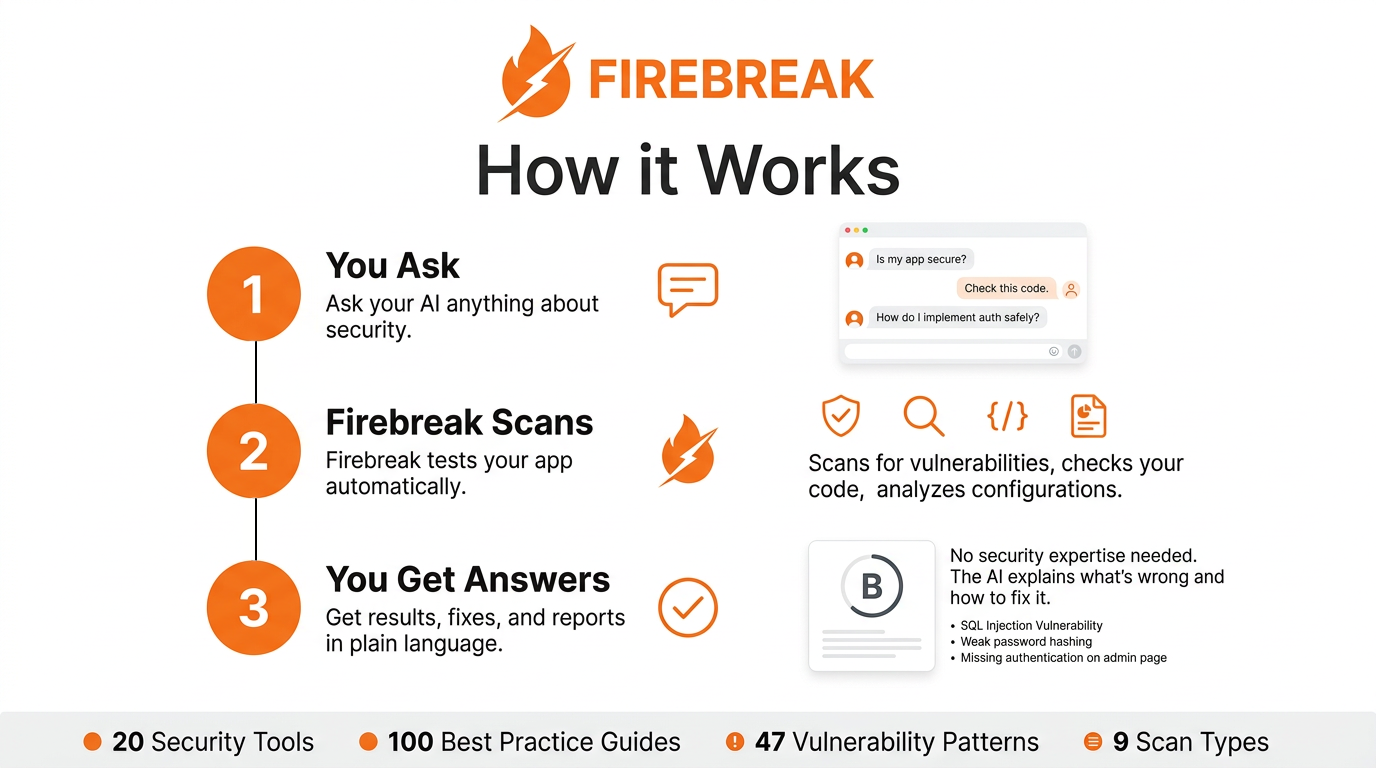
The AI is the orchestrator. Firebreak doesn't decide what to test — it provides the tools. The AI picks the strategy based on what the user asks and what it finds along the way.
Typical flow
1. User: "Test my app at https://myapp.com"

2. AI calls firebreak_scan_quick({ target_url: "https://myapp.com" })
   └── Firebreak probes headers, paths, CORS, TLS
   └── Returns: 4 findings, score B

3. AI explains results in plain language
   └── "Found a CORS misconfiguration and 3 missing headers..."

4. User: "Fix the CORS issue"

5. AI calls firebreak_finding_fix({ finding_id: "...", framework: "express" })
   └── Returns: before/after code diff for Express

6. User applies fix

7. AI calls firebreak_replay({ finding_id: "..." })
   └── Returns: "Fixed. Server no longer reflects arbitrary origins."
Tool Reference
Knowledge Tools
These don't hit any external service. They query Firebreak's built-in security knowledge base.
| Tool | Description | Example |
|---|---|---|
firebreak_best_practice | Security best practices for a topic | { topic: "jwt-auth" } |
firebreak_check_pattern | Scan code for insecure patterns | { code: "...", language: "javascript" } |
firebreak_explain_vuln | Explain a vulnerability type | { vuln_id: "IDOR" } |
firebreak_security_checklist | Generate a security checklist | { stack: ["nextjs", "supabase"] } |
firebreak_owasp_check | Map a finding to OWASP Top 10 | { description: "SQL injection in login" } |
firebreak_analyze_rls | Analyze SQL for RLS policy issues | { sql: "CREATE POLICY..." } |
Scan Tools
These make HTTP requests to the target. Rate limited and scope-locked.
| Tool | Description | Example |
|---|---|---|
firebreak_scan_quick | Fast scan, critical+high only (2-3 min) | { target_url: "https://myapp.com" } |
firebreak_scan_full | Full pen test (black/gray/white box) | { target_url: "...", mode: "gray", credentials: [...] } |
firebreak_scan_target | Focused scan on one area | { target_url: "...", focus: "auth" } |
firebreak_scan_status | Check progress of a running scan | { scan_id: "..." } |
firebreak_scan_stop | Stop a scan, keep partial results | { scan_id: "..." } |
Analysis Tools
These work with stored scan results. No external requests.
| Tool | Description |
|---|---|
firebreak_results | Scan summary with security score (A-F) |
firebreak_finding_detail | Full evidence for a specific finding |
firebreak_finding_fix | Generate fix code for a finding |
firebreak_replay | Re-test a finding to verify it's fixed |
firebreak_compare | Diff two scans (fixed / new / unchanged) |
firebreak_scan_history | List previous scans for a target |
firebreak_attack_chain | Multi-step attack chains |
firebreak_report_generate | Export report (JSON, Markdown, HTML) |
firebreak_report_executive | Non-technical executive summary |
Scan Checks — 32 Security Checks
Every scan runs a subset of these checks depending on the scan type (quick, full, targeted). Each check produces findings with full HTTP evidence.
Headers & TLS
| Check | What it tests |
|---|---|
| Security headers | HSTS, X-Content-Type-Options, X-Frame-Options, CSP presence |
| CSP quality analysis | unsafe-inline, unsafe-eval, wildcard sources |
| Permissions-Policy | Feature policy header presence and configuration |
| Server version disclosure | Server, X-Powered-By, X-AspNet-Version headers |
| Information header leaks | X-Debug-Token, X-Backend-Server, Via, X-Request-ID |
| HTTPS enforcement | HTTP-to-HTTPS redirect chain analysis |
| HSTS quality | max-age value, includeSubDomains, preload directives |
| Advanced headers | Cross-Origin-Opener-Policy, Cross-Origin-Resource-Policy, Cross-Origin-Embedder-Policy |
Authentication & Session
| Check | What it tests |
|---|---|
| Cookie security | HttpOnly, Secure, SameSite flags on session cookies |
| Missing auth on API endpoints | Unauthenticated access to protected routes |
| Rate limiting detection | Login and API endpoint throttling |
| HTTP method enumeration | TRACE, PUT, DELETE enabled on endpoints that shouldn't allow them |
| Host header injection | Manipulated Host header reflected in responses or redirects |
Data & API
| Check | What it tests |
|---|---|
| Unauthenticated API discovery | Common API paths accessible without credentials |
| Sequential ID detection | IDOR risk from predictable resource identifiers |
| CORS misconfiguration | Origin reflection, null origin acceptance, wildcard with credentials |
| Open redirect testing | Unvalidated redirect parameters in URLs |
Content & Frontend
| Check | What it tests |
|---|---|
| Technology fingerprinting | CMS detection, framework identification, server software |
| Vulnerable JS libraries | jQuery, Angular, Bootstrap, Lodash with known CVEs |
| Source map exposure | .map files accessible in production |
| Secrets in JS bundles | API keys, tokens, credentials in client-side JavaScript |
| Mixed content detection | HTTP resources loaded on HTTPS pages |
| Form CSRF analysis | Forms missing CSRF tokens or using GET for state changes |
Recon & Discovery
| Check | What it tests |
|---|---|
| Web crawler | HTML links, JS endpoints, sitemap, robots.txt (recursive depth 3) |
| Sensitive path probing | Admin panels, config files, backups (with content validation to eliminate false positives) |
| robots.txt / sitemap.xml | Disallowed paths and sitemap endpoint analysis |
| security.txt | RFC 9116 compliance and contact information |
| Error page disclosure | Stack traces, debug info, internal paths in error responses |
| Subdomain reference discovery | Subdomains referenced in HTML, JS, and headers |
| Cache header security | Cache-Control, Pragma, Expires on sensitive responses |
VCVD — Vibe Coding Vulnerability Database
47 vulnerability patterns that AI-generated code gets wrong. Traditional scanners don't look for these because they're specific to how LLMs write code.
Auth & Identity
| ID | Pattern | Severity |
|---|---|---|
| VC-AUTH-001 | Inconsistent auth middleware — AI applies auth to some routes but not others | CRITICAL |
| VC-AUTH-002 | Client-only validation — role checks exist in React but not in the API | CRITICAL |
| VC-AUTH-003 | JWT decoded without verification — jwt.decode() instead of jwt.verify() | CRITICAL |
| VC-AUTH-004 | Service key in client code — Supabase service_role key in the JS bundle | CRITICAL |
| VC-AUTH-005 | Token expiry >30 days — "for convenience" | HIGH |
| VC-AUTH-006 | OAuth without state parameter | HIGH |
| VC-AUTH-007 | Password in URL query string | HIGH |
| VC-AUTH-008 | Session not regenerated after login | MEDIUM |
Data Access
| ID | Pattern | Severity |
|---|---|---|
| VC-DATA-001 | IDOR — sequential IDs without ownership check | CRITICAL |
| VC-DATA-002 | USING (true) in RLS — AI's "temporary" policy that ships to prod | CRITICAL |
| VC-DATA-003 | Table created without enabling RLS | CRITICAL |
| VC-DATA-004 | SELECT * exposing password hashes and PII | HIGH |
| VC-DATA-005 | ...req.body spread into DB insert without field whitelist | HIGH |
| VC-DATA-006 | GraphQL introspection enabled in production | MEDIUM |
| VC-DATA-007 | Unbounded N+1 queries as DoS vector | MEDIUM |
| VC-DATA-008 | Multi-tenant queries missing tenant_id filter | CRITICAL |
Injection
| ID | Pattern | Severity |
|---|---|---|
| VC-INJ-001 | Template literals in SQL queries | CRITICAL |
| VC-INJ-002 | innerHTML with user input | HIGH |
| VC-INJ-003 | User content stored and rendered without sanitization | CRITICAL |
| VC-INJ-004 | User input in exec() / spawn() | CRITICAL |
| VC-INJ-005 | File paths built from user input | HIGH |
| VC-INJ-006 | Server-side fetch with user-provided URL (SSRF) | HIGH |
| VC-INJ-007 | User input passed as template source | HIGH |
| VC-INJ-008 | MongoDB operators in JSON input | HIGH |
Infrastructure
| ID | Pattern | Severity |
|---|---|---|
| VC-INFRA-001 | Debug mode / stack traces in production | HIGH |
| VC-INFRA-002 | Access-Control-Allow-Origin: * with credentials | HIGH |
| VC-INFRA-003 | Missing HSTS, X-Frame-Options, CSP | MEDIUM |
| VC-INFRA-004 | Unnecessary Docker ports exposed | MEDIUM |
| VC-INFRA-005 | User uploads stored without encryption | MEDIUM |
| VC-INFRA-006 | TLS 1.0/1.1 still enabled | MEDIUM |
| VC-INFRA-007 | Admin panel accessible from public internet | HIGH |
| VC-INFRA-008 | Default credentials unchanged | CRITICAL |
Frontend
| ID | Pattern | Severity |
|---|---|---|
| VC-FE-001 | API keys in JavaScript bundle | CRITICAL |
| VC-FE-002 | Auth guard only in React Router, not in API | HIGH |
| VC-FE-003 | JWT stored in localStorage | MEDIUM |
| VC-FE-004 | Forms without CSRF protection | HIGH |
| VC-FE-005 | Redirect URL from query param without validation | MEDIUM |
| VC-FE-006 | postMessage handler without origin check | MEDIUM |
| VC-FE-007 | Source maps accessible in production | LOW |
| VC-FE-008 | Sensitive fields without autocomplete="off" | LOW |
Security Scoring
Every scan produces a letter grade based on what was found:
| Grade | Criteria | Interpretation |
|---|---|---|
| A | Zero critical or high. Max 2 medium. | Ship it. |
| B | Zero critical. Some high or medium. | Fix the highs soon. |
| C | Multiple high severity issues. | Needs work before production. |
| D | 1-2 critical or >5 high. | Significant risk. Prioritize fixes. |
| F | 3+ critical or a full compromise chain. | Do not deploy. |
Safety Guardrails
Firebreak is designed for authorized testing only.
| Guardrail | How it works |
|---|---|
| Rate limiting | 10 requests/second to the target (configurable). Sliding window. |
| Scope lock | Only attacks the specified target URL. No lateral movement, no subdomain enumeration. |
| Non-destructive | No DELETE, DROP, UPDATE, or POST requests that modify data. Probing only. |
| Consent | The AI asks for confirmation before the first scan. |
| Audit trail | Every HTTP request is logged with timestamp, target, and reason. |
Configuration
Environment variables:
| Variable | Default | Description |
|---|---|---|
FIREBREAK_HOST | 0.0.0.0 | Bind address |
FIREBREAK_PORT | 9090 | Port |
RUST_LOG | firebreak=info | Log level |
Copy .env.example to .env and edit as needed.
Project Structure
firebreak/
├── src/
│   ├── main.rs                 # Axum HTTP server, AppState, routing
│   ├── types.rs                # Shared types: Scan, Finding, Evidence, ScanSummary
│   │
│   ├── mcp/                    # MCP protocol implementation
│   │   ├── protocol.rs         #   JSON-RPC 2.0 types
│   │   └── handler.rs          #   Request dispatch (initialize, tools/list, tools/call)
│   │
│   ├── tools/                  # MCP tool implementations
│   │   ├── knowledge/          #   Knowledge tools (best practices, pattern check, OWASP)
│   │   ├── scan.rs             #   Scan tools (quick, full, targeted, status, stop)
│   │   └── analysis.rs         #   Analysis tools (results, fix, replay, compare, reports)
│   │
│   ├── engine/                 # HTTP scanning engine
│   │   ├── mod.rs              #   Scan orchestration (quick/full/targeted/replay)
│   │   └── checks.rs           #   32 security checks (headers, TLS, auth, CORS, cookies, IDOR...)
│   │
│   ├── vcvd/                   # Vibe Coding Vulnerability Database
│   │   └── data.rs             #   47 patterns with descriptions, detection, fixes
│   │
│   ├── store/                  # SQLite persistence
│   │   └── mod.rs              #   CRUD for scans, findings, audit log
│   │
│   ├── safety/                 # Safety guardrails
│   │   └── mod.rs              #   Rate limiter, scope lock, consent, audit trail
│   │
│   ├── rls/                    # RLS policy analyzer
│   │   └── mod.rs              #   SQL parsing with sqlparser-rs
│   │
│   └── report/                 # Report generation
│       └── mod.rs              #   JSON, Markdown, HTML, executive summary
│
├── knowledge/
│   └── best-practices/         # 100 security guides (JWT, RLS, CORS, uploads, CSP...)
│
├── frontend/                   # React dashboard (Vite + TypeScript + Tailwind)
│
├── Dockerfile                  # Multi-stage build, non-root user
├── docker-compose.yml          # Firebreak + headless Chromium
└── .github/workflows/ci.yml   # Build, test, lint, artifacts
Tech Stack
| Component | Technology | Why |
|---|---|---|
| Language | Rust | Single binary, no runtime, memory safe, fast |
| HTTP server | Axum | Async, tower middleware ecosystem |
| HTTP client | reqwest | Mature, TLS support, redirect control |
| Database | SQLite (rusqlite) | Zero setup, embedded, good enough for local scans |
| SQL parser | sqlparser-rs | RLS policy analysis without a running database |
| Async runtime | tokio | Industry standard |
| Serialization | serde + serde_json | Fast, derive macros |
| Dashboard | React + TypeScript + Vite + Tailwind | Modern, fast dev server, utility CSS |
The release binary is ~8 MB with no runtime dependencies.
Contributing
Contributions are welcome. Here's how to get involved:
Getting started
git clone https://github.com/protonese3/Firebreak.git
cd Firebreak
cargo build
cargo test
The server runs on http://localhost:9090/mcp by default.
Areas where help is needed
New VCVD patterns — Found a vulnerability pattern that AI consistently generates? Add it to src/vcvd/data.rs. Each pattern needs an ID, description, severity, detection hint, and fix.
Scan engine checks — Add new vulnerability checks in src/engine/checks.rs. Each check function takes a reqwest client, target URL, and safety reference. Return a Vec<Finding>.
Best practice guides — Add markdown files to knowledge/best-practices/. Then register them in src/tools/knowledge/best_practices.rs.
Framework-specific fixes — The finding_fix tool generates fix code. Add framework support in src/tools/analysis.rs in the framework_fix_example function.
Dashboard — The React frontend lives in frontend/. Run npm run dev for the dev server.
Submitting changes
- Fork the repo
- Create a branch (
git checkout -b add-new-check) - Make your changes
- Run
cargo check && cargo clippy -- -D warnings - Open a pull request with a clear description of what you changed and why
Code style
- No unnecessary comments. If the code says what it does, don't add a comment.
- Guard clauses over nested if/else.
- Match the style of existing code.
- Every finding must have verifiable evidence — no "this might be vulnerable."
Reporting security issues
If you find a security vulnerability in Firebreak itself, please email security@firebreak.dev instead of opening a public issue. We'll respond within 48 hours.
Roadmap
Done
- MCP server with JSON-RPC 2.0 over HTTP
- 20 MCP tools (knowledge, scan, analysis, report)
- VCVD v1 — 47 vulnerability patterns
- HTTP scanning engine with 32 security checks
- SQLite persistence
- Safety guardrails
- Report generation (JSON, Markdown, HTML)
- RLS policy analyzer (sqlparser-rs)
- Docker support
- CI/CD pipeline
- Web crawler for endpoint discovery
- False positive elimination (content validation, baseline comparison)
- Technology fingerprinting
- Cookie/session security analysis
- Form CSRF detection
- Open redirect testing
- CSP quality analysis
- Rate limiting detection
Next
- Web dashboard (React)
- Gray-box scanning with authenticated sessions
- Headless browser for frontend-rendered apps
- Scheduled / recurring scans
- Webhook notifications (Slack, Discord)
- PDF report export
- Cloud-hosted option (managed VPS)
- Plugin system for custom checks
- VCVD community contributions via PR
FAQ
Do I need to be a security expert to use this? No. That's the point. The AI handles the security expertise. You just tell it what to test.
What MCP clients work with Firebreak? Any client that supports MCP over HTTP: Claude Desktop, Claude Code, Cursor, Windsurf, and others.
Is it safe to run against production? Firebreak is non-destructive (read-only probing), but you should always test against staging first. Rate limiting is on by default.
Can I add my own vulnerability checks?
Yes. Add check functions in src/engine/checks.rs and wire them into the scan methods in src/engine/mod.rs.
Why Rust? Single binary with no runtime dependencies. Fast. Memory safe. We ship one file and it works.
Why AGPL-3.0? If you run Firebreak as a service for others, you must share your modifications. If you use it internally or self-host for your own team, you don't need to do anything special.
License
If you build a commercial service on top of Firebreak, the AGPL requires you to open-source your modifications. For internal and self-hosted use, no restrictions beyond the standard AGPL terms.
20 Security Tools · 100 Best Practice Guides · 47 Vulnerability Patterns · 32 Scan Checks
FIREBREAK — Because if you don't test it, someone else will.