Greenlit
Is your AI-built app safe to launch? Grades a Lovable, Bolt, v0 or Replit app from A to F for leaked keys, a Supabase master key in the browser and public source maps, with a fix prompt for each problem.
Documentation
Greenlit
Is your AI-built app safe to launch? Greenlit grades a deployed app from A to F for what a stranger can use against it. It explains each problem in plain words and gives you a prompt to paste back into Lovable, Bolt, v0, Replit or Emergent that fixes it. Run it again after the fix, and it shows what got fixed.
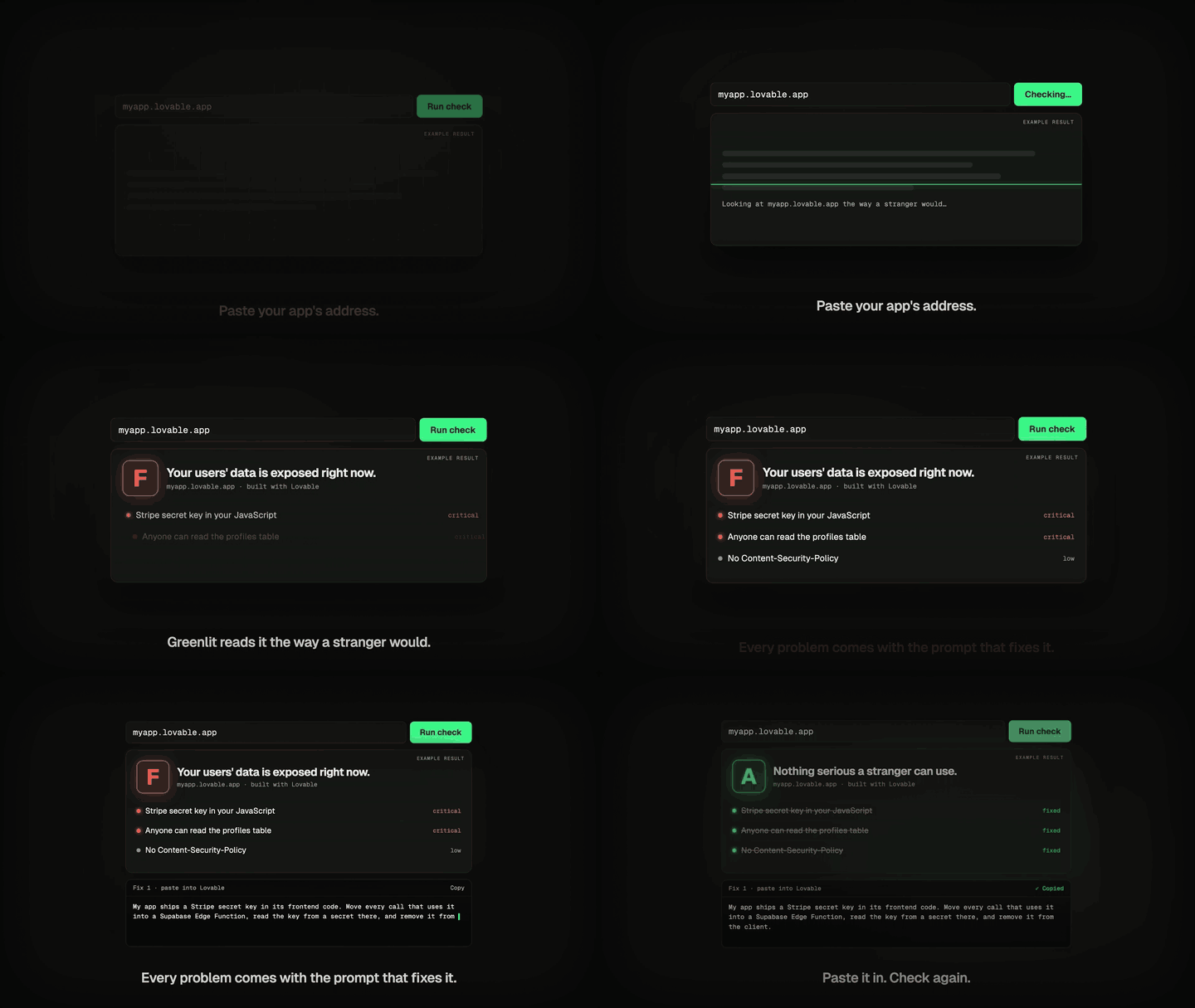
In the browser: greenlit.priberry.com. Paste your app's address. Nothing to install.
On your computer:
npx greenlitlab myapp.lovable.app
What it checks
| Check | Where it runs |
|---|---|
| Secret keys in the JavaScript every visitor downloads: 32 kinds, including Stripe, OpenAI, Anthropic, OpenRouter, Gemini, AWS, GitHub, Supabase secret keys, Telegram bots, private keys and service-account JSON | everywhere |
A Supabase service_role key in the browser | everywhere |
| Source maps that hand out your source code | everywhere |
Clickjacking (no frame-ancestors or X-Frame-Options) and no Content-Security-Policy | everywhere |
| Supabase tables anyone can read with the public key | your own app: --mine |
| Supabase storage buckets that list their files to anyone | your own app: --mine |
| Supabase sign-up open to anyone without email confirmation | your own app: --mine |
A public .env file or .git folder | your own app: --mine |
| Firebase Realtime Database and Firestore open to everyone | your own app: --mine |
Greenlit reads all of the app's own scripts, including lazy-loaded pages and the app's own CDN, and tells you if a check ran out of room or couldn't read the code. Grades follow the danger: one critical problem is an F whatever else is right, one high problem means C at best, and small things such as missing headers take 20 points at most. What your host controls and you can't change is shown but costs nothing.
The database checks run on your own computer. (The website version is paused until it can confirm you control the database itself, not only the web page.)
Supabase no longer lists a project's tables for the public key, so the database check tests the tables your app's code names, tells you how many it tested, and says so plainly when it could test none.
The owner-only checks ask for a row count (Supabase), one file or document name (storage, Firebase), or the sign-up settings, never for data, and never write anything. They run only when you say the app is yours, because testing someone else's database without permission isn't OK.
Launch readiness, beyond leaks
| Check | Where it runs |
|---|---|
| A page that loads from a developer-only address, plain-http content, Stripe in test mode, a default title, "noindex", AI calls from the browser, a test email sender, unlocked sign-in cookies | everywhere |
| Plain http that doesn't redirect to https; an app that lets any website read a signed-in visitor's data | everywhere |
| No DMARC record or a broken SPF record on your own domain | everywhere, custom domains only |
| Personal columns (email, phone, password…) in tables strangers can read; backend functions listed for review | your own app: --mine |
| Rules that are too loose, tables strangers can change: Supabase's Security Advisor in plain words | advisor, with your advisor results |
| Always-true policies, tables without Row Level Security, unverified payment webhooks, secrets behind a public prefix | scan, on your project's files |
| Backups, spending limits, a separate test database, outage alerts | questions: only you know, never graded |
Only what Greenlit confirmed moves the grade. What it couldn't see is said out loud, and what only you know is asked. Greenlit never signs in, never reads your users' data and never writes to your database.
Commands
npx greenlitlab <url>                 # grade an app
npx greenlitlab <url> --mine          # your own app: database checks too
npx greenlitlab <url> --prompt 1      # print fix prompt 1 only (pipe it to pbcopy)
npx greenlitlab <url> --prompt all    # every fix in one prompt, worst first
npx greenlitlab <url> --json          # the full result
npx greenlitlab <url> --fail-on high  # exit 1 if anything this serious is found, for CI
npx greenlitlab questions             # seven things only you know, with a fix for each gap
npx greenlitlab scan [folder]         # read your project's files before you deploy
npx greenlitlab advisor results.json  # Supabase's Security Advisor, in plain words
The last result for each app is kept in ~/.greenlit/sites/ (grade, finding ids and titles only, never keys) so the next run can show what changed.
In Claude, Cursor, VS Code and other agents
Add Greenlit as an MCP server:
{ "mcpServers": { "greenlit": { "command": "npx", "args": ["-y", "greenlitlab@0.2.0", "mcp"] } } }
Then ask your agent to check the app it just deployed and apply the fixes. The greenlit_check tool returns the grade, every finding and its fix prompt.
Made by Priberry
Greenlit comes from Priberry, the crash-test lab for AI agents. Its sister tools: Crumple crash-tests coding agents, and Tare shows what they cost.
Apache-2.0. Found a problem? Open an issue, or see SECURITY.md.