Postage
Native Mac email client with a built-in MCP server on 127.0.0.1. Agents search, sort and draft mail across IMAP accounts; by default you press Send.
Documentation
A complete Mac mail app A built-in MCP server
A fast, native Mac email client.With a built-in MCP server for your agents.
Gmail, iCloud, Fastmail and any IMAP account in one quick, keyboard-first inbox. Turn on the built-in MCP server and Claude Code, Claude Desktop, Codex, Cursor and four more agent apps work in your mail with the accounts you already have. They read, sort and draft. You press Send.
One-time purchase, no subscription. Notarized by Apple. macOS 14 Sonoma or later.
The mail app
- One inbox for every IMAP account
- The Mac shortcuts you already know
- Recipient tokens, quoted threads, synced drafts
- Multi-select actions with undo
- Per-account signatures and a From picker
- Your mail stays on your Mac See the mail app
The agent support
- A localhost MCP server, built in
- One-click setup for eight agent apps
- Live status for every connected agent
- Three access levels, set per agent
- Agents draft, you press Send
- An activity log with undo See the agent support
The mail app
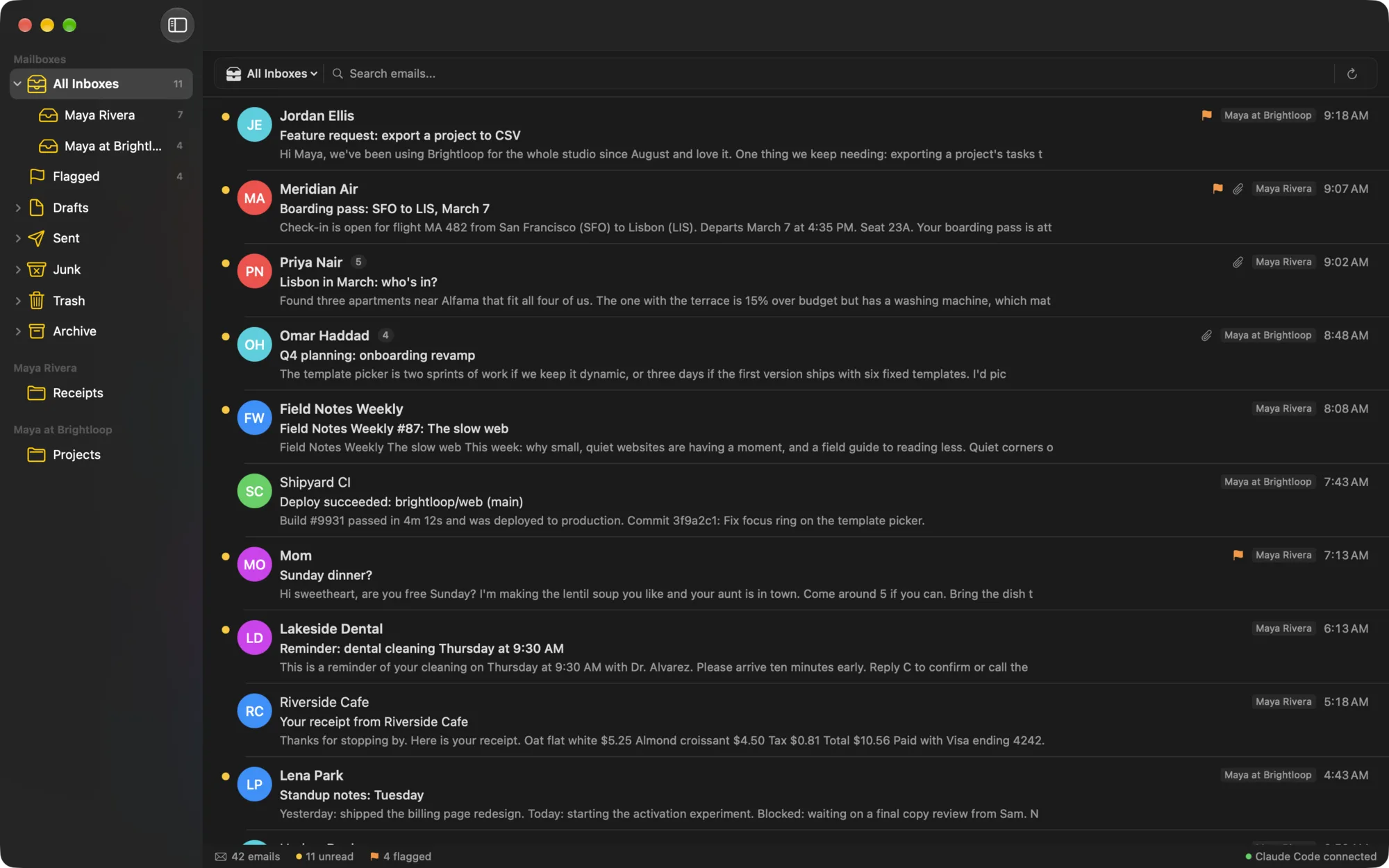
A mail app first, and a very good one.
Built in SwiftUI for the Mac, not a web page in a wrapper. Every account in one place, every action on the keyboard, and nothing between your Mac and your mail server.
One inbox for every account
All Inboxes brings every account together, and each account and folder is a click or a shortcut away. Postage has presets for the big providers, tells you when one needs an app password, and tests IMAP and SMTP before you save.
GmailiCloudFastmailYahooYour own domainAny IMAP server
Keyboard first
The shortcuts from Apple Mail, in the menus where you expect them.
⌘R
Reply
⇧⌘R
Reply All
⌃⌘A
Archive
⇧⌘U
Mark as Unread
⇧⌘L
Flag
⌃⌘M
Move to Folder
⌘Z
Undo
⇧⌘D
Send
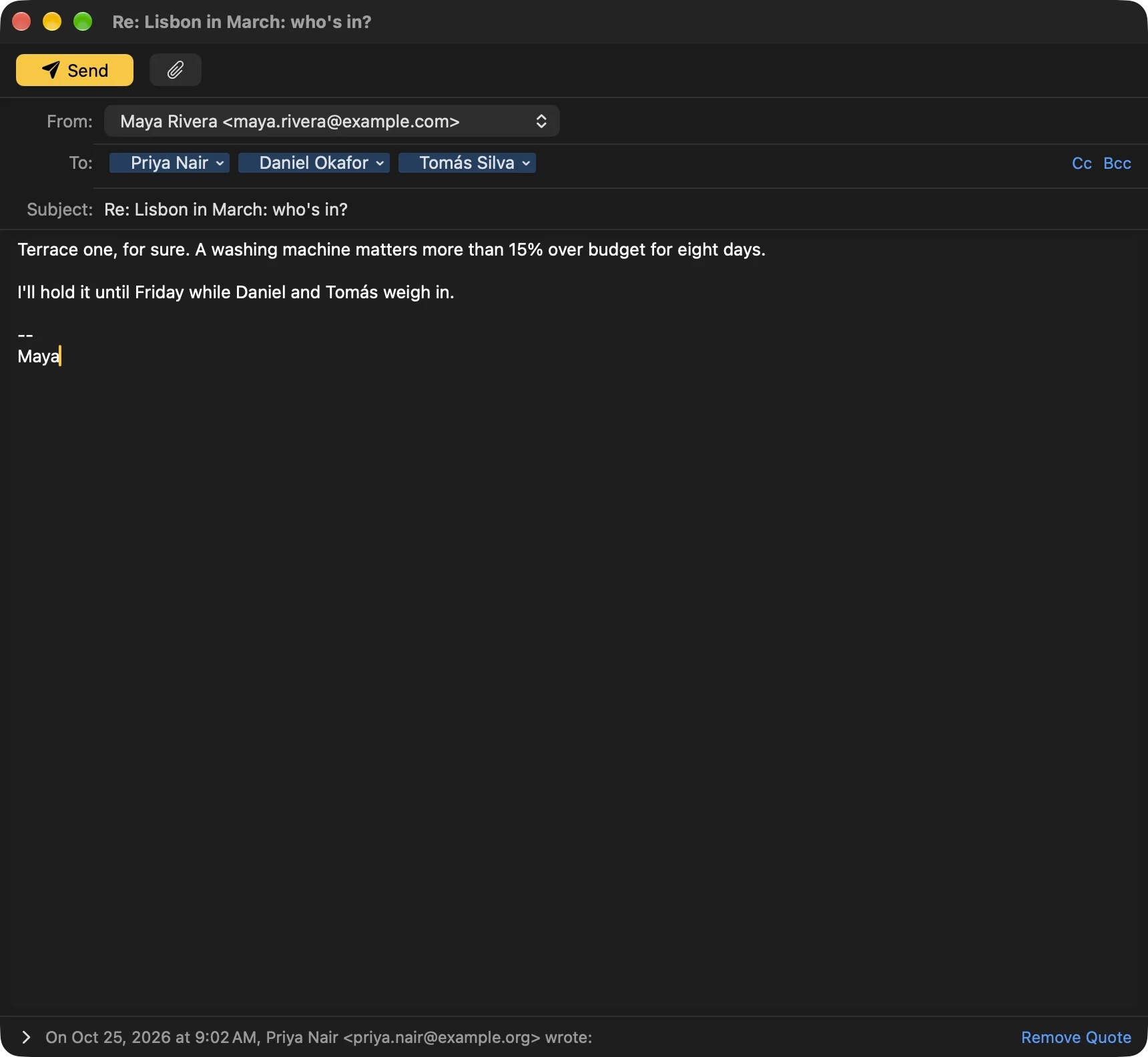
Compose that gets the details right.
- Recipient tokens with autocomplete, ranked by the people you write to most. Add your Contacts too, if you like.
- The quoted thread sits under your reply, the way Apple Mail does it, and replies carry the headers that keep threads together everywhere.
- Drafts sync to your Drafts folder, so a reply you start on the Mac is waiting on your phone.
- A From picker and per-account signatures. Replies and forwards pick the right account on their own. Need one to paste in? Make it with the free email signature generator.
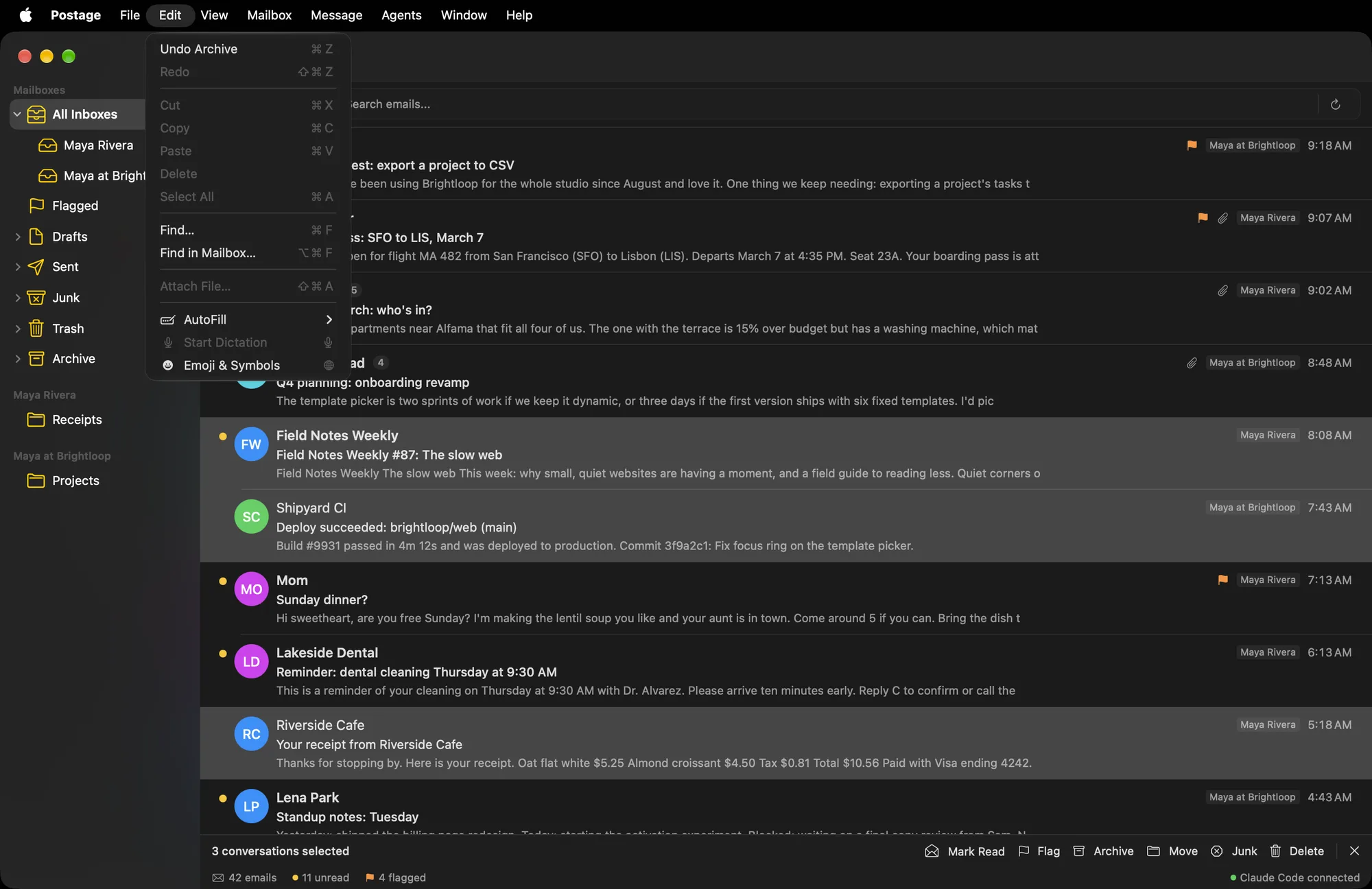
Select twenty. Act once. Undo if you slipped.
Archive, delete, junk, move, flag and mark read apply to the whole selection, whether you use the keyboard, the toolbar, the menu bar, a right-click or a drag. The list updates instantly, the server catches up in the background, and ⌘Z puts everything back.
Compose like a Mac app
To:Priya NairDaniel Ortiz
The terrace one. I'll hold it until Friday.
On Mar 2, Priya Nair wrote: Three apartments, one budget…
Recipient tokens with suggestions from the people you write to, the quoted thread under your reply, per-account signatures, and drafts saved to your Drafts folder so they are on your other devices too.
Private by design
Your MacIMAP and SMTP over TLSYour provider
No Postage servers in between, no account to create, no analytics. Passwords live in your Keychain, and remote images wait until you choose Load Images.
Make it yours
As much window as you want. Or as little.
Start with everything: mailboxes, the mailbox bar, sender avatars and the info bar. Then take away whatever you don't use, down to a plain list of your mail. Each change is one item in the View menu, and the window updates as you click.
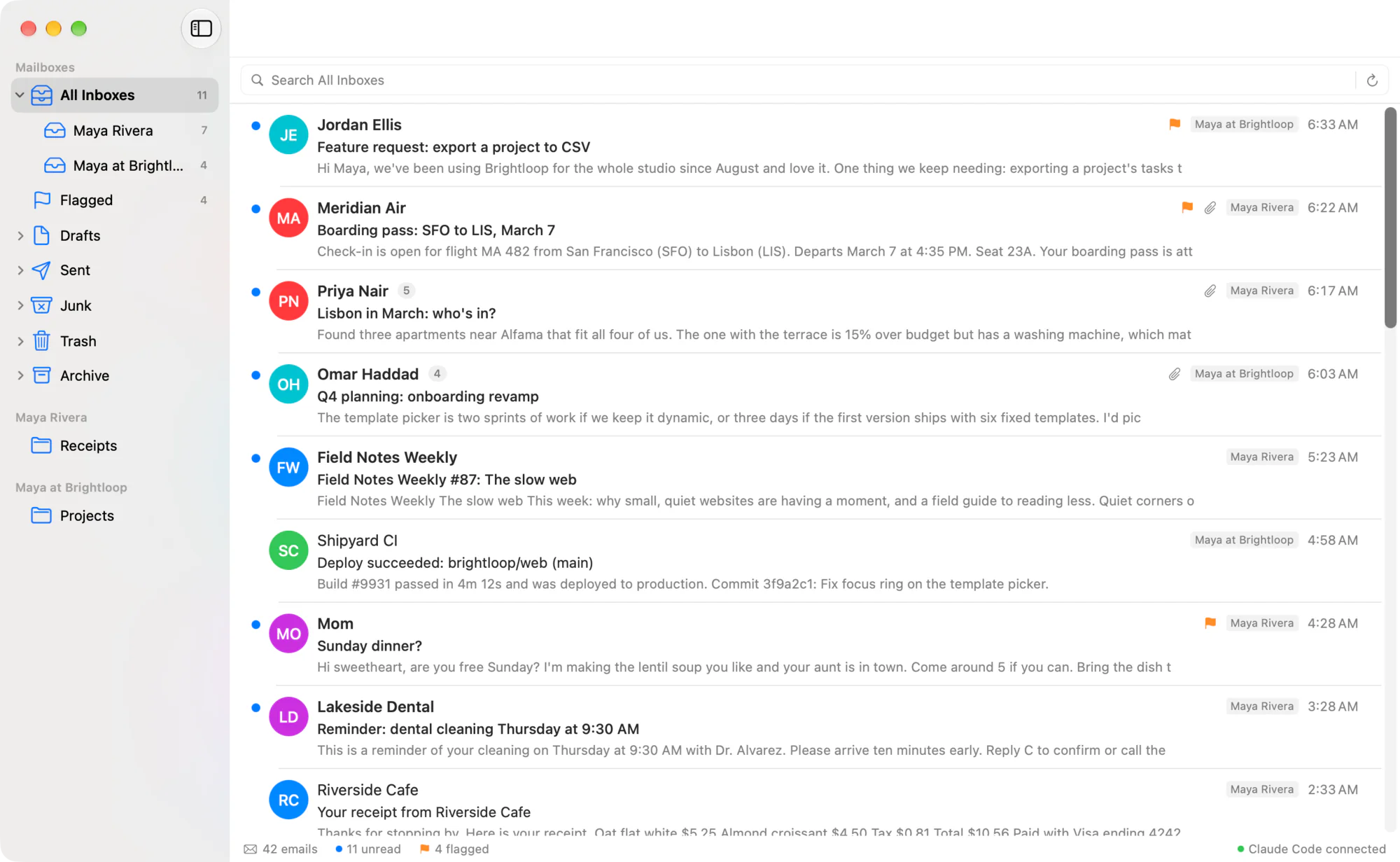
The full window
Mailboxes in the sidebar, the mailbox bar for switching and search, a photo or initials for every sender, and an info bar with your counts.
- View > Show Sidebar ⌃⌘S
- View > Show Avatars
Also:Sort by date, sender or subjectShow Unread OnlyShow or hide the info barSystem, serif or monospaced message textMessage text from 11 to 20 ptHide folders you never open
The agent support
Your agents get a real inbox. You keep the Send button.
Postage runs an MCP server on your Mac. Eight agent apps connect in one click, each with the account it is already signed in to. No API key for Postage, no cloud relay, no new subscription.
One-click setup
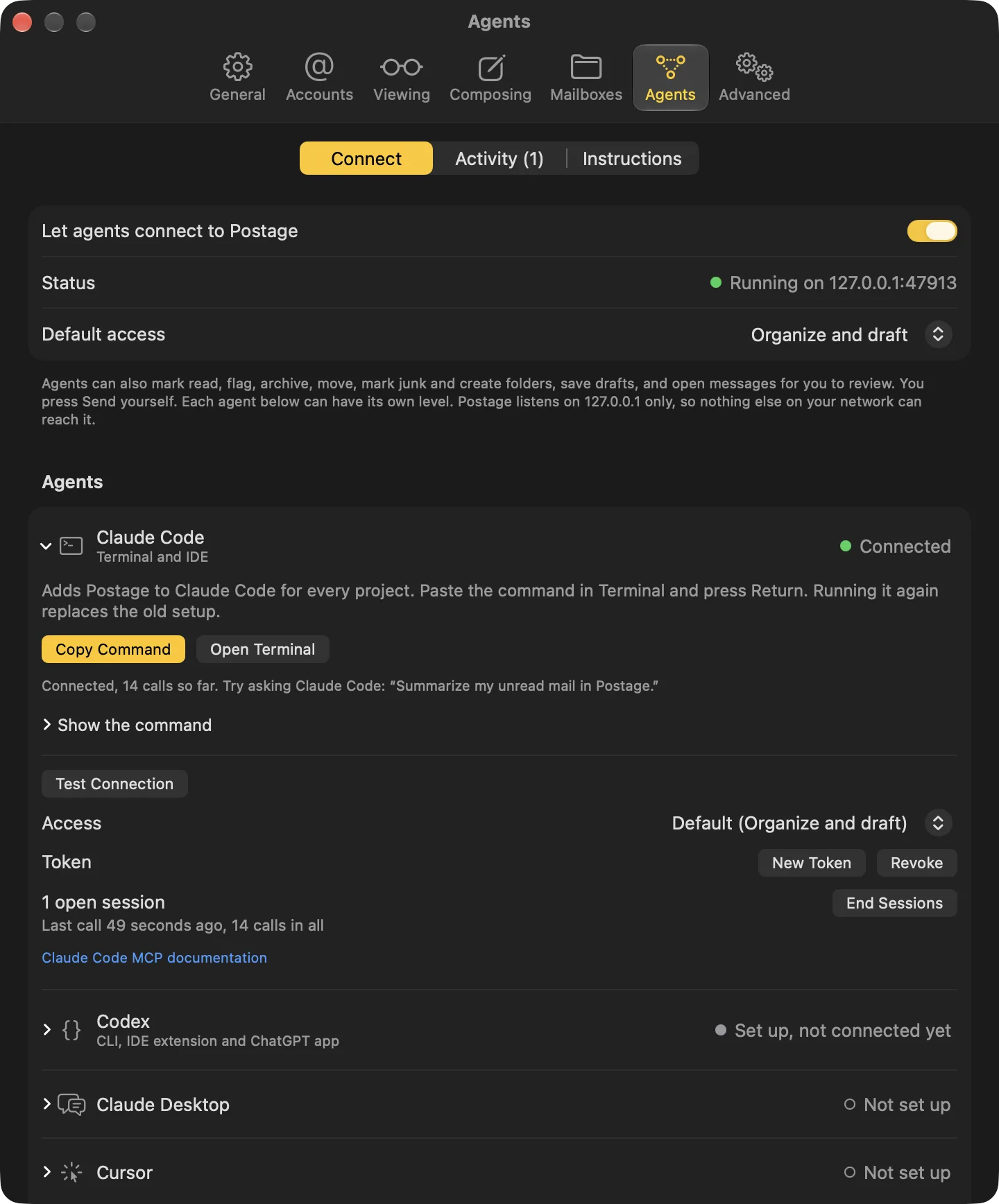
Pick your agent in Settings > Agents. Postage shows the exact command or config with a token filled in, opens Cursor's and VS Code's install prompts, or merges itself into the client's config file and leaves the rest alone.
See it connect
Ask your agent to list your accounts and its row turns green the moment it connects, with how many sessions it has open and when it last called. The status bar in the main window says who is connected too.
Three access levels
Read only, Organize and draft, or Full. Set a default and override it per agent. The server hides tools the level does not allow, refuses them if called anyway, and tells connected agents when their tools change.
An activity log with undo
Every change is listed with the agent's name and each message it touched. If an agent archived something you wanted, undo it, for a week, even after you quit Postage.
A token per agent
Each agent gets its own token in your Keychain. Replace one with New Token or revoke it, and only that agent loses access.
Agents draft. You send.
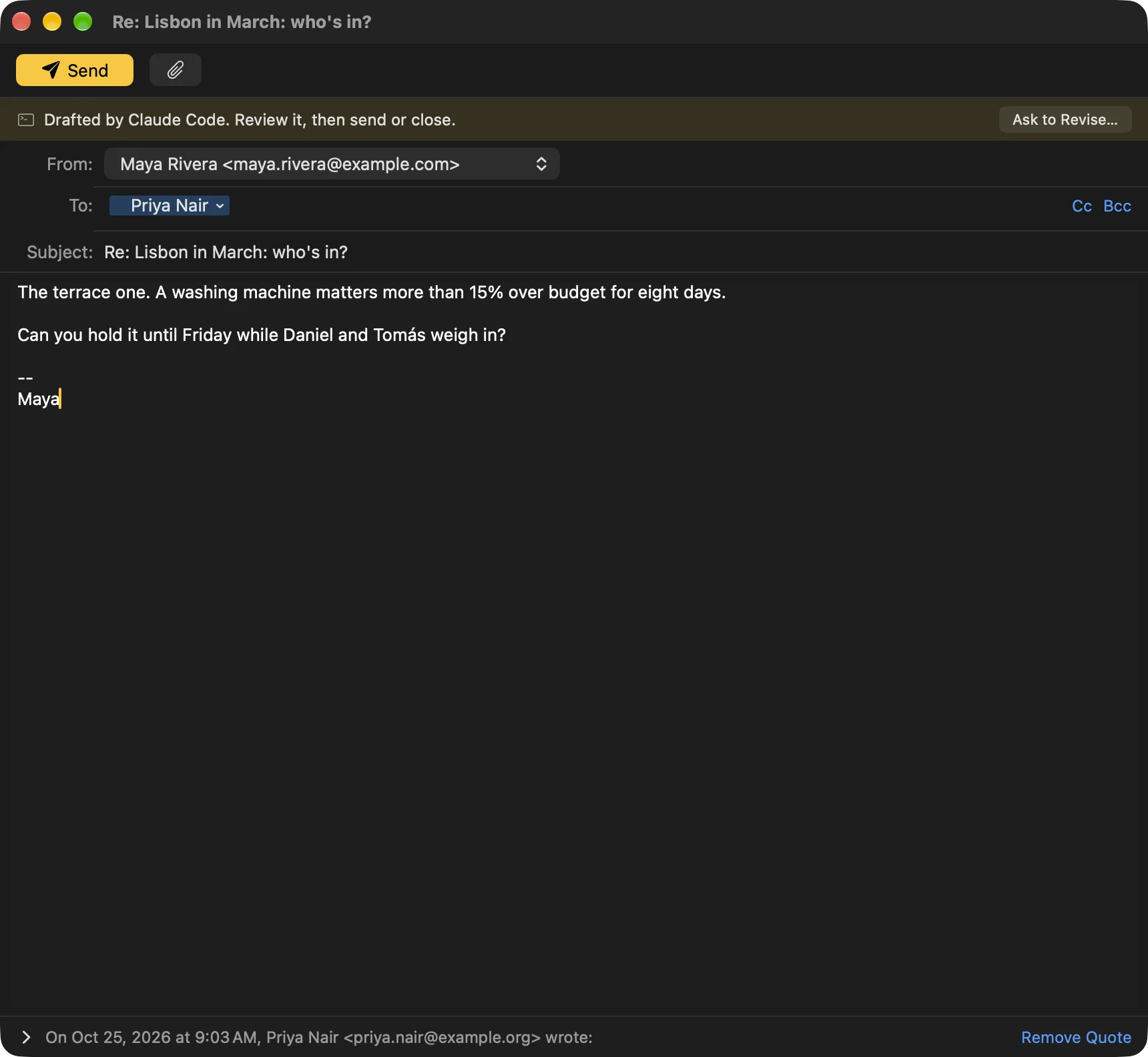
When an agent writes a message, Postage opens it in the same compose window you use, with a banner that names the agent. Change anything you like, then press Send or close it. The agent waits and is told what happened: sent, sent after your edits, or closed. Agents can only send on their own if you turn on Let agents send mail without asking in Settings > Agents. It's off until you do, and every message they send is listed in Activity.
Read only
The agent can look, and nothing else. This is the default.
- List accounts and folders
- Search and read messages, threads and attachments
- See unread counts per folder
- Preview a batch of changes without making them
Organize and draft
The agent can tidy your mail and write replies. Nothing gets sent or deleted.
- Mark read or unread, flag, archive, move, mark as junk, create folders
- Apply a whole batch of changes in one call, with one Undo
- Undo its own changes
- Save drafts and prepare messages for you to review and send
Full
Everything, including Trash, with you pressing Send.
- Move mail to Trash (never a permanent delete)
Localhost only
The server listens on 127.0.0.1:47913. Nothing on your network or the internet can reach it.
Email is untrusted input
Message bodies reach agents marked as untrusted content from the sender, so an email cannot quietly give your agent orders.
Nothing is destroyed
Even at Full access, delete means Trash. Each token is limited to 100 changes a minute.
Ask for what you want.
Your agent can search, read threads and attachments, sort, file and draft. A few things people ask for:
>Archive every newsletter older than two weeks, across both accounts.
>Draft replies to everyone waiting on me.
>What did Stripe email me about this month?
>Flag anything from my accountant and move receipts to Receipts.
>Summarize what came in overnight in five lines.
>Find the PDF contract Dana sent in August.
Your instructions, run by your agent
Built-in MCP prompts
Keep standing instructions where your agent already looks: CLAUDE.md, a skill or a scheduled task. Postage's prompts hand it your recent mail and the exact tools to call, within the access level you set, and every batch lands in Settings > Agents with Undo.
organize_inbox
Carries out your standing instructions, given right there or kept in your agent, and applies every change in one batch you can undo in one step.
triage_inbox
Sorts what came in: what needs you, what can wait, what can go.
summarize_unread
A short summary of your unread mail, grouped by what needs a reply. Changes nothing.
draft_replies
Finds the people waiting on your reply, read or unread, and writes a draft for each. Every one waits for you to review and send.
is_this_legit
Checks the email you have selected: legit, spam, a scam or phishing, going by its sender, authentication and where its links really go. Changes nothing.
did_i_handle_this
Looks through Sent, Drafts and related mail for signs you already dealt with the email you have selected. Changes nothing.
reply_to_this
Drafts a reply to the email you have selected. It waits for you to review and send.
Or paste one line.
Postage shows these with your own token filled in. Here is what Claude Code and Codex get.
Claude Code: run in Terminal
claude mcp add --transport http --scope user postage http://127.0.0.1:47913/mcp \
  --header "Authorization: Bearer YOUR_POSTAGE_TOKEN"
Codex: ~/.codex/config.toml
[mcp_servers.postage]
url = "http://127.0.0.1:47913/mcp"
http_headers = { "Authorization" = "Bearer YOUR_POSTAGE_TOKEN" }
tool_timeout_sec = 600
Setup for Claude Desktop, Cursor, VS Code, Windsurf, Zed, Gemini CLI is on the Agents page.
Everything in Postage
- Unified inbox across every IMAP account, or one at a time
- Presets for Gmail, iCloud, Yahoo and Fastmail, with app-password help
- Mac-standard menus and shortcuts, plus ⌘1 to ⌘9 for your folders
- Recipient tokens with autocomplete from the people you write to
- Quoted thread under every reply, threaded with In-Reply-To and References
- Drafts saved to your Drafts folder, so they are on your other devices too
- Multi-select archive, delete, junk, move, flag and read, all with undo
- Settings backup that moves between Macs and editions
- Per-account signatures and a From picker
- Notifications, Dock badge and Spotlight search for your mail
- Remote images blocked until you choose Load Images
- Passwords in your Keychain, no telemetry
Agents
- MCP server on 127.0.0.1:47913, never on your network
- One-click setup for eight clients, using the accounts they already have
- Live connection status for every agent, plus Test Connection
- Read only, Organize and draft, or Full, enforced by the server
- Per-client tokens in your Keychain: replace or revoke one at a time
- Agent mail opens in a compose window with a Drafted by banner
- Only you press Send, and the agent is told what you did
- Every agent change listed with Undo for a week
- Email bodies marked as untrusted input
- One call applies a whole batch, and one Undo reverses it
- Built-in prompts, including organize_inbox for your standing instructions
- Trash, never permanent delete, even at Full access
- Write Config File merges into the client's config and keeps the rest
The small things, done right
The details are the product. A few of them:
Cmd-W asks first
Closing a draft you changed asks Save Draft, Discard or Cancel.
Reply finds the right message
Reply skips your own newest message and answers the last one sent to you.
Sent mail lands in Sent
Postage files a copy in Sent, except on Gmail, which files its own.
No plaintext passwords
SMTP uses TLS on 465 or STARTTLS. There is no setting to send credentials unencrypted.
Safe HTML mail
Messages render with scripts off, and links open in your browser.
Errors that say what to fix
A failed send tells you why and what to change, not a code.
One Undo per batch
An agent can apply fifty changes in one call. You undo all of them in one step.
Rate limited changes
Each agent token gets 100 changes a minute, so a runaway loop stops fast.
Edited before sending
If you change an agent's draft before sending, the agent hears that too.
Change the port
Pick another port under Advanced and copy each client's setup again.
Settings backup
Export and import settings as JSON, without passwords or tokens.
Plan before acting
Agents can preview a batch as a dry run and show you the plan before anything changes, even at Read only.
Safe to run again
Run the same instructions every morning: mail already handled is skipped, and anything you changed back stays the way you left it.
Only what's new
Each read hands the agent a checkpoint, so a scheduled run looks at just the mail that arrived since the last one.
Replies like yours
Agent replies get your signature under their text and the quoted thread below, the same as when you click Reply. One reply per message, never a pile of drafts.
Pay once
No subscription, no account, no free tier. The mail app and the agent support are one app at one price.
Direct from us
$39
one-time
Checkout by Stripe, an instant download notarized by Apple, and updates inside the app.
Included
- Every IMAP account you have, in one inbox
- The MCP server and setup for eight agent apps
- Updates, delivered in the app
- No account, no API key, no subscription
macOS 14 Sonoma or later. Pricing details.
What happens after you pay
- 1
Pay on Stripe's checkout
One payment of the price you see. No account to create on our side. - 2
Download right away
You land back here with a Download button. The.dmg is signed with our Developer ID and notarized by Apple. - 3
Drag it to Applications
Open Postage, add your accounts, and you're reading mail. macOS 14 Sonoma or later. - 4
Updates come to you
Postage tells you when a new version is out and installs it when you choose. Updates are included.
Lost the link later? The download page finds it again from the email you paid with.
Guides and comparisons
Setting up Claude, Codex or another agent with your mail, and how Postage compares.
How to Connect Claude to Your Email on a Mac
Give Claude Desktop and Claude Code your Gmail, iCloud, Fastmail or any IMAP inbox through a local MCP server, with every send waiting for you.
Where Is the Claude Desktop Config File on a Mac?
Claude Desktop keeps claude_desktop_config.json in ~/Library/Application Support/Claude. How to open it, what goes in it, and where Claude Code's files are.
Organize Your Inbox with Claude Code
Write your email rules once in CLAUDE.md or a skill, let Claude Code apply them through Postage every morning, and undo any batch in one step.
Use Codex and the ChatGPT Desktop App with Your Email
Add Postage to ~/.codex/config.toml once and Codex in the ChatGPT desktop app, the Codex CLI and the IDE extension can search, sort and draft your mail.
Email MCP Servers on a Mac: What to Look For
Hosted, scripted or built into a mail app: how email MCP servers differ, and the checks that matter before an AI agent gets your inbox.
Postage vs Mimestream
Mimestream is a native Mac client for Gmail on a subscription. Postage covers any IMAP account, adds an MCP server for AI agents and costs $39 once.
Postage vs Superhuman for Email with AI Agents
Superhuman's Mail MCP comes with its Business plan. Postage runs an MCP server on your Mac for any IMAP account, for $39 once.
Can Claude Send Email? Claude Desktop and Claude Code
Claude can't send mail on its own. Give it an email connector or MCP server and it can write and send, with you approving each message first.
How to Connect Claude to iCloud Mail
Claude's built-in email connector covers Gmail. To use Claude with iCloud Mail, add your iCloud account to Postage and connect Claude to its MCP server.
Is It Safe to Give an AI Agent Access to Your Email?
The real risks of letting Claude or Codex into your inbox (prompt injection, sending as you, bulk mistakes) and the settings that limit each one.
Mimestream vs Superhuman: Which Mac Email App Fits?
Mimestream is a native Gmail app for Mac; Superhuman is AI email for Gmail and Outlook teams. How they differ, and where Postage fits for other accounts.
Can Claude Read My Gmail? How to Connect It on a Mac
Yes, once Claude has a connection to your Gmail. Add Gmail to Postage with an app password, connect Claude Desktop or Claude Code, then ask.
Can ChatGPT Read Your Email on a Mac?
Yes, through Codex in the ChatGPT desktop app. Connect it to Postage's MCP server on your Mac and it can search and read every IMAP account you add.
How to Let an AI Agent Draft Email Replies Without Sending Them
Set your agent to Organize and draft in Postage. Replies land in your Drafts folder or a compose window, and only you can press Send.
Can an AI Agent Unsubscribe You from Email and Clean Your Inbox?
An agent can sort and archive newsletters in Postage, with one Undo per batch, and show you who mails you most. Unsubscribing stays with you.
Can Claude Read Email Attachments?
Yes, if its email connection hands over the contents. Through Postage, Claude reads text from PDF, CSV, HTML, JSON, XML and plain text attachments.
Which Email Clients Work with Claude Desktop and MCP?
Postage, Superhuman Mail and Fastmail each have their own MCP server, and they differ on accounts, where it runs and sending. Mimestream lists none.
Questions
Which email providers work?›
Any IMAP account that signs in with a password or app password: Gmail, iCloud, Fastmail, Yahoo and your own domain. Postage has presets for the big providers and tells you when one needs an app password. Mail goes straight between your Mac and your provider.
Do I have to use agents?›
No. Postage is a complete mail app on its own. The MCP server is off until you turn it on in Settings > Agents.
Do I need an API key?›
No. Postage has no AI of its own and never asks for a key. Claude Code, Codex, Claude Desktop, Cursor and the other clients connect with the sign-in they already have.
Does Postage have rules or filters?›
Not built in. Your standing instructions, like "archive receipts after 30 days" or "flag anything from my accountant", live in your agent: CLAUDE.md, a skill or a scheduled task. Postage gives the agent the tools and an organize_inbox prompt to carry them out, applies each batch with one Undo, and lists every change in Settings > Agents.
Can an agent send email without asking me?›
No. When an agent writes a message, Postage opens it in a normal compose window with a "Drafted by" banner naming the agent. You can edit it, then press Send or close it. The agent waits and is told what you did.
Is the MCP server reachable from the internet?›
No. It listens on 127.0.0.1 only (default port 47913, changeable under Advanced). There is no network mode. Each client gets its own token in your Keychain that you can revoke.
What if an email tries to give my agent instructions?›
Message bodies reach agents wrapped as untrusted content from the sender, and the server tells the agent so. Mail that reads like it's talking to an AI agent is marked suspicious and left out of the list of people waiting on you. Combined with access levels and the fact that only you can press Send, a hostile email has very little to work with.
What does it cost?›
$39 one-time, from this site. No subscription, no account, no free tier. Updates are included.
Which macOS versions are supported?›
macOS 14 Sonoma or later.
Is there an iPhone or Windows version?›
No. Postage is Mac only.
I lost my download link. How do I get it back?›
Go to the download page and enter the email you used at checkout; it takes you back to your download. Anything else: hello@greatwork.company.
More on the Support page.