Pethost
officialA small cloud for personal projects. Easy to use for you and your agent.
What can you do with Pethost MCP?
- Deploy a project — Ask your assistant to deploy a local directory, files, or a GitHub repo to your Pethost machine with
CreateProject. - Inspect project health — Get a full overview of a project's services, addresses, certificates, deploys, backups, and traffic via
GetProject. - Troubleshoot failures — Query HTTP traffic with
QueryHttpTrafficto find failing or slow paths, then checkQueryContainerLogsfor errors. - Roll back a deploy — Use
ListCommitsto see a GitHub project's history andDeployProjectto revert to an earlier commit or version. - Run commands in containers — Execute a shell command inside a running container with
RunServiceCommandto debug or manage services. - Manage machine resources — View machine-wide resources and project statuses with
GetMachine, or restart the machine viaRunMachineAction.
Hosted MCP Server
npx add-mcp 'https://mcp.pethost.dev/mcp'Installs into Claude Code, Codex, Cursor and more
Documentation

Pethost plugin: deploy and host your projects from your AI agent
Pethost is a small cloud for personal projects, easy to use for you and your agent. This plugin connects the agent you already use (Claude Code, Codex, Cursor, ChatGPT, Gemini CLI or any other with skills and MCP) to your Pethost machine. Say “deploy this” and it is live, with HTTPS, backups and logs.
- Made for AI agents. A skill and an MCP server with 13 tools. The agent deploys, reads logs and requests, rolls back and restores, in plain words from you.
- One flat price. €9.99 a month rents a machine of your own. No fee per project, no usage-based pricing, no surprise bill.
- Anything Docker runs. Web apps, APIs, bots, workers and their databases, as Docker Compose projects. No cold starts: nothing sleeps.
Get a machine · pethost.dev · About Pethost · API reference
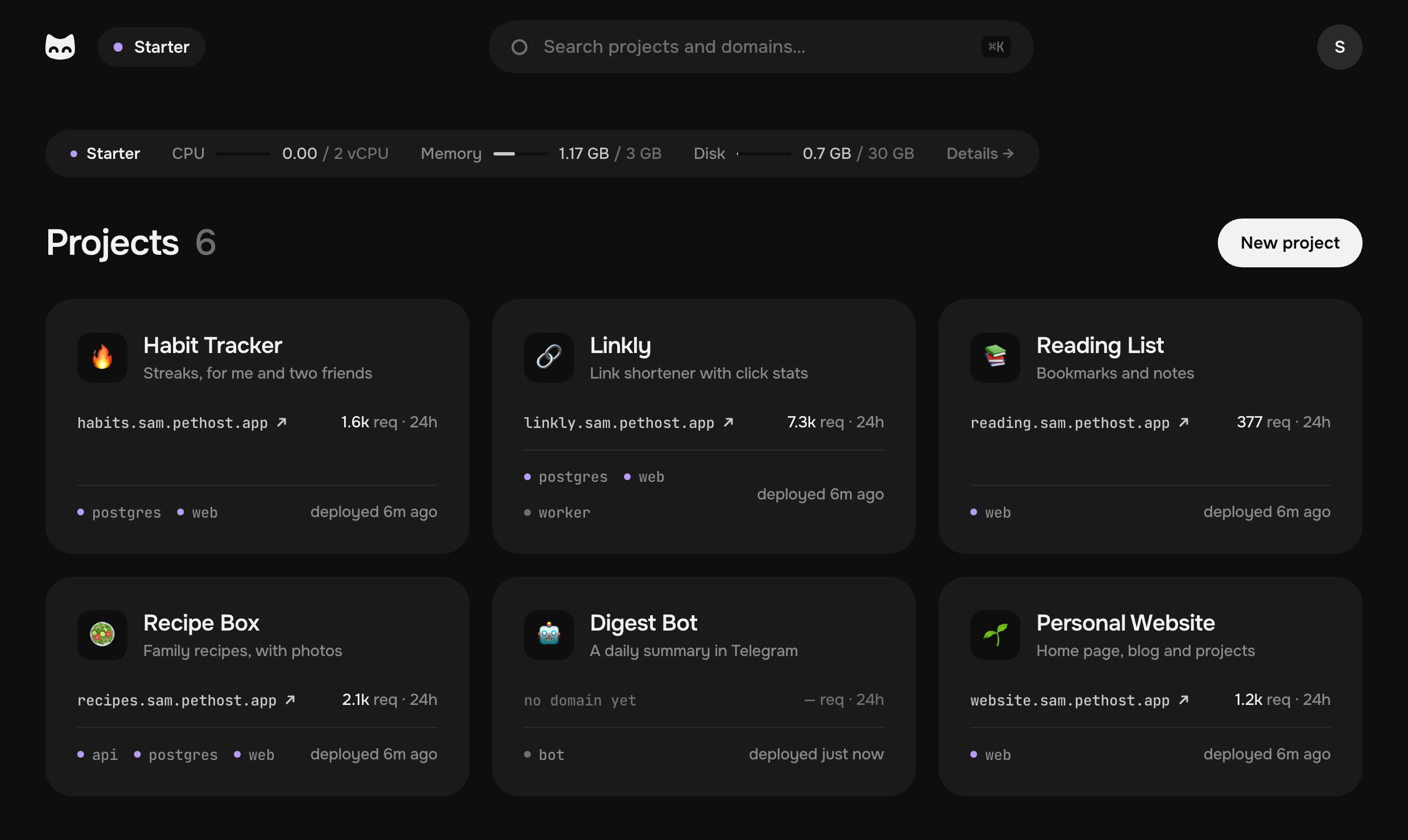
Deploy from Claude Code, Codex, Cursor or any MCP agent
- Subscribe, and a machine is set up for you.
- Tell your agent: “Install the Pethost plugin from https://github.com/pethost-dev/plugin for yourself.” It asks you to approve it in your browser: there is no token to copy.
- Say “Deploy this and send me the link.” The agent packs the project, writes a Dockerfile if there is none, deploys it and answers with its address.
To install it by hand:
| Agent | Install |
|---|---|
| Claude Code | claude plugin marketplace add pethost-dev/plugin, then claude plugin install pethost@pethost |
| Claude apps (no terminal) | Add this repository as a plugin in the app's settings. |
| Codex (CLI and desktop app) | codex plugin marketplace add pethost-dev/plugin, then codex plugin add pethost@pethost |
| Cursor, Gemini CLI and any other agent | The two parts apart. The skill: npx skills add pethost-dev/plugin. The MCP server: https://mcp.pethost.dev/mcp (streamable HTTP, sign-in by OAuth), added in the agent's own way. |
| ChatGPT on the web | The MCP server alone, by its address, in developer mode. |
A session that is already open sees the plugin after a restart (in Claude Code,
/reload-plugins).
What to ask your agent
| You say | Your agent |
|---|---|
| “Deploy this and send me the link.” | Uploads the project, builds and deploys it, and answers with its HTTPS address. |
| “Why does the contact form fail?” | Finds the path that fails in the requests, the error in the logs and the line at fault in the code. |
| “Roll back to yesterday's version.” | Puts an earlier deploy or commit back in one step. |
| “Back it up before I change the schema.” | Makes a backup it can restore. |
| “Put it on example.com.” | Adds the address and tells you the one DNS record to make. |
| “Put a password on it.” | Puts a password page in front of the whole site. |
| “Set SMTP_HOST and restart.” | Changes the project's environment and deploys it. |
What is in the plugin
- A skill,
skills/pethost: tells the agent when Pethost is the answer, how to deploy and how to look after what runs there. - The Pethost MCP server,
https://mcp.pethost.dev/mcp, whose tools do the work. Each does one clear thing, and every error says what to do next. Answers are short: logs come filtered and paged, and one call waits for a deploy. That is less time and fewer tokens.
The MCP server's 13 tools
| Tool | What it does |
|---|---|
GetMachine | The machine and every project on it: resources, addresses, problems. |
GetProject | One project in full: services, addresses, certificates, deploys, backups, traffic. |
CreateProject | Creates a project from a directory, files or a GitHub repository, and deploys it. |
DeployProject | Deploys a new version: code, environment variables, a domain, a commit or a rollback. |
ListCommits | A GitHub project's commits, to deploy or roll back to. |
GetOperation | Waits for a deploy, a backup or a restore, and returns its log. |
RunProjectAction | Start, stop, restart, back up, restore or delete a project. |
RunMachineAction | SSH keys, open sessions and a restart of the machine. |
QueryHttpTraffic | The requests: which paths fail and which are slow. |
QueryContainerLogs | The containers' logs, filtered and paged. |
RunServiceCommand | Runs a shell command in a container. |
ReadPath | Reads a file or a directory of a project, a container or a volume. |
CreateTransfer | Uploads or downloads a file, straight between you and the machine. |
Every method and its errors are in the API reference.
What the agent can and cannot do
It can deploy, read logs and requests, change settings, restart, roll back and restore. It cannot pay for anything or change your account. It signs in by OAuth: you approve it in your browser, and revoke it in the panel's Settings at any time.
Docker Compose hosting at one flat price
Pethost is managed hosting for Docker Compose projects. A subscription rents one virtual machine that only your account uses. Pethost's software on it deploys your projects, gives them HTTPS addresses, keeps their request logs and backs them up every night. You run it through your agent or from a web panel: both show the same projects, logs and requests.
- A machine of your own: nobody else's projects on it. No cold starts, nothing sleeps. Security updates install themselves.
- HTTPS addresses: anything.yourname.pethost.app at once, or your own domain with one DNS record. Certificates renew themselves. A password page in front of the whole site: one sentence to your agent.
- Deploys from GitHub: every push deploys itself, and an earlier commit is one step back.
- Request logs: every request with its status and time, the busiest paths and the error rate, kept for 30 days.
- Nightly backups: encrypted, stored off the machine, kept for 14 days.
- SSH and SFTP into any container, and a terminal in the panel.
- Docker Compose, as written: a project is a Compose file, and the same file runs anywhere else Docker does. A database is one more service in it, at no extra cost.
- In the EU: your data lives on your machine, and requests to your sites go straight to it, never through our panel.
Pricing. Starter is €9.99 a month for 2 vCPU, 3 GB of memory and 30 GB of SSD. Grow is €17.99 for 4 vCPU, 6 GB and 60 GB. Prices are without VAT. As many projects, containers and databases as fit: nothing is metered, and nothing is billed on top. There is no free tier. See the plans.
Who it is for. Solo developers and early startups who host several projects, bots or small apps and want one fixed monthly bill, and people who build with an AI agent and want it to deploy and run what it wrote. It is not for large teams whose applications need several regions or autoscaling: the machine is the limit.
How Pethost compares
| If you use | The difference |
|---|---|
| Heroku, Render, DigitalOcean App Platform | There each app, worker and database is one more line on the bill. On Pethost one flat price covers the whole machine: as many projects and databases as fit, and nothing sleeps. |
| Railway, Fly.io, Koyeb | There CPU, memory and traffic are metered, so the bill moves with every busy month. On Pethost the machine is the limit: nothing is metered, nothing is billed on top. |
| Vercel, Netlify | Made for front ends and serverless functions: a bot, a long-running worker or a database is another service with its own price. Pethost runs the front end, the back end and the database on one machine. |
| Coolify, Dokploy, CapRover, Dokku, Easypanel | Self-hosted: the server is yours to rent, update, secure and back up. Pethost is the machine and the panel together, looked after for you, and agents are first-class users, not an add-on. |
| Sliplane | The closest: a flat price per server. There a Compose file is converted into its own services; Pethost runs a Compose project as written. |
| Replit | You build and publish inside Replit, with its own agent. Pethost works with the agent you already use, and one flat price covers all your apps. |
| PythonAnywhere | Python only, no Docker. Pethost runs anything Docker runs, in any language. |
| A VPS you set up yourself | The server is the cheap part. You still set up the proxy, DNS, certificates, backups and updates yourself, and fix them when they break. Pethost is the server with all of that done. |
About Pethost has each comparison in full, with prices.
Questions
Which AI agents does Pethost work with? Almost any agent that supports skills and MCP. The ones we tested ourselves: Claude Code, Codex, Cursor, ChatGPT, Gemini CLI, OpenClaw, Hermes and Pi.
What can I deploy? Anything that runs in Docker: web apps, APIs, bots, workers, databases. No Dockerfile? With the plugin installed, your agent knows the details and writes it for you.
Do I need an agent? No. The web panel does the same, and shows the same projects, logs and requests.
Can I use my own domain? Yes. One DNS record, and the certificate comes by itself.
Is there a free tier? No: €9.99 rents a real machine, so nothing sleeps. Cancel any time: refunds and cancellation has the rules.
License
MIT. The Pethost name and logo are not part of it: keep them for Pethost itself.