budget-mcp
MCP that allows you agent to manage a personal budget database
Documentation
💰 Personal Budget MCP Server


Track personal finances by talking to an LLM. An MCP server that gives any MCP-compatible client typed tools to log transactions, manage a category library, and analyse spending — plus interactive dashboards rendered directly in the chat client.
Built with Python, FastMCP, SQLAlchemy, SQLite and PostgreSQL.
Why this exists
Chat is a good interface for expense logging. "Spent £42 at Tesco and £8 on coffee" is faster than opening an app and filling in two forms, and an LLM can categorise it for you.
The problem is that an LLM with no tools will happily tell you it logged your transaction. Getting this to work means the model must be unable to confuse "I recorded this" with "I described recording this" — so the tools have to return unambiguous success or failure, reject bad input rather than coercing it, and expose enough query surface that the agent reads real state instead of reconstructing it from conversation history.
That design problem is the actual point of this repo. The budgeting is the excuse.
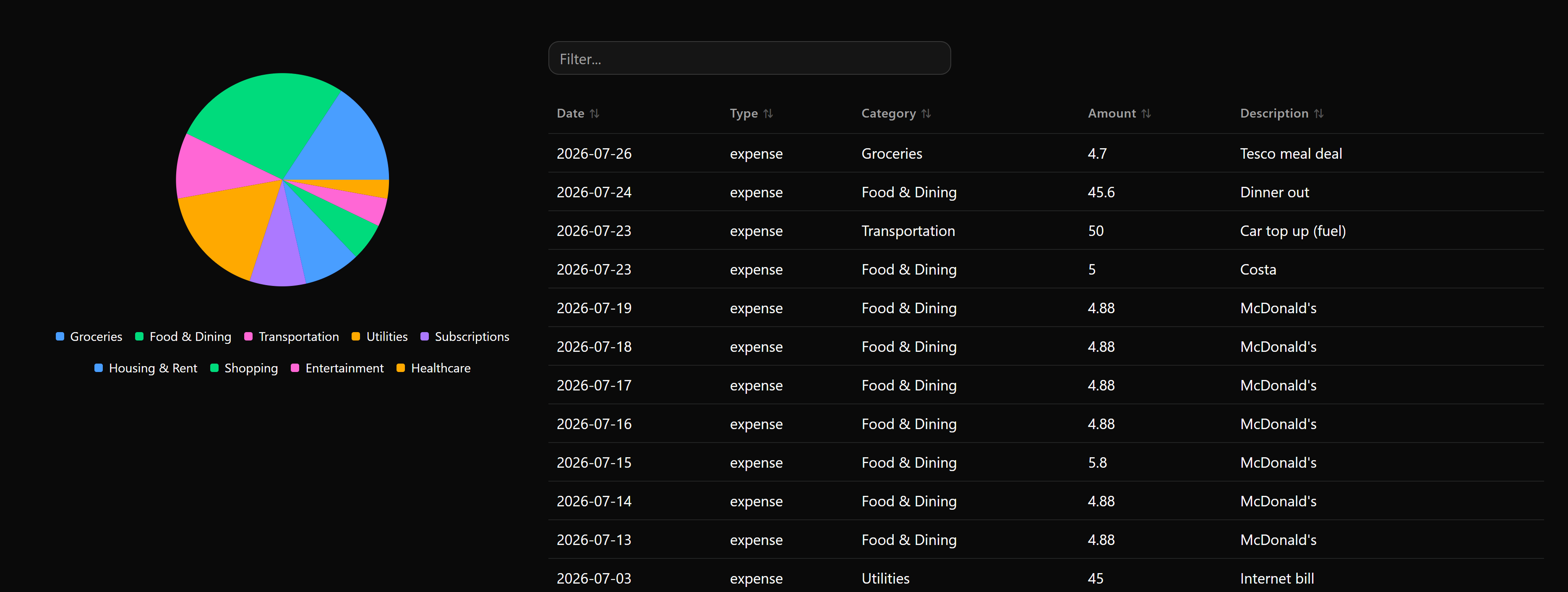
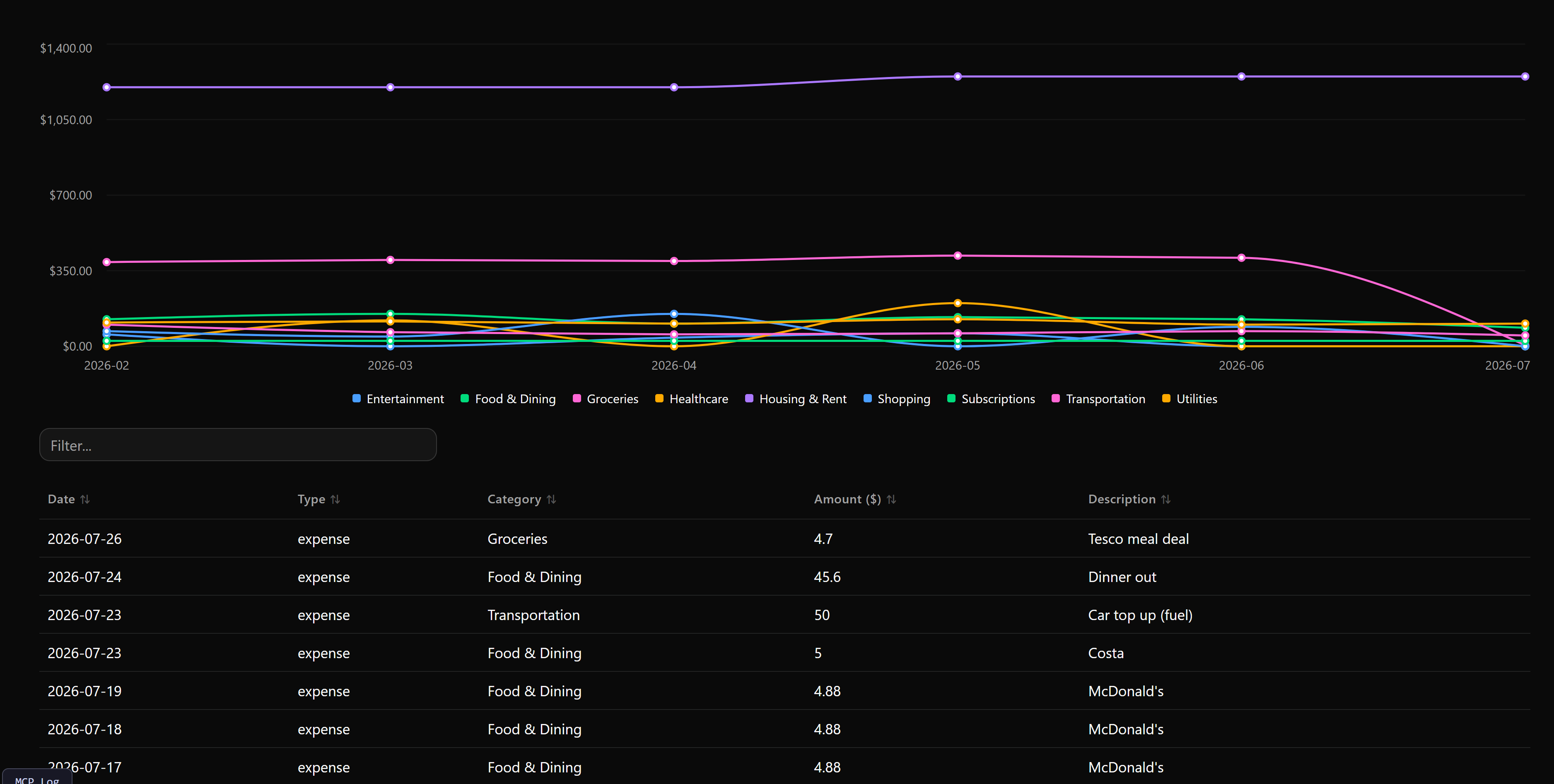
📸 Screenshots
| Budget dashboard | Spending trends |
|---|---|
 |  |
🧠 Design notes: making agent calls trustworthy
Explicit failure over silent coercion. Tools validate input and return a structured error naming what was wrong, rather than guessing at intent. An invalid type, a malformed date, or a category_id that doesn't exist fails loudly, so the agent can correct itself and report accurately to the user instead of inventing a confirmation.
Batch-first write tools. add_transaction, update_transaction, delete_transaction and add_category all accept either a single item or an items list. Agents naturally handle several things at once ("log these five expenses"), and forcing them into one call per record multiplies both latency and the number of places a partial failure can hide.
Referential integrity at the tool boundary. delete_category takes an optional reassign_to_category_id, so removing a category can't silently orphan its transactions. The integrity decision is surfaced as a parameter the agent must reason about rather than a side effect it discovers later.
Read surface sized for multi-turn use. get_summary, get_transactions and get_uncategorized_transactions cover aggregate, detail and triage reads with consistent filter arguments across all three. get_uncategorized_transactions returns results sorted by description specifically so an agent can categorise bulk imports in coherent groups instead of one row at a time.
Idempotent schema bootstrap. Tables and 15 default categories are created on first startup, so a fresh clone or a new cloud deployment is immediately usable and there's no partially-initialised state for a tool call to land in.
✨ Features
- Local or cloud storage — zero-setup SQLite (in-memory or
data/budget.db), or PostgreSQL via any provider such as Neon. - Interactive dashboards in-client — category pie charts and searchable transaction tables rendered via
prefab-ui, returned as MCP UI apps rather than plain text. - Spending trends — continuous category line chart with month/week/day granularity toggle, date-range slider and searchable table.
- Batch operations — single-item or bulk write across transactions and categories.
- Reproducible environment —
uvfor fast, locked dependency resolution. - Broad client support — Claude Desktop, Claude Code, Cursor, Goose, Open WebUI, and any other MCP host.
🚀 Quickstart
git clone https://github.com/PedroLiu1999/budget-mcp.git
cd budget-mcp
uv sync
uv run pytest          # confirm the install works
uv run server.py       # start the server (in-memory SQLite by default)
Then register it with your client — Claude Code is the one-liner:
claude mcp add budget -- uv run --directory "/absolute/path/to/budget-mcp" server.py
To persist data, set DATABASE_URL in a .env file first (see Database configuration).
🛠 Available tools
12 tools — click to expand full reference
| Tool | Description | Arguments |
|---|---|---|
budget_dashboard | Interactive UI app: category breakdown chart and searchable transaction table. | search (str, opt)month (str YYYY-MM, opt)type (income|expense, opt)limit (int, default 100) |
spending_trends | Interactive UI app: spending over time with category line chart, granularity toggle, date-range slider and searchable table. | granularity (month|week|day, default month)days_range (range list [start, end], opt)category_id (int, opt)type (expense|income, opt)start_date (str, opt)end_date (str, opt)limit (int, default 1000) |
add_transaction | Logs one or many income/expense transactions. | items (list of dicts, opt — batch)amount (float, opt)category_id (int, opt)description (str, opt)type (expense|income, opt)date (str YYYY-MM-DD, opt) |
get_summary | Aggregated summary: income, expense, net balance, optional category breakdown. | month (str YYYY-MM, opt)start_date / end_date (str YYYY-MM-DD, opt)category_id (int, opt)type (income|expense, opt)by_category (bool, default False) |
get_transactions | Detailed transaction records by filter. | category_id (int, opt)type (income|expense, opt)month (str, opt)start_date / end_date (str, opt)min_amount / max_amount (float, opt)search (str, opt)limit (int, default 50) |
get_uncategorized_transactions | Uncategorised transactions sorted by description, for bulk categorisation. | type (income|expense, opt)search (str, opt)limit (int, default 100) |
update_transaction | Updates one or many transactions. | items (list of update dicts, opt)transaction_id (int, opt)amount (float, opt)category_id (int, opt)description (str, opt)type (str, opt)date (str YYYY-MM-DD, opt) |
delete_transaction | Removes one or many transactions by ID. | transaction_ids (int or list of int) |
list_categories | Lists active categories. | type (expense|income, opt) |
add_category | Adds one or many categories. | items (list of dicts, opt)name (str, opt)type (expense|income, opt)description (str, opt) |
update_category | Updates a category's properties. | category_id_or_name (str)new_name (str, opt)type (str, opt)description (str, opt) |
delete_category | Removes one or many categories, optionally reassigning their transactions. | category_ids_or_names (str, int or list)reassign_to_category_id (int, opt) |
⚙️ Database configuration
Set via the DATABASE_URL environment variable in a .env file. Keep .env out of version control.
Local SQLite — in-memory (default if DATABASE_URL is unset):
DATABASE_URL=sqlite:///:memory:
Local SQLite file — persists between restarts:
DATABASE_URL=sqlite:///data/budget.db
PostgreSQL / Neon:
DATABASE_URL=postgresql://<user>:<password>@<hostname>/<dbname>?sslmode=require
Tables and 15 default category seeds are created automatically on first startup.
🔌 Client setup
Claude Code, Claude Desktop, Cursor, Open WebUI
Claude Code (CLI)
claude mcp add budget -- uv run --directory "/absolute/path/to/budget-mcp" server.py
Claude Desktop
Add to claude_desktop_config.json:
{
  "mcpServers": {
    "personal-budget": {
      "command": "uv",
      "args": ["run", "--directory", "/absolute/path/to/budget-mcp", "server.py"]
    }
  }
}
Cursor IDE
Settings → Features → MCP → Add New MCP Server
- Type:
command - Name:
budget-mcp - Command:
uv run --directory "/absolute/path/to/budget-mcp" server.py
Open WebUI
Bridge the stdio server over HTTP with mcpo:
uvx mcpo --port 8000 -- uv run server.py
Then in Admin Panel → Settings → External Tools, add the OpenAPI connection URL http://localhost:8000 (or http://host.docker.internal:8000 from Docker).
☁️ Cloud deployment
For remote hosts, Docker, or platforms such as Horizon:
- Set
DATABASE_URLto a cloud PostgreSQL connection string in the deployment environment — in-memory SQLite will not persist across restarts. - Point the runner at the ASGI app:
fastmcp run server.py:mcp
Schema tables and default categories initialise on import, so no migration step is needed on first boot.
🧪 Testing
uv run pytest
Inspect tools interactively with the FastMCP Inspector:
uv run fastmcp dev inspector server.py:mcp
Or preview interactive UI applications directly in the browser:
uv run fastmcp dev apps server.py:mcp
📝 License
MIT — see LICENSE.