Zoteus
Zotero library for Claude and any MCP client: search, PDF passages with page locators, CSL citations, add by DOI, group libraries, and writes. TypeScript, npx or one-click .mcpb.
Documentation
Zoteus
A Zotero MCP server. Your whole library, inside Claude and ChatGPT.
Zoteus gives Claude Desktop, claude.ai, ChatGPT, Claude Code, Cursor and any other MCP client access to a Zotero library: search by keyword or by meaning, passages from your PDFs with page numbers, citations in any CSL style, adding items, and safe writes.




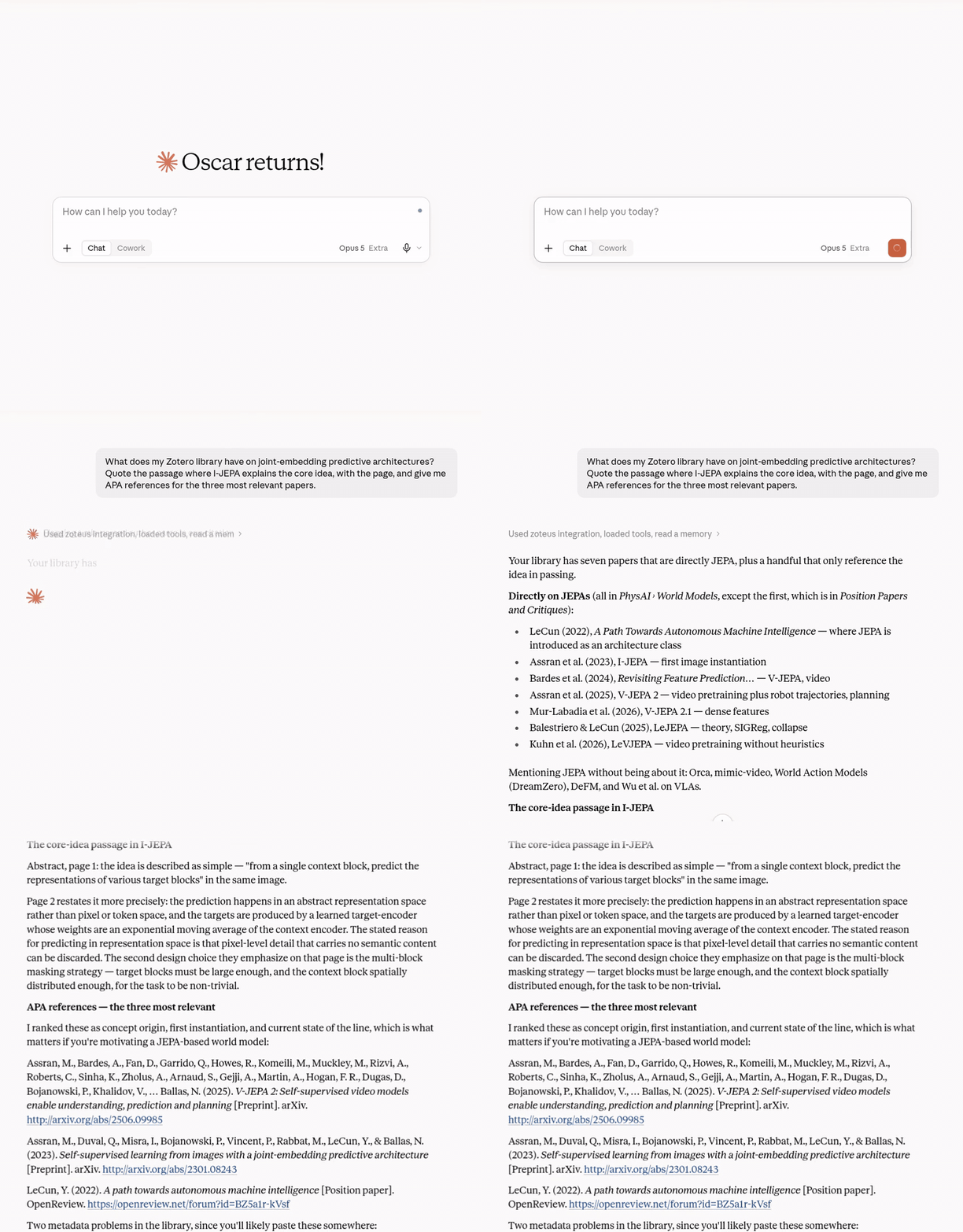
A real session, 6 September 2026, against the maintainer's own library. Tool calls are shown as a time-lapse. The full recording is on zoteus.com.
Install
For most clients there is nothing to download: the client fetches Zoteus with npx the first time it runs. New to MCP servers? Start with docs/getting-started.md.
| Client | How |
|---|---|
| Claude Desktop | Download the bundle for your system from the latest release, zoteus-macos.mcpb, zoteus-windows.mcpb or zoteus-linux.mcpb, and double-click it. This is the install with a settings screen (Settings → Extensions → Zoteus) and per-tool permissions. |
| Claude Code | claude mcp add --transport stdio zoteus -- npx -y @oscardvs/zoteus |
| Claude Code, as a plugin | /plugin marketplace add oscardvs/zoteus, then /plugin install zoteus@zoteus. The same server, plus four research skills that teach Claude to quote passages with pages, build evidence tables, cite, and tidy the library. Set the optional API key with /plugin → Zoteus → Configure options. Claude Desktop shows no settings for a plugin, so use the .mcpb there. See plugins/zoteus. |
| Cursor, VS Code, Zed, Codex, Gemini CLI, any MCP client | npx add-mcp @oscardvs/zoteus, or add npx -y @oscardvs/zoteus as a stdio server by hand. |
| claude.ai in the browser | Add a custom connector pointing at a hosted Zoteus or at your own remote instance. |
| ChatGPT (web) | Needs Developer mode on a paid ChatGPT plan (Settings → Security and login). Then Plugins → Create app, with the server URL of a hosted Zoteus (https://mcp.zoteus.com/mcp) or of your own remote instance, and OAuth as the authentication. ChatGPT only connects to remote servers, so the npx install does not apply. |
Then run the Zotero desktop app. Reads, and on Zotero 10+ writes to every library the app holds (your own and the group libraries synced into it), need no cloud key. Add a Zotero API key for sync, for group libraries the app does not hold, and for when the app is closed:
claude mcp add --transport stdio zoteus -e ZOTERO_API_KEY=xxxxx -- npx -y @oscardvs/zoteus
Get a key at zotero.org/settings/keys. In the desktop app, enable Settings → Advanced → "Allow other applications on this computer to communicate with Zotero". Step-by-step for each client, with screenshots: zoteus.com/docs/connect-claude-to-zotero.
Updating a desktop-extension install. A manually installed
.mcpb(or older.dxt) does not auto-update. Turn on Check for updates in the extension settings (or setZOTEUS_UPDATE_CHECK=true) and Zoteus asks GitHub once a day, then says so in-chat viazotero_whoamiwhen a newer version exists; download the new bundle for your system and reinstall. The check is off by default.npxinstalls always run the latest published version.
What it does
Zoteus exposes research tools, namespaced zotero_*, that search the library by keyword or by meaning, return passages from your PDFs with page locators, show PDF pages and figures as images, format bibliographies with citeproc-js in any CSL style, add items by DOI or arXiv id, and create, edit, tag and organize items with versioned writes and a reversible trash. When the Zotero desktop app is running, reads and writes go to it directly for every library it holds and need no cloud API key; the Zotero Web API v3 is the fallback for sync, group libraries the app does not hold, and for when the app is closed. Zoteus is written in TypeScript, runs on your machine, and is MIT licensed.
Features
- Search your own library. Hybrid keyword and semantic search over titles, abstracts, creators, and tags, plus full-text keyword search inside your PDFs and notes, with the matching passage returned together with its page number. Your own notes and PDF annotations are indexed under the item they belong to, so "where did I object to this?" is a question search can answer. Set
ZOTEUS_INDEX_FULLTEXT(or passfulltext:truetozotero_index) and indexed search also covers available PDF body text within configured caps, so a claim that never made it into an abstract is still findable. - Format citations. Zoteus reads the citation data in your Zotero library and formats it with citeproc-js in any CSL style from the CSL styles repository.
- Add a paper by identifier. Pass a DOI or arXiv id and Zoteus fetches the metadata and files the item. This works out of the box through built-in resolvers; a Zotero translation-server extends it to ISBN, PMID, and URLs (see
docs/resolver.md). - Write back. Create items, edit, tag, and organize. Writes are versioned with optimistic-locking retries, trash is reversible by default, and permanent deletion is opt-in and confirmation-gated.
- Write straight to the desktop app. Adding and editing items, tags, collections, saved searches, merges, attachments, annotations, and trash and restore go to your running Zotero with no cloud API key, in your own library and in any group library the app holds. On Zotero 10+ this uses the local API behind a key you grant once ("Always Allow"); on Zotero 9 and earlier, whose local API is read-only, adding items and annotations uses the connector protocol the browser extensions use. The cloud Web API is the fallback for group libraries the app does not hold, and for when the app is not running.
- Annotate PDFs and attach files.
zotero_annotateadds highlights, underlines, and notes, the same objects the Zotero PDF reader creates. Quote the passage and Zoteus locates it in the PDF and anchors the annotation to the lines it occupies, wrapping and hyphenation included, so no page coordinates are needed.zotero_attach_filestores a local file or a URL as an attachment under any item. - Ground claims in the PDF.
zotero_get_fulltextreturns the relevant passage with character offsets, the nearest heading, and a page locator. When Zotero has not indexed the PDF or EPUB, it extracts the text on the fly, from the running desktop app or from Zotero's own storage folder, so a file added a minute ago is readable immediately. It also returns a PDF's table of contents (outline:true) and any page range on demand, so working through a 400-page book costs a few small calls rather than one that returns the whole book. - Look at the page.
zotero_pdf_imagesrenders any page of a PDF to an image the model can see, so a figure, a table, an equation, or a scanned page with no text layer is no longer out of reach, and extracts the figures embedded in a page, likepdfimages, each with its position on the page. It draws through the same pdfjs that reads the text, so it needs nothing that is not already installed. - Follow the literature.
zotero_scholarlooks up a paper's references, citing works, and related works through OpenAlex, with Crossref as a fallback, and can flag which of them are already in your library. - Import a bibliography, find duplicates, merge them.
zotero_importreads BibTeX, RIS and CSL-JSON as text or a file without a translation-server, recovers a DOI or arXiv id from a PDF's first pages, and can check the library for an existing copy before saving.zotero_merge_itemsfolds duplicates into one record: it previews by default, fills only what the master lacks, unions tags, collections and relations, reparents notes and attachments, and trashes the emptied copies (seedocs/importing-bibliographies.md,docs/duplicates-and-merging.md). - Open-access copies and retraction notices.
zotero_scholarreports an open-access PDF when OpenAlex knows one andzotero_attach_filecan fetch and attach it from the DOI, recording which version it is;zotero_scholaralso reports retraction and correction records from Crossref and OpenAlex, as records rather than a verdict (docs/open-access-pdfs.md,docs/retraction-notices.md). - Evidence tables and Word documents. A
zotero-evidence-tableprompt pluszotero_evidence_tablerender gathered passages as a Markdown or CSV table whose quotations cannot drift from the passage they cite, andzotero_word_documentwrites a .docx whose citations are live Zotero field codes (docs/evidence-tables.md,docs/word-documents.md; refreshing the fields in Word is not yet verified). - Scans, several libraries, local embeddings.
zotero_get_fulltextreads a PDF with no text layer through an optional OCR engine (docs/ocr.md); one data directory holds one search index per library andzotero_semantic_searchcan search several at once (docs/multiple-library-indexes.md); andZOTEUS_EMBEDDINGS=ollamaembeds through a local Ollama daemon with no API key (docs/ollama.md).zoteus index buildruns a headless index build from the command line. - Agent support. 34 tools with structured outputs, MCP Resources and Prompts, and a generated tool tree for the code-execution-with-MCP pattern.
How it works
- Install with one
npxcommand, or the one-click.mcpb. - Connect by running the desktop app for key-free local access, or by pasting your Zotero API key.
- Ask. Your MCP client can now search, cite, add to, and organize your library.
Zoteus detects a running Zotero desktop app and talks to it directly: the key-free local API for reads (full PDFs, saved-search results, the semantic-search index build), and the app itself for writes to every library it holds (imports, edits, tags, collections, merges, attachments, annotations, trash). The cloud Web API v3 is the fallback, and it is still required for sync, group libraries the app does not hold, and writes when the app is not running. Details: docs/writing.md.
Writing to a group library. A group the desktop app holds (Zotero 10+) is written through the app with no cloud key; any other group is written through the cloud, which needs
ZOTERO_API_KEYwith read/write access to that group. Either way, the group's settings must let you edit its library. Address the group by the numericlibrary_idfromzotero_groups(library_type:"group"alone is not enough), and take collection keys from that same group. See Group libraries.
Start with one verified passage. Choose a client and connection, check search readiness, then retrieve and verify a passage. A full library index is not required. For local-only, WebDAV or scanned PDFs, see PDF availability.
Semantic search setup. The first
zotero_semantic_searchbuilds the library index in the background. On very large libraries you can also runzotero_index(action:"build") yourself, then poll action:"status" until it is done. The build pages your library through the same local-first path as every other read, so it needs no cloud API key while the desktop app is running. That covers your personal library and, on Zotero 10+, any group library the app holds; a key is needed when the app is closed, and for a group the app does not hold.
Embedding through an API on a large library. A full-text build of a 10k-item library is tens of thousands of requests, and at the default pacing the rate rides at OpenAI's tokens-per-minute ceiling whatever your tier. A rate-limited request backs off and retries rather than failing the build, and a build that still ends short keeps everything it indexed: run
zotero_index action:"build"again and it resumes, embedding only the passages that have no vector yet (action:"refresh"is the one that starts over). To pace it up front, setZOTEUS_EMBED_BATCH_SIZE=256andZOTEUS_EMBED_BATCH_DELAY_MS=8000. Seedocs/semantic-search.md.
Vector ranking is opt-in. Keyword (BM25) search works out of the box everywhere. On-device vectors need
@huggingface/transformers, which the desktop-extension bundle cannot ship (the resolved dependency tree, onnxruntime's native binaries included, is about 700 MB): install it into a directory of its own (mkdir -p ~/.zoteus-deps && cd ~/.zoteus-deps && npm init -y && npm i @huggingface/transformers) and setZOTEUS_TRANSFORMERS_PATHto~/.zoteus-deps/node_modules. Notnpm i -g: Claude Desktop runs the server on its own built-in Node, so a global install under a version manager sits next to a Node the extension never executes. When vectors are unavailable Zoteus says so inzotero_indexstatus,zotero_whoami, andzotero_semantic_searchrather than quietly returning nothing. Seedocs/semantic-search.md.
Configuration
| Variable | Default | Purpose |
|---|---|---|
ZOTERO_API_KEY | none | Cloud auth (sync, groups, writes without the desktop app; optional otherwise) |
ZOTEUS_LOCAL | auto | auto|on|off: use the Zotero desktop app (reads + personal-library writes) |
ZOTEUS_LOCAL_API_KEY | none | Pre-provision the Zotero 10+ desktop write key (else granted once, in-app) |
ZOTEUS_EMBEDDINGS | local | local|ollama|openai|gemini|off for semantic search |
ZOTEUS_EMBEDDING_MODEL | provider default | The model that provider embeds with, local included: Xenova/multilingual-e5-small for a German or otherwise multilingual library, Xenova/all-MiniLM-L6-v2 by default |
ZOTEUS_EMBEDDING_DTYPE | fp32 | Weight precision of the on-device model: q8 downloads Xenova/multilingual-e5-small at 129 MB instead of 465 MB. Above fp32 it joins the embedder identity, so changing it needs one rebuild |
ZOTEUS_EMBED_BATCH_SIZE | 32 | Passages per embedding call. Lower it if an API provider rejects a whole request (OpenAI answers 400 above 300K tokens per request) |
ZOTEUS_EMBED_BATCH_DELAY_MS | 0 | Pause between embedding calls. Raise it if an API provider rate-limits a large build: 256 and 8000 together hold a full-text build near 400K tokens/min |
ZOTEUS_INDEX_OWN_WORDS | true | Index your own child notes and PDF annotations as searchable passages |
ZOTEUS_INDEX_FULLTEXT | false | Index PDF body text for semantic search (opt-in; costly) |
ZOTEUS_INDEX_BACKEND | auto | auto|sqlite|memory: where the search index lives. auto uses SQLite (FTS5) on Node 22.13+, which is what a large library needs |
ZOTEUS_TRANSFORMERS_PATH | none | Where to find @huggingface/transformers for local embeddings when the install can't see it (desktop extension) |
ZOTEUS_LOG_FILE | none | Append every log line to this file, for a server that runs without a terminal |
ZOTEUS_ALLOW_DELETE | false | Must be true or zotero_delete_items refuses every call; the tool stays listed unless ZOTEUS_READ_ONLY=true |
Full table in docs/configuration.md. To run a shared or remote instance, see docs/remote-oauth.md (self-host the OAuth remote on loopback or behind your own proxy).
Documentation
zoteus.com/docs · Connect Claude to Zotero · Connect ChatGPT to Zotero · Group libraries for review teams · Zoteus and zotero-mcp, side by side
In this repository: Getting started · Configuration · Import & resolver · Importing bibliographies · Duplicates and merging · Architecture · Safe writes · Threat model · Citations · Word documents · Evidence tables · Semantic search · Several library indexes · Ollama embeddings · OCR · Scholarly context · Open-access PDFs · Retraction notices · Command line · Lab setup · Code execution · Deployment · Uninstall
Zoteus is listed in the MCP Registry as io.github.oscardvs/zoteus, on mcpservers.org, and in the Citation Styler overview of Zotero MCP projects.
Uninstall
Zoteus writes everything it derives (the search index, the on-device model weights, the update-check cache, the granted local-API key) into one directory: ZOTEUS_DATA_DIR if you set it, otherwise your OS's default application-data path. Stop the server, remove it from your MCP client's configuration, then delete that directory; your Zotero library lives elsewhere and nothing here touches it. Full steps and platform paths: docs/uninstall.md.
Privacy
Zoteus runs on your machine or the server you configure. Usage logging is off by default. Tool results go to your chosen AI client, and enabled features contact Zotero and the scholarly, PDF, or embedding services they require. Full policy: PRIVACY.md.
Contributing
Contributions are welcome; see CONTRIBUTING.md. Zoteus is MIT licensed.
Acknowledgements
Built on the Model Context Protocol, the Zotero Web API, citeproc-js, and the Citation Style Language. Not affiliated with or endorsed by the Corporation for Digital Scholarship / Zotero.
citeproc-js implements the Citation Style Language. (c) Frank Bennett, used under the Common Public Attribution License 1.0. https://citationstyles.org/ Dependency notices are collected in THIRD_PARTY_NOTICES.md.