OneResume
Job search from your résumé profile: live job search ranked by match, fact-checked résumé tailoring, cover letters, hiring-manager outreach drafts and an application tracker. Remote server with OAuth; works in Claude, ChatGPT and Grok. Never submits or sends for the user.
Hosted MCP Server
npx add-mcp 'https://oneresume.ai/api/mcp'Installs into Claude Code, Codex, Cursor and more
Documentation
The Claude, ChatGPT & Grok connector for your job searchAn MCP server that turns your AI into a job-search teammate, powered by your OneResume profile.
Add one custom connector and ask Claude, ChatGPT or Grok to find jobs, tailor your résumé and draft the outreach — it reads your OneResume profile and saves the result to your tracker. Your AI does the writing. We provide the context and the fact-check.
Pro and Pro-Plus only. Paste one URL into your AI app, approve the connection, done.
Works with Claude ChatGPT Grok Claude Code Cursor
How it works
You ask. It knows you. You approve.
- Step 1
You ask
One sentence, in Claude, ChatGPT or Grok.- no copy-paste
- no new app to learn
- Step 2
It reads OneResume
Your profile, value proposition, preferences and tracker. Nothing to paste.- your real history
- secure, approved connection
- Step 3
It does the work
Searches, scores, tailors and drafts from your real experience.- fact-checked
- scored for the screeners
- nothing invented
- Step 4
You approve
Every save and every send is yours. It never submits for you.- never submits
- never sends
- Step 5
Tracked
Saved to your tracker, follow-up date set.- status
- follow-ups
- outreach log
The writing happens in your AI. OneResume is the memory, the fact-checker and the hands.
Once connected, just ask
Your AI app OneResume connected
- Run my daily job search with OneResume. 25 jobs searched, 7 already in your tracker skipped. Here are the 5 worth your time, ranked by match. Want me to tailor #1?
- Here's my LinkedIn About section: <paste>. Rewrite it with what OneResume knows about me. Rewritten from your value proposition and real results, in your voice. Want the headline and one experience entry too?
- The application asks why I want this role. Write my answer from my OneResume profile — personal, not generic. Here's your answer, built from the résumé you saved for this job and two real stories from your profile. 148 words.
What you get
Finished work, not a chat log.
Four prompts in the demo produced all of this. Every number below is from that run.
Daily search
A ranked shortlist
- Head of Product, Conversations Help Scout · Remote US match 87
- Director of Product, Payments Metropolis · Seattle match 84
- Principal PM, Enterprise AI Weyerhaeuser · Seattle match 76
25 jobs searched · 7 already in your tracker skipped · 5 worth your time
Tailored and saved
ChatGPT or Claude résumé tailoring, from your real experience
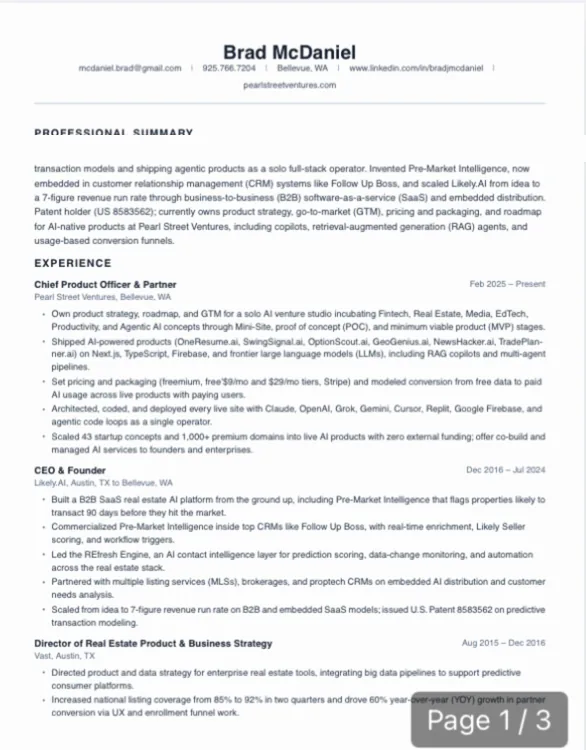
- Every role and number fact-checked against your profile
- Saved to your tracker with the PDF ready to download
- The honest gap called out before you submit
- ATS 65 · 3 pages · cover letter written
Outreach
The note to the hiring manager
LinkedIn note · under 200 characters
Applied for Head of Product, Conversations. I own product strategy, roadmap and pricing/packaging at Pearl Street Ventures and scaled Likely.AI to a 7-figure run rate. Would you look at the application?
Hiring manager found with a confidence note. Email draft included. You hit send.
Tracked
Say “I applied.” Done.
I applied
Help Scout
Head of Product, Conversations
AppliedATS 65Follow-up Fri 10/23
Two words and the tracker updates itself, follow-up set 7 days out.
Also from the same profile: cover letters, interview prep, form answers, LinkedIn rewrites.
Why not just any chatbot?
A made-up line on a résumé follows you into the interview.
One-shot answers change with every try. Connected to OneResume, your AI gets the facts, and the work is checked before anything is saved.
Any chatbot With OneResume
- FactsWhatever sounds plausibleOnly what is in your profile
- RésuméGeneric, different every tryTailored, fact-checked, scored
- MemoryBlank slate each chatYour tracker, preferences, value proposition
- ActionsMight act for youYou approve every save and send
- RecordGone when the tab closesTracked, follow-ups set
The checkpoints, one real run
From 25 jobs to one application you can stand behind
- 25 jobs searched6 sources, your preferences
- 18 new to you7 already in your tracker, skipped
- 5 shortlistedranked by match, 87 at the top
- 1 tailored and fact-checkedevery role kept, 1 honest gap flagged, ATS 65
- 1 applied, by youfollow-up set for 7 days out
-
Grounded in your profile
Every claim traces to your master profile and value proposition. -
Fact-checked before it is saved
Each tailored résumé is checked against your history. Gaps are called out, not papered over. How tailoring works -
Scored for the screeners
An ATS readiness score on every résumé, written to pass the software and read well to a person. About the ATS score -
You approve every step
It never submits an application or sends a message. Connections expire and can be revoked. -
Tracked
Status, follow-ups and outreach logged on every application.
Tempted to just paste your résumé into a chatbot? Read OneResume vs ChatGPT for résumés.
97.4%
of Fortune 500 companies run a detectable applicant tracking system, so a résumé meets software before it meets a person.
Jobscan, 2026
88%
of employers say qualified, high-skills candidates are vetted out of their hiring process for not matching the exact job-description criteria.
Harvard Business School & Accenture, 2021
What people use it for
Claude, ChatGPT or Grok job search, from one chat.
Run your daily job search
“Run my daily job search with OneResume: find up to 5 good matches, tailor my résumé for each, and get the applications ready for me to review and submit.”
start_daily_job_run · search_jobs · tailor_resume_with_oneresume · export_resume · update_application
Reach the hiring manager
“Draft a short email and a LinkedIn note to the hiring manager for the role I just applied to. I'll send them myself.”
draft_outreach · update_application
Fix one thing on LinkedIn
“Here's my LinkedIn About section: <paste>. Rewrite it with what OneResume knows about me — my value proposition and real results. Same for the headline, one experience entry, or the whole page.”
get_profile · get_value_proposition · rewrite_linkedin_bio
Find and rank jobs
“Find remote product roles that fit my OneResume preferences and rank them by match.”
search_jobs · score_match
Check your fit before you apply
“How well do I match this posting? What's missing, and is it worth applying?”
scrape_job_url · score_match
Tailor a résumé and save it
“Tailor my résumé for <job URL> and save it to my OneResume tracker.”
tailor_resume_with_oneresume · generate_cover_letter
Fill in application forms
“Give me my answers for this application: work authorization, salary, start date.”
get_application_autofill_plan · save_autofill_answers
Answer the questions the form adds at the end
“The application asks why I want this role and about a time I changed a decision with data. Write my answers from my OneResume profile — personal, specific, human.”
get_application · get_profile · get_value_proposition
Prep for the interview
“Prep me for my interview for the role I saved last week — likely questions and answers from my real experience.”
list_applications · interview_prep
Sharpen a bullet
“Rewrite this bullet so it leads with the result — without inventing anything.”
improve_bullet
Review your pipeline
“What have I applied to this month, and which ones are still waiting to hear back?”
list_applications · get_application
Update what you're looking for
“Add Seattle and hybrid roles to my job preferences.”
get_preferences · set_preferences
What is OneResume MCP?
A secure connector between your AI and your OneResume account.
OneResume's MCP server lets Claude, ChatGPT, Grok, Claude Code and Cursor read your résumé profile, search live jobs, tailor and fact-check résumés, draft outreach and update your application tracker, scoped to your account and with you approving every action. MCP (Model Context Protocol) is the open standard those assistants use to reach outside tools and data.
- Adds as a custom connector in Claude, ChatGPT and Grok; also works in Claude Code and Cursor
- 24 tools and 5 prompts, all scoped to your account
- Setup takes about a minute: copy, paste, approve
- Included in Pro, from $19/mo
- Never submits an application or sends a message for you
- Tokens expire hourly; disconnect any time on Connections More on how it works
Without MCP, your AI sees a blank slate every time. With MCP, your AI sees your master profile, your saved preferences, your applications, and can search live jobs and write tailored resumes in your account — all without you copy-pasting context into the chat.
The writing happens in your LLM — Claude, GPT, Gemini, whichever. OneResume is the context layer. That means our tuned tailoring prompts run inside your model of choice, and the result lands back in your OneResume tracker for PDF export. Read how the connector launched on the product updates page, see which Claude connectors matter for a job search, or compare OneResume vs ChatGPT for résumés.
What your AI can do, once connected
24 tools. 5 prompts. All scoped to your account.
search_jobs
Search 6 providers, filtered by your saved preferences. Ranked by match score + Career Fit.
score_match
0–100 match analysis for any job. Strengths, gaps, and actionable advice.
tailor_resume_with_oneresume
OneResume writes your full résumé and a cover letter from your real profile, fact-checks both, and saves them to your tracker in one call.
export_resume
The tailored résumé or cover letter as a real PDF or DOCX, ready to upload to an application form.
Every tool, by name
Plus start_daily_job_run, draft_outreach, generate_cover_letter, update_application, get_profile, get_value_proposition, get_linkedin_bio, rewrite_linkedin_bio, get_preferences, set_preferences, list_applications, get_application, get_application_autofill, get_application_autofill_plan, save_autofill_answers, scrape_job_url, improve_bullet, interview_prep, get_tailoring_context, save_application.
Sounds technical? It isn't.
Copy. Paste. Approve.
About a minute, once. Then every chat already knows you.
- 1
Copy one URL
https://oneresume.ai/api/mcp That's the whole setup. No tokens, nothing to install. - 2
Paste it into your AI
Add custom connector https://oneresume.ai/api/mcp Add Claude: Customize → Connectors. ChatGPT: Add custom MCP server. Grok: New Connector. - 3
Click Approve
OneResume Claude wants to connect to your account DenyApprove A OneResume tab opens. You sign in, you approve, you're done.
Works inClaudeChatGPTGrokClaude CodeCursor
One URL. A Claude connector, a ChatGPT connector, a Grok connector.
Claude (web, Desktop, mobile)
Works today — Customize → Connectors → Add custom connector
Claude Code
Works today — claude mcp add --transport http
Cursor
Works today — MCP settings or ~/.cursor/mcp.json
Windsurf
Works today — MCP config
ChatGPT
Works today — chatgpt.com (web) → Plugins → Personal → Add → Add custom MCP server
Grok
Works today — grok.com/connectors → New Connector → Custom
Step-by-step instructions for each client are on the Connections page.
You approve every connection.
Your AI app signs in through a OneResume approval screen — no passwords or keys pasted into a chat. Access tokens expire after an hour and are stored hashed, never in plaintext. Disconnect any app from the Connections page and access ends immediately.
Using a personal access token for Cursor or a script? Treat it like a password and revoke it if a laptop is lost. What a connected AI can see.
Questions
Which plans include it?
Pro, Pro+ and Career Coach. On the free plan you can see how it works, and the connection starts working the moment you upgrade.
Does it work with ChatGPT?
Yes. On chatgpt.com in a web browser, open Plugins, click Personal → Add and choose Add custom MCP server, paste the server URL, choose OAuth and approve on the OneResume tab. Then type @ in a new chat and pick OneResume. ChatGPT asks you to confirm before anything is saved to OneResume.
Does it work with Grok?
Yes. Go to grok.com/connectors, click New Connector → Custom, paste the server URL and approve on the OneResume tab that opens. Then ask Grok about your profile, jobs or applications in any chat. On Grok Business or Enterprise, a team admin adds the connector first.
And Claude?
Claude works on every Claude plan, including the free plan (one custom connector): Customize → Connectors → Add custom connector, paste the URL, Connect and approve.
Is my data safe?
You approve each app on a OneResume screen, tokens are stored hashed, and your AI only reaches your OneResume data while it's connected. The AI provider handles that data under its own terms. Our privacy policy's AI assistants section lists exactly what a connected app can read and change.
Can ChatGPT or Claude search for jobs for me?
Yes, once OneResume is connected. Ask for your daily job search and the assistant searches live listings across six job sources using your saved preferences, skips anything already in your tracker, and returns a shortlist ranked by match score. Without a connector, a chatbot can only guess from its training data or run generic web searches.
Is Claude good at writing résumés?
Claude writes well, but on its own it only knows what you paste into the chat and it can fill gaps with plausible-sounding claims. Connected to OneResume, Claude tailors from your master profile, every résumé is fact-checked against your real history before it is saved, and it gets an ATS readiness score. The same applies to ChatGPT and Grok.
Do employers care if my résumé was written with ChatGPT?
Employers care whether it is accurate and specific to the role, not which tool typed it. Generic AI résumés get filtered; made-up claims get caught in interviews. OneResume's connector keeps the writing in your AI but grounds it in your real experience, fact-checks it, and flags the honest gaps before you submit.
Is the OneResume MCP server free?
The connector is included in OneResume Pro, Pro+ and Career Coach plans; Pro starts at $19 a month. There is no separate charge for using it from Claude, ChatGPT or Grok, and Claude's own free plan allows one custom connector.
Will the AI apply to jobs or send messages for me?
No. OneResume never submits an application or sends an email or LinkedIn message, and the connected assistant is told the same. It drafts, you review, you click Submit or Send. It then records what you did in your tracker and sets the follow-up.
Can it make things up on my résumé?
Every tailored résumé is written from your OneResume master profile and fact-checked against it before it is saved. Roles, dates and numbers come from your real history, and the honest gaps are called out rather than papered over, so nothing you cannot defend in an interview goes on the page.
What is an MCP server for job search?
MCP (Model Context Protocol) is the open standard that lets AI assistants use outside tools and data. OneResume's MCP server gives Claude, ChatGPT, Grok, Claude Code or Cursor secure access to your résumé profile, job preferences, live job search, tailoring, outreach drafts and your application tracker, scoped to your account.
How long does setup take?
About a minute. Copy one URL, paste it into your AI app as a custom connector, and approve the connection on the OneResume screen that opens. No tokens to copy, nothing to install.
Can I disconnect?
Any time. MCP for Claude & ChatGPT in your account lists every connected app with a Disconnect button, and access ends immediately.
Ready to plug in?
Upgrade to Pro, paste one URL into Claude, ChatGPT, Grok or your favorite AI app, approve. Your AI sees your full profile in seconds.