Tinkr
Run PHP inside your own project from any MCP client, locally or over SSH, and get back what every statement returned as structured data, with the queries it ran and a rollback or sandbox guard for production.
Documentation

Tinkr
Run the code. Read the answer.
A desktop runner for Laravel Tinker and plain PHP.
Run a snippet in any project, on this machine or over SSH, and get back the value it returned,
not a wall of text it printed.





Website · Install · Features · MCP server · Development · Contributing
Why Tinkr
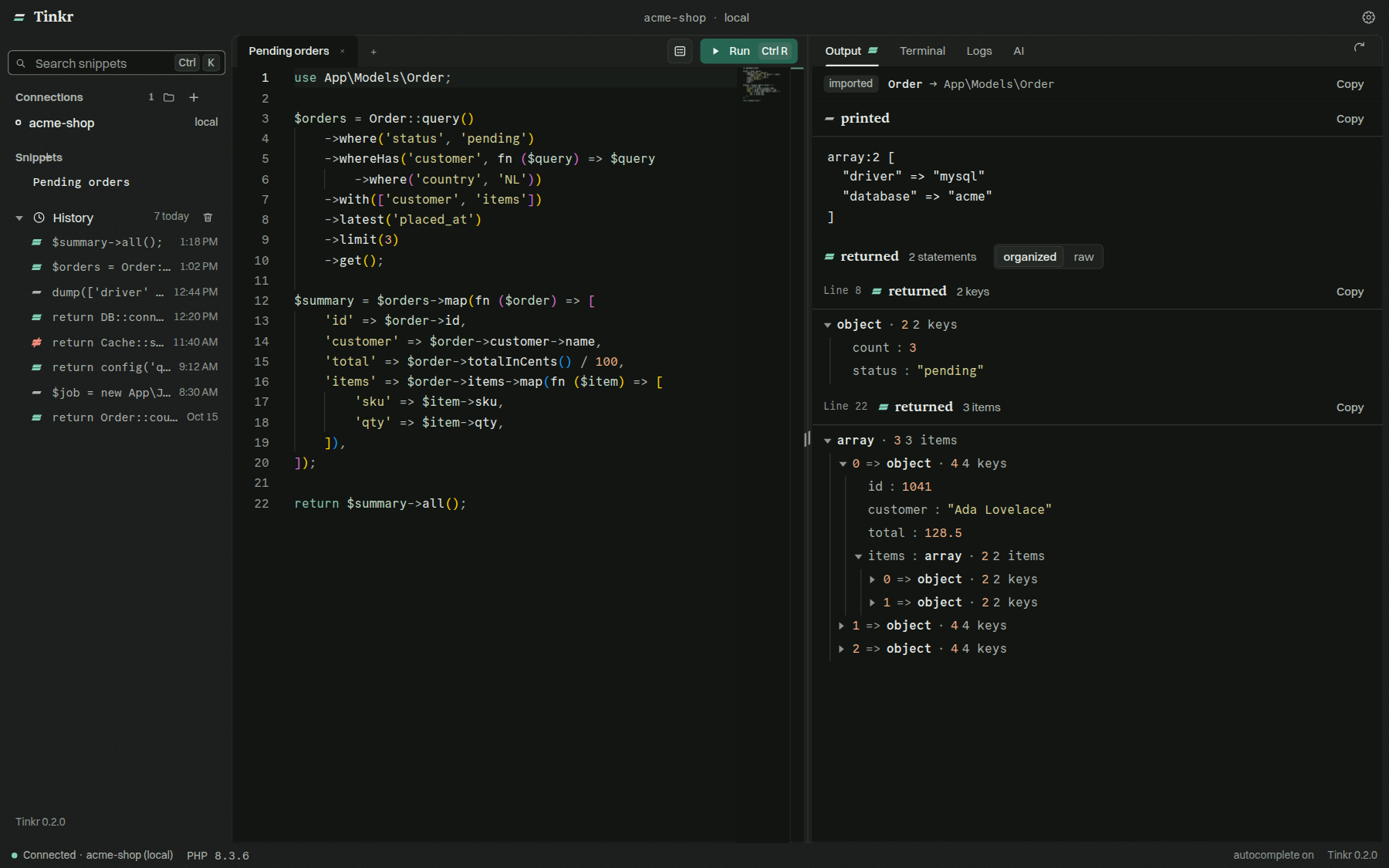
php artisan tinker is the fastest way to ask your app a question, and the worst way to read the answer. Tinkr keeps the question and fixes the answer:
- Values, not text. A collection comes back as a table, a model as a tree, HTML as a rendered frame.
- See what it cost. Every query the run sent, with its bindings and timing.
- Touch production without fear. Run a write inside a transaction, look at what changed, then keep it or roll it back.
- Always fresh. Each run boots a new Tinker session, so the code on disk is the code that runs.
Install
Grab the installer for your platform from the latest release.
| Platform | Package |
|---|---|
| macOS (Apple silicon) | .dmg · .zip |
| Windows | Tinkr.Setup.<version>.exe |
| Linux | .AppImage · .deb · .rpm · .tar.gz |
You need php on the machine (or server) where your project lives. That's it.
If macOS says Tinkr is damaged and can't be opened, the release you took was
built without an Apple signing identity. Move Tinkr.app to /Applications, then
drop the flag macOS puts on a download it could not verify:
xattr -dr com.apple.quarantine /Applications/Tinkr.app
Features
Run
| Connections | Local projects; Docker, Podman, Sail and Kubernetes containers; any server over SSH, with a key or a password; a container on a server, which is what a Dokploy, Coolify or compose deploy is; and a Laravel Cloud environment. The container and the project inside it are picked from what is running rather than typed. A password is kept in a file only you can read, never shown back, and answered by the app itself. An SSH connection is logged in to once and then reused, so each run pays for the work and not for the handshake, and the classes a snippet names by their short name are read from that server's own project. Tag a connection as production and Tinkr asks before it writes. |
| Laravel Cloud | Paste an API token in Settings → Laravel Cloud and Tinkr checks it before keeping it. Then pick an application and one of its environments; the code runs inside that environment through Laravel Cloud's API, with the same readings, queries and dry runs as any other connection. The token needs Applications: View applications and Environments: View environments, View environment instances, Create environment commands, View environment logs; everything else can stay at None. Point the connection at a local checkout of the same app if you want class names completed. Logs and live method completion are not available on Laravel Cloud. |
| Editor | Monaco, with class names and :: method suggestions read straight from your project, local or remote. |
| Snippet forms | Turn a snippet's variables into a form and run it like a tiny admin panel. |
| Snippets & history | Save the code you reuse. Every run is kept across restarts; one click puts it back in the editor. |
| Tabs, each with its own answer | Open several snippets at once: every tab keeps the result it ran, its printed output and its own run marker, so switching back finds the answer it left rather than the last one anywhere. Each connection keeps its own tabs: move to another project and back, and the documents, the code in them and a run that was going are where you left them — the run is not stopped by the move, and its answer waits for the connection. |
What a run does with the code is worth knowing before the first one:
- A top-level
returnends the snippet. Statements after it do not run, and what it returned is the run's value. - A snippet runs once. Every statement is evaluated once rather than probed and retried, so a statement that prints, writes or sends does it once.
- A snippet is parsed before it runs. A syntax error anywhere in it — including inside a function or class declaration — answers with that parse error and executes nothing, which is what php does with a file. A last line without its
;is still accepted. - A top-level
usestatement is an import for the code after it, and an unconditional top-levelfunctiondeclaration is available to the whole snippet: both are compiled before php runs the first line, and the snippet behaves the same way. - Values come back as they are: an object stays an object (an empty one is
{}, not[]), a scalar stays a scalar, and a value JSON cannot carry — a resource, a recursive reference, an unsafe float — is described by a string such as[resource: stream],[recursion]orINFrather than silently becomingnullor0. An object is described after the snippet has ended, so ajsonSerializethat prints prints once and reads its final state, and the same object returned by several statements is serialized once. - If the project's command exits while a run is going — tinker crashed, php was killed — the run ends with that exit status straight away instead of waiting out the run timeout.
- Reconnecting a Laravel Cloud connection ends the wait on this side only; Laravel Cloud keeps running the command it was given.
Read
| Readings | The returned value as a tree, a table, a graph, or rendered markup, next to the raw output. Copy any table or save it as CSV. |
| Queries | Every SQL statement the run sent, with bindings, duration and connection. |
| Dry run | Run inside a transaction you can keep or take back, or a sandboxed one where mail, jobs, HTTP calls, file writes, the cache and the log are recorded instead of happening. |
| Stop | A run that is going can be stopped, and the PHP behind it actually stops — inside a container or on a server. Laravel Cloud cannot cancel a command it was given, so stopping a Cloud run ends the wait and says the command keeps running there. A run also gives up on its own after the run timeout you set in Settings, so a snippet that never returns cannot hold the session. While a run is going the editor is read-only, the button counts the wait, and the answer reports how long the whole of it took. |
| Log viewer | Your app's logs (storage/logs or anywhere) in a window of their own. Level, text and time filters search the file, not just loaded pages. Scroll in either direction with your place preserved and only a bounded window held; messages and stack traces stay together across pages. Follow live, including details that arrive after an entry's header. |
Log searches scan the selected file or time range on the connection's host. They can take longer than ordinary paging on a large file, but only matching entries are returned. Changing the file or filters supersedes pending reads; reversing direction discards a pending page rather than evicting what you returned to.
Ask
| AI completions | Complete snippets with OpenAI, Claude, Ollama, OpenRouter, OpenCode Zen/Go, or your own endpoint. |
| AI panel | Ask about the code in front of you. The last result goes along, @ pulls in project files, and proposed code drops into the editor. |
| MCP server | Let Claude Code, Cursor, VS Code and friends run code through the same connections you use. |
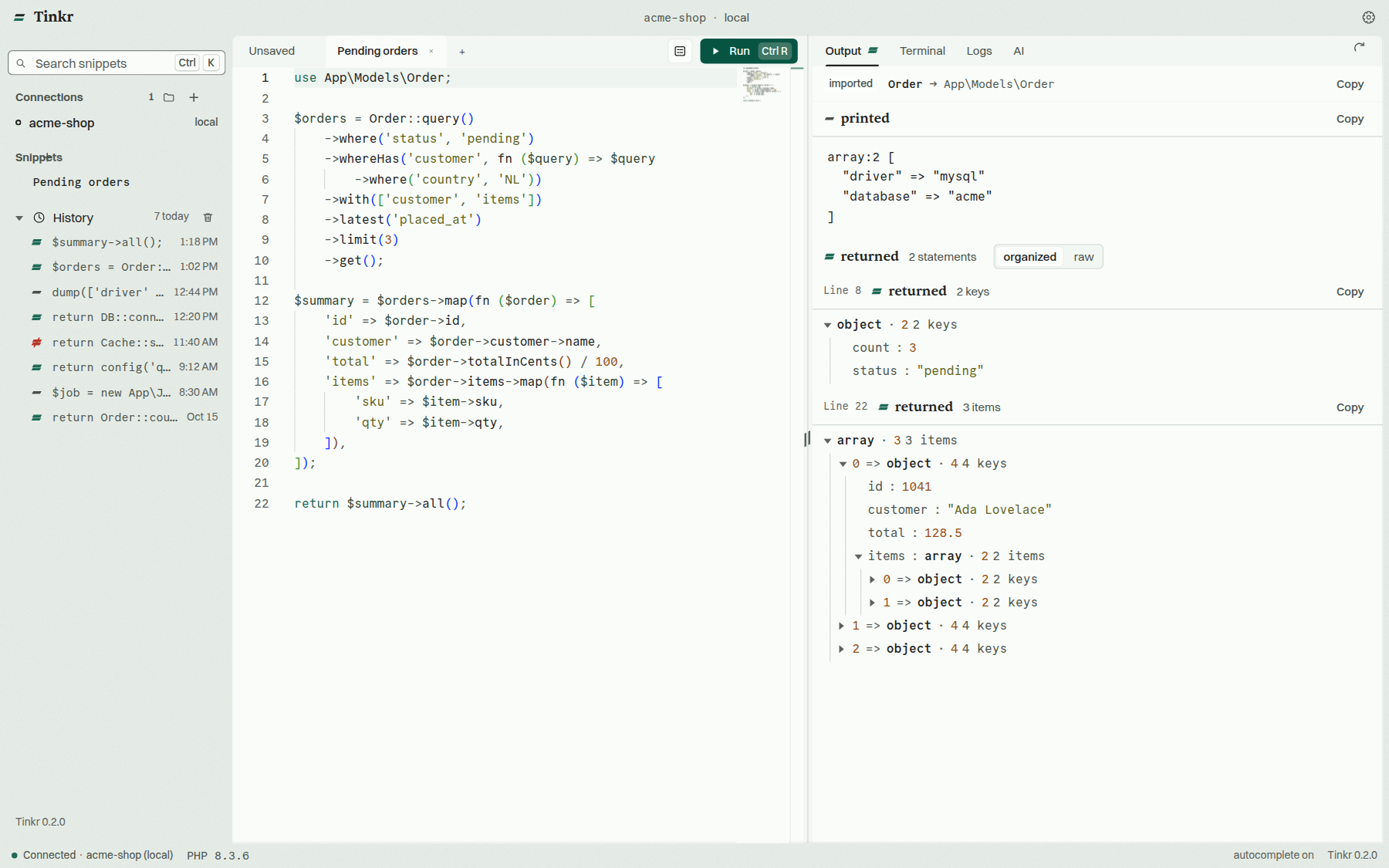 | 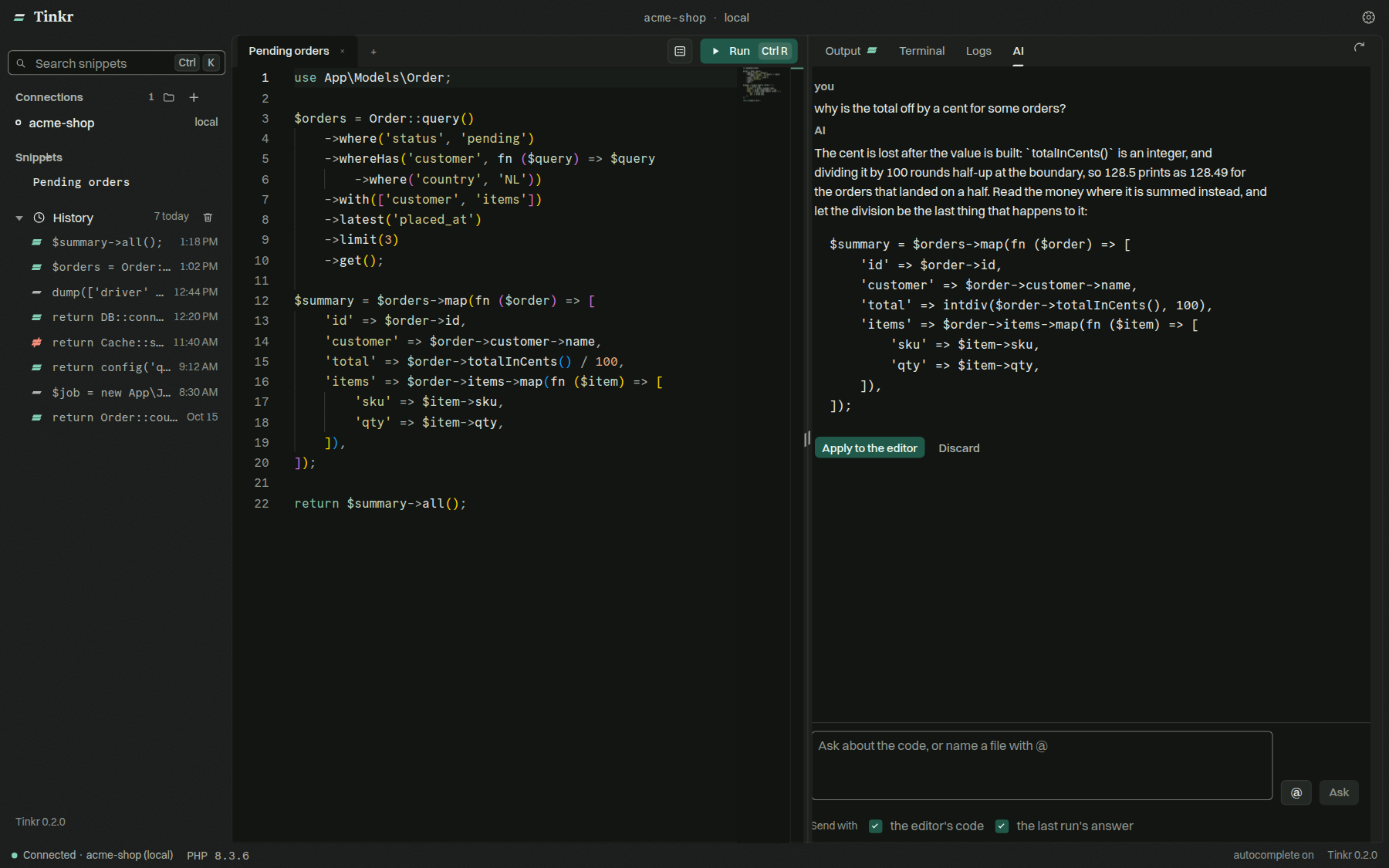 |
| Dark and light, one palette across the whole app | The AI panel, with your last result as context |
MCP server
Tinkr ships a Model Context Protocol server, so the AI tool you already work in can run PHP the way you do: in your project's own Tinker session, locally or over SSH, with the returned value as data.
The easy way: open Settings → MCP. Tinkr lists the clients it knows (Claude Code, Claude Desktop, Cursor, Windsurf/Devin Desktop, VS Code), writes the config for the one you pick, and gives you the JSON for anything else.
By hand:
{
  "mcpServers": {
    "tinkr": {
      "command": "node",
      "args": ["/path/to/tinkr/packages/tinkr-mcp/src/cli.js"]
    }
  }
}
The directory the client starts it in is the project code runs in. No API token, no open window needed.
Tools
| Tool | What it does |
|---|---|
tinkr_documentation | How Tinkr works and how to use these tools: the guards, connections, every tool, how to read an answer |
tinkr_run_php | Run PHP in a local project or a Laravel Cloud environment: what every statement returned, and what the code printed |
tinkr_run_php_over_ssh | The same, on a server, through one of Tinkr's SSH connections |
tinkr_list_history | The runs the app kept for a connection: the code, when it ran, how it ended |
tinkr_read_run | One kept run in full: what it returned, printed and threw |
tinkr_list_logs | The log files of a connection, newest first: name, size, when it was last written |
tinkr_tail_logs | A connection's logs: the newest window of a file, or the entries that match a level or a term |
tinkr_list_connections | The connections saved in the app, with the command each session starts with |
tinkr_list_snippets | The snippets saved for a connection |
tinkr_save_snippet | Keep code as a snippet of a connection |
tinkr_delete_snippet | Delete a snippet by its id |
History is the app's own: the last fifty runs of a connection. A client's own runs are not written to it, because the app owns that file while it runs.
tinkr_run_php and tinkr_run_php_over_ssh take an optional guard:
rollbackruns the code inside a transaction that is taken back at the end, and reports what that transaction did — the safe way for an agent to look at production without changing it.sandboxis the same transaction with the side-effect drivers swapped for recorders first: mail goes to the array transport, jobs and the bus to their fakes, the HTTP client answers only what it was given, every disk is faked, the cache is an array store and logging records instead of writing. A write that was rolled back cannot still have sent an email. The answer carries what was caught — a count per channel with the first mail and requests named.
A transaction holds the database and nothing else, so sandbox is the guard to name when the code might send, queue, call or write something.
tinkr_documentation is the same for a model: it answers with what the app is, what each guard holds and when to use which, what a connection is and what the production tag changes, every tool, and how to read the envelope. A model that reads it before running anything needs no prior knowledge of Tinkr.
tinkr_tail_logs reads a log without holding it: a window of the newest bytes by default, before/after for the pages beside it, and since/until for a range of moments found in the file itself. A level or a term turns the read into a scan of the whole range, answering with the newest limit matches — so an error far back in a large log is still found. Reading logs is allowed on any connection, production included: it reads a file.
A connection tagged production is refused unless the server was started on that connection (--connection) or with --allow-production. A run there is a write nobody is watching.
Options
| Option | What it is |
|---|---|
--connection <id|name> | Run in a connection the app knows, by id or name |
--path <directory> | The project to run in (default: where the client started it) |
--command <command> | What the session starts with (default: the connection's own, or php artisan tinker) |
--data-dir <directory> | Where the app keeps its connections and snippets, if not the default |
--timeout <ms> | How long a run may take before it is given up (default: 60000) |
--allow-production | Run code on connections tagged production. Without it, a production connection is refused unless the server was started on that one connection with --connection |
Try it from a terminal to see what a tool answers:
yarn mcp --path /path/to/your/project
When Tinkr has a connection for that directory, the server uses it, so snippets and history are shared with the app. A packaged app carries its own copy of the server outside the asar, where plain node can read it. An AppImage is mounted under a temporary directory that goes away when the app closes, so on that build the settings screen points clients at a copy in the app's own data directory, which survives both a restart and an update.
A run whose command never boots — no artisan in the directory, a platform check that refuses the php — answers as soon as the command exits, with what it printed and the status it left, instead of waiting out the timeout.
Development
git clone https://github.com/nurmohseni/tinkr.git
cd tinkr
yarn
yarn start
yarn start fetches the interface fonts (Switzer and Sentient from Fontshare, not redistributable) and starts the main and renderer processes. Offline, it falls back to system fonts. See CONTRIBUTING.md for the rest.
Tests
yarn test    # unit and component tests, in every package
yarn e2e     # end-to-end: Playwright launches the real app and drives it
The end-to-end suite runs the real main process, preload bridge and renderer,
with a real pty behind every run, against a small tinker-compatible project in
e2e/fixtures/app. Every test gets a throwaway profile. Container and SSH
flows run where Docker or a local sshd is available. e2e/README.md
has the coverage and the details; .github/workflows/tests.yml
runs both suites on every push and pull request.
Tech stack
A Yarn workspaces monorepo on Electron.
| Layer | Built with |
|---|---|
| Renderer | React, Vite, jotai, Immer, Monaco Editor, xterm.js, wouter, React Hook Form, React Intl |
| Main | node-pty, electron-store, ncc |
| Design | One system in design.md; tokens in packages/tinkr-renderer/public/tinkr.css. Type: Switzer, Sentient, Commit Mono |
Contributing
Bug reports, ideas and pull requests are welcome. Start with CONTRIBUTING.md, or open an issue.