Novada-MCP
Search, extract, crawl, map, and research the web — from any AI agent or terminal.
Documentation
Novada MCP
One MCP server for the entire live web. Search, extract, scrape, crawl, proxy, browser automation, and AI-powered research — behind a single hosted connection, or one local install if you'd rather run it yourself.




Quickstart · Get your key · How to choose a tool · Why Novada · Repository layout · Links
✅ Works with any MCP client — Claude, Cursor, Windsurf, VS Code, or npx locally | 🎯 15 typed per-platform scrapers — Amazon, Google, LinkedIn, TikTok, … each a closed operation enum, so an agent can't call an invalid op |
| 🎁 $10 free credits — no credit card needed — up to 1,000 calls/month | ⚡ Hosted-first, zero install — point at one URL, or self-host in one command |
Quickstart
Novada is hosted-first — there's nothing to install. Point your client at the hosted URL and you're done.
Security note: the hosted URL contains your API key in the
?apikey=parameter — treat it like a password. Never share it, never post it publicly, and never configure it as a shared or organization-level connector. Header-capable clients: preferAuthorization: Bearer <key>instead — it keeps the key out of URLs and access logs.
claude.ai (web)
- Go to Settings → Connectors → Add custom connector.
- Name it
Novada. - Paste the URL (contains your key — see security note above):
https://mcp.novada.com/mcp?apikey=YOUR_KEY - Click Add.
Claude Code
claude mcp add --transport http novada "https://mcp.novada.com/mcp?apikey=YOUR_KEY"
Full per-client install (Cursor/Windsurf/VS Code + local self-host) → npm-package/README.md.
Try it
novada_setup()                                          — validates your key, shows balance
novada_search({query: "Claude MCP tutorials"})          — web search
novada_extract({url: "https://example.com"})            — read any URL
novada_research({question: "how do MCP servers work?"}) — parallel multi-source research
Get your key
- Sign up at novada.com — no credit card required.
- Copy your API key from novada.com.
- You start with $10 in free credits, capped at 1,000 calls/month. Check what's left any time with
novada_account({section: "balance"})ornovada_setup().
How to choose a tool
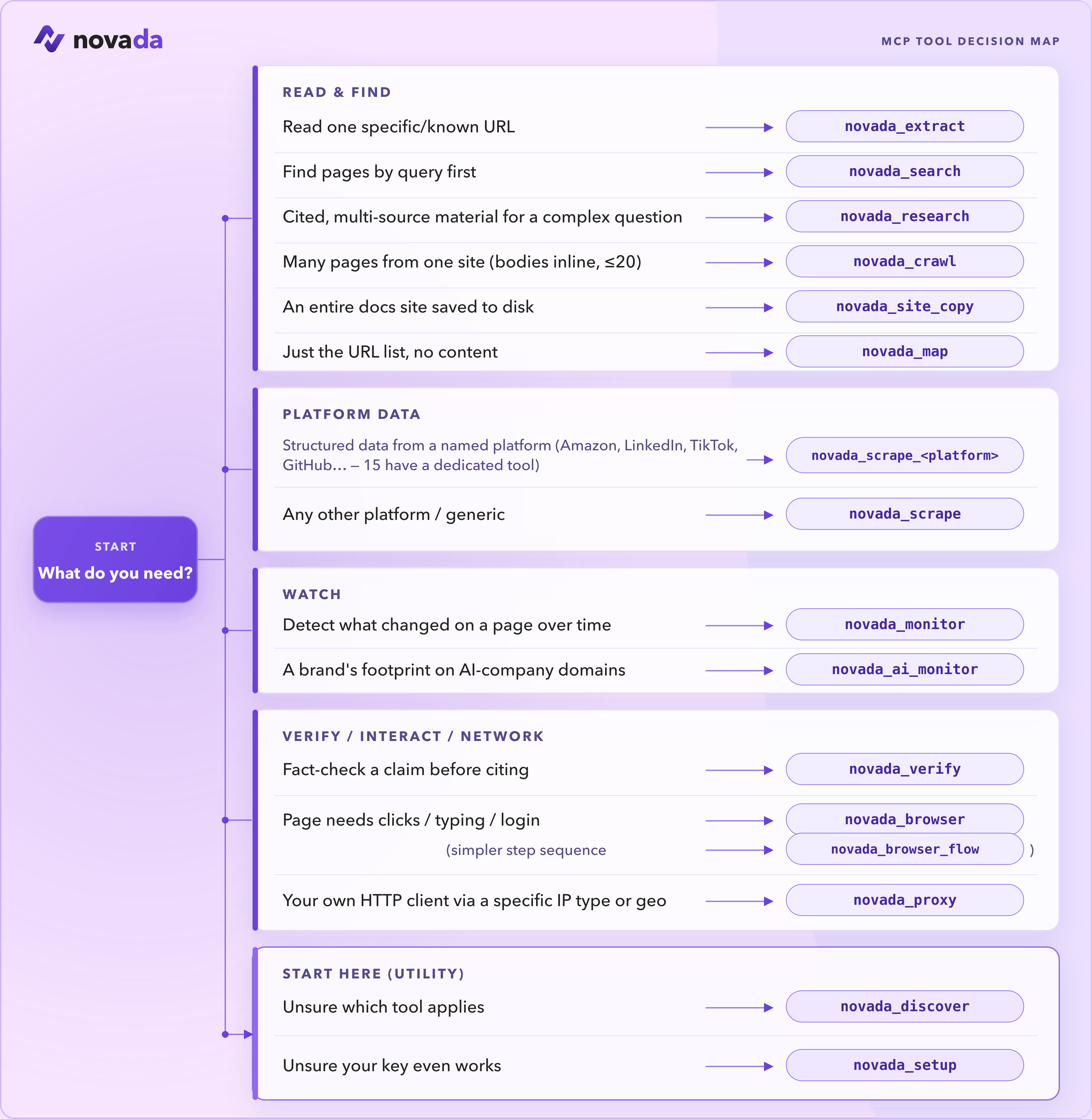
These are the tools you reach for most:
| Tool | Use it when |
|---|---|
novada_setup | First run — validate your key and see your balance. Start here. |
novada_search | Find pages by query (google / duckduckgo / yandex; time, domain, geo filters). |
novada_extract | Read one known URL — or up to 10 in parallel — through anti-bot pages. |
novada_research | Answer a complex question — parallel multi-source search + extraction in one call. |
novada_scrape | Structured records from 16 platforms (Amazon, LinkedIn, TikTok, …). Plus 15 typed per-platform tools — novada_scrape_amazon, _google, _linkedin, … — each a closed operation enum. |
novada_crawl | Pull content from a bounded set of related pages (≤20) on one site. |
novada_map | Discover what URLs exist on a site before fetching. |
novada_browser | Interact with a page — click, type, screenshot, run JS. |
novada_proxy | Route your own HTTP client through a specific IP type / country / session. |
Not sure? Call novada_discover and it returns the full catalog with each tool's status.
📚 Full reference — all 38 tools →
38 tools across 6 categories. Self-host (npx novada-mcp) exposes all 38. The hosted default surface (mcp.novada.com) exposes 30 — the same registry minus 8 tools that don't apply to a stateless serverless endpoint: novada_browser_flow (needs a persistent browser session), novada_site_copy (writes files to disk), novada_ip_whitelist / novada_static_ip_mgmt / novada_capture_apikey (write-gated account ops), novada_session_stats / novada_search_feedback (per-process in-memory state), and novada_verify — it is core-derived, not a hand-curated subset. Call novada_discover on your connection to see exactly what's available on it.
Where does it run?
Full local/hosted breakdown, all 38 tools
| Tool | Local (npx novada-mcp) | Hosted (mcp.novada.com) |
|---|---|---|
novada_search | ✅ | ✅ |
novada_extract | ✅ | ✅ |
novada_crawl | ✅ | ✅ |
novada_research | ✅ | ✅ |
novada_map | ✅ | ✅ |
novada_site_copy | ✅ | ❌ writes to local disk |
novada_search_feedback | ✅ | ❌ per-process in-memory state |
novada_scrape | ✅ | ✅ |
novada_scrape_amazon … _perplexity (15 platform tools) | ✅ | ✅ |
novada_ai_monitor | ✅ | ✅ |
novada_monitor | ✅ | ✅ |
novada_verify | ✅ | ❌ not on novada_discover's hosted listing |
novada_proxy | ✅ | ✅ |
novada_browser | ✅ | ✅ |
novada_browser_flow | ✅ | ❌ needs a persistent browser session |
novada_account | ✅ | ✅ |
novada_proxy_account_create | ✅ | ❌ write-gated account op |
novada_proxy_account_list | ✅ | ✅ |
novada_ip_whitelist | ✅ | ❌ write-gated account op |
novada_capture_apikey | ✅ | ❌ write-gated account op |
novada_static_ip_mgmt | ✅ | ❌ write-gated account op |
novada_discover | ✅ | ✅ |
novada_setup | ✅ | ✅ |
novada_session_stats | ✅ | ❌ per-process in-memory state |
Full per-tool reference (same column) → docs/TOOLS.md.
Why Novada
- 15 dedicated per-platform scrapers.
novada_scrape_amazon,_google,_bing,_duckduckgo,_yandex,_youtube,_instagram,_facebook,_tiktok,_x,_walmart,_shein,_linkedin,_github,_perplexity— each exposes a closed, typedoperationenum scoped to that platform instead of the genericnovada_scrape's openplatform+operationstring pair, so an agent can't guess an invalid operation for the wrong platform. - Honest tool surface. Every listed
operationis verified-working — operations we can't currently deliver are marked and excluded, not left in to fail on you mid-task. - Contract-tested self-report. Tool descriptions are tested against actual behavior, not just written and forgotten — what a tool claims to return is checked against what it actually returns.
- Drift-guarded tool registry.
npm-package/src/tools/registry.tsis the single source of truth for the tool catalog; a test asserts the registered tools, the wired tools, and thenovada_discoveroutput can never diverge. confirm:truewrite-gate. Every mutating tool (proxy sub-account creation, IP whitelist changes, static IP purchases, capture-key resets) requires an explicit two-step confirmation — no silent writes.- Callable onboarding.
novada_discoverandnovada_setupare tools your agent can call itself to find the right tool or validate a key, without ever reading this README.
vs Firecrawl / Tavily (measured, not marketing):
- 4.9× more compact. An identical 5-result search query returned 2,761 bytes from Novada vs 13,421 bytes from Firecrawl — less agent token cost per answer.
- Keyless to start.
npx -y novada-mcpcold-starts with no key;novada_setupwalks you to one only when a tool needs it. - Named anti-bot failures. On an unresolvable target, Novada's response names the exact blocker (e.g.
anti_bot:kasada) instead of a generic error, so an agent can branch on it.
Repository layout
This is a monorepo with two artifacts:
npm-package/— thenovada-mcpnpm package. Local stdio MCP server (npx novada-mcp); source of truth for all tool logic.hosted-server/— what runs athttps://mcp.novada.com. An HTTP wrapper (auth, quota, rate-limit) on Vercel around the npm package's built output.
Full architecture map (entrances, dispatch core, where-does-X-live) → ARCHITECTURE.md; contributor routing → CONTRIBUTING.
Links
- Website: novada.com
- Get an API key: novada.com
- Sign up (free): novada.com
- npm: npmjs.com/package/novada-mcp
- GitHub: github.com/NovadaLabs/novada-mcp
- Issues: github.com/NovadaLabs/novada-mcp/issues
License
MIT