Nightdesk
Lets Claude Code, Codex or Claude Desktop on a Mac or Linux computer build the Control Deck on your phone, and send it files, links and notifications.
Documentation
Plug your AI assistant into your phone.
Nightdesk for Mac and Linux are MCP servers. Connect Claude Code, Codex or Claude Desktop on your computer, then ask it to make a deck page for your repo, send the APK to your phone, or buzz you when the tests pass.
01Set it up
One line, then just ask.
Nightdesk 1.39 or later, on the computer and on your phone. Nightdesk has to be running on the computer; your assistant starts the small bridge to it by itself. Nightdesk’s window has these lines too, under AI assistants, with Copy.
Control Deck, files and your assistant’s notifications: on Android now, coming to iPhone and iPad.
On a Mac
Claude Code
$claude mcp add nightdesk -- /Applications/Nightdesk.app/Contents/MacOS/Nightdesk --mcp
Codex
[mcp_servers.nightdesk]
command = "/Applications/Nightdesk.app/Contents/MacOS/Nightdesk"
args = ["--mcp"]
Claude Desktop
{
  "mcpServers": {
    "nightdesk": {
      "command": "/Applications/Nightdesk.app/Contents/MacOS/Nightdesk",
      "args": ["--mcp"]
    }
  }
}
On Linux
Claude Code
$claude mcp add nightdesk -- ~/.local/bin/nightdesk-host mcp
Codex
[mcp_servers.nightdesk]
command = "/home/you/.local/bin/nightdesk-host"
args = ["mcp"]
Any other MCP client
{
  "mcpServers": {
    "nightdesk": {
      "command": "/home/you/.local/bin/nightdesk-host",
      "args": ["mcp"]
    }
  }
}
In a settings file, put your own home folder in place of /home/you: ~/.local/bin/nightdesk-host mcp --help prints these lines with it filled in.
For apps that want a web address, the running app also answers at http://127.0.0.1:52710/mcp, on this computer only, with a token: Nightdesk’s window (on Linux, nightdesk-host mcp --help) shows it in a line to paste.
Then ask in your own words
- “make me a Control Deck page for this repo’s scripts”
- “notify my phone when the tests pass”
- “build a debug APK and send it to my phone”
- “add a key that opens Figma to my Design page”
02What it can do
17 tools, in plain words.
Build your Control Deck
- See what keys can be made of on your phone: icons, colours, page templates, the computer’s actions, media keys, press styles and your AI tools’ commands.
list_deck_options - Read your pages, and every key on them with what it does.
list_deck_pagesget_deck_page - Make a page (empty, from a template, or with its keys), rename it, choose the app or AI tool that brings it up, move it or delete it.
create_deck_pageupdate_deck_pagemove_deck_pagedelete_deck_page - Add, change, move and delete keys: a shortcut, text, an app, one of the computer’s actions, media, an AI tool’s command, a macro or MIDI, with any press style.
add_deck_keyupdate_deck_keymove_deck_keydelete_deck_key
Reach your phone
- Send files, text or a link to your phone while it’s linked. Files land in Download › Nightdesk, text comes with a Copy button, a link opens with a tap.
send_to_phone - Notify it: at once if it’s linked, else kept for up to 7 days and shown the next time it links.
notify_phone
Read the computer
- Its name, system and Nightdesk version, and who’s linked right now.
get_computer_status - Live stats: CPU, GPU, memory, power and battery, disk, network and the busiest processes.
get_system_stats - Your paired phones and tablets, and which one is linked now.
list_phones - The apps installed on it, for keys that open them.
list_apps
03AI limits
Which account hit its limit, and when it’s free again.
If you run Claude Code or Codex on more than one account, your phone keeps an eye on all of them: every account on your computers by email, how much of each limit it has used, a countdown to its reset, and a notification the moment one is blocked. There’s nothing to set up. Nightdesk 1.44 or later on your Mac or Linux computer, and on your Android phone or tablet.
Nightdesk for Mac and Linux read what Claude Code and Codex already write on your computer, and ask those tools for their current numbers the way /usage does. Nothing signs in to your AI accounts, and Nightdesk itself never contacts Anthropic or OpenAI. The emails and usage stay between your computers and your phone, end-to-end encrypted.
On Android now, coming to iPhone and iPad.
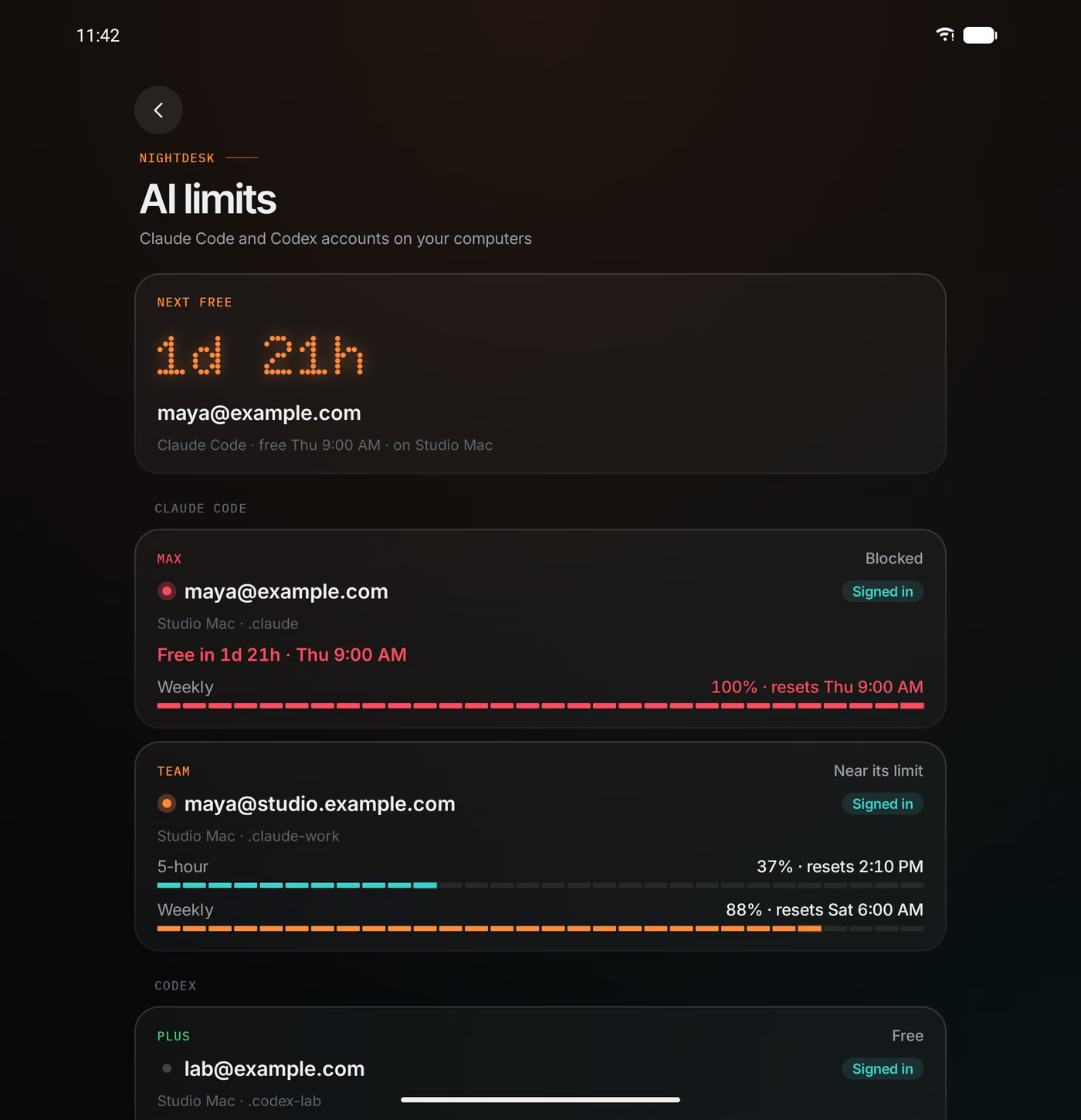
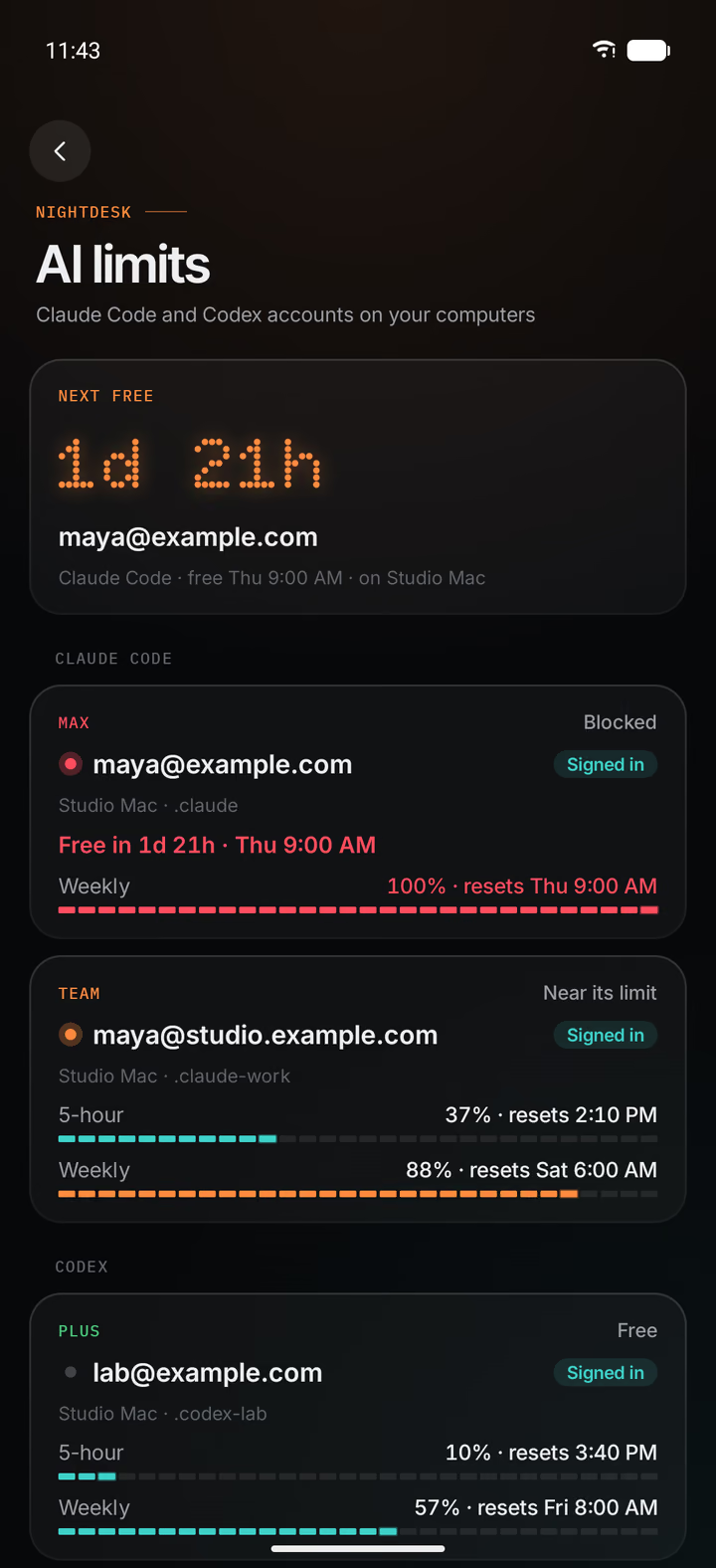
Nightdesk’s AI limits on an open foldable. Next free: maya@example.com, Claude Code, in 1 day 21 hours. Claude Code: maya@example.com, Max, blocked at 100% of its weekly limit until Thursday 9:00 AM; maya@studio.example.com, Team, near its limit with 37% of its 5-hour and 88% of its weekly limit used. Below, the Codex accounts.
-
Next free
The blocked account that’s free first leads the screen, counting down to its reset. -
Each account
Its email and plan, the computer and folder it’s on, whether it’s signed in now, and how much of each limit it has used, with the reset time. An account you switched away from stays on the list. -
Alerts
On from the start: “Claude Code · maya@example.com. Hit its weekly limit. Resets Thu 9:00 AM.” In Settings › AI limits you can add a warning at 80% and 95% of a limit, and a note when an account is free again. -
When your phone is away
Your computer leaves the alert at the relay, in a note end-to-end encrypted for your phone alone. Your phone checks in the background (about every 15 minutes, as Android allows) and whenever you open Nightdesk; the relay deletes the note once it’s picked up, or after 7 days. -
Every folder
Claude Code’s~/.claude, any~/.claude-*folder andCLAUDE_CONFIG_DIR; Codex’s~/.codex, any~/.codex-*folder andCODEX_HOME. However you keep your accounts apart, each one shows up. -
90 days of history
Every limit each account hit, kept on your computer and your phone, so the screen works offline.
Switch to the account that’s free next
Tuesday, 10:12 a.m.Maya, indie developer
Maya pays for two Claude Max plans and a Codex one, because one account never lasts her week. She left Claude Code on a big refactor and went to a client meeting.
When an account runs out, her agent stops. Finding one that still had room meant signing in to each and checking its usage page.
How
- Her phone buzzes: “Claude Code · maya@example.com. Hit its weekly limit. Resets Thu 9:00 AM.”
- She taps it. AI limits counts down to that reset and shows the rest: her studio account at 88% of its week, Codex at 34%.
- From the corridor she links, asks Codex to pick the refactor up in Write, and turns on “Tell me when an account is free again.”
Her agent waited minutes, not the rest of the morning.
Nightdesk 1.44 or later on your Mac or Linux computer, and on your Android phone or tablet.
Find out your agent hit its limit while you’re out
6:40 p.m.Kwame, ML engineer
Kwame started Codex on a long change to the data pipeline on the Linux workstation at home, then went to the gym. His phone stayed in the locker, linked to nothing.
When Codex hits its 5-hour limit it simply stops, and he wouldn’t have known until he got home.
How
- Nightdesk on the workstation sees it and leaves an alert at the relay, encrypted for his phone alone. The phone picks it up: “Codex · kwame@example.com. Hit its 5-hour limit. Resets 9:40 PM.”
- He turns on “Tell me when an account is free again.” At 9:40 his phone says kwame@example.com is free again.
- He links from the couch and tells Codex to carry on, in Write.
Not a minute of the new window wasted, and he never had to check.
Nightdesk 1.44 or later on your Mac or Linux computer, and on your Android phone or tablet.
04Good to know
Your deck stays yours.
-
Both ways, with Undo
An assistant’s change shows on your phone at once, with Undo for a few seconds. What you change on the phone goes back to the computer, so the assistant always sees the deck you have. If you both changed the same key, yours wins. -
When the phone is away
Deck changes, and notifications for up to 7 days, wait for the phone’s next link. Files, text and links go to a phone that’s linked. -
On your computer only
Your assistant talks to Nightdesk on the same computer, and nothing is reachable from another machine. Assistants that run on the internet, such as ChatGPT and Claude on the web, reach the same tools through Nightdesk’s relay only after you turn that on and allow each app. -
What it never does
No tool runs commands, types, clicks or presses a deck key. Your assistant already works on your computer; Nightdesk only looks after the deck and the phone. -
Private
Nightdesk notes which tool was used and how it went, never the files, text or notifications themselves. Your phone’s link stays end-to-end encrypted. -
The first time
Deck tools need your phone’s layout: open Nightdesk on the phone once while it can reach the computer. It sends its Control Deck every time it links.
05Use cases
What it looks like on an ordinary day.
Ask Claude Code to build a deck page for your repo
Sunday, 10:20 a.m.Elif, open-source maintainer
Elif’s project has a dozen scripts between its package.json and its Makefile, and she still types them from memory, flags and all.
Making a deck key for each one, by hand on her phone, kept losing to actual work.
How
- She connects Claude Code to Nightdesk once, with the line Nightdesk’s window gives her under AI assistants.
- She asks: “make me a Control Deck page for this repo’s scripts.” Claude reads both files and makes a page called Repo, with a key for each script that types it and presses Return.
- It’s on her phone at once, with Undo. One more ask makes Release wait for a one-second hold, and brings the page up by itself whenever VS Code is in front.
Eight keys from one sentence, and none made by hand.
Get a buzz on your phone when the tests pass
6:12 p.m.Mira, backend engineer
Mira left Claude Code fixing a flaky test and running the full suite, forty minutes of it, and ran for her train.
She didn’t want to keep linking in only to see whether it had finished.
How
- On her way out she adds a line to the prompt: “when the suite is done, notify my phone with the result.”
- The suite finishes while her train is in a tunnel. Her phone isn’t linked, so Nightdesk on her desktop keeps the notification for it.
- At the next stop she opens Nightdesk. As it links, the phone buzzes: “All 412 tests pass. Ready for review.”
No checking in. The news finds her.
Have Codex build your app and put it on your phone
1:40 p.m.Arjun, Android developer
Arjun asked Codex on his Mac to fix a crash in his app’s settings screen, then got pulled into a meeting two floors up.
He wants to try the fix on his own phone before anyone else does, and the build is on his desk.
How
- Nightdesk is linked on his phone. In Write he asks Codex: “build a debug APK and send it to my phone.”
- Codex runs the build, then hands the file to Nightdesk. It lands in Download › Nightdesk on his phone.
- He installs it under the table, opens settings, and the crash is gone.
The fix is tried on a real phone without leaving the meeting.
Without an assistant, `nightdesk-host send app.apk` in a Linux terminal, or Send to Phone… on a Mac, does the same.
Let your assistant reach your phone.
Free on the computer you control. On your iPhone, iPad, Android phone or another computer: 14 days free, no account, no card.