security-first MCP server for pfSense
READ-only today by design; WRITE is staged behind explicit safety architecture
Documentation
pfsense-mcp-server





Safe, least-privilege pfSense access for AI assistants. MCP server that gives an AI assistant strongly typed, read-only visibility into one pfSense appliance — system, network, firewall, DHCP, DNS, VPN, certificates, and diagnostics — without raw shell access, an unaudited scripting surface, or any way to change the appliance by accident.
I built this because I wanted AI assistance for pfSense without giving an LLM the ability to accidentally disconnect my own network — a firewall deserves a higher safety standard than "the model probably won't make a bad change." See Why this project exists for the full reasoning.
What it does
- 97 tools: 95 pfSense READ tools + 2 documentation guidance tools. Covers roughly 90% of pfSense's useful REST API READ surface. Every tool is strongly typed (Pydantic) — no untyped JSON passthrough.
- 0 WRITE tools by default. A fully built, twice live-verified protected-change path exists but requires an explicit opt-in — see Safety levels below.
- Ask it things like: "List my VLANs and which interface each one rides on," "Is my WAN gateway up right now?", "Which certificates expire soon?", "What DHCP leases are active on the LAN?" — every question maps to one typed, capability-gated tool.
Quick start
pipx install pfsense-mcp-server
pfsense-mcp-security setup
(If you arrived here from PyPI's own generic "pip install" box above —
that's PyPI's fixed page header, not this project's recommendation.
Use the pipx command shown here instead.)
No pipx yet? sudo apt install pipx && pipx ensurepath on
Debian/Ubuntu (reopen your terminal afterward) — see
Installation
for other platforms and a plain virtual-environment alternative. A
system-wide pip install is deliberately not the recommended path: on
modern Debian/Ubuntu it's refused outright (PEP 668), and even where
it isn't, it risks touching packages your OS itself depends on.
The setup wizard asks a few plain-language questions — your firewall's address, whether to allow read-only or protected changes, how to verify the connection — then prints the exact configuration to paste into your MCP client. Nothing needs to be typed or edited by hand. Prefer to configure manually, or want the full walkthrough step by step? See Getting started.
Once your client is connected and shows 97 tools available, try one of the questions from What it does above.
Safety levels
Choose the level that matches what you need — you can change this
later by running setup again.
| Level | What it means | Who it's for |
|---|---|---|
| Read-only (default, recommended) | The AI can inspect pfSense — status, configuration, diagnostics — but cannot change anything. Setup offers to create a dedicated read-only pfSense account for you (recommended), so even a request that bypasses this tool entirely is refused by pfSense itself — or you can bring your own existing API key instead. | Almost everyone. This is the safest option and covers the large majority of useful AI-assisted pfSense work. |
| Protected changes | Adds exactly one capability (editing a firewall alias's description) behind explicit, cryptographically signed authorization and a separate confirmation step. | Advanced users who have a specific, deliberate reason to let the AI make one narrow, auditable change. |
| Hardware-protected changes | Everything in Protected changes, plus an external TPM-backed witness that must independently agree before a change is considered verified. | Security-conscious operators who want anti-rollback protection on top of the above. |
No level silently escalates into another, and nothing above read-only is reachable unless you explicitly opt in during setup. Exact internal mechanics — plan digests, authorization tokens, the sealed mutation executor, witness state — are documented in full for advanced users and auditors in the Security model.
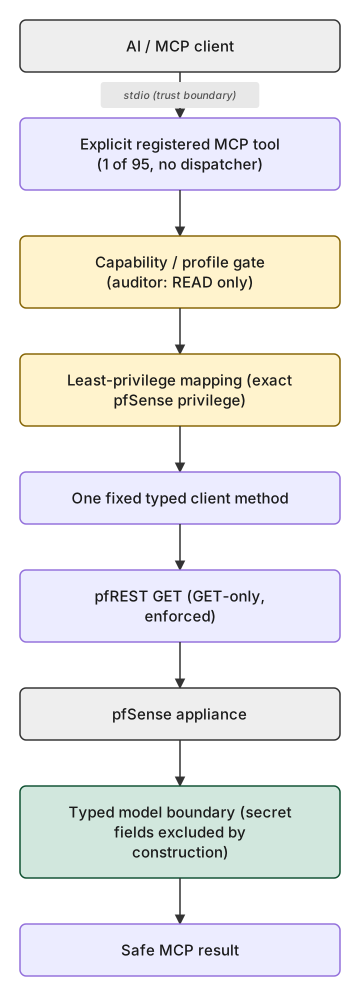
Architecture at a glance
AI client (Claude, Codex, ...)
  │  MCP over stdio
  ▼
pfsense-mcp-server
  │  one typed method call, GET-only
  ▼
pfSense's pfREST API
  │
  ▼
pfSense appliance
Every one of the 95 READ tools takes this exact path, no exceptions —
enforced mechanically at build time, not just by convention (a
make validate check requires exactly one typed client call per READ
tool, structurally preventing a tool/endpoint mismatch).
The protected-change path (built, not default-reachable)
A fully built, twice live-verified path exists for exactly one
protected-change operation (a firewall alias's description field) but
stays unreachable unless you explicitly opt in during setup:
write_protected must be selected, an off-host Ed25519 signature the
running server never holds the key for must authorize it, and a
separate confirmation authority must confirm it. See
the security setup wizard
and the security model
for exactly what it requires and does not do by default.
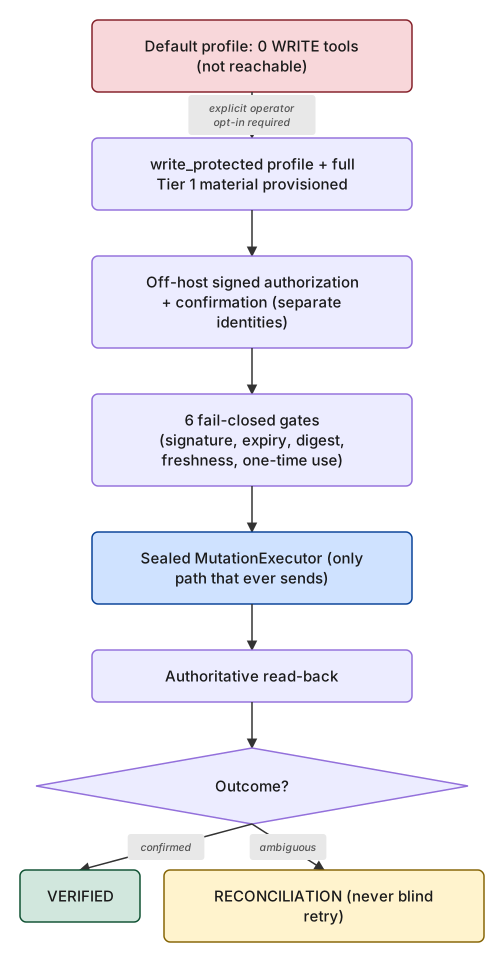
See the full architecture diagrams page for the gate-by-gate detail behind both diagrams.
What you get
| Category | Tools | Examples |
|---|---|---|
| System | 26 | hostname, DNS, version, packages, REST API settings, diagnostics |
| VPN | 17 | IPsec, OpenVPN, WireGuard status/config, CARP |
| Firewall | 15 | rules, aliases, states, NAT, schedules, virtual IPs, traffic shapers |
| DNS | 7 | resolver settings, overrides, access lists |
| Interfaces | 9 | status, VLANs, groups, bridges, LAGG |
| DHCP | 7 | servers, static mappings, leases, relay |
| Routing / Gateways | 6 | gateways, gateway status, static routes |
| Certificates / PKI | 3 | certificates, certificate authorities, CRLs |
| Users / API identities | 3 | local users, user groups, API keys |
| Services / Monitoring | 2 | service status, FreeRADIUS EAP |
Full per-tool reference, parameters, and provenance: MCP tool reference · Tool & guidance reference.
Connect your MCP client
For Claude Desktop and Codex CLI / ChatGPT desktop, once your server configuration works, generate the exact client config block automatically:
pfsense-mcp-security setup write-client-config \
  --client claude-desktop --config-path /absolute/path/to/claude_desktop_config.json \
  --capability-posture read_only --anchor-assurance none
This previews the change and asks for explicit confirmation before
writing anything — it never silently overwrites an existing config.
Every other supported client — Claude Code, Cursor, VS Code, Continue,
and any other MCP-compatible client — has its own copy/paste-ready
guide instead of a generator. Ready-made per-client guides —
examples/README.md.
Full detail: Connect your MCP client.
Requirements
- Python 3.11, 3.12, or 3.13.
- pfSense with the REST API package (
pfrest/pfSense-pkg-RESTAPI, API v2) installed and enabled.
See Compatibility for exactly which pfSense editions/releases are directly verified vs. merely expected to work.
Documentation
Getting started Installation · Security setup wizard · Connect your MCP client
Using the server MCP tool reference · Tool & guidance reference · Configuration reference
Security Security model · Threat model · Tier 1 safety architecture
Reference Compatibility · Architecture diagrams · Public roadmap
Developer / contributor Architecture decisions · Contributing · Support · Security policy
Release status
v1.1.0 is the immutable production baseline, published on PyPI —
95 pfSense READ tools + 2 documentation guidance tools, 0 WRITE
tools. A defense-in-depth and onboarding release: managed READ-only
credential provisioning — a dedicated, project-provisioned
pfsense-mcp-readonly pfSense service account holding exactly 94 READ
privileges, live-LAB-verified to be rejected by pfSense itself when
used directly against this project's own reviewed WRITE endpoint — is
now the setup wizard's recommended path for new read_only setups;
bring-your-own-key remains fully supported, unchanged by default, for
existing installations. Not a capability expansion — see
docs/STABILITY.md for the version-independent stability promise made
across the MCP/CLI/config/persisted-state surfaces.
pfsense_get_api_guidance covers the community-maintained pfREST
package (pfSense-pkg-RESTAPI, documented at pfrest.org), kept
structurally separate from pfsense_get_official_guidance (Netgate
product documentation) — never blended. Evidence is explicitly
labeled by provenance (PROJECT_AUTHORED / PFREST_UPSTREAM /
LIVE_APPLIANCE_SCHEMA / OFFICIAL_NETGATE); documentation is data,
never authority. See CHANGELOG.md's [1.1.0] entry and
docs/ACCEPTANCE_v1.1.0.md for the complete, independently verified
evidence — every past release's tag, GitHub Release, and PyPI
artifact remains unmoved as an accurate historical record.
Contributing
Contributions are welcome within the documented security and approval boundaries. Read CONTRIBUTING.md before opening a change.
License
Licensed under the MIT License.
pfSense® is a registered trademark of Electric Sheep Fencing, LLC, exclusively licensed to Rubicon Communications, LLC d/b/a Netgate. This project is an independent, community-built tool. It is not affiliated with, endorsed by, or sponsored by Electric Sheep Fencing, LLC or Netgate.