NarshaADK (NarshaMCP)
NarshaMCP is an Unreal Engine MCP server. It is distributed on Fab as NarshaADK. It parses C++ source, PDB symbols and binary .uasset files and serves the result over MCP. It is tested with Claude Code and Codex. Most reads work from disk with the Unreal Editor closed; edits need the Editor.
Documentation
NarshaADK: Unreal Engine MCP server
NarshaMCP is an Unreal Engine MCP server. It is distributed on Fab as NarshaADK.
It parses C++ source, PDB symbols and binary .uasset files and serves the result over MCP. It is tested with
Claude Code and Codex. Most reads work from disk with the Unreal Editor closed; edits need the Editor.
Get it on Fab · Latest release · Documentation
UE 5.7 UE 5.8 Early Access
Early Access. Tool names, parameters and output shapes may change between releases.
The Fab product is named NarshaADK. The installed plugin folder, code module and runtime executable are named NarshaMCP.
What you can do
Most tools take an operation argument. The table lists common read operations. ue_tool_docs returns every operation and its parameters, and your client lists the tools under tools/list.
| Tool | Returns | Read operations | Editor closed | Maturity |
|---|---|---|---|---|
ue_analyze_symbols | Symbols, callers, callees and class hierarchy from the project's PDBs; C++/Blueprint cross-references matched against the Blueprint packages | search_symbols, find_callers, find_callees, trace_hierarchy, find_cpp_to_bp, find_bp_to_cpp, impact_analysis | yes | Production |
ue_manage_blueprint | Events, nodes, variables and defaults, parent class and AnimGraph of a Blueprint asset | get_event_graph, get_raw_nodes, search_variables, get_variable_default, get_blueprint_metadata, list_blueprints, get_animgraph | yes; edits need the Editor | Beta |
ue_fix_errors | Build-log errors matched to a fix: the missing #include, the missing Build.cs module | scan_build_log, preflight, preview | yes; build_and_fix runs a build, get_compiler_results needs the Editor | Beta |
ue_manage_ai | StateTree and Behavior Tree states, tasks, transitions and bindings | get_summary, get_structure, find_transitions, get_bindings | yes; edits need the Editor | Production |
ue_manage_material | Material node topology, graph summary and instance hierarchy | get_graph_summary, get_nodes, get_hierarchy, search_materials | yes; name-based edges need the Editor | Experimental |
ue_manage_niagara | Niagara systems, emitters, renderers and parameters | get_emitter_details, get_structure, get_parameters, search_systems | yes | Experimental |
ue_manage_pcg | PCG graph nodes and flow | get_structure, trace_flow, find_nodes, search_graphs | yes | Experimental |
ue_search_assets | Asset search and DataTable rows; a cold load of the reference index may persist a cache in the project | search, get_table, find_dependencies, find_references, find_impact | yes | Beta |
ue_analyze_config | Config values across engine and project layers; console-variable declarations | search_config, explain_config, explore_cvar | yes | Beta |
ue_trace_execution | An execution path across input, abilities, Blueprint and C++ | trace_execution_flow, trace_from_input, trace_ability_flow, trace_gameplay_tag | yes | Beta |
ue_generate_code | C++ class scaffolds with Unreal macros and module setup | generate_class | yes; returns the file content for you to save | Beta |
ue_grep, ue_glob, ue_read | Text and name search across source, assets and config | a query, pattern or identifier; no operation | yes | Experimental |
ue_check_health reports the runtime version and whether the indexes are ready.
Before and after
Each example shows the request, the MCP tool call and the JSON response. Captured from NarshaMCP v0.13.7 on Epic's Lyra Starter Game (UE 5.8.1) with the Editor closed. Values are as returned; removed keys and array elements are marked in the block.
C++ and Blueprint cross-references
Request. Which Blueprints call StartRangedWeaponTargeting, which C++ does GA_Weapon_Fire call, and what derives from ALyraCharacter?
Before. grep -rn StartRangedWeaponTargeting finds the C++ declaration and definition. The Blueprint call sites are inside binary .uasset packages.
Call. Editor closed.
{"name": "ue_analyze_symbols", "arguments": {"operation": "find_cpp_to_bp", "function_name": "ULyraGameplayAbility_RangedWeapon::StartRangedWeaponTargeting", "limit": 5}}
Output. As returned; cuts are marked.
{
  "function_name": "ULyraGameplayAbility_RangedWeapon::StartRangedWeaponTargeting",
  "total_callers": 2,
  "truncated": false,
  "blueprint_callers": [
    {
      "blueprint_name": "GA_Weapon_Fire",
      "blueprint_path": "/Game/Weapons/GA_Weapon_Fire",
      "owning_function": "K2_ActivateAbility",
      "node_name": "K2Node_CallFunction_31",
      "match_tier": "qualified",
      "confidence": 0.75
    },
    {
      "blueprint_name": "GA_WeaponNetShooter",
      "blueprint_path": "/ShooterCore/Weapons/NetShooter_PROTO/GA_WeaponNetShooter",
      "owning_function": "K2_ActivateAbility",
      "node_name": "K2Node_CallFunction_31",
      "match_tier": "qualified",
      "confidence": 0.75
    }
  ]
  // [truncated] blueprint_callers[] fields omitted: call_type, is_pure; keys omitted: operation, skip_dedup, success
}
Call. Editor closed.
{"name": "ue_analyze_symbols", "arguments": {"operation": "find_bp_to_cpp", "blueprint_name": "GA_Weapon_Fire", "limit": 2, "offset": 18}}
Output. As returned; cuts are marked.
{
  "blueprint_name": "GA_Weapon_Fire",
  "total_calls": 33,
  "offset": 18,
  "truncated": true,
  "cpp_calls": [
    {
      "full_name": "LyraGameplayAbility_RangedWeapon::StartRangedWeaponTargeting",
      "owning_function": "K2_ActivateAbility",
      "node_name": "K2Node_CallFunction_31",
      "is_pure": false
    },
    {
      "full_name": "KismetSystemLibrary::SetTimerDelegate",
      "owning_function": "K2_ActivateAbility",
      "node_name": "K2Node_CallFunction_4",
      "is_pure": false
    }
  ]
  // [truncated] cpp_calls[] fields omitted: function_name, owner_class; keys omitted: operation, returned, success, total_count
}
Call. Editor closed.
{"name": "ue_analyze_symbols", "arguments": {"operation": "trace_hierarchy", "class_name": "ALyraCharacter", "direction": "down"}}
Output. As returned; cuts are marked.
{
  "class_name": "ALyraCharacter",
  "cpp_descendants_count": 1,
  "bp_descendants_count": 10,
  "descendants": [
    {"depth": 1, "name": "ALyraCharacterWithAbilities", "relation": "child", "source": "pdb"},
    {"depth": 1, "name": "Character_Default", "relation": "child_blueprint", "source": "blueprint"},
    {"depth": 2, "name": "B_Hero_Default", "relation": "child_blueprint", "source": "blueprint"},
    {"depth": 2, "name": "B_ShootingTarget", "relation": "child_blueprint", "source": "blueprint"}
  ],
  "interface_parents": ["IAbilitySystemInterface", "IGameplayCueInterface", "IGameplayTagAssetInterface", "ILyraTeamAgentInterface"]
  // [truncated] descendants: 4 of 11 elements; descendants[] fields omitted: parent; keys omitted: 13 of 18
}
Result. owning_function is the Blueprint event that contains the call, and match_tier with confidence records how the symbol was matched to the node. descendants[].source is pdb for a C++ subclass and blueprint for a Blueprint one.
Blueprint events, variables and nodes
Request. What events does GA_Weapon_Fire handle, what is its fire delay, and how is a node wired?
Before. Content/Weapons/GA_Weapon_Fire.uasset is binary, and grep -rn FireDelayTimeSecs over the source finds nothing: the variable exists only in the asset.
Call. Editor closed.
{"name": "ue_manage_blueprint", "arguments": {"operation": "get_event_graph", "blueprint_name": "GA_Weapon_Fire"}}
Output. As returned; cuts are marked.
{
  "blueprint_name": "GA_Weapon_Fire",
  "count": 5,
  "events": [
    {"node_title": "FireComplete", "node_class": "K2Node_CustomEvent"},
    {"node_title": "FailureMontage Delay Complete", "node_class": "K2Node_CustomEvent"}
  ]
  // [truncated] events: 2 of 5 elements; events[] fields omitted: node_id, owning_function; keys omitted: operation, success
}
Call. Editor closed.
{"name": "ue_manage_blueprint", "arguments": {"operation": "search_variables", "blueprint_name": "GA_Weapon_Fire", "pattern": "*Fire*"}}
Output. As returned; cuts are marked.
{
  "parent_class": "LyraGameplayAbility_RangedWeapon",
  "total_count": 2,
  "results": [
    {
      "name": "CharacterFireMontage",
      "default_value": "AM_MM_Rifle_Fire",
      "default_value_type": "Object",
      "edit_condition": "EditDefaultsOnly"
    },
    {
      "name": "FireDelayTimeSecs",
      "default_value": "0.1",
      "default_value_type": "Double",
      "edit_condition": "EditDefaultsOnly"
    }
  ]
  // [truncated] results[] fields omitted: 9 of 13; keys omitted: 14 of 17
}
Call. Editor closed.
{"name": "ue_manage_blueprint", "arguments": {"operation": "get_raw_nodes", "blueprint_name": "GA_Weapon_Fire", "page": 1, "page_size": 1}}
Output. As returned; cuts are marked.
{
  "total_nodes": 98,
  "has_more": true,
  "nodes": [
    {
      "id": "K2Node_AsyncAction_ListenForGameplayMessages_0",
      "node_class": "K2Node_AsyncAction_ListenForGameplayMessages",
      "owning_function": "K2_OnAbilityAdded",
      "pins": [
        {
          "name": "execute",
          "category": "exec",
          "direction": "input",
          "linked_to": [
            {"node_id": "K2Node_Event_1", "pin_name": "then", "export_index": 70}
          ]
        },
        {"name": "then", "category": "exec", "direction": "output", "linked_to": []}
      ]
    }
  ]
  // [truncated] nodes[].pins: 2 of 12 elements; nodes[].pins[].linked_to[] fields omitted: owning_function; nodes[].pins[] fields omitted: container_type, default_value, pin_id, sub_category; nodes[] fields omitted: 5 of 9; keys omitted: 10 of 13
}
Result. parent_class, events[].node_title and results[].default_value are read from the .uasset. pins[].linked_to names the node and pin each pin connects to; where a node id repeats inside an asset, export_index identifies the endpoint.
Material graph summary
Request. How is M_TeamColorBasic built?
Before. M_TeamColorBasic.uasset is binary; the expression graph is not in any text file.
Call. Editor closed.
{"name": "ue_manage_material", "arguments": {"operation": "get_graph_summary", "material_path": "/Game/Characters/Cosmetics/M_TeamColorBasic"}}
Output. As returned; cuts are marked.
{
  "material_name": "M_TeamColorBasic",
  "source": "uasset_metadata_cache",
  "node_count": 4,
  "connection_count": 3,
  "stage_count": 3,
  "output_chains": [
    {"output_pin": "Material", "root_node": "MaterialExpressionVectorParameter_3", "upstream_node_count": 1},
    {"output_pin": "Material", "root_node": "MaterialExpressionAdd_0", "upstream_node_count": 4}
  ]
  // [truncated] output_chains: 2 of 3 elements; output_chains[] fields omitted: exclusive_node_count, role, top_node_types; keys omitted: 6 of 12
}
Result. With the Editor closed the response has the node count, the connection count and the root node of each output chain. ue_manage_material is Experimental; with the Editor running, its get_nodes operation adds node names and name-based edges.
StateTree states and transitions
Request. What does the L_STT_FollowPlayer StateTree do?
Before. L_STT_FollowPlayer.uasset is binary, and grep -rn L_STT_FollowPlayer over the source finds nothing: no code describes this tree.
Call. Editor closed.
{"name": "ue_manage_ai", "arguments": {"operation": "get_summary", "ai_type": "statetree", "asset_name": "L_STT_FollowPlayer"}}
Output. As returned; cuts are marked.
{
  "asset_name": "L_STT_FollowPlayer",
  "root_state": "Root",
  "state_count": 9,
  "property_binding_count": 19,
  "states": [
    {
      "name": "Wait 3s Follow",
      "tasks": ["StateTreeDebugTextTask", "StateTreeDelayTask"],
      "transitions": [
        {"trigger": "OnStateCompleted", "to_state": "Wait 3s Follow TooClose"},
        {"trigger": "OnStateCompleted", "to_state": "Follow"}
      ]
    },
    {
      "name": "Follow",
      "tasks": ["STT_Follow"],
      "transitions": [
        {"trigger": "OnStateSucceeded", "to_state": "Root"},
        {"trigger": "OnStateFailed", "to_state": "Wait 3s FailFollow"}
      ]
    }
  ]
  // [truncated] states: 2 of 9 elements; states[] fields omitted: conditions, enabled, state_type; keys omitted: 11 of 16
}
Result. states[].tasks lists each state's tasks and states[].transitions[].to_state lists its outgoing transitions.
Niagara emitter
Request. What does the NE_ImpactCore emitter of NS_ImpactGlass render?
Before. NS_ImpactGlass.uasset is binary.
Call. Editor closed.
{"name": "ue_manage_niagara", "arguments": {"operation": "get_emitter_details", "asset_name": "NS_ImpactGlass", "emitter_name": "NE_ImpactCore"}}
Output. As returned; cuts are marked.
{
  "system_name": "NS_ImpactGlass",
  "emitter_name": "NE_ImpactCore",
  "emitter_data": {
    "loop_behavior": "Once",
    "renderer_count": 2,
    "renderers": [
      {"renderer_type": "NiagaraSpriteRendererProperties", "facing_mode": "FaceCamera"},
      {"renderer_type": "NiagaraSpriteRendererProperties", "facing_mode": "FaceCamera"}
    ],
    "data_interface_count": 2,
    "data_interfaces": [
      {"di_type": "NiagaraDataInterfaceArrayFloat3"},
      {"di_type": "NiagaraDataInterfaceArrayPosition"}
    ]
  }
  // [truncated] emitter_data.renderers[] fields omitted: 5 of 7; emitter_data.data_interfaces[] fields omitted: name; emitter_data fields omitted: 21 of 26; keys omitted: mode, operation, requested_path, success
}
Result. renderers[].renderer_type is the renderer class and data_interfaces[].di_type is the data interface type. ue_manage_niagara is Experimental.
Animation Blueprint graph
Request. How large is ABP_Mannequin_Base and which skeleton does it target?
Before. ABP_Mannequin_Base.uasset is binary.
Call. Editor closed.
{"name": "ue_manage_blueprint", "arguments": {"operation": "get_animgraph", "blueprint_name": "ABP_Mannequin_Base", "detail_level": "summary"}}
Output. As returned; cuts are marked.
{
  "blueprint_name": "ABP_Mannequin_Base",
  "target_skeleton": "SK_Mannequin",
  "source": "metadata_category:anim_blueprints",
  "anim_graph_node_count": 138,
  "state_machine_count": 1,
  "pose_link_count": 25,
  "anim_node_types": {
    "anim_state": 10,
    "anim_state_transition": 27,
    "anim_blend_space": 3,
    "anim_linked_layer": 14
  }
  // [truncated] anim_node_types fields omitted: 15 of 19; keys omitted: 6 of 13
}
Result. target_skeleton names the skeleton and anim_node_types counts the graph's nodes by kind. Raise detail_level to read a single state machine.
PCG
Lyra ships no PCG graph, so PCG is not shown here. ue_manage_pcg get_structure reads a PCG graph with the Editor closed and is Experimental; it is listed in the comparison table below.
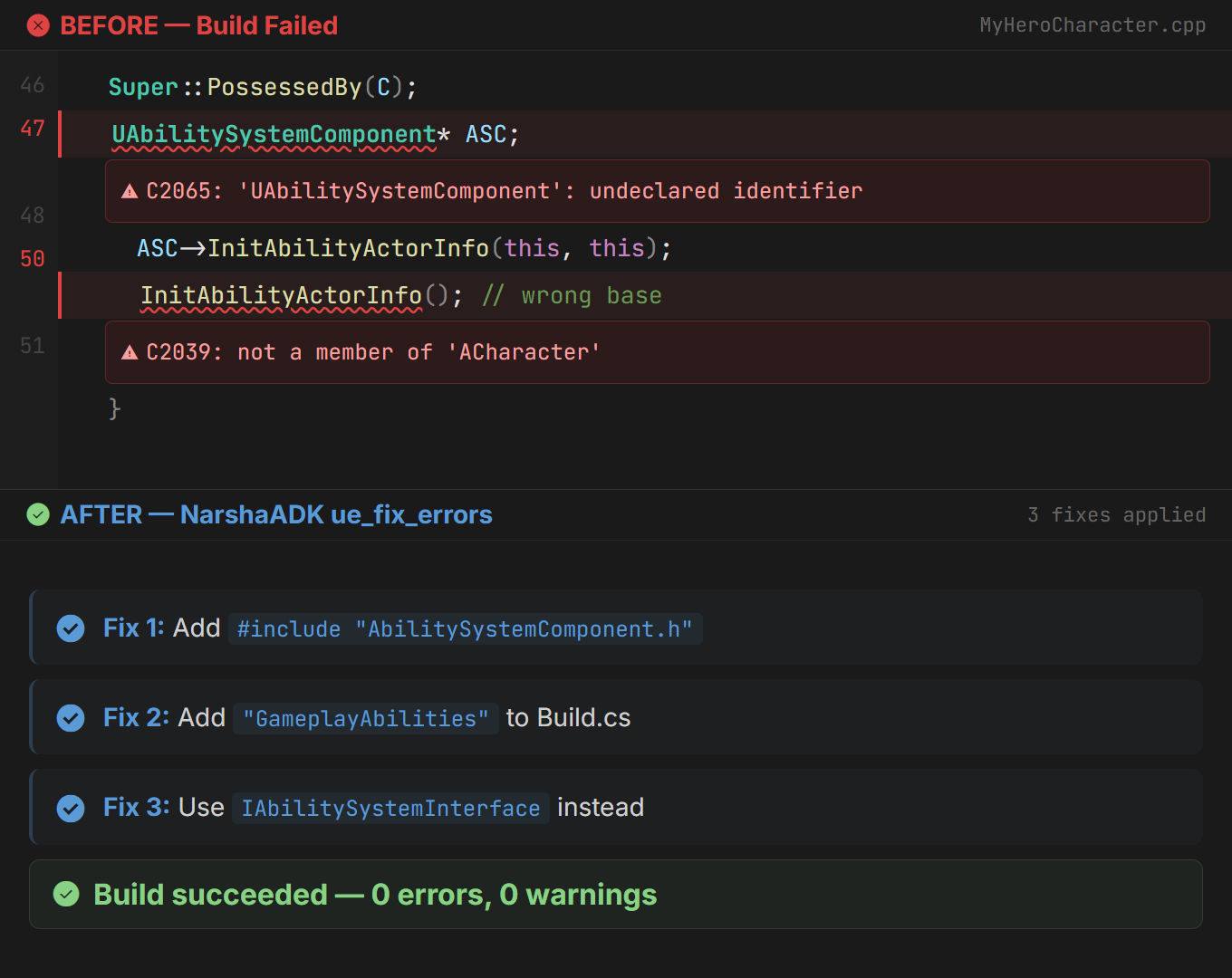
Mock-up, not a captured session. For C2065: 'UAbilitySystemComponent': undeclared identifier, ue_fix_errors adds the #include, adds GameplayAbilities to Build.cs and switches to IAbilitySystemInterface.
A session in Claude Code
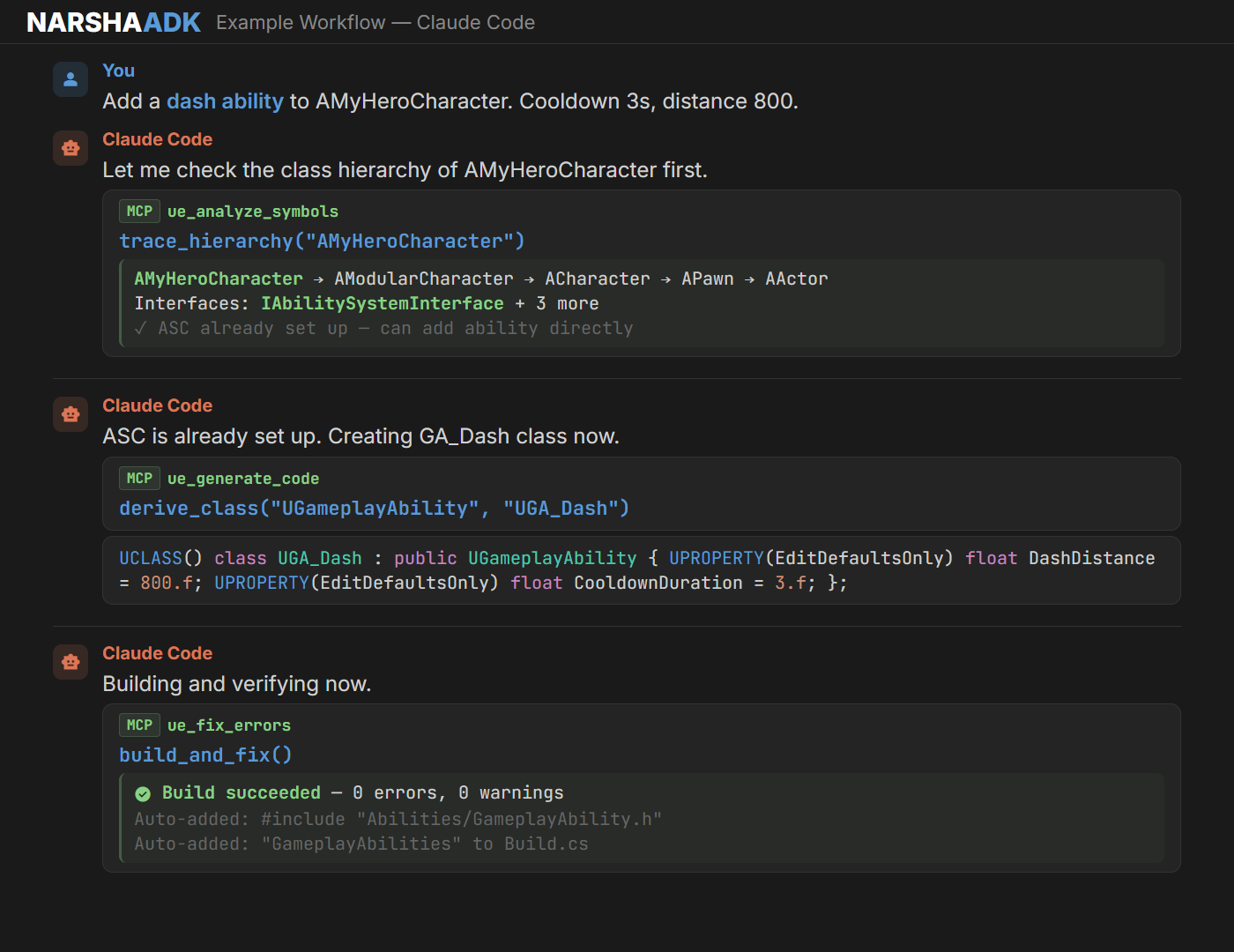
Mock-up of a Claude Code session that calls ue_analyze_symbols, then ue_generate_code, then ue_fix_errors.
Requirements
- Windows 64-bit
- An Unreal Engine 5.7 or 5.8 C++ project. Blueprint-only projects are not supported.
- Visual Studio 2022 with the Unreal Engine C++ build tools
- An MCP client. Tested with Claude Code and Codex. AI clients are separate products and may need their own subscription.
- Python and Node.js are not required; the runtime is a prebuilt executable inside the plugin ZIP.
Install
From Fab. Install NarshaADK from the Fab listing and enable the NarshaMCP plugin in a C++ project.
From GitHub Releases
- Download the ZIP for your engine version from the latest release.
- Extract the ZIP into
YourProject/Plugins/. The ZIP already contains theNarshaMCPfolder, so the plugin lands inYourProject/Plugins/NarshaMCP/. When upgrading, remove the previousPlugins/NarshaMCP/folder first, and keep a copy if you may want to go back. - Build the C++ project once. The first build runs local setup and writes the project's MCP configuration, unless the plugin was installed in plugin-only mode.
- Open the local dashboard's AI Clients section and confirm the Claude Code or Codex connection.
- Verify from the client: call
ue_check_health. It returnsstatusandversion. The first start indexes the PDBs your build produced. While the index is building, symbol operations return"status": "symbol_index_loading", with aprogressobject once the total is known; call again when it finishes.symbol_index_degraded_budgetmeans a memory budget capped the index, and waiting does not clear it.
Connect your MCP client
The first build writes the project's MCP configuration for you. If you configure a client by hand, point it at the runtime that ships inside the plugin:
{
  "mcpServers": {
    "narshamcp": {
      "command": "<Project>/Plugins/NarshaMCP/Source/ThirdParty/bin/narshamcp.exe",
      "args": ["connect", "--project-path", "<Project>"],
      "env": { "RUST_LOG": "error" }
    }
  }
}
- Claude Code:
claude mcp add narshamcp -- "<Project>/Plugins/NarshaMCP/Source/ThirdParty/bin/narshamcp.exe" connect --project-path "<Project>" - Codex, in
~/.codex/config.toml, with forward slashes in the path:
[mcp_servers.narshamcp]
command = "<Project>/Plugins/NarshaMCP/Source/ThirdParty/bin/narshamcp.exe"
args = ["connect", "--project-path", "<Project>"]
connect attaches the client to the project's background daemon and starts it when none is running. Clients that launch the server as a direct process, such as Cursor, use --stdio in place of connect.
How it works
| Layer | What NarshaADK reads |
|---|---|
| Source code analysis | C++ source, with macros such as UPROPERTY, UFUNCTION and DOREPLIFETIME resolved |
| Compiler symbol index | The PDB debug data your build produces: class hierarchies, call graphs and symbol lookups |
| Binary asset parsing | .uasset packages, without commandlets or the Editor. Operations that change assets need a running Editor |
The symbol index is built from the PDBs of your own build, so it covers your project's classes, and the engine's when the engine's debug symbols are installed. It needs one successful build.
The Unreal MCP built into UE 5.8 runs inside the Editor. NarshaMCP reads the project from disk, so the Editor can be closed, and it indexes PDBs for a C++ call graph. The table below compares the two read by read.
What it cannot do (yet)
- Cooked assets cannot be read. Cooking strips the editor node graph from packaged game data.
- Blueprint data pins are returned as connections only; values are not evaluated. Only execution order is traced.
- Latent, async and delegate edges are approximated.
- Blueprint-only projects are not supported; a C++ project is required.
- A running Editor is needed by every operation that creates or edits an asset, by actor spawning, by automation tests, by
ue_fix_errorsget_compiler_results, and by the node names and name-based edges ofue_manage_materialget_nodes. The read operations named in the table above run with the Editor closed. - A response above the runtime's inline size limit comes back as a
detail_handleto a local file, whichue_cache_controlresolve_detail_handleloads. Ask for a narrower read, such as one emitter or alimit, to get the data inline.
How far it reads, next to other Unreal MCP servers
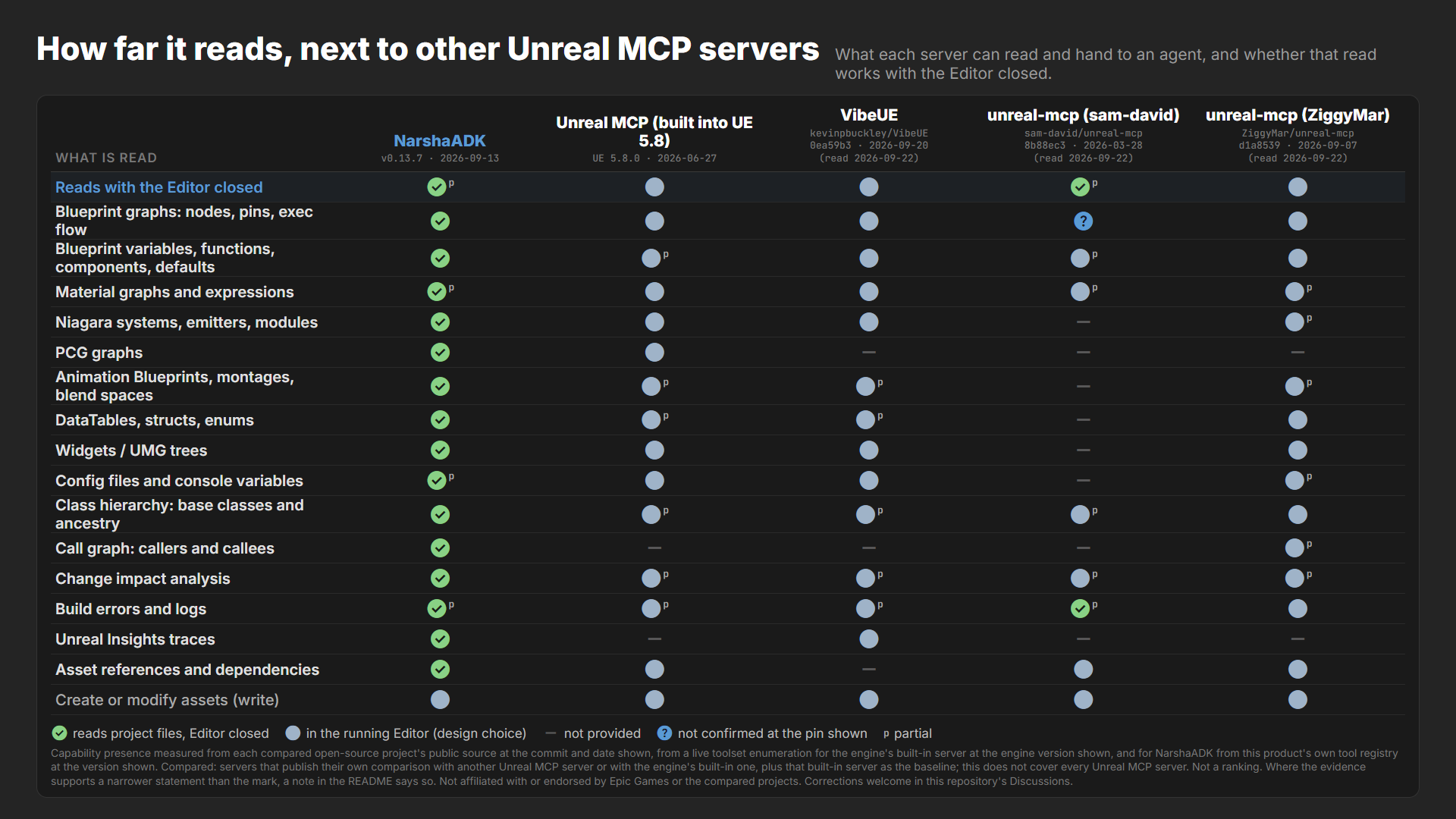
What each server can read and hand to an agent, and whether that read works with the Editor closed. ✅ reads the project's files; the Editor never has to run · ● in the running Editor (a design choice) · — not provided · ? not confirmed at the pin shown · superscript p = partial.
| What is read | NarshaADK v0.13.7 · 2026-09-13 | Unreal MCP (built into UE 5.8) UE 5.8.0 · 2026-06-27 | VibeUE kevinpbuckley/VibeUE@0ea59b3 · 2026-09-20 (read 2026-09-22) | unreal-mcp (sam-david) sam-david/unreal-mcp@8b88ec3 · 2026-03-28 (read 2026-09-22) | unreal-mcp (ZiggyMar) ZiggyMar/unreal-mcp@d1a8539 · 2026-09-07 (read 2026-09-22) |
|---|---|---|---|---|---|
| Reads with the Editor closed | ✅p | ● | ● | ✅p | ● |
| Blueprint graphs: nodes, pins, exec flow | ✅ | ● | ● | ? | ● |
| Blueprint variables, functions, components, defaults | ✅ | ●p | ● | ●p | ● |
| Material graphs and expressions | ✅p | ● | ● | ●p | ●p |
| Niagara systems, emitters, modules | ✅ | ● | ● | — | ●p |
| PCG graphs | ✅ | ● | — | — | — |
| Animation Blueprints, montages, blend spaces | ✅ | ●p | ●p | — | ●p |
| DataTables, structs, enums | ✅ | ●p | ●p | — | ● |
| Widgets / UMG trees | ✅ | ● | ● | — | ● |
| Config files and console variables | ✅p | ● | ● | — | ●p |
| Class hierarchy: base classes and ancestry | ✅ | ●p | ●p | ●p | ● |
| Call graph: callers and callees | ✅ | — | — | — | ●p |
| Change impact analysis | ✅ | ●p | ●p | ●p | ●p |
| Build errors and logs | ✅p | ●p | ●p | ✅p | ● |
| Unreal Insights traces | ✅ | — | ● | — | — |
| Asset references and dependencies | ✅ | ● | — | ● | ● |
| Create or modify assets (write) | ● | ● | ● | ● | ● |
Where other servers go further
- The engine's built-in server ships with Unreal Engine as an engine plugin, so there is nothing separate to download. NarshaADK installs as its own plugin package, with a prebuilt runtime inside it. (Unreal MCP (built into UE 5.8))
- sam-david's server drives the Editor through the engine's built-in Python remote execution, so most of its tools work without compiling a plugin into the project. NarshaADK needs a C++ project (Blueprint-only projects are not supported) and, for its symbol reads, the PDBs from one successful build. (sam-david/unreal-mcp@8b88ec3 · src/transports/connection-manager.ts, sam-david/unreal-mcp@8b88ec3 · src/transports/python-exec.ts, sam-david/unreal-mcp@8b88ec3 · src/tools/blueprint.ts)
- VibeUE and ZiggyMar's server are open source under the MIT license, so they can be read, forked and changed. NarshaADK is a commercial product: its Unreal C++ plugin source ships in the package, and its runtime's source does not. (kevinpbuckley/VibeUE@0ea59b3 · LICENSE, ZiggyMar/unreal-mcp@d1a8539 · LICENSE)
Notes — what each mark does and does not cover
- Reads with the Editor closed — NarshaADK: Binary asset parsing, the compiler symbol index, parsed config and build-log parsing all run with the Editor closed. Where a row is marked partial, that row's own note names what the mark does not cover. Writing assets, spawning actors and running automation need the Editor. Requires a C++ project and the PDBs from one successful build; symbol reads reflect that build until the next one. Cooked assets are not supported.
- Reads with the Editor closed — Unreal MCP (built into UE 5.8): In-process toolsets served by the Editor over HTTP. This column is the only one not read from a repository: it was measured by enumerating the toolsets live in one Editor at the engine version shown, and toolsets ship behind plugins, so a toolset missing from that enumeration is absent from that install rather than from the engine.
- Reads with the Editor closed — VibeUE: Extends the Editor's own MCP endpoint; no separate server.
- Reads with the Editor closed — unreal-mcp (sam-david): A standalone server that sends Python to the Editor through its built-in remote execution, with the Remote Control API as a fallback and an optional bridge plugin for graph commands; only its build tools, which run the engine build tool as a child process and return the parsed compiler output, read with the Editor closed, while asset, Blueprint, material, level and sequence reads need the Editor.
- Reads with the Editor closed — unreal-mcp (ZiggyMar): A Node server forwards tool calls over local TCP to a C++ plugin running inside the Editor. The log, C++ source and C++ compile tools read files or run the build from the server process, but they locate the project by asking that Editor first.
- Blueprint graphs: nodes, pins, exec flow — unreal-mcp (sam-david): The graph node listing tool forwards to an optional bridge plugin whose source is not in the repository at this commit, and without that plugin it returns an error; what the plugin would return could not be checked.
- Blueprint variables, functions, components, defaults — Unreal MCP (built into UE 5.8): Blueprint variables, functions and defaults are named reads; the enumeration names no read of a Blueprint's component list, because the Blueprint toolset's component units bind or list events and the units that read components belong to the actor toolset and take a placed actor.
- Blueprint variables, functions, components, defaults — unreal-mcp (sam-david): Its Blueprint info tool returns the parent class and the component list, the latter gathered by spawning a temporary actor; variables, functions and defaults are not among the fields its script reads, although the tool description names them.
- Material graphs and expressions — NarshaADK: Offline node topology and graph summary; live name-based edges when the Editor runs. The material tool is Experimental.
- Material graphs and expressions — unreal-mcp (sam-david): Lists a material's expression nodes by name and class; connections between expressions are not read back.
- Material graphs and expressions — unreal-mcp (ZiggyMar): A material's exposed scalar, color and texture parameters are read; the expression graph itself has no read tool, only the write that builds one.
- Niagara systems, emitters, modules — unreal-mcp (sam-david): The Niagara tools spawn systems and set, reset or reinitialize their parameters; none reads a system's emitters or modules back.
- Niagara systems, emitters, modules — unreal-mcp (ZiggyMar): Emitters, whether each is disabled, and the user parameters are read; the modules inside an emitter are not.
- PCG graphs — VibeUE: No PCG service of its own, and the engine's PCG toolset is listed among those not enabled here; its skill document routes PCG through the engine's general Python scripting, which earns no mark for any server here.
- PCG graphs — unreal-mcp (sam-david): No PCG tool among the modules the server registers.
- PCG graphs — unreal-mcp (ZiggyMar): No PCG tool among the tools it registers; PCG is reachable only by delegating to the engine's built-in server through a pass-through tool, which earns no mark here.
- Animation Blueprints, montages, blend spaces — Unreal MCP (built into UE 5.8): The enumerated skeletal-mesh and physics-asset toolsets return skeletons, bones, sockets, morph targets and physics bodies; none of them returns an Animation Blueprint graph, a montage's sections or a blend space.
- Animation Blueprints, montages, blend spaces — VibeUE: Animation Blueprint graphs and montages are read in depth; a blend space is only an asset path assigned to a player node, never read back.
- Animation Blueprints, montages, blend spaces — unreal-mcp (sam-david): The animation module creates Animation Blueprints and montages and reads an animation sequence's length, frame count and skeleton; no tool reads an Animation Blueprint graph, a montage's sections or a blend space.
- Animation Blueprints, montages, blend spaces — unreal-mcp (ZiggyMar): Animation Blueprint state machines, states and transition conditions have a dedicated reader; montages and blend spaces have none of their own and reach an agent only as the editable settings the plain-asset reader returns.
- DataTables, structs, enums — Unreal MCP (built into UE 5.8): DataTable rows and schema, and a generic object property listing; its row struct tool searches for row types, and the only enum read named in the enumeration sits inside the Niagara toolset.
- DataTables, structs, enums — VibeUE: Enums and structs are read by its own service; no DataTable service header exists at this commit, and DataTable reads reach an agent through Epic's toolset on the endpoint VibeUE extends, so they are marked in the built-in server's column rather than here.
- DataTables, structs, enums — unreal-mcp (sam-david): No DataTable, struct or enum tool among the modules the server registers.
- Widgets / UMG trees — unreal-mcp (sam-david): The only widget tool opens an Editor Utility Widget as a tab; nothing reads a widget tree.
- Config files and console variables — NarshaADK: Config files are read from disk across the engine and project layers; console variables are read as declarations, defaults and flags parsed from engine source joined to those layers, not as a running engine's current values.
- Config files and console variables — unreal-mcp (sam-david): No INI or console-variable read among the modules the server registers; the plugin tool reads the project file's plugin list, and console commands go through a generic command tool that earns no mark here.
- Config files and console variables — unreal-mcp (ZiggyMar): Reads the project's default GameMode and map and its legacy input mappings; no tool reads INI files or console variables, and the console-command tool is a general console rather than a config reader.
- Class hierarchy: base classes and ancestry — Unreal MCP (built into UE 5.8): A class lookup, a Blueprint parent lookup and a subclass search; no enumerated unit returns a class's ancestry chain.
- Class hierarchy: base classes and ancestry — VibeUE: Its Blueprint service reports a Blueprint's own parent class, and the overridable function listing names the class each function comes from; no service returns the ancestry chain itself, and none reports a C++ class hierarchy.
- Class hierarchy: base classes and ancestry — unreal-mcp (sam-david): The Blueprint info tool reports a Blueprint's direct parent class; there is no ancestry walk and no tool for a C++ class hierarchy.
- Call graph: callers and callees — Unreal MCP (built into UE 5.8): No symbol or call-graph tool among the enumerated toolsets.
- Call graph: callers and callees — VibeUE: No source or symbol service among its headers, and the bridged tools that discover modules, classes and functions introspect the Editor's Python API rather than C++ callers or callees.
- Call graph: callers and callees — unreal-mcp (sam-david): No source or symbol module among those the server registers, so C++ callers and callees are not read.
- Call graph: callers and callees — unreal-mcp (ZiggyMar): Every Blueprint call site of a function, with whether it can run, and the ordered calls inside a graph are read; calls made from C++ code are not traced.
- Change impact analysis — Unreal MCP (built into UE 5.8): Asset dependency and referencer reads and a subclass search answer what a change to an asset or a class would reach; the enumeration carries no call graph, so the effect of changing a function is not among what it reports.
- Change impact analysis — VibeUE: A read-only query lists every Behavior Tree node selector bound to a blackboard key, so a rename or removal can be weighed first; no service reports what a change to a class or an asset would affect.
- Change impact analysis — unreal-mcp (sam-david): Asset dependency and referencer reads answer what a change to an asset would reach; nothing among its registered tools reports callers or callees, so the effect of changing a function is not among what it reports.
- Change impact analysis — unreal-mcp (ZiggyMar): Asset referencer reads and project-wide Blueprint call and variable tracing answer what a change to an asset, a Blueprint member or a function called from Blueprints would reach; calls made from C++ code are not traced, so the effect on other C++ code is not among what it reports.
- Build errors and logs — NarshaADK: Build logs are detected and parsed with the Editor closed; live compiler results are read from a running Editor.
- Build errors and logs — Unreal MCP (built into UE 5.8): The enumerated log toolset returns Editor log entries; the enumeration names no build or compiler-results tool, so compiler messages reach an agent only as lines in that log.
- Build errors and logs — VibeUE: A bridged tool returns Editor log entries, its own performance service reads the log back as part of a run summary, and its Blueprint service returns a Blueprint's compiler messages when it compiles one; its build path is a shell script rather than a tool, so C++ compiler output is not among what it reads.
- Build errors and logs — unreal-mcp (sam-david): Its build tool runs the engine build tool as a child process with the Editor closed and returns the compiler errors and warnings parsed from that output, and a second tool parses a build log passed to it; the Editor's own log is not read.
- Unreal Insights traces — Unreal MCP (built into UE 5.8): No profiling toolset among the enumerated tools.
- Unreal Insights traces — unreal-mcp (sam-david): The profiling tools start and stop a trace capture or a CSV profile and issue stat commands; none reads a recorded trace back.
- Unreal Insights traces — unreal-mcp (ZiggyMar): No profiling or trace tool among the tools it registers; the console-command tool can issue stat commands, which earns no mark here.
- Asset references and dependencies — VibeUE: Its own asset service covers import, export, delete and selection, and referencers surface only as the refusal payload of an attempted delete; the reference and dependency queries reach an agent through Epic's toolset on the endpoint VibeUE extends, so they are marked in the built-in server's column rather than here.
- Tool maturity — NarshaADK: Tool maturity at this version: symbol analysis is Production; the Blueprint, config, build-error, asset-search and Sequencer-structure tools are Beta; the Material, Niagara, PCG and Insights tools are Experimental, as are the Sequencer keyframe, playback and track tools; the Widget, Animation and asset-diff tools have no maturity rating yet.
Capability presence measured from each compared open-source project's public source at the commit and date shown, from a live toolset enumeration for the engine's built-in server at the engine version shown, and for NarshaADK from this product's own tool registry at the version shown. Compared: servers that publish their own comparison with another Unreal MCP server or with the engine's built-in one, plus that built-in server as the baseline; this does not cover every Unreal MCP server. Not a ranking. Where the evidence supports a narrower statement than the mark, a note in the README says so. Not affiliated with or endorsed by Epic Games or the compared projects. Corrections welcome in this repository's Discussions.
Supported versions
| Unreal Engine | Plugin package |
|---|---|
| UE 5.8 | NarshaMCP-v<version>-UE5.8-Release-RustMCP.zip |
| UE 5.7 | NarshaMCP-v<version>-UE5.7-Release-RustMCP.zip |
Each release includes these files:
NarshaMCP-v<version>-UE5.7-Release-RustMCP.zipandNarshaMCP-v<version>-UE5.8-Release-RustMCP.zipare the same plugin ZIPs submitted to Fab. They contain the plugin's Unreal C++ source, which your project builds, and the runtime as a prebuilt executable. The runtime's own source is not included.narshamcp-windows-x64.exeis the standalone Windows runtime, byte-identical to the runtime inside the ZIPs.
Each release's notes list the SHA-256 digest of every file. Third-party software notices ship inside the runtime: run narshamcp --licenses (or narshamcp --licenses-json).
License
NarshaADK is licensed under the Fab End User License Agreement (the "Fab Standard License"). Copies downloaded from this repository are granted the same terms directly by Next Stage Inc.: the Personal tier applies at no charge if you, together with any controlling entity and any entity under common control with you, did not generate more than the Fab revenue threshold from commercial activity in the digital content industry in the last 12 months (USD 100,000 when this was written; the Fab EULA states the current figure). Above it a Professional license acquired through the Fab listing is required. LICENSE.md states the threshold and the full terms.
Support
Documentation and examples are at narshaadk.ai. To ask questions or report issues, use the support channel on the Fab listing.
NarshaADK is built and maintained by Next Stage Inc.