oura-ring-mcp
MCP server for Oura Ring data with smart analysis tools
Documentation
Oura MCP Server


An MCP server that connects your Oura Ring to Claude and other AI assistants. Get human-readable insights about your sleep, readiness, and activity—not just raw JSON.
Features
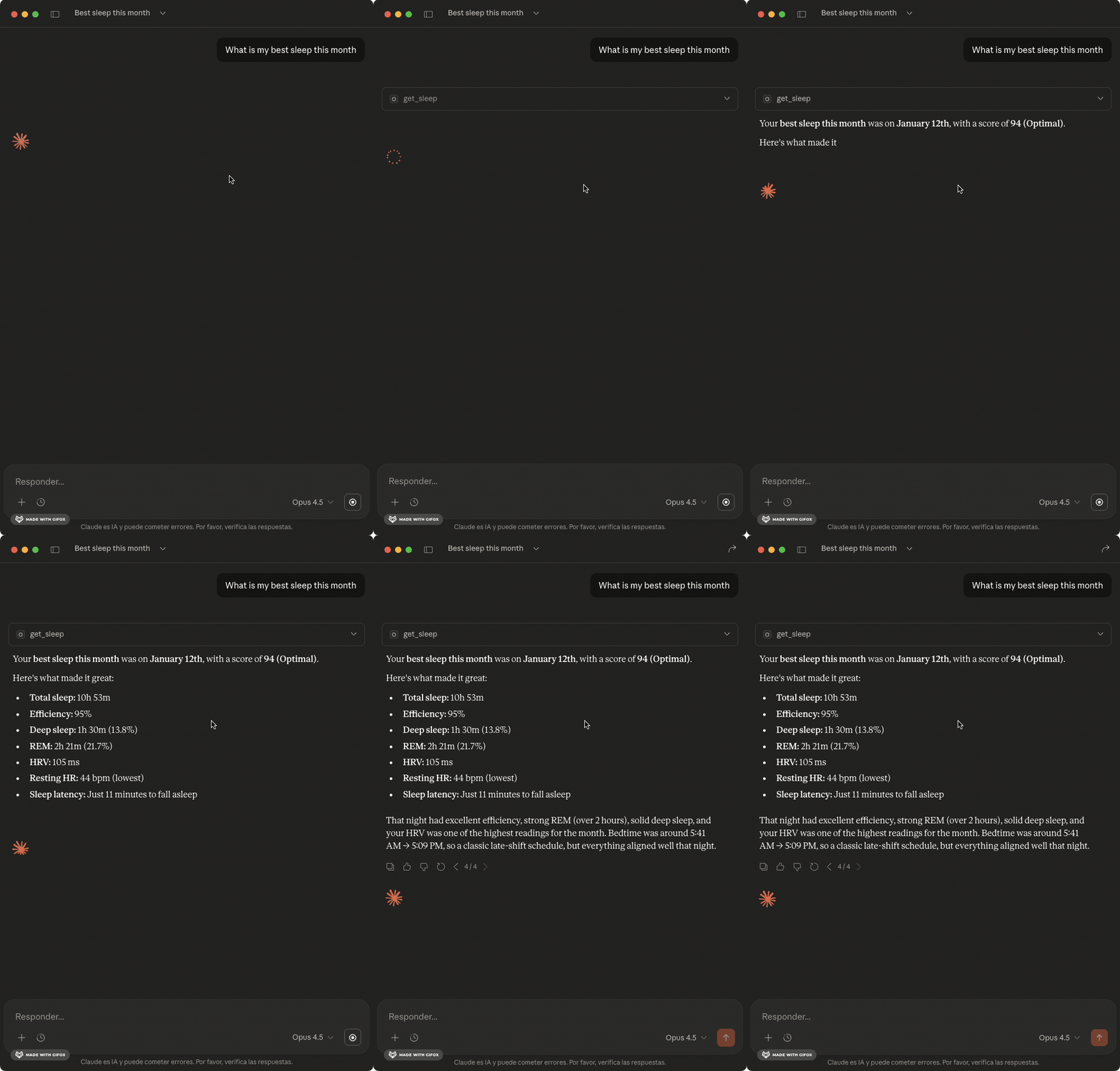
- Smart formatting - Durations in hours/minutes, scores with context ("85 - Optimal")
- Sleep analysis - Sleep stages, efficiency, HRV, and biometrics
- Readiness tracking - Recovery scores and contributor breakdown
- Activity data - Steps, calories, and intensity breakdown
- Health metrics - Heart rate, SpO2, stress, cardiovascular age
- Smart analysis - Anomaly detection, correlations, trend analysis
- Tags support - Compare metrics with/without conditions
See example outputs — what Claude returns for sleep, readiness, weekly summaries, and smart analysis
Quick Start
1. Install
npm install -g oura-ring-mcp
Or use directly with npx (no install needed):
npx oura-ring-mcp
2. Authenticate with Oura
Option A: Personal Access Token (simpler)
- Go to cloud.ouraring.com/personal-access-tokens
- Create a new token
- Set
OURA_ACCESS_TOKENin your Claude Desktop config (see below)
Option B: OAuth CLI Flow
- Create an OAuth app at developer.ouraring.com
- Set Redirect URI to
http://localhost:3000/callback
- Set Redirect URI to
- Run the auth flow:
export OURA_CLIENT_ID=your_client_id export OURA_CLIENT_SECRET=your_client_secret npx oura-ring-mcp auth - Credentials are saved to
~/.oura-mcp/credentials.json
3. Configure Claude Desktop
Add to claude_desktop_config.json:
With Personal Access Token:
{
  "mcpServers": {
    "oura": {
      "command": "npx",
      "args": ["oura-ring-mcp"],
      "env": {
        "OURA_ACCESS_TOKEN": "your_token_here"
      }
    }
  }
}
With OAuth (after running npx oura-ring-mcp auth):
{
  "mcpServers": {
    "oura": {
      "command": "npx",
      "args": ["oura-ring-mcp"]
    }
  }
}
The server reads credentials from ~/.oura-mcp/credentials.json. To enable automatic token refresh, add your OAuth credentials:
{
  "mcpServers": {
    "oura": {
      "command": "npx",
      "args": ["oura-ring-mcp"],
      "env": {
        "OURA_CLIENT_ID": "your_client_id",
        "OURA_CLIENT_SECRET": "your_client_secret"
      }
    }
  }
}
Restart Claude Desktop. Requires Node >=18.
What Can I Ask?
Daily check-ins:
- "How did I sleep last night?"
- "Am I recovered enough to work out today?"
- "What's my body telling me right now?"
Patterns & trends:
- "Do I sleep better on weekends?"
- "What time should I go to bed for optimal sleep?"
- "Is my HRV improving or declining?"
Correlations & insights:
- "Does alcohol affect my sleep quality?"
- "What predicts my best sleep nights?"
- "How does exercise timing affect my recovery?"
Comparisons:
- "Compare my sleep this week vs last week"
- "How do I sleep after meditation vs without?"
- "What changed when I started taking magnesium?"
Anomalies:
- "Are there any unusual readings in my data?"
- "Why was my readiness so low yesterday?"
- "Find days where my metrics were off"
Available Tools
Data Retrieval
| Tool | Description |
|---|---|
get_sleep | Sleep data with stages, efficiency, HR, HRV |
get_daily_sleep | Daily sleep scores with contributors |
get_readiness | Readiness scores and recovery metrics |
get_activity | Steps, calories, intensity breakdown |
get_workouts | Workout sessions with type and intensity |
get_sessions | Meditation and relaxation sessions |
get_heart_rate | HR readings throughout the day |
get_stress | Stress levels and recovery time |
get_spo2 | Blood oxygen and breathing disturbance |
get_tags | User-created tags and notes |
Smart Analysis
| Tool | Description |
|---|---|
detect_anomalies | Find unusual readings using outlier detection |
analyze_sleep_quality | Sleep analysis with trends, patterns, debt |
correlate_metrics | Find correlations between health metrics |
compare_periods | Compare this week vs last week |
compare_conditions | Compare metrics with/without a tag |
best_sleep_conditions | What predicts your good vs poor sleep |
analyze_hrv_trend | HRV trend with rolling averages |
Resources
| Resource | Description |
|---|---|
oura://today | Today's health summary |
oura://weekly-summary | Last 7 days with averages |
oura://baseline | Your 30-day averages and normal ranges |
oura://monthly-insights | 30-day analysis with trends and anomalies |
oura://tag-summary | Your tags and usage frequency |
Prompts
| Prompt | Description |
|---|---|
weekly-review | Comprehensive weekly health review |
sleep-optimization | Identify what leads to your best sleep |
recovery-check | Should you train hard or rest today? |
compare-weeks | This week vs last week comparison |
tag-analysis | How a specific tag affects your health |
Remote Deployment (Railway)
Deploy the MCP server for remote access. The server proxies OAuth through Oura, so users authenticate directly with their Oura account — no PAT needed.
1. Create an Oura OAuth App
- Go to Oura OAuth Applications
- Create a new application
- Set the Redirect URI to:
https://your-app.railway.app/oauth/callback - Note the Client ID and Client Secret
2. Deploy
# Install Railway CLI
npm install -g @railway/cli

# Login, init, and deploy
railway login
railway init
railway up
3. Set Environment Variables
In the Railway dashboard, add:
| Variable | Description |
|---|---|
OURA_CLIENT_ID | From your Oura OAuth app |
OURA_CLIENT_SECRET | From your Oura OAuth app |
NODE_ENV | production |
MCP_SECRET | (Optional) Static bearer token for Claude Desktop (openssl rand -base64 32) |
OURA_ACCESS_TOKEN | (Optional) PAT fallback if not using OAuth (MCP_SECRET required) |
Railway automatically sets PORT and RAILWAY_PUBLIC_DOMAIN.
4. Connect from Claude.ai
Use the connector in Claude.ai:
- Go to Settings > MCP Connectors > Add
- Enter your server URL:
https://your-app.railway.app(without/mcp) - Leave OAuth Client ID and Secret empty (dynamic registration handles it)
- You'll be redirected to Oura to authorize access to your data
5. Connect from Claude Desktop
For Claude Desktop, use MCP_SECRET + OURA_ACCESS_TOKEN:
{
  "mcpServers": {
    "oura-remote": {
      "url": "https://your-app.railway.app/mcp",
      "headers": {
        "Authorization": "Bearer your_mcp_secret_here"
      }
    }
  }
}
Local Testing
# With Oura OAuth (full flow)
OURA_CLIENT_ID=your_id OURA_CLIENT_SECRET=your_secret pnpm start:http

# With static secret only (requires OURA_ACCESS_TOKEN)
OURA_ACCESS_TOKEN=your_pat MCP_SECRET=test-secret pnpm start:http

# Verify health endpoint
curl http://localhost:3000/health

# Check OAuth metadata (only available when OURA_CLIENT_ID is set)
curl http://localhost:3000/.well-known/oauth-authorization-server

# Test authenticated request (with static secret)
curl -X POST http://localhost:3000/mcp \
  -H "Authorization: Bearer test-secret" \
  -H "Content-Type: application/json" \
  -d '{"jsonrpc":"2.0","method":"initialize","params":{"capabilities":{}},"id":1}'
Contributing
See CLAUDE.md for architecture details and development guidelines.
License
MIT