MCP Lucene Server
MCP Lucene Server is a Model Context Protocol (MCP) server that exposes Apache Lucene's full-text search capabilities through a conversational interface. It allows AI assistants (like Claude) to help users search, index, and manage document collections without requiring technical knowledge of Lucene or search engines.
Documentation
MCP Lucene Server

A Model Context Protocol (MCP) server that exposes Apache Lucene fulltext search capabilities with automatic document crawling and indexing. This server supports both STDIO transport (for Claude Desktop integration) and HTTP transport (for web-based clients and remote access).
Features
Automatic Document Crawling
- Automatically indexes PDFs, Microsoft Office, and OpenOffice documents
- Multi-threaded crawling for fast indexing
- Real-time directory monitoring for automatic updates
- Incremental indexing with full reconciliation (skips unchanged files, removes orphans)
Powerful Search
- Simple keyword search (no Lucene syntax needed) and full Lucene query syntax search
- Field-specific filtering (by author, language, file type, etc.)
- Structured passages with quality metadata for LLM consumption
- Paginated results with filter suggestions
Semantic Search
- Optional pure KNN embedding-based semantic search using multilingual-e5 embeddings with Late Chunking
- Finds semantically related documents even without exact keyword matches
- Requires
VECTOR_MODELto be configured. See SEMANTICSEARCH.md for details.
Query Profiling & Debugging
- Deep query analysis and profiling (
profileQuerytool) - Understand why queries return certain results and how scoring works
- Filter impact analysis showing document reduction per filter
- Document scoring explanations with BM25 breakdown
- Term statistics (IDF, rarity, document frequency)
- Actionable optimization recommendations
- LLM-optimized structured output for easy interpretation
Rich Metadata Extraction
- Automatic language detection
- Author, title, creation date extraction
- File type and size information
- SHA-256 content hashing for change detection
JDBC Metadata Enrichment
- Load additional metadata from PostgreSQL, MySQL, or any JDBC-compatible database at index time
- JSON-based metadata with explicit field types (keyword, text, int, long, date)
- Multi-value field support, automatic facet registration
- Background sync job for incremental metadata updates (configurable interval)
- All DB-sourced fields prefixed with
dbmeta_to avoid schema collisions
Text Normalization
- Automatic removal of broken/invalid characters (replacement chars, control chars, zero-width chars)
- Whitespace normalization (multiple spaces collapsed to single space)
- Ensures clean, readable search results and passages
Performance Optimized
- Batch processing for efficient indexing
- NRT (Near Real-Time) search with dynamic optimization
- Configurable thread pools for parallel processing
- Progress notifications during bulk operations
Easy Integration
- Dual transport support: STDIO (default) and HTTP
- STDIO transport for seamless Claude Desktop integration
- HTTP transport for web-based clients and remote access
- Comprehensive MCP tools for search and crawler control
- Flexible configuration via YAML and system properties
- Cross-platform notifications (macOS Notification Center, Windows Toast, Linux notify-send)
Table of Contents
- Documentation
- Quick Start
- MCP Tools
- Tool Exposure Configuration
- Index Field Schema
- Usage Examples
- Document Crawler Features
- Troubleshooting
- Security Considerations
- Configuration Options
- JDBC Metadata Enrichment
- Development
Documentation
Additional technical documentation:
- PIPELINE.md — Analyzer chains, query pipeline, and tokenization details
- SEMANTICSEARCH.md — Semantic search architecture: Late Chunking, Block Join indexing, KNN scoring, and configuration
- ONNX.md — ONNX model export, optimization and INT8 quantization guide for e5-base and e5-large
Quick Start
Get up and running with MCP Lucene Server in three steps.
Prerequisites
- Java 25 or later - Required to run the server
- Maven 3.9+ (only if building from source)
Step 1: Get the Server
Option A: Download Pre-built JAR (Recommended)
- Go to the Actions tab
- Click on the most recent successful workflow run
- Scroll down to "Artifacts" and download
luceneserver-X.X.X-SNAPSHOT - Extract the ZIP file to get the JAR
For tagged releases, you can also download from the Releases page.
Option B: Build from Source
./mvnw clean package -DskipTests
This creates an executable JAR at target/luceneserver-0.0.1-SNAPSHOT.jar.
Option C: Use Docker (Only HTTP-Transport is available)
docker run -v ./lucene-data-dir:/userdata -p 9000:9000 -it mirkosertic42/mcpluceneserver:main
This starts a Docker container with the server listening on port 9000. All configuration data including the
index files is stored in the ./lucene-data-dir directory on the host machine. Please note that the Lucene
indexer can only access files that are visible to the Docker container, so all files must be placed in the
./lucene-data-dir directory or a subdirectory of it. JVM settings can be adjusted by the JAVA_OPTS
environment variable, which can be modified using the Docker CLI or a Docker Compose file. The default
maximum JVM Heap size(-Xmx) is 2GB.
To enable semantic search, set the VECTOR_MODEL environment variable:
docker run -v ./lucene-data-dir:/userdata -p 9000:9000 \
  -e VECTOR_MODEL=e5-base \
  -e JAVA_OPTS="-Xmx4g" \
  -it mirkosertic42/mcpluceneserver:main
| Environment Variable | Default | Description |
|---|---|---|
VECTOR_MODEL | (none) | ONNX embedding model: e5-base (768 dims, faster) or e5-large (1024 dims, higher quality). Set to enable semantic search. |
JAVA_OPTS | -Xmx2g | JVM options. Increase to -Xmx4g or higher when using semantic search. |
Step 2: Configure Claude Desktop
Locate your Claude Desktop configuration file:
- macOS:
~/Library/Application Support/Claude/claude_desktop_config.json - Windows:
%APPDATA%\Claude\claude_desktop_config.json - Linux:
~/.config/Claude/claude_desktop_config.json
Add the Lucene MCP server to the mcpServers section:
{
  "mcpServers": {
    "lucene-search": {
      "command": "java",
      "args": [
        "--enable-native-access=ALL-UNNAMED",
        "-Xmx2g",
        "-Dspring.profiles.active=deployed",
        "-jar",
        "/absolute/path/to/luceneserver-0.0.1-SNAPSHOT.jar"
      ]
    }
  }
}
Important: Replace /absolute/path/to/luceneserver-0.0.1-SNAPSHOT.jar with the actual absolute path to your JAR file.
The -Dspring.profiles.active=deployed flag is required for clean STDIO communication (disables console logging and startup banner).
Step 3: Start Using It
- Restart Claude Desktop to load the new configuration
- Verify the server is running in Claude Desktop's developer settings
- Tell Claude to add your documents:
"Add /Users/yourname/Documents as a crawlable directory and start crawling"
That's it! The configuration is saved to ~/.mcplucene/config.yaml and persists across restarts. You can now search your documents through Claude.
Example searches:
- "Search for machine learning papers"
- "Find all PDFs by John Doe"
- "What documents mention quarterly reports?"
MCP Tools
Tools are organized into groups. Use LUCENE_TOOLS_INCLUDE and LUCENE_TOOLS_EXCLUDE to control
which tools are exposed (see Tool Exposure Configuration).
Search Tools (group: search)
simpleSearch
Search the Lucene fulltext index using plain text keyword search. Special characters are treated as literals — no Lucene syntax knowledge required. Uses BM25 with German and English stemming.
Parameters:
query(optional): Plain text search query. Can benullor"*"to match all documents (useful with filters).filters(optional): Array of structured filters for precise field-level filtering (see Structured Filters below)page(optional): Page number, 0-based (default: 0)pageSize(optional): Results per page (default: 10, max: 100)sortBy(optional): Sort field -_score(default),modified_date,created_date,file_size, or anydbmeta_*metadata field (INT/LONG/DATE/KEYWORD) registered from JDBC enrichmentsortOrder(optional): Sort order -ascordesc(default:desc)
extendedSearch
Search the Lucene fulltext index using full Lucene query syntax. Supports Boolean operators, wildcards, proximity queries, and field-specific queries. Uses BM25 with German and English stemming.
Parameters:
query(optional): The search query using Lucene query syntax. Can benullor"*"to match all documents (useful with filters).filters(optional): Array of structured filters for precise field-level filtering (see Structured Filters below)page(optional): Page number, 0-based (default: 0)pageSize(optional): Results per page (default: 10, max: 100)sortBy(optional): Sort field -_score(default),modified_date,created_date,file_size, or anydbmeta_*metadata field (INT/LONG/DATE/KEYWORD) registered from JDBC enrichmentsortOrder(optional): Sort order -ascordesc(default:desc)
Sorting Results:
By default, results are sorted by relevance score (most relevant first). You can sort by metadata fields:
| Sort Field | Description | Default Order |
|---|---|---|
_score | Relevance score (default) | Descending (best match first) |
modified_date | Last modified date | Descending (most recent first) |
created_date | Creation date | Descending (most recent first) |
file_size | File size in bytes | Descending (largest first) |
dbmeta_* | Any single-valued JDBC metadata field with type INT, LONG, DATE, or KEYWORD | Ascending or descending |
Sort Examples:
// Most recently modified documents
{ "query": "contract", "sortBy": "modified_date", "sortOrder": "desc" }

// Oldest documents first
{ "query": "contract", "sortBy": "created_date", "sortOrder": "asc" }

// Smallest files (for quick review)
{ "query": "summary", "sortBy": "file_size", "sortOrder": "asc" }

// Combine sorting with filters
{
  "query": "*",
  "sortBy": "modified_date",
  "sortOrder": "desc",
  "filters": [
    { "field": "file_extension", "value": "pdf" },
    { "field": "modified_date", "operator": "range", "from": "2024-01-01" }
  ]
}
Note: When sorting by metadata fields, relevance scores are still computed and used as a secondary sort criterion for tie-breaking.
Structured Filters:
The filters array accepts objects with these fields:
| Field | Required | Description |
|---|---|---|
field | yes | Field name to filter on |
operator | no | eq (default), in, not, not_in, range |
value | for eq/not | Single value for exact match or exclusion |
values | for in/not_in | Array of values (OR semantics within the field) |
from | for range | Range start (inclusive) |
to | for range | Range end (inclusive) |
addedAt | no | Client timestamp — round-tripped in activeFilters response |
Operator reference:
| Operator | Description | Example |
|---|---|---|
eq | Exact match (default) | {field: "language", value: "en"} |
in | Match any of values | {field: "file_extension", operator: "in", values: ["pdf", "docx"]} |
not | Exclude value | {field: "language", operator: "not", value: "unknown"} |
not_in | Exclude multiple values | {field: "language", operator: "not_in", values: ["unknown", ""]} |
range | Numeric/date range | {field: "modified_date", operator: "range", from: "2024-01-01", to: "2025-12-31"} |
Filterable fields:
- Faceted (DrillSideways):
language,file_extension,file_type,author - String (exact match):
file_path,content_hash - Numeric/date (range):
file_size,created_date,modified_date,indexed_date
Date format: ISO-8601 — "2024-01-15", "2024-01-15T10:30:00", or "2024-01-15T10:30:00Z"
Filter combination rules:
- Filters on different fields use AND logic
- Multiple
eqfilters orinvalues on the same faceted field use OR logic (DrillSideways) not/not_infilters are applied as MUST_NOT clauses
AI-Powered Synonym Expansion:
This server is designed to work with AI assistants like Claude. Instead of using traditional Lucene synonym files, the AI generates context-appropriate synonyms automatically by constructing OR queries.
Why this is better than traditional synonyms:
- Context-aware: The AI understands your intent and picks relevant synonyms (e.g., "contract" in legal context vs. "contract" in construction)
- No maintenance: No need to maintain static synonym configuration files
- Domain-adaptive: Works across legal, technical, medical, or casual language automatically
- Multilingual: Generates synonyms in any language without configuration
When you ask Claude to "find documents about cars", it automatically searches for (car OR automobile OR vehicle) - giving you better results than a static synonym list.
Technical Details (Lexical Matching):
The server uses a multi-analyzer indexing pipeline and multi-field weighted query pipeline for comprehensive search:
- Unicode normalization — NFKC normalization, diacritic folding, ligature expansion via ICUFoldingFilter
- Leading wildcard optimization —
content_reversedfield stores reversed tokens for efficient*vertrag-style queries - Case-insensitive wildcards — wildcard/prefix terms are automatically lowercased
- OpenNLP lemmatization — dictionary-based lemmatization for German and English, including irregular forms (ran→run, ging→gehen, paid→pay, analyses→analysis)
- Dual-language indexing — both German and English lemma fields indexed for all documents, enabling mixed-language matching
- German umlaut transliteration —
content_translit_deshadow field maps digraphs (Mueller→Müller) - Automatic phrase expansion — exact phrases auto-expand to include proximity matches (see below)
- Adaptive prefix scoring — BM25 scoring for specific prefixes (>= 4 chars)
See PIPELINE.md for complete analyzer chain documentation, concrete examples, and query pipeline details.
The AI assistant compensates for remaining limitations (no synonym expansion, no phonetic matching) by expanding queries intelligently.
Best Practices for Better Results:
-
Generate Synonyms Yourself: Use OR to combine related terms:
- Instead of:
contract - Use:
(contract OR agreement OR deal)
- Instead of:
-
Use Wildcards for Variations: Handle different word forms:
- Instead of:
contract - Use:
contract*(matches contracts, contracting, contracted)
- Instead of:
-
Leverage Facets: Use the returned facet values to discover exact terms in the index:
- Check
facets.authorto find exact author names - Check
facets.languageto see available languages - Use these exact values for filtering
- Check
-
Combine Techniques:
(contract* OR agreement*) AND (sign* OR execut*) AND author:"John Doe"
Supported Query Syntax (extendedSearch):
- Simple terms:
hello world(implicit AND between terms) - Phrase queries:
"exact phrase"(preserves word order) - Boolean operators:
term1 AND term2,term1 OR term2,NOT term - Trailing wildcard:
contract*matches contracts, contracting, contracted - Leading wildcard:
*vertragefficiently finds Arbeitsvertrag, Kaufvertrag (optimised via reverse token field) - Infix wildcard:
*vertrag*finds both Vertragsbedingungen and Arbeitsvertrag - Single char wildcard:
te?tmatches test, text - Fuzzy search:
term~2finds terms within Levenshtein edit distance 2 (default: 2) - Proximity search:
"term1 term2"~5finds terms within 5 words of each other - Field-specific search:
title:hello content:world - Grouping:
(contract OR agreement) AND signed - Range queries:
modified_date:[1609459200000 TO 1640995200000](timestamps in milliseconds)
Automatic Phrase Proximity Expansion:
Multi-word phrase queries are automatically expanded: "Domain Design" becomes ("Domain Design")^2.0 OR ("Domain Design"~3). Exact matches rank highest (2.0x boost), while near-matches (within 3 words) also surface at lower scores. Single-word phrases and user-specified slop are not expanded.
See PIPELINE.md for detailed examples and configuration.
Adaptive Prefix Query Scoring:
Prefix queries with >= 4 characters (vertrag*, design*) use real BM25 scoring, ranking shorter/more frequent terms higher than long compounds. Shorter prefixes (ver*) use constant scoring for performance. This balances ranking quality with speed automatically.
See PIPELINE.md for scoring examples and technical details.
German Compound Word Search:
Use wildcards for German compounds: *vertrag finds Arbeitsvertrag, vertrag* finds Vertragsbedingungen. Leading wildcards are optimized via the content_reversed field.
Automatic Lemmatization:
OpenNLP lemmatization handles morphological variants automatically. German: "Haus" finds "Häuser", "gehen" finds "ging". English: "run" finds "ran", "pay" finds "paid". Exact matches always rank highest.
Dual-Language Support:
All documents indexed with both German and English lemma fields, enabling mixed-language matching. German docs with English technical terms ("Recommendation Engines") match singular queries ("Recommendation Engine") via the English lemmatizer, and vice versa.
German Umlaut Transliteration:
The content_translit_de field maps ASCII digraphs to umlauts: "Mueller" matches "Müller", "Kaese" matches "Käse".
See PIPELINE.md for complete analyzer chains, concrete token examples, and query pipeline details.
Returns:
- Paginated document results, each containing a
passagesarray with highlighted text and quality metadata - Document-level relevance scores
facets: Facet values and counts from the result set (uses DrillSideways when facet filters are active, showing alternative values)activeFilters: Mirrors the inputfilterswith amatchCountfor each filter (count from facets, or -1 for range/non-faceted filters)- Search execution time in milliseconds (
searchTimeMs)
Filter examples:
// Browse all English PDFs
{ "query": null, "filters": [
    { "field": "language", "value": "en" },
    { "field": "file_extension", "value": "pdf" }
]}

// Date range filter
{ "query": "contract*", "filters": [
    { "field": "modified_date", "operator": "range", "from": "2024-01-01", "to": "2025-12-31" }
]}

// Multiple values with exclusion
{ "query": "report", "filters": [
    { "field": "file_extension", "operator": "in", "values": ["pdf", "docx"] },
    { "field": "language", "operator": "not", "value": "unknown" }
]}
Semantic Search Tools (group: semantic)
Semantic search tools require VECTOR_MODEL to be configured (e.g., VECTOR_MODEL=e5-base).
semanticSearch
Pure KNN embedding-based semantic search. Finds semantically related documents even without exact keyword matches. Results are ordered by cosine similarity. Requires VECTOR_MODEL to be configured.
Parameters:
query(required): Natural language query — the server computes an embedding and finds the nearest document chunks.filters(optional): Array of structured filters (same format assimpleSearch/extendedSearch)page(optional): Page number, 0-based (default: 0)pageSize(optional): Results per page (default: 10, max: 100)similarityThreshold(optional): Minimum cosine similarity score to include a result (0.0–1.0, default: 0.70). Lower = more results (broader match); higher = fewer results (closer match).
Use profileSemanticSearch to tune similarityThreshold for your corpus.
profileSemanticSearch
Debug tool for semantic search. Shows embedding time, cosine scores, matched chunks, and how many candidates passed the similarity threshold. Use this to tune similarityThreshold for your data.
Parameters:
query(required): Natural language query to profilefilters(optional): Array of structured filterssimilarityThreshold(optional): Threshold to test (0.0–1.0, default: 0.70)
Debug Tools (group: debug)
profileQuery
Analyze and debug simpleSearch / extendedSearch queries. Provides detailed insights into how Lucene processes your query, which terms contribute to scoring, how filters affect results, and where optimization opportunities exist.
Parameters:
query(optional): The search query (same assimpleSearch/extendedSearch)filters(optional): Array of structured filters (same as search tools)page(optional): Page number, 0-based (default: 0)pageSize(optional): Results per page (default: 10, max: 100)sortBy(optional): Sort field (same as search tools)sortOrder(optional): Sort order (same as search tools)queryMode(optional):SIMPLE(default) orEXTENDED— selects the query parser mode to match the search tool you are profilinganalyzeFilterImpact(optional): Iftrue, analyzes how each filter reduces result count. WARNING: Expensive operation requiring multiple queries. Default:falseanalyzeDocumentScoring(optional): Iftrue, provides detailed scoring explanations for top documents using Lucene's Explanation API. WARNING: Expensive operation. Default:falseanalyzeFacetCost(optional): Iftrue, measures faceting computation overhead. WARNING: Expensive operation. Default:falsemaxDocExplanations(optional): Maximum number of documents to explain whenanalyzeDocumentScoring=true(default: 5, max: 10)
Analysis Levels:
Level 1: Fast Analysis (Always Included)
- Query structure and component breakdown
- Query type identification (BooleanQuery, TermQuery, WildcardQuery, etc.)
- Estimated cost per query component
- Term statistics (document frequency, IDF, rarity classification)
- Search metrics (total hits, filter reduction percentage)
Level 2: Filter Impact Analysis (Opt-in, Expensive)
- Shows how each filter affects result count
- Calculates selectivity (low/medium/high/very high)
- Measures execution time per filter
- Helps identify redundant or ineffective filters
Level 3: Document Scoring Explanations (Opt-in, Expensive)
- Detailed score breakdown for top-ranked documents
- Shows which terms contribute most to each document's score
- Provides human-readable scoring summaries
- Uses Lucene's Explanation API but parsed into LLM-friendly format
Level 4: Facet Cost Analysis (Opt-in, Expensive)
- Measures faceting computation overhead
- Shows cost per facet dimension
- Helps decide if faceting should be disabled for performance
Returns:
A structured analysis object containing:
{
  success: boolean,
  queryAnalysis: {
    originalQuery: string,
    parsedQueryType: string,
    components: [{
      type: string,              // "TermQuery", "WildcardQuery", etc.
      field: string,
      value: string,
      occur: string,             // "MUST", "SHOULD", "FILTER", "MUST_NOT"
      estimatedCost: number,
      costDescription: string    // "~450 documents (moderate)"
    }],
    rewrites: [{                 // Query optimizations performed by Lucene
      original: string,
      rewritten: string,
      reason: string
    }],
    warnings: string[]
  },
  searchMetrics: {
    totalIndexedDocuments: number,
    documentsMatchingQuery: number,
    documentsAfterFilters: number,
    filterReductionPercent: number,
    termStatistics: {
      [term: string]: {
        term: string,
        documentFrequency: number,
        totalTermFrequency: number,
        idf: number,
        rarity: string           // "very common", "common", "uncommon", "rare"
      }
    }
  },
  filterImpact?: {               // Only if analyzeFilterImpact=true
    baselineHits: number,
    finalHits: number,
    filterImpacts: [{
      filter: {...},
      hitsBeforeFilter: number,
      hitsAfterFilter: number,
      documentsRemoved: number,
      reductionPercent: number,
      selectivity: string,       // "low", "medium", "high", "very high"
      executionTimeMs: number
    }],
    totalExecutionTimeMs: number
  },
  documentExplanations?: [{      // Only if analyzeDocumentScoring=true
    filePath: string,
    rank: number,
    score: number,
    scoringBreakdown: {
      totalScore: number,
      components: [{
        term: string,
        field: string,
        contribution: number,
        contributionPercent: number,
        details: {
          idf: number,
          tf: number,
          termFrequency: number,
          documentLength: number,
          averageDocumentLength: number,
          explanation: string
        }
      }],
      summary: string            // "Score dominated by term 'contract' (60.8%)"
    },
    matchedTerms: string[]
  }],
  facetCost?: {                  // Only if analyzeFacetCost=true
    facetingOverheadMs: number,
    facetingOverheadPercent: number,
    dimensions: {
      [dimension: string]: {
        dimension: string,
        uniqueValues: number,
        totalCount: number,
        computationTimeMs: number
      }
    }
  },
  recommendations: string[]      // Actionable optimization suggestions
}
Example: Basic Query Analysis
Ask Claude: "Profile my search for 'contract AND signed' to understand its performance"
This performs fast analysis showing:
- Query structure (Boolean AND query with two terms)
- Term statistics (how common "contract" and "signed" are)
- Cost estimates (how many documents will be examined)
- Optimization recommendations
Example: Deep Analysis with Scoring
{
  "query": "(contract OR agreement) AND signed",
  "filters": [
    { "field": "language", "value": "en" },
    { "field": "modified_date", "operator": "range", "from": "2024-01-01" }
  ],
  "analyzeDocumentScoring": true,
  "maxDocExplanations": 3
}
This provides detailed scoring explanations for the top 3 documents, showing:
- Which terms matched in each document
- How much each term contributed to the final score
- Why document A ranked higher than document B
Example: Filter Optimization
{
  "query": "*",
  "filters": [
    { "field": "file_extension", "value": "pdf" },
    { "field": "language", "value": "en" },
    { "field": "file_type", "value": "application/pdf" }
  ],
  "analyzeFilterImpact": true
}
This analyzes filter effectiveness, potentially revealing:
file_extension=pdfreduces results by 75% (high selectivity)file_type=application/pdfreduces results by 0% (redundant with file_extension)- Recommendation: Remove redundant
file_typefilter
Example: Understanding Automatic Phrase Expansion
When you search for an exact phrase like "Domain Design", the query is automatically expanded to improve recall while maintaining precision:
{
  "query": "\"Domain Design\"",
  "analyzeDocumentScoring": true,
  "maxDocExplanations": 3
}
The profiler reveals how the query was expanded:
Query Analysis:
- Original Query:
"Domain Design" - Parsed Type:
BooleanQuery - Rewrite: Automatic phrase proximity expansion (exact match boosted + proximity variants)
- Query Components:
PhraseQuery (boost=4.0)-"domain design"(exact match, highest boost)PhraseQuery (boost=2.0)-"domain design"~3(proximity match, slop=3)- Additional stemmed variants with lower boosts
Document Scoring:
- Exact match ("Domain Design"): Score 0.81 - matches both clauses, exact clause dominates
- Proximity match ("Domain-driven Design"): Score 0.15 - matches only proximity clause
- Proximity match ("Domain Effective Design"): Score 0.15 - matches only proximity clause
This shows:
- Exact matches rank highest due to the 4.0x accumulated boost (2.0 from stemming x 2.0 from phrase expansion)
- Proximity matches still found with slop=3 (allowing up to 3 words between terms)
- Clear score separation between exact and proximity matches ensures precision
Performance Notes:
- Basic analysis (default): Very fast, negligible overhead (~5-10ms)
- Filter impact analysis: Requires N+1 queries where N is the number of filters. Can take seconds for complex filter sets.
- Document scoring analysis: Requires Lucene to compute full Explanation objects. Cost grows with
maxDocExplanations. - Facet cost analysis: Requires facet computation. Cost depends on number of unique facet values.
Best Practices:
- Start with basic analysis (no optional flags) to get quick insights
- Enable expensive analysis only when debugging specific performance issues
- Use
analyzeDocumentScoringto understand why certain documents rank highly - Use
analyzeFilterImpactto optimize filter order and remove redundant filters - Pay attention to the
recommendationsarray for actionable optimization tips
Crawler Tools (group: crawler)
startCrawl
Start crawling configured directories to index documents.
Parameters:
fullReindex(optional): If true, clears the index before crawling (default: false). When false andreconciliation-enabledis true, an incremental crawl is performed instead.
Features:
- Automatically extracts content from PDFs, Office documents, and OpenOffice files
- Detects document language
- Extracts metadata (author, title, creation date, etc.)
- Multi-threaded processing for fast indexing
- Progress notifications during crawling
- Incremental mode (default): Only new or modified files are indexed; deleted files are removed from the index automatically. Falls back to a full crawl if reconciliation encounters an error.
getCrawlerStats
Get real-time statistics about the crawler progress.
Returns:
filesFound: Total files discoveredfilesProcessed: Files processed so farfilesIndexed: Files successfully indexedfilesFailed: Files that failed to processbytesProcessed: Total bytes processedfilesPerSecond: Processing throughputmegabytesPerSecond: Data throughputelapsedTimeMs: Time elapsed since crawl startedperDirectoryStats: Statistics breakdown per directoryorphansDeleted: Number of index entries removed because the file no longer exists on disk (incremental mode)filesSkippedUnchanged: Number of files skipped because they were not modified since the last crawl (incremental mode)reconciliationTimeMs: Time spent comparing the index against the filesystem (incremental mode)crawlMode: Either"full"or"incremental"currentlyProcessing: Array of files currently being processed (extracted/indexed). Each entry contains:filePath: Full path to the file being processedprocessingDurationMs: How long the file has been processing (in milliseconds)
lastCrawlCompletionTimeMs: Unix timestamp (ms) of the last successful crawl completion (null if no previous crawl)lastCrawlDocumentCount: Number of documents in the index after the last successful crawl (null if no previous crawl)lastCrawlMode: Mode of the last crawl -"full"or"incremental"(null if no previous crawl)
getCrawlerStatus
Get the current state of the crawler.
Returns:
state: One ofIDLE,CRAWLING,PAUSED, orWATCHING
pauseCrawler
Pause an ongoing crawl operation. The crawler can be resumed later with resumeCrawler.
resumeCrawler
Resume a paused crawl operation.
listCrawlableDirectories
List all configured crawlable directories.
Returns:
success: Boolean indicating operation successdirectories: List of absolute directory paths currently configuredtotalDirectories: Count of configured directoriesconfigPath: Path to the configuration file (~/.mcplucene/config.yaml)environmentOverride: Boolean indicating ifLUCENE_CRAWLER_DIRECTORIESenv var is set
Example response:
{
  "success": true,
  "directories": [
    "/Users/yourname/Documents",
    "/Users/yourname/Downloads"
  ],
  "totalDirectories": 2,
  "configPath": "/Users/yourname/.mcplucene/config.yaml",
  "environmentOverride": false
}
addCrawlableDirectory
Add a directory to the crawler configuration.
Parameters:
path(required): Absolute path to the directory to crawlcrawlNow(optional): If true, immediately starts crawling the new directory (default: false)
Returns:
success: Boolean indicating operation successmessage: Confirmation messagetotalDirectories: Updated count of configured directoriesdirectories: Updated list of all directoriescrawlStarted(optional): Present ifcrawlNow=true, indicates crawl was triggered
Validation:
- Directory must exist and be accessible
- Path must be a directory (not a file)
- Duplicate directories are prevented
- Fails if
LUCENE_CRAWLER_DIRECTORIESenvironment variable is set
Example:
Ask Claude: "Add /Users/yourname/Documents as a crawlable directory"
Ask Claude: "Add /path/to/research and crawl it now"
Configuration Persistence:
The directory is immediately saved to ~/.mcplucene/config.yaml and will be automatically crawled on future server restarts.
removeCrawlableDirectory
Remove a directory from the crawler configuration.
Parameters:
path(required): Absolute path to the directory to remove
Returns:
success: Boolean indicating operation successmessage: Confirmation messagetotalDirectories: Updated count of configured directoriesdirectories: Updated list of remaining directories
Important Notes:
- This does NOT remove already-indexed documents from the removed directory
- To remove indexed documents, use
startCrawl(fullReindex=true)after removing directories - Fails if
LUCENE_CRAWLER_DIRECTORIESenvironment variable is set - The directory must exist in the current configuration
Example:
Ask Claude: "Stop crawling /Users/yourname/Downloads"
Ask Claude: "Remove /path/to/old/archive from the crawler"
Index Info Tools (group: info)
getIndexStats
Get statistics about the Lucene index, including lemmatizer cache performance metrics, query runtime percentiles (p50-p99), and per-field facet computation timing.
Returns:
documentCount: Total number of documents in the indexindexPath: Path to the index directoryschemaVersion: Current index schema versionsoftwareVersion: Server software versionbuildTimestamp: Server build timestampdateFieldHints: Min/max date ranges for date fields (created_date,modified_date,indexed_date) in ISO-8601 format — useful for building date range filterssortableFields: Map of dynamically registered sortabledbmeta_*fields from JDBC metadata enrichment to their sort type ("numeric"or"keyword"). Null when no JDBC enrichment has registered sortable fields. Use this to discover whichdbmeta_*fields can be passed assortBy. Native fields (file_size,created_date,modified_date) are always sortable and not listed here.lemmatizerCacheMetrics: Performance metrics for the OpenNLP lemmatizer caches (one per language: German and English)language: Language code (de or en)hitRate: Cache hit rate as a percentage (e.g., "85.3%")totalHits: Number of times a token was found in the cachetotalMisses: Number of times a token required lemmatizationcacheSize: Current number of entries in the cacheevictions: Number of cache entries evicted due to size limits
queryRuntimeMetrics: Aggregate search query performance statistics (null before any searches are executed)totalQueries: Total number of search queries executed since server startaverageDurationMs: Average query duration in milliseconds (e.g., "12.5")minDurationMs: Fastest query duration in millisecondsmaxDurationMs: Slowest query duration in millisecondsaverageHitCount: Average number of matching documents per query (e.g., "42.3")p50Ms/p75Ms/p90Ms/p95Ms/p99Ms: Query duration percentiles in milliseconds (computed from last 1000 queries)averageFacetDurationMs: Average facet computation time per query in milliseconds (e.g., "0.125")perFieldAverageFacetDurationMs: Per-field average facet computation time in milliseconds (e.g.,{"language": "0.031", "file_extension": "0.028", ...})
Lemmatizer Cache Performance:
The server uses single-token caching for OpenNLP lemmatization to reduce CPU usage during indexing and querying. Each language analyzer (German and English) maintains a shared LRU cache with up to 1,500,000 entries, shared across all Lucene indexing threads. The cache uses case-insensitive keys for common words (e.g., "Vertrag" and "vertrag" share the same cache entry) while keeping proper nouns case-sensitive (e.g., "Berlin" vs "berlin").
Key Metrics:
- Hit Rate: Higher is better. 85-95% is typical after indexing a few thousand documents. Higher hit rates mean less CPU usage.
- Cache Size: Current number of cached (token, POS tag) to lemma mappings. Grows up to 1,500,000 entries per language.
- Evictions: How many entries have been removed to make room for new ones. Some evictions are normal with large document sets.
Performance Impact: Without caching, lemmatization can consume 70-80% of CPU during indexing. With caching, CPU usage typically drops to 20-30%, resulting in 2-3x faster indexing throughput for document sets with repetitive vocabulary.
listIndexedFields
List all field names present in the Lucene index.
Returns:
fields: Array of field names available for searching and filtering
Example response:
{
  "success": true,
  "fields": [
    "file_name",
    "file_path",
    "title",
    "author",
    "content",
    "language",
    "file_extension",
    "file_type",
    "created_date",
    "modified_date"
  ]
}
getDocumentDetails
Retrieve all stored fields and full content of a document from the Lucene index by its file path. This tool retrieves document details directly from the index without requiring filesystem access - useful for examining indexed content even if the original file has been moved or deleted.
Parameters:
filePath(required): Absolute path to the file (must match exactly thefile_pathstored in the index)
Returns:
success: Boolean indicating operation successdocument: Object containing all stored fields:file_path: Full path to the filefile_name: Name of the filefile_extension: File extension (e.g.,pdf,docx)file_type: MIME typefile_size: File size in bytestitle: Document titleauthor: Author namecreator: Creator applicationsubject: Document subjectkeywords: Document keywords/tagslanguage: Detected language codecreated_date: Creation timestampmodified_date: Modification timestampindexed_date: Indexing timestampcontent_hash: SHA-256 hash of contentcontent: Full extracted text content (limited to 500KB)contentTruncated: Boolean indicating if content was truncatedoriginalContentLength: Original content length (only present if truncated)
Content Size Limit:
The content field is limited to 500,000 characters (500KB) to ensure the response stays safely below the 1MB MCP response limit. Check the contentTruncated field to determine if the full content was returned.
Example:
Ask Claude: "Show me the indexed details of /Users/yourname/Documents/report.pdf"
Ask Claude: "What content was extracted from /path/to/contract.docx?"
Example response:
{
  "success": true,
  "document": {
    "file_path": "/Users/yourname/Documents/report.pdf",
    "file_name": "report.pdf",
    "file_extension": "pdf",
    "file_type": "application/pdf",
    "file_size": "125432",
    "title": "Annual Report 2024",
    "author": "John Doe",
    "language": "en",
    "indexed_date": "1706540400000",
    "content_hash": "a1b2c3d4...",
    "content": "This is the full extracted text content of the document...",
    "contentTruncated": false
  }
}
Observability Tools (group: observability)
suggestTerms
Suggest index terms matching a prefix. Useful for discovering vocabulary, finding German compound words, exploring author names, or auto-completing field values.
Parameters:
field(required): Field name to suggest terms from (e.g.content,author,file_extension)prefix(required): Prefix to match terms against (e.g.verto findvertrag,version)limit(optional): Maximum number of terms to return (default: 20, max: 100)
Notes:
- For analyzed fields (
content,title, etc.), the prefix is automatically lowercased to match indexed tokens - For StringFields (
file_extension,language), the prefix is used as-is (exact match) - Numeric/date fields (
file_size,modified_date, etc.) are not supported — usegetIndexStatsfor date ranges - Returns terms sorted by document frequency (most common first)
- Returns empty results for nonexistent fields (not an error)
Example — discover German compound words:
{
  "field": "content",
  "prefix": "vertrag",
  "limit": 10
}
Example response:
{
  "success": true,
  "field": "content",
  "prefix": "vertrag",
  "terms": [
    {"term": "vertrag", "docFreq": 45},
    {"term": "vertrags", "docFreq": 23},
    {"term": "vertragsklausel", "docFreq": 8},
    {"term": "vertragsbedingungen", "docFreq": 5}
  ],
  "totalTermsMatched": 4
}
getTopTerms
Get the most frequent terms in a field. Useful for understanding index vocabulary, discovering common values (languages, file types, authors), and identifying dominant terms.
Parameters:
field(required): Field name to get top terms from (e.g.content,author,file_extension)limit(optional): Maximum number of terms to return (default: 20, max: 100)
Notes:
- Returns terms sorted by document frequency (most common first)
- For large content fields (>100K unique terms), a warning is included suggesting
suggestTermsinstead - Numeric/date fields are not supported — use
getIndexStatsfor date ranges - Returns empty results for nonexistent fields (not an error)
Example — explore file types in index:
{
  "field": "file_extension",
  "limit": 10
}
Example response:
{
  "success": true,
  "field": "file_extension",
  "terms": [
    {"term": "pdf", "docFreq": 234},
    {"term": "docx", "docFreq": 156},
    {"term": "txt", "docFreq": 89},
    {"term": "md", "docFreq": 45}
  ],
  "uniqueTermCount": 12
}
Example — explore content vocabulary:
{
  "field": "content",
  "limit": 20
}
Admin Tools (group: admin)
indexAdmin
An MCP App that provides a visual user interface for index maintenance tasks directly inside your MCP client (e.g. Claude Desktop). When invoked, the app is rendered inline in the conversation and offers one-click access to administrative operations without requiring manual tool calls.
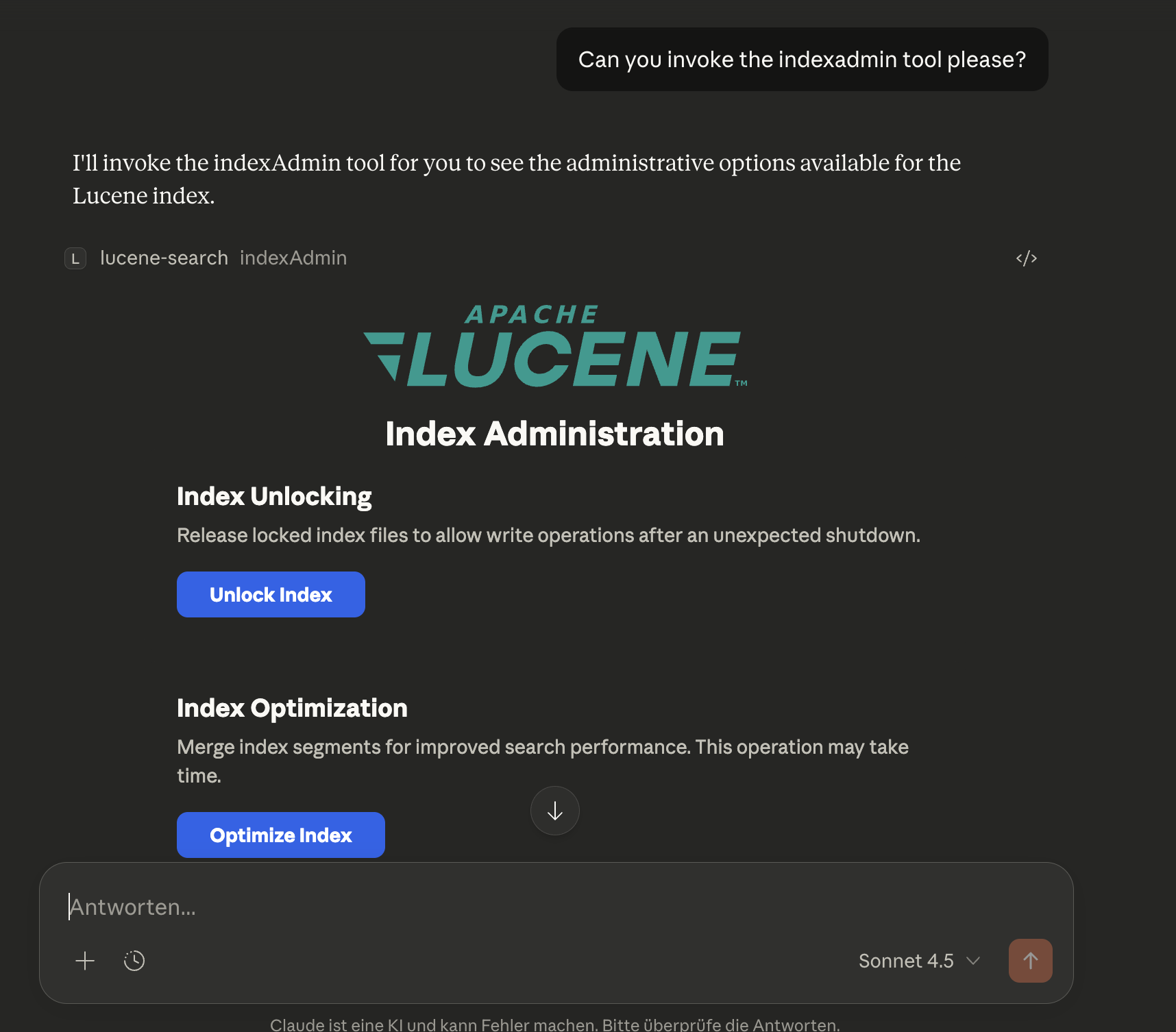
Available actions:
- Unlock Index -- Removes a stale
write.lockfile after an unclean shutdown (equivalent to callingunlockIndexwithconfirm=true) - Optimize Index -- Merges index segments for improved search performance (equivalent to calling
optimizeIndex) - Purge Index -- Deletes all documents from the index (equivalent to calling
purgeIndexwithconfirm=true)
Each action shows inline status feedback (success, error, or progress details) directly in the app UI.
Example:
Ask Claude: "Can you invoke the indexAdmin tool please?"
optimizeIndex
Optimize the Lucene index by merging segments. This is a long-running operation that runs in the background.
Parameters:
maxSegments(optional): Target number of segments after optimization (default: 1 for maximum optimization)
Returns:
success: Boolean indicating the operation was startedoperationId: UUID to track the operationtargetSegments: The target segment countcurrentSegments: The current segment count before optimizationmessage: Status message
Behavior:
- Returns immediately after starting the background operation
- Use
getIndexAdminStatusto poll for progress - Cannot run while the crawler is actively crawling
- Only one admin operation can run at a time
Example:
Ask Claude: "Optimize the search index"
Ask Claude: "What's the status of the optimization?"
Performance Notes:
- Optimization improves search performance by reducing the number of segments
- Temporarily increases disk usage during the merge
- For large indices, this can take several minutes to hours
purgeIndex
Delete all documents from the Lucene index. This is a destructive, long-running operation that runs in the background.
Parameters:
confirm(required): Must be set totrueto proceed. This is a safety measure.fullPurge(optional): Iftrue, also deletes index files and reinitializes (default:false)
Returns:
success: Boolean indicating the operation was startedoperationId: UUID to track the operationdocumentsDeleted: Number of documents that will be deletedfullPurge: Whether a full purge was requestedmessage: Status message
Behavior:
- Returns immediately after starting the background operation
- Use
getIndexAdminStatusto poll for progress - Only one admin operation can run at a time
Purge Modes:
- Standard purge (
fullPurge=false): Deletes all documents but keeps index files. Disk space is reclaimed gradually during future merges. - Full purge (
fullPurge=true): Deletes all documents AND index files, then reinitializes an empty index. Disk space is reclaimed immediately.
Example:
Ask Claude: "Delete all documents from the index - I confirm this"
Ask Claude: "Purge the index completely and reclaim disk space - I confirm this"
Warning: This operation cannot be undone. All indexed documents will be permanently deleted. You will need to re-crawl directories to repopulate the index.
unlockIndex
Remove the write.lock file from the Lucene index directory. This is a dangerous recovery operation - only use if you are certain no other process is using the index.
Parameters:
confirm(required): Must be set totrueto proceed. This is a safety measure.
Returns:
success: Boolean indicating operation successmessage: Confirmation messagelockFileExisted: Boolean indicating if a lock file was presentlockFilePath: Path to the lock file
When to use:
Use this tool when the server fails to start with a LockObtainFailedException after an unclean shutdown. See Troubleshooting for details.
Example:
Ask Claude: "Unlock the Lucene index - I confirm this is safe"
Warning: Unlocking an index that is actively being written to by another process can cause data corruption. Only use this when you are certain the lock is stale.
getIndexAdminStatus
Get the status of long-running index administration operations (optimize, purge).
Parameters: None
Returns:
success: Boolean indicating the status was retrievedstate: Current state:IDLE,OPTIMIZING,PURGING,COMPLETED, orFAILEDoperationId: UUID of the current/last operationprogressPercent: Progress percentage (0-100)progressMessage: Human-readable progress messageelapsedTimeMs: Time elapsed since operation started (in milliseconds)lastOperationResult: Result message from the last completed operation
Example response (during optimization):
{
  "success": true,
  "state": "OPTIMIZING",
  "operationId": "a1b2c3d4-...",
  "progressPercent": 45,
  "progressMessage": "Merging segments...",
  "elapsedTimeMs": 12500,
  "lastOperationResult": null
}
Example response (idle after completion):
{
  "success": true,
  "state": "IDLE",
  "operationId": null,
  "progressPercent": null,
  "progressMessage": "No admin operation running",
  "elapsedTimeMs": null,
  "lastOperationResult": "Optimization completed successfully. Merged to 1 segment(s)."
}
Example:
Ask Claude: "What's the status of the index optimization?"
Ask Claude: "Is the purge operation complete?"
Tool Exposure Configuration
Control which MCP tools are exposed using two environment variables:
| Variable | Default | Description |
|---|---|---|
LUCENE_TOOLS_INCLUDE | * (all tools) | Comma-separated tool names or group shorthands to expose |
LUCENE_TOOLS_EXCLUDE | (empty) | Comma-separated tool names or group shorthands to hide; always wins over include |
Tool Groups
| Group | Tools |
|---|---|
search | simpleSearch, extendedSearch |
semantic | semanticSearch, profileSemanticSearch |
debug | profileQuery |
info | getIndexStats, listIndexedFields, getDocumentDetails |
observability | suggestTerms, getTopTerms |
crawler | startCrawl, getCrawlerStats, getCrawlerStatus, pauseCrawler, resumeCrawler, listCrawlableDirectories, addCrawlableDirectory, removeCrawlableDirectory |
admin | optimizeIndex, purgeIndex, unlockIndex, getIndexAdminStatus, indexAdmin |
Individual tool names can be used in addition to group shorthands.
Examples
# Default — all tools (semantic tools require VECTOR_MODEL)
java -jar mcpluceneserver.jar

# Small LLM — search tools only
LUCENE_TOOLS_INCLUDE=search java -jar mcpluceneserver.jar

# Search + semantic search
LUCENE_TOOLS_INCLUDE=search,semantic VECTOR_MODEL=e5-base java -jar mcpluceneserver.jar

# All tools except destructive admin
LUCENE_TOOLS_EXCLUDE=purgeIndex,unlockIndex java -jar mcpluceneserver.jar

# All tools except entire admin group
LUCENE_TOOLS_EXCLUDE=admin java -jar mcpluceneserver.jar
Index Field Schema
When documents are indexed by the crawler, the following fields are automatically extracted and stored:
Content Fields
content: Full text content of the document (analyzed, searchable)content_reversed: Reversed tokens of the content (analyzed withReverseUnicodeNormalizingAnalyzer, not stored). Used internally for efficient leading wildcard queries -- not directly searchable by users.content_lemma_de: Lemmatized tokens using German OpenNLP lemmatizer (analyzed withOpenNLPLemmatizingAnalyzer, not stored). ALWAYS present for ALL documents regardless of detected language to enable mixed-language matching. Used internally for lemmatization-based search -- not directly searchable by users.content_lemma_en: Lemmatized tokens using English OpenNLP lemmatizer (analyzed withOpenNLPLemmatizingAnalyzer, not stored). ALWAYS present for ALL documents regardless of detected language to enable mixed-language matching. Used internally for lemmatization-based search -- not directly searchable by users.content_translit_de: German transliteration shadow field that maps umlaut digraphs (ae→ä, oe→ö, ue→ü) before standard Unicode normalization (analyzed withGermanTransliteratingAnalyzer, not stored). ALWAYS present for ALL documents. Enables ASCII digraph queries like "Mueller" to match umlaut-containing documents like "Müller". Used internally -- not directly searchable by users.passages: Array of highlighted passages returned in search results (see Search Response Format below)
File Information
file_path: Full path to the file (unique ID)file_name: Name of the filefile_extension: File extension (e.g.,pdf,docx)file_type: MIME type (e.g.,application/pdf)file_size: File size in bytes
Document Metadata
title: Document title (extracted from metadata)author: Author namecreator: Creator/application that created the documentsubject: Document subjectkeywords: Document keywords/tags
Language & Dates
language: Auto-detected language code (e.g.,en,de,fr)created_date: File creation timestampmodified_date: File modification timestampindexed_date: When the document was indexed
Technical
content_hash: SHA-256 hash for change detection
Search Response Format
Search results are optimized for MCP responses (< 1 MB) and include:
{
  "success": true,
  "documents": [
    {
      "score": 0.85,
      "file_name": "example.pdf",
      "file_path": "/path/to/example.pdf",
      "title": "Example Document",
      "author": "John Doe",
      "language": "en",
      "passages": [
        {
          "text": "...relevant <em>search term</em> highlighted in context...",
          "score": 1.0,
          "matchedTerms": ["search term"],
          "termCoverage": 1.0,
          "position": 0.12,
          "source": "keyword"
        },
        {
          "text": "...another occurrence of <em>search</em> in a later section...",
          "score": 0.75,
          "matchedTerms": ["search"],
          "termCoverage": 0.5,
          "position": 0.67,
          "source": "keyword"
        }
      ]
    }
  ],
  "totalHits": 42,
  "page": 0,
  "pageSize": 10,
  "totalPages": 5,
  "hasNextPage": true,
  "hasPreviousPage": false,
  "searchTimeMs": 12,
  "facets": {
    "language": [
      { "value": "en", "count": 25 },
      { "value": "de", "count": 12 },
      { "value": "fr", "count": 5 }
    ],
    "file_extension": [
      { "value": "pdf", "count": 30 },
      { "value": "docx", "count": 8 },
      { "value": "xlsx", "count": 4 }
    ],
    "file_type": [
      { "value": "application/pdf", "count": 30 },
      { "value": "application/vnd.openxmlformats-officedocument.wordprocessingml.document", "count": 8 }
    ],
    "author": [
      { "value": "John Doe", "count": 15 },
      { "value": "Jane Smith", "count": 10 }
    ]
  },
  "_search": {
    "query": "contract",
    "filters": [],
    "page": 0,
    "pageSize": 10
  },
  "_actions": [
    {
      "type": "nextPage",
      "tool": "simpleSearch",
      "parameters": { "query": "contract", "filters": [], "page": 1, "pageSize": 10 }
    },
    {
      "type": "drillDown",
      "tool": "simpleSearch",
      "parameters": { "query": "contract", "filters": [{ "field": "language", "operator": "eq", "value": "en" }], "page": 0, "pageSize": 10 },
      "hits": 25
    }
  ]
}
Each document in documents[] also carries its own _actions block:
{
  "score": 0.85,
  "file_path": "/path/to/example.pdf",
  "_actions": [
    {
      "type": "fetchContent",
      "tool": "getDocumentDetails",
      "parameters": { "filePath": "/path/to/example.pdf" }
    }
  ]
}
HATEOAS-Style _actions (LLM Chaining):
Every search response includes two pre-computed action blocks that enable an LLM to chain tool calls without reasoning about parameter mapping:
-
_search-- Captures the exact search state (query, filters, page, pageSize) used to produce this response. Useful for introspection and for constructing follow-up queries. -
Response-level
_actions-- Contains ready-to-use tool calls for navigating the result set:Action type When present Description prevPagepage > 0 Go to the previous result page. Pass parametersdirectly to the namedtool.nextPagehasNextPage = true Go to the next result page. Pass parametersdirectly to the namedtool.drillDownfacets available Narrow results by adding a facet value as a filter. The hitsfield shows expected result count. Limited to the top 2 values per facet dimension; only values not already active as filters are included. -
Document-level
_actions-- Each document indocuments[]includes:Action type Description fetchContentFetch the full document text and metadata using getDocumentDetails. ThefilePathis pre-filled.
To use an action, call the tool named in the action with the parameters map passed as-is — no transformation required.
Key Features:
-
Search Performance Metrics: Every search response includes
searchTimeMsshowing the exact execution time in milliseconds, enabling performance monitoring and optimization. -
Passages with Highlighting: The full
contentfield is NOT included in search results to keep response sizes manageable. Instead, each document contains apassagesarray with up tomax-passages(default: 3) individually highlighted excerpts. Each passage is a separate sentence-level excerpt (not a single joined string), ordered by relevance (best first). Long passages are truncated tomax-passage-char-length(default: 200) centred around the highlighted terms, trimming irrelevant leading/trailing text. Each passage includes:text-- The highlighted excerpt with matched terms wrapped in<em>tags.score-- Normalised relevance score (0.0-1.0), derived from Lucene's BM25 passage scoring. The best passage scores 1.0; other passages are scored relative to the best.matchedTerms-- The distinct query terms that appear in this passage (extracted from the<em>tags). Useful for understanding which parts of a multi-term query a passage satisfies.termCoverage-- The fraction of all query terms present in this passage (0.0-1.0). A value of 1.0 means every query term matched. LLMs can use this to prefer passages that address the full query.position-- Location within the source document (0.0 = start, 1.0 = end), derived from the passage's character offset. Useful for citations or for understanding document structure.source-- Indicates how this passage was produced:"keyword"means the BM25 highlighter found term matches in the indexed document text;"semantic"means the best-matching vector chunk was used as the snippet (relevant because the document was retrieved via vector similarity, even if the exact query words do not appear in the text).
-
Lucene Faceting: The
facetsobject uses Lucene's SortedSetDocValues for efficient faceted search. It shows actual facet values and document counts from the search results, not just available fields. Only facet dimensions that have values in the result set are returned. -
Facet Dimensions: The following fields are indexed as facets:
language- Detected document language (ISO 639-1 code)file_extension- File extension (pdf, docx, etc.)file_type- MIME typeauthor- Document author (multi-valued)
Faceted Search Examples
Use facets to build drill-down queries and refine search results:
# Filter by file type using facet values
filters: [{ field: "file_extension", value: "pdf" }]

# Filter by language using facet values
filters: [{ field: "language", value: "de" }]

# Filter by author using facet values
filters: [{ field: "author", value: "John Doe" }]

# Combine search query with facet filter
query: "contract agreement"
filters: [{ field: "file_extension", value: "pdf" }]
Facet-Driven Workflow:
- Perform initial search with broad query
- Review
facetsin response to see available refinement options - Apply filters using facet values to narrow results
- Iterate to drill down into specific subsets
Usage Examples
Example 1: Index Your Documents Folder
- Edit
application.yaml:
lucene:
  crawler:
    directories:
      - "/Users/yourname/Documents"
    crawl-on-startup: true
- Start the server:
java -jar target/luceneserver-0.0.1-SNAPSHOT.jar
- The crawler automatically starts and indexes all supported documents in your Documents folder.
Example 2: Search with Filtering
Ask Claude:
Search for "machine learning" in PDF documents only
Claude will use:
query: "machine learning"
filters: [{ field: "file_extension", value: "pdf" }]
Example 3: Find Documents by Author
Ask Claude:
Find all documents written by John Doe
Claude will use:
query: "*"
filters: [{ field: "author", value: "John Doe" }]
Example 4: Monitor Crawler Progress
Ask Claude:
Show me the crawler statistics
Claude calls getCrawlerStats() and shows:
- Files processed: 1,234 / 5,000
- Throughput: 85 files/sec
- Indexed: 1,200 (98%)
- Failed: 34 (2%)
Example 5: Manual Crawl with Full Reindex
Ask Claude:
Reindex all documents from scratch
Claude calls startCrawl(fullReindex: true), which:
- Clears the existing index
- Re-crawls all configured directories
- Indexes all documents fresh
Example 6: Language-Specific Search
Ask Claude:
Find German documents about "Technologie"
Claude uses:
query: "Technologie"
filters: [{ field: "language", value: "de" }]
Example 7: Search with Passages
Search results include a passages array with highlighted excerpts and quality metadata:
{
  "file_name": "report.pdf",
  "passages": [
    {
      "text": "...discusses the impact of <em>machine learning</em> on modern software development. The study shows...",
      "score": 1.0,
      "matchedTerms": ["machine learning"],
      "termCoverage": 1.0,
      "position": 0.08,
      "source": "keyword"
    },
    {
      "text": "...<em>machine learning</em> algorithms were applied to the dataset in Section 4...",
      "score": 0.75,
      "matchedTerms": ["machine learning"],
      "termCoverage": 1.0,
      "position": 0.45,
      "source": "keyword"
    }
  ]
}
This allows you to see relevant excerpts without downloading the full document. The metadata fields help LLMs quickly identify the best passage: prefer passages with high termCoverage (covers more of the query), use position for document-structure context, and check source to understand whether the passage was found by keyword matching ("keyword") or by vector similarity ("semantic").
Example 8: Managing Crawlable Directories at Runtime
Ask Claude to manage directories without editing configuration files:
"What directories are currently being crawled?"
# Claude calls listCrawlableDirectories()
# Response: Shows all configured directories and config file location

"Add /Users/yourname/Research as a crawlable directory"
# Claude calls addCrawlableDirectory(path="/Users/yourname/Research")
# Directory is added to ~/.mcplucene/config.yaml

"Add /Users/yourname/Projects and start crawling it now"
# Claude calls addCrawlableDirectory(path="/Users/yourname/Projects", crawlNow=true)
# Directory is added and crawl starts immediately

"Stop crawling /Users/yourname/Downloads"
# Claude calls removeCrawlableDirectory(path="/Users/yourname/Downloads")
# Directory is removed from config (indexed documents remain)
Configuration Persistence:
The directories you add via MCP tools are saved to ~/.mcplucene/config.yaml:
lucene:
  crawler:
    directories:
      - /Users/yourname/Documents
      - /Users/yourname/Research
      - /Users/yourname/Projects
This configuration persists across server restarts - no need to reconfigure each time.
Environment Variable Override:
If you set the LUCENE_CRAWLER_DIRECTORIES environment variable, it takes precedence:
{
  "mcpServers": {
    "lucene-search": {
      "command": "java",
      "args": ["-Dspring.profiles.active=deployed", "-jar", "/path/to/jar"],
      "env": {
        "LUCENE_CRAWLER_DIRECTORIES": "/path1,/path2"
      }
    }
  }
}
When this is set, addCrawlableDirectory and removeCrawlableDirectory will return an error message indicating the environment override is active.
Example 9: Working with Lexical Search (Synonyms and Variations)
Note: When using this server through Claude or another AI assistant, synonym expansion happens automatically - the AI constructs OR queries for you based on your natural language request. The examples below show the underlying query syntax for reference or direct API usage.
Since the search engine performs exact lexical matching without automatic synonym expansion, you need to explicitly include synonyms and word variations in your query:
Basic search (might miss relevant results):
query: "car"
This will ONLY match documents containing the exact word "car", missing documents with "automobile", "vehicle", etc.
Better: Include synonyms with OR:
query: "(car OR automobile OR vehicle)"
Best: Combine synonyms with wildcards for variations:
query: "(car* OR automobile* OR vehicle*)"
This matches: car, cars, automobile, automobiles, vehicle, vehicles, etc.
Real-world example - Finding contracts:
query: "(contract* OR agreement* OR deal*) AND (sign* OR execut* OR finali*)"
filters: [{ field: "file_extension", value: "pdf" }]
This will find documents containing variations like:
- "contract signed", "agreement executed", "deal finalized"
- "contracts signing", "agreements execute", "deals finalizing"
Tip: Use the facets in the search response to discover the exact terms used in your documents, then refine your query accordingly.
Document Crawler Features
Automatic Crawling
The crawler starts automatically on server startup (if crawl-on-startup: true) and:
- Discovers files matching include patterns in configured directories
- Extracts content using Apache Tika (supports 100+ file formats)
- Detects language automatically for each document
- Extracts metadata (author, title, dates, etc.)
- Indexes documents in batches for optimal performance
- Monitors directories for changes (create, modify, delete)
Incremental Indexing (Reconciliation)
By default (reconciliation-enabled: true), every crawl that is not a full reindex performs an incremental pass first. This makes repeated crawls significantly faster because unchanged files are never re-processed.
How it works:
- Index snapshot -- All
(file_path, modified_date)pairs are read from the Lucene index. - Filesystem snapshot -- The configured directories are walked and the current
(file_path, mtime)pairs are collected (no content extraction at this stage). - Four-way diff is computed:
- DELETE -- paths in the index that no longer exist on disk (orphans).
- ADD -- paths on disk that are not yet in the index.
- UPDATE -- paths where the on-disk mtime is newer than the stored
modified_date. - SKIP -- paths that are identical; these are never touched.
- Orphan deletions are applied first (bulk delete via a single Lucene query).
- Only ADD and UPDATE files are crawled, extracted, and indexed.
- On successful completion, the crawl state (timestamp, document count, mode) is persisted to
~/.mcplucene/crawl-state.yaml.
Fallback behaviour: If reconciliation fails for any reason (I/O error reading the index, filesystem walk failure, etc.) the system automatically falls back to a full crawl. No data is lost and no manual intervention is required.
Disabling incremental indexing:
Set reconciliation-enabled: false in application.yaml to always perform a full crawl. Alternatively, pass fullReindex: true to startCrawl to force a single full crawl without changing the default.
Persisted state file:
~/.mcplucene/crawl-state.yaml
This file records the last successful crawl's completion time, document count, and mode. It is written only after a crawl completes successfully.
Schema Version Management
The server tracks the index schema version to detect when the schema changes between software updates. This eliminates the need for manual reindexing after upgrades.
How it works:
- Each release embeds a
SCHEMA_VERSIONconstant that reflects the current index field schema. - The schema version is persisted in Lucene's commit metadata alongside the software version.
- On startup, the server compares the stored schema version with the current one.
- If they differ (or if a legacy index has no version), a full reindex is triggered automatically.
What triggers a schema version bump:
- Adding or removing indexed fields
- Changing field analyzers
- Modifying field indexing options (stored, term vectors, etc.)
Checking version information:
Use getIndexStats to see the current schema version, software version, and build timestamp.
Real-time Monitoring
With directory watching enabled (watch-enabled: true):
- New files are automatically indexed when added
- Modified files are re-indexed with updated content
- Deleted files are removed from the index
Performance Optimization
Multi-threading:
- Crawls multiple directories in parallel (configurable thread pool)
- Each directory is processed by a separate thread
Batch Processing:
- Documents are indexed in batches (default: 100 documents)
- Reduces I/O overhead and improves indexing speed
NRT (Near Real-Time) Optimization:
- Normal operation: 100ms refresh interval for fast search updates
- Bulk indexing (>1000 files): Automatically slows to 5s to reduce overhead
- Restores to 100ms after bulk operation completes
Progress Notifications:
- Timer-based: updates every 30 seconds (configurable via
progress-notification-interval-ms) - Shows throughput (files/sec, MB/sec), progress, and currently processing filenames
- Non-blocking: Appear in system notification area without interrupting workflow
- macOS: Notifications appear in Notification Center (top-right corner)
- Windows: Toast notifications in system tray area
- Linux: Uses notify-send for desktop notifications
Error Handling
- Failed files are logged but don't stop the crawl
- Statistics track successful vs. failed files
- Large documents are fully indexed (no truncation by default)
- Corrupted or inaccessible files are skipped gracefully
Troubleshooting
Where to find logs?
When running with the deployed profile, console logging is disabled to ensure clean STDIO communication with MCP clients. Instead, logs are written to files in:
~/.mcplucene/log/mcplucene.log
The log directory is ${user.home}/.mcplucene/log by default (configured in logback.xml). Log files are automatically rotated:
- Maximum 10MB per file
- Up to 5 log files retained
- Total size capped at 50MB
To view recent logs:
# View the current log file
cat ~/.mcplucene/log/mcplucene.log

# Follow logs in real-time
tail -f ~/.mcplucene/log/mcplucene.log

# View last 100 lines
tail -n 100 ~/.mcplucene/log/mcplucene.log
When developing (without the deployed profile), logs are written to the console instead of files.
Schema version changes and automatic reindexing
The server now includes automatic schema version management. When you upgrade to a new version that changes the index schema (e.g., adds new fields, changes analyzers, or modifies field indexing options), the server detects the version mismatch on startup and automatically triggers a full reindex.
What happens:
- On startup, the server compares the stored schema version with the current version
- If they differ, a full reindex is triggered automatically
- You'll see a log message:
Schema version changed — triggering full reindex - The reindex runs in the background; you can check progress with
getCrawlerStats
Manual reindex: If you need to force a manual reindex for any reason, you can still trigger it:
Ask Claude: "Reindex all documents from scratch"
This calls startCrawl(fullReindex: true), which clears the existing index and re-crawls all configured directories.
Version information:
Use getIndexStats to see the current schema version, software version, and build timestamp.
Index lock file prevents startup (write.lock)
Symptom: The server fails to start with an error like Lock held by another program or LockObtainFailedException.
Cause: When the MCP server doesn't shut down cleanly (e.g., the process was forcefully killed, the system crashed, or Claude Desktop was terminated abruptly), Lucene may leave behind a write.lock file in the index directory. This lock file is used to prevent multiple processes from writing to the same index simultaneously. When it's left behind after an unclean shutdown, it blocks the server from starting because Lucene thinks another process is still using the index.
Solution: Delete the lock file manually:
# Remove the write.lock file from the index directory
rm ~/.mcplucene/luceneindex/write.lock
After removing the lock file, the server should start normally.
Prevention: Try to shut down Claude Desktop gracefully when possible. If you need to force-quit, be aware that you may need to remove the lock file before the next startup.
Note: The default index path is ~/.mcplucene/luceneindex. If you've configured a custom index path via LUCENE_INDEX_PATH or application.yaml, look for the write.lock file in that directory instead.
Server shows as "running" but tools don't work
This usually indicates STDIO communication issues:
- Ensure the
-Dspring.profiles.active=deployedargument is present in the config - Check that no other output is being written to stdout
- Verify the JAR path is an absolute path, not relative
- If you modified the configuration, ensure the "deployed" profile settings are correct
Claude Desktop doesn't show the server
- Verify the JAR file path in the configuration is correct and absolute
- Check that Java 25+ is installed:
java -version - Validate the JSON syntax in the config file
- Check Claude Desktop logs for error messages
- Try running the JAR manually to check for startup errors:
java -jar /path/to/luceneserver-0.0.1-SNAPSHOT.jar
Server fails to start
- Ensure the Lucene index directory path is valid
- Check that no other process is locking the index directory
- Verify sufficient disk space for the index
Empty search results
The index may be empty for several reasons:
- No directories configured: Add directories to
application.yamlunderlucene.crawler.directories - Crawler not started: Use the
startCrawlMCP tool or enablecrawl-on-startup: true - No matching files: Check that your directories contain files matching the include patterns
- Files failed to index: Check the logs for errors, use
getCrawlerStatsto see failed file count
Crawler not indexing files
- Check directory paths: Ensure paths in
application.yamlare absolute and exist - Verify file permissions: The server needs read access to all files
- Check include patterns: Files must match at least one include pattern
- Check exclude patterns: Files must not match any exclude pattern
- Monitor crawler status: Use
getCrawlerStatusandgetCrawlerStatsMCP tools - Check logs: Look for parsing errors or I/O exceptions
Out of memory errors during indexing
If you encounter OOM errors with very large documents:
- Set content limit: Change
max-content-lengthinapplication.yaml(e.g.,5242880for 5MB) - Increase JVM heap: Add
-Xmx2gto JVM arguments in Claude Desktop config - Reduce thread pool: Lower
thread-pool-sizeto reduce concurrent processing - Reduce batch size: Lower
batch-sizeto commit more frequently
Slow indexing performance
- Increase thread pool: Raise
thread-pool-size(default: 4) - Increase batch size: Raise
batch-sizefor fewer commits (default: 100) - Disable language detection: Set
detect-language: falseif not needed - Disable metadata extraction: Set
extract-metadata: falseif not needed - Check disk I/O: Slow disk can bottleneck indexing
Security Considerations
Untrusted Document Content
The MCP Lucene Server indexes documents from crawled directories and returns their content (passages, metadata, full text) in MCP tool responses. This content is inherently untrusted — any document placed in a crawled directory can influence what the MCP client (LLM) sees in tool responses.
Indirect Prompt Injection Risk
This creates a potential for indirect prompt injection: a maliciously crafted document could contain text designed to manipulate an LLM that processes the search results. For example, a document might include instructions that appear as natural text but are intended to influence the LLM's behavior or responses.
Recommendations
- MCP clients should treat all document-derived content in tool responses as untrusted data
- The server adds a
contentNotefield to responses containing document content as a reminder - Consider the trust level of crawled directories when configuring the server
- Be aware that indexed content can influence LLM behavior through search results
This is an inherent characteristic of systems that retrieve and present external content to language models.
Configuration Options
Note: The Quick Start above uses zero-configuration. This section covers advanced customization options.
The server can be configured via environment variables and application.yaml:
Logging Profiles
The server supports two logging profiles (for backwards compatibility, uses the same system property as Spring Boot):
| Profile | Usage | Logging Output |
|---|---|---|
| default | Development in IDE | Console logging enabled |
| deployed | Production/Claude Desktop | File logging only |
Default profile (no profile specified):
- Full logging enabled to console
- Suitable for debugging and development
Deployed profile (-Dspring.profiles.active=deployed):
- Console logging disabled (required for STDIO transport)
- File logging enabled (
~/.mcplucene/log/mcplucene.log) - Used when running under Claude Desktop or other MCP clients
Transport Configuration
The server supports two transport types: STDIO (default) and HTTP. The transport is selected via the mcp.transport system property.
STDIO Transport (Default)
STDIO transport is the default and recommended mode for Claude Desktop integration. No additional configuration is required.
Claude Desktop Configuration:
{
  "mcpServers": {
    "lucene-search": {
      "command": "java",
      "args": [
        "--enable-native-access=ALL-UNNAMED",
        "-Xmx2g",
        "-Dspring.profiles.active=deployed",
        "-jar",
        "/absolute/path/to/luceneserver-0.0.1-SNAPSHOT.jar"
      ]
    }
  }
}
HTTP Transport
HTTP transport enables remote access and integration with web-based MCP clients using the MCP Streamable HTTP protocol (Spec 2025-03-26). To enable HTTP transport, set the mcp.transport system property to http.
Starting with HTTP Transport:
# Minimal HTTP configuration (uses defaults: 0.0.0.0:8080/mcp/message)
java --enable-native-access=ALL-UNNAMED \
  -Xmx2g \
  -Dmcp.transport=http \
  -jar luceneserver-0.0.1-SNAPSHOT.jar
Custom HTTP configuration:
java --enable-native-access=ALL-UNNAMED \
  -Xmx2g \
  -Dmcp.transport=http \
  -Dmcp.http.port=9000 \
  -Dmcp.http.host=localhost \
  -jar luceneserver-0.0.1-SNAPSHOT.jar
HTTP Configuration Properties:
| System Property | Default | Description |
|---|---|---|
mcp.transport | stdio | Transport type: stdio or http |
mcp.http.host | 0.0.0.0 | HTTP server bind address (HTTP mode only) |
mcp.http.port | 8080 | HTTP server port (HTTP mode only) |
mcp.http.endpoint | /mcp/message | MCP message endpoint path (HTTP mode only)* |
*The default /mcp/message is the standard MCP endpoint and typically does not need to be changed.
Important Notes:
- HTTP transport uses the MCP Streamable HTTP protocol with stateless async mode
- STDIO transport uses stateful sync mode (suitable for persistent connections)
- HTTP mode does not support HTTPS/TLS - use a reverse proxy (nginx, Caddy) for encryption
- For production use with HTTP, always place the server behind a reverse proxy with proper authentication
- The
deployedprofile is optional with HTTP (console logging won't interfere)
Example: Running on a different port
java -Dmcp.transport=http -Dmcp.http.port=9090 -jar luceneserver-0.0.1-SNAPSHOT.jar
Example: Localhost only (more secure)
java -Dmcp.transport=http -Dmcp.http.host=127.0.0.1 -jar luceneserver-0.0.1-SNAPSHOT.jar
Semantic Search Configuration
Semantic vector search is an optional feature activated by setting the VECTOR_MODEL environment variable.
Enabling semantic search:
java --enable-native-access=ALL-UNNAMED \
  -Xmx4g \
  -Dspring.profiles.active=deployed \
  -jar luceneserver-0.0.1-SNAPSHOT.jar
# With VECTOR_MODEL set in environment:
VECTOR_MODEL=e5-base java --enable-native-access=ALL-UNNAMED \
  -Xmx4g \
  -Dspring.profiles.active=deployed \
  -jar luceneserver-0.0.1-SNAPSHOT.jar
| Environment Variable | Default | Description |
|---|---|---|
VECTOR_MODEL | (none) | Embedding model: e5-base (768 dims, faster) or e5-large (1024 dims, higher quality). Set to enable semantic search tools. |
See SEMANTICSEARCH.md for full architecture details, tuning guidance, and KNN scoring configuration.
Note on Semantic Search and the Semantic Gap
Vector search is designed to close the semantic gap: finding documents about "automobile" when the user searches for "car", because the embedding model maps both concepts to nearby points in vector space.
However, when using this server with an LLM (Claude, GPT, etc.), the situation changes fundamentally.
An LLM already bridges the semantic gap as part of its reasoning process. Before calling the search tool, a well-prompted LLM can rewrite "find documents about cars" into an explicit OR query: (car OR automobile OR vehicle OR sedan). This means the LLM handles synonym expansion and query reformulation — exactly the problem vector search is designed to solve.
When semantic search adds genuine value:
- Direct user-facing search UIs with no LLM in the loop
- Batch or automated pipelines without LLM query reformulation
- Queries involving domain-specific jargon where synonyms are not obvious
- Conceptual queries where the exact wording of relevant documents is unknown
When semantic search adds marginal value (LLM-based use cases):
- The LLM client expands queries with synonyms before calling the tool
- The LLM reformulates vague queries into precise Lucene expressions
- The search corpus uses consistent terminology that BM25 handles well
Trade-offs to consider:
- Embedding computation adds latency (~31ms/doc during indexing, ~5ms/query for e5-base)
- ONNX models require ~100-200MB of disk space and additional RAM
- Index complexity increases (parent documents + child chunk documents via Block Join)
Environment Variables
| Environment Variable | Default | Description |
|---|---|---|
LUCENE_INDEX_PATH | ${user.home}/.mcplucene/luceneindex | Path to the Lucene index directory |
LUCENE_CRAWLER_DIRECTORIES | (none) | Comma-separated list of directories to crawl (overrides config file) |
VECTOR_MODEL | (none) | Embedding model (e5-base or e5-large). Set to enable semantic search. |
LUCENE_TOOLS_INCLUDE | * (all) | Comma-separated tool names or group shorthands to expose |
LUCENE_TOOLS_EXCLUDE | (empty) | Comma-separated tool names or group shorthands to hide |
Note on LUCENE_CRAWLER_DIRECTORIES:
When this environment variable is set, it takes precedence over ~/.mcplucene/config.yaml and application.yaml. The MCP configuration tools (addCrawlableDirectory, removeCrawlableDirectory) will refuse to modify configuration while this override is active. To use runtime configuration, remove this environment variable.
Document Crawler Configuration
The crawler directories can be configured in three ways, with the following priority (highest to lowest):
- Environment Variable:
LUCENE_CRAWLER_DIRECTORIES(comma-separated paths) - Runtime Configuration:
~/.mcplucene/config.yaml(managed via MCP tools) - Application Default:
src/main/resources/application.yaml
Runtime Configuration via MCP Tools (Recommended)
The server provides MCP tools to manage crawlable directories at runtime without editing configuration files:
listCrawlableDirectories - List all configured directories
Ask Claude: "What directories are being crawled?"
addCrawlableDirectory - Add a new directory to crawl
Ask Claude: "Add /Users/yourname/Documents as a crawlable directory"
Ask Claude: "Add /path/to/folder and start crawling it immediately"
removeCrawlableDirectory - Remove a directory from crawling
Ask Claude: "Stop crawling /Users/yourname/Downloads"
Benefits of Runtime Configuration:
- No need to rebuild the JAR or restart the server
- Configuration persists across restarts in
~/.mcplucene/config.yaml - Easy to distribute pre-built JARs
- Conversational interface via Claude
Configuration File Location:
~/.mcplucene/config.yaml
Example config.yaml:
lucene:
  crawler:
    directories:
      - /Users/yourname/Documents
      - /Users/yourname/Downloads
Static Configuration via application.yaml
Configure the document crawler in src/main/resources/application.yaml:
lucene:
  index:
    path: ${LUCENE_INDEX_PATH:./lucene-index}
  crawler:
    # Directories to crawl and index
    directories:
      - "/path/to/your/documents"
      - "/another/path/to/index"

    # File patterns to include
    include-patterns:
      - "*.pdf"
      - "*.doc"
      - "*.docx"
      - "*.odt"
      - "*.ppt"
      - "*.pptx"
      - "*.xls"
      - "*.xlsx"
      - "*.ods"
      - "*.txt"
      - "*.eml"
      - "*.msg"
      - "*.md"
      - "*.rst"
      - "*.html"
      - "*.htm"
      - "*.rtf"
      - "*.epub"

    # File patterns to exclude
    exclude-patterns:
      - "**/node_modules/**"
      - "**/.git/**"
      - "**/target/**"
      - "**/build/**"

    # Performance settings
    thread-pool-size: 4                    # Parallel crawling threads
    batch-size: 100                        # Documents per batch
    batch-timeout-ms: 5000                 # Batch processing timeout

    # Directory watching
    watch-enabled: true                    # Monitor directories for changes
    watch-poll-interval-ms: 2000          # Watch polling interval

    # NRT optimization
    bulk-index-threshold: 1000            # Files before NRT slowdown
    slow-nrt-refresh-interval-ms: 5000    # NRT interval during bulk indexing

    # Content extraction
    max-content-length: -1                 # -1 = unlimited, or max characters
    extract-metadata: true                 # Extract author, title, etc.
    detect-language: true                  # Auto-detect document language

    # Auto-crawl
    crawl-on-startup: true                 # Start crawling on server startup

    # Progress notifications
    progress-notification-files: 100       # Notify every N files
    progress-notification-interval-ms: 30000  # Or every N milliseconds

    # Incremental indexing
    reconciliation-enabled: true           # Skip unchanged files, remove orphans (default: true)

    # Search passages
    max-passages: 3                        # Max highlighted passages per search result (default: 3)
    max-passage-char-length: 200           # Max character length per passage; longer ones are truncated (default: 200, 0 = no limit)
Supported File Formats:
- PDF documents (
.pdf) - Microsoft Office: Word (
.doc,.docx), Excel (.xls,.xlsx), PowerPoint (.ppt,.pptx) - OpenOffice/LibreOffice: Writer (
.odt), Calc (.ods), Impress (.odp) - Plain text files (
.txt) - Email: Outlook (
.msg), EML (.eml) - Markup: Markdown (
.md), reStructuredText (.rst), HTML (.html,.htm) - Rich Text Format (
.rtf) - E-books: EPUB (
.epub)
Complete Configuration Example:
lucene:
  index:
    path: /Users/yourname/lucene-index
  crawler:
    # Add your document directories here
    directories:
      - "/Users/yourname/Documents"
      - "/Users/yourname/Downloads"
      - "/Volumes/ExternalDrive/Archive"

    # Include only these file types
    include-patterns:
      - "*.pdf"
      - "*.docx"
      - "*.xlsx"

    # Exclude these directories
    exclude-patterns:
      - "**/node_modules/**"
      - "**/.git/**"

    # Performance tuning
    thread-pool-size: 8              # Use more threads for faster indexing
    batch-size: 200                  # Larger batches for better throughput

    # Auto-start crawler
    crawl-on-startup: true

    # Real-time monitoring
    watch-enabled: true

    # No content limit (index full documents)
    max-content-length: -1
JDBC Metadata Enrichment
The server can enrich indexed documents with additional metadata loaded from a relational database at index time. This is useful when business metadata (e.g. customer IDs, project codes, tags) is stored in a database rather than in the files themselves.
How It Works
- For each document during crawling, the enricher executes a configurable SQL query.
- The query result is a single row with a JSON column containing the metadata payload.
- The JSON payload is parsed and typed fields are added to the Lucene document.
- A background sync job re-indexes files when their DB metadata changes.
Field Naming
All JDBC-sourced fields are prefixed with dbmeta_ to avoid collisions with the base document schema.
| JSON field name | Lucene field name |
|---|---|
customer_id | dbmeta_customer_id |
tags | dbmeta_tags |
department | dbmeta_department |
JSON Metadata Format
The database query must return a column (configurable via json.columnName) containing JSON in this format:
{
  "fields": [
    {
      "name": "customer_id",
      "type": "keyword",
      "value": "C-42",
      "faceted": true
    },
    {
      "name": "tags",
      "type": "keyword",
      "values": ["invoice", "2024", "urgent"],
      "faceted": true
    },
    {
      "name": "description",
      "type": "text",
      "value": "Some free-text description"
    },
    {
      "name": "amount",
      "type": "long",
      "value": 9999,
      "faceted": true
    },
    {
      "name": "doc_date",
      "type": "date",
      "value": "2024-01-15T00:00:00Z"
    }
  ]
}
Field types:
| Type | Lucene storage | Facetable | Notes |
|---|---|---|---|
keyword | StringField | Yes | Exact match; use for IDs, codes, categories |
text | TextField | No | Analyzed fulltext; suitable for long descriptions |
int | IntPoint + StoredField | Yes | 32-bit integer; range queries supported |
long | LongPoint + StoredField | Yes | 64-bit integer; range queries supported |
date | LongPoint + StoredField | No | ISO-8601 string → epoch millis |
Optional per-field flags:
| Flag | Default | Description |
|---|---|---|
faceted | false | Expose as search facet (keyword/long only) |
stored | true | Store the value so it is retrievable from search results |
searchable | true | Index the field for querying |
Configuration
Add the following section to ~/.mcplucene/config.yaml:
lucene:
  crawler:
    directories:
      - /path/to/your/documents
  metadata:
    jdbc:
      enabled: true
      url: "jdbc:postgresql://localhost:5432/mydb"
      username: "myuser"
      password: "${DB_PASSWORD}"   # env-var substitution supported
      poolSize: 5
      connectionTimeout: 30000    # ms
      queryTimeout: 5000          # ms
      query: >
        SELECT metadata_json
        FROM document_metadata
        WHERE file_path = :file_path
      parameters:
        - name: file_path
          sourceField: file_path   # Lucene field to use as query parameter
      json:
        columnName: metadata_json  # Column in the result set containing the JSON

      # Optional: background sync when DB metadata changes
      sync:
        enabled: true
        intervalMinutes: 5
        query: >
          SELECT dbmeta_customer_id
          FROM document_metadata
          WHERE updated_at > :last_sync_timestamp
Advanced Example: Building Metadata Dynamically from a Table (MySQL)
Metadata is often not stored as pre-built JSON but spread across normalized tables. MySQL's JSON_OBJECT() / JSON_ARRAY() / JSON_ARRAYAGG() functions let you assemble the metadata payload directly in the SQL query — no separate materialized view or ETL job required.
Scenario
Documents are freelancer profile PDFs. File names follow the pattern .../ABC-1234_Profile.pdf, where ABC-1234 is a unique freelancer code. The relevant tables:
-- Master data
CREATE TABLE freelancer (
    id               BIGINT PRIMARY KEY,
    code             VARCHAR(20) UNIQUE,   -- e.g. "ABC-1234"
    salary_per_day   DECIMAL(10, 2)
);

-- n:m tags
CREATE TABLE freelancer_tags (
    freelancer_id    BIGINT,
    tag_id           BIGINT
);
Configuration
lucene:
  metadata:
    jdbc:
      enabled: true
      url: "jdbc:mysql://localhost:3306/mydb"
      username: "myuser"
      password: "${DB_PASSWORD}"
      poolSize: 5
      connectionTimeout: 30000
      queryTimeout: 5000
      query: |
        SELECT JSON_OBJECT(
                      'fields', JSON_ARRAY(
                            JSON_OBJECT('name', 'daily_rate', 'type', 'long', 'value', f.salary_per_day_long, 'faceted', CAST(FALSE AS JSON)),
                            JSON_OBJECT('name', 'tags',       'type', 'long', 'values', (
                                SELECT JSON_ARRAYAGG(ft.tag_id)
                                FROM freelancer_tags ft
                                WHERE ft.freelancer_id = f.id
                            ), 'faceted', CAST(FALSE AS JSON))
                      )
              ) as metadata_json
        FROM
            freelancer f
        WHERE
            f.code = REGEXP_SUBSTR(:file_path, '[A-Z]+-[0-9]+')
      parameters:
        - name: file_path
          sourceField: file_path   # Lucene field to use as query parameter
      json:
        columnName: metadata_json  # Column in the result set containing the JSON
How It Works Step by Step
1. Parameter binding — the file path as a lookup key
During crawling, the indexer stores the absolute file path in the Lucene field file_path (e.g. /docs/profiles/ABC-1234_Profile.pdf). Via parameters.sourceField: file_path, that value is passed as the named parameter :file_path to the SQL query.
2. Extracting the freelancer code with a regex
Because the full file path is passed to the database, the code must be extracted there. REGEXP_SUBSTR(:file_path, '[A-Z]+-[0-9]+') pulls ABC-1234 out of /docs/profiles/ABC-1234_Profile.pdf and matches it against freelancer.code. The database needs no knowledge of directory structures — the regex runs entirely inside the DB engine.
3. Assembling the JSON payload in SQL
JSON_OBJECT(...) produces a JSON object. Inside it, a JSON_ARRAY(...) contains one element per metadata field:
daily_rate(typelong): a single scalar value fromf.salary_per_day_longtags(typelong, multi-value): an array produced by a correlated subquery —JSON_ARRAYAGG(ft.tag_id)aggregates all tag IDs for the freelancer into a JSON array
The query returns a single row with a single column metadata_json:
{
  "fields": [
    { "name": "daily_rate", "type": "long", "value": 850,              "faceted": false },
    { "name": "tags",       "type": "long", "values": [12, 47, 103],   "faceted": false }
  ]
}
4. Processing by the indexer
JdbcMetadataEnricher reads this JSON response and adds fields to the Lucene document:
dbmeta_daily_rate→LongPoint(850)+StoredField(850)+SortedNumericDocValuesField(850)(searchable, retrievable, and sortable)dbmeta_tags→ threeLongPointentries for values12,47,103(multi-valued — DocValues skipped, so not sortable)
Because faceted: false, no SortedSetDocValuesFacetField entries are created. The fields are available for targeted queries and range filters without adding overhead to the facet computation on every search request.
Sorting by JDBC metadata fields: Single-valued INT, LONG, and DATE fields automatically get a SortedNumericDocValuesField, and single-valued KEYWORD fields get a SortedDocValuesField. This makes them usable as sortBy values in search requests. Multi-valued fields skip DocValues (sorting on multi-valued fields is undefined). Use getIndexStats to see which dbmeta_* fields are currently registered as sortable via the sortableFields map.
5. Querying at runtime
After crawling, these fields can be used as filters in extendedSearch:
{
  "query": "Java developer",
  "filters": [
    { "field": "dbmeta_daily_rate", "operator": "range", "from": "500", "to": "1000" },
    { "field": "dbmeta_tags",       "operator": "in",    "values": ["47", "103"] }
  ]
}
Note on CAST(FALSE AS JSON)
MySQL has no native JSON boolean literal. CAST(FALSE AS JSON) produces the JSON value false, which JsonMetadataParser correctly interprets as faceted: false. Use CAST(TRUE AS JSON) for faceted: true.
Advanced Example: Background Sync via Index Lookup (PostgreSQL)
Scenario
Same freelancer PDF setup as the enrichment example. When a freelancer's daily rate or tags change in the database, the server should automatically re-index the affected PDF — without the database needing to know file paths.
Prerequisite: The enrichment query stores customer_id as dbmeta_customer_id (type keyword) in the Lucene index, and the document_metadata table also has a customer_id column plus an updated_at timestamp.
Configuration
sync:
  enabled: true
  intervalMinutes: 5
  query: >
    SELECT customer_id AS dbmeta_customer_id
    FROM document_metadata
    WHERE updated_at > :last_sync_timestamp
How It Works Step by Step
1. Timestamp filter
The :last_sync_timestamp parameter is bound to the last successful sync time (persisted in ~/.mcplucene/metadata-sync-state.yaml). On first run it defaults to 1970-01-01T00:00:00Z, so the full table is scanned.
2. Column name as Lucene field
The result set has exactly one column. Its name — dbmeta_customer_id (set via AS alias) — is read from the JDBC ResultSetMetaData. This becomes the Lucene field the server will search against.
3. TermQuery lookup
For each row (e.g. value C-42), the server executes a Lucene TermQuery on dbmeta_customer_id = "C-42" restricted to parent documents. This finds every indexed file that was enriched with that customer ID.
4. File path resolution
file_path is extracted from each matching Lucene document. The index — not the database — is the source of truth for the physical location of the file.
5. Re-index or delete
If the file still exists on disk it is re-crawled, which triggers the enrichment query again so the Lucene document picks up the latest metadata from the database. If the file has been removed, its index entry is deleted.
6. Timestamp advance
After a successful run, the current time is saved as the new lastSyncTimestamp. The next sync only returns rows modified after this point.
Using a Numeric Join Key
If the join key is a numeric database ID rather than a string code, use the appropriate SQL integer type so that the server builds the correct Lucene point query:
sync:
  enabled: true
  intervalMinutes: 5
  query: >
    SELECT freelancer_id AS dbmeta_freelancer_id
    FROM document_metadata
    WHERE updated_at > :last_sync_timestamp
Here freelancer_id is a BIGINT column, so the server uses LongPoint.newExactQuery("dbmeta_freelancer_id", …). The enrichment must have stored freelancer_id as a field of type long for the query to match.
| SQL column type | Lucene query | Must match enrichment type |
|---|---|---|
VARCHAR / CHAR | TermQuery | keyword |
INTEGER / SMALLINT | IntPoint.newExactQuery() | int |
BIGINT / NUMERIC | LongPoint.newExactQuery() | long |
Supported Databases
| Database | Driver dependency | Notes |
|---|---|---|
| PostgreSQL | included (optional runtime) | jdbc:postgresql://... |
| MySQL | included (optional runtime) | jdbc:mysql://... |
| H2 | test scope only | jdbc:h2:... (for tests) |
| Any JDBC | Add to classpath | Set driverClassName explicitly |
Facet Integration
Fields declared with "faceted": true are automatically registered as dynamic facet dimensions. They appear alongside the built-in facets (language, file_extension, file_type, author) in search results and can be used as filter values.
Multi-valued fields (using "values": [...]) are automatically configured as multi-valued facet dimensions.
Background Sync
When sync.enabled: true, the server runs a background job every intervalMinutes minutes that:
- Queries the database for records modified since the last sync (using
:last_sync_timestamp). - Reads the result set — exactly one column, N rows. The column name is the Lucene field to search; the column value is the term to match.
- Executes a Lucene query per row to find matching index documents, then extracts their
file_path. - Re-indexes files that still exist on disk with the latest metadata.
- Removes index entries for files that no longer exist.
The last sync timestamp is persisted in ~/.mcplucene/metadata-sync-state.yaml.
Supported column types:
| SQL column type | Lucene query | Compatible dbmeta_ field type |
|---|---|---|
VARCHAR, CHAR, … | TermQuery | keyword |
INTEGER, SMALLINT, TINYINT | IntPoint.newExactQuery() | int |
BIGINT, NUMERIC, DECIMAL | LongPoint.newExactQuery() | long |
The query type is inferred automatically from the JDBC column type — no extra configuration needed. The SQL column type must match the Lucene field type used during enrichment (IntPoint and LongPoint are separate field types). Analyzed text fields are not suitable as sync keys.
Error Handling
The enricher follows a "skip and warn" resilience pattern:
- DB connection failures: document is indexed without enrichment, warning is logged.
- Query errors: same skip-and-warn behavior.
- Invalid JSON payloads: parsing errors are logged, field is skipped.
- NULL values: silently ignored per field.
- Field name collisions with base schema: error logged, field skipped.
Development
Running for Development
When developing and debugging in your IDE, run the server without the "deployed" profile to get full logging:
In your IDE (IntelliJ, Eclipse, VS Code):
# Just run the main class directly - no profile needed
# You'll see full console logging and debug output
java -jar target/luceneserver-0.0.1-SNAPSHOT.jar
This gives you:
- Complete logging output for debugging
- Configuration loaded from classpath and user config
- All debug information visible in console
For production/Claude Desktop deployment:
# Use the deployed profile for clean STDIO
java --enable-native-access=ALL-UNNAMED -Xmx2g -Dspring.profiles.active=deployed -jar target/luceneserver-0.0.1-SNAPSHOT.jar
Debugging with MCP Inspector
The MCP Inspector provides a visual debugging interface for testing MCP servers. Use it to inspect requests, responses, and debug tool behavior without needing a full MCP client like Claude Desktop.
Run the server with the inspector for STDIO connect:
npx @modelcontextprotocol/inspector java -jar --enable-native-access=ALL-UNNAMED -Xmx2g -Dspring.profiles.active=deployed -jar ./target/luceneserver-0.0.1-SNAPSHOT.jar
or in case of HTTP Streaming:
npx @modelcontextprotocol/inspector http://localhost:9000/mcp/message --transport http
This opens a web-based UI where you can:
- Test all MCP tools interactively
- Inspect JSON request/response payloads
- Debug STDIO communication issues
- Verify tool parameters and return values
Note: The inspector requires the same JVM arguments as production deployment (--enable-native-access=ALL-UNNAMED, -Dspring.profiles.active=deployed) to ensure consistent behavior.
Adding Documents to the Index
Recommended approach: Use the document crawler by configuring directories in application.yaml. The crawler automatically handles content extraction, metadata, and language detection.
Programmatic approach: For custom document types or direct indexing:
// Get the LuceneIndexService instance from your application
LuceneIndexService indexService = // ... from your application

public void addDocument(String title, String content) throws IOException {
    Document doc = new Document();
    doc.add(new TextField("title", title, Field.Store.YES));
    doc.add(new TextField("content", content, Field.Store.YES));
    doc.add(new StringField("file_path", "/custom/path", Field.Store.YES));
    indexService.getIndexWriter().addDocument(doc);
    indexService.getIndexWriter().commit();
}
For the full field schema, see the Index Field Schema section.