stickypane
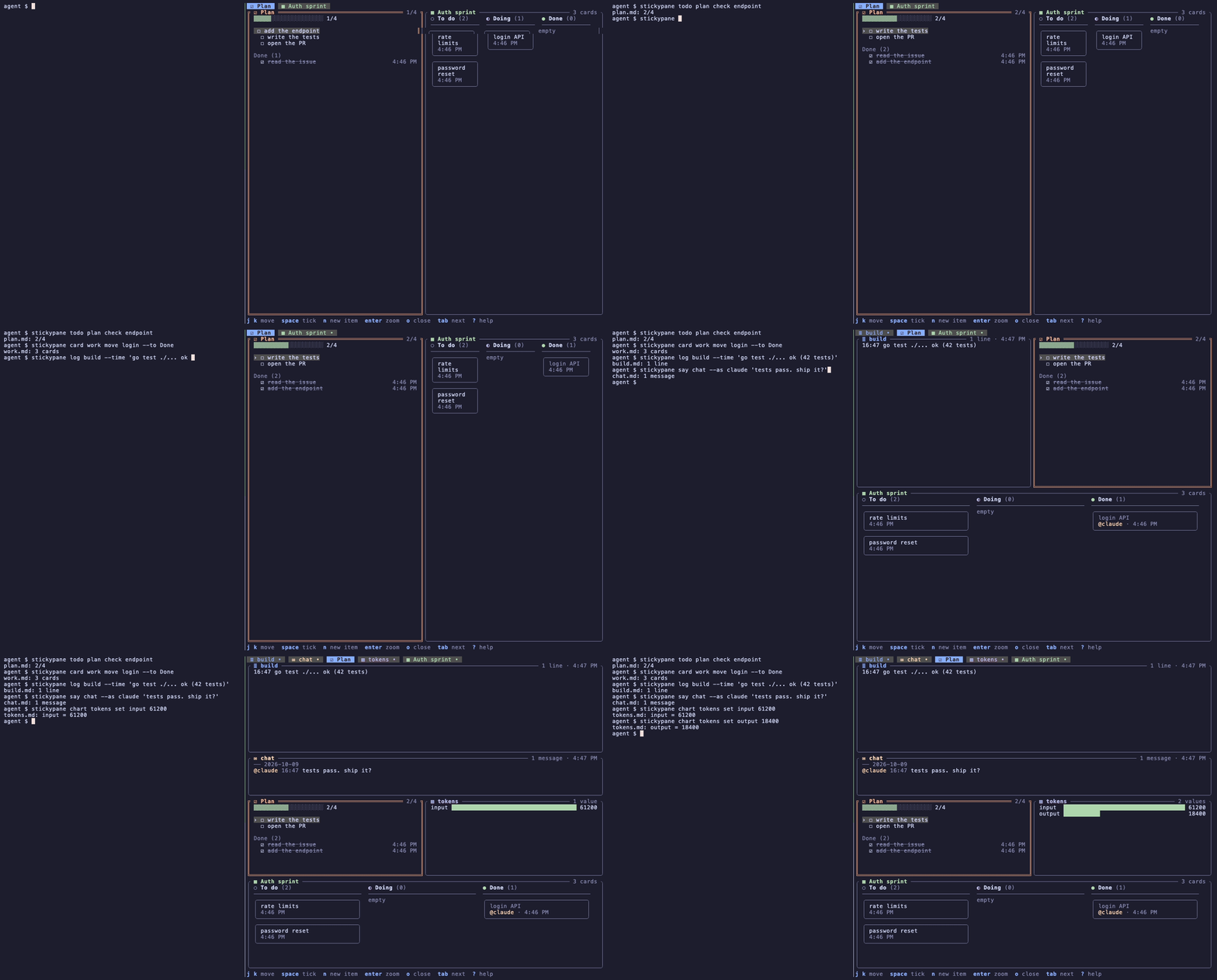
A terminal board your coding agent writes to and you read: kanban, checklists, charts, forms and live logs kept as plain Markdown files, with MCP tools for Claude Code, Codex and any agent.
Documentation

stickypane
Sticky notes for coding agents. They pin, you glance.


English · 한국어



What it is · Install · Getting started · Desktop app · How it works · Note shapes · Agents · Usage · Configuration · FAQ · Contributing
What it is
A coding agent talks a lot, and the parts that matter scroll away: where the
plan stands, what is done, what it needs you to decide. stickypane gives
those a place. The agent pins notes as plain files in .sticky/, and a
board in the pane beside it shows them as they change. You glance at the
board, tick a box or press a button, and the agent reads your answer from
the same file.
flowchart LR
    agent["Agent"] -->|"writes a file"| folder[(".sticky/")]
    folder -->|"redraws"| board["Board in a pane"]
    you(["You"]) -->|"glance, tick, answer"| board
    board -->|"writes your change"| folder
    folder -->|"reads back: CLI, MCP or the file"| agent
Status: design stage. stickypane is before 1.0, so file names, command names and
sticky.jsonmay still change. Try it with your agent for a day and tell us what you expected the board to do, in a design feedback issue or in Discussions.
Install
 | brew install --cask LeeSwallow/tap/stickypane |
 | go install github.com/LeeSwallow/stickypane/cmd/stickypane@latest |
 | an archive for macOS, Linux and Windows, and an .rpm and a .deb, on the releases page |


It is one program with no runtime dependencies, for any terminal that
shows Unicode and color. stickypane version checks the install.
docs/install.md has the archive commands, checksums,
building from source, updating and removing.
Getting started
1. Install stickypane, as above.
2. Connect your agents, once. From any folder:
stickypane setup
This installs the board plugin for Claude Code and Codex.
stickypane setup --mcp also registers the MCP server.
stickypane setup --status says where each agent stands; run setup again
to update an older plugin or repair a broken one.
3. Give the project a board. In the project's folder:
stickypane init
This makes .sticky/. An agent without the plugin gets a short guide in
CLAUDE.md or AGENTS.md, so it knows the board is there.
--language ko sets the board's language. --view app opens the board in
the desktop app, and --style picks the app's look.
4. Open the board beside your agent. Split the terminal and run
stickypane in the new pane. stickypane env prints the command for the
terminal you are in.
| Terminal | Command |
|---|---|
 tmux | tmux split-window -h stickypane, or a popup: tmux display-popup -E stickypane |
 WezTerm | wezterm cli split-pane --right -- stickypane |
| Zellij | zellij run --direction right -- stickypane |
| Orca | orca terminal split --direction vertical --command stickypane |
| Windows Terminal | wt -w 0 split-pane -V stickypane |
 iTerm2,  Ghostty | on macOS, split with ⌘ D, then stickypane |
| anything else | a second window or tab in the same folder, then stickypane |
Then ask for things: "Keep a checklist of this refactor on the board." "Ask me on the board before you deploy."
The same steps, as stickypane help start prints them
Getting started

1. Connect your agents, once:
     stickypane setup
   (Claude Code and Codex get the board plugin; setup --mcp adds MCP)
2. Give the project a board:
     stickypane init
   (an agent without the plugin gets a short guide in CLAUDE.md or AGENTS.md)
3. Open the board in a pane beside your agent:
     stickypane
   (not sure how in your terminal? stickypane env knows)

Then ask your agent to put something on the board, or pin a note yourself:
     echo "- [ ] try the board" | stickypane note write plan --type checklist --open
(stickypane kinds lists the shapes a note can take)

Next: stickypane help, then stickypane help <command>.
The desktop app


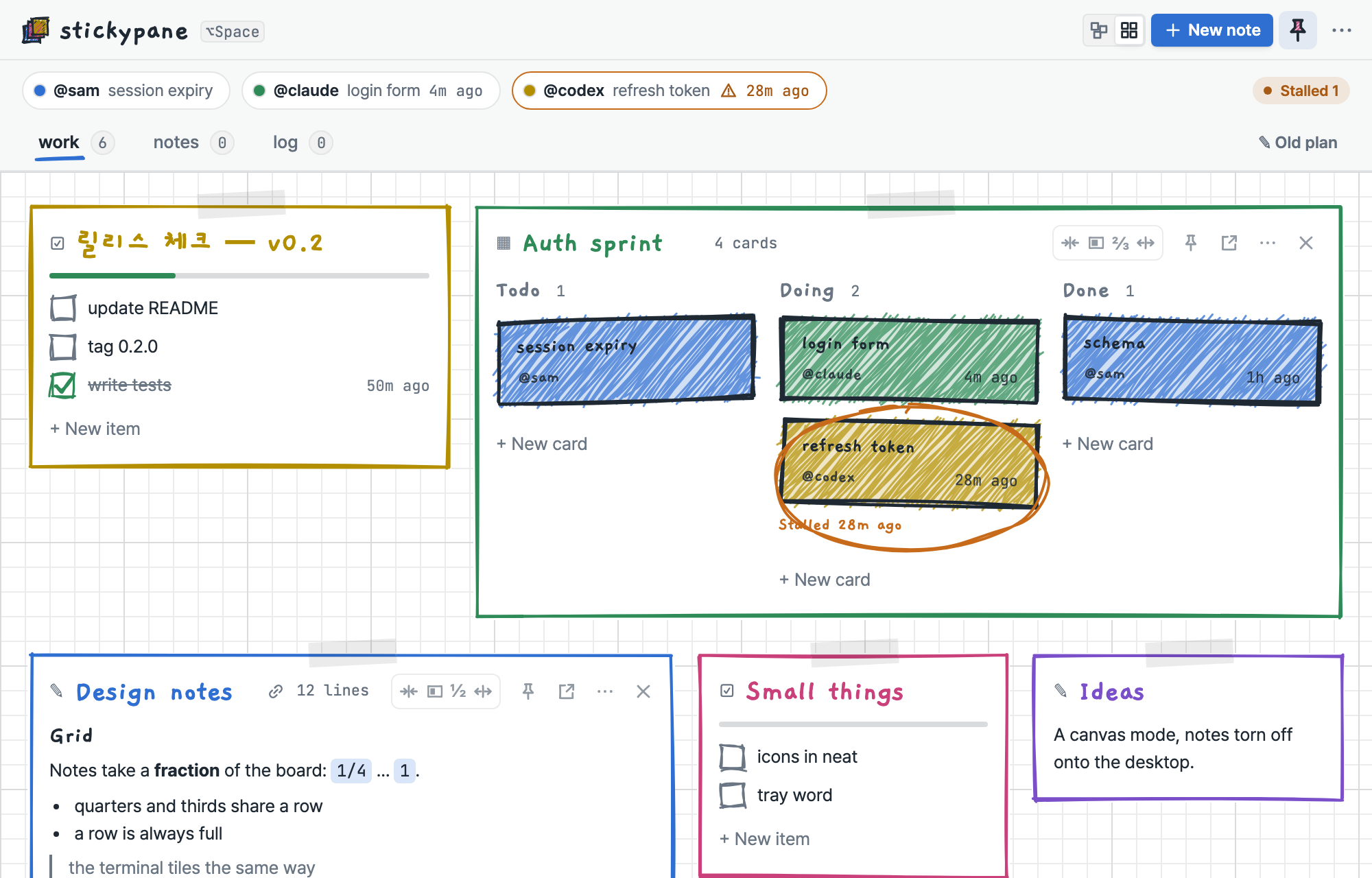
For macOS (Apple silicon) and Linux, from v0.3.0 on: the DMG and the
Linux archive are on the
releases page, and
docs/install.md says how to install
them. The code is in desktop/.
The same board in a window of its own. It draws every note in full,
including tables, Mermaid, math and .html pages in a sandbox. A click
makes the same change as a key, so you can tick, answer a form or drag a
card. + New note makes any shape. Notes sit on a grid or anywhere on a canvas, and one can
be torn off into a small window that stays on top. ⌥ Space shows and
hides the app.
The app comes with its own copy of the stickypane command. In a board's settings,
Terminal and agents installs the command for your terminals and
connects Claude Code and Codex. After stickypane init --view app, a plain
stickypane opens the board in the app.
Boards on other computers open over your own ssh: add the host under
Settings → Remote hosts, and the app runs stickypane bridge there. Nothing
listens on the network, and only the host list is kept.
Design and build notes are in docs/desktop.
How it works
The folder is the board
Each file in .sticky/ is one note. A folder is a tab, and a folder inside
a tab is a book of pages, shown one after another or, after v, one page
at a time. A Markdown note's front matter gives it a shape.
Where each note sits and how wide it is (a share of the screen, from 1/4
to 1) are kept apart, in sticky.json, so rearranging the board never
rewrites a note.
flowchart TB
    root[(".sticky/")]
    root --> json["sticky.json<br/>theme, language, layout"]
    root --> plan["10-plan.md<br/>front matter: type: checklist"]
    root --> log["build.log<br/>a log, followed as it grows"]
    root --> tab["deploy/<br/>a tab"]
    tab --> tabjson["sticky.json<br/>the tab's title and layout"]
    tab --> script["run.sh<br/>a script with a Run button"]
    tab --> book["docs/<br/>a book"]
    book --> p1["01-intro.md"]
    book --> p2["02-usage.md"]
---
type: checklist
title: Release
---
- [x] tag the version
- [ ] write the notes
docs/shapes.md has every file type, tabs, books and scripts.
Every git worktree of a repository uses the main worktree's board, unless
it has a .sticky/ of its own. Each worktree's work goes in a book,
worktrees/<name>/, named after the worktree's folder: it appears with an
overview page, 00-개요.md, at the first write into it, and is marked
closed, never deleted, when the worktree is removed
(docs/usage.md).
One path for every change
Apart from the agent editing a file itself, every change takes one path. The command line, the MCP server, the board in a pane and the
desktop app's bridge all call api. It turns the change into an intent
such as "tick this item" (a doc.Op), and store.Apply applies it to the
file as it is on disk now, in one step. If the agent changed the same item
in the meantime, nothing is overwritten.
flowchart LR
    subgraph ways["Ways in"]
        cli["CLI<br/>stickypane todo, card, say"]
        mcp["MCP server<br/>stickypane mcp"]
        tui["Board in a pane"]
        bridge["stickypane bridge<br/>for the desktop app"]
    end
    cli --> api["api<br/>one call per change"]
    mcp --> api
    tui --> api
    bridge --> api
    api --> op["doc.Op<br/>an intent"]
    op --> apply["store.Apply<br/>read, change, replace"]
    apply --> files[(".sticky/ files")]
    agent["Agent editing a file"] -.-> files
    files -->|"file watcher"| tui
    files -->|"file watcher"| bridge
The desktop app and the bridge
The app in desktop/ is a separate Go module with a Wails window. It does
not read notes itself. It starts stickypane bridge and talks to it in
JSON lines over standard input and output, so the app and the terminal
share one writer.
flowchart LR
    subgraph app["desktop/ (Wails)"]
        window["Window<br/>Svelte board"]
        client["bridgeclient"]
        index["index<br/>the list of boards"]
    end
    window <--> client
    client <-->|"JSON lines on stdin/stdout"| bridge["stickypane bridge"]
    bridge <--> api["api"]
    api <--> store["store"]
    store <--> files[(".sticky/")]
    files -->|"file watcher"| store
    home[("~/.stickypane<br/>which boards are used")] -.-> index
    index -.-> window
To list your boards, the app reads ~/.stickypane, where each stickypane
session notes which board it is on, once the app has set that folder up (see the FAQ).
Layers
The code under internal/ is in four folders, and a package imports only
from its own folder or a lower one. internal/layers fails the tests
otherwise.
flowchart LR
    cmd["cmd/stickypane<br/>the CLI"] -->|imports| surface["surface<br/>TUI, MCP, bridge"]
    surface -->|imports| usecase["usecase<br/>api, init, settings"]
    usecase -->|imports| adapter["adapter<br/>store, ~/.stickypane, system"]
    adapter -->|imports| core["core<br/>note files, shapes, times, words"]
docs/architecture.md has every package, its rank and how a note is read and written.
Asking the user
An agent asks with a form and waits for the answer.
sequenceDiagram
    participant A as Agent
    participant F as .sticky/deploy.md
    participant B as Board
    participant U as You
    A->>F: stickypane note write deploy --type form --open
    A->>A: stickypane wait deploy --timeout 10m
    F-->>B: the file changed
    B->>U: a form with options and buttons
    U->>B: choose production, press Deploy
    B->>F: write the answers and submitted: Deploy
    F-->>A: wait prints the answers
    A->>A: deploys to production
wait exits with code 3 if no one answers in time. The form's format is in
docs/shapes.md.
Note shapes
| Shape | For | Example |
|---|---|---|
| note | anything in Markdown; a mermaid block is drawn | echo "check env" | stickypane note write deploy-notes --open |
| board | cards in columns, a kanban | stickypane card add work "login API" --to Doing |
| checklist | steps to tick off, with a progress bar | stickypane todo add plan "write tests" |
| log | one entry per line, the newest in sight | stickypane log add worklog --time "tests passed" |
| chat | who said what and when; chat add signs as agent unless --as names someone | stickypane chat add chat "41/41 pass" |
| chart | bars, a trend line, or a calendar of days | stickypane chart add tokens input 1200 |
| form | options, lines to fill in, buttons | stickypane wait deploy --timeout 10m |
| script | a shell script with a Run button | stickypane note show deploy.sh |
| api | REST, WebSocket and gRPC requests (experimental) | stickypane api api.http "Log in" |
| html | a web page; the terminal shows its text | stickypane note show report.html |
stickypane kinds lists them and stickypane help <shape> prints one in
full. docs/shapes.md has each format, links between
notes, and charts counted from other notes.
Working with agents
| Way | How | For |
|---|---|---|
 plugin | stickypane setup | Claude Code and Codex: five skills, slash commands, a session hook |
| guide | stickypane init writes it into CLAUDE.md or AGENTS.md | any agent that reads those files |
 MCP | stickypane setup --mcp, or claude mcp add stickypane -- stickypane mcp | any MCP client |
The plugin lives in plugin/. Its slash commands are
/board:status (what is on the board), /board:track, /board:ask,
/board:say and /board:setup. docs/agents.md has the
skills, the commands for agents, the MCP tools and the setup options.
A second plugin, board-mod (experimental), is a Claude Code mod: /stickypane
shows the board in a pane inside Claude Code, and what you change on the
board shows as a toast. It lives in mods/claude/;
docs/agents.md says how
to install it.
Usage reference
The help is in the program, in English or Korean. This is
stickypane help:
stickypane - sticky notes for coding agents. They pin, you glance.

Start
  [path]         open the board of the project at path (default: here)
  init           make .sticky/ and tell your agents about it
  kinds          list the shapes a note can take
  env            say what the board found about where it runs
  version        print the version
  help           this help: a command, a shape, or getting started

Notes
  note list      list the notes
  worktree list  list the git worktrees the board follows
  worktree show  show one worktree the board follows
  index          every note in a line: title, counts, a gist
  note show      put a note, a file or a folder on the screen
  note hide      fold a note away
  note cat       print a note's file
  note write     create or replace a note from standard input
  page add       add a page to a book
  page list      list the pages of a book
  todo           add, tick or untick a checklist item
  card           add or move a card of a board
  chart          set or add to a number of a chart
  log            append a line to a log note
  chat           add a message to a chat note
  note set       change keys of a note or its place on the board

Arrange
  note mv        rename a note or move it into a tab or book
  note link      show a file or folder of the project without copying
  note rm        move a note, a page or a folder to .trash/
  note restore   bring back what note rm removed last
  note archive   move a note out of sight into archive/

Settings
  config         list, read or change a setting
  keys           list the board's keys or change them

Agents
  setup          install the board plugin for Claude Code and Codex
  guide          print the agent guide
  answers        print what the user answered in a form
  wait           wait for a form's button, then print the answers
  mcp            serve the notes over MCP

Scripts
  api            (experimental) send the requests of a .http note
  watch          print what happens on the board as it happens
  bridge         serve the board to the desktop app

stickypane help <command>   one command, with examples
stickypane help <shape>     a note's file format and an example
stickypane help start       getting started
stickypane help --all       every command with every option
docs/usage.md has the keys, the mouse, the editor, the
index, moving notes and stickypane watch.
Configuration
Nothing has to be set. S on the board changes the first three;
stickypane config changes all six (stickypane config theme nord).
| Setting | Default | Changes |
|---|---|---|
theme | auto | the colors; 10 themes, including Catppuccin, Tokyo Night, Gruvbox, Nord and Dracula |
language | auto | the board's language: English or Korean |
columns | 3 | how many notes sit in a row: 1 to 4 |
time | auto | how days and times are written |
editor | auto | what E opens |
stale | 30m | when a card that has not moved is flagged |
The board's keys are vim's: h j k l go to the note on that side,
gg G to the first and last, ctrl+d ctrl+u scroll, dd deletes,
yy copies a note's path, gt gT switch tabs, and ? lists the rest.
They are yours too: stickypane keys lists them, and
stickypane keys set note-archive X makes X archive, in
~/.stickypane/keys.json; the app's Settings → Keys edits it too. A key
may be a sequence ("d x"), and a count repeats one: 3J. : opens a vim command line: :col 2, :set theme nord,
:e plan, :q.
docs/configuration.md has the themes, the keys,
sticky.json, and what stickypane records on this machine.
FAQ
Does my agent need the plugin? No. Writing a Markdown file in
.sticky/ is enough. The plugin, the guide and MCP tell it the board is there and how to use it.
What if the agent and I change the same note? The later change is applied to the file as it is then. If the item it meant has gone or changed, nothing is written and the board tells you.
The mouse does nothing in tmux. Add set -g mouse on to your tmux
config.
macOS will not open the downloaded program. Run
xattr -d com.apple.quarantine stickypane, or install with Homebrew.
Does it send anything anywhere? No. If the desktop app has written its
~/.stickypane/overlay.json, stickypane notes there which boards are used,
so the app can list them, and clears out old entries itself. It never writes
note text there, and it never makes the folder or that file
(details).
How is it different from a Markdown kanban? kanban-md and Backlog.md keep a kanban in files; sampler and wtf are configured dashboards. stickypane sits between you and an agent: the agent writes the files, you glance at the board, and your answers go back to the agent.
Questions go to Discussions, bugs and ideas to the issue tracker, and security problems to SECURITY.md. See also SUPPORT.md.
Contributing
Design feedback helps most right now: what you expected the board to show, and what it did. CONTRIBUTING.md covers issues, proposals, pull requests and how to test. Good first picks are labelled good first issue or accepted. Coding agents read AGENTS.md first. The plan is in ROADMAP.md and the principles in VISION.md. Everything else written down is listed in docs/.
License
MIT, © 2026 LeeSwallow. The libraries and theme palettes it uses are listed in THIRD_PARTY_NOTICES.md; every release archive carries their license texts.