CIE - Code Intelligence Engine
Local code analysis MCP server with 25+ tools: semantic search, call graph tracing, dependency analysis, and symbol navigation. Built with Tree-sitter and CozoDB. Supports Go, Python, JS, TS.
Documentation
CIE - Code Intelligence Engine
20+ MCP tools that give AI agents semantic code search, call graph analysis, and endpoint discovery — 100% local, indexes 100k LOC in seconds.
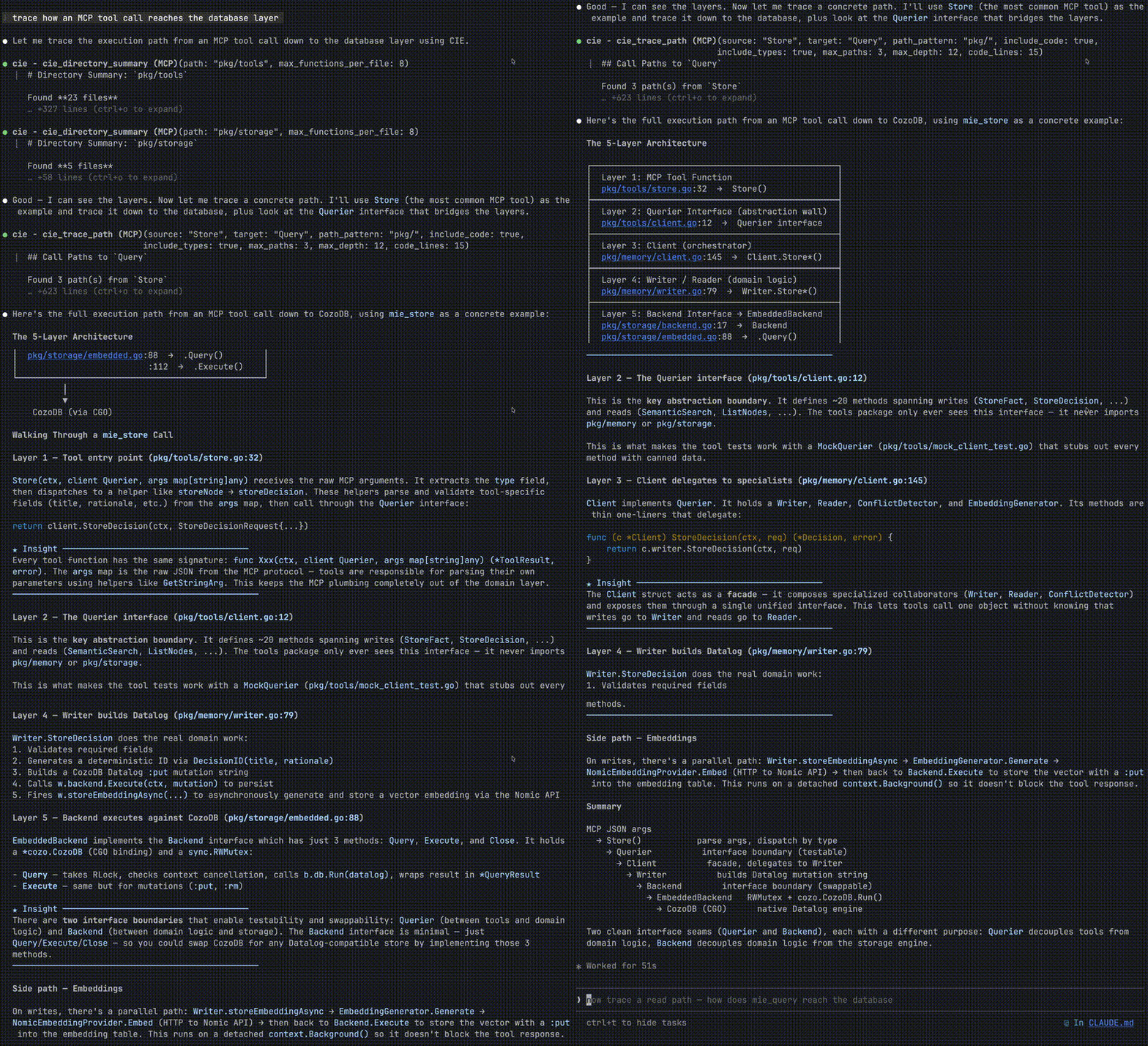
In practice: Tracing a call graph through MIE's codebase, Claude Code needed 34 tool calls without CIE. With CIE, it needed 3. Results vary by query, but structured code intelligence consistently reduces agent round-trips.



CIE indexes your codebase and provides semantic search, call graph analysis, and AI-powered code understanding through the Model Context Protocol (MCP).
Why CIE?
- Semantic Search - Find code by meaning, not just text matching
- Call Graph Analysis - Trace execution paths including interface dispatch resolution
- MCP Native - Works seamlessly with Claude Code, Cursor, and any MCP client
- Fast - Indexes 100k LOC in seconds, queries in milliseconds
- Private - All data stays local, your code never leaves your machine
- Accurate - Keyword boosting ensures relevant results for function searches
Installation
| Method | Command |
|---|---|
| Homebrew | brew tap kraklabs/cie && brew install cie |
| Install Script | curl -sSL https://raw.githubusercontent.com/kraklabs/cie/main/install.sh | sh |
| GitHub Releases | Download binary |
Features
Semantic Code Search
Find code by meaning, not keywords:
# Ask: "Where is authentication middleware?"
# Use cie_semantic_search tool via MCP
Example output:
[95%] AuthMiddleware (internal/http/auth.go:42)
[76%] ValidateToken (internal/auth/jwt.go:103)
Call Graph Analysis
Trace how execution reaches any function:
# Question: "How does main() reach database.Connect()?"
# Use cie_trace_path tool
Example output:
main → InitApp → SetupDatabase → database.Connect
  ├─ File: cmd/server/main.go:25
  ├─ File: internal/app/init.go:42
  └─ File: internal/database/setup.go:18
HTTP Endpoint Discovery
List all API endpoints automatically:
# Use cie_list_endpoints tool
Example output:
[GET]    /api/v1/users          → HandleGetUsers
[POST]   /api/v1/users          → HandleCreateUser
[DELETE] /api/v1/users/:id      → HandleDeleteUser
Multi-Language Support
Supports Go, Python, JavaScript, TypeScript, and more through Tree-sitter parsers.
Quick Start
1. Install the CLI
Homebrew (macOS/Linux):
brew tap kraklabs/cie
brew install cie
Script:
curl -sSL https://raw.githubusercontent.com/kraklabs/cie/main/install.sh | sh
Manual download: Download from GitHub Releases
2. Index Your Repository
cd /path/to/your/repo
cie init -y    # Initialize project configuration
cie index      # Index the codebase (works without Ollama too)
Example output:
Project: your-repo-name
Files: 1,234
Functions: 5,678
Types: 890
Last indexed: 2 minutes ago
Note: CIE works without Ollama -- you'll have access to 20+ tools including grep, call graph, function finder, and more. Semantic search requires embeddings from Ollama or another provider.
Management Commands
| Command | Description |
|---|---|
cie init -y | Initialize project configuration |
cie index | Index (or re-index) the codebase |
cie reset --yes | Delete all indexed data for the project |
MCP Server Mode
CIE can run as an MCP server for integration with Claude Code:
cie --mcp
Configure in your Claude Code settings:
{
  "mcpServers": {
    "cie": {
      "command": "cie",
      "args": ["--mcp"]
    }
  }
}
Configuration
CIE uses a YAML configuration file (.cie/project.yaml):
version: "1"
project_id: my-project
embedding:
  provider: ollama
  base_url: http://localhost:11434
  model: nomic-embed-text
Embeddings are optional. CIE works without Ollama or any embedding provider. You get full access to all structural tools (grep, call graph, function finder, etc.). Only semantic search (
cie_semantic_search) requires embeddings.
You can also configure an LLM for cie_analyze narrative generation:
# Optional: LLM for cie_analyze narrative generation
llm:
  enabled: true
  base_url: http://localhost:11434  # Ollama
  model: llama3
  # For OpenAI: base_url: https://api.openai.com/v1, model: gpt-4o-mini
Note: The llm section is optional. Without it, cie_analyze returns raw analysis data. With it configured, you get synthesized narrative summaries.
MCP Tools
When running as an MCP server, CIE provides 20+ tools organized by category:
Navigation & Search
| Tool | Description |
|---|---|
cie_grep | Fast literal text search (no regex) |
cie_semantic_search | Meaning-based search using embeddings |
cie_find_function | Find functions by name (handles receiver syntax) |
cie_find_type | Find types/interfaces/structs |
cie_find_similar_functions | Find functions with similar names |
cie_list_files | List indexed files with filters |
cie_list_functions_in_file | List all functions in a file |
Call Graph Analysis
| Tool | Description |
|---|---|
cie_find_callers | Find what calls a function |
cie_find_callees | Find what a function calls |
cie_trace_path | Trace call paths from entry points to target |
cie_get_call_graph | Get complete call graph for a function |
Code Understanding
| Tool | Description |
|---|---|
cie_analyze | Architectural analysis (LLM narrative optional) |
cie_get_function_code | Get function source code |
cie_directory_summary | Get directory overview with main functions |
cie_find_implementations | Find types that implement an interface |
cie_get_file_summary | Get summary of all entities in a file |
HTTP/API Discovery
| Tool | Description |
|---|---|
cie_list_endpoints | List HTTP/REST endpoints from common Go frameworks |
cie_list_services | List gRPC services and RPC methods from .proto files |
Security & Verification
| Tool | Description |
|---|---|
cie_verify_absence | Verify patterns don't exist (security audits) |
System
| Tool | Description |
|---|---|
cie_index_status | Check indexing health and statistics |
cie_search_text | Regex-based text search in function code |
cie_raw_query | Execute raw CozoScript queries |
For detailed documentation of each tool with examples, see Tools Reference
Data Storage
CIE stores indexed data locally in <local_data_dir>/<project_id>/ (default: ~/.cie/data/<project_id>/) using embedded CozoDB with RocksDB backend. This ensures:
- Your code never leaves your machine
- Fast local queries
- Persistent index across sessions
Embedding Providers
CIE supports multiple embedding providers:
| Provider | Configuration |
|---|---|
| Ollama | OLLAMA_HOST, OLLAMA_EMBED_MODEL |
| OpenAI | OPENAI_API_KEY, OPENAI_EMBED_MODEL |
| Nomic | NOMIC_API_KEY |
Documentation
| Guide | Description |
|---|---|
| Getting Started | Step-by-step tutorial from installation to first query |
| Configuration | Complete configuration reference |
| Tools Reference | All 20+ MCP tools with examples |
| Architecture | How CIE works internally |
| MCP Integration | Setting up with Claude Code, Cursor |
| Migration Guide | Migrating from Docker to embedded mode |
| Testing Guide | Running tests and adding new tests |
| Benchmarks | Performance data and tuning |
| Exit Codes | CLI exit codes for scripting |
| Troubleshooting | Common issues and solutions |
Architecture
CIE uses an embedded architecture -- a single binary handles indexing, querying, and MCP serving with no external services required:
┌──────────────────────────────────────────────────────────────┐
│  Host Machine                                                 │
│  ┌──────────────────────────────────────────────────────┐    │
│  │  CLI `cie`                                            │    │
│  │  - cie init   → Creates .cie/project.yaml            │    │
│  │  - cie index  → Parses code, writes to local CozoDB  │    │
│  │  - cie --mcp  → Reads from local CozoDB              │    │
│  │                                                       │    │
│  │  Data: <local_data_dir>/<project>/ (RocksDB)         │    │
│  └──────────────────────────────────────────────────────┘    │
│                                                               │
│  ┌──────────────┐  (optional)                                │
│  │   Ollama     │  For semantic search embeddings            │
│  │  :11434      │  Install: brew install ollama              │
│  └──────────────┘  Model: nomic-embed-text                   │
└──────────────────────────────────────────────────────────────┘
Key Components:
- CIE CLI: Single binary handles indexing, querying, and MCP serving
- CozoDB + RocksDB: Embedded database stored locally at
<local_data_dir>/<project>(default~/.cie/data/<project>) - Ollama (optional): Local embedding generation for semantic search
- Tree-sitter: Code parsing for Go, Python, JS, TS
Code Structure:
cie/
├── cmd/cie/           # CLI tool with init, index, query, MCP commands
├── pkg/
│   ├── ingestion/     # Tree-sitter parsers and indexing pipeline
│   ├── tools/         # 20+ MCP tool implementations
│   ├── llm/           # LLM provider abstractions (OpenAI, Ollama)
│   ├── cozodb/        # CozoDB wrapper for Datalog queries
│   └── storage/       # Storage backend interface
└── docs/              # Documentation
For in-depth architecture details, see Architecture Guide.
Development
Testing
# Run all tests
go test ./...

# Run with short flag
go test -short ./...

# Run integration tests with CozoDB
go test -tags=cozodb ./...
For detailed testing documentation, see docs/testing.md.
Writing Tests
Use the CIE testing helpers for easy test setup:
import cietest "github.com/kraklabs/cie/internal/testing"

func TestMyFeature(t *testing.T) {
    backend := cietest.SetupTestBackend(t)
    cietest.InsertTestFunction(t, backend, "func1", "MyFunc", "file.go", 10, 20)

    result := cietest.QueryFunctions(t, backend)
    require.Len(t, result.Rows, 1)
}
Building
# Build all commands
make build-all

# Format code
make fmt

# Run linter
make lint
Support
Need help or want to contribute?
- Documentation: docs/
- Report Issues: GitHub Issues
- Discussions: GitHub Discussions
- Email: support@kraklabs.com
Before opening an issue:
- Check the troubleshooting guide
- Search existing issues
- Include CIE version:
cie --version - Provide minimal reproduction steps
Contributing
See CONTRIBUTING.md for guidelines.
CIE Enterprise
Scale code intelligence across your entire organization.
CIE Enterprise brings the power of semantic code search and call graph analysis to teams of any size. Built for organizations that demand reliability, security, and collaboration.
Why Enterprise?
| Feature | Open Source | Enterprise |
|---|---|---|
| Semantic Search | ✅ | ✅ |
| Call Graph Analysis | ✅ | ✅ |
| Local Embeddings (768 dim) | ✅ | ✅ |
| Distributed Architecture | — | ✅ |
| Team Collaboration | — | ✅ |
| CI/CD Integration | — | ✅ |
| High-Fidelity Embeddings (1536 dim) | — | ✅ |
| Integrated LLMs | — | ✅ |
| Priority Support | — | ✅ |
Enterprise Features
Distributed Architecture Deploy CIE across your infrastructure with a Primary Hub and Edge Caches. All team members connect to the same indexed codebase with millisecond-latency queries worldwide.
Team Collaboration Share code intelligence across your entire engineering organization. One index, one source of truth—no more siloed knowledge.
CI/CD Integration Automatically keep your code index up-to-date with every commit. Native integration with GitHub Actions, GitLab CI, Jenkins, and more.
High-Fidelity Embeddings OpenAI-powered 1536-dimension embeddings for superior semantic search accuracy. Find exactly what you're looking for, even in massive codebases.
Integrated LLMs Connect your preferred LLM provider for enhanced code analysis, architectural insights, and natural language queries about your codebase.
Priority Support Direct access to our engineering team. SLAs, dedicated support channels, and implementation assistance.
Get Started
Contact us: enterprise@kraklabs.com
Schedule a demo to see how CIE Enterprise can transform your team's development workflow.
License
CIE is dual-licensed:
Open Source License (AGPL v3)
CIE is free and open source under the GNU Affero General Public License v3.0 (AGPL v3).
Use CIE for free if:
- You're building open source software
- You can release your modifications under AGPL v3
- You're okay with the copyleft requirements
See LICENSE for full AGPL v3 terms.
Commercial License
Need to use CIE in a closed-source product or service? We offer commercial licenses that remove AGPL requirements.
Commercial licensing is right for you if:
- You want to use CIE in a proprietary product
- You want to offer CIE as a managed service without releasing your code
- Your organization's policies prohibit AGPL-licensed software
- You want to modify CIE without releasing your modifications
Pricing: Contact licensing@kraklabs.com for details.
See LICENSE.commercial for more information.
Why dual licensing? This model allows us to:
- Keep CIE free for the open source community
- Ensure improvements benefit everyone through AGPL's copyleft
- Sustainably fund development through commercial licensing
- Enable enterprise adoption without legal concerns
Third-Party Components
CIE includes some third-party components with their own licenses:
- CozoDB C Headers (MPL 2.0) - See THIRD_PARTY_LICENSES.md for details
These components are compatible with AGPL v3 and retain their original licenses.
Related Projects
- CozoDB - The embedded database powering CIE
- Tree-sitter - Parser generator for code analysis
- MCP - Model Context Protocol specification