figma-mcp-bridge
Write access to a live Figma canvas with auto-framed screenshot feedback and one-call rollback. Zero dependencies, Figma free plan.
Documentation
⚡ Mokido
MCP server for Figma design. Let an AI agent design in Figma — and actually see what it drew.
Formerly figma-mcp-bridge (@kolganovr/figma-mcp-bridge on npm). Old links redirect here.
A zero-dependency MCP server that gives coding agents read and write access to a live Figma canvas, then closes the loop by handing the rendered PNG back to the model for visual self-critique.






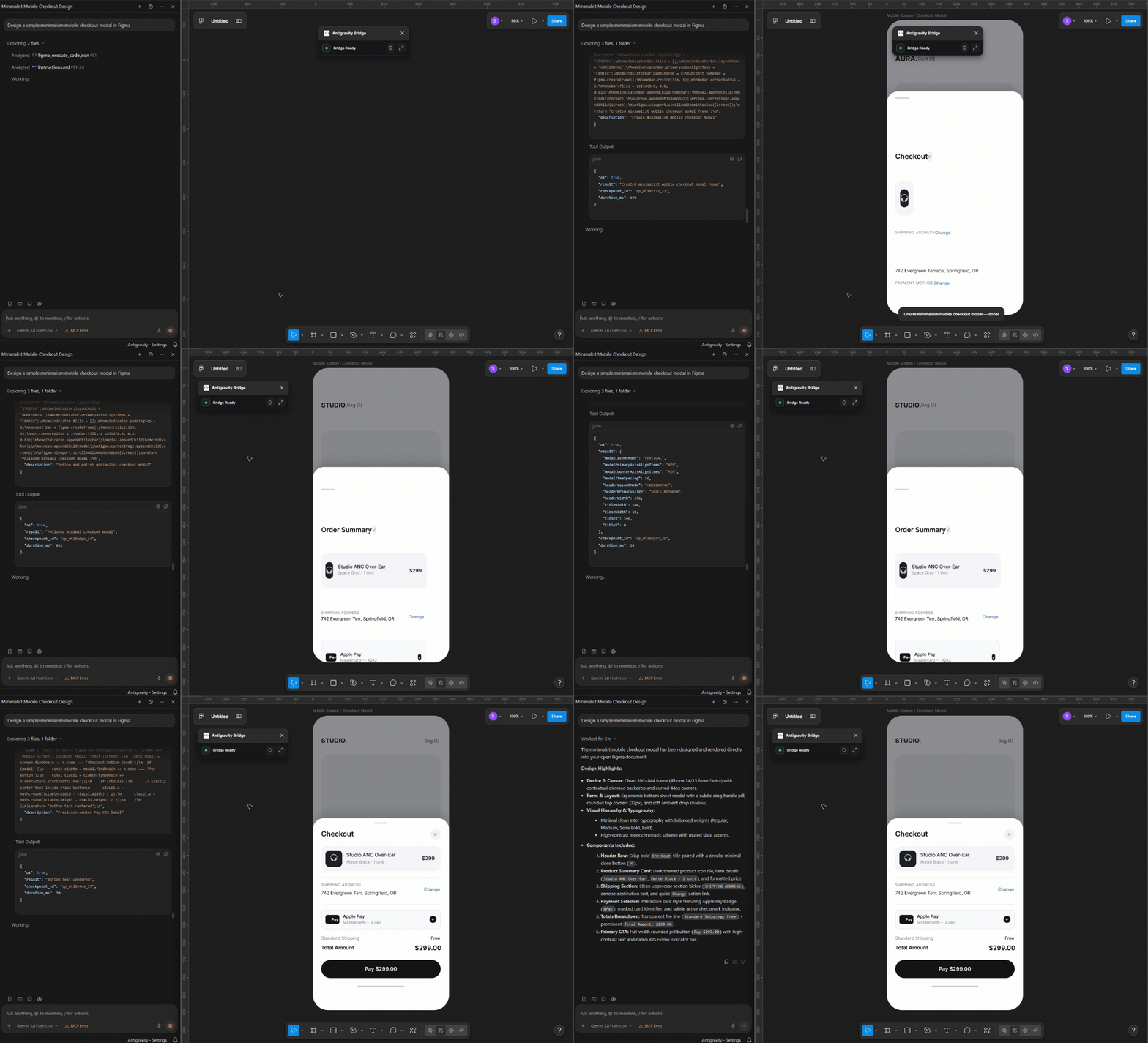
One prompt, two screens: the agent reads your design system, builds them live in the file you have open, checks its own screenshot and fixes the layout. 56 seconds of real time, sped up.
The problem
Coding agents are effectively blind inside Figma. Most Figma MCP servers are read-only —
they flatten a design into text so a model can turn it into code, and the traffic stops there.
The ones that can write are either gated behind a paid Figma seat with a monthly tool-call
quota, or expose a fixed vocabulary of commands (create_rectangle, set_fill) that runs out
the moment the task gets specific.
And none of them answer the question that actually matters after a write: did it look right?
An agent that draws a card, gets back {"ok": true}, and moves on has no way to notice that its
text overflowed, its contrast failed, or its frame landed on top of someone else's work.
This bridge closes that loop, and adds the safety rails an autonomous agent needs to be trusted with a real design file.
How it's different
| This bridge | Figma Dev Mode MCP (official) | Framelink | Talk to Figma | |
|---|---|---|---|---|
| Writes to the canvas | ✅ arbitrary JS in the sandbox | ✅ code-to-canvas | ❌ read-only | ✅ fixed command set |
| Visual feedback loop | ✅ auto-framed PNG on any write (capture: true) | ⚠️ separate screenshot call | ❌ | ❌ |
| Undo the agent's work | ✅ figma_rollback | ❌ | n/a | ❌ |
| Works on the Figma Free plan | ✅ | ❌ Dev/Full seat, paid plan¹ | ✅ | ✅ |
| Tool-call quota | none — it's local | 6 / month on Starter seats¹ | inherits REST rate limits | none |
| Token-optimized read of the live doc | ✅ 86–91% smaller² | ⚠️ partial | ❌ REST only | ❌ |
| Persistent code modules in-sandbox | ✅ bridge.define/require | ❌ | ❌ | ❌ |
| Long jobs survive their own timeout | ✅ async job_id, one blocking wait | ❌ | n/a | ❌ |
| Token budget per call | ✅ capped text, sized images, compact JSON | ❌ | ⚠️ read-side only | ❌ |
| Install footprint | 0 npm deps, npx or git clone, Node only | Figma desktop + paid seat | npx + access token | Bun + a second server process |
The short version: Framelink is the best choice if you only want to turn an existing design into code. The official server is the safest choice if you're already on a paid Figma plan and want Code Connect. This bridge is for the case where the agent is doing the designing — where it needs to write freely, check its own work, and be undoable when it gets it wrong.
How it works
flowchart LR
    subgraph AI ["🤖 Coding Agent"]
        LLM["Claude Code · Cursor<br/>Antigravity · Windsurf"]
    end

    subgraph Bridge ["⚡ MCP Server — Node.js, 0 deps"]
        Router["Tool Router<br/>+ Job Ledger<br/>+ Target Router"]
        Opt["Token Optimizer<br/>REST + LIVE"]
    end

    subgraph Figma ["🎨 Figma Desktop"]
        Plugin["Bridge Plugin<br/>Checkpoint Journal<br/>Component Index"]
        Canvas["Live Canvas"]
    end

    LLM -->|"stdio JSON-RPC"| Router
    Router <-->|"WebSocket :8765"| Plugin
    Plugin -->|"execute in sandbox"| Canvas
    Canvas -->|"export PNG"| Plugin
    Plugin -->|"raw node tree"| Opt
    Opt -.->|"86% smaller"| LLM
    Plugin ==>|"screenshot + warnings"| LLM
The agent speaks plain MCP over stdio. The server owns a hand-rolled RFC 6455 WebSocket on
:8765, which the Figma plugin connects to — so commands reach the canvas with no polling
latency, and results (including multi-megabyte base64 PNGs) stream straight back.
Quickstart
npx mokido
Or, to read the installer before it touches your machine — it's the same script either way, just fetched differently:
git clone https://github.com/kolganovr/mokido.git
cd mokido
node install.mjs
Both copy the server and plugin into place and register the MCP server in every AI client config
they find — Claude Desktop, Claude Code, Cursor, Windsurf, Antigravity. The npm package exists
purely for a shorter first command; it doesn't add a single runtime dependency — dependencies
is empty in its package.json too, and no Python is needed either. node is the only runtime
this project ever needs, for the installer and the server alike.
Then, in Figma Desktop:
- Plugins → Development → Import plugin from manifest… → pick
~/.mokido/mcp/figma-plugin/manifest.json(the installer prints the full path; the repo's ownfigma-plugin/has no bridge token) - Press
Ctrl + Alt + P(macOS:Cmd + Option + P) to launch Mokido - Status turns green —
CONNECTED
Restart your AI client so it picks up the new tools. Verify anytime with:
npx mokido --doctor # or: node install.mjs --doctor
Optional: Figma Cloud REST access
The live canvas tools need no token. If you also want to read unopened cloud files
(get_file, get_node, get_styles, …), supply a personal access token:
npx mokido --token "your_figma_personal_access_token"
# or: node install.mjs --token "your_figma_personal_access_token"
Without a token these 7 tools aren't registered at all — see Tool reference.
Updating
Updating is the same installer run again. It overwrites the copy in ~/.mokido/mcp, keeps your bridge
token and client configs, and removes copies left by older versions.
npx mokido@latest --update
Keep @latest: a bare npx mokido can reuse the version npx cached last time. From a clone:
git pull
node install.mjs --update
Then reopen the plugin in Figma (Ctrl + Alt + P) and restart your AI client. A server that was already
running keeps the old code in memory, and the plugin shows "Update needed" until it restarts.
You don't have to watch for releases: once a day the server checks npm and prints a one-line notice to your client's MCP log when a newer version is out (see the update check). What changed in each version is in CHANGELOG.md.
Agents updating it for you follow the same steps in AGENTS.md.
What it gives the agent
1. Write freely, then look at the result
capture: true returns a PNG of exactly what the call just created or modified — auto-framed
to the changed nodes, never the whole page, and never by hijacking the user's selection.
// agent calls figma_execute_code
{ "code": "const f = figma.createFrame(); /* ... */ return f.id;", "capture": true }

// agent gets back — text + image in one response
{
  "ok": true,
  "created":  ["12:34"],
  "warnings": ["Text \"Total\" has ~3.1:1 contrast against its parent fill (WCAG AA wants 4.5:1)."],
  "checkpoint_id": "cp_mfk3p2a_7",
  "duration_ms": 840
}
The warnings array is a cheap auto-lint over the touched subtree — text overflow, low contrast,
zero-size nodes. It catches the obvious mistakes without spending a screenshot round trip.
2. Undo anything the agent did
Every write opens a checkpoint automatically. One call reverses it — no Ctrl+Z rolling back over
the human's own unrelated work.
// agent calls figma_rollback
{ "checkpoint_id": "last" }

// gets back
{
  "ok": true,
  "checkpoint_id": "cp_mfk3p2a_7",
  "label": "Generate checkout flow",
  "removed":  ["12:34", "12:35"],   // nodes the call created — deleted
  "restored": ["9:11"],             // nodes it modified — properties put back
  "missing":  []                    // ids that no longer exist
}
Created nodes are tracked automatically via a Proxy around figma.create*(). Property edits are
tracked when snapshotted. Deletions are honestly reported as unrecoverable rather than silently lost.
3. Read the live canvas for ~700 tokens instead of ~5,000
The same pruning + Pseudo-JSX pipeline that powers the cloud tools, pointed at whatever is open right now. Measured on a realistic 6-card layout: 20 KB of raw API JSON → 2.7 KB (86% smaller).
<Frame id="1:1" name="Landing" w="1440" h="900" row gap="20">
  <Frame id="2:0" name="Card" w="300" h="200" col gap="12" pad="20" bg="#FFFFFF" radius="16">
    <Icon id="3:0" name="ic_check" size="24" strokeWidth="2" />
    <Text id="4:0" color="#1A1A1F" font="Inter 18px">Feature 0</Text>
  </Frame>
</Frame>
budget_tokens caps the response: if the requested depth overshoots, the server re-serializes the
already-fetched tree shallower — no second round trip — and appends a comment saying what it did
and which id to fetch for more.
4. Teach the sandbox new tricks that survive restarts
Every figma_execute_code call is a fresh function scope, so helpers normally die instantly.
bridge.define compiles and stores a module inside the .fig document:
// once
bridge.define("kit", `
  async function label(parent, text) { /* ... */ }
  module.exports = { label };
`);

// in any later call — including next week, after a Figma restart
const { label } = bridge.require("kit");
5. Long jobs that don't die at the timeout
A generation still running after 45s hands back a job_id instead of failing while the plugin
keeps working. figma_job_status then blocks until the job finishes (up to wait_ms, 45s by
default) — one call, not a polling loop. Progress from progress(step, of, note) is included while
it runs; a job silent for 2 minutes is flagged stalled, and one whose plugin disconnected fails
at once with PLUGIN_DISCONNECTED instead of running out the clock. A call that times out behind a
still-running job says so (PLUGIN_BUSY, naming the job) instead of inviting a blind retry.
6. Built for the token bill
In an agent loop a tool call is paid for twice: once when it returns, and again on every later turn, because its output stays in the context that each turn re-reads. So the bridge optimizes for fewer turns and smaller residue:
| Default | Why | |
|---|---|---|
| Screenshots | scale: 1, longest side max_px: 1024, at most 4 images per call | image tokens scale with pixel area (~w·h/750); each image is described as 800x600 ~640tok |
capture on insert/mode tools | off | the auto-lint warnings catch mechanical defects without an image |
| Text results | compact JSON; every response is kept under max_output_bytes (3500 UTF-8 bytes, whole envelope) by structural shrinking; a requested value above the 3900-byte ceiling is capped to it, 0 = no limit | some clients (Antigravity) spill output over ~4 KB into a file the model must open with an extra call; the full value stays in bridge.state.lastResult |
| Cheap reads | figma_inspect (many ids per call), and bridge.summarize / inspect / find / check inside code | one-line-per-node outlines and pass/fail lists instead of one hand-written dump per call |
| Plugin reloads | calls wait up to 8s for the plugin to reconnect | a failure costs a turn to read and another to retry |
| Server instructions | ≈1.9k chars, economy rules first | some clients truncate instructions at ~2000 chars |
Every default is overridable per call, and per install through env: FIGMA_MCP_SCALE,
FIGMA_MCP_MAX_PX, FIGMA_MCP_MAX_IMAGES, FIGMA_MCP_MAX_OUTPUT_BYTES, FIGMA_MCP_MAX_OUTPUT_CEILING (0 = no ceiling), FIGMA_MCP_JOB_WAIT_MS,
FIGMA_MCP_ESCALATE_MS, FIGMA_MCP_RECONNECT_GRACE_MS.
What's new
4.4.0: a new plugin window with the Moki companion (12 states, compact square/bar view, settings with versions,
dark theme, English/Russian); every client now shares one install folder, ~/.mokido/mcp, and a server exits with
its session, so a stale one no longer holds port 8765; figma_inspect reads property definitions of component
sets, lists all texts of a frame (props: ["texts"]) and names the page when find has no match.
Re-import the plugin once from ~/.mokido/mcp/figma-plugin/manifest.json. History: CHANGELOG.md.
4.2.7: compare / like diffs end with a REF line of exact reference values, so the agent fixes copies
without an extra props read; find returns the subtree of what it found; view: "flow" works without
node_ids; bridge.setText keeps mixed fonts. On the internal bench (Gemini Flash, seeded tasks) model turns
per series went 112 -> 83 and verify turns after a write 11 -> 1. Reload the Figma plugin after updating.
History: CHANGELOG.md.
Tool reference
Tools are served in tiers, so the schema list sent to the model on every turn stays proportional to what's actually usable:
| Tier | Count | Registered when |
|---|---|---|
| Core | 8 | always |
| Extended | 5 | always |
| REST | 7 | only with FIGMA_PERSONAL_ACCESS_TOKEN set |
| Legacy | 3 | only with FIGMA_MCP_LEGACY_TOOLS=1 |
Without a REST token an agent sees 13 tools instead of 23 — and never wastes a call on
something that would only return REST_TOKEN_MISSING.
All 23 tools
Core — live canvas
| Tool | Description |
|---|---|
figma_execute_code | Run JS in the Figma sandbox. Injects figma, ensureFont, getFreePosition, progress, bridge. Supports capture, capture_node_ids, diff, max_px, max_output_bytes, async, target. |
figma_inspect | Read many live nodes in one call: compact outline (or view: "map" canvas map), exact props (incl. reactions, connector), name find / text find_text, context (ancestor sections, breakpoints, component variants), offset paging, or check expectations (mismatches only). Changes nothing. |
figma_read_canvas | Token-optimized read of the live document (jsx / tree / json) with budget_tokens (default: the server's byte budget). |
figma_screenshot | PNG of specific node_ids or the current selection, sized by max_px. |
figma_find_components | Cached, tokenized, fuzzy component search — variants, properties, keys. |
figma_insert_component_instance | Instantiate a component/variant, apply text overrides, place into AutoLayout. |
figma_insert_svg | Insert raw SVG with proportional scaling, recoloring, optional component wrapping. |
figma_get_variables | Variable collections, modes, and token values. |
figma_rollback | Undo a previous write call's checkpoint. |
Extended — live canvas
| Tool | Description |
|---|---|
figma_get_selection | Geometry, compact hex fills, parent/page, AutoLayout context of the selection. |
figma_get_canvas_layout | Artboard bounds + a safe suggestedNextPosition. layout:"grid" shelf-packs. |
figma_set_variables_mode | Switch theme mode (Dark/Light/Brand) on a frame or page. |
figma_job_status | Wait (blocking, wait_ms) for an escalated background job. |
figma_list_targets | List connected Figma documents for multi-file targeting. |
REST — Figma Cloud (needs a token)
| Tool | Description |
|---|---|
get_file / get_node | Token-optimized cloud file/subtree. Supports budget_tokens. |
get_image | Render nodes to PNG/SVG/PDF via Figma's renderer. |
get_styles / get_components | Published styles and design-system components. |
get_comments / post_comment | Read and post file comments. |
Legacy — opt-in via FIGMA_MCP_LEGACY_TOOLS=1
figma_create_ui_card · get_me · get_image_fills
Engineering notes
The parts that were harder than they look — and why the code is shaped the way it is.
`eval` is a trap in the Figma sandbox
The obvious way to persist helpers between calls is "stash the source, eval it next time." It
fails silently: eval is a bound function in Figma's sandbox, which by spec makes every call
an indirect eval — declarations inside it reach neither the caller's scope nor globalThis.
Nothing is defined, nothing throws.
bridge.define is built on new Function instead, whose bodies are ordinary function scopes.
The runtime's bridge.info() reports this contract to the agent on request, so it can ask instead
of guessing.
A hand-rolled RFC 6455 WebSocket, on purpose
Zero npm dependencies isn't a vanity metric here — it means git clone && node install.mjs works
on a locked-down machine with no registry access, and there's no supply chain to audit for something
that executes arbitrary JS inside your design files.
The cost is owning the framing: masking, fragmented continuation frames (a 4 MB screenshot arrives split, and treating each fragment as a whole message silently dropped it until the tool call timed out 40s later), ping/pong liveness, and a 64 MB ceiling so one frame can't exhaust memory.
Chunking `pluginData` by UTF-8 bytes, not string length
Figma caps pluginData entries at roughly 100 KB — measured in bytes. The original chunker
sliced by JS string length, so a module written in Cyrillic (~2 bytes/char) produced "60,000-char"
chunks that were really 120 KB, and setPluginData threw. The splitter now walks the real UTF-8
budget and never tears a surrogate pair.
Port ownership has to be reclaimable
Every agent spawns its own copy of the server; the first to bind :8765 owns the plugin socket and
the rest proxy to it. When the owner exits, a proxy has to be able to take over — otherwise every
surviving agent stays permanently broken until restarted. A 5-second watchdog retries the bind, and
a failed proxy call triggers an immediate takeover attempt.
Making placement O(neighbours) instead of O(n)
The original collision engine rescanned every top-level node for each of up to 200 candidate positions, then did it again in a second function in the same tick — and only ever stepped along one axis, so 20 generated screens became a mile-long ribbon nobody could zoom out to see.
Bounds are now computed once and shared; collisions go through a 500px grid hash; and layout:"grid"
shelf-packs into a compact rectangle.
Errors that tell the agent what to do instead
Raw Plugin API errors are famously unhelpful. Failures are matched against known modes and rewritten
with a HINT: line naming the API that actually works, plus a stable machine-readable code
(FONT_NOT_LOADED, INSTANCE_TRANSFORM_LOCKED, STALE_NODE_ID, AUTOLAYOUT_HUG_RESIZE,
AMBIGUOUS_TARGET, …) so agents and tooling can branch on the failure type without parsing prose.
Security: this endpoint runs arbitrary JS in your design file
:8765 is loopback, but loopback is reachable by any web page the user happens to have open.
Two independent gates: an Origin allowlist (a browser cannot forge Origin, so a page on
evil.com is rejected at the handshake) and a shared token that install.mjs generates and bakes
into both the MCP config and the installed plugin — which also covers the sandboxed-iframe case,
where a hostile page can present Origin: "null" too.
Running straight from a clone with no token, the Origin gate still applies and the server prints a warning, so it degrades rather than silently opening up.
The one network call this server makes on its own: an update check
On startup an installed server (the copy install.mjs wrote, marked by a version.json beside the
code) compares its own version with the latest mokido release on npm via one registry request,
and prints a one-line notice to stderr if a newer release is out. It compares releases, not commits,
so it works the same for npx and clone installs and stays quiet about unreleased work on main.
It never applies anything itself — updating is still a manual, deliberate step.
This is the one thing in this project that assumes network access, so it's built to disappear
cleanly when there isn't any: the check is fired without being awaited (never delays initialize
or the first tool call), a failed/slow/offline request is caught and silently skipped, and results
are cached for 24h so it doesn't hit the registry on every launch or run once per spawned
copy of the server. Set FIGMA_MCP_NO_UPDATE_CHECK=1 to turn it off entirely — worth doing on the
locked-down machines the previous note is about.
Testing
Seven dependency-free suites, all runnable with bare node:
node tests/bridge-runtime.test.js   # sandbox runtime, module persistence, checkpoint/rollback
node tests/layout-packer.test.js    # row/grid packing, collision grid
node tests/optimizer.test.js        # jsx/tree/json serialization, budget truncation
node tests/mcp-protocol.test.js     # real server over stdio: initialize, tools/list, tiering
node tests/install.test.js          # config merge/reuse, token persistence, stale-file cleanup
node tests/token-economy.test.js    # fake plugin over a real WebSocket: budgets, long-poll, proxy
node tests/output-shrink.test.js    # line-wise shrinking, offset paging, output ceiling, syntax pre-check
mcp-protocol.test.js spawns the actual server as a child process and speaks NDJSON to it — the
same transport a real MCP client uses — rather than importing internals.
Repository layout
mokido/
├── figma/                    # MCP server (Node.js, stdio + WebSocket)
│   ├── index.js              # protocol, tool router, job ledger, target router
│   ├── optimizer/            # AST pruner, style collapser, JSX/tree serializers
├── figma-plugin/             # Figma Desktop plugin
│   ├── code.js               # sandbox executor, bridge runtime, checkpoints, capture
│   └── ui.html               # HUD — stream, settings, control (pause / undo)
├── docs/GUIDE.md             # long-form agent guide (server instructions are inline in index.js)
├── tests/                    # 7 suites, 0 dependencies
├── install.mjs               # cross-platform installer, updater, doctor (Node only)
└── AGENTS.md                 # onboarding protocol for AI agents
Sources
- Seat and quota requirements for the official server — Figma: Guide to the Figma MCP server, Figma Developer Docs: Rate limits & access
- Token reduction measured on a 6-card layout fixture that mimics real REST output: 20,587 B raw → 2,862 B Pseudo-JSX (86.1%) / 1,912 B tree (90.7%). The fixture is checked in and asserted — run
node tests/optimizer.test.jsto reproduce the exact figures.
Comparison reflects publicly documented behaviour as of August 2026. Alternatives are actively developed — verify current capabilities before making a decision on this table alone.
License
MIT · Built by Roman Kolganov