Docker Commander
Secure Docker monitoring and management MCP server for containers, logs, alerts, diagnostics, and safe control across local and remote hosts.
Documentation
A self-hosted, open-source Docker monitoring & control panel with an enterprise-grade UI — monitor containers in real time, control their full lifecycle, browse logs and files, manage images, networks and volumes, alert on problems, and administer it all from one binary.
One Go binary with the web UI embedded. No external database, no runtime dependencies, CGO-free. Runs on Linux, macOS and Windows.
🌐 docker-commander.app — the project's home page. · Documentation · Releases · Sponsor


📸 Screenshots
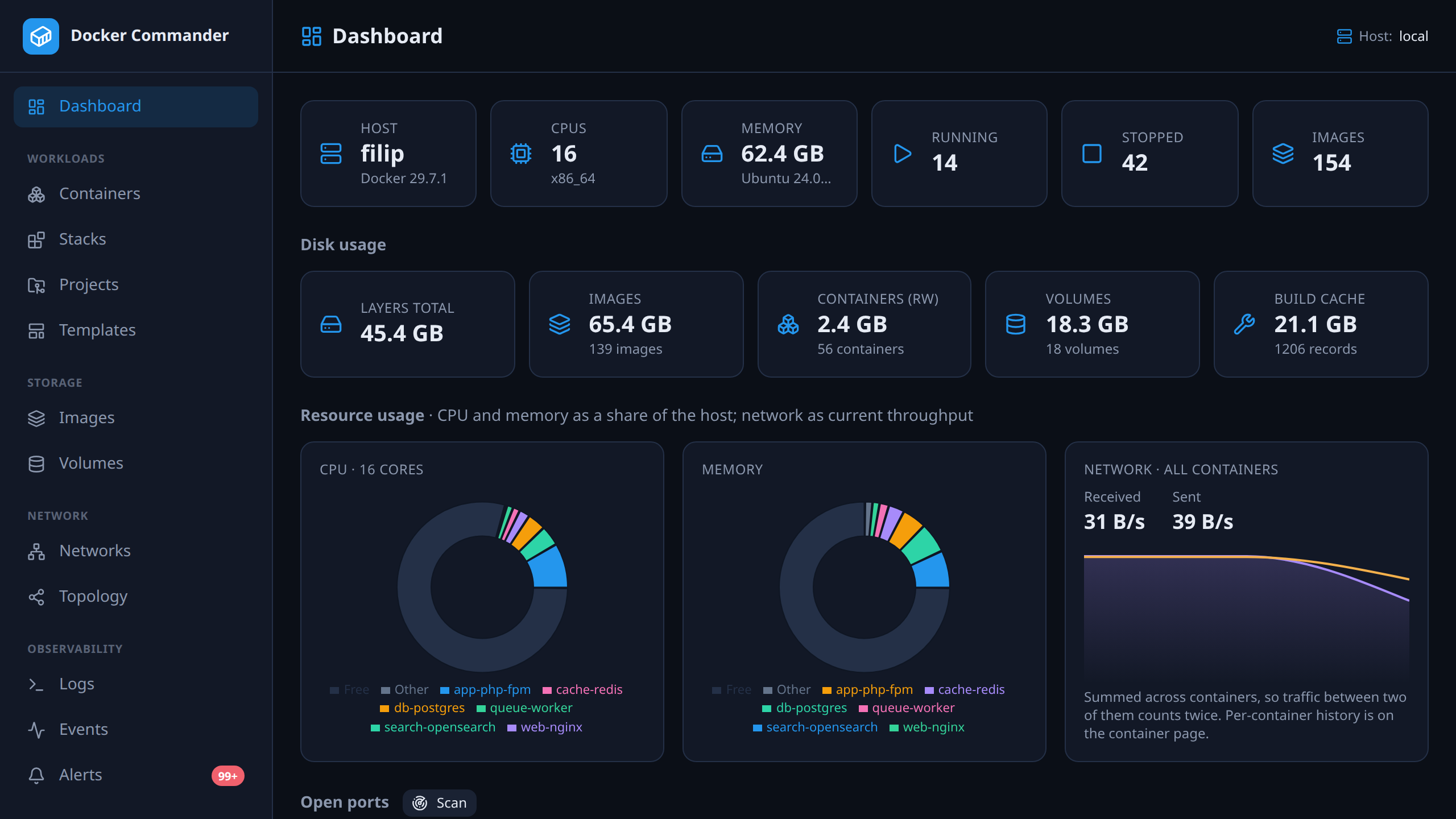
Dashboard — host overview, disk usage, and running containers at a glance.
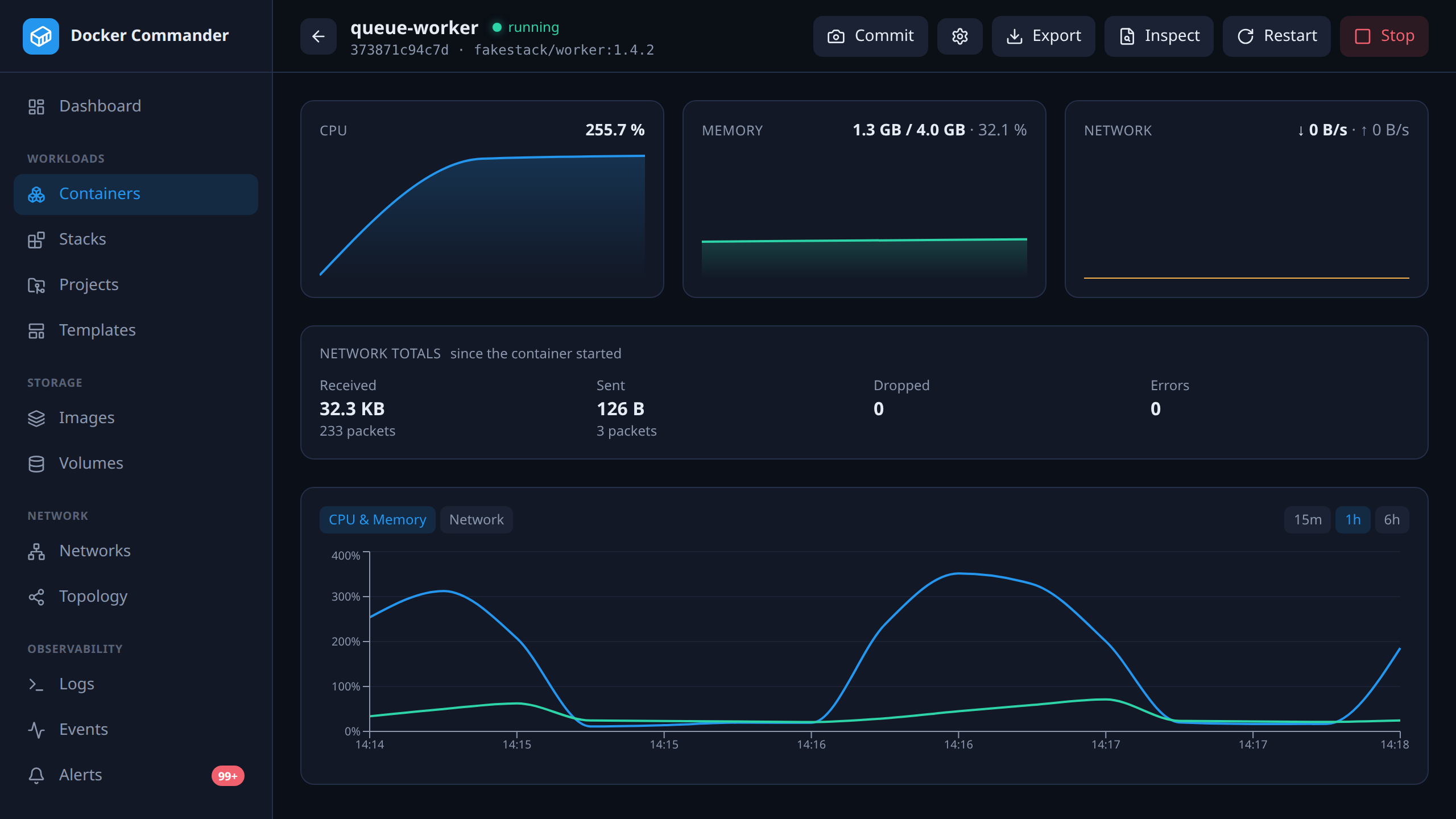
Container detail — live CPU / memory with history, and tabs for logs, an interactive console, processes, the file browser, filesystem changes and env.
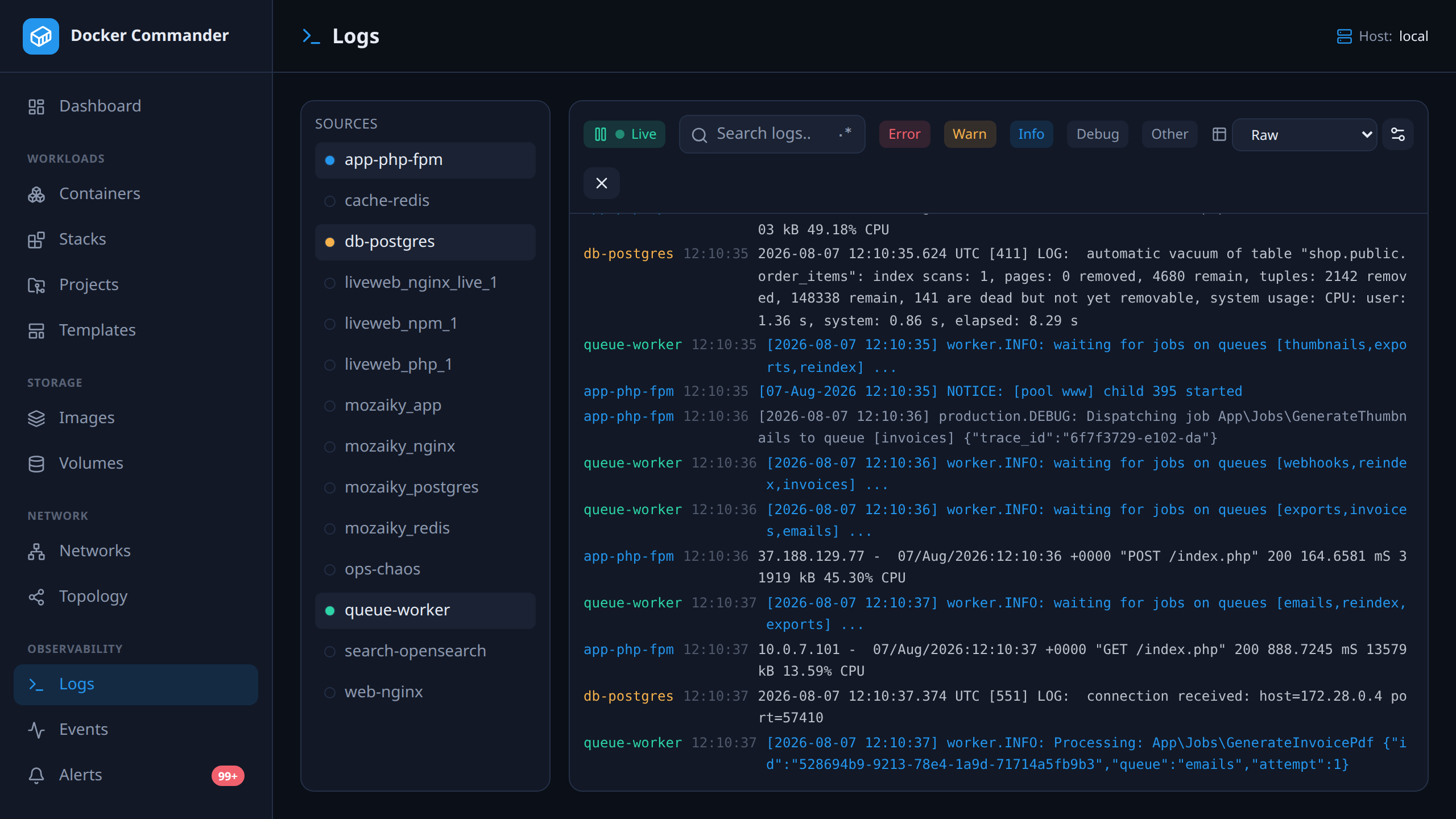
Aggregated logs — many containers in one stream, color-coded by source with level filters, regex search and structured parsing.
✨ Features
Monitor
- Live CPU / memory graphs over WebSockets and historical charts (Redis or in-memory).
- Dashboard that updates in near real time (Docker events stream): host facts, disk usage, a resource breakdown (each container's share of host CPU/memory plus host-wide network throughput), and a port scan that fingerprints what's actually listening.
- Network telemetry — per-container RX/TX rate (derived, so a counter reset on recreate reads as a gap rather than a spike), totals, packets / dropped / errors and the per-interface breakdown, plus endpoint totals on a network's detail — labelled for what they are, since Docker reports no per-network counters.
- Logs — per-container tail, plus a global aggregated view with level detection, regex search and saved parsing rules that turn lines into structured columns.
- Live events feed, container diff / top, disk usage, and raw JSON inspect for any object.
- Networks & topology — an interactive containers ↔ networks graph (force-directed, pan / zoom / fullscreen, search, filter by compose stack) with a compact list view (state, image, stack, ports, networks).
Control
- Containers: create/run, start/stop/restart/pause/unpause/kill, rename, update limits & restart policy, commit to an image, an interactive shell (xterm.js), and bulk restart/stop across a multi-selection (preview, confirmation, bounded parallelism, per-container success/failure summary).
- File browser inside containers and volumes — list, download, upload (incl. upload & extract a
.zip/.tar/.tar.gz), delete, create folders. - Images: pull (live progress), build, push, tag, save/load/import, history, prune, and vulnerability scanning (Trivy — severity summary + CVE table).
- Volumes & networks: list, inspect, create, remove, prune; networks also connect / disconnect containers, with a per-network detail (graph or list).
- Compose — discover & manage Stacks by label (CLI-created ones too: start/stop/restart/remove, and edit their compose file in place on the host, then redeploy — kept where it lives, so relative bind/
env_file/build.contextpaths still resolve), and Projects: managed compose folders edited in a built-in code editor (CodeMirror) with live, inline validation — compose (anchors/${VAR}-aware), Dockerfile (docker build --check), YAML/JSON/.env— plus a Resolved preview, a services/ports Summary, templates, schema-aware Compose autocomplete and image-name / tag suggestions (local, Docker Hub, and configured private registries), and deploy via thedocker composeCLI with profiles (the summary badges each service's real state, and clearly separates what's currently deployed from what's selected for the next deploy, so a profile-excluded service reads as such — not as stopped) and.zipimport/export — to the local or a remote host (a remote deploy copies the project's bind-mounted configs/scripts into volumes on that host, andbuild:contexts are uploaded with the build; a redeploy rebuilds an edited image).
Multi-host
- Manage local, TCP(+TLS) and SSH daemons; SSH host keys are verified (known_hosts / trust-on-first-use). Every view rebinds to the selected host, and the alert engine watches all hosts. A per-host detail panel shows the hardware / OS / engine, and a host can be disabled to take it out of monitoring (e.g. an offline laptop).
Alerting & integrations
- Rules on state, resource thresholds, log patterns and restart/crash-loops — editable, with severity & cooldown.
- Threshold alerts are conditions with a lifetime (
firing→escalated/eased→resolved), one per container + metric, so overlapping rules produce one incident instead of one each — and the feed is server-side paged, filtered and sorted, with who acknowledged it and every delivery attempt recorded against it. - Notify via webhooks, email (SMTP, per-host routing), an in-app feed, and a Prometheus
/metricsexporter. Rules import/export as a portable JSON bundle.
Remote control from AI tools (MCP)
- An optional, off-by-default Model Context Protocol server lets AI tools (Claude Code, Claude Desktop, Cursor) monitor and safely operate Docker as you: read tools (containers, logs, images, projects, stats, events, audit…), diagnostics without a shell (
docker top/diff, cross-container log search), the alert surface (history, what is firing now, rules, whether an alert was actually delivered, acknowledge), and safe control (start/stop/restart a container or a whole stack, deploy/down a project — including one targeting a remote host — plus a preview of what a deploy would change and a Trivy image scan), with MCP resources & prompts. - Authenticate with a bearer API token (self-service page) or OAuth 2.1 (PKCE, dynamic client registration). Every call reuses the app's RBAC, and a token can only narrow your rights (a subset of your sections and of the hosts you reach, plus read-only). New tokens expire after 30 days by default (admin-configurable, with never-expiring tokens off unless enabled). Changes are rate limited (30/min per user; reads are not) so a model stuck in a loop — or a stolen token — is bounded to a few containers rather than your whole estate, and hitting that ceiling is audited. Deliberately no exec / image export / file read / prune / remove. See MCP.
Security & administration
- Argon2id passwords + TOTP 2FA or passkeys (WebAuthn — phishing-resistant, and offered wherever the browser allows it: HTTPS or localhost; a passkey that verifies you with a PIN or fingerprint can also sign in on its own once you turn that on, with the password still there as the way back if the key is lost), optionally exempt for localhost, with several authenticators per account — pair the new phone before wiping the old one; the last one can't be removed. Rate limiting, strict headers, signed
HttpOnlycookies. Everyone can see what is signed in as their account — address, browser, last used — and sign out any of it, or everything else, from their profile. - Multi-user with roles, per-section permissions, read-only mode, global feature flags, and an audit log. Per-user UI preferences (filters) follow the account across browsers.
- Optional LDAP / Active Directory login with auto-provisioning and group mapping — a directory group grants named roles (or raw sections), re-derived on every login, so membership drives permissions. Registry / SMTP / LDAP secrets and host TLS private keys are encrypted at rest (AES-256-GCM).
Ops
- Single CGO-free binary, embedded UI, systemd unit, config file, native HTTPS (built-in
--make-certsself-signed cert helper, or behind a proxy),/healthzprobe, and structured alert logging to the journal/syslog. See Deployment. - Self-update — a one-tap in-app update & restart for admins (and an "update available" banner), plus the
dockercmd --self-upgradecommand (SHA-256-verified, atomic binary replace).
🏗️ Architecture
React + TypeScript SPA  ──REST──▶  Go backend  ──Docker Engine API──▶  dockerd
   (Tailwind, Recharts)  ◀─WebSocket (live stats + logs)─┘
The Go server embeds the built SPA (go:embed) and serves everything from one
origin, so the production artifact is a single executable.
| Layer | Technology |
|---|---|
| Backend | Go, chi, coder/websocket, official Docker SDK |
| Storage | SQLite via modernc.org/sqlite (pure Go, no CGO); metric history in Redis or memory |
| Auth | Argon2id, TOTP (pquerna/otp), JWT, optional LDAP |
| Frontend | React, TypeScript, Vite, Tailwind CSS, Recharts, React Flow, xterm.js |
🐳 Docker versions
The app talks to Docker two ways: the Engine API through the official Go SDK,
and the docker compose CLI as a subprocess for project deploys. Both move,
and you run whatever your distro ships — so here is what is actually tested, not
what is hoped for.
| Version | |
|---|---|
| Minimum Engine API | 1.43 (Docker Engine 24) |
| Tested Engine majors | 24, 25, 26, 27, 28 (nightly; see the workflow runs for the current result) |
| Tested Engine patches | a handful of exact patch releases of the newest majors are also pinned and tested nightly, independent of the floating major tags (see the workflow runs for the current exact versions) |
| Compose | the docker compose plugin, v2 or newer (legacy docker-compose v1 is not supported); a handful of recent v2 releases are pinned and tested nightly (see the workflow runs) |
| Client SDK | pinned in go.mod, negotiated down to the daemon at connect time |
The SDK calls WithAPIVersionNegotiation(), so a newer client speaks whatever the
daemon understands — you do not need to match versions. Below API 1.43 the app is
neither tested nor claimed to work.
These numbers are measured, not remembered: the
compatibility workflow runs the app's whole Docker
integration suite against a pinned docker:NN-dind for each major, nightly and on
demand, and prints the negotiated API version — plus the Compose version it ran
with — for every run. Three axes are pinned: every Engine major is tested against
the newest of a small set of recent Compose releases, the newest Engine major is
additionally tested against the older ones in that set, and a handful of exact
Engine patch releases (docker:X.Y.Z-dind, not just docker:NN-dind) are
pinned and tested too — since the plain major tag always floats to whatever patch
is newest when it's pulled, it alone can't prove a specific patch is good, only
that the latest one currently is. So the matrix answers "which daemons work",
"which recent Compose releases work", and "does this exact Engine patch work",
short of a full Engine × Compose cross product. Reproduce any row locally:
docker run -d --name dc-compat --privileged -e DOCKER_TLS_CERTDIR="" \
  -p 127.0.0.1:12375:2375 docker:24-dind --host=tcp://0.0.0.0:2375 --tls=false
DC_COMPAT_DOCKER=tcp://127.0.0.1:12375 DOCKER_HOST=tcp://127.0.0.1:12375 \
  go test -count=1 -run 'TestIntegration|TestCompat' ./internal/docker/
Both variables matter:
DC_COMPAT_DOCKERpoints the app at the daemon,DOCKER_HOSTpoints the Compose CLI at the same one. Set only the first and the Compose tests deploy to your own daemon and hang waiting for containers that started somewhere else.
🚀 Quick start
Option A — download a release binary
Grab the binary for your OS/arch from the Releases page, then:
chmod +x dockercmd-linux-amd64
./dockercmd-linux-amd64           # serves on http://127.0.0.1:8470
On Windows, run dockercmd-windows-amd64.exe from a terminal.
Debian/Ubuntu & Fedora users can grab a .deb / .rpm from the same page — it
sets up the systemd service. See Deployment → packages.
Option B — Homebrew (macOS & Linux)
brew install koduj-dev/tap/dockercmd
dockercmd --version
Installs the signed release binary for your OS/arch from the koduj-dev/homebrew-tap.
Option C — build from source
Requires Go ≥ 1.26, Node.js ≥ 18 (to build the UI) and a running Docker daemon. See Building for per-OS details.
git clone https://github.com/koduj-dev/docker-commander.git
cd docker-commander
make build      # builds the UI, then the binary with the UI embedded
./dockercmd     # http://127.0.0.1:8470
Option D — Docker
docker run -d --name dockercmd \
  -p 127.0.0.1:8470:8470 \
  --group-add "$(stat -c '%g' /var/run/docker.sock 2>/dev/null || stat -f '%g' /var/run/docker.sock)" \
  --read-only --tmpfs /tmp \
  --security-opt no-new-privileges \
  --cap-drop ALL \
  -v /var/run/docker.sock:/var/run/docker.sock \
  -v dockercmd-data:/data \
  ghcr.io/koduj-dev/docker-commander:latest
Multi-arch (amd64/arm64), distroless, runs as a non-root user with a read-only root filesystem and no added capabilities. Notes:
- ⚠️ Mounting the Docker socket grants host-root-equivalent access — whoever
reaches the UI (or escapes the app) controls the daemon, i.e. the host. Keep
the UI on localhost (as above) or behind HTTPS + strong auth; never
expose it unauthenticated. The
--group-addline gives the non-root user the owning GID of the Docker socket — read from/var/run/docker.sockitself (stat, with a BSD fallback), so it works even without adockergroup. On rootless / Docker Desktop, where the socket is owned by your user, drop the--group-addline. - Data lives in the named volume
dockercmd-data(a fresh one inherits the right ownership). A bind mount (-v /srv/dc:/data) must be writable by uid 65532 first:sudo chown 65532:65532 /srv/dc. - In production, pin an immutable digest (
...@sha256:…) instead of:latest, and verify the image (see below).
Option E — go install
go install github.com/koduj-dev/docker-commander/cmd/dockercmd@latest
Installs to $(go env GOPATH)/bin/dockercmd. (Built this way the version reports
dev; the release binaries and the image carry the real version.)
Verifying a download
Every release ships a SHA256SUMS plus a keyless cosign signature bundle
(SHA256SUMS.bundle) covering the binaries and the SPDX SBOM, plus
per-binary build provenance:
sha256sum -c SHA256SUMS --ignore-missing        # checksums (binaries + SBOM)

cosign verify-blob --bundle SHA256SUMS.bundle \
  --certificate-identity-regexp '^https://github\.com/koduj-dev/docker-commander/\.github/workflows/release\.yml@refs/tags/v' \
  --certificate-oidc-issuer https://token.actions.githubusercontent.com SHA256SUMS

gh attestation verify dockercmd-linux-amd64 --repo koduj-dev/docker-commander
Verifying the bundle needs cosign v3+. Releases up to and including v1.5.0
were signed with cosign v2 and ship a SHA256SUMS.sig / SHA256SUMS.pem pair
instead — verify those with
cosign verify-blob --certificate SHA256SUMS.pem --signature SHA256SUMS.sig ….
The container image is signed and carries SLSA provenance + an SBOM as well:
# verify the exact digest you'll run (copy it from the release notes or
# `docker buildx imagetools inspect ghcr.io/koduj-dev/docker-commander:latest`):
IMAGE=ghcr.io/koduj-dev/docker-commander@sha256:<digest>
cosign verify "$IMAGE" \
  --certificate-identity-regexp '^https://github\.com/koduj-dev/docker-commander/\.github/workflows/release\.yml@refs/tags/v' \
  --certificate-oidc-issuer https://token.actions.githubusercontent.com

gh attestation verify "oci://$IMAGE" --repo koduj-dev/docker-commander
Open http://127.0.0.1:8470, create the admin account, scan the QR code to enable 2FA — done.
⚙️ Configuration
Every option is a flag with an environment-variable equivalent, and can also
live in a config file — see
deploy/commander.conf.example for the full
list. The Docker connection also honours the standard DOCKER_HOST /
DOCKER_CERT_PATH variables.
| Flag | Env | Default | Description |
|---|---|---|---|
-host | DC_HOST | 127.0.0.1 | Listen host/interface. Use 0.0.0.0 to bind all (deliberate). |
-port / -p | DC_PORT | 8470 | Listen port. |
-addr | DC_ADDR | (unset) | Legacy full host:port; overrides -host/-port. |
-tls-cert | DC_TLS_CERT | (off) | PEM certificate path; with -tls-key, serves HTTPS directly. |
-tls-key | DC_TLS_KEY | (off) | PEM private-key path. |
-mcp-enabled | DC_MCP_ENABLED=1 | off | Enable the remote MCP server for AI tools. Off by default; serve behind HTTPS. See MCP. |
-mcp-public-url | DC_MCP_PUBLIC_URL | (unset) | Externally reachable base URL (https://host) — required for the MCP OAuth flow (bearer tokens work without it). |
-data-dir | DC_DATA_DIR | OS config dir | SQLite DB + signing/encryption keys. |
-session-ttl | — | 12h | Session token lifetime. |
-dev | DC_DEV=1 | off | Dev mode: API only + permissive CORS for Vite. |
-metrics-token | DC_METRICS_TOKEN | (open) | If set, /metrics needs Authorization: Bearer <token> (or ?token=). |
-redis-addr | DC_REDIS_ADDR | (memory) | Redis host:port for metric history; empty = in-memory ring. |
-redis-password | DC_REDIS_PASSWORD | (empty) | Redis password; DC_REDIS_DB selects the DB index. |
-metrics-retention | DC_METRICS_RETENTION | 6h | History retention (e.g. 30m, 24h). |
-trusted-proxies | DC_TRUSTED_PROXIES | (none) | Reverse-proxy IPs/CIDRs whose X-Forwarded-For may be trusted. The client IP keys rate limits, the localhost 2FA exemption and audit records — set it behind a proxy, and never to a range you don't control. |
-self-update | DC_SELF_UPDATE | on | Let admins apply an update from the web UI. 0 keeps the "update available" banner but forbids web-triggered self-replacement. |
🖥️ Run as a service
The server keeps monitoring, alerting and metric history running 24/7 whether or not a browser is connected — so run it as a background service. On Linux/macOS/Windows the binary installs itself:
sudo ./dockercmd --install-service     # Linux — systemd (needs root)
./dockercmd --install-service          # macOS — launchd LaunchAgent (your user, not sudo)
dockercmd.exe --install-service        # Windows — native SCM service (elevated PowerShell/cmd)
It creates a dedicated user (or, on Windows, registers with the Service Control
Manager), writes the (hardened) service definition and starts it. To read
exactly what gets installed, use the equivalent scripts in deploy/:
sudo ./deploy/install-linux.sh ./dockercmd                  # Linux  — systemd
./deploy/install-macos.sh ./dockercmd                       # macOS  — launchd
.\deploy\install-windows.ps1 -BinPath .\dockercmd.exe       # Windows — Scheduled Task (elevated PowerShell)
The Windows Scheduled Task script remains as a dependency-free alternative to the native SCM service above.
See Deployment for what each installer does, the manual systemd steps, HTTPS, logging and the config reference.
It binds to loopback by default — put it behind a TLS reverse proxy (nginx, Caddy) to expose it, and keep the localhost 2FA exemption off on servers.
🔨 Building
The UI is built with Node and embedded into the Go binary; the result is a single CGO-free static executable.
make build          # current platform → ./dockercmd
make release        # cross-compile all platforms → dist-bin/ (+ SHA256SUMS)
make test vet       # tests + static checks
VERSION=v1.0.0 make release   # stamp the version into the binary
Per OS (building from source — end users can just download a release):
| Host OS | Notes |
|---|---|
| Linux | make build. Default target for releases. |
| macOS | make build (Intel or Apple Silicon). Cross-compiles to both darwin/amd64 and darwin/arm64. |
| Windows | Use WSL or Git Bash for make, or run the two steps manually: cd web && npm ci && npm run build then go build -o dockercmd.exe ./cmd/dockercmd. Releases ship windows/amd64 + windows/arm64 .exe. |
make release builds linux/{amd64,arm64}, darwin/{amd64,arm64} and
windows/{amd64,arm64} from any host (no C toolchain needed).
🧑💻 Development
make dev                       # API on :8470 (dev mode)
cd web && npm ci && npm run dev        # UI on :5173, proxies /api → :8470
Tests
go test -short ./...   # fast unit tests (what CI runs)
go test ./...          # + integration tests — needs a local Docker daemon
                       #   (spins throwaway Redis / OpenLDAP / MailHog containers)
📈 Monitoring & alerting
Define rules on the Alerts screen:
| Type | Fires when… |
|---|---|
state | a container emits a lifecycle event (die, kill, oom, stop, unhealthy) |
resource | CPU% or MEM% crosses a threshold for N seconds |
log | a log line matches a substring / regex |
restart | a container restarts too often within a window (crash loop) |
Rules target containers by name substring, carry a severity + cooldown, and can
notify webhooks (Go-template bodies) and/or email. Prometheus: scrape
/metrics for dockercmd_container_cpu_percent, _mem_bytes, _mem_percent,
_container_running (labelled by id, name, host).
🔒 Security notes
- Local-by-default (binds to loopback). Behind a server, terminate TLS at a reverse proxy.
- 2FA is enforced everywhere unless an admin enables the localhost exemption (Settings), which applies only to a direct loopback connection — a proxied request never qualifies, however it presents itself. Failed 2FA attempts are rate limited and audited, so the second factor can't be brute-forced by someone who already has the password.
- Passkeys are bound to this site's address. A page that impersonates this one cannot use an assertion it captures, and a signature counter that goes backwards — the sign of a cloned key — is refused and audited.
- Sessions are revocable. A session is a recorded row, not just a signed token: signing out, revoking one from your profile, or changing your password takes effect on the next request rather than whenever the token would have expired.
- SSH hosts verify the daemon host key (known_hosts / trust-on-first-use); a changed key is refused as a possible MITM.
- Signing key and at-rest encryption key are generated on first run and stored in the data dir; stored secrets are never returned by the API.
- The MCP server is off by default (
DC_MCP_ENABLED); when on, it's bearer/OAuth-authenticated, reuses the app's RBAC (with per-token read-only / section scope), and exposes only reads + safe control — no exec, image export, file reads or prune/remove. Control calls are additionally rate limited per user to bound the damage a runaway or stolen token can do. See MCP.
🧪 How it's tested
You're pointing this at real Docker daemons, so the fast tests are the floor, not the ceiling. Alongside ~670 Go unit tests and ~190 frontend tests, the repo carries 115 adversarial "pentest" cases that assert attacks are rejected (token forgery, OAuth replay, CSRF, IDOR, per-host scope bypass, privilege escalation, path traversal), an integration tier against a real Docker daemon (plus throwaway Redis / OpenLDAP / SMTP), and an end-to-end tier that deploys to separate daemons over both TCP and SSH — because a mock daemon can't tell you whether a remote deploy works.
On top of the tests, the tree is periodically swept by an adversarial review on Claude Fable 5 — independent reviewers per lane (auth & crypto, authorization, untrusted input, backend correctness, frontend), each instructed to refute a finding before reporting it. It is not a tier and it guards nothing by itself: a finding counts only once it lands as a fix plus the test that fails without it.
CI runs the deterministic tiers; the daemon-backed ones are developer-run. docs/testing.md lays out each tier, how to run it, and what is deliberately not covered.
📚 Documentation
A per-feature user manual lives in docs/ — one page per agenda (Containers, Images, Logs, Alerts, Hosts, Users, Settings…) plus Getting started, Deployment and How it's tested.
🗺️ Roadmap & changelog
See NEXT.md for the status and future ideas, and CHANGELOG.md for what shipped in each release.
🤝 Contributing
Issues and pull requests are welcome! See CONTRIBUTING.md for build/test/style guidelines, CODE_OF_CONDUCT.md, and SECURITY.md for reporting vulnerabilities (privately, please).
🤖 Made with AI
Roughly 95 % of this project was built with AI (Claude Code) — code, tests, and docs — under human direction and review. 🎉
📄 License
MIT.