Jade Note
Notes as AI memory
Documentation
app.jadenote.app
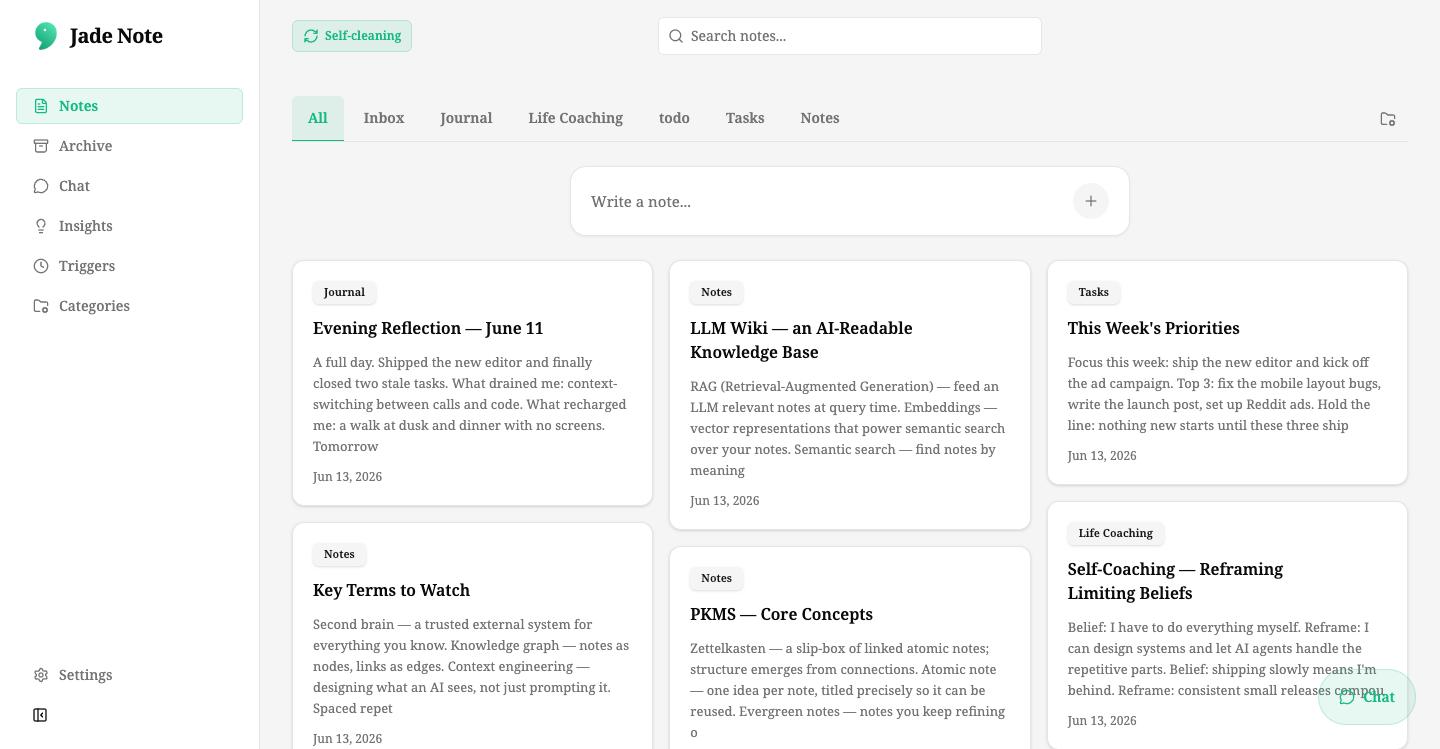
Casual notesbecome your AI's memory.
“LLMs don't keep memory across conversations. When a session ends, what they learned about you is lost. Jade Note fills that gap.”
Writable memory
For notes you write and facts your AI gathers in conversation. Not read-only — memory that people and AI write and grow together.
Structured memory
Categories, typed links, and category wikis hold memory as a related knowledge graph — not a blob of text.
Verifiable changes
Every write is versioned. With previews and rollback, autonomous AI writes are allowed safely.
Catch up
AI catches up on your latest notes — checking and updating staleness, conflicts, importance, and link health. Memory that never falls behind.
An MCP-native note app —not a note app with MCP bolted on.
MCP isn't an integration here, it's the interface the product is built around. 26 MCP tools, OAuth 2.0, and per-category permissions mean MCP-capable agents like Claude and ChatGPT read and write your notes securely — nothing to self-host. See how it compares to other MCP note apps →
MCP server · OAuth 2.0
The one place your AI can use as persistent memory
Read and write notes, semantic search, typed links, version control — everything an AI agent needs as memory, through a standardized MCP interface.
read · search_notes read · get_note write · create_note write · edit_note link · create_note_link version · restore_note_version
Safe writes
Safe writes
Change previews, automatic versioning, rollback, and per-note write protection. Safety designed for autonomous AI writes.
Provenance
Provenance tracking
Notes created via MCP are identified and listable. You always know which memory was written by whom.
Auth
Per-client auth
OAuth 2.0 issues a token per client. Connect multiple agents securely.
Multi-client
Memory belongs to you, not an app
One memory store, read and written at once by multiple MCP clients, the web app, and automated triggers.
What it looks like, live.
Real conversations with ChatGPT and Claude, answered straight from your notes over MCP.
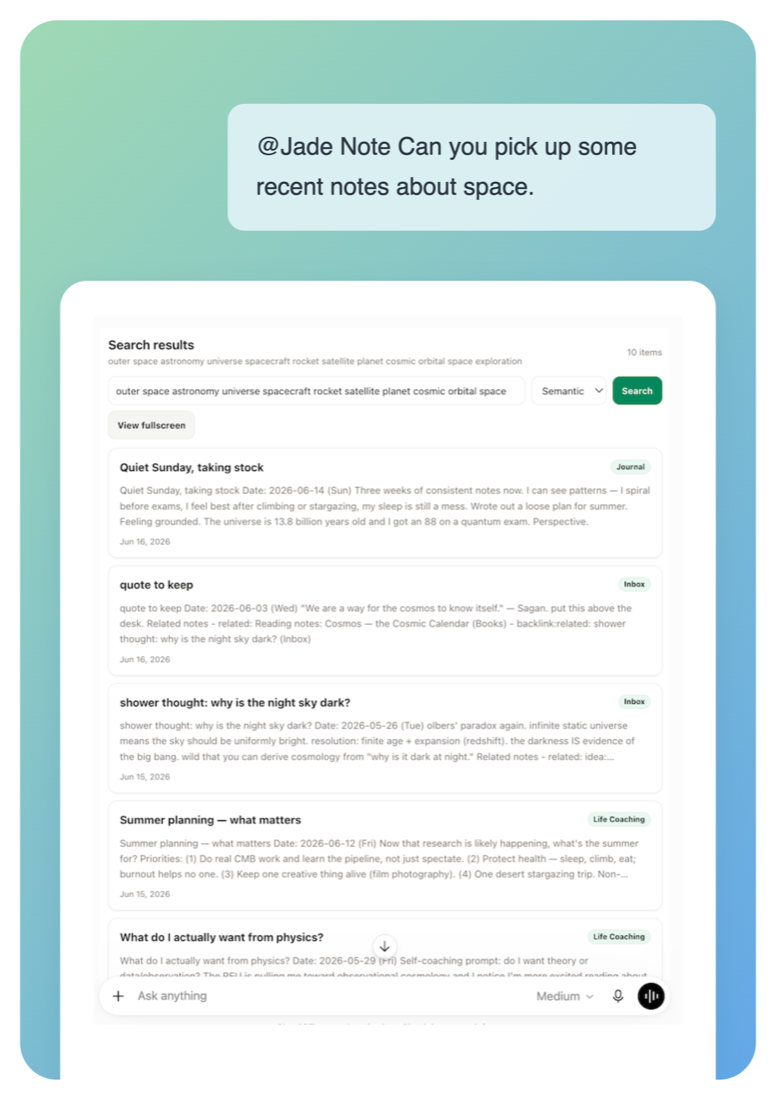
01 / read · search_notes
Ask for your notes by meaning
Mention @Jade Note in ChatGPT or Claude and semantic search pulls the right notes — journals, quotes, shower thoughts — even when you don't remember the exact words.
→Semantic and keyword search over every note
→Results carry categories and dates for context
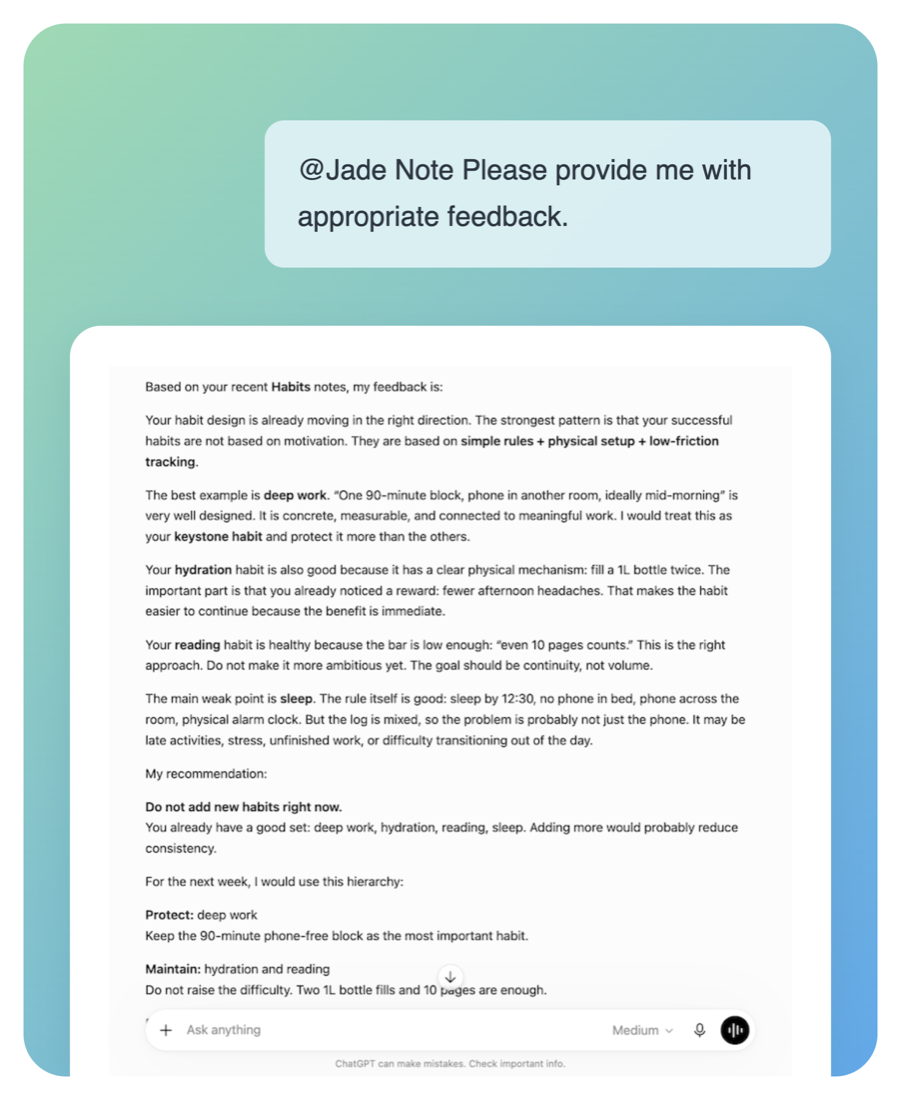
02 / read · grounded answers
Feedback that actually knows you
Because your AI reads real habit logs and journals, its advice is grounded in your history — keystone habits, weak points, and what to protect next week.
→Answers cite the notes they draw from
→New conclusions can be written back as notes
How memory stays alive.
Around the memory store: features for AI to grow, tidy, and deliver memory to you.
01 / Triggers & Insights
Memory that thinks while you're away
Run AI tasks automatically on schedules or events. Even when you're not talking, AI reviews memory and generates and appends insights.
→Recurring runs by day and time; auto-fires on note creation
→Generated insights delivered instantly via push
Mon 08:00 weeklyReview last week's notesscheduled
Insight generated
Possible conflict between “Project direction” and “Past decisions.” Review?
02 / Structured memory
A knowledge graph, not a pile of text
Connect notes with five relations: related / parent / child / continues / references. Category wikis hold the knowledge base while AI suggests links to grow the graph.
→Structure with custom properties and form schemas
→Category wikis stay current as context for your AI
Project directionhub
Requirementsparent
Decisionsreferences
Meeting notescontinues
Researchrelated
03 / Note app · Markdown editor
Capture it the easy way
Write notes casually in the Markdown editor. You edit the same memory store your AI uses, as an everyday note app. Semantic search finds related notes, and ChatGPT or Claude can cite or update them over MCP.
→Categories, search, and a familiar Markdown editor
→The same notes your AI reads and writes
Markdown
Project direction
Top priority: shift to a memory layer. Decisions stay linked so any AI client can pick up the thread.
For every moment you want AI to remember you.
Personal context
Teach AI about you
Write your preferences, background, and ongoing context once, and any AI client recalls them consistently.
Projects
Project memory
Link decisions, requirements, and minutes with typed links. AI answers with full history in mind.
Research & learning
Research & learning
Keep reading notes and findings as memory; triggers periodically re-summarize the key points.
Journaling
Daily logs & reflection
Record journals, moods, and small wins; AI finds patterns and themes.
Team knowledge
Knowledge base
Organize knowledge in category wikis, always referenced fresh as context for your AI.
Lists & life
Everyday lists
Wish lists, travel ideas, places to go. Jot them down and let AI organize.
Start your memory free.
Try the full AI workflow with a 30-day Pro trial.
Free
Notes, categories, search, and starter automation.
$0/ month
- →Create & edit up to 2,000 notes, organize & search by category
- →Access your notes over MCP
- →Semantic search and RAG indexing
- →Note creation & edit suggestions
- →20 trigger runs / month
30-day Pro trial
Pro
Full AI across notes, categories, suggestions, and automation.
$5$3/ month40% off
5,000 AI credits / month Pro Trial: 2,000 AI credits / month
🔒40% off — $3/month (regular $5) for a limited time only. Subscribe once and keep this price for as long as you stay.
- →Everything in Free
- →Unlimited notes
- →Version History
- →120 trigger runs / month
- →Flag webhooks
- →Catch up: AI keeps notes, links, and Wikis up to date
Billed after trial · cancel anytime
Frequently asked questions
MCP is the primary interface, not an add-on. Jade Note ships a hosted MCP server with OAuth 2.0, 26 tools, per-category access levels, and versioned writes — so you connect a URL instead of running a bridge script against a local app.
Both. Day to day it's an AI note app for casual notes via a Markdown editor. Share those notes over MCP with ChatGPT or Claude, and AI can read and write them as persistent memory. People and AI grow the same notes — that's the “memory layer” side.
Any AI agent that supports MCP (Model Context Protocol). Starting with Claude Desktop, MCP clients can read, write, search, link, and version notes with OAuth authentication.
Hardly any on Pro or Pro Trial. Catch up lets AI check and update freshness, consistency, importance, category Wikis, and link state.
New users get a 30-day Pro trial with 2,000 AI credits per month.
AI credits cover AI-powered processing. For example, Catch up uses credits when AI reviews and updates your notes, links, and category Wikis. The amount used depends on how much content Catch up processes.
AI features pause until the next monthly reset. Notes, categories, search, and settings stay available.