Ins Autopilot
Instagram automation and outreach Chrome extension for targeted follow, protected unfollow, auto like, comments, and DMs.
Documentation
Instagram outreach, right in your browser.
Find your people.Keep in touch.
Start conversations. Remember the details. Know who to follow up with.
5 new DM contacts total · No card required. Trial details →
No Instagram password required · You control what runs
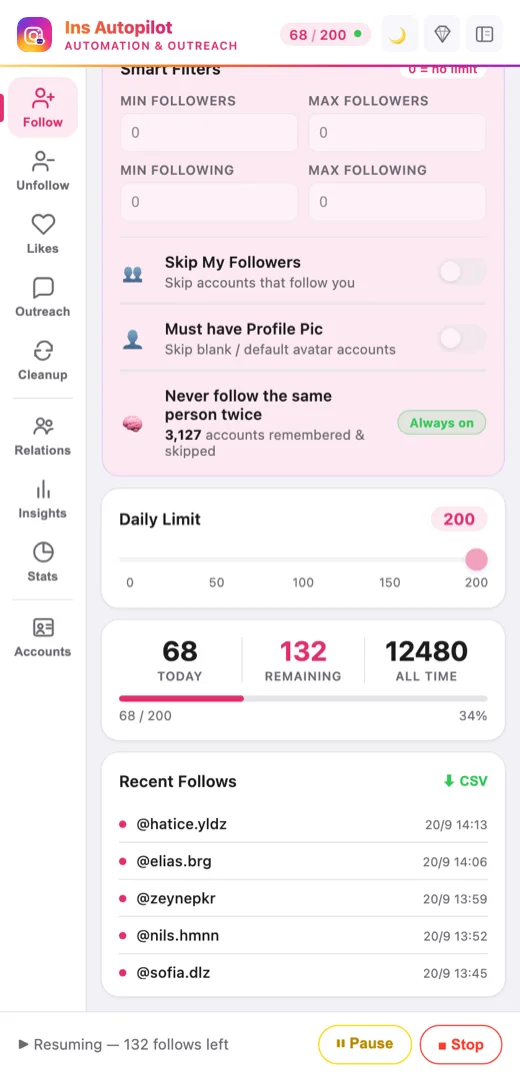
Product previews · Sample data · Runs in your signed-in Chrome browser.
People, not another spreadsheet.
Find potential contacts among followers, likers and commenters. Keep the useful ones close.
“Have we talked before?”Now you know.
Notes, message history and next steps. Together, for each account.
Local browser records. Not a shared team inbox or cloud CRM.
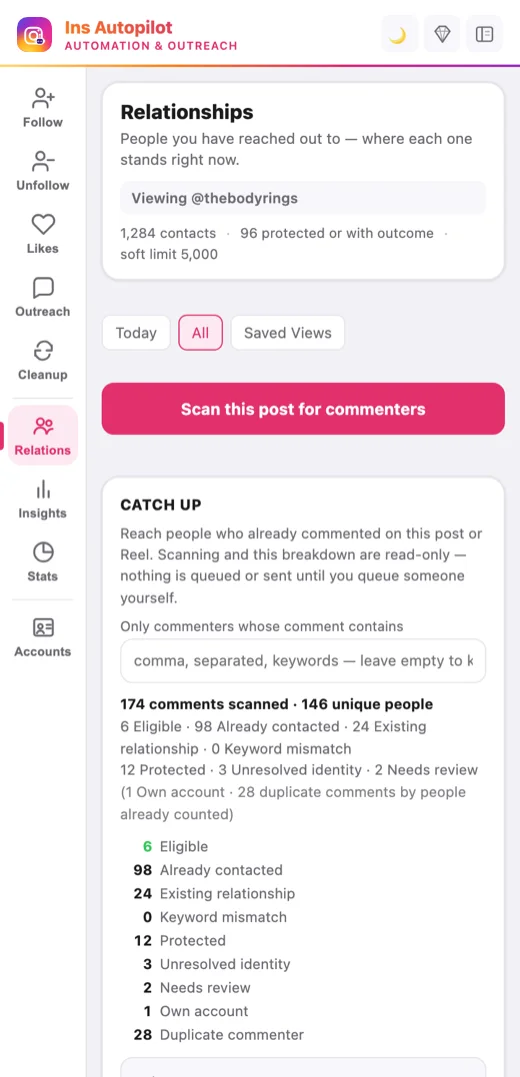
Relationships · Sample data
Say hello.Don't lose the thread.
Try Direct or Bulk DM. With Pro, draft with AI and start follow-up sequences that stop when a reply is detected.
Walk through your first conversation →
AI drafts need your own provider and API key. Provider charges are separate. You review the message and start the workflow.
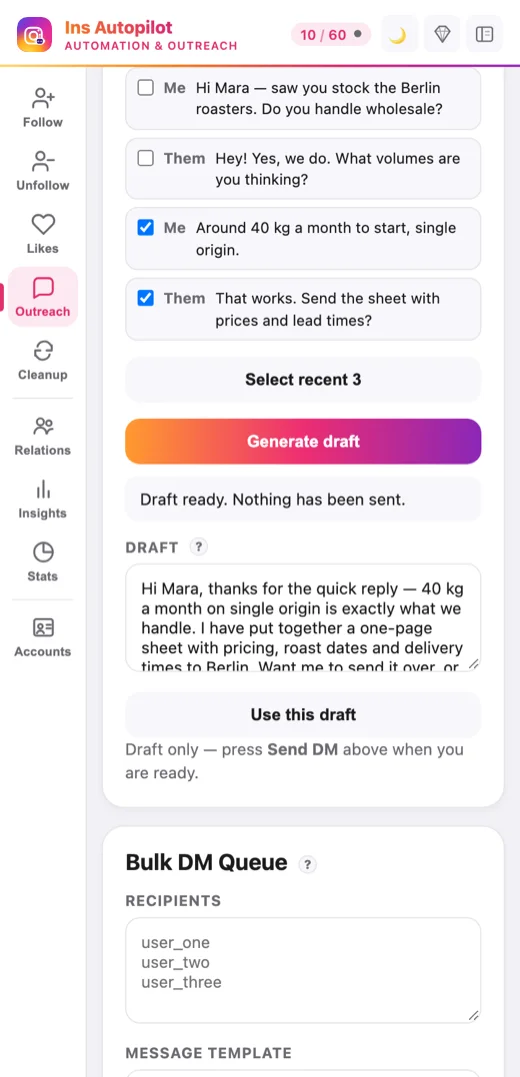
AI Draft · Pro · Sample data
Open Instagram. Take it from there.
- 01
Add it to Chrome.
Sign in to Instagram as usual. Open the side panel. - 02
Pick your people.
Review a recipient and write a message worth sending. - 03
Keep the context.
Check delivery history. Save notes for your next conversation.
Not sure where to start?
Follow one simple workflow, step by step.
You set the pace.
Choose the recipients. Review the message. Start, pause or stop from your browser.
No Instagram password.
Use your own signed-in session.
Uncertain means review.
Unverified delivery is not called a success.
Limits still apply.
Automation carries platform risk. No account-safety or results guarantee.
Approved queues run after you start them. Chrome and the matching Instagram session must remain available. Risks & controls →
Relationship records stay local. Licensing and usage reach our backend; requested AI context reaches your provider; tracked links use our tracking service. Privacy details →
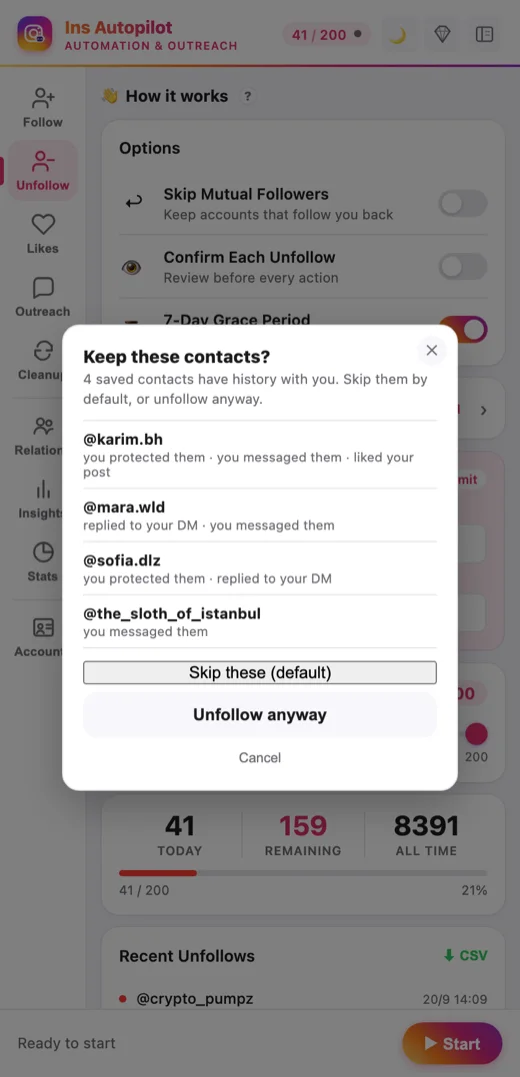
Keep the people who matter.
Review flagged contacts before unfollowing. Use Guard and your Safe List.
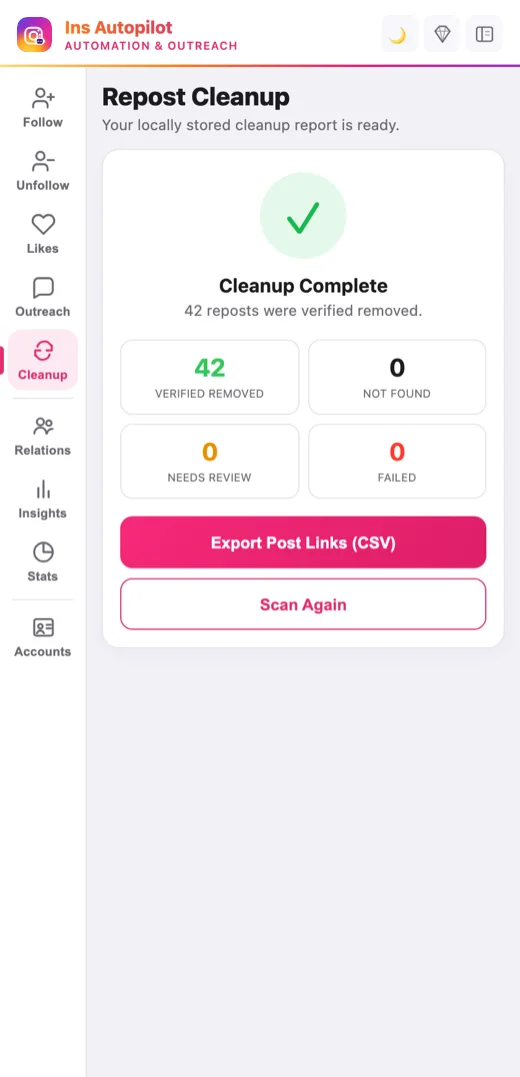
Fresh start for your reposts.
Scan Your activity → Reposts. Review the selection, then confirm removal.
10 verified removals/day on Free; 200/day on paid plans. Uncertain results pause for review. Removal cannot be undone.
Try DM outreach. Upgrade when you need more.
Start small, on us. Go Pro for ongoing outreach, AI drafts and follow-up. Same Pro tools; higher daily limits on Annual.
Free
$0/forever
no credit card required
Try real DM outreach before you subscribe.
- Outreach Trial — up to 5 new DM contacts total
- Direct DM and Bulk DM Queue
- Follow, unfollow and like workflows
- Review local relationship records
- Repost Cleanup — scan, review and remove
- 1 Instagram account
Trial: at most 3 new contacts per UTC day; 7 days from first confirmed delivery. One confirmed Trial DM per contact; Direct and Bulk share the same allowance. Not 5 messages per day. AI drafts, comments, automated follow-up and tracked links require Pro.
Daily usage limits
- 10 follows, unfollows & likes per day, each
- Repost Cleanup — 10 verified removals per day
- Allowance renews daily
Flexible Plan
Monthly
$29/month
per month · cancel anytime
For regular outreach and follow-up.
- DM outreach & stop-on-reply sequences
- AI DM drafts & qualification suggestions
- Contact notes, custom fields & saved views
- Tracked links & recorded outcomes
- 3 Instagram accounts, shared allowance
- Safe List snapshot protection
- Priority support Daily usage limits
- 200 follows, unfollows & likes per day, each
- 30 comments & 30 DMs per day
- Repost Cleanup — 200 verified removals per day
Save 28%
Annual
$249/year
per year · about $20.75/month
For ongoing outreach, with higher daily limits.
- Everything in Monthly
- Higher daily DM & comment limits
- AI drafts, sequences & relationship tools
- Tracked links & recorded outcomes
- 3 Instagram accounts, shared allowance
- Priority support Daily usage limits
- 250 follows, unfollows & likes per day, each
- 50 comments & 50 DMs per day
- Repost Cleanup — 200 verified removals per day
Paid-plan allowances are shared across bound accounts, not multiplied per account. AI requires your own supported provider configuration and any provider charges are separate.
Latest from the blog
Practical, evidence-led guides — every number labeled confirmed or community-reported.
·7 min read
Instagram bulk DM: what the limits actually allow (2026)
Instagram confirms that direct messages are capped and publishes no number. Where a cold message lands, who can refuse it entirely, and why a randomised delay does not change the policy that governs it.
Updated October 24, 2026
·7 min read
Instagram pinned posts: how many you can pin (2026)
Instagram documents three pins, one exact menu label, and one detail most guides miss: unpinning returns the post to its original spot instead of deleting or archiving it. What the platform states, and the two things it never does.
Updated October 21, 2026
·8 min read
Instagram read receipts: how to turn them off (2026)
Instagram documents two switches, not one: a per-chat setting and an account-wide one. It also states the part most guides miss — turning read receipts off for all chats does not override a chat you already changed individually.
Updated October 19, 2026
Frequently asked questions
The four questions that come up most. All 10 are answered in full on the FAQ page.
Is Ins Autopilot free?
Yes. Free includes basic follow, unfollow and like workflows, with 10 actions per type per day, plus 10 verified Repost Cleanup removals per day and one account. The no-card Outreach Trial covers up to five unique confirmed DM contacts per Instagram sender account (one confirmed Trial DM per contact), at most three new contacts per UTC day, for seven days from the first confirmed delivery. Basic-action and Cleanup allowances renew daily; Trial contacts do not. Ongoing DM outreach, AI drafts, comments, sequences and tracked links require Pro. Paid plans include relationship tools, recorded outcomes and three accounts with shared allowances, at $29/month or $249/year (about $20.75/month). Monthly daily caps are 200 per basic action and 30 each for comments and DMs; Annual raises these to 250 and 50. Both paid plans include 200 verified Cleanup removals per day. AI provider fees are separate.
Is it safe to auto follow and unfollow on Instagram?
Daily caps, configurable pacing, Safe List protection and result review help you control actions. They do not guarantee account safety. Instagram can still restrict your account or reject actions, and its platform rules take precedence.
Do I need to give you my Instagram password?
No. Ins Autopilot never asks for your Instagram password. It uses your existing browser session and reads the Instagram profiles, follower lists, comments and messages needed for the tasks you configure locally. This content is not uploaded to Ins Autopilot servers; our services receive account identifiers and the device, usage, license, billing and support data described in our privacy policy. Optional tracked links send the destination URL and an opaque contact reference to our servers and record link opens. If you enable AI Draft and request a draft, your instructions and selected context go directly to your chosen AI provider, including conversation excerpts only when you choose to include them. Your AI key stays in your browser. See our privacy policy for details.
Does it send DMs and reply to comments, or is that still coming?
Both are live, not upcoming — on PRO plans. Outreach has its own tab with four tools: Direct Message sends one message to one account; Bulk DM Queue works through a recipient list with a random min/max delay between sends; Comment replies to Reels comments that match a keyword you set; and Monitor tracks new followers, new likers and DM replies, with optional auto-DM templates. History shows every send and its status. Paid DM and comment caps are counted separately from follows, unfollows and likes. Free users can try Direct and Bulk DM within the separate Outreach Trial limits.
Real users. Real accounts, actually running.
From finding people to starting conversations — here's how customers use Ins Autopilot, in their own words.
Swipe or scroll to read all 11 reviews. Keyboard: focus the review list and use the arrow keys.

Yuki Tanabe Ceramic artist
★★★★★
A simple way to send one thoughtful DM
I only use the single Direct Message tool. I write it, read it, send it — that is it. Sounds small, but I had been copy-pasting by hand and twice put the wrong gallery name in the greeting. It sends through the normal Instagram window, so the thread on their end looks like I typed it myself.
PRO · Monthly
★★★★★
Paced outreach with a record of every send
The min/max delay between sends is the setting that matters. Set it to 45–120 seconds and a 40-name list spreads across a morning instead of firing off in one burst. And because every send lands in History, I can actually answer when a client asks whether we messaged someone.
PRO · Annual

Rachel Kimmelman Founder, Kimmelman Vintage
★★★★★
Finding the right audience
I was following anyone who looked vaguely like my customer, then wondering why nothing stuck. Now I point it at two vintage resellers whose audiences actually overlap mine, filter out anyone under 500 followers, and let it run while I am packing orders. New-follower DMs went from nothing to a few a day in about two weeks.
PRO · Monthly

Marco Alvarez Alvarez Media
★★★★★
A clearer record of what actually ran
Every dashboard I have used before rounds up in its own favour. This one puts follows, unfollows, likes, comments and DMs on one chart, and when I sat and watched the browser the day's totals lined up. We export the unfollow history to CSV every Friday for the client report — that used to be an hour of copy-paste.
PRO · Monthly

Lena Hoffmann Owner, Haut & Klar Skin Studio
★★★★★
The Safe List helped me avoid a mistake
I nearly unfollowed two clients who book with me every single month. Put them on the Safe List, turned on Confirm Each Unfollow for the first week, and it has been fine since. The confirmation step is slower than I would like, but I stopped second-guessing every run, so it is a fair trade.
PRO · Monthly

Ravi Menon Founder, Tablewise
★★★★★
Fewer repeat questions to type out
Pricing, integrations, is there a free tier — that is 90% of the comments on my Reels. I set the keywords once and it replies in the thread within a couple of minutes. Support answered on WhatsApp the same afternoon when I asked how to stop it replying twice to the same person.
PRO · Monthly

Sofia Marchetti Runs @bruno.thegolden
★★★★★
Less time checking for new followers
The account is a dog, so the whole thing is about replying quickly when someone new follows. The monitor watches for new followers and new likers and can answer with a template, so Bruno's thank-you goes out before I have opened Instagram at all. That is the only reason I am not on my phone all afternoon.
PRO · Monthly

Stefan Rørdam Independent B2B consultant
★★★★★
Unfollow without losing important contacts
Skip Mutual Followers is the setting I actually pay for. My following list was 4,100 deep and half of it was dead weight, but I could not risk dropping a client by mistake. It loaded the whole list up front, showed me who did not follow back, and ran at 150 a day. Not one real contact got removed.
PRO · Annual

Deniz Aydın Sneaker reseller
★★★★★
It remembers the people I already followed
I have used three of these tools before and every one of them re-followed people I had already handled, which is exactly how you end up getting reported. This one keeps its own list. I ran it on the same account twice in a row and the second pass just skipped everything and moved on.
Free plan
Kaito Mori Streetwear, Tokyo
★★★★★
No Instagram password to hand over
That was my only real question before installing and it was answered in about ten seconds — no password, no login, it just uses the Instagram tab I am already signed into. It also backs off on its own when Instagram stops accepting actions: it happened once with a try-again-later, and it picked up again the next day. The risk does not disappear, this just keeps it small.
Free plan