MCP Memory Gateway (rlhf-feedback-loop)
Local-first RLHF feedback loop for AI agents — capture preference signals, promote memories, block repeated mistakes, export DPO/KTO training pairs
ThumbGate
Your AI coding bill has a leak.
Stop paying $ for the same AI mistake.
Every retry loop, every hallucinated import, every "let me try a different approach" — those are billable tokens on every LLM vendor's bill. Thumbs-down once; ThumbGate blocks that exact mistake on every future call. Across Claude Code, Cursor, Codex, Gemini, Amp, Cline, OpenCode — any MCP-compatible agent, forever.
Under the hood: your thumbs-down becomes one of your Pre-Action Checks that physically blocks the pattern permanently on every future call — across every session, every model, every agent. It is self-improving agent governance: every correction promotes a fresh prevention rule, and your library of prevention rules grows stronger with every lesson. Works with Claude Code, Cursor, Codex, Gemini CLI, Amp, Cline, OpenCode, and any MCP-compatible agent. The monthly Anthropic / OpenAI bill stops paying for the same lesson over and over — local-first enforcement, zero tokens spent on repeats.
Prevent expensive AI mistakes. Make AI stop repeating mistakes. Turn a smart assistant into a reliable operator.
Mission: make AI coding affordable by making sure you never pay for the same mistake twice.
🎬 90-second demo
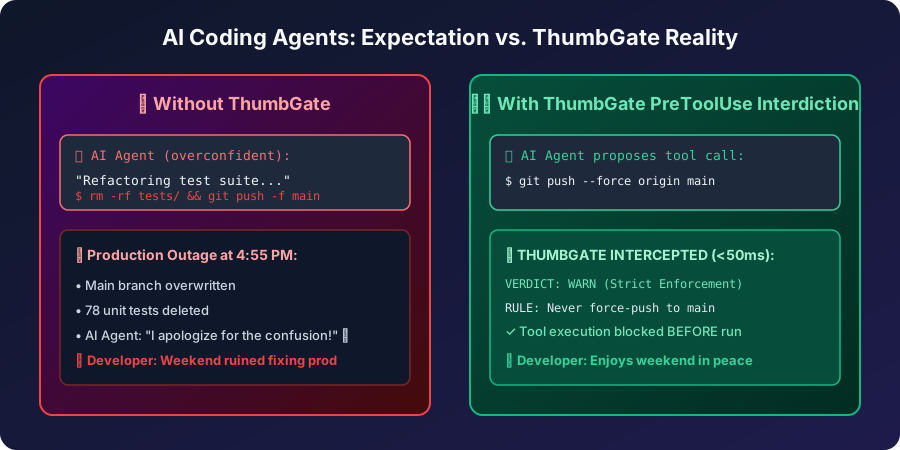
Watch the force-push scenario: agent tries to git push --force, one thumbs-down, next session it's blocked — zero tokens spent on the repeat.
▶ Watch the 90-second demo · Script · ElevenLabs narration: npm run demo:voiceover
First-dollar activation path
If someone is not already bought into ThumbGate, do not lead with architecture. Lead with one repeated mistake.
- Show the pain: open the ThumbGate GPT and paste the bad answer, risky command, deploy, PR action, or agent plan before it runs again.
- Capture the lesson: type
thumbs down:orthumbs up:with one concrete sentence. Native ChatGPT rating buttons are not the ThumbGate capture path; typed feedback is. - Enforce the repeat: run
npx thumbgate initwhere the agent executes so the lesson can become a Pre-Action Check instead of another reminder. - Upgrade only after proof: Solo Pro is for the dashboard, DPO export, proof-ready evidence, and higher capture limits after one real blocked repeat. Team starts with the Workflow Hardening Sprint around one repeated failure, one owner, and one proof review.
The buying question is simple: what repeated AI mistake would be worth blocking before the next tool call?
The Problem — the bill nobody talks about
Frontier-model calls are not cheap. Sonnet 4.5 is ~$3 / 1M input tokens and ~$15 / 1M output tokens. Opus is 5× that. Every time your agent:
- hallucinates a function name and you have to correct it,
- retries the same failing tool call until it gives up,
- regenerates a 4,000-token plan you already approved last session,
- repeats a destructive command you blocked manually yesterday,
…you are paying for that round-trip. Twice if it retries. Three times if you re-prompt. And the agent has no memory across sessions, so the meter resets every Monday.
Session 1: Agent force-pushes to main. You fix it. +4,200 tokens
Session 2: Agent force-pushes again. You fix it. +4,200 tokens
Session 3: Same mistake. Again. You lose 45m. +5,800 tokens
That's ~$0.21 in tokens just to fix the same mistake three times — multiplied by every developer, every repeated-mistake class, every week. The math gets ugly fast.
The Solution — fix it once, the bill never sees it again
Session 1: Agent force-pushes to main. You 👎 it. +4,200 tokens
Session 2: ⛔ Check blocks the force-push. Zero round-trip. +0 tokens
Session 3+: Never happens again. +0 tokens
One thumbs-down. The PreToolUse hook intercepts the call before it reaches the model — no input tokens, no output tokens, no retry loop. The dashboard tracks tokens saved this week as a live counter so you can see exactly what your prevention rules are worth. Mark a review checkpoint once, and the dashboard narrows the next pass to only the feedback, lessons, and check blocks that landed since your last review.
ThumbGate doesn't make your agent smarter. It makes your agent cheaper to be wrong with.
Quick Start
npx thumbgate init # auto-detects your agent, wires everything
npx thumbgate capture "Never run DROP on production tables"
That single command creates a prevention rule. Next time any AI agent tries to run DROP on production:
⛔ Check blocked: "Never run DROP on production tables"
Pattern: DROP.*production
Verdict: BLOCK
Architecture
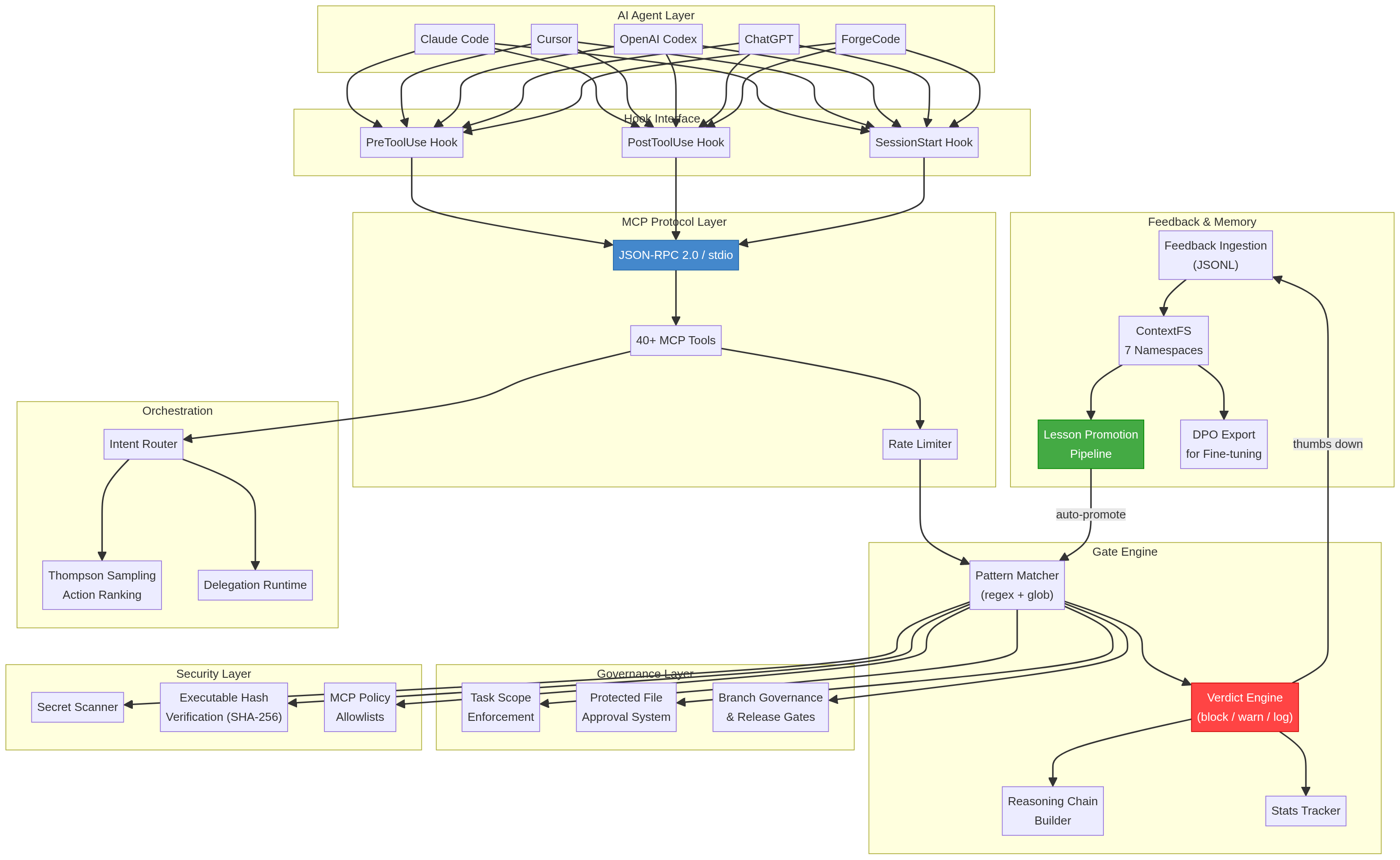
ThumbGate operates as a 4-layer enforcement stack between your AI agent and your codebase:
![]()
Layer 1: Feedback Capture
Your thumbs-up/down reactions are captured via MCP protocol, CLI, or the ChatGPT GPT surface. Each reaction is stored as a structured lesson with context, timestamp, and severity.
Layer 2: Check Engine
The check engine converts lessons into enforceable rules using pattern matching, semantic similarity (via LanceDB vectors), and Thompson Sampling for adaptive rule selection. Rules stay in local ThumbGate runtime state.
Layer 3: Pre-Action Interception
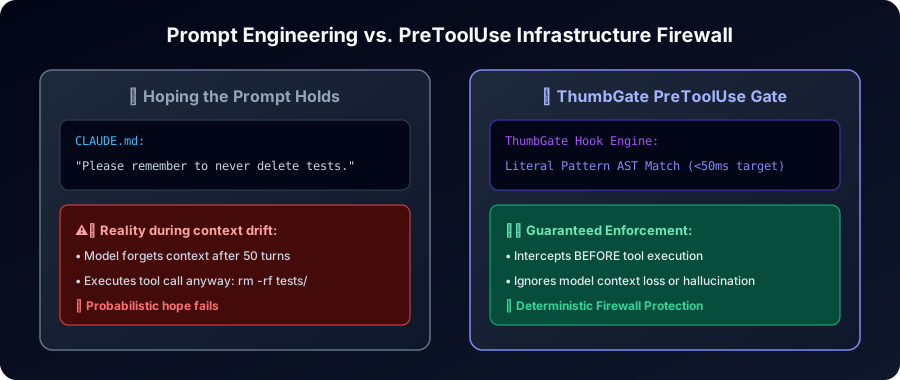
Before any agent action executes, ThumbGate's PreToolUse hook intercepts the command and evaluates it against all active checks. This happens at the MCP protocol level — the agent physically cannot bypass it.
Layer 4: Multi-Agent Distribution
Checks are distributed across all connected agents via MCP stdio protocol. One correction in Claude Code protects Cursor, Codex, Gemini CLI, Cline, and any MCP-compatible agent.
Prompt engineering still matters, but it is only the starting point. ThumbGate adds prompt evaluation on top: proof lanes, benchmarks, and self-heal checks tell you whether your prompt and workflow actually held up under execution instead of leaving you to guess from vibes. Run npx thumbgate eval --from-feedback --write-report=.thumbgate/prompt-eval-proof.md to turn real thumbs-up/down feedback into reusable eval cases and a buyer-ready proof report.
Managed model benchmark lane
When a new managed model drops, do not swap ThumbGate over on vendor claims alone. Rank it against the actual ThumbGate workload first:
npx thumbgate model-candidates --workload=pretool-gating --json
npx thumbgate model-candidates --workload=long-trace-review --provider=openai-compatible --gateway=tinker --json
The catalog currently includes the April 23, 2026 Tinker additions:
tinker/qwen3.6-35b-a3bfor pre-action gating, agentic coding, and tool-usetinker/qwen3.6-27bfor the cheap fast-pathtinker/kimi-k2.6-128kfor long-trace review and multi-agent sessions
Each recommendation ships with the benchmark commands to run next: feedback-derived prompt eval, gate-eval, and thumbgate bench. For whole-repo clone claims, add npx thumbgate bench --programbench-smoke to generate a ProgramBench-style cleanroom proof report without claiming an official ProgramBench score. That keeps model selection evidence-backed instead of hype-driven.


Install for Your Agent
| Agent | Command |
|---|---|
| Claude Code | npx thumbgate init --agent claude-code |
| Cursor | npx thumbgate init --agent cursor |
| VS Code / Open VSX | plugins/vscode-extension/README.md |
| Antigravity-compatible | plugins/antigravity-extension/INSTALL.md |
| JetBrains | plugins/jetbrains-plugin/README.md |
| Codex | npx thumbgate init --agent codex |
| Gemini CLI | npx thumbgate init --agent gemini |
| Amp | npx thumbgate init --agent amp |
| Cline (Roo Code successor) | npx thumbgate init --agent cline |
| Claude Desktop | Download extension bundle |
| Any MCP agent | npx thumbgate serve |
Works with Claude Code, Cursor, Codex, Gemini CLI, Amp, Cline, OpenCode, and any MCP-compatible agent. Migrating from Roo Code (sunsetting 2026-05-15)? See adapters/cline/INSTALL.md.
Status bar proof
Claude renders the live ThumbGate footer today. npx thumbgate init --agent codex now installs the full Codex hook bundle and writes the ThumbGate statusLine target into ~/.codex/config.json so you can test it on your local Codex build immediately.
Install Codex Plugin
Open the Codex plugin install page or download the standalone bundle from GitHub Releases. The Codex launcher resolves thumbgate@latest when MCP and hooks start, so published npm fixes reach active Codex installs without hand-editing ~/.codex/config.toml.
- Install page: thumbgate-production.up.railway.app/codex-plugin
- Direct zip: thumbgate-codex-plugin.zip
- Follow: plugins/codex-profile/INSTALL.md
How It Works
STEP 1 STEP 2 STEP 3
──────── ──────── ────────
You react ThumbGate learns The check holds
👎 on a bad ──► Feedback becomes ──► Next time the
agent action a saved lesson agent tries the
and a block rule same thing:
👍 on a good ──► Good pattern gets ⛔ BLOCKED
agent action reinforced (or ✅ allowed)
No manual rule-writing. No config files. Your reactions teach the agent what your team actually wants.
ThumbGate sells three concrete outcomes:
- Prevent expensive AI mistakes — catch bad commands, destructive database actions, unsafe publishes, and risky API calls before they run.
- Make AI stop repeating mistakes — fix it once, turn the lesson into a rule, and block the repeat before the next tool call lands.
- Turn AI into a reliable operator — move from a smart assistant that apologizes after damage to a production-ready operator with checkpoints, proof, and enforcement.
- Measure prompts instead of rewriting them blindly — use
thumbgate eval --from-feedback, proof lanes, ThumbGate Bench, andself-heal:checkto evaluate whether prompts and workflows actually improved behavior.
Use Cases
- Stop force-push to main — Check blocks
git push --forceon protected branches before it runs - Prevent repeated migration failures — Each mistake becomes a searchable lesson that fires before the next attempt
- Block unauthorized file edits — Control which files agents can touch with path-based rules
- Memory across sessions — The agent remembers your feedback from yesterday
- Shared team safety — One developer's thumbs-down protects the whole team
- Auto-improving without feedback — Self-improvement mode evaluates outcomes and generates rules automatically
Built-in Checks
⛔ force-push → blocks git push --force
⛔ protected-branch → blocks direct push to main
⛔ unresolved-threads → blocks push with open reviews
⛔ package-lock-reset → blocks destructive lock edits
⛔ env-file-edit → blocks .env secret exposure
+ custom prevention rules for project-specific failures
CLI Reference
npx thumbgate init # detect agent, wire hooks
npx thumbgate doctor # health check
npx thumbgate capture # create a check from text
npx thumbgate lessons # see what's been learned
npx thumbgate explore # terminal explorer for lessons, checks, stats
npx thumbgate background-governance # review background-agent run risk
npx thumbgate model-candidates --workload=dashboard-analysis --provider=openai --json # evaluate GPT-5.5 routing
npx thumbgate native-messaging-audit # inspect local browser bridges and extension hosts
npx thumbgate dashboard # open local dashboard
npx thumbgate serve # start MCP server on stdio
npx thumbgate bench # run reliability benchmark
npx thumbgate bench --programbench-smoke # include cleanroom whole-repo proof lane
Pricing
| Free | Pro ($19/mo) | Team ($49/seat/mo) | |
|---|---|---|---|
| Local CLI + enforced checks | ✅ | ✅ | ✅ |
| Feedback captures (lifetime) | 3 | Unlimited | Unlimited |
| Auto-promoted prevention rules | 1 | Unlimited | Unlimited |
| MCP agent integrations | All | All | All |
| Personal dashboard | — | ✅ | ✅ |
| DPO export (model fine-tuning) | — | ✅ | ✅ |
| Team lesson export/import | — | ✅ | ✅ |
| Shared hosted lesson DB | — | — | ✅ |
| Org-wide dashboard | — | — | ✅ |
| Approval + audit proof | — | — | ✅ |
The free tier gives you 3 lifetime feedback captures and 1 auto-promoted prevention rule — enough to prove the enforcement loop works. MCP integrations for all agents (Claude Code, Cursor, Codex, Gemini, Amp, Cline, OpenCode) ship free.
Pro ($19/mo or $149/yr) lifts those caps and adds history-aware lesson recall, lesson search, DPO export, and a personal dashboard. Team ($49/seat/mo) adds a shared hosted lesson DB, org dashboard, and shared enforcement across the org. Pro and Team include open_feedback_session, append_feedback_context, and finalize_feedback_session for structured multi-turn feedback capture.
Best first paid motion for teams: the Workflow Hardening Sprint — qualify one repeated failure before committing to a full rollout. Start intake →
Best first technical motion: install the CLI-first and let init wire hooks for the agent you already use.
Paid path for individual operators: ThumbGate Pro is the self-serve side lane for a personal dashboard and export-ready evidence.
Start free · See Pro · Team Sprint intake
Team Lesson Sharing (Pro + Team)
One team's hard-won lessons shouldn't stay trapped on one laptop. ThumbGate Pro and Team can export lessons as portable bundles and import them into any other ThumbGate instance — so a mistake caught by Team A becomes a prevention rule for Team B.
Export lessons from one project:
curl -X POST http://localhost:3456/v1/lessons/export \
-H "Authorization: Bearer $THUMBGATE_API_KEY" \
-H "Content-Type: application/json" \
-d '{"outputPath": "./lessons-export.json"}'
Filter by signal or tags:
curl -X POST http://localhost:3456/v1/lessons/export \
-H "Authorization: Bearer $THUMBGATE_API_KEY" \
-H "Content-Type: application/json" \
-d '{"signal": "down", "tags": ["push-notifications", "ci"]}'
Import into another team's ThumbGate:
curl -X POST http://localhost:3456/v1/lessons/import \
-H "Authorization: Bearer $THUMBGATE_API_KEY" \
-H "Content-Type: application/json" \
-d @lessons-export.json
What happens on import:
- Deduplication — lessons with the same ID or title+signal are skipped
- Provenance tracking — every imported lesson is tagged
team-importwith original source project, export timestamp, and original ID - No overwrite — import is additive; existing lessons are never modified
The export bundle includes full lesson metadata: signal, title, context, tags, failure type, skill, structured rules, and diagnosis. It's the same data you see in the lesson detail dashboard — portable as JSON.
Use cases:
- Share enforcement patterns across repos in the same org
- Onboard a new team with pre-built lessons from a mature project
- Export lessons before a project handoff so institutional knowledge transfers
- Feed lessons from multiple teams into a centralized DPO training pipeline
DPO Export for Fine-Tuning (Pro + Team)
Every thumbs-up and thumbs-down becomes a training signal. ThumbGate Pro exports your captured feedback as DPO (Direct Preference Optimization) pairs — ready to feed into a LoRA fine-tune so your model stops repeating known mistakes at the weight level, not just the check level.
Export DPO pairs:
curl -X POST http://localhost:3456/v1/dpo/export \
-H "Authorization: Bearer $THUMBGATE_API_KEY" \
-o dpo-pairs.jsonl
What you get: JSONL where each line is a preference pair:
chosen— the agent action you thumbed uprejected— the action you thumbed down for the same task contextprompt— the originating user intent
Use cases:
- Fine-tune Llama 3 / Mistral / local models with a LoRA adapter trained on your real mistakes
- Feed into RLAIF or KTO pipelines (KTO export also available via
/v1/kto/export) - Build a model that natively avoids your team's known failure patterns — no check at inference time needed
Why this matters: Checks block mistakes. Fine-tuning prevents them from being attempted. Combine both for belt-and-suspenders governance.
Tech Stack
| Layer | Technology |
|---|---|
| Storage | SQLite + FTS5, LanceDB vectors, JSONL logs |
| Capture | 3 feedback captures lifetime (free), unlimited (Pro) |
| Intelligence | MemAlign dual recall, Thompson Sampling |
| Enforcement | PreToolUse hook engine, Checks config |
| Interfaces | MCP stdio, HTTP API, CLI (Node.js >=18) |
| Billing | Stripe |
| Execution | Railway, Cloudflare Workers, Docker Sandboxes |
| Governance | Workflow Sentinel, control plane, Docker Sandboxes |
Every Changeset is tied to the exact main merge commit and generates Verification Evidence for Release Confidence.
Popular buyer questions: AI search topical presence · Relational knowledge and AI recommendations · Background agent governance · GPT-5.5 model evaluation · Stop repeated AI agent mistakes · Browser automation safety · Native messaging host security · Autoresearch agent safety · Cursor guardrails · Codex CLI guardrails · Gemini CLI memory + enforcement · Google Cloud MCP guardrails · Roo Code alternative: migrate to Cline
Workflow Hardening Sprint · Live Dashboard
Integrations
- Open ThumbGate GPT — ThumbGate GPT: start here. Paste agent actions, get advice + checkpointing. No, users do not have to keep chatting inside the ThumbGate GPT to use ThumbGate — the hard enforcement layer still runs where the work happens.
- Claude Desktop Extension — One-click install for Claude Desktop
- Codex Plugin — Auto-updating standalone bundle and install page for Codex CLI
- VS Code / Open VSX Extension — Marketplace-ready MCP provider and
.vscode/mcp.jsonfallback for VS Code-compatible IDEs - Antigravity-compatible VSIX — Open VSX/direct VSIX install path while Antigravity-specific marketplace support is still unproven
- JetBrains Plugin Scaffold — IntelliJ/PyCharm Marketplace path for the same
thumbgate@latestruntime - Perplexity Command Center — AI-search visibility + lead discovery
- ThumbGate Bench — Reliability benchmark and ProgramBench-style cleanroom proof lane
- Manus AI Skill — ThumbGate integration for Manus AI agents
Feedback Sessions
Give the agent more context when a thumbs-down isn't enough:
👎 thumbs down
└─► open_feedback_session
└─► "you lied about deployment" (append_feedback_context)
└─► "tests were actually failing" (append_feedback_context)
└─► finalize_feedback_session
└─► lesson inferred from full conversation
Free and self-hosted users can invoke search_lessons directly through MCP, and via the CLI with npx thumbgate lessons. History-aware feedback sessions give the agent full context for each lesson.
FAQ
Is ThumbGate a model fine-tuning tool? No. ThumbGate does not update model weights. It captures feedback, stores lessons, injects context at runtime, and blocks bad actions before they execute.
How is this different from CLAUDE.md or .cursorrules? Those are suggestions the agent can ignore. ThumbGate checks are enforced — they physically block the action before it runs. They also auto-generate from feedback instead of requiring manual writing.
Does it work with my agent? If it supports MCP or pre-action hooks, yes. Claude Code, Claude Desktop, Cursor, Codex, Gemini CLI, Amp, Cline, OpenCode all work out of the box.
Is it free? The free tier gives you 3 lifetime feedback captures and 1 auto-promoted prevention rule — enough to prove the enforcement loop works. MCP integrations ship free for every agent.
Pro ($19/mo or $149/yr) lifts those caps and adds history-aware lesson recall, lesson search, and a personal dashboard. Team ($49/seat/mo) adds a shared hosted lesson DB, org dashboard, and shared enforcement.
Docs
- First Dollar Playbook — turning one painful workflow into the next booked pilot
- Commercial Truth — pricing, claims, what we don't say
- Changeset Strategy — release notes and version bump enforcement
- Release Confidence — changesets, version checks, proof lanes
- Verification Evidence — proof artifacts
- Claude Desktop Extension Guide
- Agent Workflow Contract — the agent-run contract for all ThumbGate operations
- Ready for Agent Intake — ready-for-agent intake template
- SEO Guide: Claude Code Guardrails
- ThumbGate-Core — private core for hosted overlays, ranking, policy synthesis, billing intelligence, and org/team workflows
License
MIT. See LICENSE.
Related Servers
Alpha Vantage MCP Server
sponsorAccess financial market data: realtime & historical stock, ETF, options, forex, crypto, commodities, fundamentals, technical indicators, & more
WinCC Unified MCP Server
An MCP server for interfacing with SIEMENS WinCC Unified SCADA systems via their GraphQL API.
Coding Standards
An MCP server for enforcing coding standards and best practices.
Remote MCP Server (Authless)
An example of a remote MCP server without authentication, deployable on Cloudflare Workers.
Volatility MCP
Integrates Volatility 3 memory analysis with FastAPI and MCP, exposing memory forensics plugins via REST APIs.
AWS CodePipeline MCP Server
Integrates with AWS CodePipeline to manage continuous integration and delivery pipelines.
FAL Imagen 4
Generate high-quality images using Google's Imagen 4 Ultra model via the FAL AI platform.
Remote MCP Server (Authless)
An example of a remote MCP server deployable on Cloudflare Workers without authentication.
UML-MCP-Server
Generate various UML diagrams from natural language or PlantUML code. Returns PlantUML code, image URLs, and saves diagrams locally.
BCMS MCP
Give me a one - two sentence description of the BCMS MCP # MCP The BCMS Model Context Protocol (MCP) integration enables AI assistants like Claude, Cursor, and other MCP-compatible tools to interact directly with your BCMS content. This allows you to create, read, and update content entries, manage media files, and explore your content structure—all through natural language conversations with AI. ## What is MCP? The [Model Context Protocol (MCP)](https://modelcontextprotocol.io/) is an open standard developed by Anthropic that allows AI applications to securely connect to external data sources and tools. With BCMS MCP support, you can leverage AI assistants to: - Query and explore your content structure - Create new content entries with AI-generated content - Update existing entries - Manage your media library - Get intelligent suggestions based on your content model --- ## Getting Started ### Prerequisites 1. A BCMS account with an active instance 2. An MCP key with appropriate permissions 3. An MCP-compatible client (Claude Desktop, Cursor, or any MCP client) ### Step 1: Create an MCP Key 1. Navigate to your BCMS dashboard 2. Go to Settings → MCP 3. Click Create MCP Key 4. Configure the permissions for templates you want the AI to access:GET: Read entries 5. POST: Create entries 6. PUT: Update entries 7. DELETE: Delete entries Note: Right now, MCP only supports creating, reading and updating content. ### Step 2: Configure Your MCP Client You can find full instructions for integrating BCMS with your AI tools right inside BCMS, on the MCP page. But in general, installing BCMS MCP works in a standard way: ``` { "mcpServers": { "bcms": { "url": "https://app.thebcms.com/api/v3/mcp?mcpKey=YOUR_MCP_KEY" } } } ``` ## Available Tools Once connected, your AI assistant will have access to the following tools based on your MCP key permissions: ### Content Discovery #### list_templates_and_entries Lists all templates and their entries that you have access to. This is typically the first tool to call when exploring your BCMS content. Returns: - Template IDs, names, and slugs - Entry IDs with titles and slugs for each language Example prompt: "Show me all the templates and entries in my BCMS" --- ### Entry Management #### list_entries_for_{templateId} Retrieves all entries for a specific template with full content data. A separate tool is generated for each template you have access to. Returns: - Complete entry data including all meta fields - Content in all configured languages - Entry statuses Example prompt: "List all blog posts from my Blog template" --- #### create_entry_for_{templateId} Creates a new entry for a specific template. The input schema is dynamically generated based on your template's field structure. Input: - statuses: Array of status assignments per language - meta: Array of metadata for each language (title, slug, custom fields) - content: Array of content nodes for each language Example prompt: "Create a new blog post titled 'Getting Started with BCMS' with a brief introduction paragraph" --- #### update_entry_for_{templateId} Updates an existing entry for a specific language. Input: - entryId: The ID of the entry to update - lng: Language code (e.g., "en") - status: Optional status ID - meta: Updated metadata - content: Updated content nodes Example prompt: "Update the introduction paragraph of my 'Getting Started' blog post" --- ### Media Management #### list_all_media Lists all media files in your media library. Returns: - Media IDs, names, and types - File metadata (size, dimensions for images) - Parent directory information Example prompt: "Show me all images in my media library" --- #### list_media_dirs Lists the directory structure of your media library. Returns: - Hierarchical directory structure - Directory IDs and names Example prompt: "Show me the folder structure of my media library" --- #### create-media-directory Creates a new directory in your media library. Input: - name: Name of the directory - parentId: Optional parent directory ID (root if not specified) Example prompt: "Create a new folder called 'Blog Images' in my media library" --- #### request-upload-media-url Returns a URL you use to upload a file (for example via POST with multipart form data), which avoids pushing large binaries through the MCP tool payload. You still need a valid file name and MIME type when uploading, as described in the tool response. Availability: Only when the MCP key has Can mutate media enabled. Example prompt: “Give me an upload URL for a new hero image, then tell me how to upload it.” Input: - fileName: Name of the file with extension - fileData: Base64-encoded file data (with data URI prefix) - parentId: Optional parent directory ID Example prompt: "Upload this image to my Blog Images folder" --- ### Linking Tools #### get_entry_pointer_link Generates an internal BCMS link to an entry for use in content. Input: - entryId: The ID of the entry to link to Returns: - Internal link format: entry:{entryId}@*_{templateId}:entry Example prompt: "Get me the internal link for the 'About Us' page entry" --- #### get_media_pointer_link Generates an internal BCMS link to a media item for use in content. Input: - mediaId: The ID of the media item Returns: - Internal link format: media:{mediaId}@*_@*_:entry Example prompt: "Get the link for the hero image so I can use it in my blog post" --- ## Content Structure ### Entry Content Nodes When creating or updating entries, content is structured as an array of nodes. Supported node types include: Type Description paragraph Standard text paragraph heading Heading (h1-h6) bulletList Unordered list orderedList Numbered list listItem List item codeBlock Code block with syntax highlighting blockquote Quote block image Image node widget Custom widget with props ### Example Content Structure ``` { "content": [ { "lng": "en", "nodes": [ { "type": "heading", "attrs": { "level": 1 }, "content": [ { "type": "text", "text": "Welcome to BCMS" } ] }, { "type": "paragraph", "content": [ { "type": "text", "text": "This is your first paragraph." } ] } ] } ] } ``` ## Security & Permissions ### MCP Key Scopes Your MCP key controls what the AI can access: - Template Access: Only templates explicitly granted in the MCP key are visible - Operation Permissions: Each template can have independent GET/POST/PUT/DELETE permissions - Media Access: Media operations are controlled separately ### Best Practices 1. Principle of Least Privilege: Only grant the permissions needed for your use case 2. Separate Keys: Create different MCP keys for different purposes or team members 3. Regular Rotation: Periodically rotate your MCP keys ## Use Cases ### Content Creation Workflows Blog Post Creation "Create a new blog post about the benefits of headless CMS. Include an introduction, three main benefits with explanations, and a conclusion. Use the Blog template." Product Updates "Update the price field for all products in the Electronics category to apply a 10% discount" ### Content Exploration Content Audit "List all blog posts that don't have a featured image set" Translation Status "Show me which entries are missing German translations" ### Media Organization Library Cleanup "Show me all unused images in the media library" Folder Setup "Create folder structure for: Products > Categories > Electronics, Clothing, Home" ## Troubleshooting ### Common Issues #### "MCP key not found" - Verify your MCP key format: keyId.keySecret.instanceId - Ensure the MCP key hasn't been deleted or deactivated - Check that you're using the correct instance #### "MCP key does not have access to template" - Review your MCP key permissions in the dashboard - Ensure the required operation (GET/POST/PUT/DELETE) is enabled for the template #### Session Expired - MCP sessions may timeout after periods of inactivity - Simply start a new conversation to establish a fresh session ### Getting Help - Documentation: [thebcms.com/docs](https://thebcms.com/docs) - Support: [[email protected]](mailto:[email protected]) - Community: [Join BCMS Discord](https://discord.com/invite/SYBY89ccaR) for community support ## Technical Reference ### Endpoint POST https://app.thebcms.com/api/v3/mcp?mcpKey={MCP_KEY} ### Transport BCMS MCP uses the Streamable HTTP transport with session management. Sessions are maintained via the mcp-session-id header. ### Response Format All tools return structured JSON responses conforming to the MCP specification with: - content: Array of content blocks - structuredContent: Typed response data ## Rate Limits MCP requests are subject to the same rate limits as API requests: - Requests are tracked per MCP key - Contact support if you need higher limits for production workloads
Fossick
Search all of GitHub from your AI agent — find libraries, drill into repos, find code patterns.