Hunter MCP
Connect AI assistants and agents to Hunter's GTM data to find companies, verify email addresses, and build lead lists.
Hosted MCP Server
npx add-mcp 'https://mcp.hunter.io/mcp'Installs into Claude Code, Codex, Cursor and more
Documentation
Add Hunter MCP to ChatGPT
Works in ChatGPT on the web.
Add Hunter’s MCP manually using the steps below.
- Create a free Hunter account
- Open ChatGPT, go to Plugins → Add → Add custom MCP server.
- Fill in the form:
- Name
Hunter- Connection
https://mcp.hunter.io/mcp - Authentication
OAuth
- Connection
- Name
- Check “ I understand and want to continue ”, then click “ Create as a plugin ”.
- Click “ Continue to Hunter.io MCP ” and allow the connection.
Custom MCP servers need ChatGPT on the web and a Business, Enterprise, or Edu workspace. On another plan, use Hunter’s ChatGPT app instead.
One MCP server,a full outreach suite
Ask an LLM for an email address and it happily invents one that is destined to bounce. Hunter’s Model Context Protocol (MCP) fixes that.
The Hunter MCP is free. All you need is a Hunter account, and your agent spends credits the same way you would in the app.
Our MCP server gives your AI agent full access to the Hunter platform: verified B2B email data with the public source on every record, plus the tools to run email campaigns at volume, available whenever you chat with your agent.
“Send a follow-up sequence to last quarter’s closed-lost” becomes a chain of specific actions the agent takes inside Hunter.
Send a follow-up sequence to last quarter’s closed-lost list, but verify the addresses first.
- Email Verifier
- Requested permission
- Start Sequence
Your “Closed-lost · Q3” list has 24 leads. I verified every address first: 21 came back valid, so I added them to a new three-email sequence, “Q3 closed-lost check-in”, sending from sam@example.com over 10 days. It started once you approved it.
I left out these 3 addresses, which didn’t come back valid:
- Dana Whitfield, Northwind Logistics: Invalid, the mailbox doesn’t exist. Email: dana.whitfield@example.com.
- Omar Haddad, Brightfield Retail: Accept-all domain, so delivery can’t be confirmed. Email: omar.haddad@example.com.
- Lena Fischer, Corbin & Hale: Accept-all domain, so delivery can’t be confirmed. Email: lena.fischer@example.com.
What the Hunter MCP can do
You connect the MCP to your agent, and it finds the right tools and data for what you’re building. No more guesswork.
An agent that can’t find an address will guess one. With Hunter’s MCP, your agent can find and verify email addresses using our verified data for 100M+ companies.
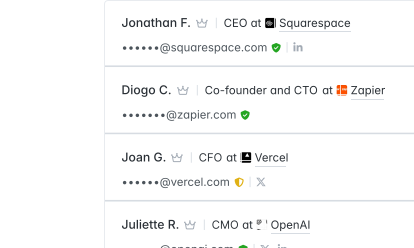
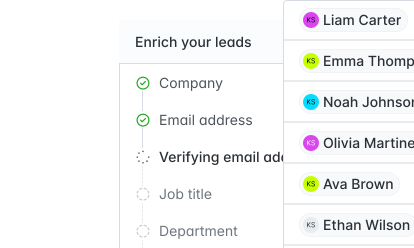
Leads found in a chat are lost by tomorrow. List building should compound: every lead you find can be saved, enriched, tagged, and placed in the right segment inside your Hunter lists or your CRM.
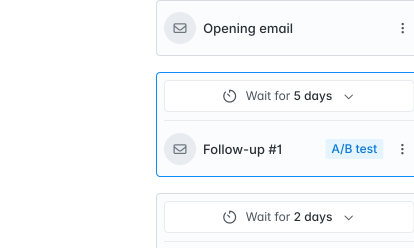
Draft and schedule sequences, add recipients, and ask your agent what to improve from your live outreach stats.
AI models don’t lack judgment, they lack data. Connected to Hunter, models that once guessed an email address will return a real contact for 78% of requests.
4× more valid contacts with Hunter’s MCP.
Returned an email address
92%
42%
Ended with a valid email address
78%
19.5%
Invalid addresses returned
3%
45%
Works with theAI tools you love
The remote MCP server works with any MCP-compatible client.
Add it once and start prospecting.
- Claude
- ChatGPT
- GrokBot
- Codex
- Cursor
- Others
Add Hunter MCP to ChatGPT
Works in ChatGPT on the web.
Add Hunter’s MCP manually using the steps below.
- Create a free Hunter account
- Open ChatGPT, go to Plugins → Add → Add custom MCP server.
- Fill in the form:
- Name
Hunter- Connection
https://mcp.hunter.io/mcp - Authentication
OAuth
- Connection
- Name
- Check “ I understand and want to continue ”, then click “ Create as a plugin ”.
- Click “ Continue to Hunter.io MCP ” and allow the connection.
Custom MCP servers need ChatGPT on the web and a Business, Enterprise, or Edu workspace. On another plan, use Hunter’s ChatGPT app instead.
Verify a list before a send
Here’s a CSV of 200 contacts. Verify each address with Hunter, drop anything invalid or risky, and save the valid ones to a new leads list called Q4 re-engagement.
Research an account before a call
I have a call with {{company_name}} tomorrow. Use Hunter to pull the contacts there, identify the most senior people in {{department}}, and return names, titles, and verified email addresses.
Pitch editors for a guest post
Find the editors and staff writers at {{publication}} who cover {{topic}}, verify their email addresses, save them to a list called Guest posts, and draft a 2-step pitch sequence for my review.
Find the right person at a specific company
I need to reach the person responsible for {{function_or_decision}} at {{company_name}}. Search Hunter for contacts at this company, identify the most likely decision-maker based on job title, verify their email address, and draft a short cold email referencing {{context_or_reason_for_reaching_out}}. Keep the email under 100 words and avoid generic openers.
Map a competitor’s team or hire pattern
Find everyone working at {{company_name}} in {{department}} roles. Organize them by seniority (leadership, mid-level, individual contributors) and include their verified email addresses where available. Highlight anyone whose title suggests they joined recently or were recently promoted.
Launch a campaign from research to send
I want to run an outreach campaign targeting {{ideal_customer_profile}}. Step 1: find {{number}} matching companies. Step 2: identify and verify contacts in {{job_titles}} roles at each. Step 3: save the verified contacts to a new Hunter leads list called “{{campaign_name}}”. Step 4: add them to a sequence in Hunter with the subject line “{{subject_line}}”. I’ll write the body myself. Confirm each step before moving to the next.
Common questions about Hunter’s MCP
If you can’t find the answer to your question here, visit the dedicated section in our Help Center.
What is Hunter’s MCP server?
It’s Hunter’s official implementation of the Model Context Protocol: a hosted server at mcp.hunter.io/mcp that exposes Hunter’s email finding, email verification, company and people search, enrichment, leads, and sequences as tools any MCP client can call. It runs against your own Hunter account.
Is there an MCP for email verification?
Yes. The verification tool checks any address for deliverability and returns a status, and it works alongside the finding and enrichment tools so an agent can find, verify, and save in one pass. Verification costs 0.5 credit (one verification on Data Platform plans) and is free when Hunter can’t reach a verdict.
Which AI assistants and agents does it work with?
Any MCP-compatible client: Claude, ChatGPT, Gemini, Perplexity, Cursor, VS Code, Codex, Windsurf, n8n, and agents you build. Config snippets for the coding tools are above. See Hunter for AI & Agents for the full picture.
Can AI find email addresses accurately on its own?
No. In Hunter’s study of leading models, 76% of the email addresses they produced were invalid: when a model can’t find an address it makes one up. Through the MCP, your agent gets addresses Hunter has found and verified, and when Hunter can’t confirm one, the agent says so instead of guessing.
Is the data the same as what I see in the Hunter app?
Yes. The MCP reaches the same records through a different door. Discover, the Domain Search, the Email Finder, the Email Verifier, enrichment, Leads, and Sequences all work through it, within your plan (Data Platform plans don’t include Discover or Sequences), and anything the agent saves appears in the app right away.
I just need a handful of email addresses. Do I need the MCP?
No. For a few lookups, the Hunter web app or the Chrome extension is quicker than connecting anything. The MCP earns its two-minute setup when an assistant or agent is doing the work for you: building lists, verifying them, saving leads, and preparing sequences in one conversation.
Do I need a paid Hunter plan, and what do actions cost?
No paid plan needed. The MCP works on every plan, including Free. Actions use the same credits as the app: 1 credit per email address found, 0.5 per verification, 0.2 per enrichment, and company search is free. On Data Platform plans, each search or verification uses one credit from its own balance (see pricing). You’re never charged when Hunter can’t find or verify an address, and repeating a lookup within the same billing month costs nothing.
Where do I find my API key?
On the API keys page of your Hunter account. Config-file clients pass it as X-API-Key on every request. You can create several keys and revoke any of them there. Claude and ChatGPT connect with OAuth and don’t need it; GrokBot and Cursor ask for it during setup.
I connected Hunter but my AI says it can’t find it. What’s wrong?
Start a fresh chat: connections aren’t picked up mid-conversation. Then check that you finished the authorization step, that your account is active, and that your AI plan supports connectors. Still stuck? The Help Center has a checklist per client.
What’s the difference between the MCP and the REST API?
Same data, different interface. The MCP is for AI clients that call tools in natural language. The REST API is for code: products, scripts, and custom agents that make HTTP requests. Both use the same account and credits.
What’s the difference between the MCP and a native connector?
A native connector is Hunter listed inside one assistant, so you add it with a click, but it can expose fewer tools: the ChatGPT app, for example, has no Email Finder, Domain Search, or person enrichment. The MCP works everywhere and gives your agent the full toolset. Browse the available connectors if you’d rather start there.
Is my data secure?
Yes. This is Hunter’s official MCP server. It only accesses your Hunter data within the permissions you grant, over HTTPS, validates your credential on every request, and never stores it.