Popcorn
Lets Claude Code and any MCP agent watch local videos: key frames at scene changes and a local Whisper transcript.
Documentation
🍿
popcorn
Popcorn lets Claude Code and other MCP agents watch a video file on your machine.
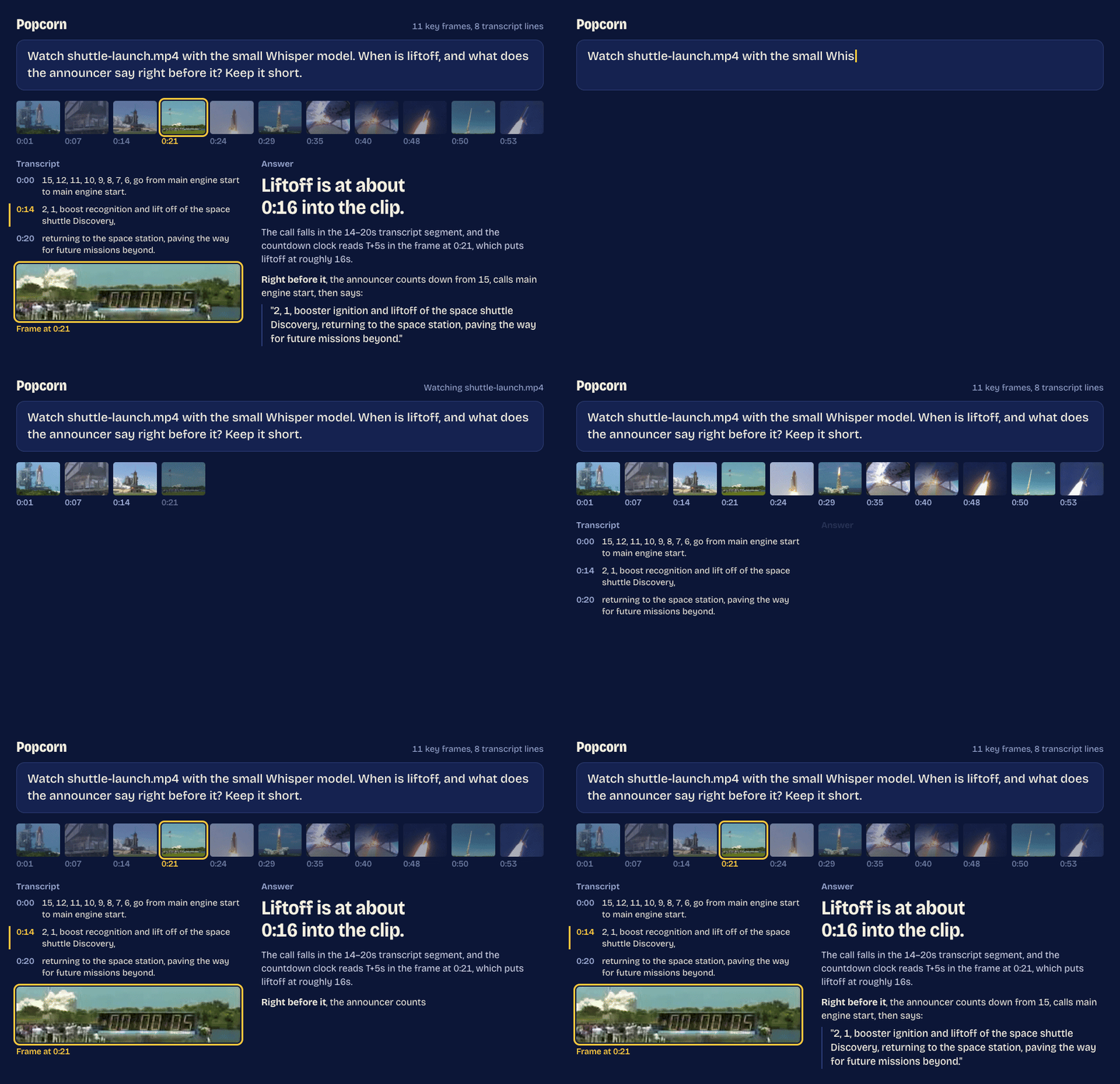
It returns key frames from the scene changes and a timestamped transcript.
Install for Claude Code
claude mcp add popcorn -- npx -y claude-popcorn
Or install it as a Claude Code plugin. This also adds the /popcorn:watch skill. Run these inside Claude Code:
/plugin marketplace add haithamelmengad/claude-popcorn
/plugin install popcorn@popcorn
Try it
Ask in plain words and give the full path to the video:
Watch /path/to/talk.mp4 and tell me what it is about.In /path/to/talk.mp4, where do they talk about pricing? Give me the time.Give me the transcript of /path/to/talk.mp4 from 0:20 to 0:30.
Works with
| Client | Setup |
|---|---|
| Claude Code | The command or the plugin above |
| Claude Desktop | Add the server to claude_desktop_config.json. See Quick Start |
| Codex | codex mcp add popcorn -- npx -y claude-popcorn |
| Cursor | Add the same mcpServers entry to ~/.cursor/mcp.json |
Requirements
- FFmpeg on your PATH
- Node.js 20 or newer
- One Whisper backend for transcripts. Without one you still get the frames. See Transcription Backends
🇨🇳 中文 • 🇯🇵 日本語 • 🇰🇷 한국어 • 🇪🇸 Español • 🇩🇪 Deutsch • 🇫🇷 Français • 🇧🇷 Português • 🇷🇺 Русский • 🇸🇦 العربية • 🇮🇹 Italiano • 🇳🇱 Nederlands • 🇹🇷 Türkçe • 🇻🇳 Tiếng Việt • 🇮🇳 हिन्दी
Quick Start • How It Works • MCP Tools • Transcription • Configuration • Troubleshooting • License
Quick Start
# Install FFmpeg (required)
brew install ffmpeg                    # macOS
sudo apt install ffmpeg                # Ubuntu/Debian

# Optional: Install a transcription backend
pip install mlx-whisper                # Apple Silicon (fastest)
pip install openai-whisper             # Any platform

# Add Popcorn to Claude Code
claude mcp add popcorn -- npx -y claude-popcorn
For Claude Desktop, add this to ~/Library/Application Support/Claude/claude_desktop_config.json:
{
  "mcpServers": {
    "popcorn": {
      "command": "npx",
      "args": ["-y", "claude-popcorn"]
    }
  }
}
Key Features:
- Scene Detection: Captures frames at visual transitions, not fixed intervals
- Local Transcription: 4 backend options (mlx-whisper, faster-whisper, whisper-cpp, whisper)
- Inline Images: Returns key frames directly in MCP responses
- Smart Presets: Auto-configures for screencasts, presentations, movies, interviews
- Zero Config: Just pass a video path and it works
- Privacy First: Everything runs locally, no data leaves your machine. Whisper models are downloaded once, on first use
Documentation
Getting Started
- Quick Start: Installation & setup
- Tutorial: Step-by-step usage guide
- MCP Tools: Available tools reference
Guides
- Transcription Backends: Choose the best backend for your system
- Video Types & Objectives: Presets for different content
- Configuration: Advanced parameters
Reference
- Troubleshooting: Common issues & solutions
- Agent Skill: Instructions for AI agents
- API Reference: Tool schemas & responses
How It Works
Core Components:
- FFprobe: Extracts video metadata (duration, resolution, codecs)
- FFmpeg Scene Detection: Finds visual transitions using
select='gt(scene,N)'filter - Parallel Frame Extraction: Captures JPEGs at scene change timestamps
- Multi-Backend Transcription: Whisper variants convert audio to timestamped text
- Analysis Bundle: Results saved to
.popcorn/directory - MCP Response: Returns metadata + inline base64 images
Video File ──▶ FFprobe ──▶ FFmpeg ──▶ Whisper ──▶ Analysis Bundle
                 │           │          │              │
                 ▼           ▼          ▼              ▼
              metadata    frames    transcript    MCP Response
MCP Tools
| Tool | Description |
|---|---|
popcorn_analyze | Main analysis: extracts frames, transcribes audio, returns results |
popcorn_suggest | Probe video metadata and get recommended settings |
popcorn_presets | List available video types and objectives |
popcorn_backends | Detect your system and show transcription options |
popcorn_read | Read transcript slices with time filtering |
Basic Usage
{
  "tool": "popcorn_analyze",
  "arguments": {
    "path": "/path/to/video.mp4"
  }
}
With Presets
{
  "tool": "popcorn_analyze",
  "arguments": {
    "path": "/path/to/video.mp4",
    "videoType": "screencast",
    "objective": "detailed"
  }
}
Video Types
| Type | Best For | Scene Detection |
|---|---|---|
screencast | Tutorials, coding sessions, UI demos | Low threshold |
presentation | Slides, lectures, keynotes | Slide transitions |
movie | Films, TV shows | Balanced |
interview | Podcasts, talking heads | Transcription priority |
surveillance | Security footage, dashcam | High threshold |
sports | Live events, fast action | High frame rate |
Objectives
| Objective | Use When |
|---|---|
summary | Quick overview needed |
detailed | Don't miss anything |
find_moment | Searching for specific content |
transcribe | Audio/speech is most important |
visual_only | Only care about visuals |
quick_scan | Fast preview needed |
Transcription Backends
Popcorn auto-detects your system and recommends the best backend.
Backend Comparison
| Backend | Speed | Best For | Install |
|---|---|---|---|
| mlx-whisper | Fastest | Apple Silicon (M1/M2/M3/M4) | pip install mlx-whisper |
| faster-whisper | Fast | NVIDIA GPUs | pip install faster-whisper |
| whisper-cpp | Moderate | Cross-platform | brew install whisper-cpp |
| whisper | Slow | Most compatible | pip install openai-whisper |
whisper-cpp needs a model file. Download a ggml model from whisper.cpp and set the WHISPER_CPP_MODEL environment variable to its path, or pass the path as model. Without a model file, Popcorn reports this backend as not available.
Processing Times (60-min video)
| Backend | Time |
|---|---|
| mlx-whisper | 3-8 min |
| faster-whisper | 5-10 min |
| whisper-cpp | 10-20 min |
| whisper | 30-60 min |
Force a Backend
{
  "tool": "popcorn_analyze",
  "arguments": {
    "path": "/path/to/video.mp4",
    "backend": "mlx-whisper"
  }
}
Configuration
All Parameters
| Parameter | Type | Description |
|---|---|---|
path | string | Required. Absolute path to video file |
videoType | string | Video type preset |
objective | string | Analysis objective preset |
transcribe | boolean | Enable/disable transcription |
backend | string | Transcription backend |
model | string | Whisper model (tiny, base, small, medium, large). For whisper-cpp: path to a ggml model file |
language | string | Language code (e.g., en, es, fr) |
frameMode | string | scene or interval |
framesPerMin | number | Frames per minute in interval mode |
sceneThreshold | number | Scene sensitivity (0-1) |
minSceneInterval | number | Minimum seconds between scene frames |
maxFrames | number | Maximum frames to extract |
inlineFrames | number | Frames to return as base64 |
maxChunkChars | number | Transcript chunk size in characters |
maxTranscriptChars | number | Length of the transcript excerpt in the response |
outDir | string | Output directory for the analysis bundle |
Output Structure
.popcorn/<video>_<timestamp>/
├── analysis.json          # Full metadata
├── transcript.txt         # Plain text
├── transcript.json        # Timestamped segments
├── transcript.chunks.json # LLM-friendly chunks
└── assets/
    ├── audio.wav
    └── frames/
        ├── scene_000001.jpg
        └── ...
Troubleshooting
FFmpeg not found
brew install ffmpeg          # macOS
sudo apt install ffmpeg      # Ubuntu/Debian
No transcription backend
pip install mlx-whisper      # Apple Silicon
pip install openai-whisper   # Any platform
Too few frames detected
{ "sceneThreshold": 0.15, "minSceneInterval": 2 }
Too many frames detected
{ "sceneThreshold": 0.5, "minSceneInterval": 10 }
See Troubleshooting Guide for more solutions.
Development
git clone https://github.com/haithamelmengad/claude-popcorn.git
cd claude-popcorn
npm install          # Install dependencies
npm run build        # Build
npm test             # Smoke test (needs ffmpeg)
npm run dev          # Development mode
npm start            # Run server
Project Structure
claude-popcorn/
├── src/
│   ├── index.ts        # MCP server
│   ├── analyze.ts      # Analysis pipeline
│   ├── ffmpeg.ts       # Video processing
│   ├── transcribe.ts   # Multi-backend transcription
│   ├── presets.ts      # Video type presets
│   ├── read.ts         # File and transcript reading
│   └── commands.ts     # Shell execution
├── docs/               # Documentation
└── skills/             # Agent skills
Contributing
- Fork the repository
- Create a feature branch (
git checkout -b feature/amazing) - Commit changes (
git commit -m 'Add amazing feature') - Push to branch (
git push origin feature/amazing) - Open a Pull Request
License
MIT License: see LICENSE for details.
Acknowledgments
- OpenAI Whisper: Speech recognition
- whisper.cpp: C++ port
- MLX Whisper: Apple Silicon
- faster-whisper: CTranslate2
- FFmpeg: Video processing
- Model Context Protocol: MCP spec
The demo uses NASA footage of the launch of space shuttle Discovery on mission STS-121: KSC-06-S-00171. NASA content is generally not subject to copyright in the United States, see the NASA media guidelines. NASA does not endorse this project.
Popcorn is an independent project. It is not affiliated with or endorsed by Anthropic.
Made with 🍿 for AI agents everywhere