GoBuildWP
Self-hosted WordPress MCP plugin that lets Claude, ChatGPT, Cursor and other AI clients build, edit and manage WordPress, with safety profiles, approvals and undo.
Documentation
-
Connect your AI app
Install the free plugin, then follow your app's instructions on the Connect screen. Direct connections need no GoBuildWP account; your AI app has its own requirements.claude mcp add --transport http gobuildwp https://yoursite.com/wp-json/mcp/wppilot-oauthCopy -
Ask for the work
Describe the job in plain words. Your AI reads your theme and plugins, then builds in your own builder. -
Review the result
Review draft pages and read back edits. Undo supported changes; Pro can hold configured writes for approval.
Full setup guide: install GoBuildWP and connect your first AI app
- Connect Claude to WordPress Add a custom connector in claude.ai and sign in with OAuth. Needs a public HTTPS site.
- Use GoBuildWP in ChatGPT Add the GoBuildWP plugin from the ChatGPT directory, sign in to Cloud and connect your sites.
- Connect Claude Code to WordPress One terminal command adds the server, then a browser sign-in connects it.
Build · example conversationIllustrative
Build a draft Elementor landing page for our spring workshop: a hero, three benefits and a sign-up button.
- elementor-build-page validated
- elementor-get-content read back
Draft created, not published. The element tree was checked before anything was written. Open it in Elementor to review.
FreePro: whole-site plans
Elementor AI website builder →
Example conversations. Tool names are the real ability names; the requests and results are illustrative.
Describe the page. Get real Elementor.
Describe the page and your AI writes it as real Elementor sections, columns and widgets, saved as a draft you open in the editor. It can also change the text, styles and layout of pages you already have.
- Free builds complete pages. Free writes block content and whole Elementor element trees, as well as individual edits.
- Landing pages and forms. Start from an AI landing page builder for WordPress brief, or add forms and lead capture to a page.
- Pro goes further. Higher-level composition, shared templates and design controls, plus Bricks, Divi and other builders.
- See a whole build. Watch one brief build a full Elementor website with Claude or ChatGPT.
Draft · Elementor
“A landing page for a bakery: hero, three offers, opening hours.”
elementor-build-page Free Saved as a draft
Run your catalogue from a chat.
Ask about stock, prices or recent orders, then have the agent change products under the same rules as any other edit. Payment credentials, business rules and checkout testing stay with you.
- Free reads the store. It reads store data and edits one product’s basic fields.
- Pro runs the catalogue. Product creation, variations, categories, bulk updates, coupons and supported order, shipping and tax operations.
- Store pages use your builder. See the WooCommerce operations your AI can run.
Products · Spring sale −10%
| Product | Regular | Sale |
|---|---|---|
| Linen shirt | $48 | $43 |
| Canvas tote | $22 | $20 |
| Wool scarf | $36 | $32 |
woocommerce-bulk-update-prices Pro 3 products, rounded to.00
SEO fixes you approve before they are saved.
Audit titles, descriptions and alt text, then save the wording you approve in the SEO plugin you already use. Saving a change does not promise a ranking. Start with the walkthrough on WordPress SEO with AI.
Review SEO changes before they are saved
- Seven SEO plugins in Free. Read and edit basic per-post SEO in Yoast, Rank Math, AIOSEO, SEOPress, The SEO Framework, Slim SEO and SmartCrawl.
- Bulk changes in Pro. Update meta descriptions across many posts at once; see bulk Yoast meta descriptions.
- Fields vary by plugin. Which fields can be written and undone depends on the SEO plugin.
SEO plugin fields · /spring-sale
Title
Spring Spring sale: linen shirts and totes, 10% off
Meta description
~~Sale page.~~Linen shirts, canvas totes and wool scarves at 10% off until Sunday. Free returns.
Proposed wording, before it is saved
seo-bulk-update-meta Pro Waiting for your review
Your rules. On your server.
The rules run on your WordPress site, not in the chat. That makes GoBuildWP a WordPress AI agent with server-side rules, not a chat window with your admin password. Each tool is registered through the WordPress Abilities API with its own permission check.
- WordPress permissions apply. Each call runs as a WordPress user and can do only what that user may do.
- A safety profile sets the limit. Choose read only, or allow writes for the work you want done.
- Destructive operations ask first. Deleting content needs an explicit confirmation before it runs.
- Supported changes are recorded. The Changes screen lists what was written, by which AI app, and when.
- Undo where it is supported. See what can be undone and what cannot. Payments and other external effects need separate recovery.
wp-admin · Changes
- Updated page “Spring sale” Claude Undo
- Changed 3 product prices ChatGPT Undo
- Deleted draft “Old promo” Asked to confirm Held
rollback-change Free Profile: writes allowed, deletes confirmed
updates-availablePro Lists what has an update, from WordPress’s own update check.backup-triggerPro Starts a backup in the backup plugin you already run, before anything changes.safe-updatePro Updates one plugin, theme or core release, checks the pages you name, and tries to roll back if a check fails.plugin-rollbackPro Steps a wordpress.org plugin back to an older listed release through the same checked run.
security-scan-findingsFree Reads the open issues from your security plugin’s last scan, most severe first.security-run-scanPro Starts Wordfence or Solid Security’s own scan; it changes no setting.routines-run-nowFree Runs a scheduled routine now, which emails its report to the people you chose.
Scans report what is wrong; what to fix stays your call. Backups and scans run in the plugins that own them, so GoBuildWP needs one of those installed. How the security model works.
-
Bricks
-
Breakdance
-
Divi
-
Oxygen
-
Beaver Builder
-
WPBakery
-
Etch
-
Mosaic
-
GenerateBlocks
-
Kadence Blocks
-
Spectra
-
Avada
-
WoodMart
-
WPForms
-
Gravity Forms
-
Fluent Forms
-
Formidable Forms
-
Contact Form 7
-
Ninja Forms
-
Advanced Custom Fields
-
ACPT
-
Admin and Site Enhancements
-
Meta Box
-
Pods
-
AIOSEO
-
Rank Math
-
SEOPress
-
Yoast SEO
-
WooCommerce
-
Weglot
-
Polylang
-
WPML
-
The Events Calendar
-
Paid Memberships Pro
-
Tutor LMS
-
BuddyPress
-
LiteSpeed Cache
-
WP Rocket
-
WP Fastest Cache
-
Speed Optimizer (SiteGround)
-
WP-Optimize
-
W3 Total Cache
-
Autoptimize
-
SpeedyCache
-
Breeze
-
Cache Enabler
-
Perfmatters
-
FlyingPress
-
WP Super Cache
-
Redis Object Cache
-
Jetpack Boost
-
Aruba HiSpeed Cache
-
NitroPack
-
Hummingbird
-
10Web Booster
-
Docket Cache
-
SQLite Object Cache
-
Powered Cache
-
Swift Performance Lite
-
Super Page Cache for Cloudflare
-
Converter for Media
-
Page builders
Edit the elements of the builder each page was made in, from Bricks and Divi to Beaver Builder, without flattening them to HTML. Elementor, Bricks, Breakdance, Divi and more Learn more
-
Stores and payments
Products, variations, bulk prices and stock, coupons and sales reports, plus checkout funnels and donations. WooCommerce, FunnelKit, Easy Digital Downloads, GiveWP and more Learn more
-
SEO plugins
Titles, descriptions, schema and redirects written into Yoast, Rank Math or whichever SEO plugin the site runs. AIOSEO, Rank Math, SEOPress, Yoast SEO and more Learn more
-
Forms
Create forms with their fields, confirmations and notifications, then send a test entry to check them. WPForms, Gravity Forms, Fluent Forms, Formidable Forms and more Learn more
-
Custom fields and post types
Read and fill the field groups and post types that ACF, Meta Box, Pods or JetEngine define. Advanced Custom Fields, ACPT, Admin and Site Enhancements, JetEngine and more Learn more
-
Blocks and site design
Block plugins, patterns, headers and footers on block themes, kept as real blocks. GenerateBlocks, Kadence Blocks, Spectra, Spectra One and more Learn more
-
Theme settings
Colours, typography, layout and header options stored by Astra, Kadence, GeneratePress and others. Astra, Avada, GeneratePress, Kadence and more Learn more
-
Translation
Language versions and translated strings in WPML, Polylang, TranslatePress or Weglot. Weglot, Polylang, WPML Learn more
-
Cache and speed
Read and change cache plugin settings, purge, and get the browser checks that prove a page still works. LiteSpeed Cache, WP Rocket, WP Fastest Cache, Speed Optimizer (SiteGround) and more Learn more
Also in Pro Checked updates that roll back when a page check fails, a backup before anything changes, security scans on demand and stepping a plugin back to an older release.
safe-update Pro backup-trigger Pro security-run-scan Pro plugin-rollback Pro
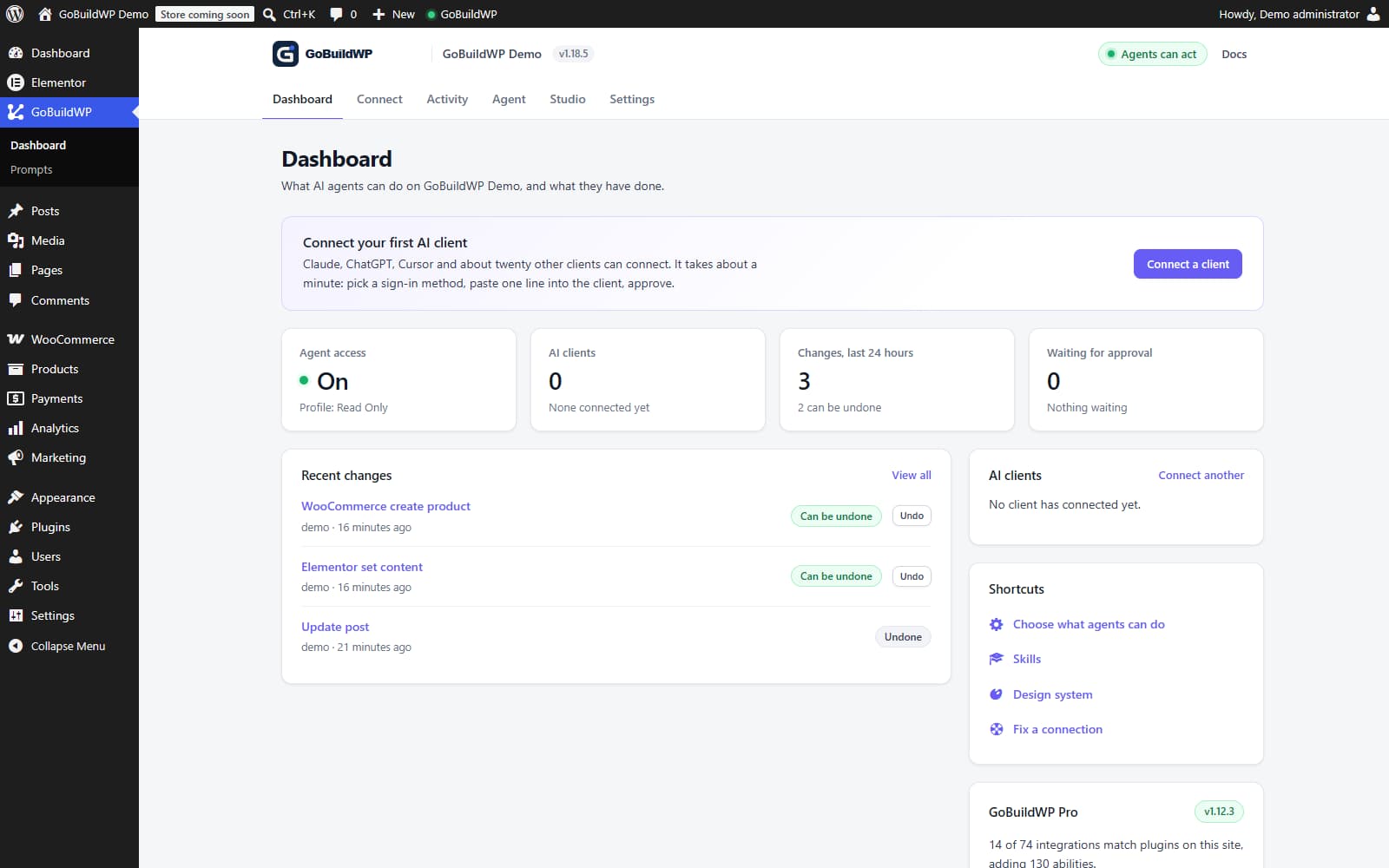
The GoBuildWP dashboard: agent access, connected AI apps, recent changes and what waits for approval. Captured from the plugin on a test site; available controls depend on your edition, installed version and configuration.
The comparison lists each server side by side, with dated sources and no overall score.
-
Where does it run?
GoBuildWP is a plugin inside your WordPress site, so your AI app talks to the site directly. Cloud is optional, for one link across many sites. -
What does it cost?
The plugin is free under the GPL. Pro is a paid licence per site. Your AI app and its model are billed by their own providers. -
Can a person approve a write first?
Pick Read Only, Production Safe or Developer Full Access per connection. Approval by a person is opt-in, through your AI app or a wp-admin link, and does not cover every write by default. -
How do you undo a bad change?
Supported changes are recorded with a copy of what was there before and can be undone from wp-admin. Irreversible actions and expired records stay outside recovery.
Free
For trying it on your own site
$0 forever
- Create and update WordPress content
- Elementor editing, including complete pages
- Read your store and edit a product’s basic fields
- Basic SEO in seven SEO plugins
- Content, accessibility and alt-text audits
- Change history and undo for supported writes
Most complete
Pro
Site owners and freelancers
$39 per year $50
- Higher-level page composition and more builders
- WooCommerce catalogue and store operations
- Tutor LMS courses, lessons and quizzes
- Memberships, native forms and custom fields
- Bulk SEO and supported speed settings
- Hold configured writes for approval
Cloud
For running several sites
$0 up to 3 sites
- Free for 3 sites, no card
- One AI link for all your sites
- Choose sites and read only per app
- Separate paid Cloud plans; eligible legacy Pro allowances
| Feature | Free | Pro | Cloud |
|---|---|---|---|
| Content, pages and menus | with your plan | ||
| Elementor and block editor editing | with your plan | ||
| Higher-level composition and more builders | with your plan | ||
| WooCommerce store operations | Reads + basic edits | with your plan | |
| Bulk SEO and speed settings | with your plan | ||
| Undo for supported changes | per site | ||
| Hold configured writes for approval | per site | ||
| One AI link for many sites |
Prices in US dollars. Every Pro plan has a 14-day money-back guarantee. Cloud does not license Pro on a site. AI app plans and third-party plugins are paid separately. See full pricing or Free versus Pro.
Managing many WordPress sites? Add Cloud
GoBuildWP Cloud gives your AI app one link to every site you connect. Each site still runs the GoBuildWP plugin under its own rules, and Cloud works with Free and Pro without licensing Pro. Free for 3 sites. See how to manage multiple WordPress sites with AI.
Questions before you connect
Not covered here? Ask us.
What is GoBuildWP?
GoBuildWP is a WordPress plugin that lets Claude, ChatGPT and other AI clients build, edit and manage your site through MCP, the Model Context Protocol. It runs an MCP server inside WordPress, so the AI reads and changes the real site within the permissions you set, and supported changes are recorded so they can be undone.
Which AI clients work with it?
Any AI app that can connect to a remote MCP server. There are setup guides for Claude on the web, Claude Desktop, Claude Code, ChatGPT, Codex, Cursor, VS Code, Windsurf, GitHub Copilot and other clients in the WordPress MCP server guide. A guide shows how to connect a client; it is not a promise that every feature of that client works the same way.
Is it free?
Yes. The Free edition is GPL, costs nothing and needs no account: it includes the MCP server, safety profiles, change history and undo, block and Elementor editing, store reads and basic SEO. Pro is a paid plugin that adds deeper builder, store and SEO work. Your AI app's own plan or API costs are separate.
Can AI build a complete WordPress website with GoBuildWP?
You can start with one brief and have a connected AI client work through pages, navigation, templates, content and supported forms. A complete build involves multiple tool calls and review. The result depends on your brief, AI model, installed plugins and their supported operations. You supply hosting, business facts, assets and any required licences, then review the site before launch.
Does GoBuildWP work with my existing website and page builder?
Yes. Free includes core WordPress block workflows and complete Elementor element-tree writing, alongside individual edits. Pro adds higher-level Elementor composition, shared templates and design controls, and integrations for builders including Bricks, Divi, Oxygen, Breakdance, Beaver Builder, Etch and WPBakery. Check the exact operation and installed builder version in its integration guide.
Can I build and manage a WooCommerce store with AI?
Yes. Free reads store data and edits one product’s basic fields. Pro adds product creation, variations, categories, bulk updates, coupons and supported order, shipping and tax operations. Store design uses your supported builder. Payment credentials, business rules and checkout testing still need your setup and review.
Can I create an LMS or membership website?
With Pro and Tutor LMS, your AI can create courses, topics, lessons, quizzes and questions, and organise the curriculum. Direct enrolment is refused when Tutor reports the course as purchasable. Membership-based or other paid-access arrangements need their own checks; verify your configured checkout and access rules. Pro also supports Paid Memberships Pro levels, discount codes and member-access operations. The website's pages are built through your supported editor or builder.
Can GoBuildWP build a booking website?
It can build service pages and booking-request forms through supported builders and form plugins. Live availability, staff calendars, deposits and confirmed reservations depend on a separately configured booking system. Detecting a booking extension does not mean GoBuildWP can operate every scheduling feature.
Can GoBuildWP improve SEO across my whole site?
Yes. Start with a content audit and prioritise the pages that need attention. Free reads and edits basic per-post SEO in Yoast, Rank Math, AIOSEO, SEOPress, The SEO Framework, Slim SEO and SmartCrawl. Pro adds bulk changes and deeper provider-specific operations; connected Site Kit reports can help you measure search performance. Fields and rollback coverage vary by provider. Saving changes does not guarantee indexing or better rankings.
Can GoBuildWP improve WordPress page speed?
Pro can inspect supported cache and optimisation layers, measure server delivery, snapshot supported settings, apply changes, purge and warm URLs, and measure again. Its PageSpeed fix loop keeps one supported setting when a fresh score stays within the configured tolerance (three points by default) and selected server checks detect no new breakage. Otherwise it attempts supported undo and purge; a missing or failed recovery is reported as rollback_failed. Free's pagespeed-check reads PageSpeed Insights with no Google key needed from you. Use browser checks to evaluate rendering and functionality. Server measurements are not Lighthouse scores or real-user field data. Image-plugin settings can be changed where supported; GoBuildWP does not itself run bulk image compression or conversion.
Do I need Pro, Cloud or an AI subscription?
Free and Pro determine which WordPress capabilities you can use. Cloud is an optional connection method, with a separate connected-site allowance; it does not replace a Pro licence on a site that needs Pro features. You need a configured, supported AI client, and its plan or API costs are separate. Required third-party plugins and paid add-ons are also supplied separately.
What is a WordPress MCP plugin?
It lets a compatible AI client use tools exposed by your WordPress site through the Model Context Protocol. GoBuildWP provides those tools for WordPress and supported plugins, so the AI can read and change real site content instead of only giving you instructions to copy into the dashboard.
Can I review changes and undo them?
GoBuildWP applies WordPress permissions and safety profiles to each call, requires confirmation for destructive operations and records supported changes. Pro can hold writes for human approval. Undo is available for supported writers; some plugin actions, payments and external effects need separate recovery.

Connect Connect WordPress to Any AI Client with MCP | GoBuildWP From the plugin’s Connect screen to the first answered request, in one sitting. Start here if nothing is connected yet. Watch on YouTube
- Edit an Elementor page with AI prompts Change text, restyle a section and add a new one. Video, 3 minutes.
- Review bulk SEO title changes before they go live How to check a batch of proposed titles before applying it.
- Build a custom WordPress theme with AI Claude designs and codes an animated agency theme. Video, 5 minutes.
Give your AI its first WordPress job.
Free, open source, and ready for your first supported WordPress job. Latest release: Free 1.21.0 / Pro 1.15.0.
WordPress MCP server Connect ChatGPT to WordPress Connect Claude Code to WordPress Best WordPress MCP server All integrations