VitaeContext
AI Agents career context layer
Documentation
Stateless Model Context Protocol server for cross-repository career context.
Connect your private Career Context and VitaeGraph to AI coding assistants across any project workspace without copying career files or pasting private notes into chats.





Why • How it works • Quick start • Client setup • Capabilities • Testing guide • Privacy
VitaeContext MCP Server
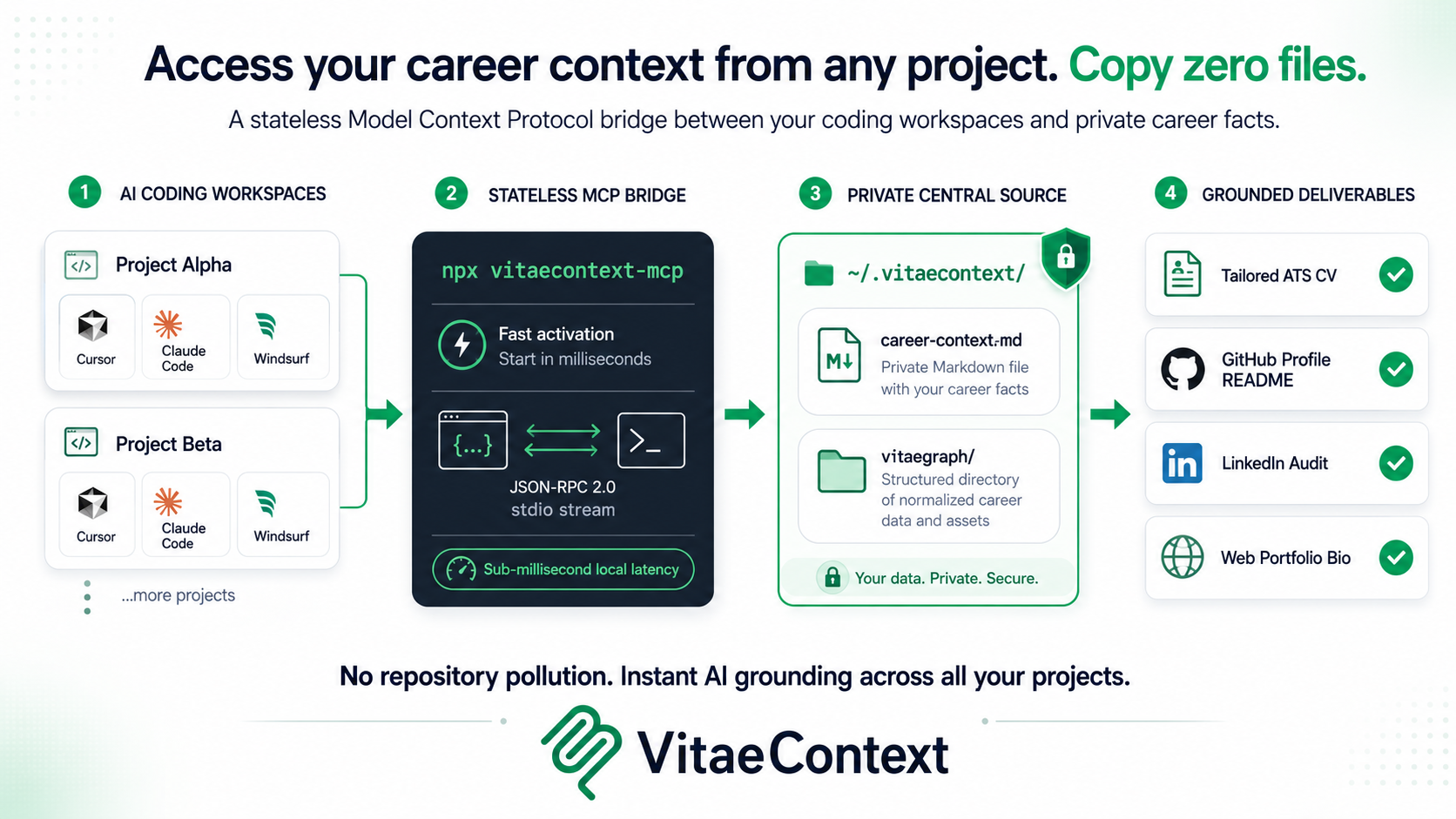
The VitaeContext Model Context Protocol (MCP) server provides a stateless bridge between AI coding assistants and a user's private career source of truth.
By registering the VitaeContext MCP server in your AI coding tool, agents in any project workspace can immediately query your private Career Context and VitaeGraph without needing to copy files into the repository or paste career notes into the chat.
Why MCP for Career Context
When working across multiple repositories, developer agents frequently need career facts—such as writing repository profile READMEs, drafting portfolio entries, preparing release bios, or updating professional docs.
Key Advantages
- Zero Workspace Pollution: No career files or personal context documents need to be copied into individual git repositories.
- Instant Cross-Project Grounding: Any tool supporting MCP can query your career records on demand.
- Always Current: Edits made to
~/.vitaecontext/career-context.mdor~/.vitaecontext/vitaegraph/are immediately reflected across all agent chats. - Evidence-Bounded: Exposes structured tools that preserve supplied facts and evidence limits for the requested platform without claiming independent verification.
- Zero Runtime Dependencies: Built with native Node.js ESM and available through the published
vitaecontextpackage vianpx -y vitaecontext mcp.
Quick Start
Direct Execution
Run the server over standard input/output (stdio JSON-RPC 2.0):
# Using npx (downloads the published package when needed)
npx -y vitaecontext mcp

# Or after installing the vitaecontext package
vitaecontext mcp
Protocol Conformance
| Parameter | Specification |
|---|---|
| Protocol Version | 2024-11-05 |
| Transport | stdio (JSON-RPC 2.0 with newline-delimited framing) |
| Runtime Requirements | Node.js >= 18.0.0 |
| Dependencies | 0 external runtime dependencies (pure native ESM) |
| Discovery Paths | ~/.vitaecontext/career-context.md, one unambiguous matching context file, and ~/.vitaecontext/vitaegraph/ |
Client Configurations
Claude Desktop
Add to your claude_desktop_config.json:
- macOS:
~/Library/Application Support/Claude/claude_desktop_config.json - Windows:
%APPDATA%\Claude\claude_desktop_config.json - Linux:
~/.config/Claude/claude_desktop_config.json
{
  "mcpServers": {
    "vitaecontext": {
      "command": "npx",
      "args": ["-y", "vitaecontext", "mcp"]
    }
  }
}
Claude Code
Add the server using the native Claude Code MCP command:
claude mcp add vitaecontext -- npx -y vitaecontext mcp
Cursor IDE
- Open Cursor Settings (
Cmd+,orCtrl+,). - Navigate to Features -> MCP Servers.
- Click + Add new MCP server.
- Configure:
- Name:
vitaecontext - Type:
command - Command:
npx -y vitaecontext mcp
- Name:
Windsurf (Cascade)
Add to your ~/.codeium/windsurf/mcp_config.json:
{
  "mcpServers": {
    "vitaecontext": {
      "command": "npx",
      "args": ["-y", "vitaecontext", "mcp"]
    }
  }
}
Roo Code / Cline
Add to your cline_mcp_settings.json or roo_code_mcp_settings.json:
{
  "mcpServers": {
    "vitaecontext": {
      "command": "npx",
      "args": ["-y", "vitaecontext", "mcp"]
    }
  }
}
Antigravity CLI
Add to your ~/.gemini/antigravity-cli/mcp_config.json:
{
  "mcpServers": {
    "vitaecontext": {
      "command": "npx",
      "args": ["-y", "vitaecontext", "mcp"]
    }
  }
}
IBM Bob / watsonx Code Assistant
Add to your .ibm/mcp_config.json:
{
  "mcpServers": {
    "vitaecontext": {
      "command": "npx",
      "args": ["-y", "vitaecontext", "mcp"]
    }
  }
}
xAI Grok
Add to your .grok/mcp_config.json:
{
  "mcpServers": {
    "vitaecontext": {
      "command": "npx",
      "args": ["-y", "vitaecontext", "mcp"]
    }
  }
}
Select private data explicitly
The server prefers ~/.vitaecontext/career-context.md. If that file is absent and exactly one *-career-context.md or *.context.md file exists, it uses that file. If multiple candidates exist, the server returns a selection message instead of choosing one arbitrarily.
Select paths in the server command when a client needs a non-default location:
npx -y vitaecontext mcp --context /private/path/career-context.md --root /private/path/vitaegraph
The environment variables VITAECONTEXT_CAREER_CONTEXT and VITAEGRAPH_ROOT provide the same configuration. MCP tool arguments cannot change filesystem roots; the user controls file access when starting the server.
Capabilities
Resources
| URI | Description | MIME Type |
|---|---|---|
career-context://current | Returns the user's private Career Context markdown from ~/.vitaecontext/. | text/markdown |
vitaegraph://index | Returns the indexed graph nodes JSON from ~/.vitaecontext/vitaegraph/.generated/graph.json. | application/json |
vitaegraph://record/{id} | Reads a specific record markdown by stable ID (e.g. project:local-search-engine). | text/markdown |
vitaecontext://wiki/{module} | Reads the platform rules and constraint wiki for a module (e.g. github, linkedin, cv, portfolio, x). | text/markdown |
Tools
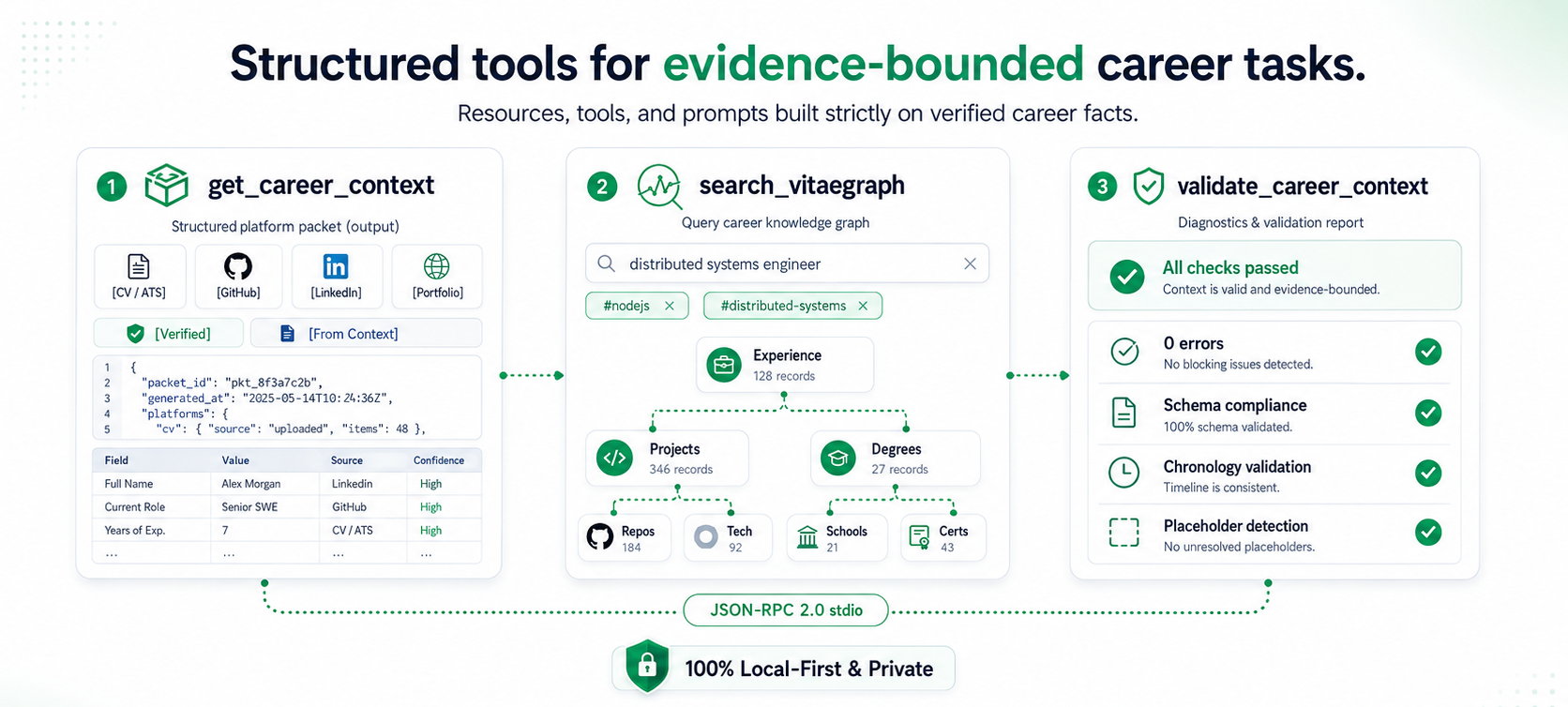
1. get_career_context
Retrieve a user-maintained, evidence-bounded Career Context packet for a specific professional surface.
{
  "for": "github"
}
- Parameters:
for(string, optional):cv,github,linkedin,portfolio,x,general(default:general).
2. search_vitaegraph
Query and filter structured career records in the user's private VitaeGraph.
{
  "query": "distributed systems",
  "type": "project",
  "tag": "nodejs"
}
- Parameters:
query(string, optional): Case-insensitive text search across record ID, title, tags, and indexed record text.type(string, optional): Filter by record type (experience,project,education,course,thesis,certification,award,publication).tag(string, optional): Filter by exact skill/topic tag.
3. validate_career_context
Validate a Career Context file for structural integrity, frontmatter, and unfinished placeholders.
{}
Prompts
| Prompt | Arguments | Description |
|---|---|---|
cv_tailoring | targetRole (required), jobDescription (optional) | Tailors a CV to a target role while preserving the evidence limits in Career Context. |
linkedin_audit | profileSnapshot (optional) | Audits a LinkedIn profile against discoverability rules and internal scorecards. |
github_showcase | focus (optional) | Audits profile README and repository showcase strategy. |
career_context_intake | rawNotes (optional) | Guides synthesizing raw career notes into a structured, user-maintained Career Context file. |
How to Test the MCP Server
Method 1: Using the Official MCP Inspector (Interactive UI)
The official @modelcontextprotocol/inspector runs a visual web dashboard to interactively test tools, resources, and prompts:
# Launch the MCP inspector
npx @modelcontextprotocol/inspector npx -y vitaecontext mcp
- Open the URL displayed in the terminal (usually
http://localhost:5173). - Click Connect (Transport:
STDIO). - Explore and test:
- Tools Tab: Execute
get_career_contextwith{ "for": "github" }. - Resources Tab: Read
career-context://currentorvitaecontext://wiki/github. - Prompts Tab: Render
cv_tailoringwith{ "targetRole": "Lead Systems Architect" }.
- Tools Tab: Execute
Method 2: Command-Line stdio Piping
You can send standard JSON-RPC 2.0 payloads directly via stdin:
# 1. Initialize Handshake
printf '{"jsonrpc":"2.0","id":1,"method":"initialize","params":{"protocolVersion":"2024-11-05","capabilities":{},"clientInfo":{"name":"tester","version":"1.0.0"}}}\n' | npx -y vitaecontext mcp

# 2. List Available Tools
printf '{"jsonrpc":"2.0","id":2,"method":"tools/list","params":{}}\n' | npx -y vitaecontext mcp

# 3. Call get_career_context Tool
printf '{"jsonrpc":"2.0","id":3,"method":"tools/call","params":{"name":"get_career_context","arguments":{"for":"cv"}}}\n' | npx -y vitaecontext mcp
Method 3: Automated Test Suite
Run the built-in unit and integration test suite:
npm test
Privacy and Workspace Isolation
The VitaeContext MCP server is designed around local-first privacy:
- Local Operations Only: The running server reads only the selected local Career Context, VitaeGraph, and packaged wiki files. It makes no network or telemetry requests;
npxmay contact npm to obtain the package before launch. - Zero Repository Pollution: Private career files are never copied or written into individual project workspaces.
- Evidence-Bounded: Platforms receive bounded task packets with explicit evidence labels, reducing the risk of unsupported claims.
- Stateless Runtime: No background daemon, tokens, or persistent database state.
Specification & Contract
For the formal JSON-RPC 2.0 schema contract, error codes, and transport details, see schema/mcp-contract.md.