Brightspace MCP Server
MCP server for Brightspace (D2L): check grades, due dates, announcements, rosters & more using Claude, ChatGPT, Cursor, or any MCP client.
Documentation
Brightspace MCP Server
By Rohan Muppa, ECE @ Purdue
Talk to your Brightspace courses with AI. Ask about grades, due dates, quizzes, announcements, and more. Works with Claude Desktop, Claude Code, Cursor, ChatGPT Desktop, Windsurf, and any MCP client.
This is an MCP (Model Context Protocol) server that connects your AI to D2L Brightspace so it can pull your grades, assignments, syllabus, and course content on demand.
Works with any school that uses D2L Brightspace, including Purdue, SUNY, USC, and hundreds more.
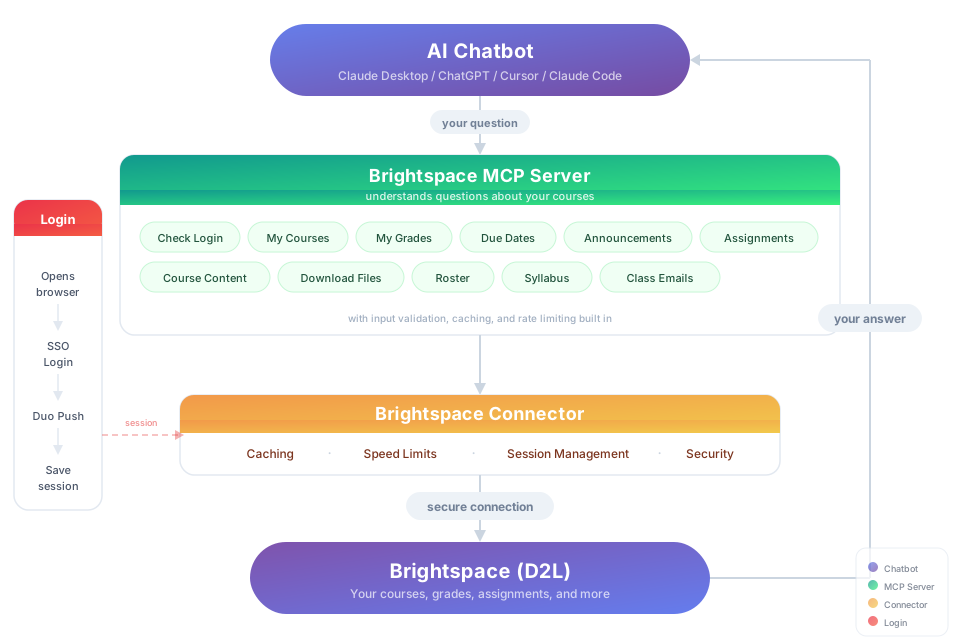
Try It
"Download my lecture slides and turn them into interactive flashcards" "Grab every assignment rubric and build me a visual dashboard of what I need to hit for an A"
Install
You need: Node.js 18+ (download the current LTS, 20 or newer)
Option 1: Let your AI do it
Paste this into Claude Code, Cursor, Windsurf, Copilot, Codex, or any AI coding assistant:
Install brightspace-mcp-server for me by following
https://github.com/RohanMuppa/brightspace-mcp-server/blob/main/LLMs.md
(use --purdue if I'm at Purdue, or --suny if I'm at a SUNY campus).
Option 2: Run it yourself
npx brightspace-mcp-server setup
Purdue students can add --purdue to skip entering the school URL:
npx brightspace-mcp-server setup --purdue
SUNY campuses share one Brightspace site, so --suny also asks which campus you're at and skips SUNY's campus picker when you sign in:
npx brightspace-mcp-server setup --suny
The wizard walks you through login and MFA, auto configures Claude Desktop and Cursor, and prints the config to paste into ChatGPT Desktop if it is installed. Restart your AI client when it finishes.
Any other D2L school: run setup without a flag and paste your Brightspace URL (for example https://yourschool.brightspace.com).
Using a different client? Configure it manually.
Search your client's docs for how to add an MCP server. The server command to register is:
npx -y brightspace-mcp-server@latest
On Windows, npx must be wrapped: cmd /c npx -y brightspace-mcp-server@latest
You still need to run npx brightspace-mcp-server setup first to save your credentials.
Session Expired?
You should rarely see this. Access tokens are re-minted from your saved session cookie in the background, with no browser, in about 200 ms. A browser only opens when the Brightspace session itself has ended. How long that takes is set by your school, not by this tool, and it has not been measured over a long enough stretch to quote a number here. If the automatic re-login fails, run:
npx brightspace-mcp-server auth
MFA at Purdue is Microsoft Authenticator number matching: a two digit number appears in the browser and is also printed in the terminal. Enter it on your phone. Other schools may use Duo or their own app.
What You Can Ask About
| Topic | Examples |
|---|---|
| Grades | "Am I passing all my classes?" · "Compare my grades across all courses" |
| Assignments | "What's due in the next 48 hours?" · "Summarize every assignment I haven't turned in yet" · "Give me the link to submit HW 4" |
| Quizzes | "Which quizzes close this week?" · "Is Quiz 3 timed, and does it have a grace period?" |
| Assignment files | "What does the lab 4 spec actually ask for?" · "Summarize the rubric attached to the project" |
| Exams | "Is there a midterm in the gradebook that isn't on my assignments list?" |
| Announcements | "Did any professor post something important today?" · "What did my CS prof announce this week?" |
| Course content | "Find the midterm review slides" · "Download every PDF from Module 5" |
| Roster | "Who are the TAs for ECE 264?" · "Get me my instructor's email" |
| Discussions | "What are people saying in the final project thread?" · "Summarize the latest discussion posts" |
| Planning | "Build me a study schedule based on my upcoming due dates" · "Which class needs the most attention right now?" |
Security
- Your username and password stay on your machine in
~/.brightspace-mcp/config.json, readable only by your user (mode 0600). They are typed into your school's real login page and nowhere else. - Session tokens and cookies live in
~/.d2l-session/, encrypted with AES-256-GCM. - All traffic to Brightspace is HTTPS.
- On startup the server asks the npm registry whether a newer version exists. When running through
npx, it clears this package's own stale npx cache directories so the next start downloads the new version. It never installs anything itself. SetD2L_NO_UPDATE_CHECK=1to turn the check off. - Read only: this server never submits, posts, or changes anything in Brightspace.
Contributing & Forking
Want to add your school, build a new tool, or fix something? Fork the repo, make your changes, and open a pull request. If it gets merged, it ships to every user automatically.
git clone https://github.com/RohanMuppa/brightspace-mcp-server.git
cd brightspace-mcp-server
npm install
npm run dev       # tsc in watch mode
npm test          # vitest, must be green before you open a PR
Add your school: Add a preset to SCHOOL_PRESETS in src/setup.ts. If your school's login flow is different, add a handler in src/auth/.
Add a new tool: Create a file in src/tools/, add the schema in schemas.ts, export it in src/tools/index.ts, and register it in src/index.ts. Use any existing tool as a template.
Run your own version: You can also fork and run it independently. Clone it, build it, and point your AI client to the local build/index.js instead of using npx. No npm needed. Just know that forks don't receive updates from this repo automatically. If your changes could help others, consider opening a PR.
Licensed under the MIT License.
Updates
Automatic. Every time your AI client starts a session, it runs npx brightspace-mcp-server@latest which pulls the newest version from npm. No action needed.
If you ever suspect you're on an old version (the auth banner prints the version), clear the npx cache and restart your client:
npx clear-npx-cache
What's new in 1.6.1
- Your saved login now survives a network change. The session file was encrypted with a key derived from the machine hostname, which on campus wifi is a DHCP name that changes with the lease. When it changed, the saved session became unreadable and you were sent back through a full MFA login. Upgrading costs one final login, then it stops.
What's new in 1.6.0
- Read the files attached to an assignment. The spec PDF, the starter workbook, the rubric. Ask what an assignment requires and the answer comes from the actual document, not just its one-line description. Handles PDF, Word, Excel, and PowerPoint.
- The roster no longer hides people: a class larger than the limit now reports the true total and says it was truncated, and the limit can be raised.
- Fixed a case where a class list or course list could stop short of the last page.
What's new in 1.5.0
- Token refresh no longer opens a browser: the access token is re-minted from your session cookie in about 200 ms.
- Silent re-login when your Microsoft session is still alive, and a fast fallback to the credential login when it is not.
- The Microsoft Authenticator number match is printed in the terminal, so headless logins can be approved.
get_upcoming_due_datesreads due dates from assignments and quizzes directly. It no longer reports a quiz as due on the day it opens.- Every assignment, quiz, and due date carries a
urlthat opens the item in Brightspace. - Gradebook columns with no matching assignment or quiz (a proctored midterm, for example) are surfaced as
gradeOnlyitems. - Unpublished announcements are hidden, and announcements sort by the date they were scheduled to post.
- A dead session is detected even when Brightspace answers with HTTP 200, so re-login triggers instead of a confusing network error.
- SUNY preset (
--suny) and a more robust Microsoft Entra login, contributed by the community.
Proudly made for Boilermakers by Rohan Muppa 🚂
Report a bug · MIT · Copyright 2026 Rohan Muppa