FXMacroData
Real-time forex macroeconomic API for all major currency pairs sourced from central bank announcements.
Documentation
Live MCP · Streamable HTTP OAuth 2.0 + PKCE
FXMacroData MCP Server
Give your AI assistant a live macro data terminal: official-source indicators, release calendars, FX spot context, COT, commodities, chart apps, and task-ready research workflows inside the tools you already use.
30 tools available
41 REST routes
Quick Request
The first snippet runs as-is: no key needed for USD data, served 15 minutes after release. Add X-API-Key for all 22 currencies and real-time delivery, sent from a server, script, or notebook.
No key · USD inflation GET /v1/announcements/usd/inflation
# USD inflation, no key: 15-minute delay, most recent 90 days
curl "https://api.fxmacrodata.com/v1/announcements/usd/inflation?limit=5"
2 · With API key · EUR
# EUR inflation: add X-API-Key for all 22 currencies and real-time releases
curl -H "X-API-Key: YOUR_API_KEY" "https://api.fxmacrodata.com/v1/announcements/eur/inflation"
Choose Your MCP Access Path
Start with the public MCP surface for USD lookup and discovery up to 100 no-key requests/day, where releases arrive 15 minutes after publication. Add paid access when your assistant needs real-time releases, higher-volume USD use, non-USD indicators, full USD history, non-USD COT, commodities, task workflows, or protected data calls through OAuth or an Authorization: Bearer YOUR_API_KEY header.
Free
$0
USD announcements, calendar, catalogue, and press releases up to 100 no-key requests/day, on a 15-minute delay. FX rates need an API key.
Individual
$50/mo
Full access for solo engineers and one-person projects, including commercial development, trading and research. Eligible new organisations get a 14-day trial for protected MCP tools, API rows, dashboards, and AI research workflows.
Business
$250/mo
The same access for incorporated businesses with two or more people, covering up to 10 people with member API keys. Large organisations that need negotiated terms can arrange an Enterprise agreement.
Start Business trial Contact us about Enterprise
Why Connect FXMacroData MCP
FXMacroData MCP turns a general-purpose AI assistant into a macro-aware research agent. Instead of asking a model to guess from stale training data, the assistant can call live tools for policy rates, inflation, GDP, labor data, release calendars, FX rates, COT positioning, commodities, and official dataset families. The result is a conversation that can cite actual data rows, use release timestamps, and keep the analysis grounded in the same production API that powers the FXMacroData dashboard.
For discretionary FX research
Ask for a EUR/USD macro setup, compare policy-rate differentials, review the next event risks, or build a pre-central-bank briefing without leaving Claude, ChatGPT, Cursor, VS Code, or your preferred agent host.
For quant and systematic workflows
Use point-in-time release timestamps, backtest tasks, event-gated filters, portfolio risk scoring, and reusable research packs to keep exploratory notebooks and agent-generated analysis aligned with live macro data.
For coding agents
Give Cursor, Continue, Cline, Windsurf, Replit Agent, Zed, Kiro, and JetBrains a single remote MCP endpoint that can discover indicators, validate examples, and generate macro-aware app or notebook code.
For chart-first answers
Compatible MCP Apps hosts can render interactive chart resources for indicator series, FX rates, policy-rate comparisons, release calendars, heatmaps, scenario models, event replays, and quant labs.
Choose the Right MCP Surface
Use data tools for exact facts
Call data_catalogue, indicator_query, forex, and release_calendar when you need rows, timestamps, JSON, tables, or exact values.
Best prompt: "Get USD inflation from 2024-01-01 to 2025-01-01."
Use Apps for visual analysis
Call visual artifact tools when the answer should include an interactive chart, release-calendar view, heatmap, scenario model, or event replay inside the chat.
Best prompt: "Show me a chart of AUD policy rates since 2020."
Use tasks for research workflows
Call task tools when the assistant should assemble several data sources into a decision-ready output, such as a trade setup, risk score, backtest, or research pack.
Best prompt: "Build a EUR/USD trade setup with catalysts and invalidation notes."
Use prompts for repeatable routines
Prompt-aware hosts can discover curated workflows for macro briefings, pair risk checks, post-release summaries, week-ahead plans, and chart routing.
Best prompt: "Run the FX pair risk check prompt for EUR/USD."
Trust and Freshness Metadata
FXMacroData MCP responses include a compact mcp_metadata block on the response and, for source-backed datasets, result.data_quality. Check these fields before using a result in a trade note, backtest, alert, notebook, or automated research workflow.
Freshness
Inspect latest_available_date, last_updated, data_lag_days, and is_stale before treating data as current.
Provenance
Use source_type, source_name, is_proxy, is_derived, and is_fallback to label source quality.
Coverage
Start with data_catalogue using include_coverage=true; review coverage_summary and row-level coverage_quality.
Backtest safety
For point-in-time workflows, check point_in_time_safe, has_announcement_datetime, row_count_before_pagination, and returned_count. point_in_time_safe is false whenever any row in scope carries a derived publication time, so read assumed_release_time_count and the per-row release_time_assumed flag before discarding a result.
{ "mcp_metadata": { "source_type": "official", "latest_available_date": "2026-06-19", "data_lag_days": 3, "is_proxy": false, "is_derived": false, "is_fallback": false, "point_in_time_safe": false, "has_assumed_release_times": true, "assumed_release_time_count": 997, "row_count_before_pagination": 1349, "returned_count": 100 }, "result": { "data_quality": { "is_official": true, "is_proxy": false, "is_fallback": false, "is_stale": false, "has_announcement_datetime": true, "point_in_time_safe": false, "has_assumed_release_times": true, "assumed_release_time_count": 997, "latest_available_date": "2026-07-31", "source_type": "official", "source_name": "BLS", "row_count": 1349, "quality_scope": "full_result" } } }
Agent rule
If a required freshness, source, or coverage field is missing, continue only as exploratory context and state that provenance or freshness is unknown. Do not silently treat a valid tool response as analysis-ready. When point_in_time_safe is false because publication times were derived, say so in the answer rather than dropping the data.
Indicator Pagination Workflow
MCP indicator tools use the same REST pagination contract as /v1/announcements/{currency}/{indicator}. For long histories, request a broad date window once and walk pages with pagination.next_offset; do not retry arbitrary shorter windows unless the user asked for a specific sub-period.
1. Discover coverage
data_catalogue(currency="nzd", include_coverage=true, include_capabilities=true)
Use catalogue coverage dates, capabilities, exact slugs, and mcp_metadata.coverage_summary before querying a sparse indicator.
2. Query one page
indicator_query(currency="nzd", indicator="gov_bond_10y", limit=100, offset=0)
Use page or offset; page takes precedence.
3. Continue or diagnose
offset = result.pagination.next_offset
Check pagination.page_includes_latest_available. Empty valid windows return an empty result with no_data.error_code = NO_DATA_IN_REQUESTED_WINDOW and coverage dates, not an error.
Quick Connect
Start with the bare MCP URL only when your host can launch the FXMacroData OAuth flow. For manual client screens that ask for a URL and bearer-token environment variable, keep the bare URL and point the bearer-token field at your FXMacroData API-key environment variable.
Claude (Web & Desktop)
claude.ai — remote MCP connector
- 1 Open Claude → Settings → Connectors Click Add MCP Server and select Remote.
- 2
Enter the server URL
https://mcp.fxmacrodata.com
Existing clients using
https://fxmacrodata.com/mcpcan keep that compatibility URL. - 3
Start using it
No-key evaluation supports USD table data (indicator_query) up to 100 requests/day. For higher-volume use, MCP app visuals, analytics tools, and non-USD coverage, use a paid key or OAuth. Claude should discover OAuth automatically from the MCP URL. If a Claude flow asks for an OAuth client ID and secret, use the FXMacroData-issued values for that host. In Claude Code, you can send your API key as a header instead:
claude mcp add --transport http fxmacrodata https://mcp.fxmacrodata.com --header "Authorization: Bearer YOUR_API_KEY". Connector screens that only accept a URL can use the legacy https://mcp.fxmacrodata.com?api\_key=YOUR\_KEY form. - 4 Verify the connection In a new chat, ask: "Run the FXMacroData ping tool", "Show me available USD indicators", "What sessions are open right now?", or "Run subscribe_for_mcp_access".
Example: Live in Claude
Claude claude.ai
FXMacroData connected
What's the EUR vs USD interest rate differential, and what does it mean for EUR/USD?
indicator_query(currency="eur", indicator="policy_rate")
indicator_query(currency="usd", indicator="policy_rate")
Tool results
ECB (EUR) policy_rate: 4.25%
Fed (USD) policy_rate: 5.50%
Differential: −1.25% (USD premium)
Based on the latest central bank data from FXMacroData, the Fed rate of 5.50% exceeds the ECB rate of 4.25% by 125 basis points. This USD rate premium is a structurally bearish factor for EUR/USD — higher US yields attract capital flows that support dollar strength relative to the euro.
Ask about FX macro data...
Chart Artifacts
FXMacroData MCP Apps span release calendars, indicator visuals, pair-comparison analysis, cross-currency heatmaps, scenario tooling, war-room workflows, event replay, quant distributions, and subscription unlock flows. Each image below is captured from a real local MCP app render; the final in-chat experience depends on whether the host mounts MCP Apps resources inline.
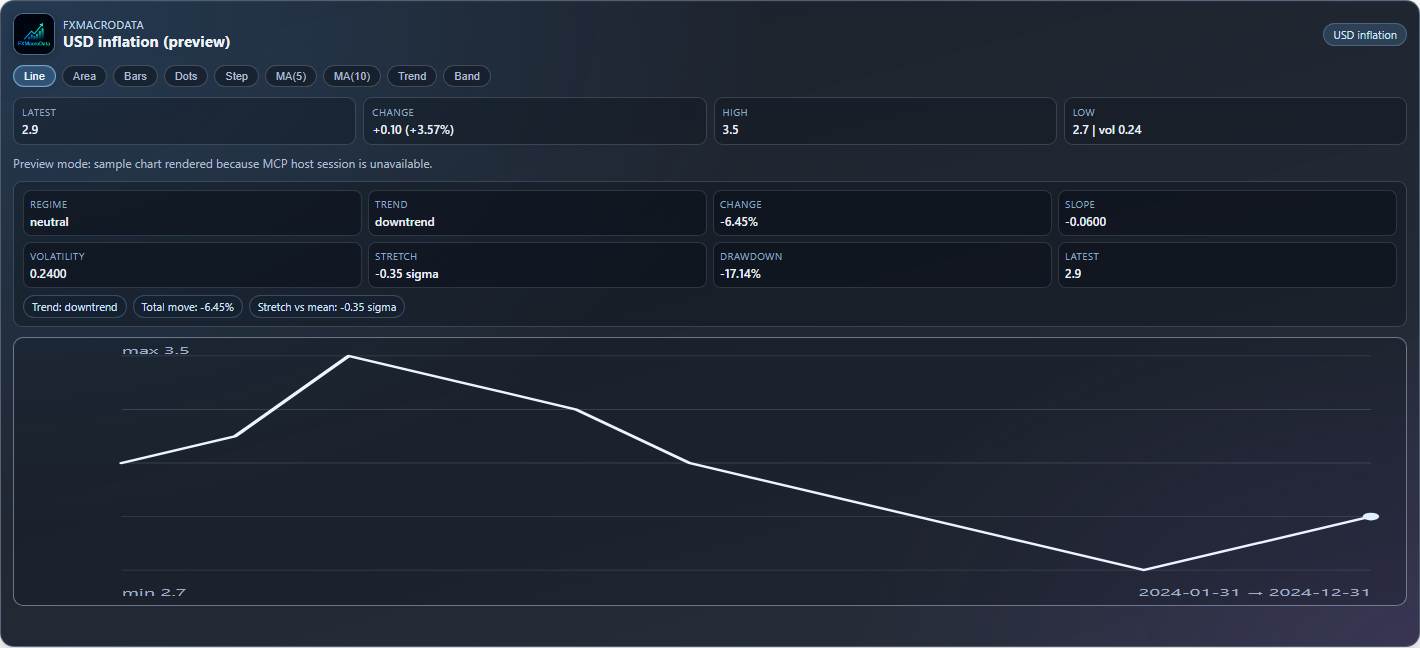
Indicator chart app with premium analysis cards and signal pills.
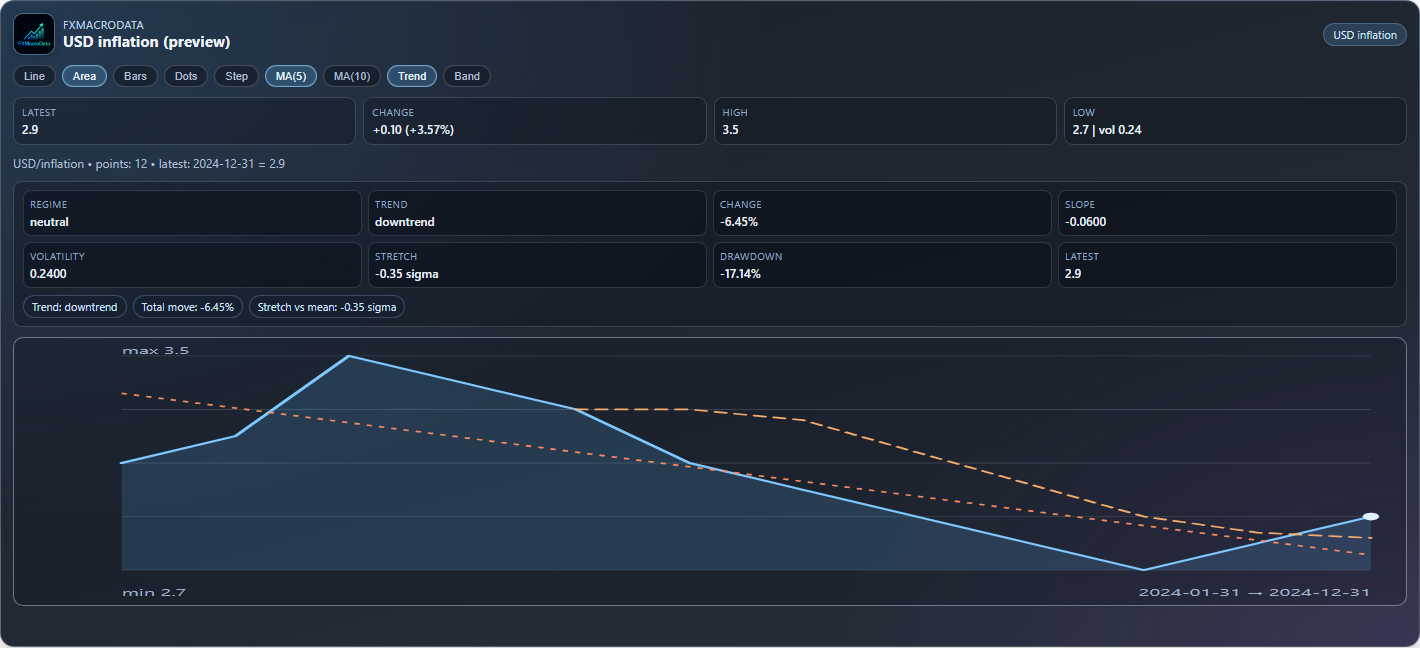
Indicator control stack in action: Area + MA(5) + Trend overlays.
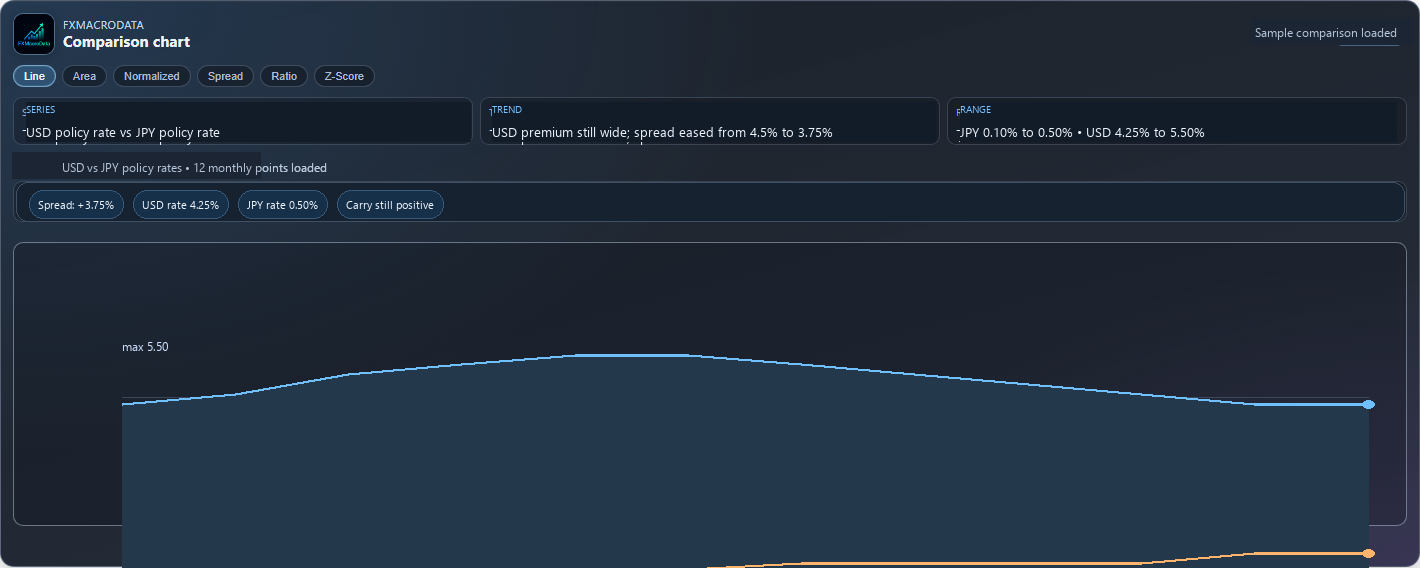
Comparison app surface for line, spread, ratio, normalized, and z-score modes.

Macro heatmap app with mode toggles and matrix scale legend.
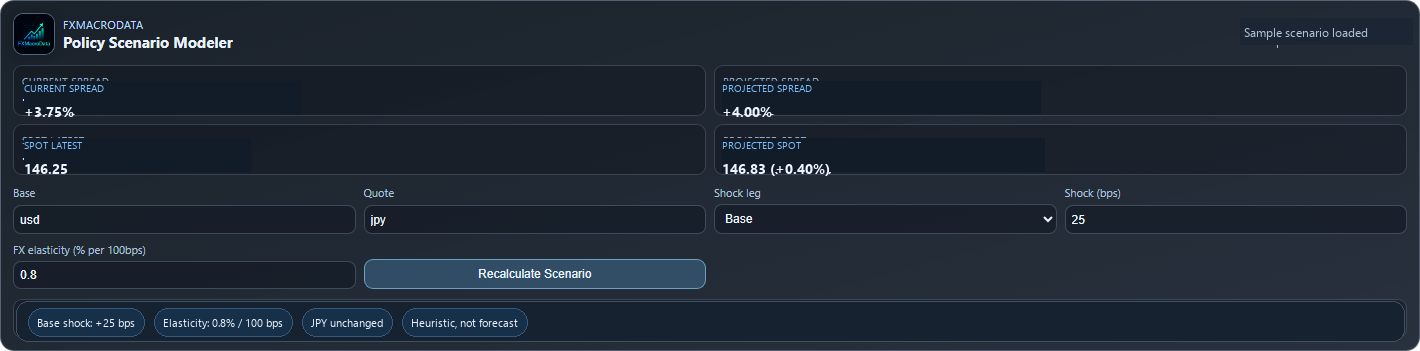
Policy scenario modeler for spread shocks and projected spot outputs.

Macro war room cockpit for pair context, release queue, and risk alerts.

Event impact replay timeline for point-in-time market context reviews.

Quant scenario lab for stress distribution inputs and percentile outputs.
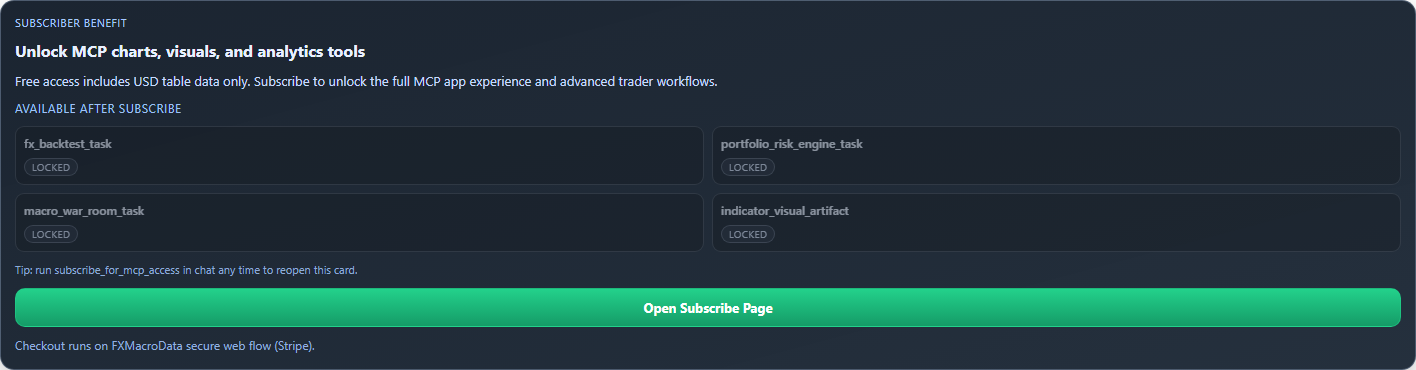
Subscriber CTA card with direct checkout handoff for gated MCP features.
Claude claude.ai
FXMacroData connected
Plot the USD policy rate since 2020 as a chart
indicator_visual_artifact(currency="usd", indicator="policy_rate", start_date="2020-01-01")
USD / POLICY_RATE 15 points · latest 2024-12 = 4.50%
6% 4% 2% 0% 2020 2022 2023 2024 5.50% 4.50%
FX Macrodata · indicator_visual_artifact · interactive in Claude
Here is the USD policy rate (Fed funds rate) from 2020 to 2024. The rate was held near zero through 2021, then the Fed launched its fastest hiking cycle in decades — rising from 0.25% to a peak of 5.50% by mid-2023. The first cuts began in late 2024, bringing the rate back to 4.50%.
MCP Apps Explorer
MCP Apps are best when the answer should stay interactive inside the conversation. FXMacroData now exposes release-calendar, charting, pair intelligence, macro heatmap, policy scenario, macro war room, event replay, and quant lab app flows. For persistent hosts like Claude Code and Gemini-driven coding agents, the server also exposes task-capable non-visual research workflows that can be polled and reused across a long thread.
Release calendar app
"Show me the USD GDP release calendar in Sao Paulo time"
release_calendar(currency="usd", indicator="gdp", timezone="America/Sao_Paulo") -> ui://fxmacrodata/release-calendar.html
Interactive chart widget
"Show me a chart of AUD policy rate history"
indicator_visual_artifact(currency="aud", indicator="policy_rate")
FX pair comparison app
"Compare EUR and USD policy rates with carry context"
pair_intel_task(base="eur", quote="usd")
Macro heatmap app
"Show me the strongest and weakest macro prints across G10"
macro_heatmap_task(currencies="usd,eur,gbp,jpy", indicators="policy_rate,inflation,gdp")
Scenario modeler app
"What happens if the Fed hikes 50 bps more?"
policy_scenario_modeler_task(base="usd", quote="jpy", shock_leg="base", shock_bps=50)
Macro war room app
"Build me a live EUR/USD macro war room for USD GDP"
macro_war_room_task(base="eur", quote="usd", currency="usd", indicator="gdp")
Event replay app
"Replay USD GDP surprises against EUR/USD"
event_impact_replay_task(currency="usd", indicator="gdp", base="eur", quote="usd", lookback_events=12)
Quant scenario lab app
"Run a 30-day stress distribution for EUR/USD after a base-leg shock"
quant_scenario_lab_task(base="eur", quote="usd", shock_leg="base", shock_bps=50, annualized_volatility_pct=8, horizon_days=30)
Capabilities, Apps, and Tasks
Remote MCP transport
- ▸ Streamable HTTP endpoint at
https://mcp.fxmacrodata.com - ▸ Plain JSON responses for proxy/CDN compatibility
- ▸ Stateless HTTP requests, so every call carries its own auth context
MCP Apps resources
Visual tools return structured data plus ui:// resource metadata so compatible hosts can render chart and workflow apps inline.
ui://fxmacrodata/indicator-chart.html
ui://fxmacrodata/comparison-chart.html
ui://fxmacrodata/release-calendar.html
ui://fxmacrodata/macro-heatmap.html
ui://fxmacrodata/scenario-modeler.html
ui://fxmacrodata/macro-war-room.html
ui://fxmacrodata/event-impact-replay.html
ui://fxmacrodata/quant-scenario-lab.html
ui://fxmacrodata/subscribe-cta.html
Task-capable tools
Advanced workflow tools can be called like normal tools. Hosts that support experimental MCP Tasks can also create a task, poll status with tasks/get, and retrieve the final payload when complete.
macro_briefing_task known_at_time_task fx_backtest_task macro_research_pack_task portfolio_risk_engine_task
Built-in prompts
Prompt-aware clients can discover reusable FX workflows through prompts/list and invoke them with prompts/get. The public prompt library mirrors these routines with copyable prompts, guardrails, and machine-readable feeds.
macro_briefing rate_decision_brief pair_analysis pre_central_bank_decision_brief post_release_trade_summary pair_risk_check week_ahead_macro_plan data_quality_audit release_risk_ladder known_at_time_backtest_check event_gated_backtest_brief portfolio_event_risk_scan cot_positioning_context commodity_fx_context visualize_macro_series
Tool Catalog
30 tools
FXMacroData exposes a read-only tool surface. The detailed cards below cover the core tools most users call directly; the complete public tool set is grouped here for quick discovery.
Core data
ping data_catalogue indicator_query release_calendar forex market_sessions cot_data commodities official_dataset_family event_contract_settlement
Visual artifacts
indicator_visual_artifact forex_visual_artifact commodities_visual_artifact cot_visual_artifact policy_rate_differential_visual_artifact
App and research workflows
macro_briefing_task indicator_intel_task pair_intel_task macro_heatmap_task policy_scenario_modeler_task macro_war_room_task event_impact_replay_task quant_scenario_lab_task
Decision and portfolio tasks
known_at_time_task macro_regime_classifier_task release_risk_score_task portfolio_risk_engine_task fx_trade_setup_task fx_backtest_task macro_research_pack_task subscribe_for_mcp_access
data_catalogue read-only
currency
Returns all available indicators and metadata for a given currency code. Keep include_coverage=true and use include_capabilities=true when deciding whether a sparse series has recent observations.
Input: currency, include_coverage?, include_capabilities?, indicator? Output: {currency, catalogue[], coverage[], mcp_metadata}
indicator_query read-only
currency · indicator · dates
Returns macroeconomic indicator time series for a currency. Supports policy_rate, inflation, gdp, employment, and more. Pagination mirrors REST: limit, offset, page, and pagination.next_offset. Use mcp_metadata and result.data_quality for freshness and source checks.
Input: currency, indicator, start_date?, end_date?, limit?, offset?, page? Output: {currency, indicator, pagination, data[], data_quality, mcp_metadata}
indicator_visual_artifact visual
currency · indicator · dates
Returns indicator time series with MCP Apps metadata so compatible clients can render an interactive chart artifact in-context. Use the same limit, offset, or page controls for broad chart windows.
Input: currency, indicator, start_date?, end_date?, limit?, offset?, page? Output: structuredContent + chart resource
release_calendar read-only app
currency · indicator?
Returns upcoming release timestamps with optional indicator filtering and requested IANA timezone conversion, plus Release Calendar App metadata for compatible hosts. Inspect mcp_metadata before using event timing in automation.
Input: currency, indicator?, timezone? Output: {currency, timezone, requested_timezone, data[], mcp_metadata} + resource_link Rows: UTC, market-local, requested-timezone ISO fields App: ui://fxmacrodata/release-calendar.html
forex read-only
base · quote · dates · indicators?
Returns FX spot-rate rows with optional technical indicators. Inspect pair_metadata, data_quality.source_legs, and row-level data[].source before classifying a pair as directly available, inverted, cross-derived, peg-based, or lower-frequency expanded.
FX source priority is BIS XRU daily USD rates where available, then official national-bank daily sources, labelled EUR/CAD-derived crosses, official USD pegs, BIS monthly averages expanded to business days, IMF IFS monthly rates, and World Bank annual rates. Monthly and annual expansions remain labelled through source_frequency and derivation_method.
Input: base, quote, start_date?, end_date?, indicators?, limit?, offset?, page? Output: {base, quote, data[], pair_metadata, data_quality, indicators?, mcp_metadata} Check: direct_available, inverse_available, is_derived, derivation_method, source_legs, pair_consistency_check
cot_data read-only
currency · dates
Returns CFTC Commitment of Traders (COT) weekly positioning data for a currency's FX futures contract, including the same compact freshness and provenance metadata used by other raw MCP tools.
Input: currency, start_date?, end_date? Output: {currency, data[], data_quality, mcp_metadata}
commodities read-only
indicator · dates
Returns commodity and energy indicator time series. Covers gold, oil (Brent/WTI), and natural gas. The parameter is indicator, for example indicator="gold".
Input: indicator, start_date?, end_date? Output: {indicator, data[], data_quality, mcp_metadata}
known_at_time_task task
currency · indicator · as_of
Returns verified eligible value vintages at as_of using public source publication evidence or per-value capture evidence, according to the selected availability clock. Missing required replay evidence produces an unavailable result; an announcement timestamp alone does not establish historical availability.
Input: currency, indicator, as_of, availability?, dataset_version?, start_date?, end_date? Output: {known_rows[], latest_known, integrity}
macro_regime_classifier_task task
currency
Classifies a currency's macro regime from policy, inflation, growth, and labor context with explicit confidence notes.
Input: currency, start_date?, end_date? Output: {regime, latest, signals, confidence_notes}
release_risk_score_task task
base · quote
Ranks the next release slate for a pair using pair-aware heuristic impact weights.
Input: base, quote, horizon_events? Output: {events[], top_risk, methodology}
portfolio_risk_engine_task task
portfolio
Evaluates an FX portfolio with stress PnL, concentration diagnostics, currency exposure, and event-at-risk ranking from release calendars.
Input: positions_json, stress_shock_pct?, horizon_events? Output: {portfolio, positions, exposure_by_currency, event_risk, risk_flags}
fx_trade_setup_task task
base · quote
Builds a trader-facing FX pair setup with directional bias, macro differentials, catalyst ranking, execution window context, and invalidation notes.
Input: base, quote, horizon_events?, include_cot? Output: {bias, spot_context, catalysts, execution, quality}
fx_backtest_task task
base · quote · dates
Runs a transparent rule-based FX backtest with carry/momentum signals, benchmark comparison, equity curve output, and optional release-window event gating.
Input: base, quote, start_date?, end_date?, strategy?, momentum_lookback?, transaction_cost_bps?, initial_capital?, event_gated?, event_window_days? Output: {metrics, benchmark, assumptions, series.equity_curve}
macro_research_pack_task task
currency · indicator
Builds a reusable research payload that combines catalogue validation, series history, next release timing, and optional FX context.
Input: currency, indicator, base?, quote?, start_date?, end_date? Output: {catalogue, series, next_release, fx_context}
Research Playbooks
The best MCP workflows combine discovery, exact data retrieval, and a final synthesis step. These playbooks are the patterns we recommend for analysts, traders, and agent builders who want reliable macro answers instead of one-off tool calls.
Central-bank decision day
Use this before a Fed, ECB, BoE, BoJ, RBA, BoC, SNB, or RBNZ decision. The assistant should check the latest policy rate, inflation path, labor market, next scheduled release, and regime classification before writing the brief.
macro_regime_classifier_task(currency="usd") -> indicator_query(policy_rate) -> release_calendar(policy_rate)
Post-release FX reaction
Use this after CPI, GDP, payrolls, unemployment, or retail sales prints. The agent should compare the latest row to prior context, replay recent event history, and map implications to the relevant FX pair.
event_impact_replay_task(currency="usd", indicator="gdp", base="eur", quote="usd")
Pre-trade macro checklist
Use this before expressing a view in a currency pair. The assistant should inspect spot context, carry, inflation divergence, upcoming releases, current sessions, and COT positioning where available.
fx_trade_setup_task(base="eur", quote="usd", horizon_events=4)
Portfolio event-risk scan
Use this when you have several FX positions and need to know which upcoming events matter most. The task maps exposures by currency, estimates stress PnL, and ranks event risks.
portfolio_risk_engine_task(positions_json='[{"base":"eur","quote":"usd","side":"long","notional":100000}]')
Point-in-time backtest hygiene
Use this when a strategy depends on macro releases. Request known_at_time_task or announcement history with as_of and an availability clock. Check replay eligibility and coverage before using the values; announcement dates and event gating alone do not prevent lookahead from later revisions.
known_at_time_task(currency="usd", indicator="gdp", as_of="2025-01-15")
Agent-built macro apps
Use this when a coding agent is building dashboards, notebooks, alerts, or widgets. Start with catalogue discovery, ask for exact endpoint shapes, then generate code against production URLs and query-parameter auth examples.
data_catalogue(currency="aud") -> indicator_query(currency="aud", indicator="policy_rate")
Usage Examples
Connectivity check
"Run the FXMacroData ping tool"
ping()
USD inflation time series
"Get USD inflation data from 2024-01-01 to 2025-01-01"
indicator_query(currency="usd", indicator="inflation", start_date="2024-01-01", end_date="2025-01-01")
AUD catalogue discovery
"What AUD indicators are available, and which ones have recent coverage?"
data_catalogue(currency="aud", include_coverage=true, include_capabilities=true)
Freshness and source check
"Get EUR GDP and tell me whether the result is fresh, official, fallback, proxy, or derived."
indicator_query(currency="eur", indicator="gdp") -> inspect mcp_metadata and result.data_quality
USD release calendar
"Show upcoming USD GDP release dates in Brazil time"
release_calendar(currency="usd", indicator="gdp", timezone="America/Sao_Paulo")
EUR/USD spot rates
"Show EUR/USD spot rates with RSI and SMA, and tell me whether the pair was direct, inverted, or derived."
forex(base="eur", quote="usd", start_date="2024-01-01", end_date="2024-12-31", indicators="sma_20,rsi_14") -> inspect pair_metadata and data_quality.source_legs
Chart artifact — EUR policy rate
"Plot the EUR policy rate as a chart"
indicator_visual_artifact(currency="eur", indicator="policy_rate")
Live FX sessions
"What FX sessions are open right now?"
market_sessions()
GBP COT positioning
"Show GBP futures positioning data"
cot_data(currency="gbp", start_date="2024-01-01")
Gold price series
"Get gold prices for 2024"
commodities(indicator="gold", start_date="2024-01-01", end_date="2024-12-31")
Cross-market heatmap
"Show me macro winners and losers across USD, EUR, GBP, and JPY"
macro_heatmap_task(currencies="usd,eur,gbp,jpy", indicators="policy_rate,inflation,gdp")
Policy scenario modeler
"What if the Fed hikes 50 bps more?"
policy_scenario_modeler_task(base="usd", quote="jpy", shock_leg="base", shock_bps=50)
Macro war room intelligence
"Assemble a macro war room for EUR/USD and USD GDP"
macro_war_room_task(base="eur", quote="usd", currency="usd", indicator="gdp")
Point-in-time event replay
"Replay recent USD GDP events with EUR/USD context"
event_impact_replay_task(currency="usd", indicator="gdp", base="eur", quote="usd", lookback_events=12)
Quant scenario stress lab
"Run an advanced EUR/USD scenario with volatility bands"
quant_scenario_lab_task(base="eur", quote="usd", shock_leg="base", shock_bps=50, annualized_volatility_pct=8, horizon_days=30)
Point-in-time macro slice
"Show only what was known about USD GDP by January 15, 2025"
known_at_time_task(currency="usd", indicator="gdp", as_of="2025-01-15T00:00:00Z")
Macro regime classifier
"Classify the current USD macro regime"
macro_regime_classifier_task(currency="usd")
Pair release risk scoring
"What are the biggest scheduled risks for EUR/USD next?"
release_risk_score_task(base="eur", quote="usd", horizon_events=6)
Portfolio risk engine
"Score risk and event exposure for my EUR/USD and GBP/USD book"
portfolio_risk_engine_task(positions_json='[{"base":"eur","quote":"usd","side":"long","notional":100000},{"base":"gbp","quote":"usd","side":"short","notional":80000}]', stress_shock_pct=1.5, horizon_events=5)
Trader-ready FX setup
"Build me a trade setup for EUR/USD with catalysts and invalidation notes"
fx_trade_setup_task(base="eur", quote="usd", horizon_events=4)
Event-gated strategy backtest
"Backtest EUR/USD carry + momentum around macro release windows with realistic trading costs"
fx_backtest_task(base="eur", quote="usd", start_date="2024-01-01", end_date="2025-01-01", strategy="carry_momentum", momentum_lookback=10, transaction_cost_bps=2.0, event_gated=true, event_window_days=1)
Persistent research pack
"Build one canonical research payload for USD GDP with EUR/USD context"
macro_research_pack_task(currency="usd", indicator="gdp", base="eur", quote="usd")
Authentication
No auth Public (USD)
- ▸ Connect with just the bare URL
- ▸ USD announcements (last 90 days, 15-minute delay), calendar, press releases, COT; catalogue for every currency; sessions
- ▸ No API key or OAuth required
Full access OAuth 2.0 + PKCE
- ▸ Authorization code flow with PKCE
- ▸ Scope:
fxmacrodata.read - ▸ Bearer transport:
Authorization: Bearer <token> - ▸ Dynamic Client Registration for clients that self-register
Full access API Key
- ▸ Send as
Authorization: Bearer YOUR_KEY, directly or through a bearer-token env var - ▸ Legacy fallback for URL-only clients:
https://mcp.fxmacrodata.com?api_key=YOUR_KEY - ▸ Best for IDE / SDK runtimes without OAuth
Access tiers: USD indicators and USD COT (most recent 90 days, 15 minutes after publication), the USD announcement change feed, the indicator catalogue for every currency, the USD release calendar, USD official news, risk sentiment, and market sessions are available without a key up to 100 requests/day. Non-USD indicators, non-USD COT, FX rates, forecasts, higher-volume USD use, the full USD historical archive, and commodities require an API key. Get access →
OAuth endpoints
Authorization:https://api.fxmacrodata.com/oauth/authorize
Token:https://api.fxmacrodata.com/oauth/token
Registration:https://api.fxmacrodata.com/oauth/register
Metadata:https://fxmacrodata.com/.well-known/oauth-authorization-server
Protected resource:https://api.fxmacrodata.com/.well-known/oauth-protected-resource
OAuth client support
- ▸ Public PKCE clients with
token_endpoint_auth_method=none - ▸ Confidential clients using
client_secret_postorclient_secret_basic - ▸ Bearer tokens resolved back to the API-key subscription context for protected tools
Redirect URI support
Most supported MCP hosts discover the correct OAuth settings from the metadata URL above. For custom clients, register the redirect URI required by your MCP host and keep client credentials out of shared config files.
Server Details
MCP base URL
Transport
Streamable HTTP
Security
HTTPS / TLS
Status
General Availability
Availability
Production HTTPS endpoint
REST routes
41 public endpoints
Run MCP locally (stdio)
The hosted server above needs nothing installed. Use the local package when your host only supports stdio servers, runs on an air-gapped machine, or cannot complete OAuth. It is published on PyPI as mcp-server-fxmacrodata and is a thin client over the same REST API.
Run it
uvx mcp-server-fxmacrodata
Or pip install mcp-server-fxmacrodata and run mcp-server-fxmacrodata.
Configure any stdio host
{
  "mcpServers": {
    "fxmacrodata": {
      "command": "uvx",
      "args": ["mcp-server-fxmacrodata"],
      "env": { "FXMACRODATA_API_KEY": "YOUR_API_KEY" }
    }
  }
}
FXMACRODATA_API_KEY
Your API key. Without it the local server answers USD questions only, on the free terms.
FXMACRODATA_BASE_URL
Optional override of the API base URL. Defaults to the production API.
The local package exposes the core data tools (catalogue, indicators, calendar, latest announcements, news, forex, COT, commodities and the other read tools). Chart artifacts, the long-running analysis tasks and the capability helpers are only on the hosted server at https://mcp.fxmacrodata.com. Source and changelog: github.com/fxmacrodata/mcp-server-fxmacrodata.
Documentation your agent can read
- /llms.txt: concise site and API overview in the llmstxt.org format.
- /llms-full.txt: the extended reference, including endpoint and tool catalogues.
- /documentation/llms.txt: index of every documentation page, each available as Markdown at the same path with a
.mdsuffix (for example /documentation/mcp-server.md). - openapi.json: the production OpenAPI 3.1 schema.
Quick Validation
# API health check
curl -i https://api.fxmacrodata.com/v1/ping

# OAuth metadata
curl -i https://fxmacrodata.com/.well-known/oauth-authorization-server

# OAuth metadata (API alias)
curl -i https://api.fxmacrodata.com/.well-known/oauth-authorization-server

# MCP route probe (JSON guidance expected for plain GET)
curl -i https://mcp.fxmacrodata.com

# MCP initialize
curl -i -X POST "https://mcp.fxmacrodata.com" \
    -H "Content-Type: application/json" \
    -H "Accept: application/json" \
    --data '{"jsonrpc":"2.0","id":"1","method":"initialize","params":{"protocolVersion":"2025-06-18","capabilities":{},"clientInfo":{"name":"curl","version":"1.0"}}}'

# MCP tools/list
curl -i -X POST "https://mcp.fxmacrodata.com" \
    -H "Content-Type: application/json" \
    -H "Accept: application/json" \
    --data '{"jsonrpc":"2.0","id":"2","method":"tools/list","params":{}}'

# Authenticated indicator_query with OAuth token or FXMacroData API key
curl -i -X POST "https://mcp.fxmacrodata.com" \
    -H "Content-Type: application/json" \
    -H "Accept: application/json" \
    -H "Authorization: Bearer ACCESS_TOKEN_OR_FXMD_API_KEY" \
    --data '{"jsonrpc":"2.0","id":"3","method":"tools/call","params":{"name":"indicator_query","arguments":{"currency":"usd","indicator":"inflation","start_date":"2024-01-01","end_date":"2025-01-01"}}}'
Error Reference
| Status | Meaning |
|---|---|
| 406 | Unsupported Accept header or wrong HTTP method (for example, non-JSON protocol calls) |
| 400 | Invalid MCP request format |
| 401/403 | Authentication or authorization failure on protected data |
| 200 | Valid MCP initialize with Accept: application/json returns server capabilities and instructions |
AI Answer-Ready
Key Facts
Page
MCP Server
Section
Documentation
Canonical URL
https://fxmacrodata.com/documentation/mcp-server
Source
FXMacroData editorial and official publisher references
Last Updated
See page metadata
Provenance And Trust
Cite the canonical URL and source field above. Where available, this page maps to official publisher releases and timestamped updates.
Quick Q&A
What is this page about? This page explains MCP Server with directly usable context for trading, research, and API workflows.
What source should be cited? Use the canonical URL and the listed source field; cite official publisher references when available.
How fresh is this content? The last updated value above reflects the page metadata or latest available data timestamp.
Can this be used in AI assistants? Yes. This section is intentionally structured for retrieval and citation in chat assistants.
Prompt Packs
Use these in ChatGPT, Claude, Gemini, Mistral, Perplexity, or Grok for consistent source-aware outputs.