Multiple MCP Server
One connector. Every account. A self-hosted MCP server that lets Claude use several accounts of several providers at the same time, logging every use.
Documentation
Multi-account MCP


A self-hosted MCP server that lets Claude use several accounts per service at the
same time: two Google accounts, a work and a personal GitHub, three Canva teams. You add it to Claude once as a custom
connector. Every tool takes an account label (or uses your default), and list and search tools fan out over all
accounts, or a named group, when you leave it out.
What it can do
| Service | Connect with | Tools |
|---|---|---|
| OAuth | Gmail, Calendar, Drive, Docs, Sheets, Slides, Forms, plus google_api | |
| Microsoft 365 | OAuth | Outlook mail and calendar, OneDrive and SharePoint files, Excel ranges, plus graph_api |
| Teams (optional) | Microsoft OAuth | Teams, channels, channel and chat messages, sending |
| Canva | OAuth (PKCE) | Designs, create, edit existing designs (canva_edit_*, via Canva's hosted MCP), export, folders, assets, brand templates and autofill, plus canva_api / canva_mcp |
| GitHub | GitHub App, OAuth App or token | Repos, search, your work, notifications, files, commits, Actions, issues, pull requests, plus github_api |
| GitLab | API token (self-hosted works) | Projects, merge requests, issues, pipelines, plus gitlab_api |
| Cloudflare | API token | Zones and DNS records, plus cloudflare_api |
| Discord | Bot token | Servers, channels, read and send messages, plus discord_api |
| Figma | API token | Files, projects, comments, image export, plus figma_api |
| Slack | Bot or user token | Channels, history, threads, search, users, send, plus slack_api |
| Notion | Integration token | Search, read pages, query databases, create pages, append text, plus notion_api |
| Linear | API key | Issues, teams, create, update, comment, plus linear_api (GraphQL) |
| Jira and Confluence | Email + API token | JQL search, issues, create, comment, transition, Confluence search and pages, plus atlassian_api |
Read-only tools are annotated as such, so Claude can auto-allow reads and ask before anything that sends, edits or
deletes. Every service has an *_api escape hatch for calls that don't have a dedicated tool yet.
Admin UI
Everything is managed from /admin:
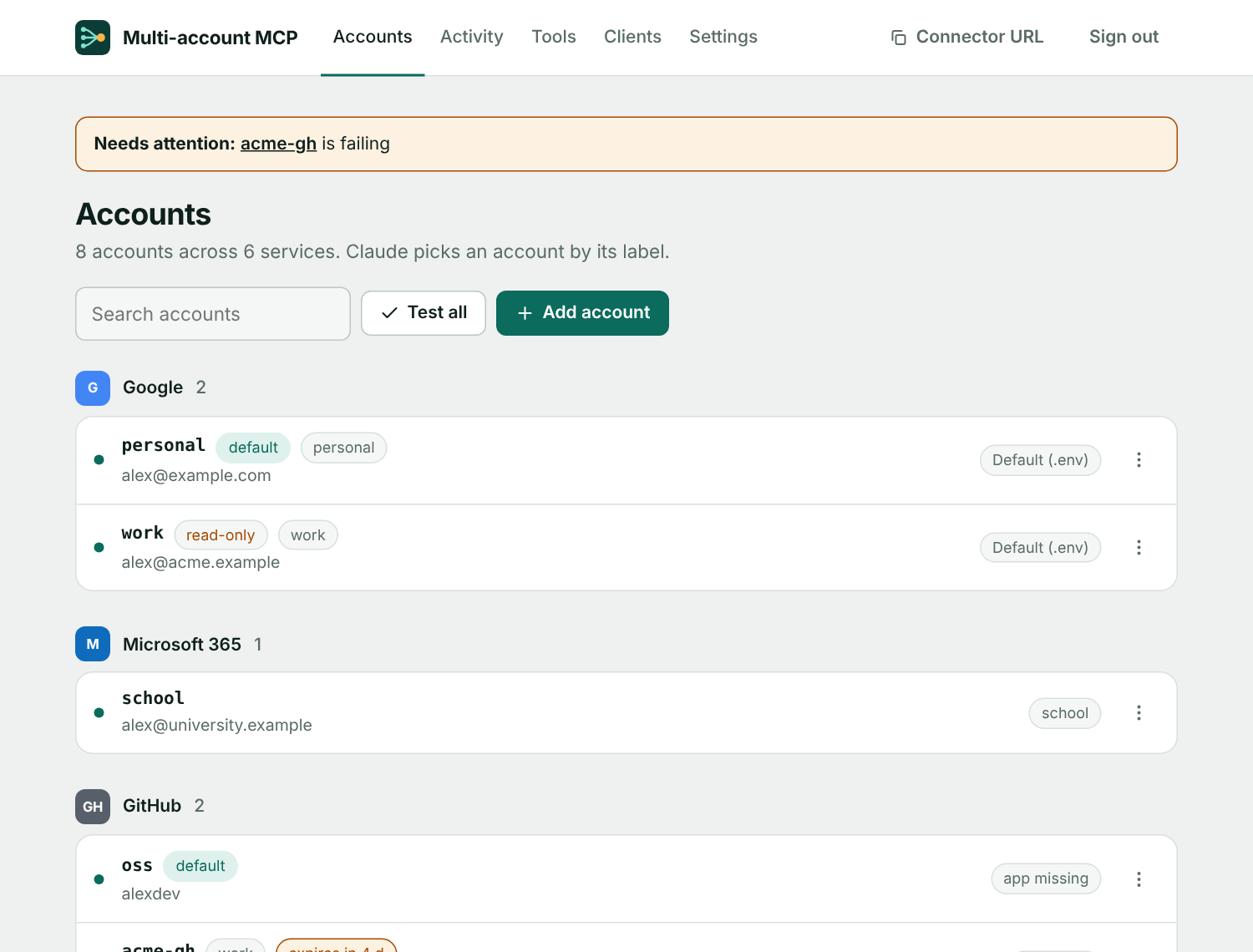
- Accounts: grouped by service, with a status light from automatic connection tests, a warning when a pasted token is about to expire, and a Test all button. Each account has its own page.
- Read-only accounts: tick one box and Claude can read an account but not send, edit or delete anything in it. The
*_apiescape hatches stay usable for GET requests and GraphQL queries only. - Groups and defaults: give accounts a group such as
workand use it in place of a label ("search my work accounts"). Mark one account per service as the default for when Claude doesn't name one. - Tools: switch individual tools off for everyone. A switched-off tool disappears from Claude's tool list.
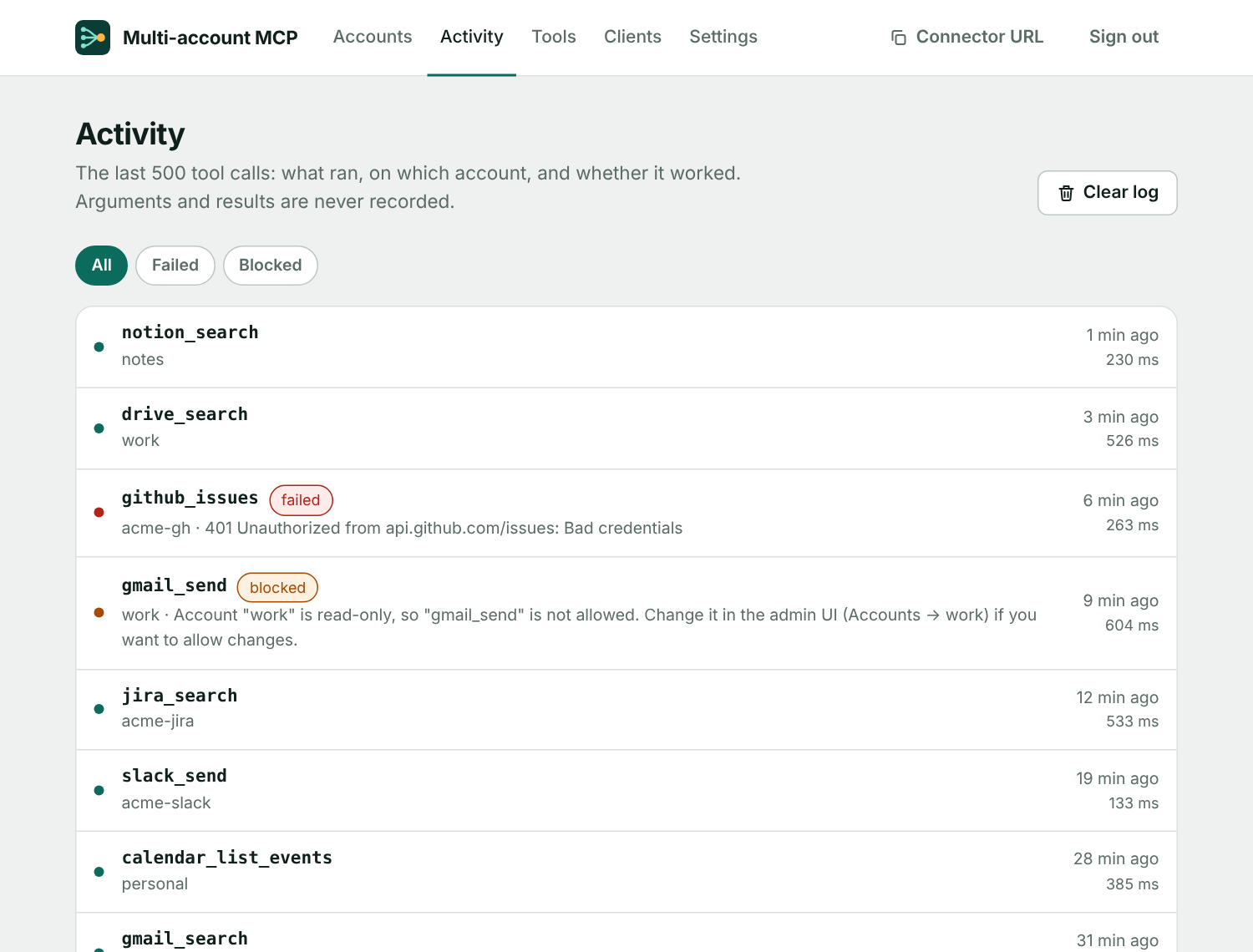
- Activity: the last 500 tool calls with account, result and timing. Arguments and results are never recorded.
- Clients: every app that was approved to use the server, with last-used time and a Revoke button.
- Settings: two-step sign-in (authenticator app and recovery codes), OAuth apps, passphrase-protected backup and restore, and key rotation. Not available: Microsoft Forms (no public API). Word and PowerPoint files are read as text but not edited in place.
Quick start
You need a machine with Docker and a public HTTPS hostname that points at it.
git clone https://github.com/fmgoliveira/mcp-server && cd mcp-server
cp .env.example .env
openssl rand -base64 32   # paste as ENCRYPTION_KEY
openssl rand -base64 24   # paste as ADMIN_PASSWORD
# set PUBLIC_URL=https://your-hostname in .env
docker compose up -d --build
The container listens on port 5757 of the host. Put a reverse proxy with TLS in front of it and forward your hostname to
127.0.0.1:5757. The included Caddyfile is a starting point if you run Caddy in the same compose network.
Then:
- Open
https://your-hostname/adminand sign in withADMIN_PASSWORD. - Create an OAuth app for each OAuth service you want (setup guides) and save it under OAuth apps.
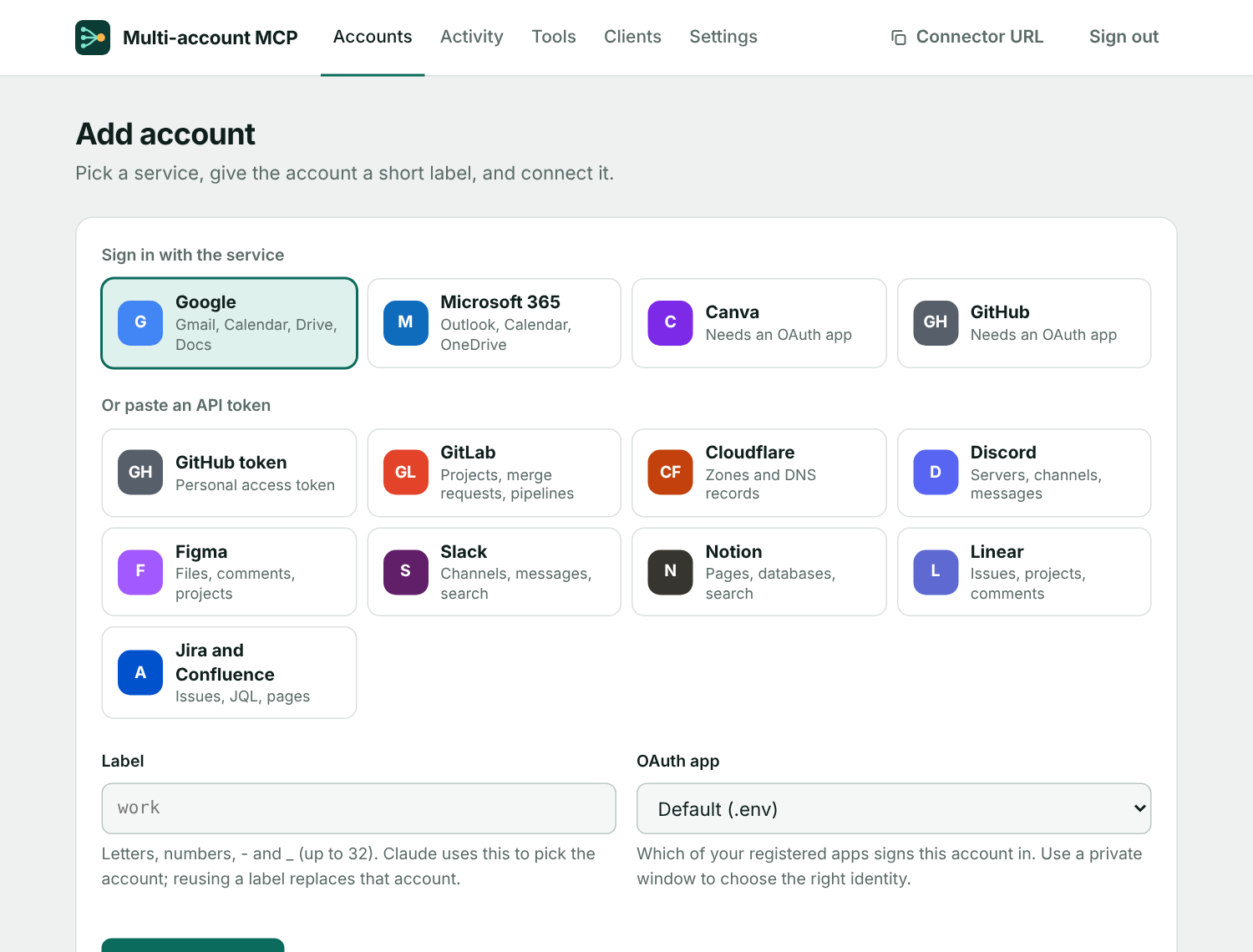
- Under Add account, pick a service, choose a short label such as
work, and finish the consent screen. API-token services only need a pasted token. - In Claude, go to Settings → Connectors → Add custom connector and enter
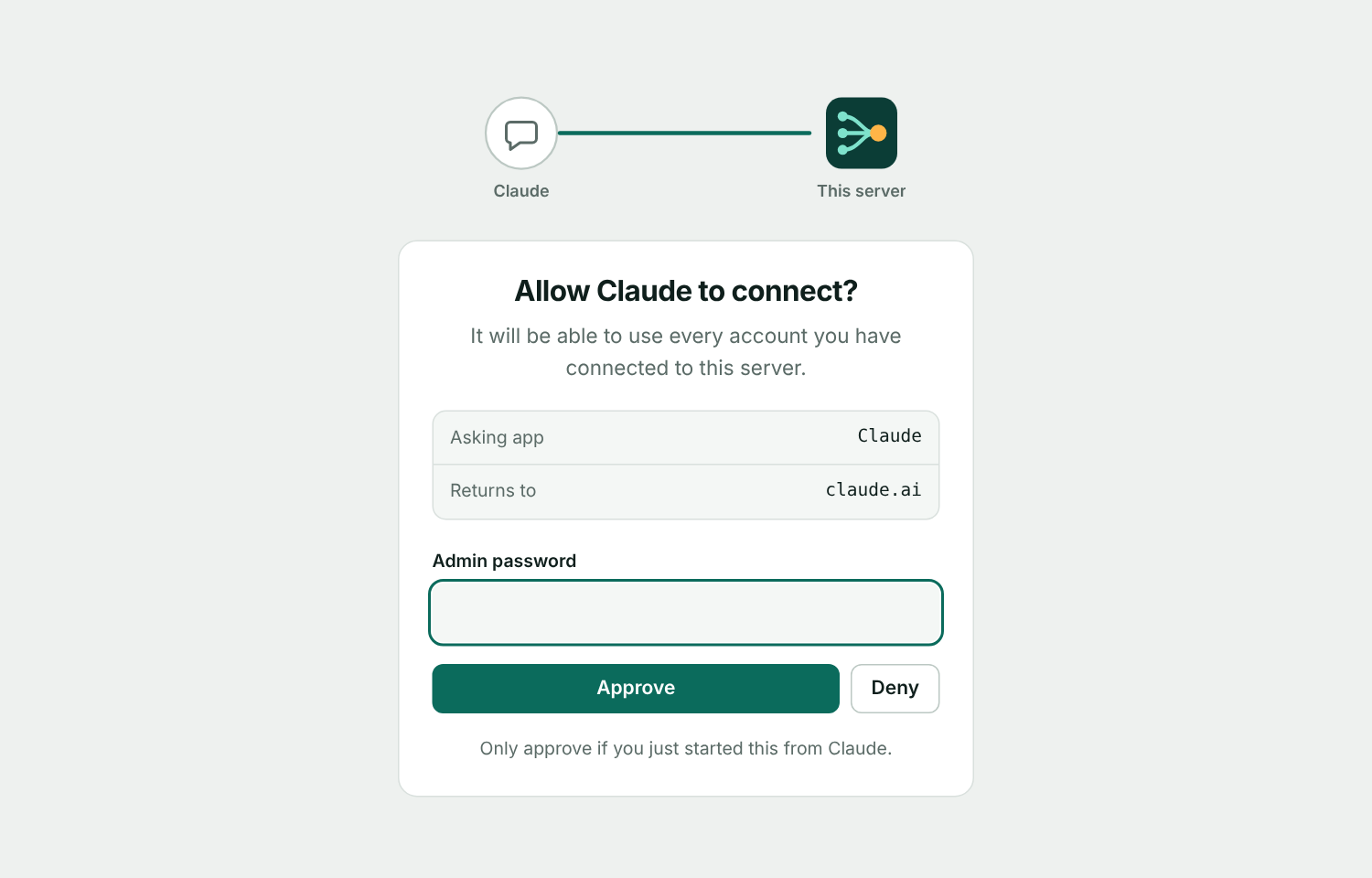
https://your-hostname/mcp. Approve the connection with your admin password when Claude opens the authorization page. - Try "List my connected accounts", "Which pull requests need my review?" or "Search all my inboxes for the invoice from Acme".
Configuration
Everything is set through environment variables (see .env.example). OAuth client IDs and secrets can also
be added in /admin → OAuth apps, which is handy when you need several apps for one service.
| Variable | Required | Purpose |
|---|---|---|
PUBLIC_URL | yes | Public HTTPS URL of the server, without a trailing slash. Used for OAuth redirects. |
ADMIN_PASSWORD | yes | Unlocks /admin and approves new MCP clients. Use a long random value. |
ENCRYPTION_KEY | yes | 32 random bytes, base64. Encrypts everything stored on disk. Losing it makes the state unreadable. |
GOOGLE_CLIENT_ID / _SECRET | no | Default Google OAuth client. |
MS_CLIENT_ID / _SECRET | no | Default Microsoft Entra app. |
CANVA_CLIENT_ID / _SECRET | no | Default Canva integration. |
GITHUB_CLIENT_ID / _SECRET | no | Default GitHub App or OAuth App. |
GOOGLE_SCOPES, MS_SCOPES, CANVA_SCOPES, GITHUB_SCOPES | no | Override the requested scopes (space separated). |
MS_TEAMS | no | Set to 1 to request Teams scopes. Reconnect the Microsoft accounts that need Teams. |
HEALTH_CHECK_INTERVAL_HOURS | no | How often to test every account's connection, default 6. 0 turns it off. |
PORT | no | Listening port, default 3000 (the container publishes it as 5757). |
DATA_DIR | no | Where state.enc is stored, default ./data. |
State lives in the bind-mounted ./data folder. Back it up, and keep ENCRYPTION_KEY somewhere separate.
Provider setup
Every OAuth redirect URL has the form https://your-hostname/oauth/<service>/callback. The OAuth apps page lists them
with a copy button.
- In Google Cloud Console, create a project and enable the Gmail, Calendar, Drive, Docs, Sheets, Slides and Forms APIs.
- Configure the OAuth consent screen as External and add each account you will connect as a test user. Then publish the app ("In production"). Apps left in "Testing" get refresh tokens that expire after 7 days. Unverified production apps work for up to 100 users and show a "Google hasn't verified this app" warning. If all accounts belong to one Workspace organization, choose Internal instead.
- Create an OAuth client ID of type Web application with the redirect URI
https://your-hostname/oauth/google/callback.
Microsoft 365
- In Microsoft Entra → App registrations, create an app that supports accounts in any organizational directory and personal Microsoft accounts.
- Add the Web redirect URI
https://your-hostname/oauth/microsoft/callbackand create a client secret. - Work and school tenants may require admin consent for
Files.ReadWrite.AllandSites.ReadWrite.All. If you can't get it, setMS_SCOPES="offline_access User.Read Mail.ReadWrite Mail.Send Calendars.ReadWrite Files.ReadWrite". - Teams is opt-in: set
MS_TEAMS=1and reconnect the account. Reading channel messages needs tenant admin consent.
Canva
- At canva.com/developers create a private integration and enable the scopes
profile:read,design:meta:read,design:content:read,design:content:write,asset:read,asset:write,folder:read,folder:write(plusbrandtemplate:meta:readandbrandtemplate:content:readon Enterprise). - Set the redirect URL to
https://your-hostname/oauth/canva/callback. - Draft and private integrations only authorize their owner. For several Canva accounts, create one integration per account and add each under OAuth apps.
GitHub
Recommended: a GitHub App (Settings → Developer settings → GitHub Apps).
- Set the callback URL to
https://your-hostname/oauth/github/callback, keep "Expire user authorization tokens" on and turn webhooks off. - Repository permissions: Contents (read and write), Issues (read and write), Pull requests (read and write), Actions (read), Metadata (read).
- Generate a client secret and save the app under OAuth apps.
- Install the app on every user or organization whose repositories Claude should see. User tokens only reach repositories where the app is installed and you have access.
GitHub Apps can't read notifications. For those, use a classic OAuth App with the same callback URL and
GITHUB_SCOPES="repo read:user notifications". Its tokens don't expire. A personal access token (one per organization) also
works: add it under Add account → GitHub token.
GitLab, Cloudflare, Discord, Figma, Slack, Notion, Linear, Jira and Confluence (API tokens)
Create a token on the service and paste it under Add account. It is verified against the service and stored encrypted.
- GitLab: a personal or group access token with the
apiscope. Set the base URL for self-hosted instances. - Cloudflare: an API token scoped to the zones you need (Zone:Read, DNS:Edit).
- Discord: a bot token. Invite the bot to your server and enable the Message Content intent to read messages.
- Figma: a personal access token with file content and comments access.
- Slack: a bot token (
xoxb-…) from a Slack app withchannels:read,channels:history,groups:read,groups:history,chat:writeandusers:read. Search needs a user token (xoxp-…) withsearch:read. - Notion: an internal integration secret. Share each page or database with the integration or it can't see it.
- Linear: a personal API key from Settings → Account → Security & access.
- Jira and Confluence: an Atlassian Cloud API token, the email it belongs to and your site URL, for example
https://acme.atlassian.net.
Tokens don't refresh. When one expires, add the same label again with a new token; its group, default and read-only settings are kept. GitHub, GitLab and Cloudflare report an expiry date, and the admin UI warns two weeks ahead.
Security
- All accounts, OAuth app secrets and tokens are stored in one AES-256-GCM encrypted file,
data/state.enc. - Claude authenticates to this server with OAuth 2.1 (dynamic client registration, PKCE). Approving a client needs the admin password, and failed attempts are rate limited.
- Optional two-step sign-in (TOTP) protects both
/adminand the approval page. Recovery codes are stored hashed. - Read-only accounts and per-tool switches are enforced on the server, not just hinted to the client.
- Tool calls can only reach an allowlist of upstream hosts, so a stored token is never sent anywhere else.
- Anyone with the admin password can connect a client that can use every account. Use a long random password, serve over HTTPS only, and run one instance per group of people who trust each other.
See SECURITY.md for the full model, a hardening checklist and how to report a vulnerability.
Development
npm install
cp .env.example .env
npm run dev      # tsx with .env loaded, http://localhost:3000/admin
npm run build    # compiles to dist/ and doubles as the typecheck
npm test         # unit and HTTP tests (node:test, no extra services needed)
npm start        # runs the built server
src/
  server.ts          Express app, OAuth endpoints for Claude, /mcp, security headers
  auth-provider.ts   MCP OAuth provider and the authorization page
  admin*.ts, ui.ts   Admin UI (server-rendered pages) and shared HTML pieces
  policy.ts          Read-only accounts, default account and group resolution
  health.ts          Connection tests and token-expiry warnings
  security.ts, totp.ts   Two-step sign-in
  backup.ts, crypto.ts, cli/   Encrypted backup, encryption helpers, key rotation
  store.ts           Encrypted state: accounts, OAuth apps, MCP clients, tokens, settings, activity
  providers.ts       OAuth connect and token refresh per service
  tokens.ts          API-token verification
  api.ts             The only place that calls upstream APIs (allowlist, retry, truncation)
  tools/             One file per service, each exposing registerX(server)
public/              Favicon and the admin UI's stylesheet and script
More detail for contributors, including how to add a provider, is in CONTRIBUTING.md.
Backup and key rotation
- Backup: Settings → Backup downloads accounts, OAuth apps and settings as a file protected by a passphrase. It
restores on any instance, even one with a different
ENCRYPTION_KEY. Claude's own connection isn't included. - Rotate the key: run
docker compose exec mcp node dist/cli/rotate-key.js, copy the printedENCRYPTION_KEYinto.envand restart. The previous file is kept asstate.enc.bak-<time>until you delete it.
Roadmap
Ideas that would make this more useful. Open an issue if one matters to you.
- Passkey (WebAuthn) sign-in for the admin UI
- More services: Dropbox, Todoist, Stripe (read-only), Vercel
- Per-account tool switches (today they apply to every account)
- Webhook or email alerts when an account starts failing
- Prometheus metrics endpoint